DS4Windows (site original) est un programme portable qui vous permet d’obtenir la meilleure expérience lors de l’utilisation d’un DualShock 4 sur votre PC, en émulant un contrôleur Xbox 360, beaucoup de jeux deviennent alors accessibles.
 
– Changed startup device init and hotplug to unify code routines
– Changed minimum sensitivity for LS and RS
– Updated H.NotifyIcon package to version 2.0.60
– Implemented workaround for H.NotifyIcon disposing TaskbarIcon instance after display scaling changes and RDP sessions
– Updated NLog package to version 5.0.2
– Small change to display of Binding window panels when bringing up macro recorder
– Added credit notes for vJoyInterfaceCS
– Changed ViGEmPluginFailure string text. Removed reference to old PurgeOldXInput project


Version alternative (fork) ici.
 

Télécharger DS4Windows (original) (x86) v3.3.3 (2.6 Mo)

Télécharger DS4Windows (original) (x64) v3.3.3 (2.6 Mo)

Site Officiel

En savoir plus…

Il s’agit d’un émulateur d’ordinateurs de la série Fujitsu FM-7 (FM-7/FM77AV/FM77AV40). Le but est principalement d’émuler le FM77AV40 et de prendre en charge au minimum le FM77AV.


À l’heure actuelle, il ne peut exécuter que quelques jeux sans son. Par la suite de nouvelles fonctionnalités arriveront bientôt.


Mutsu_CUI ROM-PATH 

Options:

-PAUSE
  Pause on start.

-IMGPATH dir
  Image search path.

-T77|-TAPE t77file.t77
  Set T77 cassette data recorder dump.

-AUTOSTARTTAPE
  Auto start the first tape program.

-T77AUTOSAVE|-AUTOSAVETAPE t77file.t77
  In old days, we were saving programs/data in audio cassette tapes.  I had to press REC
  button before writing, and must release REC button before reading.  If I forgot pressing
  REC and thought I was saving data, it was not saved, and gone as soon as I turned off
  the PC.  If I forgot releasing the REC button before reading, I accidentally erased
  the tape instead of reading from it.  Not to repeat such tragedy, you can specify
  auto-save tape image.  The file does not have to exist.  The program will create it.
  If you don't virtually press REC button in the emulator, or if you write-protect the
  primary tape image, data will be saved to this auto-save image.  You can later mount it
  for reading.

-FD0 filename
  Floppy disk image file name for Drive A.

-FD1 filename
  Floppy disk image file name for Drive B.

-FD0WP,-FD1WP
  Write protect floppy disk.

-FD0UP,-FD1UP
  Write un-protect floppy disk.

-GENFD filename.d77 320|640
  Generate an empty disk. Need to specify 320KB disk (2D) or 640KB disk (2DD)
  Specify 400 as size to make 2D disk with 1024-byte per sector, 5 sectors per track.

-DIVD77 filename.d77
  Divides multi-disk D77 file into single-disk D77 files.
  Suffix  _1, _2, _3, ... will be added after each file name.
  Does nothing if the file is already a single-disk image.

-NOWAIT
  Run VM without adjusting time for the wall-clock time.

-ALIAS aliasLabel filename
  Define file-name alias.  Alias can later be used as a parameter to FDxLOAD, TAPELOAD commands.
  eg. You can use -ALIAS DISKA "full-path-to-game-diskA" to ease disk swap from command.

-KEYBOARD DIRECT/TRANS/TRANS2/TRANS3
  Keyboard mode.  DIRECT is good for gaming.  TRANS/TRANS2/TRANS3 is good for typing.

-AUTOSTOP autoStopType
  FM-7 seriew before FM77AV could not detect key-release.  Therefore, game programs
  could start moving a character by a key stroke, but did not know when the key was
  released and should stop.  Therefore, we had to press typically Num-5 top stop a
  character.  In the emulator, this problem can be solved by virtually typing a
  different key when num keys or arrow keys are released.  You can choose from
  AFTER_NUM_RELEASE, AFTER_ARROW_RELEASE, AFTER_NUM_RELEASE_AND_RETYPE,
  AFTER_ARROW_RELEASE_AND_RETYPE, and AFTER_ANY_KEY_RELEASE.

-AUTOSTOPKEY keyCode
  Specify which key should virtually be pressed after num keys or arrow keys are
  released.

-GAMEPORT0 KEY|PHYSx|ANAx|NONE
-GAMEPORT1 KEY|PHYSx|ANAx|NONE
  Specify game-port emulation.  By keyboard (Arrow,Z,X,A,S), or physical gamepad.
  PHYS0,PHYS1,PHYS2,PHYS3 use physical game pad direction button (or hat switch) as up/down/left/right.
  ANA0,ANA1,ANA2,ANA3 use physical game pad analog stick as up/down/left/right.
  KEYMOUSE use arrow keys and ZX keys for mouse cursor and buttons.
  NUMPADMOUSE use NUMPAD number keys and /* keys for mouse cursor and buttons.
  PHYS0MOUSE,PHYS1MOUSE,PHYS2MOUSE,PHYS3MOUSE use physical game pad digital axis for mouse.
  ANA0MOUSE,ANA1MOUSE,ANA2MOUSE,ANA3MOUSE use physical game pad analog axis for mouse.

-BUTTONHOLDTIME0 0|1 time_in_millisec
-BUTTONHOLDTIME1 0|1 time_in_millisec
  In some games, when you click on a menu or a button, you end up selecting the next menu
  or the button that happens to appear in the next options.  Daikoukai Jidai (KOEI)
  is virtually unplayable.  Super Daisenryaku keeps scrolling to the end when you want
  to scroll only by one screen width.  You really had to press the button and release
  immediately.  How patient we were!
  It is due to the bad programming.  When the program reads button state as DOWN, it must
  wait until the state changes to UP before making a next selection.  But, we cannot go
  in to all of the programs and write patches.  Instead, this option let you limit
  maximum time that the button is sent as DOWN to the virtual machine even when
  you keep it down for 100 seconds.

-VIRTKEY townsKey gamePadPhysicalId button
  Assign a virtual key to a gamepad button.

-COM0, -COM1, -COM2, -COM3
  Enable COM port.

-QUICKSSDIR dir
  Specify quick screen shot directory.

-HOSTSHORTCUT hostKey ctrl shift "command"
  Assign host short cut key (hot key).

-INITCMD cmd
  Specify initial command.

-EVTLOG filename.evt
  Specify event-log file to play back.

-SCALE X
  Screen scaling X percent.

-AUTOSCALE
  Auto scaleing screen to match the window size.

-MAXIMIZE
  Maximize the window on start up

-FULLSCREEN
  Fullscreen on start up


Build compilé par BabaJeanmel pour Emu-France exclusivement.
 

Télécharger Mutsu Build 20251206 (1.0 Mo)

Site Officiel

En savoir plus…

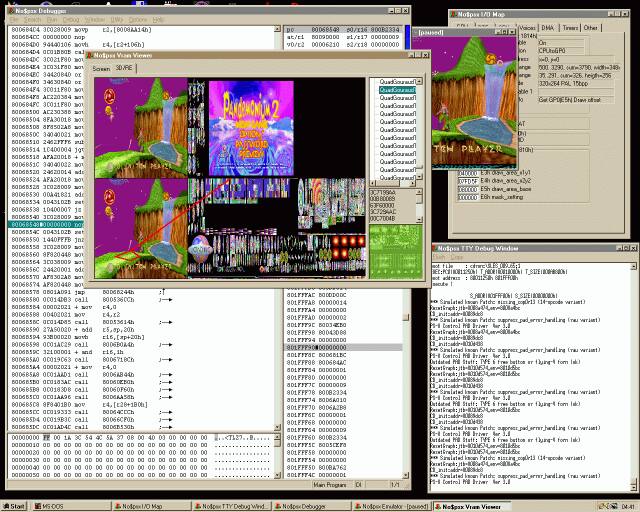
Il s’agit d’un émulateur et débogueur de Sony Playstation créé par le célèbre Martin Corth.
L’émulation devrait être complète avec la prise en charge de toutes les fonctions du matériel. Normalement tout fonctionne pleinement. Néanmoins Martin Korth n’a testé son programme que sur une douzaine de titres, donc il peut y avoir des problèmes sur d’autres jeux.
 
Le BIOS est émulé également via un clone qui est gratuit (théoriquement libre de droit) et plus rapide que le BIOS d’origine. Normalement no$PSX ne requiert donc pas de BIOS pour lancer les jeux de la console. Cependant il peut y avoir des problèmes de compatibilité avec certains jeux. Dans ce cas, il faut employer une copie du BIOS officiel.
 
Les CD-ROM sont supportés via un lecteur CD réel. Il est également possible d’utiliser des images de disque aux formats .NRG, .CUE+.BIN et .ISO ou des exécutables .EXE.


nopsx


Changements :

– help: released psxspx update, including new multi-page htm version
– xed: editor supports ctrl+up/dn and ctrl+pgup/pgdn (as in help engine)
– debug: shows correct branch-delay-opcode-address in tracelog/warnings/membreak
– joypad/help: dualshock2 pinout, button-access, rumble-details (thanx scanlime)
– boot/bios clone/emu/help: details on initial state of hardware registers
– boot: forces display enable via GP1(03h)=0 (for Saga Frontier, thanks denim)
– bios clone/help: workaround for hardware glitch on cdrom-irq-polling
– bios clone: exception vector [86h]<>375Ah (avoid BRK(101h) in WCW Mayhem)
– bios clone: patch_install_lightgun_irq_handler_k0_k1 (Star Wars: Rebel As 2)
– cdrom/debug: warning on sector-size-change during reading (crash team arcade)
– cdrom/debug: displays cdrom command names in tty debug message window
– cdrom/emu: ensures matching sector_index/remain despite sector size changes
– cdrom/emu: abort reading on command 0Ah (Init), required for MagDemo15
– cdrom/emu: supports .cue files with separate .bin files for each track
– debug: fixed buffered_3d_log crash in multi-machine mode
– io/emu: fixed crash on 32bit reads from 2x16bit spu registers
– io/emu: allows nonsense 1F801130h read (Gran Turismo 2, MagDemo27: GT2\*)
– help: added specs for various psx file formats (archives, sound, video) (2021)
– cdrom/debug: added filesystem viewer window for cdrom/memcard (summer 2021)
– help: bugfix: bios C(03h) SysDeqIntRP is working (it’s messy, but not bugged)
– help: added Keyboard controllers chapter (various homebrew hardware hacks)
– gpustat: supports even/odd FRAME for INTERLACE mode (for online cd)
– ass/dis: supports GTE cop2 opcodes/register names (+opcode params)
– debug: supports symbols and psyq line numbers from PsyQ .SYM files
– debug: supports symbols and dwarf line numbers from PsxSdk .ELF files
– cartloader: loads exe from .cpe/.elf files (works also for xboo exe uploads)
– setup: option for polling joystick/gamepad every frame; SLOW on old gameports
– setup: option for RAM size (2Mbyte for retail, or 8Mbyte for debug/testing)
– bios clone: vcd/software: fixed noise on power-up (init reverb before memfill)
– bios clone: fixed GUI bug up open/close lid (unexpected door IRQ5 when paused)
– bios clone: fixed fast memcard access modes (forces pause between chip select)
– bios clone: fixed installer filesize of PSX-EXP.EXE (needs 800h-byte align)
– bios clone: removed gui’s eject callback event (mistriggered when unformatted)
– bios clone: added memcard pre-select delay (needed for some memcards/pockstat)


Télécharger No$PSX (Debug version) v2.2 (1.0 Mo)

Télécharger No$PSX (Gaming version) v2.2 (187 Ko)

Site Officiel

En savoir plus…

Ceci est un fork de l’émulateur Playstation, PCSX. L’objectif est à peu près le suivant:
 
– Apportez une base de code conforme aux normes d’aujourd’hui.
– En finir avec le système de plug-in et permettre une base de code monolithique unique qui gère tous les aspects de l’émulation Playstation.
– Utiliser SDL / OpenGL3 + / ImGui pour la portabilité et la lisibilité.
– Améliorez l’expérience du déboggage.
– Améliorez l’expérience de rendu.
 
Il s’agit de binaires préliminaires.


NB: Je précise que ce sont des builds basés sur le GIT à un instant T, l’auteur n’a rien proposé de stable ni de finalisé. Ces versions sont toujours à considérer comme des versions alpha préliminaires tant que l’auteur ne propose officiellement rien d’autres, cela permet en outre de faire connaitre le projet au plus grand nombre et si certain(e)s d’entre vous veulent y contribuer, tant mieux pour tous. Donc il se peut que ce genre de build fonctionne ou pas du tout, c’est en soit « normal » car c’est tout sauf finalisé. Cela s’applique à tous builds dit « GIT » que nous proposons.
 

Télécharger PCSX Redux (32 bits) (2023/03/27) (41.0 Mo)

Télécharger PCSX Redux (64 bits) (2025/11/18) (42.6 Mo)

Site Officiel

En savoir plus…

Les dernières versions de GameEX/Arcade et PinballX sont disponibles ci-dessous.


Sachez que même si je ne les news pas souvent, les archives sont quand même très rapidement mises à jour sur notre site.
 

Télécharger PinballX v6.99 (327 Mo)

Télécharger GameEx v19.62 (490 Mo)

Télécharger GameEx Arcade Edition v18.87 (339 Mo)

Site Officiel

En savoir plus…

Il s’agit d’un émulateur multi-systèmes qui émule les machines suivantes :
 
emma2
– CDP18S020 Evaluation Kit
– Cidelsa
– COMX-35
– COMIX-35
– Cosmac Elf
– Cosmac Elf 2000
– Cosmac VIP
– Cosmac VIP II, prise en charge des versions ‘ED’ et ‘RCA’
– Cosmicos
– ETI 660
– FRED 1
– FRED 1.5
– Infinite UC1800
– MCDS, Microboard Computer Development System
– Membership Card
– Microboard System, prise en charge des CPU CDP18S600 à CDP18S610
– Microtutor
– Microtutor II
– MS 2000, MicroDisk Development System
– Netronics Elf II
– Oscom Nano
– Pecom 32 and 64
– Pico/Elf V2
– Quest Super Elf
– RCA Coin Arcade
– RCA Studio II
– RCA Studio III / Victory MPT-02
– RCA Studio IV
– Telmac TMC-600
– Telmac 1800
– Telmac 2000
– VELF
– VIP2K Membership Card
– Visicom COM-100
 

Les changements sont visibles ici.


Télécharger Emma 02 (x86) v2.0 (40.8 Mo)

Télécharger Emma 02 (x64) v2.0 (42.6 Mo)

Télécharger Emma 02 (Win2K/XP) v1.23 (8.1 Mo)

Site Officiel

En savoir plus…

Conçu pour gérer les roms MAME, ClearMAMEPro supporte également tous les dats au format CM, mais aussi XML, permettant de gérer efficacement vos collections de roms & isos. Le manager le plus complet.
 
clrmamepro
 
Changement :
– Another small rare thing fixed
 
clrmamepro


Télécharger ClrMAME Pro (XP) v4.035 (3.1 Mo)

Télécharger ClrMAME Pro (x86) v4.050 (3.9 Mo)

Télécharger ClrMAME Pro (x64) v4.050 (4.5 Mo)

Site Officiel

En savoir plus…

Il s’agit d’un émulateur Sinclair Zx 81 basé sur VB81 v1.30 de Chris Cowley.


A l’origine, le but était d’ajouter quelques fonctionnalités (screenshots…) puis au fur et à mesure plusieurs périphériques ont été implémentés, et des fonctionnalités partielles du ZX81 ont été ajoutées.
 

Télécharger VB81 XuR (2025/08/28) (7.2 Mo)

Site Officiel

En savoir plus…

Il s’agit d’un émulateur de PS4 et PS5 (le premier) très préliminaire créé par InoriRus (Vladimir M). Certes c’est encore trop tôt pour parler d’émulation de PS5 mais à partir du moment ou quelques fonctions sont implémentés on peu commencer à évoquer ce titre, du moins dixit l’auteur.


It is possible to run some simple games for PS4 and homebrews for PS5
There maybe graphics glitches, crashes, freezes and low FPS. It’s OK for now.
 
Features that are not implemented:
– Audio input/output
– MP4 video
– Network
– Multi-user
– Path to Savedata folder is hardcoded and can’t be configured. System parameters (language, date format, etc.) are also hardcoded.


Source officielle.
 

Télécharger Kyty v0.2.0 (15.5 Mo)

Site Officiel

En savoir plus…

Novo Player est une application écrite en Electron et Angular et qui aide à organiser votre collection de logiciels MSX et à l’exécuter sur openMSX.


– Display the text in English, Catalan, Dutch, French, Italian, Japanese, Portuguese and Spanish.
– View current file totals, launched games and launch history and totals in the dashboard.
– View related games to a selected game based on game name, genre and company.


Télécharger Novo Player v1.14 (62.8 Mo)

Site Officiel

En savoir plus…

Hatari est un émulateur Atari ST, STE, TT et Falcon tournant sous Linux, BSD, BeOS, Mac OS X et bien d’autres systèmes supportant la bibliothèque SDL.
 
hatari
 
Main changes since Hatari 2.4.0 :
– Fix some possible sound issues in STE/TT mode when converting CPU clock to YM2149 clock
– Fix regression in TT mode where video counter was not updated anymore on each HBL
– Fix VDI width alignment on 16 pixels
– Avoid some overhead when DSP is enabled in config but machine is not Falcon
– More consistent handling for outputs of logging and traces messages
– Fix some memory leaks
– Fix duplicate symbol name removal in debugger
– Improved macOS version with better support for different models (thanks to Troed)
 
Fixed programs:
– BLSPLAY.TTP module player for STE (fix sound glitches)
– HexTracker in TT mode (update video counter on each HBL)
 
Emulation improvements:
– Sound: Much more precise function to convert CPU clocks to YM2149 clocks in the case where YM2149 doesn’t use the same source clock as the CPU (fixes e.g. some STE sound glitches in BLSPLAY.TTP)
– Video: Fix regression in TT mode: Update video counter again on each HBL (fixes e.g. Hextracker when run in TT mode)
 
Emulator improvements:
– DSP: Avoid small extra overhead on non-Falcon machines when DSP config option is set
– Misc:
*Fix memory leaks on PNG save and GEMDOS HD program load
*All Hatari output (outside of debugger) uses now appropriate logging and trace functions so that they can be controlled
– VDI mode:
*Fix: VDI width needs to be aligned to (at least) 16-pixels
*Fix: a possible crash with (default) SMALL_MEM build config(when ST program sets a bad video base address)
– Statusbar: Show « Linux » when running Linux directly with –lilo
– Debugger:
*Fix: to duplicate symbol name removal
*Fix: all IDE trace output did not go to trace file
*Like with rest of debugger, profiler responses go now to stderr (not stdout)
 
Documentation:
– Document Hatari outputs and their controls in debugger manual
 
– Misc


Télécharger Hatari (x86) v2.6.1 (5.9 Mo)

Télécharger Hatari (x64) v2.6.1 (6.0 Mo)

Site Officiel

En savoir plus…

m64p (ou Mupen64Plus-GUI) est une interface graphique écrite en Qt6. Elle supporte tout ce que vous attendez d’une interface mupen64plus (sélection de plugins, édition de la configuration, gestion des sauvegardes, capture d’écran, pause, etc.).
 
Cette archive inclut Mupen64Plus + ParaLLEl-RDP + une interface utilisateur.
Notez que la dernière archive incluant le plugin GlideN64 est disponible ici.


– A huge thanks to @DarthSidious666 who went through the USA games list to compile a list of known issues: #288
– Some performance improvements that should slightly lower the CPU usage
– Fix for a regression in the last release (caused freezing/lockups in some games)
– This release marks the removal of the last game-specific hack/setting. There was a hack in place that prevented flickering in San Francisco Rush, which is no longer required.
– Tweaks to how RDP (graphics) are timed. Fixes Tetris 64, may provide slightly improved performance when SynchronousRDP is enabled.
– Tweaks to memory access timing based on https://github.com/rasky/n64-systembench

 
A noter que le système de version change pour le type vAAAA/MM/n soit année/mois/nombre de builds pendant le mois en cours.


Code source. Builds ici.

Télécharger Simple64 (x86) (2020/06/02) (20.6 Mo)

Télécharger Simple64 (x64) v2024.12.1 (46.5 Mo)

Site Officiel

En savoir plus…


Casino-en-ligne-fiable.com

https://getourbonus.com/fr/accueil

https://www.romspedia.com/

https://www.casinoonlinefrancais.fr

Lucky 7 bonus

https://www.casinogratuitsansdepot.com

pablocasino.org

critiquejeu.info

playbonus

casinodoc.org

laplanquedujoueur.com

casinoonlinefrancais