SuperSNES9X est un fork avancé de SNES9X, développé par shanytc, qui ajoute de nombreuses améliorations modernes tout en conservant la rapidité et la simplicité du SNES9X original. Il vise autant les joueurs (retroachievements, online) que les créateurs (sprite ripping, hacking, debugging).

Principales améliorations:
– Support multi-système: Super NES, GameBoy, GameBoy Color, Super GameBoy (1 et 2) et Super GameBoy Color (expérimental)
– Support Super FX 3 (FX3) pour les nouvelles sorties LRG 2026, avec synchronisation GSU cycle par cycle
– Support du dongle de vibration LRG SNES (Ultimate Doom FX3, RT.SFC)
– Core libretro pour SNES / SGB / GB / GBC
– Émulation du périphérique Voicer-kun et lecture de ses CD audio depuis des images CUE/BIN
– Émulation du Super Famicom Box (SNES d’hôtel), avec traduction OSD anglaise en temps réel
– Support du Nintendo SuperDisc
– Support du Nintendo Super System
– Support des cartouches événementielles: PowerFest ’94 et Nintendo Campus Challenge ’92
– Émulation du Voicer-kun: transmetteur/récepteur infrarouge connecté au deuxième port manette
– RetroAchievements intégrés, sans support du mode Hardcore
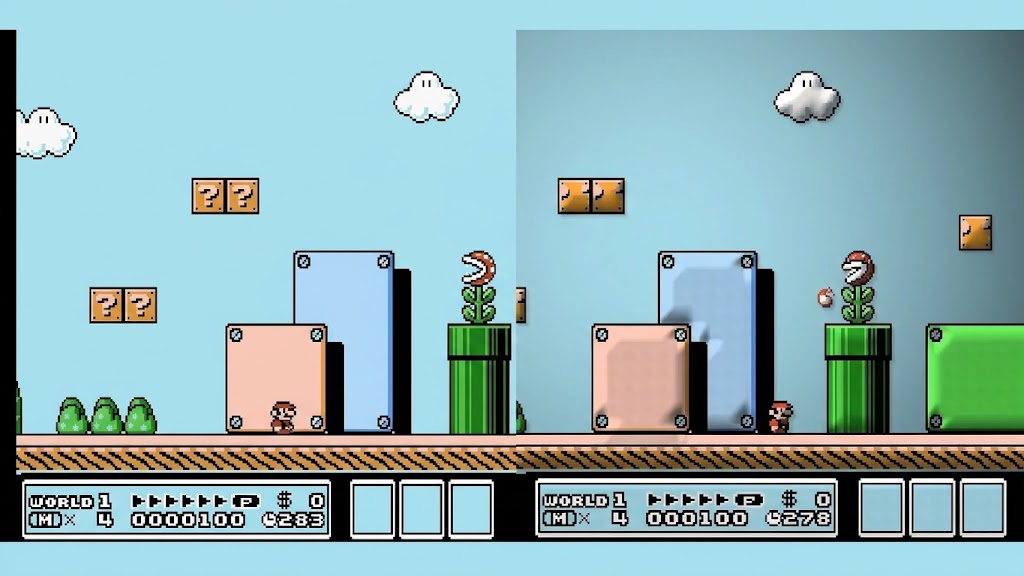
– Support de Wide-SNES, pour le hack ROM widescreen de Super Mario World par Vitor Vilela
– Kaillera (Client/Serveur) pour le jeu en ligne
– Run-Ahead pour réduire la latence d’entrée
– Correction colorimétrique et couleurs CRT natives
– Viewers PPU avancés (Sprites/Tiles) pour SNES, GB, GBC et SGB, destinés notamment aux rippers et map-makers
– Visualiseur de forme d’onde audio avec pistes par canal, fonctions solo/muet et vumètres
– Cheat Search & Editor améliorés: support SNES et GB, avec notamment les codes GB en mode BIOS SGB
– Assignation Multi-Bind-Controller
– Support SDL (Simple DirectMedia Layer)
– Pack multilingue
– Prise en charge à 100 % des tests Acid pour GB, GBC et SGB
– Convertisseur de sauvegarde SNES9X <-> MESEN, disponible ici.
A noter que les fichiers de configuration et sauvegardes sont 100% compatibles entre SNES9X et SuperSNES9X.
Les changements sont:
Lua Scripting
– Added Lua 5.4 scripting: File > Script > Lua opens a script editor on win32, Qt and GTK, with syntax colouring, line numbers, completion, an API reference, a console and session restore.
– Added a script debugger: breakpoints (with conditions, hit counts and log messages), Step Into / Over / Out, Break on Errors, and Variables, Watch, Call Stack and Breakpoints panels.
– 28 example scripts under Help > Examples: FPS Counter, Sprite Boxes, RAM Heat Map, Input Display, Cheat Finder, Trace Logger and more.
– -lua « script » runs a script from the command line.
– gui.set_antialias smooths lines, circles, ellipses and polygons.
– No speed cost while no script is loaded.
– Guide and API reference: Lua scripting
Enhancement Chips (DSP-1/2/3/4, Cx4)
– DSP-1, DSP-1B, DSP-2, DSP-3, DSP-4 and the Cx4 now run as native chips that match their firmware instruction for instruction, with no dump needed.
– Each chip can also run its firmware dump (new BIOS Manager slots), or the old HLE.
– The BIOS Manager picks Legacy (HLE), Native (LLE) (the default) or Firmware per chip, with a speed chart comparing the three.
– The window title shows (DSP-1B Enhanced) for a native chip and (DSP-1B Chip Enhanced) for a firmware run.
– Fixes Top Gear 3000’s cars being too fast (#256) and Mega Man X3’s intro searchlight.
Barcode Battler II
– Added Epoch’s Barcode Battler II on port 2: Input > Barcodes > Connect, Scan Barcode and Use Last Barcode Again. (#283)
– The scan dialog takes a typed EAN-13 / UPC-A / EAN-8 code, a random one, a picture (or one dropped on the dialog), or the webcam picked in Display settings.
– Find a card: 1331 known cards in 41 sets, with their front, back and fluorescent photos from barcodes/battler beside the executable.
– The scan dialog stays open while the game runs, and scanning is offered only in games that read the Battler.
– Added a Barcodes hotkey tab.
– More: Barcode Battler II
Sunsoft Pachinko
– Added the Sunsoft Pachinko controller on port 2: Input > Use Sunsoft Pachinko.
– Stronger, Weaker and Stop keys (E, Q, W by default), with the controller’s picture and a power gauge in Input Configuration.
– Ganso Pachinko Ou checks the port only at boot, so reset after connecting.
– More: Sunsoft Pachinko
Game Boy Real Time Clock
– MBC3, HuC-3 and TAMA5 clocks run, are saved with the battery and catch up with the PC’s clock on load.
– Saved in the .sav (the default) or a separate .rtc: Emulation > Real Time Clock.
– Saves load in and from other emulators: MBC3 as BGB’s block, HuC-3 as VBA-M’s 24 bytes, BGB/SameBoy’s 17 or mGBA’s 136 (any of them loads), TAMA5 as mGBA’s.
– Real Time Clock > Settings can stop following the PC’s clock and use a date and time you pick.
– Added MBC30 (Pocket Monsters Crystal, Japan).
– Tamagotchi 3 keeps its clock.
– More: RTC
SNES
– Timing follows Mesen and bsnes more closely: DMA and HDMA init sync to the DMA divider, HDMA and IRQs take the bus where bsnes does, APU ports are read and written at bus timing, and the first opcode after reset is fetched at cycle 186.
– Fixes Desert Strike’s ICBM launching from a destroyed silo and Full Throttle’s trembling water.
– A.S.P.’s mid-scanline shadow is shaped and placed as on bsnes.
– Super FX: the cycle-accurate GSU no longer runs ahead of hardware, so Star Fox’s intro keeps time with its music.
– Fixed Yoshi’s Island’s Fuzzy effect showing blocks of backdrop.
– Savestates keep the sprite range/time-over flags, so rewind, run-ahead and netplay no longer change games that seed their RNG from them.
Bilinear Mode 7
– Snes9x 1.43’s Bi-linear Mode 7 is back: it smooths a magnified Mode 7 plane (F-Zero, Super Mario Kart, Pilotwings) while sprites and the HUD stay sharp. (#305)
– Off by default: win32 Display Settings, Qt’s Display panel, GTK’s Preferences and a libretro core option.
Games that didn’t boot
– Loader fixes for betas, protos and pirates that loaded black or crashed: Killer Instinct (Beta), Dennis the Menace (Beta), Pop’n TwinBee (Beta 2), Rockfall, Special Tee Shot (Proto), NBA Live 97 (Beta), Little Magic (Proto), Super Ghouls ‘N Ghosts (Beta), Tekkaman Blade (Beta), Noughts & Crosses, Operation Thunderbolt (Beta), Push-Over (Beta), Skuljagger (Beta) and more.
– Emulated the security chips of A Bug’s Life, Soul Blade and Hercules.
– Emulated the « Pocket Monster » bitswap chip: X-Men vs. Street Fighter, King of Fighters ’98 / 2000, Soul Edge vs Samurai, Digimon Adventure, Aladdin 2000, Pokemon Gold & Silver, Squirrel, Pokemon Stadium, Picachu and Marvel Super Heroes vs. Street Fighter.
– Super 20 Hab: multicart banking, and all 20 entries launch.
– Super Ice Hockey (Europe) no longer hangs, and Cute Angela, Gamars Puzzle and Power Slide (Proto) boot.
Xeno Crisis
– The audio no longer crackles, and the RP2040 runs faster. (#292)
Nintendo Super System
– Operator settings, bookkeeping and the clock now survive reboots and sessions, in one NSS.srm for the cabinet.
– Each cartridge keeps its own .srm, whichever socket it is in.
– Added an Operational Guide entry, and Restart works outside a game.
– Game 1-3 are only panel buttons; cartridges mount and eject through Slot N: Mount… / Slot N: Eject entries, with hotkeys.
– The DIP switches flip without closing the menu.
– The one-cartridge Operational Guide’s last line fits the frame.
Super Famicom Box
– Added MAME’s ROM sets (pss61-64.zip, sfcbox.zip, krom1.zip). (#294)
– Added KROM 2.00, picked under Emulation > Super Famicom Box > BIOS.
– Both slots mount and eject.
– Added the Reset and GAME/TV front-panel switches.
– Added keyswitch position 4 (Power OFF), and the positions are named by what they do.
– The 4S Attraction ROM alone boots the box.
– Added hotkeys for the switches, the slots and Power OFF.
Nintendo Super Disc
– Debug Menu opens the BIOS’s SFX-100 monitor.
Game Boy
– Savestates keep the DMA, PPU and APU state in flight, so a state loads the same way every time.
– Apply Cheats works on the session’s first Game Boy load.
– Loading an empty savestate slot says it doesn’t exist.
– Rewind no longer shows its replay frames.
– Loading a Game Boy game or a MultiCart ends a running NSS, SFC-Box, Super Disc or Xeno Crisis session.
Input
– Input Configuration shows a large USA, European or Japanese controller picture that lights held buttons; click a button to edit its binding. On win32, Qt and GTK.
– Port-2 devices toggle in the Input menu and keep Use SNES Joypad(s) checked, and an on-screen message names what went into port 2.
– The pressed-keys display shows every device, named with its port.
Bios Manager
– Slots are grouped by family in a sidebar, and each BIOS has its own card. On win32, Qt and GTK.
– Each slot’s info popup lists every supported dump with its CRC32.
– The Super Game Boy boot ROM slots are named in full.
Win32 GUI
– Added Copy Screenshot to Clipboard (File > Save Other, Ctrl+F12), and Copy to Clipboard in the Tile, Tilemap and Sprite viewers.
– Run-ahead applies to frame advance. (#314)
– Holding rewind while paused rewinds at frame rate.
– Fixed DirectInput-only pads missing at startup.
– Fixed flickering when some games open their menus.
– Input Configuration lays its buttons out in three columns, and Enter no longer closes it.
– The hotkey dialog’s tabs stack in two rows.
GTK
– Added a controller picker and Auto-Assign, as on win32 and Qt.
– Updated Simplified Chinese translation. (kongfl888)
Qt
– The software (qt) display driver draws the on-screen display.
– The window title names every game.
Libretro
– Core options pick Native, Firmware or Legacy for each DSP and the Cx4, and BIOS dumps can sit zipped in the system folder.
– Added the Barcode Battler II and Sunsoft Pachinko as port-2 devices, with core options to scan codes and pick cards.
– Added a Bilinear Mode 7 core option.
– The Windows core reads zips (MSU-1 packs, zipped firmware).
– CPU overclock works on the Windows and Android cores. (#289)
– Xeno Crisis finds its firmware on Android saf:// paths (#292), and the Android core is built at -O3.
Télécharger SuperSnes9x v1.63.32 (14.9 Mo)
Site Officiel
En savoir plus…