Un pack de shaders en langage Cg Shader destiné à Snes9x (>1.52) et Retroarch (SSNES).
0 commentaire



Un pack de shaders en langage Cg Shader destiné à Snes9x (>1.52) et Retroarch (SSNES).

I’m finally done with updating all the simulators of games from the popular
VTech « Time & Fun » series. I’m releasing the missing five games today,
making a total of 2 new games and 23 updates in 3 weeks – wow!
Due to the high demand of Nintendo games, I promise I’ll spend more time to
updating Game & Watch simulators next time!
The newly updates games are:
– Chicky Woggy (VTech, Arcade Time & Fun) S4/1.04 (Standard 4, various
optimizations)
– Monkey Jump (VTech, Arcade Time & Fun) S4/1.05 (Standard 4, various
optimizations)
– Chicky Woggy (VTech, Electronic Tini-Arcade) S4/1.03 (Standard 4, various
optimizations)
– Crazy Chewy (VTech, Electronic Tini-Arcade) S4/1.02 (Standard 4, various
optimizations) + source
– Wild Man Jump (VTech, Electronic Tini-Arcade) S4/1.02 (Standard 4, various
optimizations) + source
The games and the newly released Madrigal CD Collection ver. 59.1 are
available for download from the usual page.
Yours,
Luca
Créé par Avery Lee (l’auteur de VirtualDub), il s’agit d’un émulateur d’Atari 8 bits (800/800XL/130XE). Il a beaucoup d’options, et la compatibilité est décente. Il prend en charge les jeux protégés conformément à l’émulation.
La dernière version béta publique de l’excellent WinUAE, célèbre émulateur Amiga. Traduite en Français.
2 bêtas pour le prix d’une. La version finale devrait arriver d’ici peu. Voici les nouveautés :
Bêta 17 :
-Les interruptions dan le débugeur fonctionne de nouveau (bêta 14).
-Implantation complète des fonctions CPUSHA/CPUSHL/CPUSHP dans le désassembleur.
-Amélioration de la compatibilité dans le mode integer scale (échelle entier !!!) avec les modes d’affichages programmés.
-Changements dans le mode integer scale du glisseur pour le zoom (dans l’onglet filtre) de -99 à 99.
-Correction de la fonction fill_line() pour les modes programmés.
-Correction d’un problème de ligne colorisée dans certains modes programmés.
-La ligne de commande (ou le double clic sur l’icône chargé chargeait la config qui ne redémarrait pas les valeurs précédentes du fichier (default.uae, s’il existait).
-Emulation de plus de régions d’adresse Fat Gary qui n’était pas définies.
-Emulation de l’accès à l’espace d’une adresse invalide Fat Gary. Cela permet d’éviter de stupides bugs au dernier moment ou des rapports de bugs, le retard n’est pas encore activé.
Bêta 18 :
-Correction d’un problème avec l’adresse 0xFFFF. Ce n’est pas complètement juste mais c’est un peu plus compatible avec les programmes.
-L’émulation du Cirrus Logic avait des journaux activés inutiles.
-Ajout d’une option pour activer/désactiver la nouvelle sélection de la résolution du mode programmé en automatique, c’est activé par défaut.
-Correction d’un problème avec l’A1200.Correction d’un problème avec la couleur de la bordure qui n’était pas dessiné correctement dans certains cas-.
Une version corrective du précédent GoodNes est disponible.
– Sorry, but had to fix another bug in ‘fixnes’.
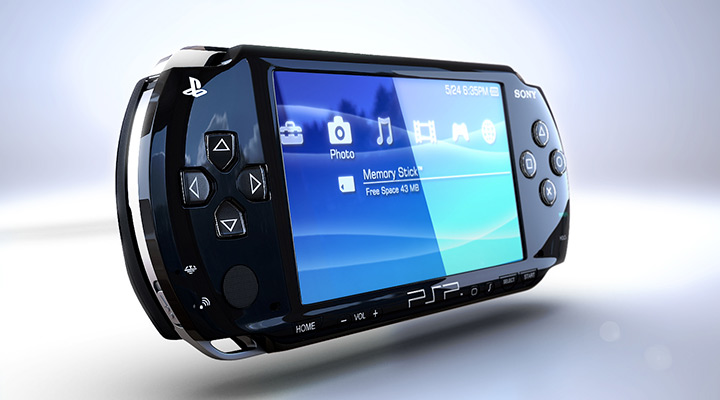
Un émulateur de PSP écrit en Java. Codé par mad et shadow (PCSX2) et rejoint par wrayal, fiveofhearts, hlide et dreampeppers99. Il émule quelques jeux commerciaux (tel que Puzzle Bobble Pocket ou Breath Of Fire III…) mais pas à pleine vitesse. Cet émulateur s’améliore progressivement.
r3503
Avoid compiler error when branching to the 2nd instruction of a native code sequence with the delay slot instruction being the 1st instruction.
———————
r3502
Fixed sceUtilitySavedata mode=FILES: do not return more file entries than allowed (memory overflow).
Liste de jeux compatibles
Site de développement du projet.
Builds SVN automatiques.
Télécharger JPcsp (x86) v0.7 rev 3503 (17,0 Mo)
Créé par BUT, Emuman, K&K, Sword et Xvi. Mame Plus! est sans problème la meilleure version de Mame pour Windows, avec ou sans frontend. Support multi-langage, tirs automatiques, option anti-sortie, interface interne améliorée, interface de gestion des roms améliorée, effets vidéos supplémentaires (2xSai, RGB, hq3x, 2xPM…), meilleure gestion des contrôles, support de la NeoGeo en mode console, il regroupe également plein de correctifs et de drivers additionnels…
r5134
* update some files.
Site source n°1. Site source n°2. Site source n°3.
Télécharger Mame/MameUI Plus! (x86) v0.153 r5134 (24.0 Mo)
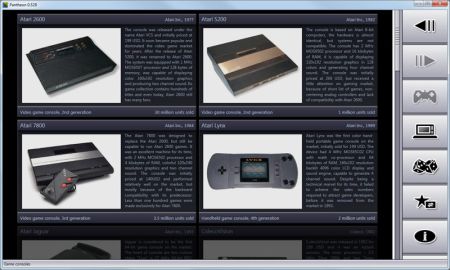
Superbe interface et très simple d’utilisation. Il s’agit d’un émulateur Acorn Atom, Acorn BBC Micro, Atari VCS 2600, Atari VCS 5200, Atari VCS 7800, Atari 8-bit, Atari Lynx, ColecoVision, MSX. Le gros avantage est que les jeux sont téléchargés automatiquement en un clic sans que l’on ait besoin de faire quoi que ce soit d’autre. Un excellent multi-console en devenir !
Nouveautés :
-Magnavox Odyssey2 emulator: sound fix and Voice support -games for Magnavox Odyssey2: A Labyrinth Game, Air Battle, Atlantis, Attack of the Timelord, Baseball, Buzzword, Casino Slot Machine, Clay Pigeon, Comando Noturno, Computer Golf, Cosmic Conflict, Crypto-Logic, Dam Buster, Depth Charge, Echo, Electronic Volleyball, Exojet, Football, Freedom Fighters, Helicopter Rescue, Interpol, I’ve got your number, J.G. Munchkin, K.C. Pac-Man, Keyboard Creations, Kill the attacking Aliens, Killer Bees, Kinder im Verkehr 1, Kinder im Verkehr 2, Logix, Marksman, Martian Threat, Matchmaker, Mission Impossible, Morse, Mr. Roboto, Neutron Star, Nimble Numbers Ned, Pachinko, Pinball, Play Tag, Pocket Billiards, Pong, Popeye, Programmed Trip, Puzzle Piece Panic, Restaurant, Shark Hunter, Showdown in 2100 A.D., Sid the Spellbinder, Smithereens, Spider-Man, Super Bee, Super Cobra, Supermind, Syracuse, The Quest for the Rings, Tutankham
Un émulateur de Sinclair ZX SPectrum écrit en JAVA.
De nombreux changements sont apportées :
– Command line arguments in order to integrate the emulator with other utilities. Included parameters -h / – help to find out what options can be put.
– Support Drag & Drop files TAP/TZX/CSW/SNA/SP/Z80/SZX/ROM.
– Following the first news I’ve had to place the configuration file, JSpeccy.xml in a fixed place, so that when you run the emulator from the command line, always find that file and creating it do not go out there to spray and Moche. However, there is an important detail to consider. If command line only put a file to upload (tape, snapshot or ROM), the emulator will boot with the configuration you have on file. If there is a choice, start with the default options, like I just create the configuration file and will have to put all the options we need or want. The file is created in the user’s $ HOME on Linux (and I suppose in MAC) and Windows in C: Documents and Settings nombre_usuario_sesion
– Italian translation, courtesy of Alessandro Grussu. Thank you very much, Alessandro.
– Correct emulation bits 3 and 5 of register F in SCF / CCF instructions. This emulation is consistent with that observed in Zilog processors. In the NEC could be different. Thanks to Patrick for his research Rak about and test programs.
– SZX file format has been updated to version 1.5, which will preserve the information needed to emulate the above.
– Complete, now hidden log memptr emulation. Thanks again to Patrick for test programs.
– Added an option to disable questions confirmation actions.
– Added an option to reverse the state of the bit while loading EAR TZX. The only game I know of that requires this is the Forbidden Planet, but who knows if any more.
– Added support for loading snapshot files in SP format, the emulator itself VGASPEC Pedro Gimeno.
– Double-click the icon for ribbon status bar, the dialog opens tape catalog.
– Added an option to open a file to tape, the emulator automatically start charging. No more, reboot and type LOAD « » (snif!).
Fixes and improvements:
– Improved the sound emulation subsystem, so that the exact number of sound samples are always generated in each frame. In fact, now the sound card is used for better timing by the above method. However, the above method is still used in case that the sound is disabled. With this improvement I managed to successfully use the emulator to play tapes or TZX TAP and load, while in fact, in the emulator and on the real Spectrum, using the headphone output of the PC. You just have to disable fast loading and raise enough volume PC.
– Thanks to the illustrious Misco Jones of our good and dear friend Radastan, I discovered a small bug in the emulation of the beeper. Incidentally, I tried to improve a bit the filter to avoid some strange effects that could be heard at times.
– Thanks to the theme music of Carlos Michelis I discovered an error in the emulation AY-3-8912 that caused some things sounded slightly out of tune. As usual with the AY, which seemed a cumbersome problem to solve, things led to many hours of work ended with an amendment to this emulation that tries to make it perfect. If I have succeeded or not, you will say.
– Windows is no longer necessary to have a thread launched for adequate timing.
– Fixed some errors in the mapping mode to PC keyboard to Spectrum.
– Fixed an exception error handling timeouts
Emulateur Tandy modèle 100/102/200 écrit par Ken Pettit, Stephen Hurd, Jerome Vernet.
Voici les nouveautés de cette nouvelle version 3 ans après la précédente:
1. Fixed issue with remote interface simulated keystokes where the keys wouldn’t
always be regconized. There was a race condition between the remote thread
and the simulation thread.
2. Completed the 8085 relocating linker!! This was the primary reason for this
release in fact. Many, many changes to get to this point.
3. Modified the IDE with new tabs for selecting the file to edit. The old tabs used
the standard FLTK tab control and were really ugly, plus had an issue with tab
width calculations with regard to mouse presses to select the tab.
4. Updated GNUmakefile to auto-generate dependencies and use wildcard search for
selecting source files vs. specifying everything manually.
5. Added feature to FX80 printer emulation to perform auto word-wrap selectable via
the printer setup page.
6. Modified CPU speed indicator to show 2 decimal places precision for speeds less than
10 MHz.
7. Made the FX80 Virtual Paper display resizeable.
8. MAJOR modifications to CPU Registers window to implement program tracing with
scrolling, configurable font sizes and trace depths, auto-redraw vs manual
redraw button, saving of breakpoints and window position when VirtualT terminates,
resizeable window, saving trace data to a file, keyboard shortcuts.
9. Added saving and restoring of opened windows when VirtualT is shutdown and restarted.
10. Now reports error if REX / ReMem memory cannot be loaded / saved.
11. Updated REX emulation to support REX3 for PC8201 state machine changes.
12. Created a Watch Variables Widget and added it to the Memory Editor Window. This
will also be used in the IDE debugger.
13. Added options to Memory Editor Window to use black background with color coded text
and the ability to set the font size.
14. Started converting the preferences file to use preference groups to help organize
the growing list of entries in the file.
15. Completed the « -nogui » option under Linux and added console interface control. This
provides an identical interface to the existing socket / telnet control interface.
16. Added emulated NADSBox (minimal implementation so far) and controls in Peripheral
Setup to connect it to the serial port.
17. Added TPDD Server (NADSBox) packet log viewer window to Tools menu.
18. Added support for NEC PC-8300 emulation.
19. Started adding support to Disassembler window to disassemble things other than the
main ROM.
20. Added color syntax hilighting, Load and Save, and Find operations to Disassembler window.
21. Modified serial.c to map 75 baud = 57600 and 110 baud = 115200.
RPCS3 a pour objectif de devenir un émulateur de Playstation 3 complet même s’il reste un chemin important avant d’y parvenir. Pour le moment il fait principalement office de désassembleur et pousse la performance jusqu’à exécuter quelques jeux devenant ainsi le premier émulateur de PS3 émulant un jeu du commerce, toutefois il nécessite un PC extrêmement performant. N’espérez donc pas jouer à un jeu commercial à pleine vitesse avant longtemps, en revanche il commence à exécuter quelques jeux amateurs avec succès .
Télécharger RPCS3 (32 bits) v0.0.0.4 (2014/06/02) (3.1 Mo)
Télécharger RPCS3 (WIP) v0.0.43 Alpha (2026/11/25) (35.6 Mo)
Créé par BUT, Emuman, K&K, Sword et Xvi. Mame Plus! est sans problème la meilleure version de Mame pour Windows, avec ou sans frontend. Support multi-langage, tirs automatiques, option anti-sortie, interface interne améliorée, interface de gestion des roms améliorée, effets vidéos supplémentaires (2xSai, RGB, hq3x, 2xPM…), meilleure gestion des contrôles, support de la NeoGeo en mode console, il regroupe également plein de correctifs et de drivers additionnels…
Changements :
r5133
*updated emu/ui/* *incomplete *need more update for emu/ui/*, rendfont.c, scale effect
Site source n°1. Site source n°2. Site source n°3.
Télécharger Mame/MameUI Plus! (x86) v0.153 r5133 (24,0 Mo)

