Les builds 32 bits de MAME compatibles XP et compilés par StHiryu sont à présent disponibles.


Télécharger MAME (XP) v0.289 (64.6 Mo)

Télécharger MAME(MESS) [32 bits] v0.289 (42.5 Mo)

Télécharger MESSUI (32 bits) v0.288.4 (28.3 Mo)

Télécharger MAMEUI32 v0.289.5 (63.2 Mo)

Télécharger HBMame (32 bits) v0.289.4 (18.5 Mo)

Télécharger HBMame GUI (32 bits) v0.289.4 (18.7 Mo)

Télécharger ARCADE (32 bits) v0.289.5 (33.6 Mo)

Page Officielle


Je rajoute le binaire de MAME en version Arcade uniquement, compilé par moi-même:

Télécharger MAME(Arcade) [32 bits] v0.289 (75.2 Mo)


SSE pour « Steven Seagal Edition » est un émulateur d’Atari ST basé sur le STeem original v3.2 de 2004. Il emprunte également des améliorations en provenance de Hatari.


R21
– Fix PRG or TOS file not reloaded on startup
– Fix loading AUTOMATION PACKER V2.3r PRG files


Télécharger Steem SSE (D3D) [32 bits] v4.2.1 R2 (6.1 Mo)

Télécharger Steem SSE (D3D) [64 Bits] v4.2.1 R2 (6.9 Mo)

Site Officiel

En savoir plus…

DS4Windows est un programme portable qui vous permet d’obtenir la meilleure expérience lors de l’utilisation d’un DualShock 4 sur votre PC, en émulant un contrôleur Xbox 360, beaucoup de jeux deviennent alors accessibles.
 
– Found a way to pass URL to Explorer and have the shell not interpret it. Removes cmd window appearing
– Disable Program Folder panel on initial config window when location cannot be written to
– Moved main touchpad options to a tab in the Profile Editor
– Moved items in DS4 Canvas around. Top Touch hover image now appears above Lightbar button
– Only reset rumble on extras deactivatoin if extras has rumble enabled
– Allow Touchpad Click to be used as a Gyro trigger
– Added an initial Touchpad Absolute Mouse implementation
– Make sure to isolate Touchpad double tap check to Mouse mode
– Added rotation setting to Touchpad Mouse
– Make No Controller Connected message dynamic. Show updated controller limit depending on build
– Increased interval for flashing latency warning
– Added minimum threshold to Touchpad Relative Mouse
– Added Min Threshold setting for Gyro Mouse
– Updated Dutch Translation. Contribution by RedDevilus
– Updated French Translation. Contribution by RedDevilus
– Added translation contributors to About window finally
– Disable ViGEm install button while installation process is active


Télécharger DS4Windows (original) (x86) v3.3.3 (2.6 Mo)

Télécharger DS4Windows (original) (x64) v3.3.3 (2.6 Mo)

Site Officiel

En savoir plus…

BletchMAME est un frontend pour MAME. Contrairement aux autres existants (et qui fonctionnent comme des lanceurs tout en conservant l’interface utilisateur interne de MAME), BletchMAME remplace l’interface utilisateur interne de MAME par une interface graphique plus conventionnelle pour offrir une expérience plus conviviale dans un certain nombre de domaines (tels que les profils, la configuration des entrées et un certain nombre d’autres éléments). Bien que BletchMAME soit conçu pour prendre en charge toutes les machines que gère MAME, il convient particulièrement à la partie émulation d’ordinateur.


Télécharger BletchMAME v3.0 (9.3 Mo)

Site Officiel

En savoir plus…

Nplayers : Exclusivement pour les frontends comme EmuLoader, MaLa etc.. ce fichier vous servira à classer les jeux par nombre de joueurs possibles : 1p, 2p, 1p+2p, 1p+2p alt, etc…
 
Multiplayer (ex Nplayers32) : Exclusivement pour MAME/MAMEUI ou clone de celui-ci… ce fichier vous servira à classer les jeux par nombre de joueurs possibles : 1p, 2p, 1p+2p, 1p+2p alt, etc…
 

Télécharger Nplayers v0.278 (303 Ko)

Site Officiel

En savoir plus…

Il s’agit d’une interface très simplifiée destinée au projet Libretro (les cores qui composent Retroarch) et qui a été écrite en langage de programmation GO. Plus simple et rapide que l’interface de Retroarch (mais proposant moins d’options), elle sera satisfaire la plupart des utilisateurs.


– Add a L3+R3 combo to toggle the menu
– Add Lutro engine on ARM builds
– Switch to stella2014, you will need to edit your settings.toml to set it as replacement of stella
– Switching to full screen on OSX will choose a high resolution mode
– Fix DualShock 4 wired mapping on Windows
– Add a dark mode
– Fix a screenshot bug
– Smoother font rendering


Télécharger Ludo v0.22.5 (58.1 Mo)

Site Officiel

En savoir plus…

Créé par CaptainYS, il s’agit d’un émulateur pour Windows, MacOs et Linux de Fujitsu FM-Towns et sa déclinaison console Marty. C’est un émulateur du légendaire ordinateur Fujitsu FM TOWNS. Le but est d’imiter le modèle II MX qui était le dernier ordinateur sur lequel l’auteur a (dixit) « prêté allégeance ». L’auteur essaie également de trouver et de documenter autant que possible les fonctionnalités non documentées du système FM TOWNS pendant l’écriture de l’émulateur.


Les changements:
 

– ESC key makes ESC and BREAK key code in Keyboard TRANSLATION mode.
– SCSI controller returns error when the high 3 bits of the second byte of the SCSI command (Logical Unit ID) is non-zero, aligned with the actual TOWNS II MX behavior.


Pack de bios ici.


Télécharger Tsugaru (2026/05/22) (2.1 Mo)

Site Officiel

En savoir plus…

Il s’agit d’un frontend multi-émulateurs qui va mettre en avant les « box art ».


Télécharger Nostlan (Gratuit) v2.6 (115 Mo)

Site Officiel

En savoir plus…

Pegasus est une interface graphique pour permet de parcourir votre bibliothèque de jeux et de lancer toutes sortes d’émulateurs via un même endroit. Il se concentre sur la personnalisation, la prise en charge multiplateformes et les hautes performances.


Télécharger Pegasus Frontend Alpha 16 r106 (14.9 Mo)

Site Officiel

En savoir plus…

RockNES est un très bon émulateur pour Nintendo NES. A essayer !


[gfx]
– Default palette is restored on new ROM loading (fix when a VS palette was selected).
 

[ppu]
– Sprite address is always cleared on VBlank end, fixing a few unlicensed games.
 

[menu/GUI]
– Now you can select GUI colors for menus.
– Video options were separated from [Misc] menu.
– Fixed custom fullscreen setting (on General settings), saves the current video mode.
– Fixed a bug setting on/off percentage of FPS.
– Fixed « general settings » and « set directories » GUI dialogs not « closing ».
– Fixed « sound options » GUI dialog (all options are working ok).
– Fixed a few mapper/board names in order to be shorter, avoiding glitching the GUI.
– General tweaks, cleanups and minor improvements.


Télécharger RockNES (i686) v5.80 (581 Ko)

Site Officiel

En savoir plus…

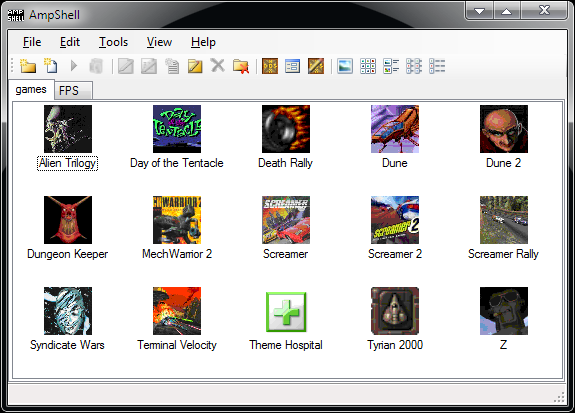
Il s’agit d’un frontend simple et complet pour DosBox et ses clones.
 

AmpShell1.1
 

– Incompatible (read: 10 years old) or malformed user data won’t crash AmpShell anymore (BUT it will STILL be ignored, be warned !)
– Removed small non-crashing error when user data was redrawn but there was no focused item to restore focus on.
– On the very first start, we don’t erase the window position chosen by Windows, because we have none saved.
– To improve usability on the very first run, we do select the first category (tab) created if there is one automatically
– We use Costura.Fody to embed all the dependencies in a single executable (the old Microsoft.Bcl Nuget package is the cause of this)
– The changes of v1.2.5 were too small so they are released together with this version.


Télécharger AmpShell v1.3.8 (3.4 Mo)

Site Officiel

En savoir plus…

DBGL est une interface graphique en JAVA pour DOSBox, qui se base largement sur l’interface D-Fend. Elle gère plusieurs profils, plus de 1 000 si nécessaire, et il est possible d’en importer de D-Fend. Elle accepte plusieurs versions de DOSBox. Elle supporte les archives compressées au format 7z. Enfin, elle simplifie bien sûr le lancement de jeux sous DOS.
 

dbgl
 
Les changements:

– Added a first implementation of ‘directory scanning for known games’. Currently, all files/games from the D-Fend Reloaded ‘Auto setup templates’ are recognized. You can try it out using ‘Profiles’->’Import known games in folder’ and selecting the directory to scan. After a while, it should show a dialog with the results. Simply select the entries that you want to import into the existing profiles list. Proceeding the wizard will allow you to select default DOSBox configuration settings (like machine, cycles etc) and optionally check the DBConfWS online database for game-specific configuration (when available).
– DBGL can now query MobyGames meta-data using a local database from ‘Metropolis Launcher’, very quickly. Note that cover-art and screenshots are still being fetched from www.mobygames.com, though.
– Added support for the DOSBox SVN OpenGL shader patch from ny00123 & jmarsh.
– You may now browse through the various captured images using the left and right arrow keys, or the buttons below the image.
– Various fixes related to MobyGames querying, especially in relation to (.gif) image data.
– Fixed « Start profile manually with a specific DOSBox version » creating an incomplete .conf file (_Rob).
– Fixed possible issues when using symbolic links on Linux (_Rob). Also fixed a rare file path mangling issue (Epsilon).
– A few usability improvements, refactored more parts of the GUI code, updated translations.
Updated all libraries, most importantly HSQLDB (from 1.8.1 to 2.5.0).


Télécharger DBGL v0.99 (20.6 Mo)

Site Officiel

En savoir plus…



https://getourbonus.com/fr/accueil

https://www.romspedia.com/