La dernière version béta publique de l’excellent WinUAE, l’émulateur Commodore Amiga.


Changements :

New year, new beta series. Not just a 3.0 bug fix series, includes new features too.

Main rule: Before reporting, make sure bug is NOT in previous offical version. (If it is -> post in separate thread) More information: http://eab.abime.net/showpost.php?p=861456&postcount=1.

http://www.winuae.net/files/b/winuae_3010b1.zip

Beta 1:

- Lowered disk motor startup delay, more closer match with real hardware (at least matches some random drive in my A500)
- Memwatch points in KS ROM address space crashed during reset. (Wrong ROM mirror selection)
- A4000T NCR SCSI data bus width become 16-bit in cycle-exact mode. Caused write triggerable registers to start operation before full 32-bit value was written.
- Memwatch points didn't work in ROM addresses.
- CPU HALT state caused infinite loop in some configurations.
- 2900b16 68040 MMU MOVEM stack frame update was incorrect. (NetBSD crash, probably other Unix-likes too)
- Some 68000 MOVE variants seem to sample interrupt lines before writes and some after writes. Added special case for one variant, allows Made in Croatia / Binary to work in cycle-exact mode. Need more testing later, there does not seem to be any pattern.
- Last line sometimes flickered with random colors in "Double, fields/+" non-interlaced mode.
- RTG mode screenshots in 16-bit host color depth mode had wrong colors.
- Non-cycle exact modes with display vertical diw open but bitplane DMA disabled: in some situations display was corrupted or shifted. (Gloom AGA, Worms Directors Cut title screens)
- Directory filesystem exnext packet update didn't always work correctly if file was deleted during directory enumeration. (Which is technically illegal but it accidentally worked with OFS/FFS and become a feature..)
- Autoconfig space was not unmapped after it finished, broke during previous autoconfig rewrite.
- GUI didn't allow selection of custom SCSI ROM file.
- Completely rewritten CPU idle function, max CPU idle setting should now work without any slowdown side-effects, also lowest CPU idle state should be less than 10%. Please test.
- Last line is not special if A1000 Agnus. I was expecting this result when I noticed that A1000 sprite behavior is different in last line vs later Agnus models. A1000 Agnus: all visible lines are normal, later revisions: last line inhibits bitplane and sprite DMA. Real A1000 confirmed. I think this is last A1000 vs later Agnus revision undocumented difference.
- Small sprite update, only writes to SPRxCTL disarms sprite (I had special case for first DMA write to SPRxPOS too, only because it worked around another old bug..). Now OCS Agnus + ECS Denise + KS3.1 combination mouse cursor sprite corruption is 100% correct.
- On the fly media insertions are now serialized and only processed when Windows PnP manager reports idle state (Media mounting works even if it causes "installing drivers" phase) and multiple simultaneous media insertions also work reliably now (for example USB reader connected with multiple cards already inserted)
- First on the fly inserted device name becomes RDH0:, second RDH1: and so on. Previously number was next available directory filesystem unit number.
- Delay enumeration of inserted/removed input devices by 2 seconds. One removal or insertion can cause multiple device events (which is harmless but sometimes annoying)
- Picasso IV autoconfig missed special case, other boards are 16M in Z3 mode but PIV is 32M. Fixes incorrect address alignment if Z3 fast RAM is also enabled and size is less than 32M. (OS4 black screen hang)
- Picasso IV byteswap VRAM space didn't handle byte reads or writes correctly, only words and longs worked. (OS4 1024*768*16 screen mode glitches, possibly also other 16 bit modes)

New hardware emulated:

- GVP SCSI Series I and II hardware emulation (WD33C93), HC+8 board. v3.15 and v4.15 boot ROMs added to ROM scanner (gvpscsi.device). GVP SCSI enabled + Z2 fast RAM: use GVP Z2 fast ram autoconfig ID.
- DKB 1230/1240 accelerator board + SCSI emulation (FAS246 which appears to be compatible with 53C94/FAS216). SCSI is non-DMA (dkbscsi.device). v1.23 ROM added to ROM scanner. RAM not emulated, no idea about address space.
- Fusion Forty accelerator board emulation. It has interesting menu and graphics in boot ROM, press right mouse button when booting. v3.4 ROM images added to ROM scanner. RAM expansion emulated.
- Toccata Z2 sound card emulation.

Toccata hardware features emulated:
- Mono and stereo channel modes.
- 8-bit and 16-bit linear PCM. Companded (ulaw/alaw) modes are not supported.
- Left and right output channel volume control and mute.
- All AD1848 supported output frequencies.
- Output only. Input channels are not supported.

Technical details:
- Has 1024x9bit FIFO chip, one for output and one for input.
- No DMA. Uses level 6 interrupt to fill FIFO, 512 bytes/interrupt. Interrupt triggers when FIFO has 512 bytes or less
data available. (Which makes about 7 interrupts/frame at 44100Hz/16bit/stereo)

Notes:
- Different implementation than uae ahi and CD audio. Audio goes to Paula emulation backend (after Paula 8 to 16-bit conversions and filters). Very good latency but glitches are possible if configured buffer size is too small or not enough CPU power available (just like with Paula audio). Toccata emulation should be usable for (game) sound effects too, not just for music.
- Because it uses Paula audio path, Toccata audio is included with sound recording. Same method may be used with CD audio in future. (Possibly optionally).
- It is best to set same sample rate in both AHI and UAE sound settings to reduce possible resampling artifacts.
- Does any DMA capable simple sound cards exist? (Simple = basic CODEC chip only, no DSP chip)


Télécharger WinUAE (Public Beta) v3.1.0 Beta 1 (4.3 Mo)

Site Officiel

En savoir plus…

Voici le pack d’icônes et de snaps pour Mameui mis à jour par John IV.


Télécharger MAMEUI Icons Pack v0.157 (10.3 Mo)

Télécharger MAMEUI Screenshots Pack (Update) up to v0.258 (5.6 Mo)

Site Officiel

En savoir plus…

MameUI32 est un émulateur multi-arcades émulant plus de 28000 jeux (à partir de 1975) et incluant une interface (frontend). Ce build est compilé par nos partenaires de chez MameWorld.


Télécharger MAMEUI32 v0.157 (16,6 Mo)

Site Officiel

En savoir plus…

MameUI64 est un émulateur multi-arcade émulant plus de 28000 jeux (à partir de 1975) et incluant une interface (frontend). Ce build est compilé par John IV et destiné exclusivement aux processeurs supportant les instructions 64 bits (x86-64 dit x64), de plus il vous faudra un système d’exploitation compatible x64 pour le faire fonctionner.


Télécharger MAMEUI64 v0.157 (18,1 Mo)

Site Officiel

En savoir plus…

Ces fichiers ini sont a mettre dans le répertoire « folders » de MAMEUI (ou clones). Il propose un tri des jeux par catégorie, année de sortie, version de Mame…


Télécharger MAMEUI Inifiles v0.157 (193,5 Ko)

Site Officiel

En savoir plus…

MAMEUIFX est basé sur le code source de MAME/MAMEUI, emprunte des améliorations à de nombreux builds non officiels (en vrac : StretchMAME, JMAME, RND, AdvanceMAME, CANAME, WHACK…).


Changements :

– Implemented SYNCREFRESH feature from GroovyMAME (thanks to Calamity and Haynor666)
– Removed SOUNDSYNC feature from CabMAME (no more needed)


Télécharger MAMEUIFX32 v0.157 (16,2 Mo)

Télécharger MAMEUIFX64 v0.175.1 (18.4 Mo)

Site Officiel

En savoir plus…

Les derniers builds en développement sont à présent disponibles.


Citra : Emulateur de Nintendo 3DS.
3Dmoo : Emulateur de Nintendo 3DS.
Play! : Emulateur de Playstation 2.
RPCS3 : Emulateur de Playstation 3.
Jpcsp : Emulateur de Sony PSP.
CxBx : Emulateur de Microsoft X-Box.
Xenia : Emulateur de Microsoft X-Box 360.
Cen64: Emulateur de Nintendo 64.


Télécharger Citra (32 bits) (2015/04/01) (12.5 Mo)

Télécharger Citra (Final build) (2024/03/07) (140 Mo)

Télécharger 3dmoo (x86) (2017/08/21) (454 Ko)

Télécharger 3dmoo (x64) (2017/08/21) (533 Ko)

Télécharger Play! (x86) GIT v0.77 (2026/10/25) (8.9 Mo)

Télécharger Play! (x64) GIT v0.77 (2026/10/25) (10.3 Mo)

Télécharger RPCS3 (32 bits) v0.0.0.4 (2014/06/02) (3.1 Mo)

Télécharger RPCS3 (WIP) v0.0.43 Alpha (2026/11/23) (35.6 Mo)

Télécharger JPcsp (x86) v0.7 rev 0318d15e (26.4 Mo)

Télécharger JPcsp (x64) v0.7 rev 00ac4d6 (29.1 Mo)

Télécharger CXBX Shogun v0.8.1-Pre3 (2015/10/30) (398 Ko)

Télécharger Xenia v1.0.2844 (2026/11/23) (3.9 Mo)

Télécharger Cen64 (WIP) (2022/10/02) (2.6 Mo)

Il s’agit d’un fichier DAT tenu par MASH regroupant toutes les infos du site « mametesters.com ». Il donne des infos sur l’émulation des jeux sous MAME, c’est a dire le développement, les bugs, les améliorations…


Changements :
-Updated to MAME 0.157 (git.redump.net\mame)
-Added Source/Listinfo changes
-Newest Bugs (29th Dec)
-Added/Fixed ‘Recommended Games’
-Fixed Mameinfo.dat infos


Télécharger Mameinfo.dat v0.157 (5,4 Mo)

Site Officiel

En savoir plus…

QMC2 – M.A.M.E./M.E.S.S est une interface graphique pour l’émulateur de jeux d’arcade M.A.M.E. Il est le successeur d’une des premières interfaces graphiques UNIX pour M.A.M.E. : QMamecat, et est aujourd’hui le projet le plus actif dans le domaine. QMC2 repose sur l’utilisation de la bibliothèque graphique Qt4. QMC2 s’avère judicieux en complément d’UME 🙂


qmc2


Changements :
fix: Mac OS X build: corrected linker issues when building with clang (LLVM)
fix: avoid crash when caching software-lists while ROM states are being checked
fix: Mac OS X: using the platform’s default key-sequence for ‘close application’ (Command+Q) to stop current processing / quit QMC2
fix: ROMAlyzer (system-mode): sort selected set-names before analyzing them
imp: ROMAlyzer / check-sum scanner: show the progress of running scans in the corresponding status widget as well
imp: updated MESS category.ini contributed by ASH to MESS 0.157
imp: QMC2 Arcade: teached QMC2 Arcade the use of the new DAT-info database added in 0.46 (including fall back to the parent’s info if applicable)
imp: QMC2 Arcade / ToxicWaste theme: minor cosmetic corrections regarding the bottom menu-bar
imp: changed the default setting for ‘NativeFileDialogs’ to true on Mac OS X
imp: build: added make option ‘L_LIBDIRFLAGS’ which allows for changing the order in which library paths are searched when linking (usually not required, but may be useful for solving Qt library version conflicts)
imp: ROMAlyzer: added a reproduction option to toggle the creation of a ZIP comment (may be annoying)
imp: the main GUI no longer restores the visibility of certain sub-windows as it’s prone to trouble and wasn’t consequently implemented anyway (i.e. not all sub-windows were restored)
imp: software-lists: utilizing the same (much faster) algorithm for searching within known software as used by the system search
new: ROMAlyzer: added support for software / software-lists (there are two instances of the ROMAlyzer now, one for ‘systems’ and one for ‘software’) — see also bug tracker ID #61


Télécharger QMC2 (x86) v0.47 (30,3 Mo)

Télécharger QMC2 (x64) v0.243 (48.9 Mo)

Site Officiel

En savoir plus…

HqMame c’est tout simplement Mame avec le support des excellents filtres HQnX et xBR ainsi qu’une liste étendue des jeux disponibles dans l’interface interne de Mame.


hqmamehqmame


Changements :
– Updated Intel TBB to version 4.3 Update 2
– Updated MAME to most recent version


Télécharger HqMAME v2.18 (0.157) (28.0 Mo)

Site Officiel

En savoir plus…

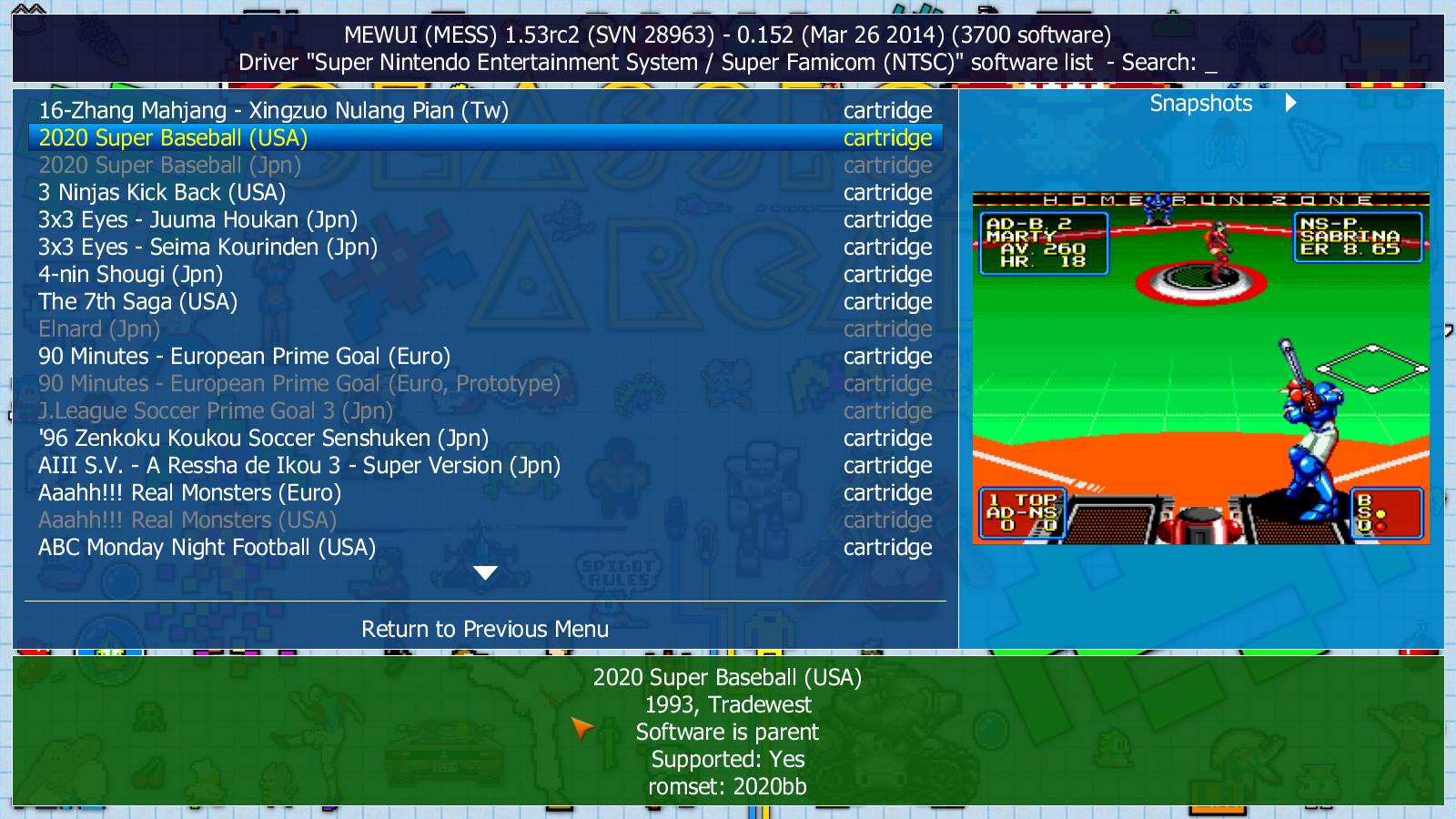
MEWUI-UME est une simple extension de l’interface interne de UME, dont la caractéristique principale réside dans la visualisation de la liste complète des jeux.


Voici un aperçu des fonctionnalités:
– Affichage de la liste complète des jeux.
– Confirmation à la fermeture d’un jeu, réglage activé par défaut.
– Recherche activée avec un minimum de 4 caractères inscrits.
– La recherche renvoie les 200 premiers résultats utiles.
– La pression de la touche TAB sur le menu principal active le menu de configuration.
– Changement de la taille de la police de caractère dans l’interface utilisateur.
– Changement de certaines informations affichées en bas du menu principal.
– Ajout d’informations sur MEWUI en haut du menu principal.


Changements :
– Added option in UME build to switch from full list to those of MAME and/or MESS.
– Updated to MAME / MESS / UME 0.157.
– Fixed crash when displaying some images (Ex: gtipoker).
– Fixed internal search that showing wrong results in some cases.
– Improved time loading from software list (MESS / UME).
– Fixed missing handling for Backspace / DEL / TAB keys in SDL build.
– Fixed crash occurred in favorite filter selection.
– Fixed custom filter.
– Various minor fixed and improvements.


Télécharger MEWUI-UME (x86) v1.57 (31,1 Mo)

Télécharger MEWUI (x64) v1.70.1 (46.7 Mo)

Site Officiel

En savoir plus…

MEWUI-MESS est une simple extension de l’interface interne de MESS, dont la caractéristique principale réside dans la visualisation de la liste complète des jeux.


Voici un aperçu des fonctionnalités:
– Affichage de la liste complète des jeux.
– Confirmation à la fermeture d’un jeu, réglage activé par défaut.
– Recherche activée avec un minimum de 4 caractères inscrits.
– La recherche renvoie les 200 premiers résultats utiles.
– La pression de la touche TAB sur le menu principal active le menu de configuration.
– Changement de la taille de la police de caractère dans l’interface utilisateur.
– Changement de certaines informations affichées en bas du menu principal.
– Ajout d’informations sur MEWUI en haut du menu principal.


mewuimess


Changements :
– Added option in UME build to switch from full list to those of MAME and/or MESS.
– Updated to MAME / MESS / UME 0.157.
– Fixed crash when displaying some images (Ex: gtipoker).
– Fixed internal search that showing wrong results in some cases.
– Improved time loading from software list (MESS / UME).
– Fixed missing handling for Backspace / DEL / TAB keys in SDL build.
– Fixed crash occurred in favorite filter selection.
– Fixed custom filter.
– Various minor fixed and improvements.


Télécharger MEWUI-MESS (x86) v1.57 (17,3 Mo)

Site Officiel

En savoir plus…


https://getourbonus.com/fr/accueil

https://www.romspedia.com/