RPCS3 a pour objectif de devenir un émulateur de Playstation 3 complet même s’il reste un chemin énorme avant d’y parvenir. Pour le moment il fait principalement office de désassembleur, la première marche vers un début d’émulation. N’espérez donc pas jouer à un jeu commercial avant longtemps, toutefois il commence à exécuter quelques jeux amateurs.


Télécharger RPCS3 (32 bits) v0.0.0.4 (2014/06/02) (3.1 Mo)

Télécharger RPCS3 (WIP) v0.0.43 Alpha (2026/11/25) (35.6 Mo)

Site Officiel

En savoir plus…

Un gestionnaire de roms avec une interface aussi claire que Romcenter et axé sur la simplicité avec un nombre limité de fonctions. Une référence désormais.

L’immense avantage de ce manager est de pouvoir scanner n’importe quel repertoire de roms , en VRAC & ensuite -en fonction de ce que vous avez comme dats- de les ranger et replacer automatiquement. (très utile si vous avez des tonnes de dats (TOSEC). Il vous permet réellement de collectionner des centaines de collections avec un gain de temps considérable par rapport aux autres managers. Il convertit également les zips au format Torrentzip afin de faciliter le partage à travers les fichiers torrent.


romvault2.1
– Happy Fat Tuesday, and here is a quick bug fix update, fixed a couple of bug that caused the fix engine to crash when fixing files.
– Fixed renaming a file if it was needing the case of some characters changed.
– Fixed moving files out to ToSort 


Télécharger RomVault v2.1.23 (923,8 Ko)

Site Officiel

En savoir plus…

La dernière version béta publique de l’excellent WinUAE.


– Programmed display mode positioning bug fixed, should fix remaining problems with clipped left or right edges.
– Switching between interlace PAL and interlace NTSC modes calculated wrong vertical line count.
– Some CPU emulation optimization, only modify linear memory address in getpc/setpc/incpc functions if mode is not prefetch/ce/mmu.
– Added slirp inbound port configuration, config file slirp_redir=<proto>:<port>:<internal port>:<internal ip>, multiple entries supported, internal ip part is optional.
– Added simple slirp inbound port configuration, config file slirp_ports=port1,port2,.. (TCP ports only, internal address is default 10.0.2.15, host port equals internal port)
– Added quick slirp inbound port selection to GUI, opens TCP ports 21, 22, 23 and 80. (Same as slirp_ports=21,22,23,80)
– Added missing slirp cleanup code from QEMU.
– 6888x Packed-Decimal Real negative k-factor values fully emulated (Previous confirmed, required by NeXTSTEP OS), positive non-zero values not emulated yet which needs Fortran « E » scientific notation format string that C does not directly support.
– First and last drawn scanlines were always detected incorrectly since few major versions ago, breaking vertical centering.
– Input device autoswitch by using analog directions now only work with X or Y axis, other directions may work differently and can cause accidental switches.
– Force recalculation of horiz and vert centering (if enabled) when screen mode is detected (guessed) as changed.
– Toggle input events (warp mode, mute etc..) now also support setting to on or off state without toggling. Input panel only, click on input event name to change mode
– Added audio/video recording input event, supports also new toggle/on/off modes. If recording is started using input event (not from GUI), number is appended to filename and it is increased each time recording is started.


Télécharger WinUAE (Public Beta) v2.7.1 Beta 10 (3,9 Mo)

Site Officiel

En savoir plus…

EmuCenter2 est une interface simpliste qui regroupe les meilleurs émulateurs de console de jeux vidéo pour une simplicité accrue


Les atouts :
– Une interface simpliste qui regroupe tous vos jeux (Émulation, PC ou Web)
– Téléchargement automatique des pochettes, descriptions, notes, diaporamas des jeux
(nouveau: Descriptions en Anglais en plus de celles en Français)
– Regroupe les plus connus des émulateurs console en version 32 ou 64 bits.
– Configure tous les émulateurs pour un usage immédiat dans de bonnes conditions.
– Regroupe les principales options des émulateurs sur une même page
– Mise à jour automatique du logiciel et de ses émulateurs.
– Interface pouvant être pilotée par une manette.
…


Les consoles supportées :
– Bandai : Wonderswan
– NEC : PC-Engine
– Nintendo : Nes, Super nes, Gameboy, 64, Gamecube, DS et Wii
– Sega : Master system, MegaDrive, Gamegear, Saturn et Dreamcast
– Sony : PlayStation 1, 2 et PSP
– Autres : Neogeo et Bornes d’arcade (Capcom CPS, Taito, Sega Model 2, ARCADE LaserDisc …)


Télécharger EmuCenter2 (complet) v6.7 (152,5 Mo)

Télécharger EmuCenter2 (mise à jour) v7.1.0.1 (7.3 Mo)

Site Officiel

En savoir plus…

Un émulateur russe (dont l’interface est en anglais).


Il émule les machines suivantes:


Apogee ,Bashkiria-2M rom, Bashkiria-2M disk, BK-0010, BK-0010_01, BK-0010fdd, Korvet, Lik, Lik2, Lvov, Lions PK-01, Mikro-80, Mikrosha, Mikrosha (cas), Orion-128, Orion-128z80-Card-ll, Orion-Pro, Orion-Pro 2, Partner, Pc junior, Radio-86RK, Radio-86RK (cas), Radio-86RK 4K, Radio-86RK color, Specialist, SpecialistMX, SpecialistRamfos, Spektr-001, UT88, UT88 (cas), Vector06c, Vector06c-z80, YUT-88, ZX Spectrum 48 et ZX Spectrum 48 (cas).


Télécharger EMU v1.01 (2014/01/13) (1,6 Mo)

Site Officiel

En savoir plus…

Pantheon
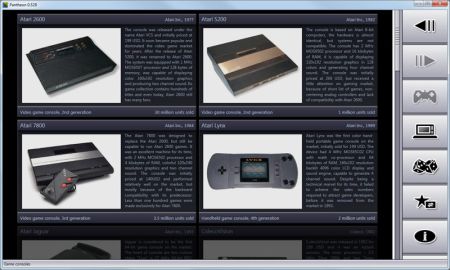
Superbe interface et très simple d’utilisation. Il s’agit d’un émulateur Acorn Atom, Acorn BBC Micro, Atari VCS 2600, Atari VCS 5200, Atari VCS 7800, Atari 8-bit, Atari Lynx, ColecoVision, MSX. Le gros avantage est que les jeux sont téléchargés automatiquement en un clic sans que l’on ait besoin de faire quoi que ce soit d’autre. Un excellent multi-console en devenir !


Lse changements:

86 games for Atari 8-bit computers: A-Zone, Alien Swarm, Balloon Pop, Boulder Dash III, Caverns of Mars, Chromatics, Dandy, Dr. Mario, Fort Apocalypse, Golfer, H3x0r, Johnny the Ghost, Kenny Dalglish Soccer Manager, Kik-Start… More games for Atari 8-bit computers in April.


Télécharger Pantheon v1.894 (17,8 Mo)

Site Officiel

En savoir plus…

Il s’agit d’un émulateur et débogueur de Sony Playstation créé par le célèbre Martin Corth.
L’émulation devrait être complète avec la prise en charge de toutes les fonctions du matériel. Normalement tout fonctionne pleinement. Néanmoins Martin Korth n’a testé son programme que sur une douzaine de titres, donc il peut y avoir des problèmes sur d’autres jeux.


Le BIOS est émulé également via un clone qui est gratuit (théoriquement libre de droit) et plus rapide que le BIOS d’origine. Normalement no$PSX ne requiert donc pas de BIOS pour lancer les jeux de la console. Cependant il peut y avoir des problèmes de compatibilité avec certains jeux. Dans ce cas, il faut employer une copie du BIOS officiel.


Les CD-ROM sont supportés via un lecteur CD réel. Il est également possible d’utiliser des images de disque aux formats .NRG, .CUE+.BIN et .ISO ou alors des exécutables .EXE.


Les nouveautés sont les suivantes:


– new: plain gaming-version (miniaturized nonsense emulator without debugger)
– snapshots: doesn’t touch cdrom status/door on cdrom-loading (preserve snap)
– sound: currently disabled new zigzag for slow 18900Hz xa-adpcm (eg. dracula)
– dma: fixed crash on num_blks=0 (should act as 10000h) (Where’s Derpy spu/dma)
– dma: updates dma address/length registers in special sync/chopping modes
– setup/sound: volume slider (optionally hardware/mixer or software/multiply)
– gpu/bugfix: wraps when DisplayBase+DisplayHeight exceeds 512-lines vram size
– disass: shows valatcur for load/store opcodes (now also in native syntax mode)
– a22i: recognizes native mips assembler syntax (alternately to nocash syntax)
– a22i: fixed crash on complex numeric expressions with missing close bracket
– a22i: works without space character between labels and greater/less symbols
– a22i: uses predef in opcode list, refuses ‘pop’ if SP-load-delay busy
– gpu/speedup: omits rectangle tex-blending on color=808080h (eg. Where’s Derpy)
– iomap: adds rect/fill/vram2vram time to gpu emu load (formerly only poly/line)
– bios clone: dummy A(9D) opcode for « set_conf_without_realloc » (Roll Boss Rush)
– help: added info on homebrew « set_conf_without_realloc » bios hack/patch
-snapshots: survives snap loading even if old cdrom-image folder doesn’t exist
– snapshots: added better (but slower) LZ-based .SNA file compression (optional)
– snapshots: includes BIOS ROM (for loading regardless of bios versions/clones)
– expansion rom: prevents skip_intro patch on expansions (which may hook intro)
– expansion rom: prevents tty_enable patch for caetla (which needs bios chksum)
– expansion rom: supports actionreplay and xplorer io ports (namely switch=on)
– expansion rom: supports actionreplay 2x128K mapping and normal xplorer mapping
– bios-clone: fixed rename-function (added mov r4,r16)(ridgeracer sav overwrite)
– gpu: prevents better-than-real-quads on concave/twisted quads (crashbandicoot)
– timers: supports separate dest/overflow events, completion flags, dest changes
– help: added specs and cautions on cdrom autopause (or autostop) feature
– cdrom: implemented autopause feature with INT4(stat) on end of track (Rayman)
– gpu: CpuToVram wraps from x=3FFh to X=000h with Y=SAME (Alundra memcard save)
– gpu: fixed polygon height limit (don’t draw if height>=512) (for Spiderman)
– cdrom: implemented authentic 2nd_response timings (Gundam Battle Assault 2)
– help: added ‘CDROM – Response Timings’ chapters (some min/max/average timings)
– help: corrected cdrom GetID description (only one response on DoorOpen/SpinUp)
– vram viewer: forces « swap_buffers » after timeout (avoids dracula mem overflow)
– cpu: emulates cop0 bpc/bpcm opcode fetch breaks (for cheat device booting)
– help: fixed cop0 debug break description (bpc-then-bpcm, not vice-versa)
– bios-clone: added dummy « add r4,0,385h » opcode at (for Xplorer bios hook)
– bios-clone: moved gui-entrypoint to 80030000h (for Action Replay bios hook)
– cdrom/bugfix: bugfixed new cdrom-dma timing; minus intcount (dino crisis 1-2)
– fileloader: allows to load/debug/emulate expansion roms (.rom and .fcd files)
– help: new Cheat Devices chapter (code formats, i/o ports, decryption, etc)
– web: new no$psx forum: http://ngemu.com/forums/no-psx-discussion.147/


Télécharger No$PSX v1.8 (546,8 Ko)

Télécharger No$PSX (Gaming version) v2.3 (204 Ko)

Site Officiel

En savoir plus…

MAME Content Manager Plus est un programme simple qui permet de trier et selectionner les roms que vous voulez garder sur votre PC. Il permet de facilement renommer ou effacer les roms MAME en utilisant les catégories : Adult, Quiz, Mahjong, Puzzle, etc.


MCM Plus n’est pas une mise à jour de Doug’s MCM 2.0. Il s’agit d’une complète ré-écriture.


Les changements:


– Added version info detection for WolfMAME emulator
– Added support for all driver status categories: emulation status, color status, sound status, graphic status
– Updated driver status search filter to support other status categories
– Added columns of driver status categories to the work list (icons only, no text): green for good; yellow for imperfect, gray for preliminary
– Added detection of mechanical games (« ismechanical » tag from -listxml output) and a new search filter (classic, mechanical)
– Added detection of screen orientation and a new search filter (horizontal, vertical, unknown)
– Added detection of bios sets and device sets, along with new icons
– Renamed « Parent and Clone » search filter to « Game Set Type » and added bios sets and device sets to the filter list
– Simplified the -listxml parsing function and removed redundant code
– Fixed a selection painting bug in categories list when using arrow keys to select a category
– removed the Segoe UI font from the project as Windows XP doesn’t have this font by default, replaced with Arial font
– Implemented virtual list mode to load the entire games list into RAM and speed up search games / work list processes. It’s lightning fast now and RAM usage is as low as 35 MegaBytes (estimate)
– Replaced dark intro logo by a light one. It looks better this way 🙂
– If MAME config file doesn’t exist, MCM Plus asks if you want to create it
– Improvements to the user interface… screen space is precious for MCM Plus!


Télécharger MAME Content Manager Plus v1.0.7 (664,7 Ko)

Site Officiel

En savoir plus…

CpcAlive est un émulateur d’ordinateur Amstrad CPC.


– gestion de sources Basic avec étiquettes + corrections 


Télécharger CpcAlive (Dos) v1.20c (2.0 Mo)

Télécharger CpcAlive (Win) v1.20c (2.9 Mo)

Site Officiel

En savoir plus…

Une interface graphique pour émulateur en ligne de commande comme Mame, Mess et Nestopia.


– Favourites added. Favourites can now be marked, filtered and navigated through for each romlist
– Added a French localization (thanks Nolan!)
– Improved gamepad and analog joystick support
– Added GLSL shader support to layouts
– Import from Hyperspin and Mamewah/Wahcade! romlists
– Support proper multi-user install on Linux and OS X
– Added ability to filter based on display type and number of displays
– Fixed crash when creating filters
– Added ‘relaunch last game’ and an option to auto-relaunch on startup
– Option to hide bracketed text in game titles
– You can now configure layout-specific options from the configure menu
– New included layout (thanks cools!)
– many other bug fixes and improvement


Télécharger Attract-Mode v1.2 (8,4 Mo)

Site Officiel

En savoir plus…

Créé par BUT, Emuman, K&K, Sword et Xvi. Mame Plus! est sans problème la meilleure version de Mame pour Windows, avec ou sans frontend. Support multi-langage, tirs automatiques, option anti-sortie, interface interne améliorée, interface de gestion des roms améliorée, effets vidéos supplémentaires (2xSai, RGB, hq3x, 2xPM…), meilleure gestion des contrôles, support de la NeoGeo en mode console, il regroupe également plein de correctifs et de drivers additionnels…

Site source n°1. Site source n°2. Site source n°3.


Télécharger Mame/MameUI Plus! (x86) v0.152 r5123 (50,3 Mo)

Télécharger Mame/MameUI Plus! (x64) v0.168 r5272 (32.8 Mo)

Site Officiel

En savoir plus…

MAME Plus! Plus Kaillera permet le jeu Online avec ou contre d’autres joueurs. Cette version permet notamment de jouer à plusieurs sur des titres exclusivement supportés par Mame.

Site source n°1. Site source n°2. Site source n°3.


Télécharger MAME Plus! Plus Kaillera (x86) v0.152 r208 (27,4 Mo)

Site Officiel

En savoir plus…


https://getourbonus.com/fr/accueil

https://www.romspedia.com/