BletchMAME est un frontend pour MAME. Contrairement aux autres existants (et qui fonctionnent comme des lanceurs tout en conservant l’interface utilisateur interne de MAME), BletchMAME remplace l’interface utilisateur interne de MAME par une interface graphique plus conventionnelle pour offrir une expérience plus conviviale dans un certain nombre de domaines (tels que les profils, la configuration des entrées et un certain nombre d’autres éléments). Bien que BletchMAME soit conçu pour prendre en charge toutes les machines que gère MAME, il convient particulièrement à la partie émulation d’ordinateur.

• Added a capability to import subsets of MAME.ini settings
• Placing the BletchMAME version and (when running) the MAME version on the title bar
• Cosmetic changes to the « About… » dialog to make it appear cleaner
• Fixed a thread safety problem that could cause random crashes when communicating with MAME
• Lowering the priority of background audit tasks
• Fixed a bug that caused auditing to not respect « romof » when identifying paths
• Preventing Info DB refreshes when emulations are running



0 commentaire
Il s’agit d’une branche de l’émulateur de Microsoft X-Box CXBX, apportant certains modifications et améliorations diverses.

Branche Darkrush3760
Branche LukeUsher
Télécharger CXBX Reloaded v0.1.0 (1.3 Mo)
Télécharger CXBX Reloaded (WIP) v0.1.0 (2026/04/21) (4.4 Mo)
86Box Manager est le gestionnaire de configuration officiel mais facultatif de l’émulateur 86Box. Il est écrit par Overdoze en C# avec Windows Forms et est publié sous la licence MIT, il peut donc être distribué gratuitement avec 86Box.


Caractéristiques:
– Puissant, léger et entièrement optionnel
– Permet de créer plusieurs machines virtuelles isolées
– Donne à chaque machine virtuelle un nom unique et une description facultative
– Permet d’exécutez plusieurs machines virtuelles en même temps
– Contrôle les machines virtuelles depuis le Manager (pause, réinitialisation, etc.)
– Une icône dans barre d’état vous évitera que la fenêtre du gestionnaire ne vous gêne !
Changements:
This release increases the minimum build of 86Box deemed fully compatible to 3541. 3333 to 3540 are considered mostly compatible, while anything pre-3333 can have major functionality problems.
– Fixed issue #103 . The Manager should now be compatible with Qt builds and launch problems should be gone – a unique VM ID is now sent to the emulator to keep track of things.
– Fixed issue #89
– Updated icons to match 86Box 3.0+ (program, tray icon, about logo, VM status icons)
– Switched to long arguments for 86Box
– Moved LoadSettings() and LoadVMs() to main form’s Load() event
– Disabled window state persistence due to sizing problems on startup
– Removed .NET Core project due to errors
– Removed the launch timeout feature as it’s no longer needed
– Some other minor UI and code tweaks
Attract-Mode est une interface graphique pour émulateur en ligne de commande comme Mame, Mess et Nestopia. Elle cache le système d’exploitation sous-jacent et est destinée à être contrôlée par un joystick, manette ou trackball, ce qui la rend idéale pour une utilisation dans des configurations de bornes d’arcade. Attract-Mode est open-source et fonctionne sur Linux, OS X et Windows.
Les changements sont visibles ici.
Télécharger Attract-Mode XP (x86) v2.6.1 (34.0 Mo)
Télécharger Attract-Mode XP (x64) v2.6.1 (35.2 Mo)
Télécharger Attract-Mode (x86) v2.7.0 (24.3 Mo)
86Box (anciennement nommé PCem Unofficial, PCem Experimental ou PCem-X) est une branche non officielle de l’émulateur PCem, qui vise à émuler des machines compatibles IBM de la période 1981-2000. Cette branche ajoute plusieurs cartes mères émulées. (site de développement de l’auteur)
Cet émulateur peut également fonctionner avec cette interface ou celle-ci qui lui sont dédiée.
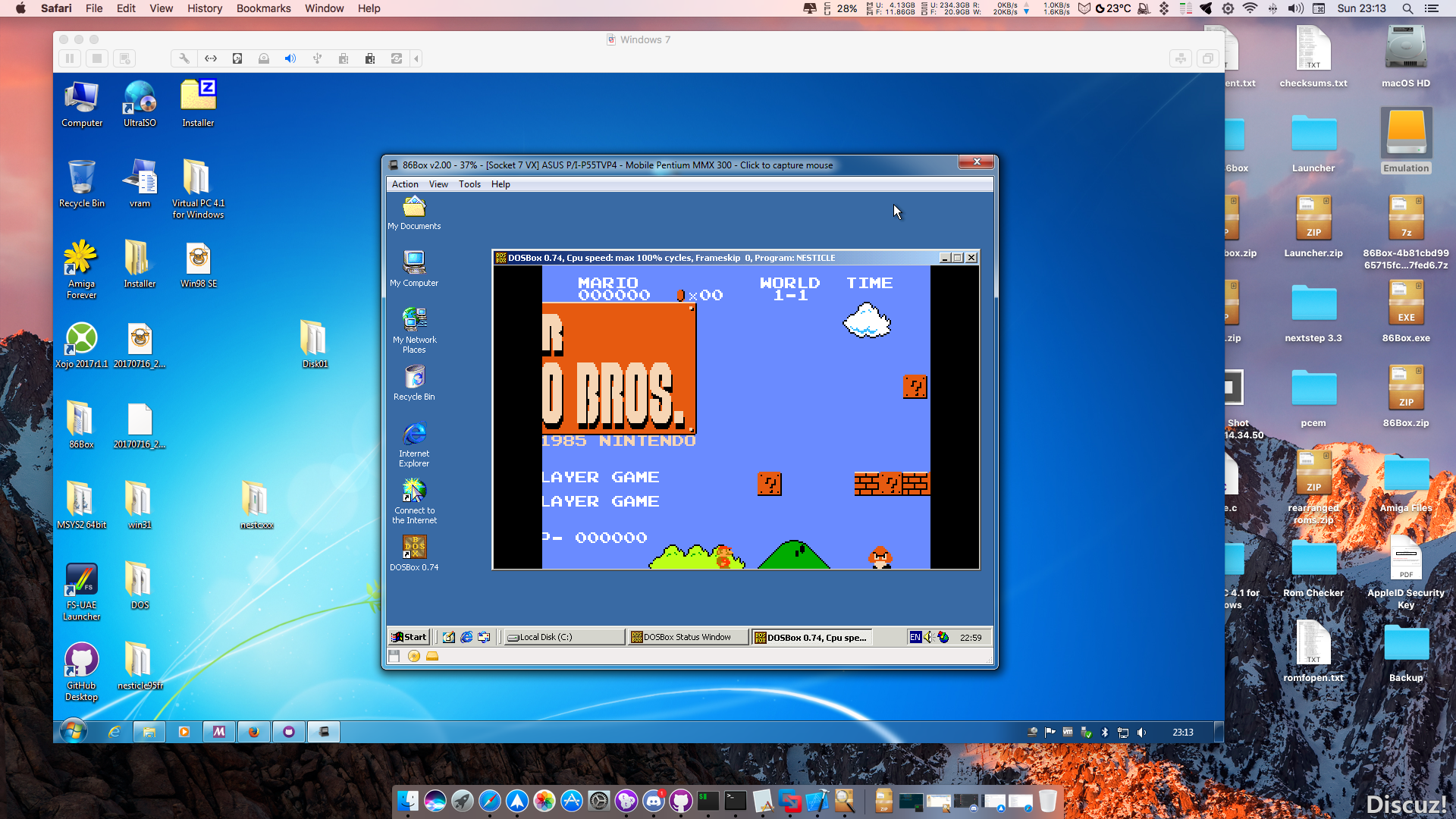
Les changements en détails sont visibles ici.
– Xi2: Warp mouse cursor only on Xi2 thread by @Cacodemon345 in #2131
– Updated Japanese translation by @EmpyreusX in #1960
– Updated Simp. Chinese translation by @EmpyreusX in #1963
– Re-added the threaded FIFO in place of the non-threaded one, but with… by @TC1995 in #1964
– Fixes to config file backwards compatibility by @lemondrops in #1968
– Парочка изменений // A couple of changes by @kroshmorkovkin in #1974
– Update hu-HU.rc in #1975
– Updates to the current German translation by @dob205 in #1977
– Change MO vendor length to 9 by @Cacodemon345 in #1978
– Fix plat_mmap on FreeBSD by @Cacodemon345 in #1980
– Fixes for midi input by @ts-korhonen in #1979
– Pass sysex messages in mpu-401 uart mode by @ts-korhonen in #1981
– Various translation fixes by @dob205 in #1982
– Fix UART-mode detection on input sysex messages by @ts-korhonen in #1983
– Add hide_tool_bar config file setting by @ts-korhonen in #1984
– Fix opengl core renderer message pump by @ts-korhonen in #1987
– Update pt-BR.rc by @altiereslima in #1986
– Exit full screen mode if changing window (with alt-tab) by @ts-korhonen in #1988
– Implement the toolbar by @dhrdlicka in #1985
– Update pt-BR.rc by @altiereslima in #1990
– Updated Simp. Chinese and Japanese translations by @EmpyreusX in #1989
– Implemented ES1371 midi input by @TC1995 in #1999
– Added MIDI In/Out to the AdLib Gold as well as a fix to wave out. by @TC1995 in #2000
– Added gameport at port 201h to AdLib Gold sound card by @Ompronce in #2001
– Fixed incorrect control chip ID of AdLib Gold and added auxillary registers to mixer by @Ompronce in #2002
– Polish translation by @Fanta-Shokata in #2006
– AdLib Gold changes: by @TC1995 in #2003
– Update the Russian translation by @lemondrops in #2007
– Minor update ru-RU.rc by @KeishiX in #2008
– Fixes and updates by @jriwanek in #2012
– Initial Boca Research BocaRAM/AT support by @jriwanek in #2013
– Better translation by @Diicorp95 in #2015
– Added TVP3026 clock emulation and hooked up to the corresponding S3 c… by @TC1995 in #2017
– Fix several build issues if built with -DDYNAREC=Off by @goshhhy in #2021
– Re-organized Buslogic card versions based on their microcode informat… by @TC1995 in #2023
– fix build with dynarec by @goshhhy in #2025
– Correctly emulate FPU concurrent execution timings by @goshhhy in #2022
– Openal changes by @jriwanek in #2026
– Adlib Gold EEPROM data fix by @jriwanek in #2028
– Some video related cleanups by @jriwanek in #2030
– PS/1 Audio & Tandy Nano by @jriwanek in #2029
– More Consistency for github actions builds by @jriwanek in #2027
– Added FastLine accel command to the TGUI96xx family of chips (TGUI944… by @TC1995 in #2031
– Even more cleanups, and fixes by @jriwanek in #2032
– MMIO writes to 0xe2e8 are no longer redirected to the FIFO functions … by @TC1995 in #2033
– Add Ukrainian Translation. by @Danik2343 in #2034
– Fix missing strings by @jriwanek in #2035
– Fix brief extreme noise on hard resets by @Cacodemon345 in #2036
– device_t refactor by @jmlovelace in #2011
– Added the Matrox Millennium card to dev branch and its respective bit… by @TC1995 in #2041
– Preliminary config stuff for selectable uart type by @jriwanek in #2040
– Additional comments in sb_dsp.c by @jriwanek in #2039
– Fixes to config file backwards compatibility, take 2 by @lemondrops in #2038
– win32 UI changes by @jriwanek in #2047
– Small fix for uk-UA.rc by @SuperMaxusa in #2042
– Added EMS emulation to the SCAMP chipset from the PCem emulator. by @TC1995 in #2048
– More UI Layout Improvements by @jriwanek in #2049
– Fixed IDE storage class identification. by @TC1995 in #2051
– Qt port by @ts-korhonen in #2016
– More win32 UI changes by @jriwanek in #2053
– Miscellaneous code cleanup by @lemondrops in #2054
– fix statusbar message by @ts-korhonen in #2056
– Ported the latest fixes of the SCAMP EMS implementation from PCem. by @TC1995 in #2057
– Fixed the ISA bus detection of the Mach64GX. by @TC1995 in #2059
– Add MT-32 LCD message display support in the status bar by @Cacodemon345 in #2060
– Fix window title after changing UI language by @Cacodemon345 in #2067
– Fix untranslated hide toolbar string by @Cacodemon345 in #2066
– Translation updates for Win32 and Qt (German and Croatian) by @dob205 in #2064
– Qt is now on by default for non-Windows by @Cacodemon345 in #2063
– Potential fixes for GitHub Actions on macOS by @dob205 in #2068
– Disable LCD messages on Roland CM-32L emulation by @Cacodemon345 in #2062
– Fix missing include by @Cacodemon345 in #2073
– Update pl-PL.rc by @Adrianwo99 in #2070
– Fix compile error by @Cacodemon345 in #2093
– Fix a compile-breaking typo in qt_progsettings.c by @lemondrops in #2095
– Mach64 changes/improvements: by @TC1995 in #2099
– Add missing I/O, DMA and IRQ Ranges by @jriwanek in #2101
– Ported the SCAMP IDE fix from PCem. by @TC1995 in #2104
– More Win32 UI, TNDY, and Soundblaster Improvements by @jriwanek in #2112
– Consistency fixes to text strings by @lemondrops in #2118
– Miscellaneous fixes by @lemondrops in #2117
– Move the Tandy PSG ISA clones to the Dev branch by @lemondrops in #2121
– Remove the last remaining trace of the defunct VRAM dumping function by @lemondrops in #2119
– Updated Simp. Chinese and Japanese translations by @EmpyreusX in #2123
Télécharger 86Box (x86) v4.2.1 build 6130 (31.3 Mo)
Il s’agit de ArcCabView mais destiné à MAME et réalisé par Aubrel pour afficher votre jeu (presque tous vos jeux) comme vous le souhaitez.
C’est pour simplifié la conversion de ArcCabView Reshade vers bgfx (basé sur CRTGeom Deluxe de cgwg).
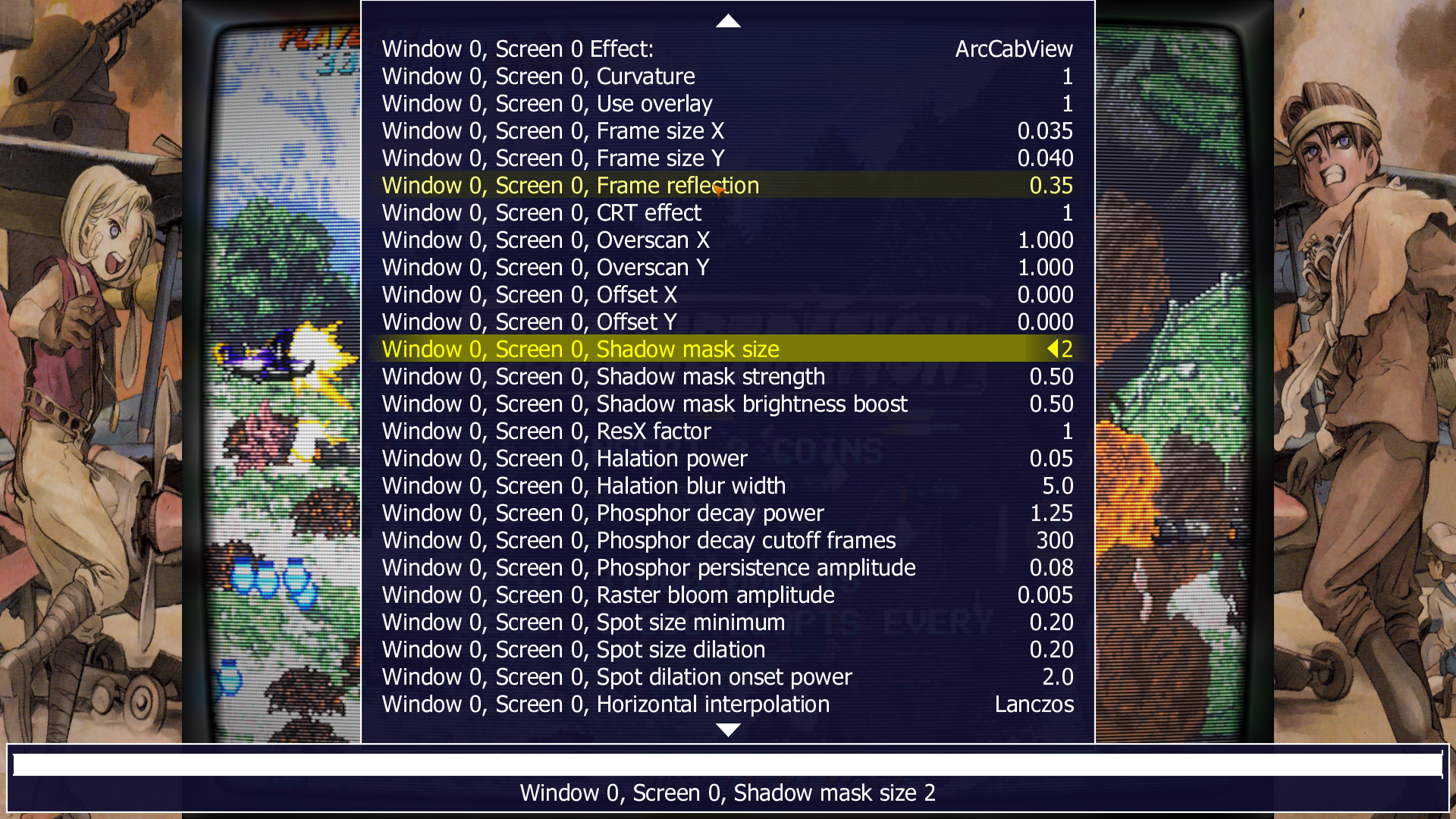
ArcCabView BGFXChain For MAME

(MOD of CRTGeom-Deluxe BGFX Chain by cgwg)
- aperture mask code changed to match the grill and to look like our Reshade's Shader.
- support for 2x2 and 1x1 slot mask textures (auto switch)
- native frame display support (with and without curvature).
- screen reflection on frame added.
- frame size setting added (you can change the frame and resize)
- native overlay image support added
- curvature without CRT effect added
- better overscan support and offsets support added (so now you can resize and crop your games correctly :)
- many settings and details improved.
...
The pack contains:
- ArcCabView's BGFX Chain
- A custom MAMEUI build
- Some bezel examples
- Some chain settings examples
- Some pre-configured ini for a few games as examples
As this pack is already "set" please do a clean install!!!!
The folder "artwork\ArcCabView" is requiered to get ArcCabView's BGFX chains working.
Ce pack est disponible ici (pensez à créer un doublons de MAME, plusieurs fichiers écraserons les originaux, il vaut donc mieux créer un MAME-ArcCabView pour utiliser ce shader très spécifique).
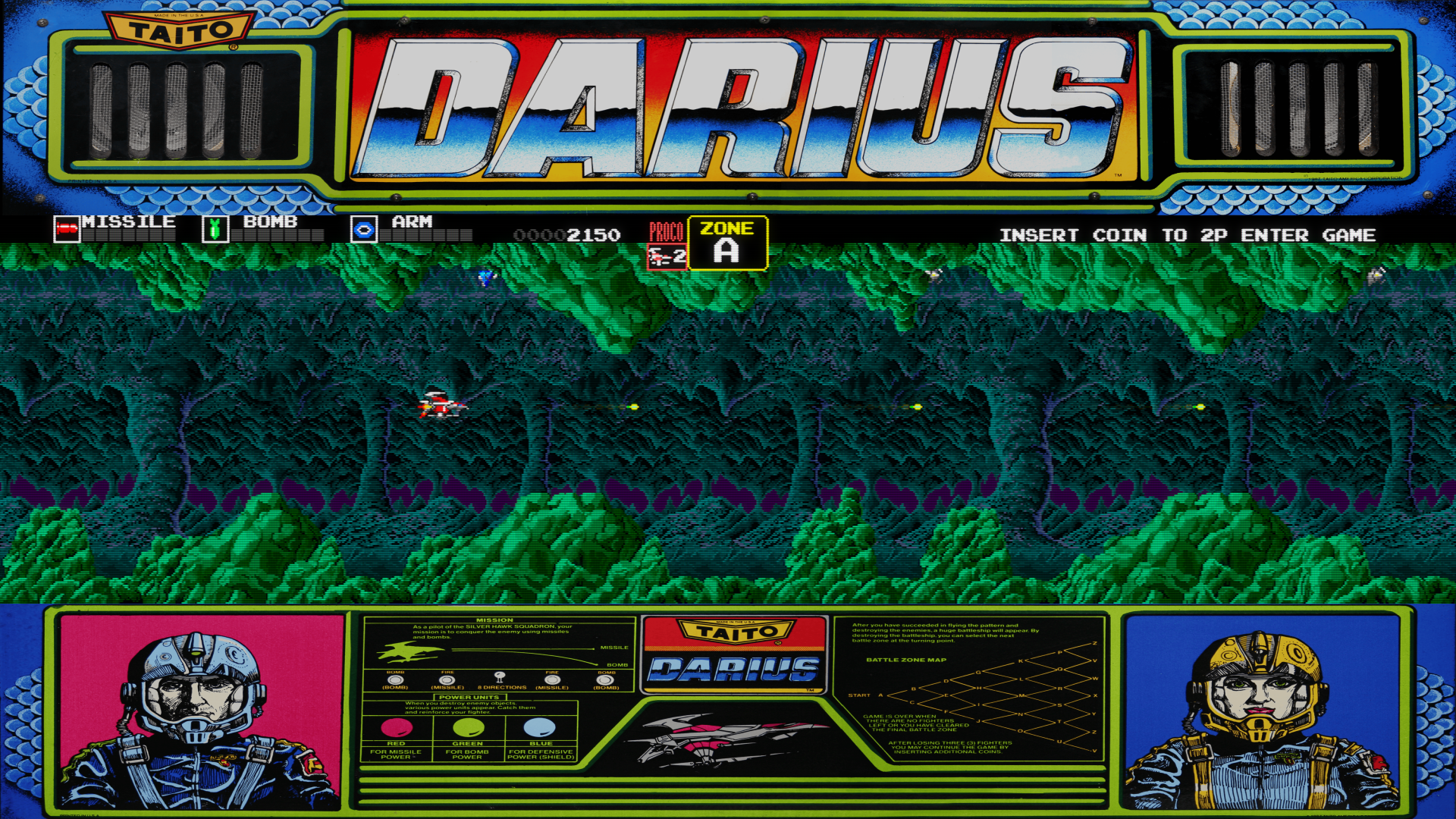
A noter qu’une version compilé de MAMEUI est également disponible à cette occasion, si vous voulez un tout en un directement c’est donc possible.
The custom MAMEUI(64) 0.240  build included features:

- No-Nag when "skip info" is activated.

- CV1000 CPU 50% underclocked, blitter delay activated and set at 57%.

- Neogeo 304 pixels width games display fixed (but not when using softlist)

- Neogeo CPU oveclocked at 16MHz (should help some games to run better)

- samsh5pf, samsh5fe and xeno (Xeno-Crisis MVS/Genesis) support added

- ffightae (Final Fight 3 players hack version) added

- halway (Progear Hack) support added

- PrimalRage2 patch applied (should be working)

- kovshp and kovshxas BGM fixed

- and a few other small changes...
Cette version de MAMEUI incluant le pack est disponible là.
Un émulateur de PSP écrit en Java. Codé par Mad et Shadow (PCSX2) et rejoint par Wrayal, Fiveofhearts, Hlide et Dreampeppers99. Il émule les jeux commerciaux mais nécessite une puissante configuration.

Liste de jeux compatibles (ou ici).
Site de développement du projet.
Builds SVN automatiques (alternative / Mirror).
Télécharger JPcsp (x86) v0.7 rev 0318d15e (26.4 Mo)
Il s’agit d’un émulateur Commodore 64 & 128 Scala.


C64 & C128
– WiC64 emulation: new dialog from Settings -> I/O. Added fix: url encoding removed.
– Fixed video cache (black line on last video line)
C128
– Fixed page 0 & 1 redirection for common memory.
– Beam Racer
– Fixed handling of bank pointers.
Cet émulateur est également le plus complet des outils de développements X68000 existant aujourd’hui. Il s’agit d’un fork de l’émulateur XM6 v2.05 de PI avec une pléthore de nouvelles fonctionnalités. Les changements sont pour la plupart liés à l’interface utilisateur et un accent a été mis sur le développement et les fonctions de débogage plutôt que sur l’exactitude de l’émulation, cependant il y a suffisamment d’améliorations pour qu’il soit recommandé d’utiliser cette version plutôt que XM6 v2.06 finale.


Les changements:
– The MIDI tab in the options now checks for MIDI device changes when opened.
– Dynamic Memory Search (DMS) windows now have clipboard support.
Bug fixes:
– Post-dialog input blocking had some holes in it.
– The previous fix for MIDI data loss was faulty and caused additional problems.
– The MIDI handler is now more resistant to side effects from loading state.
PlayNite est un gestionnaire open source de bibliothèque de jeux vidéo et un launcher avec prise en charge des bibliothèques tierces telles que Steam, GOG, Origin, Battle.net et Uplay. Incluant le support d’émulation de jeu et fournissant une interface unifiée pour vos jeux.
Fixed:
– Changing view settings is very slow with huge libraries

Foobar2000 est un lecteur de prime abord minimaliste. Son interface est des plus sobre avec la seule présentation d’une liste de lecture alors que la barre de progression et les boutons de contrôle peuvent n’être que des caractères textuels. Il supporte de nombreux formats sonores (notamment les formats audio d’anciennes machines) grâce à l’ajout de plugins.
Cette légèreté permet bien sûr à Foobar2000 d’être l’un des lecteurs MP3 les plus léger en termes de ressources mémoire / processeur, mais il ne faudrait pas croire que cela le contraint au minimum syndical. Le fonctionnement par plugins de ce lecteur lui permet d’être incroyablement modulaire et d’intégrer un nombre impressionnant de fonctions.
De nombreux formats audio en rapport avec l’émulation sont parfaitement supportés.

Les changements:
– Fixed stuck now playing album art with many single tracks in one folder.
– Workaround for certain radio serving .pls that 302-redirects to audio/mpeg stream.
– Playlist Search: Don’t reload view / drop selection if search refresh changed nothing.
– Properly focus newly spawned UI Element popup – Library Search etc is now focused if invoked via global hotkey.
– Implemented #EXT-X-PROGRAM-DATE-TIME for HLS internet radio.
– Fixed incorrect decoding of FLAC files with 3 channels and no explicit channel mask set. (beta 3)
– Better formatting of HTTPS related error messages. (beta 4)
– Fixed a rare shutdown crash. (beta 4)
Raine est un émulateur Arcade/NeoGeoCD ainsi qu’une excellente alternative à MAME.

En résumé:
v0.93.1:
– gauntlet finally works with starscream (you’ll get 4 welcome when you start the game, but after that everything seems fine). Gauntlet 2 doesn’t work though (with starscream), still some problems with the slapstick there… (it means it works in the 32 bits version !).
– fix for timers badly saved in savegames made with the optimized builds ! This one was quite a surprise, and it’s suprising nobody noticed before that, but anyway. You got a strange warning about a bad id in the savegame with previous version, for all the games which used timers, and there are quite a few. (I didn’t notice because it happens only on optimized builds, and I use a debug build most of the time !).
– Finally merged the controllermap program from sdl2 inside raine ! It’s because of the findings from mer-curious. Anyway most people shouldn’t need this, it’s in case where your game controller doesn’t behave normally at all, as a last resort. You can try it by curiosity if you want… ! The command is in the inputs menu, « Controller mapping », and it saves its settings in config/userdb.txt. By the way I could only test this with a controller which was already recognized as a game controller, for those who have a beast which isn’t even recognized as such, you might have to quit raine and restart it after using this so that it reads the new gamecontroller configuration. I can’t test all the possibilities here… !.
Télécharger Raine (Dos) v0.96.6 (5.3 Mo)
Télécharger Raine (32 bits) v0.98 (7.2 Mo)

