Un émulateur de MZ-800 / MZ-700 / MZ-1500 pour Windows.


Les changements principaux sont:
 
New Virtual CMT (cassette deck)
The cassette deck was rewritten from scratch. Every tape is now a list of blocks that you can inspect and edit.
 
– Opens **TMZ and TZX** tapes (including loops, jumps and calls) in addition to MZF, M12, MZT, TAP and WAV; WAV files in IEEE float and WAVE_FORMAT_EXTENSIBLE format are accepted too.
– One window with a compact and a full layout, and three loading modes: **Tape**, **Boost** and **Direct**.
– **Recording goes onto the tape in the deck.** A program saved in the ROM format becomes a program block, anything else is kept as a raw recording that plays back exactly as it was recorded.
– Tape editing: delete, move and import blocks, change block speeds, save as TMZ, TZX, MZT or MZF, export as MZF or WAV.
– **Recording analysis** finds programs inside a raw recording and adds them as blocks – not only the standard Sharp format, but also TURBO (TurboCopy, Intercopy), FASTIPL, CP/M (CMT.COM, TAPE.COM, Intercopy CPM) and BSD data files of BASIC.
– **Echo**: optionally hear the tape signal from the speaker while playing or recording.
– Snapshots and input replays keep the tape, including unsaved changes.
 
 
Sound closer to the real machine
The sound output was compared with oscilloscope measurements on a real MZ-800 and corrected in many places.
 
– **Hardware output filter** (Interface > Audio…): the low-pass filter that sits between the sound chip and the amplifier on a real MZ-800 is now emulated. It is on by default, so the sound is duller, like from the computer’s own speaker.
– The speaker and the PSG output are AC coupled as on the real hardware: a constant level fades back to idle instead of being cut after 45 ms.
– The speaker (CTC0) is now about 8 dB quieter relative to the PSG, matching the measured ratio.
– PSG fixes: noise channel (shift register length, rate and feedback – periodic noise used for bass was almost an octave too high), divider 0 now plays the lowest tone, samples played through the volume register have the right level, counters of muted channels keep running, and the CPU wait on a PSG write matches the real machine in all sixteen phases.
– CTC 8253: modes 4 and 5, BCD counting and several less common cases now behave like the real chip.
 
How well founded the sound is: the MZ-800 is measured on a real computer, the MZ-1500 is derived from the MZ-800, the MZ-700 is estimated from the schematic.
 
MZ-700 expansion hardware
– **K&P (Kersten & Partner) 80 column card** with its own second monitor (80 x 25, CRTC SY6845E) – [devices/kp80.md](https://github.com/michalhucik/mz800emu/blob/v2.0.7/docs/en/devices/kp80.md)
– **Sharp Users Club UK 80-column kit** – [devices/suc80.md](https://github.com/michalhucik/mz800emu/blob/v2.0.7/docs/en/devices/suc80.md)
– **PCG-700** programmable character generator (HAL Laboratory) – [devices/pcg700.md](https://github.com/michalhucik/mz800emu/blob/v2.0.7/docs/en/devices/pcg700.md)
– The expansion devices share the Z80 data bus as on the real machine, and the new **Bus Map** debugger window shows who owns which port and memory-mapped address (on all three machines).
 
Input recording and playback (Replay)
Replay > Record Inputs… records the keyboard, joysticks, resets, tape control and debugger writes from a start snapshot, together with state hashes. Replay > Play Replay… repeats the run exactly, with rewind and seek. The contents of the mounted disks and the tape are stored inside the replay. See [replay.md](https://github.com/michalhucik/mz800emu/blob/v2.0.7/docs/en/replay.md).
 
New debugger tools
– **Memory Search** (Alt+Shift+E): find where a program keeps a value (lives, score, a timer) by narrowing candidates step by step, with Undo / Redo and Freeze Bytes.
– **RAM Write Log**: who wrote this byte? Records the writing instruction, old and new value and the source of every write.
– **Code coverage**: which instructions ran and which way each conditional instruction went, shown in the Disassembly windows and exportable as JSON, CSV or lcov (`docs/tools/coverage_to_lcov.py`).
– **Instruction history** keeps the CPU registers before each of the last 32 instructions; CPU Track can record registers after every instruction.
– New breakpoint actions `stop`, `exit`, `ramlog_start` / `ramlog_stop` / `ramlog_clear`, the function `lastwriter(addr)` and the identifiers `InsnPC` and `FrameCycle`.
 
Display, capture and command line
– **CRT scanlines** (Display > CRT Scanlines) with adjustable intensity.
– **Screenshot Control** (Alt+G) and **Audio Capture Control** (Alt+Shift+Q) windows.
– `–fdd =` and `–fdd0` to `–fdd7` insert DSK images at startup; `–fdd-readonly ` write-protects a drive for the run.
– Choice of the device code a directly started MZF program gets (CMT, FD, QD, RD or custom), so programs such as BASIC 1Z-016 pick the right default device.
– Joystick Setup has an **Apply** button.
 
Unattended runs for CI
`–headless` runs can end by themselves and return an exit code: `–exit-after-frames`, `–timeout-frames` / `–timeout-seconds`, `–exit-on-pc`, `–fail-on-pc`, `–exit-on-write`, `–exit-on-out`, or a breakpoint with the `exit` action. `–result-json` writes the result with registers and SHA-256 hashes of memory and screen; `–replay-verify` checks a replay at MAX SPEED. The headless mode no longer keeps a CPU core busy.
 
MCP server
A large update for automation and AI agents:
– Full control of the Virtual CMT, input replay, memory search, RAM write log, code coverage and audio capture.
– `emu_state_observe` reads registers, flags and memory windows from one moment, also while the emulator runs.
– `emu_machine_hash` and `state_rev` answer « did the machine state change? » without transferring data; reads return SHA-256, writes can be conditional (`expected_sha256`).
– Run control with run numbers, stop history, `emu_resume`, `emu_wait_stop` and deadlines in emulated time.
– `emu_trace_read` reads Trace Suite records and the breakpoint log page by page, without parsing files.
– `emu_replay_goto` jumps to the machine state at any moment of a playing replay.
– `emu_periph_attach` / `emu_periph_detach` and `emu_media_insert` for Quick Disk now actually work.
 
Emulation accuracy fixes
– **Z80**: interrupt acceptance timing at the end of an instruction (verified with a logic analyzer), stray DD / FD prefixes, MEMPTR and flags of repeating block instructions, write order of PUSH / CALL / RST.
– **GDG MZ-800**: VRAM wait states now follow a simulation of the GDG circuit; hardware scroll applies only to the displayed frame; mid-line scroll changes; palette and memory map after reset.
– **Joystick MZ-800**: strobe taken from the correct 8255 bits (PA4 / PA5), so programs strobing the joysticks separately now read them.
– **FDC**: formatting with 128 B and 1024 B sectors stores the track correctly in the DSK image.
– **Snapshots** save and restore more hidden state (Z80 MEMPTR and pending interrupts, CTC0, hardware scroll, FDC end-of-track state) and load safely with a different RAM disk or IDE8 configuration.
– **MZ-1P16 plotter**: self-test, reset and attach no longer stall the emulation and the sound.
– Many debugger fixes: debugger reads and writes no longer trigger memory breakpoints or disturb the emulation, range and mask breakpoints set over MCP, Sharp MZ ASCII conversion in Watch and Memory Browser.
 
Changes you should know about when upgrading
– **Sound is different by default.** If you prefer the previous, brighter sound, turn off Hardware output filter in Interface > Audio….
– **Virtual CMT replaces the old CMT window**, the Tape Filelist window and the « CMT Hack is activated! » window. The saved window position is not taken over, Escape does not close the window (Alt+C does), and the Record button records onto the tape instead of asking for a WAV file. TAP tapes have the signal level inverted compared with earlier versions.
– **Files given by a relative path now live in the configuration directory** (the program directory by default, otherwise `–cfg-dir`) instead of the directory the emulator was started from: RAM disk backup files (MZ-1R18, PEZIK), the Unicard SD card root and the MemExt FLASH file. If you start the emulator from another directory, move your existing files next to the program.
– **MZ-800 ROM selection in the INI file** (`[ROM] rom_type`) is now saved and read under the ROM’s own name. A configuration file written by the previous version is still read the old way, so your selected ROM stays; a ROM name written into the INI by hand may need a check.
– **Host keyboard and keypad joystick** reach the machine at the frame boundary, so a key press shows up at most one frame later.
– **MCP**: `emu_input_send_key` / `emu_input_send_keys` hold a key for 6 frames by default (previously 3); `emu_settings_set` no longer accepts `QDISK/filename` and `QDISK/write_protected` (use `emu_media_insert(slot= »qd »)`); Watch and `emu_watch_eval` ignore the `!` side-effect suffix.


Télécharger Mz800emu v2.0.7 (46.4 Mo)

Site Officiel

En savoir plus…

Super A’Can Emulator est un émulateur open source de la console 16 bits Super A’Can, commercialisée par Funtech en 1995. Développé en C++, il reproduit le fonctionnement de la machine, notamment ses composants graphiques et sonores, et permet de faire fonctionner sa ludothèque sur les systèmes modernes. Il propose plusieurs fonctionnalités comme la sauvegarde d’état, l’avance rapide et la prise en charge de deux manettes. Disponible sous Windows, macOS et Linux, il est également utilisable avec RetroArch grâce à un cœur Libretro, notamment sous Android.


Télécharger SuperACan-Emu v3.1 (1.8 Mo)

Site Officiel

En savoir plus…

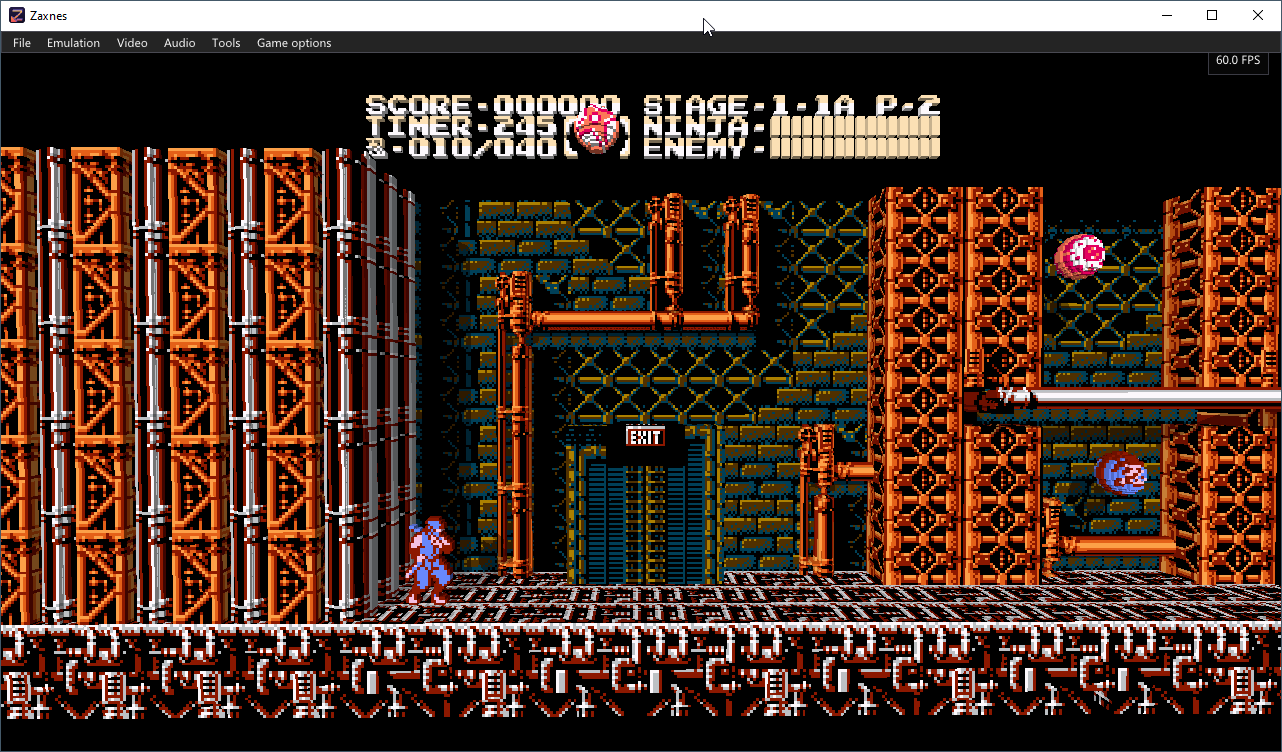
Zaxnes est un émulateur de Nintendo Entertainment System (NES) pour Windows qui propose une conversion en temps réel de l’image 2D des jeux en environnement 3D, avec des éléments représentés sous forme de voxels. Il permet notamment de gérer la profondeur des plans, les ombres et une caméra libre, tout en conservant la possibilité de revenir à l’affichage 2D original.


Télécharger Zaxnes v0.6.0 (67.1 Mo)

Site Officiel

En savoir plus…

Il s’agit d’une version améliorée de M88, émulateur de Nec PC8801.


Télécharger M88x v2.21a (2026/10/13) (156 Ko)

Site Officiel

En savoir plus…

Il s’agit d’un émulateur de NEC PC-9801 qui supporte également le NEC PC-9821.
 
NB: A noter qu’une version béta est disponible sur le site officiel.
 
neko
 

Télécharger Neko Project 21/Win v0.86 Rev. 106 (23.3 Mo)

Site Officiel

En savoir plus…

Voici les derniers émulateurs en développement, ainsi que ceux bénéficiant des mises à jour les plus fréquentes.


Télécharger DuckStation v0.1 build 12XXX (71.7 Mo)

Télécharger RPCS3 (WIP) v0.0.43 Alpha (2026/11/18) (35.6 Mo)

Télécharger ScarletNX (2026/11/18) (108 Mo)

Télécharger KytyPS5 r261118 (25.7 Mo)

Télécharger Citron Neo (2026/11/07) (62.1 Mo)

Télécharger Xenia v1.0.2844 (2026/11/18) (3.9 Mo)

Télécharger Xenia Edge (2026/11/18) (16.0 Mo)

Télécharger Vita3K v0.2.1 (2026/11/18) (36.5 Mo)

Télécharger EKA2L1 v0.0.9 r261118 (70.5 Mo)

Télécharger PCSX Redux (64 bits) (2026/11/18) (48.7 Mo)

Télécharger Pureikyubu (64 bits) v2.0 (2026/10/23) (2.4 Mo)


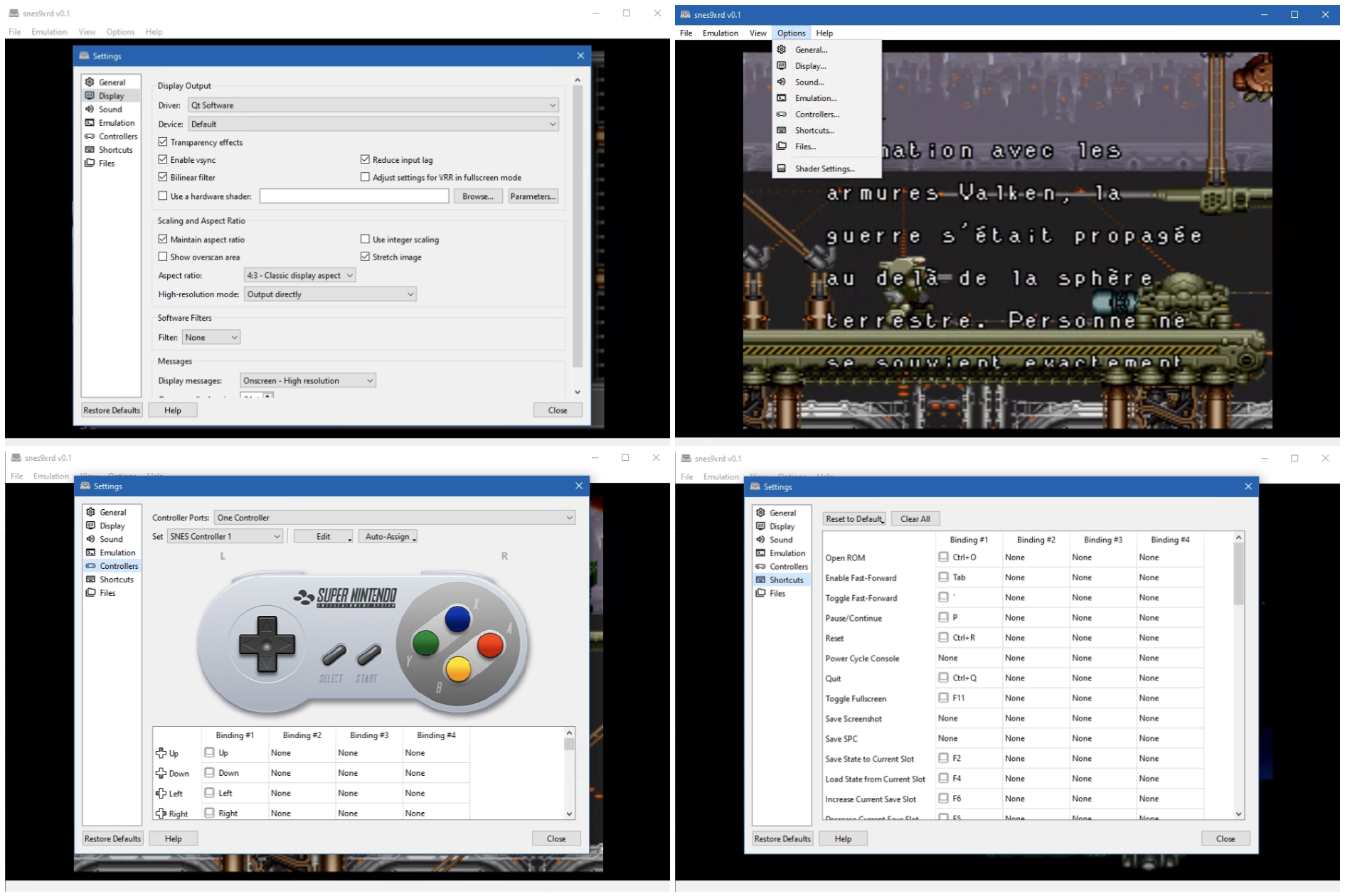
Snes9xrd est un fork personnel de l’émulateur Super Nintendo Snes9x. Il conserve intégralement le cœur d’émulation officiel ainsi que les front-ends GTK, Win32, macOS et libretro, tout en proposant une refonte importante du front-end Qt afin de le rendre plus complet, plus cohérent et plus agréable à utiliser.


L’un des principaux objectifs de ce fork est de rendre l’interface Qt aussi complète que l’interface Win32 en y réintroduisant les fonctionnalités qui lui faisaient défaut. Les paramètres d’affichage, les options de transparence, les shaders, les filtres logiciels, le frame skipping ainsi que les réglages audio avancés sont désormais entièrement accessibles depuis Qt. Les menus d’émulation et de configuration ont également été réorganisés afin d’offrir une présentation plus claire, plus intuitive et plus homogène.
 
Snes9xrd apporte également plusieurs améliorations à la gestion des contrôleurs. Le widget représentant la manette SNES indique désormais avec précision le bouton pressé, sans erreurs de surbrillance, tout en s’intégrant visuellement au thème général de l’interface. La configuration des manettes a été rendue plus fiable: les différents types d’entrées (boutons, axes analogiques et directions) sont correctement distingués, les associations de touches peuvent être sauvegardées et restaurées sans perte d’informations, et les boutons affichés correspondent fidèlement aux entrées réellement détectées.
 
L’interface générale a également été simplifiée. La sidebar expérimentale a été supprimée au profit d’une fenêtre principale plus traditionnelle, organisée autour d’une barre de menus classique. Le menu « Help → About » a été réintroduit et inclut désormais les crédits spécifiques au fork, renforçant ainsi la cohérence de l’ensemble.
 
En résumé, Snes9xrd ne modifie pas l’émulation SNES elle-même, mais vise avant tout à moderniser et à stabiliser l’expérience utilisateur en améliorant l’interface Qt, en fiabilisant la gestion des contrôleurs et en proposant un environnement plus propre, plus complet et plus agréable à utiliser.


Les changements sont les suivants:
 
NETPLAY
– Enabled TCP_NODELAY on client and server sockets, so small joypad/heartbeat packets are no longer held back by Nagle’s algorithm.
– Fixed the server heartbeat clock. It truncated the frame time to whole milliseconds (16 ms, about 62.5 Hz instead of 60 Hz). It now paces in microseconds.
– The server now waits on its client sockets until the next frame deadline instead of sleeping, so joypads that arrive mid-frame are no longer delayed by an extra frame. It also resyncs the clock after a long stall instead of bursting heartbeats.
– Windows: requests 1 ms timer resolution while a netplay server/client is running.
– Qt: controller and mouse button events are now applied during heartbeat waits, and changed joypad state is sent immediately. This reduces local input delay.
– « Show ping » now reports input echo time, heartbeat interval, jitter and queued heartbeat backlog, instead of a nominal ping value.
 
WINDOWS / PROJECT
– Removed the legacy Win32 desktop frontend and its build/dependency tree. The Qt frontend remains supported on Windows, as does the Windows libretro core build.
– Application title, About dialog and Windows file metadata now identify snes9xrd v0.7.
– README updated to document the game library, RetroAchievements and netplay.
 
PACKAGE
– snes9xrd-v0.7-win64.zip contains snes9xrd-qt.exe, libwinpthread-1.dll, cheats.bml, LICENSE and changes.txt.
– Keep libwinpthread-1.dll in the same folder as the executable.


Télécharger Snes9xRD v0.7 (9.6 Mo)

Site Officiel

En savoir plus…

Uzai est un frontend gratuit et open source qui transforme un PC Windows en console de jeu. Il regroupe les jeux de tous les launchers et les émulateurs dans une bibliothèque unique, entièrement utilisable à la manette, du lancement des jeux à la gestion des amis, de la musique et des contenus multimédias.


Fonctionnalités principales:
– Bibliothèque unifiée: Uzai détecte les jeux provenant de Steam, Epic, EA, GOG, Ubisoft, Battle.net, Xbox, Amazon, Riot et itch.io, ainsi que les émulateurs et les ROMs, avec 34 profils d’émulateurs couvrant les systèmes depuis la NES jusqu’à la Switch.
– Guide accessible en jeu: une simple pression sur un bouton permet d’accéder aux amis, à Discord, à la musique, aux captures d’écran et aux options d’alimentation, directement par-dessus le jeu en cours. Un appui prolongé permet de réaliser une capture d’écran, d’enregistrer un clip ou de quitter le jeu.
– Conçu pour le téléviseur: une boutique Steam entièrement utilisable à la manette, la gestion des succès avec notamment RetroAchievements, ainsi que YouTube, Twitch et Plex/Jellyfin.
… et bien plus encore.
 

Télécharger Uzai v0.16.92 (104 Mo)

Site Officiel

En savoir plus…


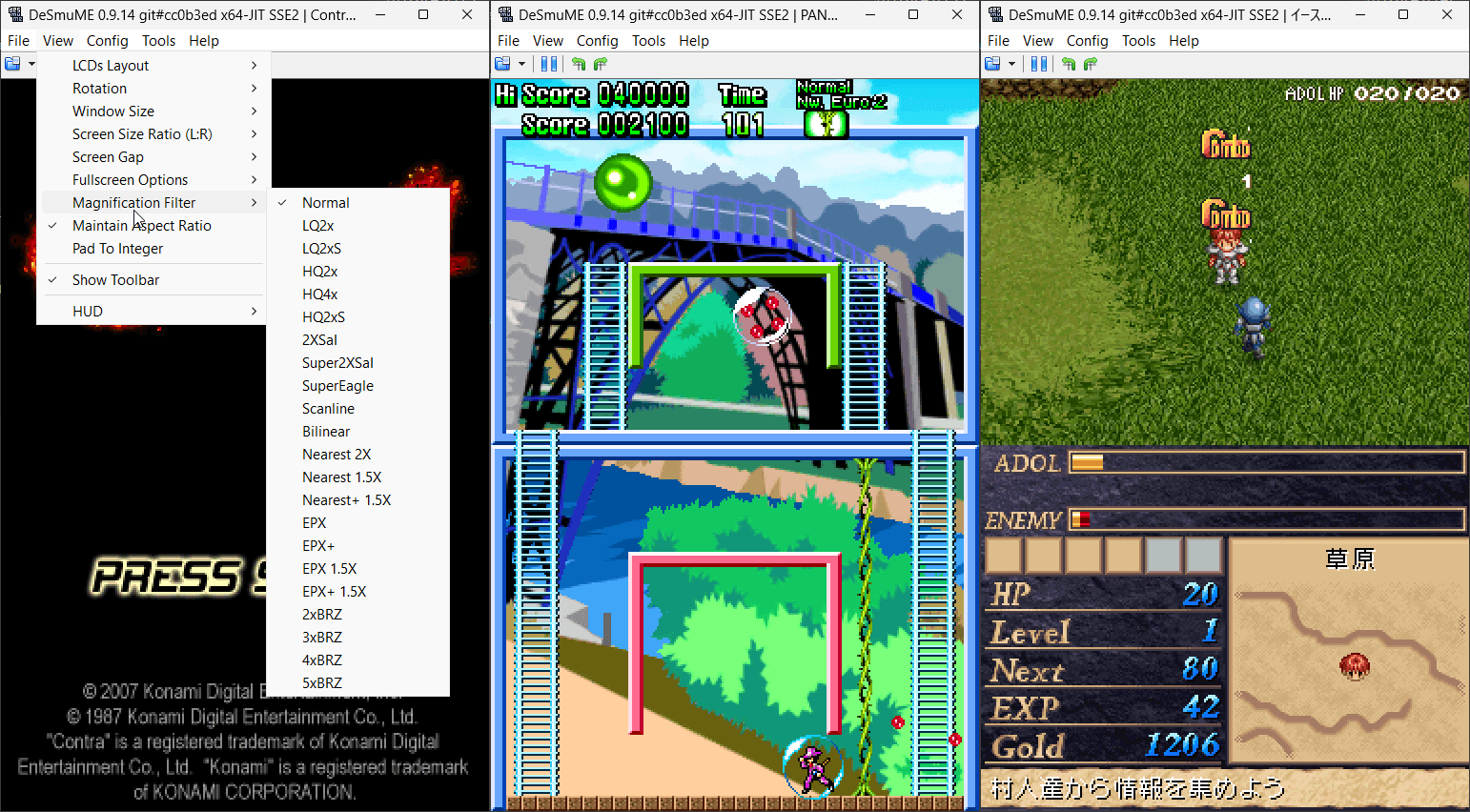
Il s’agit de l’émulateur de Nintendo DS mais dans une version en cours de développement.


(Builds automatiques ou là)
 
Les principaux changements depuis ma news précédente sont:
– Cocoa Port: Do some random refactoring and code cleanup.
– POSIX GTK3: Filter the FFmpeg encoder lists and compose the two screens.
– POSIX GTK3: Add an FFmpeg video recorder
– GTK3 Port: rebuild the cheat windows around the shared cheat engine.
– POSIX: Add a build option to disable WebGPU
– POSIX: Restore the GTK2 frontend in maintenance mode
– Cocoa Port: Bring the RAM Search window up to the Windows feature set.
– Cocoa Port: Oops! Fix some comments in ClientDisplayPresenterProperties that were left incomplete in the last commit. (Related to commit 3c4b95a.)
– Cocoa Port: Refactor ClientDisplayPresenterProperties to handle more display view information.
– CI: Update github action runners for macOS builds to use macos-15.
– Cocoa Port: Fix a display view sizing bug where resizing a display window or switching into full screen on a monitor with a notch, while in a multi-monitor setup where the notched monitor is not the main monitor, could result in an incorrectly sized display view.
– Fixed notch sizing for offset macOS displays
– Cocoa Port: Mark DeSmuME.app as one that doesn’t need NSPrefersDisplaySafeAreaCompatibilityMode.

 
Notez que les fichiers sont mis à jour régulièrement sur notre site mais ne sont newsés que de temps en temps.


Télécharger DeSmuME (Dev) v0.9.14.1763 (2.7 Mo)

Télécharger DeSmuME (Français) v0.9.14 (14/02/2024) (2.1 Mo)

Site Officiel

En savoir plus…

OceanBlast est un émulateur de la console portable Nikko digiBLAST, commercialisée en 2005. Il émule son processeur ARM920T ainsi que ses composants graphiques et sonores, et prend en charge les cartouches de jeux et les fonctions multimédias de la machine.
 
Développé pour Windows et Linux, il permet notamment de faire fonctionner les jeux commerciaux de la console, avec une compatibilité annoncée de 11 titres sur 11 testés.


Télécharger OceanBlast v0.4.0 (4.8 Mo)

Site Officiel

En savoir plus…

V-Bear est un émulateur de la console Funtech Super A’Can, commercialisée à Taïwan en 1995. Développé en Rust, il s’appuie sur le cœur MiSTer et le pilote MAME pour reproduire le fonctionnement de la machine.


Il permet de lancer les 12 jeux commercialisés sur la console et propose une interface graphique complète avec bibliothèque de jeux et jaquettes, sauvegardes d’état, fonction rewind, enregistrement vidéo aux formats GIF et MP4, débogueur et système de cheats.
 
Le projet est également disponible sous forme de cœur libretro pour une utilisation avec RetroArch.


Télécharger V-Bear v0.5.2 (11.2 Mo)

Site Officiel

En savoir plus…

Mil Capivaras est un émulateur de la console Casio PV-1000, commercialisée en 1983. Développé en Rust, il s’appuie sur une réimplémentation du cœur FPGA MiSTer, avec une validation de l’émulation image par image.


Il prend en charge les 13 jeux commerciaux de la console ainsi que 26 homebrews. Il propose notamment une interface graphique avec bibliothèque de jeux et jaquettes, sauvegardes d’état, retour en arrière (rewind), enregistrement vidéo au format GIF et MP4, débogueur et système de cheats.
 
Le projet est également disponible sous forme de cœur libretro pour une utilisation avec RetroArch.


Télécharger Mil Capivaras v0.9.1 (8.9 Mo)

Site Officiel

En savoir plus…


https://getourbonus.com/fr/accueil

https://www.romspedia.com/