


Azahar est une fusion entre Lime3DS et le fork Citra de PabloMK7.


Soyez informé que la prise en charge des jeux cryptés n’est plus disponible…
Pour éviter toute confusion concernant les objectifs d’Azahar, la décision a été prise de limiter autant que possible le contournement du TPM (Trusted Platform Module). Le contournement ne sera effectué que lorsque l’interopérabilité du code de Nintendo est nécessaire avec Azahar ou d’autres codes de Nintendo. En conséquence, Azahar n’autorisera pas le lancement ou l’installation de jeux cryptés à moins qu’ils n’aient été obtenus par le biais des applications officielles de Nintendo, telles que l’eShop ou les paramètres système.
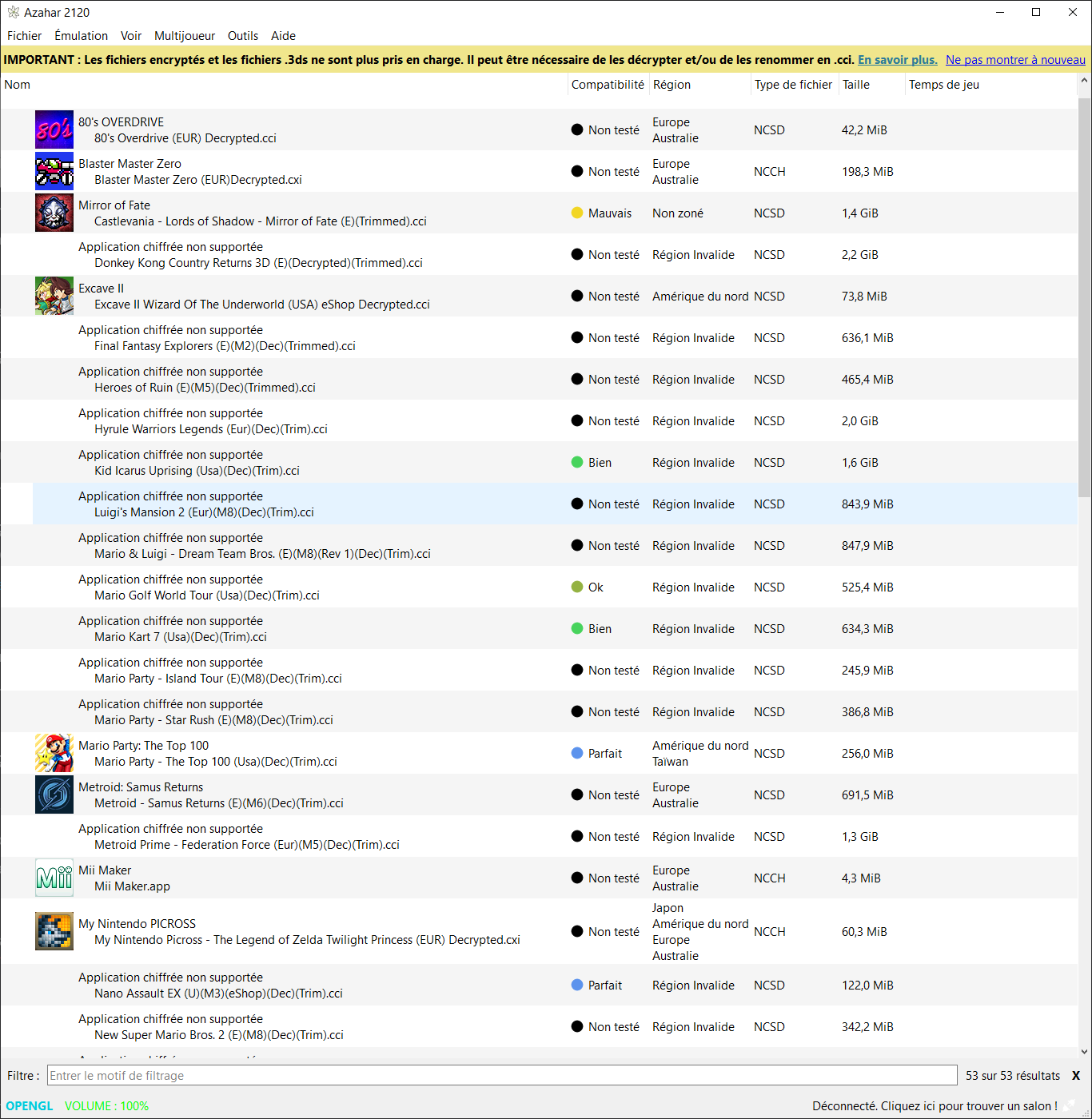
Notez qu’en renommant les .3ds (non cryptés) en .cci, les jeux se lancent…
Il est envisageable de penser que Azahar devienne un moteur pour d’autres émulateurs, qui pourraient tirer parti de ses améliorations pour les intégrer dans leurs propres projets sans limitation…
Les changements:
All:
– Implemented emulated cartridge insertion functionality.
– This causes the cartridge to appear inserted on the emulated HOME menu, and otherwise act as an inserted cartridge would on real hardware.
– Implemented texture filtering while using the Vulkan renderer.
– Added support for secondary screen opacity while using the Vulkan renderer.
– Improved HLE NWM support.
– This enables multiplayer functionality with use of the LLE DLP module in several new games, including Luigi’s Mansion, Luigi’s Mansion: Dark Moon, and Mario Kart 7.
– Implemented HLE DSP sleep and wakeup functionality.
– This fixes an issue where games could have bugged sound when opened from the HOME menu.
– Added new SMDH region free patch setting which is enabled by default.
– This functions similarly to the region free patch from Luma3DS.
– Improved memory mode handling, allowing extended memory games to be launched from the HOME menu.
– Improved plugin memory management, allowing launching applications with plugins from the HOME menu.
– Changed unimplemented GAS mode behaviour, fixing visual issues in the Monster Hunter games when a blur effect is used.
– Fixed garbled HOME menu graphics when suspending an application.
– Fixed a long-standing issue where microphone input could sound slowed-down or stuttery.
– Various improvements to stereoscopic 3D settings and functionality.
– Implemented AM:CancelImportProgram, allowing emulated CIA installations to be cancelled mid-way.
– Improved implementation of MemorySystem::GetPhysicalPointer, resulting in a very minor performance improvement.
– Moved the plugin framebuffer address ownership from the plg:ldr service to the memory system, resulting in a very minor performance improvement.
– Fixed a possible crash in the Vulkan renderer caused by malformed geometry shaders.
– Switch to using xxHash instead of CityHash64 and improve ShaderSetup hashing behaviour, resulting in a minor performance improvement.
– Implemented game-specific fixes for broken geometry shaders in SEGA 3D Classics titles: Thunder Blade, After Burner, Power Drift.
– The play_time.bin file has now been moved from the log directory to the sysdata directory.
Android:
– Increased minimum Android version to Android 10.
– Added support for compressing and decompressing ROM files.
– Implemented background color, second screen opacity, and audio emulation settings from the desktop build.
– Fixed an issue where Discord could break secondary screen detection on dual-screen devices.
– Added « Hide 3DS Images from Android » setting.
– This prevents images related to Azahar from showing up in the Android gallery.
– VSync is now disabled by default on Android.
– This results in a noticeable reduction in input latency with little to no effect on the visual appearance of games.
– This change applies retroactively to existing configurations.
– Fixed an issue where resetting input bindings to their default value wouldn’t actually clear the binding.
– Fixed a bug where the secondary screen opacity setting was being applied in layouts other than the custom layout.
– Fixed an issue where certain external gamepads would have inverted axis controls.
– Affected gamepads will have to be re-bound after updating the emulator.
– The emulator UI’s refresh rate is no longer limited to 60hz on phones with a higher refresh rate.
– During emulation, the display refresh rate is still limited to 60hz to preserve battery life.
– Fixed the Toggle Controls menu flickering on the bottom edge and misaligned list clickboxes on certain Android devices.
– Fixed a bug where the screen size could be detected incorrectly.
Desktop:
– Implemented batch compression and decompression functionality.
– Improved consistency of capitalization and colon usage in the UI.
– Prevented refreshing game directory while emulation is powered on, avoiding a race condition.
Docker:
– Added new Docker image download option to release files.
– This docker image contains the azahar-room executable, allowing local multiplayer rooms to be hosted.
Technical:
– ARM macOS binaries are now built using macOS 26 runners.
– Added new game launch stress testing functionality to the desktop build behind the ENABLE_DEVELOPER_OPTIONS CMake option.
– Various minor internal improvements to the Android performance overlay.
– Fixed build failure on unix-like operating systems introduced by Qt 6.10.0.
– Moved DSP memory ownership to the memory subsystem.
– Updated dynarmic to the latest version.
NB: L’outil Azahar Artic Setup est une application homebrew pour la Nintendo 3DS qui permet d’installer des fichiers système et des données uniques de la console sur l’émulateur Azahar en utilisant votre console. Il diffuse l’application « Paramètres Système » ainsi que le module système NIM pour effectuer une mise à jour système, et copie vos données uniques de la console pour activer les fonctionnalités en ligne.







