


VBoyColor est un émulateur open source de la console Virtual Boy de Nintendo, développé par yuk27 à partir de VirtualBoGo. Il permet de jouer aux jeux de la console en couleurs, tout en conservant l’affichage stéréoscopique 3D sur Meta Quest. Des versions pour Windows et Linux permettent également d’y jouer sur un écran classique. Le projet utilise le cœur d’émulation Beetle VB, issu de Mednafen.
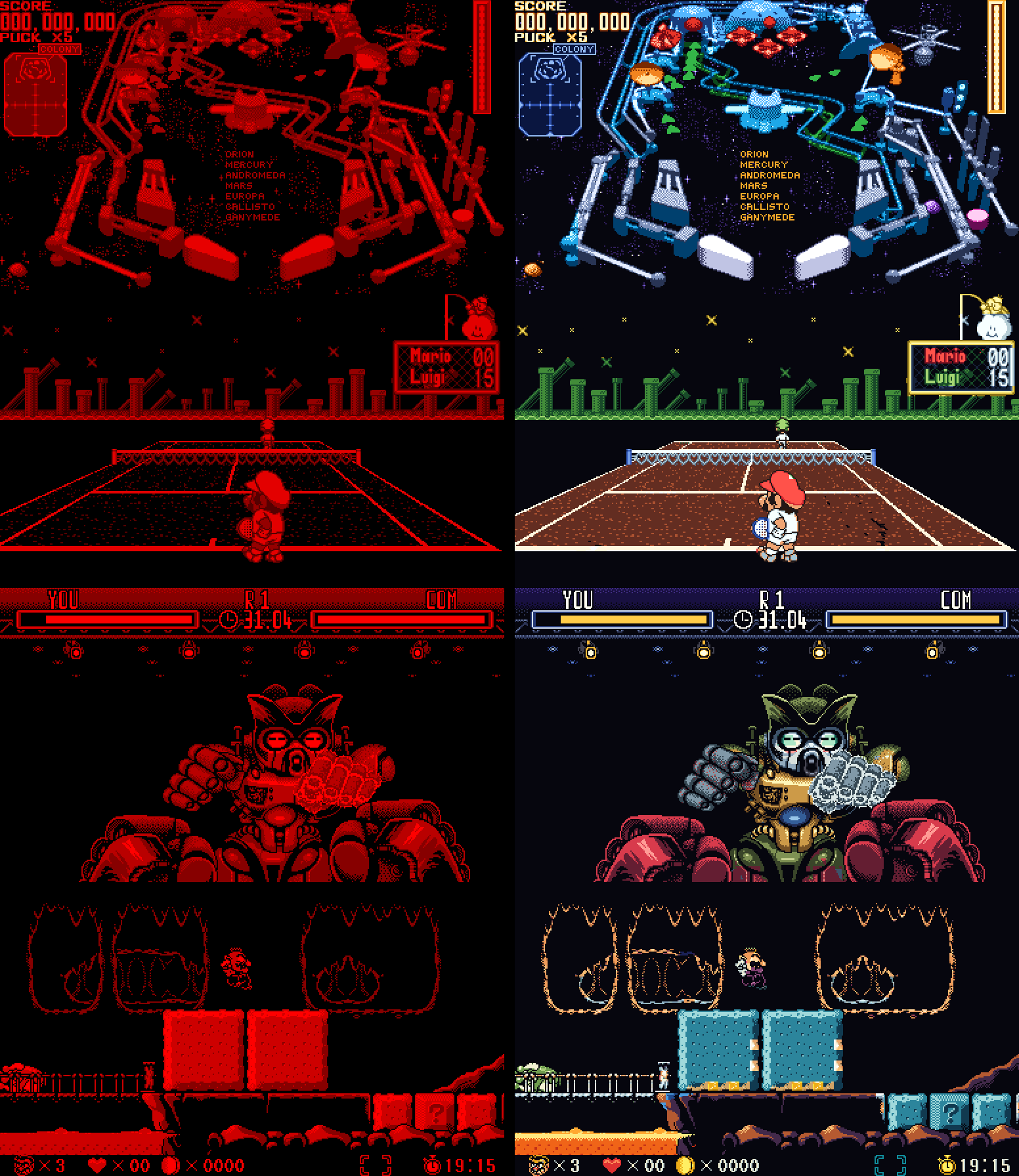
Caractéristiques:
– Émulation de la Nintendo Virtual Boy.
– Colorisation automatique des jeux, notamment grâce à la profondeur des éléments 3D.
– Plusieurs modes de couleurs: palettes multicolores, dégradés et teintes personnalisables.
– Packs de couleurs prédéfinis pour plusieurs jeux.
– Affichage stéréoscopique 3D sur Meta Quest.
– Plusieurs modes d’affichage: pixels nets, lissage ou rendu LED inspiré de l’écran original.
– Sauvegardes instantanées (save states) avec plusieurs emplacements par jeu.
– Configuration des commandes au clavier, à la manette ou avec les contrôleurs VR.
– Prise en charge de Windows, Linux, Android et des casques Meta Quest.
Les changements:
– Android TV and Fire TV – the README now explains how to install VBoy Color on a TV box: the Downloader app, the APK’s link, a gamepad, and Quit at the bottom of the menu to close it.
– README – brought up to date with everything through beta 8: the update notice, and how each version (PC, PC VR, Android, RetroArch) is built.
– Wario Land – the minigames and the hub, painted part by part:
Wario in the minigames: his face in the coin game’s front poses, the hat in his form’s color when he’s seen from behind on the BET screen, and the far-away Wario in the heart game (and in the levels’ far plane) with his hat, face, overalls and gloves instead of plain orange.
Wario’s laugh in the elevator: a yellow shirt and white gloves rubbing together, instead of an orange shirt.
The hub’s host: purple all over (his belly’s plain patches too), with white eyes and fang, on a wooden stool – instead of a red head and patches of orange, brown and grey.
The sleeping creature on the save point’s map: the host’s purple, with a light blue snot bubble.
The minigame bats: green all over, with no red patches.
The heart game’s flying creatures: light blue with a yellow eye, instead of an orange outline.
– Close game and Quit – at the bottom of the menu’s sidebar (press twice): Close game goes back to the library with nothing running (its save written); Quit closes VBoy Color – on PC, and on Android phones and TVs (with a gamepad, there’s no other way out). Not on the Quest, whose own menu closes apps.
– Screenshots – Save states > Screenshot (F12 on PC) saves the game’s picture as a PNG, in its colors and three times its size, into a new folder of its own: the games folder’s screenshots by default, or one picked in Settings > Folders > Screenshots.
– Hotkeys (PC) – Settings > Controls > Hotkeys: any key, alone or with Ctrl / Alt / Shift (Alt+F1…), for the menu, fullscreen, screenshot, save / load state, previous / next slot, reset, close game and quit. Defaults: Tab, Alt+Enter, F12, F2, F4, F6, F7, Ctrl+R, none, Ctrl+Q.
The color pack and video tools (F4 to F12: captures, re-import, recording…) are now off by default – turn them on in the same page; while on, those keys are theirs, and the page lists what each of them does.
– Updates – when the check at start finds a newer version, a notice says so over the game or the menu, like the achievement pop-ups. The Windows app no longer downloads the RetroArch core’s zip by mistake (« Not a VBoy Color package »).
– RetroArch core – VBoy Color now also runs inside RetroArch (or any other libretro frontend) on Windows, Linux (x86-64 and ARM64, handhelds included), macOS and Android. It has the color packs built in, plus Auto, Multicolor, Gradient and Tint, and the 3D for a normal screen (side by side, top and bottom, colored glasses). RetroArch’s save states, rewind, run-ahead, shaders and achievements all work. To install it, put the core in RetroArch’s cores folder and vboycolor_libretro.info in its Core Info folder – without the .info, RetroArch shows only .zip games, not .vb. The zip’s INSTALL.txt says where both go.
– RetroAchievements (softcore) – log in on the new Achievements page and earn achievements as you play. Unlocks pop up over the game, and the page lists every achievement with its badge. The login’s keyboard has Copy and Paste (Ctrl+C / Ctrl+V on PC too) and an eye that shows the password as you type it.
– Mario Clash – Mario repainted part by part: a red cap and shirt, white gloves, dark overalls with gold buttons, and brown shoes, in every pose.
– Wario Land – Wario’s nose stays pink when he dashes.
– Jack Bros. – Jack Frost’s side views smile again, as before beta 6; the front view keeps its closed mouth.
– Dragon Hopper – a second pass on its pack: the title screen, the story scenes and the fairies.
– Smoother on Quest 3 – if you set the headset to 100 Hz with Quest Games Optimizer (or adb), VBoy Color now keeps that rate instead of switching to 120 Hz. The README explains how.
– Android phones, tablets and handhelds – the same APK now plays on them, with touch controls you can move and resize, or a gamepad.
– Gamepads fixed everywhere – PC window, PC VR and Android: the usual layout (A right, B bottom), every connected pad, pads plugged in later.
– Settings per game – hold a game’s card in the library to give it its own button mapping (and, on a phone, its own touch controls).
– 3D on a normal screen – side by side, top and bottom, or colored glasses (red/cyan, green/magenta, amber/blue).
– Choose your folders – games, saved games, save states and settings wherever you want them.
– Updates from the app – About → Update.
– Dragon Hopper – a first color pack. (Still WIP)
– Hand fixes to the colors – Wario’s face on the Wario Land title, Jack Frost’s face in Jack Bros., Panic Bomber’s moon.