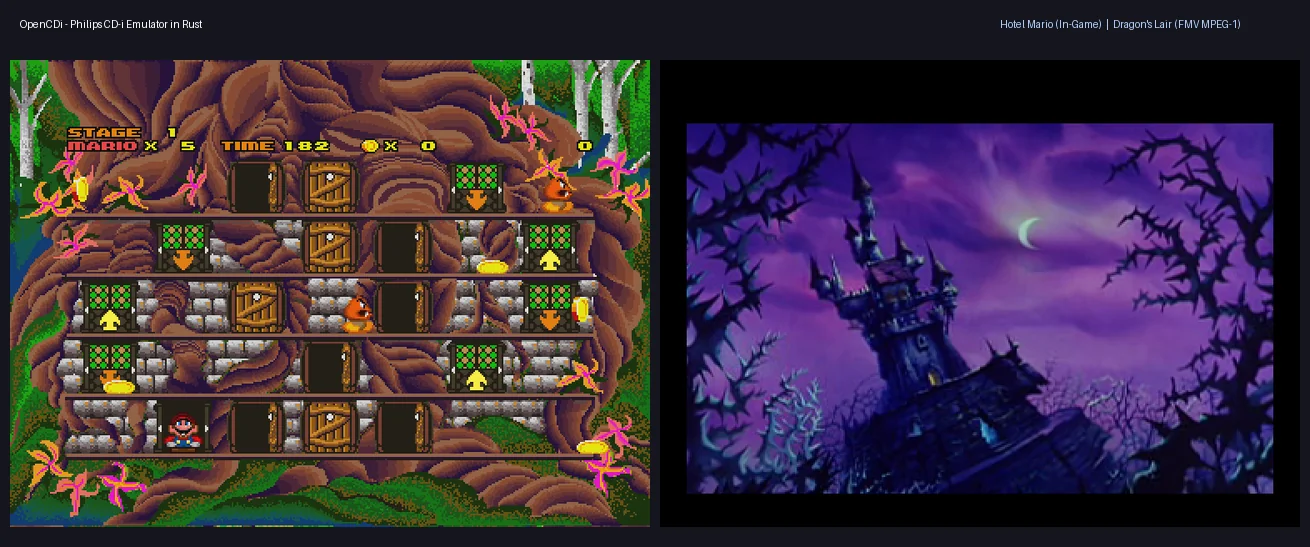
OpenCDi est un émulateur open source de la console Philips CD-i, développé en Rust. Il vise à reproduire le fonctionnement du matériel original, notamment le processeur, le système vidéo, l’audio et la lecture des CD. Il prend également en charge le Digital Video Cartridge (DVC), utilisé pour la lecture de vidéos MPEG-1.


Fonctionnalités:
– CPU: émulation du Philips SCC68070, avec instructions 68000/68010, timers internes, UART et DMA.
– Vidéo: émulation du contrôleur Philips MCD-212, avec plans A et B, fond matériel, modes graphiques CLUT4/7/8, RLE 7/8 bits, DYUV et RGB555, ainsi que l’exécution des listes d’instructions ICA/DCA ligne par ligne.
– Audio et CD: émulation du contrôleur CDIC, avec décodage audio CD-DA et ADPCM de niveaux A, B et C, et prise en charge native des images de disques CHD.
– Vidéo numérique: émulation du Digital Video Cartridge (DVC), avec démultiplexage matériel des flux MPEG-1 audio/vidéo, décodage vidéo, composition via le MCD-212 et synchronisation des timestamps de présentation.
– Périphériques: émulation de haut niveau du microcontrôleur esclave 68HC05, avec prise en charge du clavier, de la souris et des manettes.
 
Compatibilité: Hotel Mario est entièrement jouable, tandis que Striker Pro permet de jouer avec menus et audio. Dragon’s Lair, The 7th Guest et Lost Eden démarrent et exécutent notamment leurs séquences vidéo, avec une compatibilité encore partielle.
 

Télécharger OpenCDi v0.4.1 (2.5 Mo)

Site Officiel

En savoir plus…

JPEmu Renamer est un logiciel développé en C# permettant d’identifier, de renommer et de gérer des collections de ROMs à partir de fichiers DAT au format OfflineList, grâce à la vérification des CRC32. Il permet également de repérer les jeux manquants et de renommer les fichiers directement dans les archives ZIP.


Il intègre des cores libretro pour lancer les jeux sans émulateur externe, mais permet également de configurer des émulateurs indépendants. Il propose différentes fonctionnalités de gestion des sauvegardes, des save states et des captures d’écran, ainsi que des options de personnalisation de l’affichage avec filtres CRT, scanlines et ratios d’image. La configuration des commandes et des manettes peut être adaptée à chaque système et à chaque jeu.


Télécharger JPEmu Renamer v1.3.0 (65.3 Mo)

Site Officiel

En savoir plus…

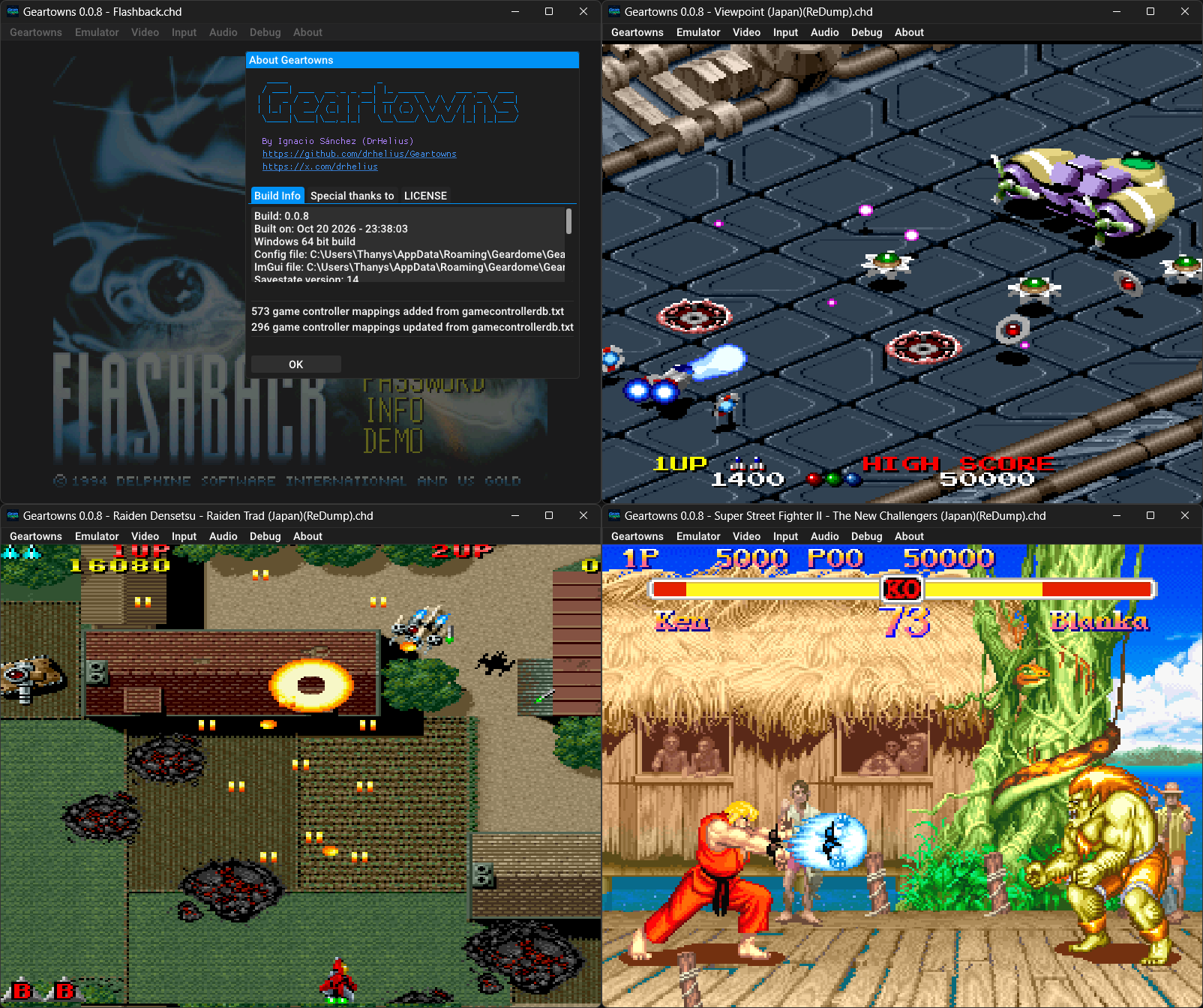
Geartowns est un émulateur open source du Fujitsu FM Towns / FM Towns Marty, écrit en C++ et disponible pour Windows, macOS, Linux et BSD. Il prend également la forme d’un cœur Libretro compatible avec RetroArch.


Il prend en charge les CD-ROM aux formats CHD, CUE/BIN et ISO, ainsi que les disquettes aux formats D77, D88, HDM, XDF, IMG et MFM. Il propose également les sauvegardes d’état, le rembobinage, les filtres graphiques par shaders, la capture vidéo au format AVI, les captures d’écran et l’enregistrement audio VGM.
 
Geartowns intègre par ailleurs un débogueur avec désassembleur, points d’arrêt et outils d’inspection de la mémoire. Un serveur MCP permet également de connecter des assistants IA à ces outils pour faciliter l’analyse et le débogage des jeux. L’émulateur nécessite les ROM système du FM Towns et est distribué sous licence GNU GPL v3.
 
Les changements sont:
🚀 Faster CPU emulation
⏪ Improved rewind with memory budget and frame scrubbing
🖥️ Added 16:10 aspect ratio
🏙️ Added FM Towns II HC model
🧠 More MCP server tools for controllers, keyboard and mouse
🐛 Many bug fixes and improvements


Télécharger Geartowns v1.0.9 (5.4 Mo)

Site Officiel

En savoir plus…

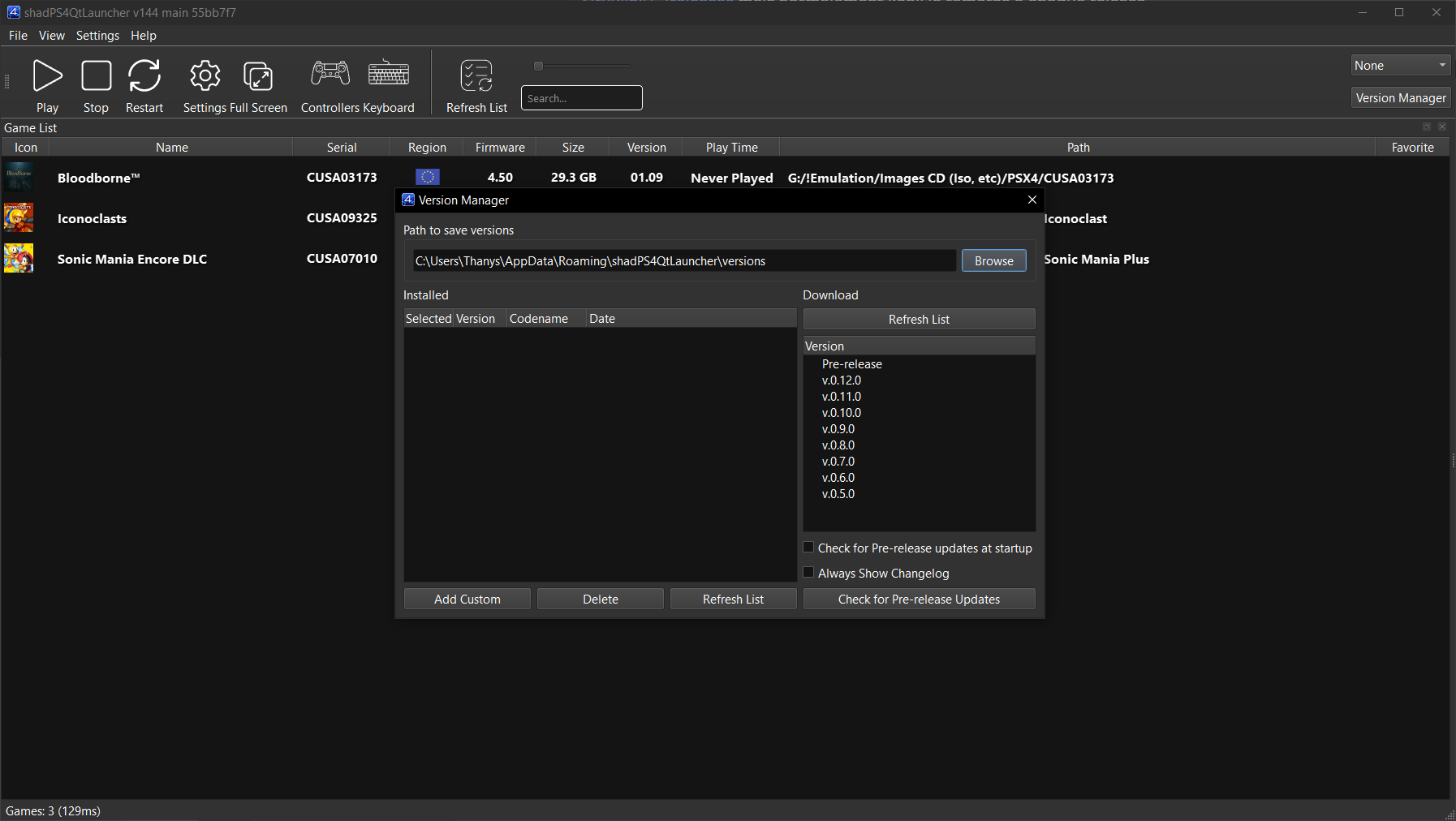
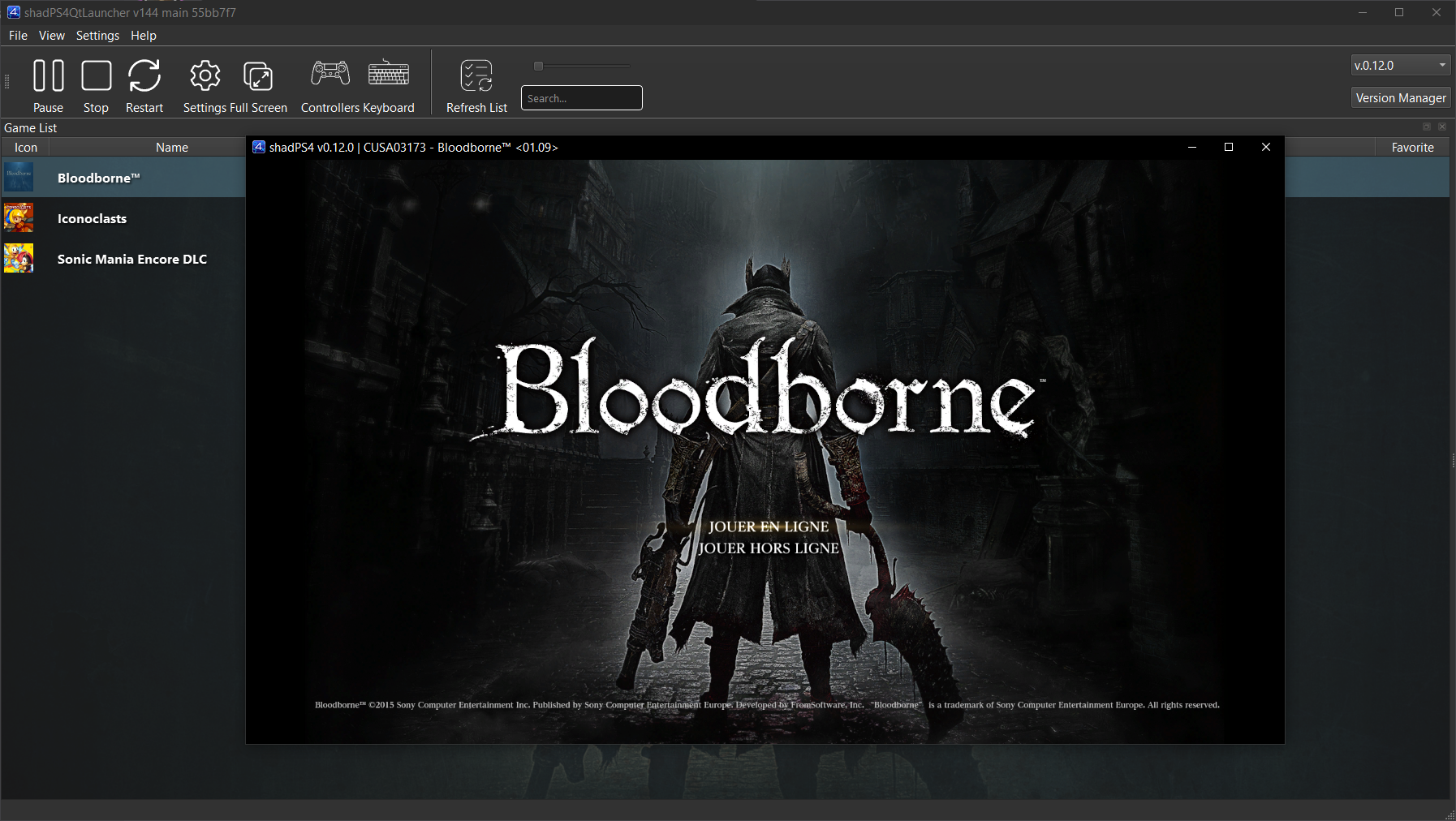
shadPS4 est un émulateur PlayStation 4 open-source. Depuis la version 0.12.1, il abandonne son interface graphique intégrée pour fonctionner uniquement en ligne de commande.
 
Pour faciliter son usage, une interface externe est disponible. Elle permet de lancer des jeux, configurer les options, et suivre les performances via une interface visuelle simple et intuitive.
 

Cette interface est développée séparément et reste compatible avec les futures versions de shadPS4.


Les changements:
– Add the shader patches option to the Experimental settings tab (#517)
– Translate the user entries of Delete Save Data (#509)
– Fix crash when sorting unknown firmware versions (#519)
– Show the Enable Shader Cache description on hover (#518)
– keep fast_shader_math, submit_draw_interval after after saving per-game setting (#520)
– New Crowdin updates
– Misc fixes


Télécharger ShadPS4 (GUI) v411 (26.4 Mo)

Site Officiel

En savoir plus…

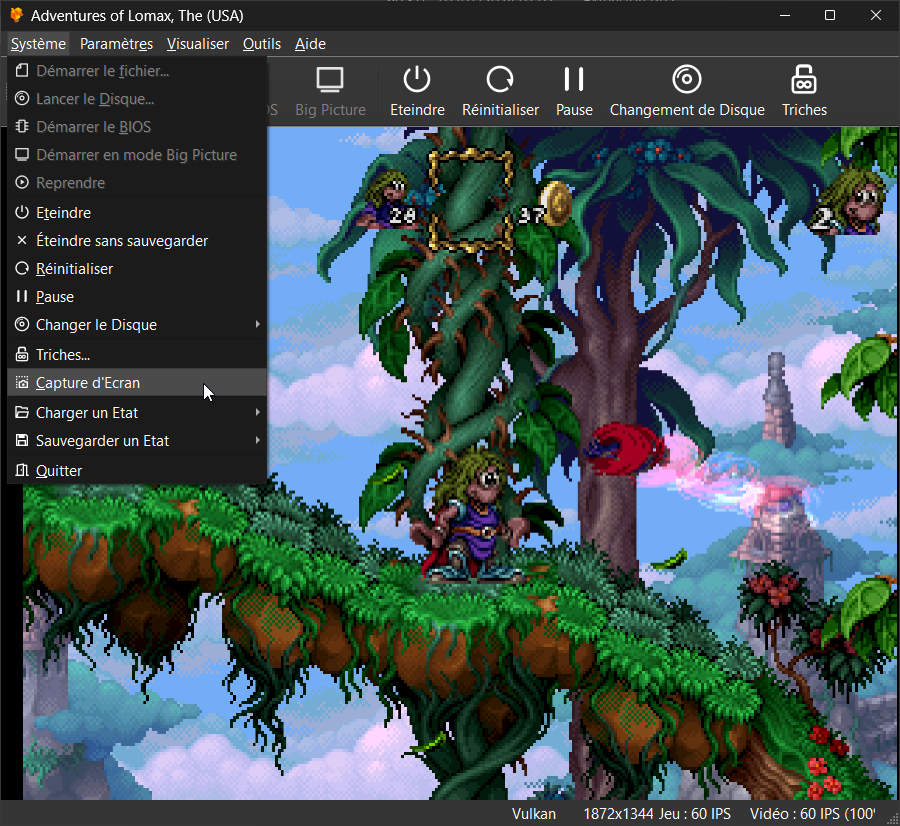
Il s’agit du meilleur émulateur de PlayStation One, devant ePSXe et pSX.


Caractéristiques:
– Recompilateur/JIT CPU (x86-64, armv7/AArch32, AArch64, RISC-V/RV64).
– Rendu matériel compatible avec les API D3D11, D3D12, OpenGL, Vulkan et Metal.
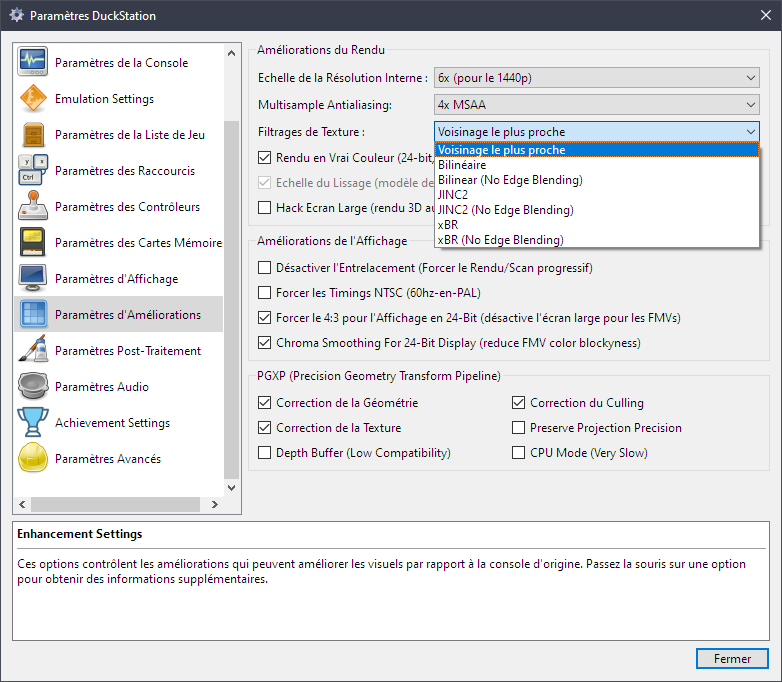
– Mise à l’échelle, filtrage des textures et couleurs vraies (24 bits) dans les moteurs de rendu matériels.
– PGXP pour la précision géométrique, la correction des textures et l’émulation du tampon de profondeur.
– Mélange précis via Rasterizer Order Views / Fragment Shader Interlock.
– Système de remplacement de textures dans les moteurs de rendu matériels.
– Rendu logiciel vectorisé et multi-threadé.
– Désentrelacement adaptatif au mouvement.
– Filtre de sous-échantillonnage adaptatif.
– Rotation d’écran pour les jeux de tir verticaux ou en mode « TATE ».
– Chaînes de shaders de post-traitement (GLSL, Reshade FX et préréglages Slang).
– Bordures décoratives affichées autour du contenu du jeu.
– « Démarrage rapide » pour ignorer l’intro du BIOS.
– Prise en charge des sauvegardes d’état, avec exécution anticipée et rembobinage.
– Compatible avec Windows, Linux et macOS.
– Lecture directe depuis CD, images bin/cue, fichiers bin/img bruts, MAME CHD, ECM à piste unique, MDS/MDF, CCD et formats PBP non chiffrés.
– Préchargement des images disque en RAM pour éviter les interruptions dues à la mise en veille du disque.
– Fusion des jeux multi-disques dans la liste/grille avec cartes mémoire partagées.
– Chargement/application automatique des patchs PPF.
– Démarrage direct des exécutables homebrew.
– Chargement direct des fichiers Portable Sound Format (psf).
– Audio étiré dans le temps lors de l’exécution hors de la vitesse 100 %.
– Prise en charge des manettes numériques et analogiques (le retour de force est transmis à l’hôte).
– Support des pistolets GunCon et Justifier (simulés à la souris).
– Support de la manette NeGcon.
– Préréglages de manette et configuration par jeu.
– Interface utilisateur Qt et mode « Big Picture ».
– Mises à jour automatiques avec canaux preview et stable.
– Analyse automatique du contenu — titres/hachages fournis par redump.org.
– Commutation automatique optionnelle des cartes mémoire par jeu.
– Prise en charge des cheats à partir de listes existantes.
– Éditeur de carte mémoire et importateur de sauvegardes.
– Overclocking CPU émulé.
– Base de données de codes de triche (cheats) avec prise en charge de plus de 4 000 jeux.
– Base de données de correctifs (patchs) avec améliorations visuelles, du taux de rafraîchissement et du format d’image.
– Analyse et modification de la mémoire en direct.
– Exploration d’images ISO et extraction de fichiers.
– Débogage intégré et à distance.
– Support des manettes multitap (jusqu’à 8 appareils).
– Intégration RetroAchievements.
– Présence enrichie Discord.
– Capture vidéo via Media Foundation (Windows) et FFmpeg (toutes plateformes).
– Fonction de caméra libre.
– Émulation de cartouches via port parallèle.

 
Configuration requise:
– Windows 10/11 (7/8/8.1 ici), Linux (AppImage/Flatpak), macOS.
– Un CPU plus rapide qu’une patate. Mais il doit être x86_64, AArch32/armv7, AArch64/ARMv8 ou RISC-V/RV64.
– Un GPU capable de OpenGL 3.1 / OpenGL ES 3.1 / Direct3D 11 niveau de fonctionnalité 10.0 / Vulkan 1.0. Donc, en gros, n’importe quoi fabriqué au cours des 10 dernières années.
– Une manette compatible SDL, XInput ou DInput (par exemple XB360/XBOne/XBSeries). Les utilisateurs de DualShock 3 sous Windows devront installer les pilotes officiels DualShock 3 inclus dans PlayStation Now.


Les améliorations sont:
 
Preview Build:
– Force recompiler ICache for Tomba!/Tombi!/Ore! Tomba (Stenzek)
– Add TIM texture replacement name generator (Stenzek)
– Hash reduced palette range from pal_min (Stenzek)
– Track fifth page of unaligned 8-bit palettes (Stenzek)
– Fix VRAM write splitting (Stenzek)
– Parse MaxVRAMWriteSplits as an integer in config.yaml (Stenzek)
– Don’t merge VRAM writes that have already been drawn with (Stenzek)
– Fix RectDistance() for picking the closest draw rect (Stenzek)
– Don’t retry loading replacement images that failed to load (Stenzek)
– Initialize palette fields when parsing C16 replacement names (Stenzek)
– Only apply replacements once for writes spanning pages (Stenzek)
– Fix TextureReplacementIndex comparison (Stenzek)
– Fix argument order in missing alias file error (Stenzek)
– Dump original pixels before local VRAM copies (Stenzek)
– Clock noise on quarter/eighth-period slots (Stenzek)
– Apply Phase bit in exponential decrease sweeps (Stenzek)
– Don’t set STATX busy during DMA writes (Stenzek)
– Apply the first block’s loop start on the key on header fetches (Stenzek)
– Interleave RAM transfers with sample generation (Stenzek)
– Write the DMA FIFO to RAM at 32 cycles/halfword (Stenzek)


Stable Build (or rolling release):
– GPU: Decode GP1 command bits 29-31, only GP1(10h) ignores bits 30-31
– Host: Move core thread handle to host
– CDROM: Clear active status bits before Stop acknowledge
– CDROM: Queue GetID response immediately
– CDROM: Any command replaces a second response not yet sent
– CDROM: Keep the motor braking in the background after Stop
– CDROM: Init spins up a stopped motor, after braking finishes
– CDROM: Scale Stop time with the disc’s angular velocity
– CDROM: Reject ReadTOC on vC0 mechacons
– CDROM: Retune speed change times to hardware measurements
– CDROM: Don’t delay for double speed change with the motor stopped
– CDROM: Overlap seeks with a pending speed change
– CDROM: Overlap a speed change with a seek in progress
– CDROM: Don’t cancel a speed change when switching back
– GPU: Hold DMA request through polygon setup and quad first triangle
– GPU: Request next GP0 DMA block while at most one word is queued
– GameDB: Remove DMA timing overrides from Chrono Cross
– GPU: Hold DMA request until a poly-line’s last segment starts
– GPU: Report FIFO mode request from FIFO occupancy
– GPU: Remove FIFO size hack, use the hardware 16-word FIFO
– GPU: Look up GP0 command word counts in the command table
– GPU: Use measured FIFO slots held by quads in FIFO mode
– GPU: Don’t postpone command completion when rescheduling
– Hotkeys: Fix frame number not toggling with OSD toggle
– Settings: Reduce default DMA max slice ticks to 200
– GameDB: Remove DMA slice overrides matching the new default
– GPU: Count command ticks in system clock cycles
– GPU: Release held DMA requests at the release point
– GPU: Use measured v2 polygon costs
– GPU: Use measured v2 rectangle and line costs
– GPU: Use measured v2 fill and VRAM copy costs
– GPU: Drop unused bool return from GP0 command handlers
– Settings: Don’t save DMA and GPU timing tweaks
– Settings: Rename DMA slice and GPU run-ahead keys
– GameDB: Remove more hacks
– Update duckstation-qt_es.ts (#3821)
– Host: Move QueueAsyncTask to host/remove WaitForAllAsyncTasks
– Common: Remove TaskQueue
– GPU: Match v2 GPUSTAT.13 timing and hold it with interlace off
– Bus: Reset RAM size when releasing memory map
– Qt: Add physical disc read speed override
– Android: Update translation strings
– Update mmpx adv v3.5 (#3822)
– CPU: Fix COP0 debug enables and status-only breakpoints
– CPU: Match LWR and SWR data breakpoints at the effective address
– CPU: Preserve data breakpoint and alignment exception priority
– CPU: Check execution breakpoints on debug interpreter fetch faults
– CPU: Delay SR-enabled interrupts by one interpreter instruction
– GTE: Handle RTPS and DCPL opcode aliases
– Sockets: Run SocketMultiplexer on a worker thread
– System: Process core thread events while throttling with GDB clients
– MediaCapture: Fix default codec with mp3/wav containers
– mmpx adv: A bug fix and minor optimizations (#3824)
– Update duckstation-qt_ru.ts (#3823)
– InputManager: Resume when controller reconnects after disconnect pause
– optimizations mmpx Enhanced (#3825)
– Tests: Disable COP0 EXP1/unfetchable execution breakpoint tests
– ShaderGen: Use GL_EXT_control_flow_attributes on Vulkan
– GPUDevice: Fix Metal compute images aliasing sampled texture slots
– VulkanDevice/D3D12Device: Fix compute dispatch texture state and group count
– GPU/HW: Use compute shader for VRAM readback encoding
– GPU/HW: Fix reset not clearing framebuffer VRAM view
– System: Reset components in Initialize() instead of resetting on boot
– Host: Add FormatByteSize() and use it for size displays
– ImGuiOverlays: Polish component debug windows
– GPU: Use documented NTSC and PAL scanline lengths
– GPU: Select NTSC on GP1(00h)
– GPU: Use interlaced field lengths for CRTC timing
– GPU: Restart the Timer 0 dot count on every line
– GPU: Read GPUSTAT.31 as the displayed VRAM row parity in 240p
– GPU: Hold the next field when interlace is turned off in scanline 311
– GPU: Run the line counter on when interlace is turned on in the field’s last line
– DMA: Prevent GPU slicing from starving SPU transfers
– Qt: Update machine translations
– CPU/PGXP: Compute precise values for MVMVA in CPU mode
– GameDB: Enable PGXP-CPU for Ape Escape
– GameDB: Enable PGXP-CPU for Crime Crackers
– OpenGLDevice: Fix framebuffer fallback for depth copies
– OpenGLDevice: Fix download buffer debug labels
– OpenGLDevice: Support compute shaders
– InputManager: Fix binding capture of triggers and endpoint-rest axes
– mmpx adv: minor optimizations (#3826)
– System: Report BIOS version/physical disc as title when not known
– VideoThread: Support changing thread enable without recreation
– GPU: Add missing x/y flip to memory states
– CPU/PGXP: Keep exact halves when clearing bits shifted into packed X
– CPU/PGXP: Make CPU_BITWISE funct a template parameter
– GameDB: Tekken 3: Use 512 PGXP depth threshold, drop tolerance
– Tests: Fix util-tests linking
– Data: Remove old files
– Qt: Add specialValueText for PGXP geometry tolerance
– Qt: Fix nullable handling for QComboBox
– Regtest: Read back VRAM before hashing GPU dumps
– GPU: Add optional 2MB VRAM mode
– GPU: Decode the texture palette per primitive instead of storing it
– D3D12Device: Minor tidy-up
– VideoThread: Move null backend helper to private header
– GPU: Better names for constants
– FullscreenUI: Add semantic colours derived from the theme
– Qt: Add Midnight Amber theme
– FullscreenUI: Add shared dashed empty slot tile
– FullscreenUI: Add BeginScrollFade/EndScrollFade
– SaveStateSelectorUI: Large preview with slot list, dashed empty slots
– FullscreenUI: Use dashed empty slot tile in save state selector
– Qt: Minor theme tweaks
– Qt: Dim horizontal rule in settings help text
– Qt: Use a dimmer selection colour in Dark Ocean theme
– GameList: Add generated artwork monogram/colour helpers
– FullscreenUI: Use generated gradient artwork for missing covers
– Qt: Use generated gradient artwork for missing covers
– OpenGLDevice: Blacklist compute shaders on vmwgfx
– Qt: Show achievement progress as a ring in game list
– OpenGLDevice: Fix compiler warning
– Qt: Add search icon to SearchBox
– Update duckstation-qt_es.ts (#3827)
– Qt: Fix initial fullscreen action state
– GPUDevice: Fix incorrect texture format name
– GPU: Hold the DMA request while a polygon or line waits for parameters
– GPU: Hold the DMA request until a poly-line’s terminator
– GPU: Request GP0 DMA during a VRAM read while the FIFO is empty
– GPU: Count a pending VRAM read as a FIFO slot in FIFO mode
– GPU: Remove 0xFFFFFFFF size hack
– GameDB: Remove full boot hack for Lomax
– GameDB: Remove Nightmare Creatures full-boot hack
– GPU: Match hardware for odd-length GPUREAD and interrupted VRAM writes
– Qt: Fix step values for overclocking
– Settings: Merge RAM mapping/VRAM options into size enums with Forced variants
– Data: Fix fxaa.fx compiling in D3D11
– Update duckstation-qt_es.ts (#3828)
– FullscreenUI: Use spinbox for CPU overclock
– Fix xdg-desktop-portal registration (#3829)
– dep/reshadefx: Fix building with C++23
– CMake: Set the default standard to C17/C++23
– dep/cubeb: Don’t override C/C++ standard
– dep/rcheevos: Don’t override C standard
– MSBuild: Don’t override C++ standard for zydis
– MSBuild: Work around /std:c++23 being unavailable in clang-cl


Télécharger DuckStation v0.1 build 12XXX (71.7 Mo)

Site Officiel

En savoir plus…

Un émulateur de MZ-800 / MZ-700 / MZ-1500 pour Windows.


Les changements principaux sont:
 
New Virtual CMT (cassette deck)
The cassette deck was rewritten from scratch. Every tape is now a list of blocks that you can inspect and edit.
 
– Opens **TMZ and TZX** tapes (including loops, jumps and calls) in addition to MZF, M12, MZT, TAP and WAV; WAV files in IEEE float and WAVE_FORMAT_EXTENSIBLE format are accepted too.
– One window with a compact and a full layout, and three loading modes: **Tape**, **Boost** and **Direct**.
– **Recording goes onto the tape in the deck.** A program saved in the ROM format becomes a program block, anything else is kept as a raw recording that plays back exactly as it was recorded.
– Tape editing: delete, move and import blocks, change block speeds, save as TMZ, TZX, MZT or MZF, export as MZF or WAV.
– **Recording analysis** finds programs inside a raw recording and adds them as blocks – not only the standard Sharp format, but also TURBO (TurboCopy, Intercopy), FASTIPL, CP/M (CMT.COM, TAPE.COM, Intercopy CPM) and BSD data files of BASIC.
– **Echo**: optionally hear the tape signal from the speaker while playing or recording.
– Snapshots and input replays keep the tape, including unsaved changes.
 
 
Sound closer to the real machine
The sound output was compared with oscilloscope measurements on a real MZ-800 and corrected in many places.
 
– **Hardware output filter** (Interface > Audio…): the low-pass filter that sits between the sound chip and the amplifier on a real MZ-800 is now emulated. It is on by default, so the sound is duller, like from the computer’s own speaker.
– The speaker and the PSG output are AC coupled as on the real hardware: a constant level fades back to idle instead of being cut after 45 ms.
– The speaker (CTC0) is now about 8 dB quieter relative to the PSG, matching the measured ratio.
– PSG fixes: noise channel (shift register length, rate and feedback – periodic noise used for bass was almost an octave too high), divider 0 now plays the lowest tone, samples played through the volume register have the right level, counters of muted channels keep running, and the CPU wait on a PSG write matches the real machine in all sixteen phases.
– CTC 8253: modes 4 and 5, BCD counting and several less common cases now behave like the real chip.
 
How well founded the sound is: the MZ-800 is measured on a real computer, the MZ-1500 is derived from the MZ-800, the MZ-700 is estimated from the schematic.
 
MZ-700 expansion hardware
– **K&P (Kersten & Partner) 80 column card** with its own second monitor (80 x 25, CRTC SY6845E) – [devices/kp80.md](https://github.com/michalhucik/mz800emu/blob/v2.0.7/docs/en/devices/kp80.md)
– **Sharp Users Club UK 80-column kit** – [devices/suc80.md](https://github.com/michalhucik/mz800emu/blob/v2.0.7/docs/en/devices/suc80.md)
– **PCG-700** programmable character generator (HAL Laboratory) – [devices/pcg700.md](https://github.com/michalhucik/mz800emu/blob/v2.0.7/docs/en/devices/pcg700.md)
– The expansion devices share the Z80 data bus as on the real machine, and the new **Bus Map** debugger window shows who owns which port and memory-mapped address (on all three machines).
 
Input recording and playback (Replay)
Replay > Record Inputs… records the keyboard, joysticks, resets, tape control and debugger writes from a start snapshot, together with state hashes. Replay > Play Replay… repeats the run exactly, with rewind and seek. The contents of the mounted disks and the tape are stored inside the replay. See [replay.md](https://github.com/michalhucik/mz800emu/blob/v2.0.7/docs/en/replay.md).
 
New debugger tools
– **Memory Search** (Alt+Shift+E): find where a program keeps a value (lives, score, a timer) by narrowing candidates step by step, with Undo / Redo and Freeze Bytes.
– **RAM Write Log**: who wrote this byte? Records the writing instruction, old and new value and the source of every write.
– **Code coverage**: which instructions ran and which way each conditional instruction went, shown in the Disassembly windows and exportable as JSON, CSV or lcov (`docs/tools/coverage_to_lcov.py`).
– **Instruction history** keeps the CPU registers before each of the last 32 instructions; CPU Track can record registers after every instruction.
– New breakpoint actions `stop`, `exit`, `ramlog_start` / `ramlog_stop` / `ramlog_clear`, the function `lastwriter(addr)` and the identifiers `InsnPC` and `FrameCycle`.
 
Display, capture and command line
– **CRT scanlines** (Display > CRT Scanlines) with adjustable intensity.
– **Screenshot Control** (Alt+G) and **Audio Capture Control** (Alt+Shift+Q) windows.
– `–fdd =` and `–fdd0` to `–fdd7` insert DSK images at startup; `–fdd-readonly ` write-protects a drive for the run.
– Choice of the device code a directly started MZF program gets (CMT, FD, QD, RD or custom), so programs such as BASIC 1Z-016 pick the right default device.
– Joystick Setup has an **Apply** button.
 
Unattended runs for CI
`–headless` runs can end by themselves and return an exit code: `–exit-after-frames`, `–timeout-frames` / `–timeout-seconds`, `–exit-on-pc`, `–fail-on-pc`, `–exit-on-write`, `–exit-on-out`, or a breakpoint with the `exit` action. `–result-json` writes the result with registers and SHA-256 hashes of memory and screen; `–replay-verify` checks a replay at MAX SPEED. The headless mode no longer keeps a CPU core busy.
 
MCP server
A large update for automation and AI agents:
– Full control of the Virtual CMT, input replay, memory search, RAM write log, code coverage and audio capture.
– `emu_state_observe` reads registers, flags and memory windows from one moment, also while the emulator runs.
– `emu_machine_hash` and `state_rev` answer « did the machine state change? » without transferring data; reads return SHA-256, writes can be conditional (`expected_sha256`).
– Run control with run numbers, stop history, `emu_resume`, `emu_wait_stop` and deadlines in emulated time.
– `emu_trace_read` reads Trace Suite records and the breakpoint log page by page, without parsing files.
– `emu_replay_goto` jumps to the machine state at any moment of a playing replay.
– `emu_periph_attach` / `emu_periph_detach` and `emu_media_insert` for Quick Disk now actually work.
 
Emulation accuracy fixes
– **Z80**: interrupt acceptance timing at the end of an instruction (verified with a logic analyzer), stray DD / FD prefixes, MEMPTR and flags of repeating block instructions, write order of PUSH / CALL / RST.
– **GDG MZ-800**: VRAM wait states now follow a simulation of the GDG circuit; hardware scroll applies only to the displayed frame; mid-line scroll changes; palette and memory map after reset.
– **Joystick MZ-800**: strobe taken from the correct 8255 bits (PA4 / PA5), so programs strobing the joysticks separately now read them.
– **FDC**: formatting with 128 B and 1024 B sectors stores the track correctly in the DSK image.
– **Snapshots** save and restore more hidden state (Z80 MEMPTR and pending interrupts, CTC0, hardware scroll, FDC end-of-track state) and load safely with a different RAM disk or IDE8 configuration.
– **MZ-1P16 plotter**: self-test, reset and attach no longer stall the emulation and the sound.
– Many debugger fixes: debugger reads and writes no longer trigger memory breakpoints or disturb the emulation, range and mask breakpoints set over MCP, Sharp MZ ASCII conversion in Watch and Memory Browser.
 
Changes you should know about when upgrading
– **Sound is different by default.** If you prefer the previous, brighter sound, turn off Hardware output filter in Interface > Audio….
– **Virtual CMT replaces the old CMT window**, the Tape Filelist window and the « CMT Hack is activated! » window. The saved window position is not taken over, Escape does not close the window (Alt+C does), and the Record button records onto the tape instead of asking for a WAV file. TAP tapes have the signal level inverted compared with earlier versions.
– **Files given by a relative path now live in the configuration directory** (the program directory by default, otherwise `–cfg-dir`) instead of the directory the emulator was started from: RAM disk backup files (MZ-1R18, PEZIK), the Unicard SD card root and the MemExt FLASH file. If you start the emulator from another directory, move your existing files next to the program.
– **MZ-800 ROM selection in the INI file** (`[ROM] rom_type`) is now saved and read under the ROM’s own name. A configuration file written by the previous version is still read the old way, so your selected ROM stays; a ROM name written into the INI by hand may need a check.
– **Host keyboard and keypad joystick** reach the machine at the frame boundary, so a key press shows up at most one frame later.
– **MCP**: `emu_input_send_key` / `emu_input_send_keys` hold a key for 6 frames by default (previously 3); `emu_settings_set` no longer accepts `QDISK/filename` and `QDISK/write_protected` (use `emu_media_insert(slot= »qd »)`); Watch and `emu_watch_eval` ignore the `!` side-effect suffix.


Télécharger Mz800emu v2.0.7 (46.4 Mo)

Site Officiel

En savoir plus…

Super A’Can Emulator est un émulateur open source de la console 16 bits Super A’Can, commercialisée par Funtech en 1995. Développé en C++, il reproduit le fonctionnement de la machine, notamment ses composants graphiques et sonores, et permet de faire fonctionner sa ludothèque sur les systèmes modernes. Il propose plusieurs fonctionnalités comme la sauvegarde d’état, l’avance rapide et la prise en charge de deux manettes. Disponible sous Windows, macOS et Linux, il est également utilisable avec RetroArch grâce à un cœur Libretro, notamment sous Android.


Télécharger SuperACan-Emu v3.1 (1.8 Mo)

Site Officiel

En savoir plus…

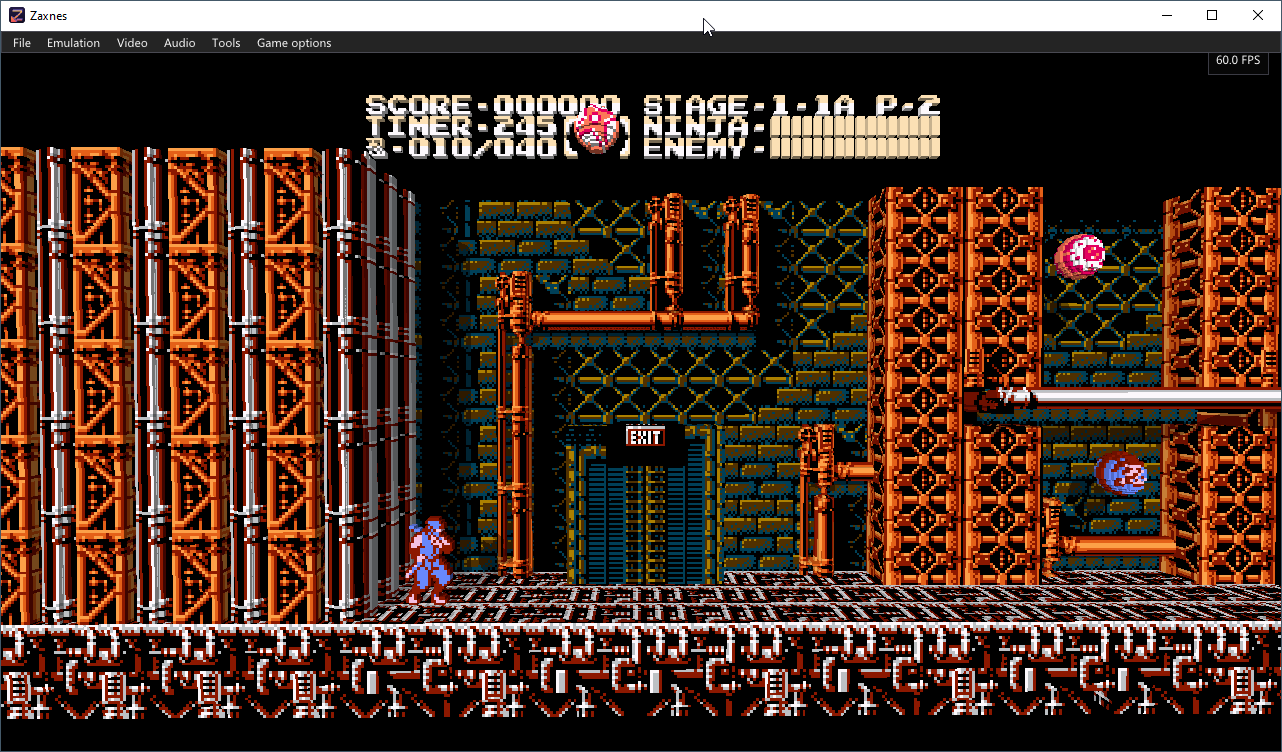
Zaxnes est un émulateur de Nintendo Entertainment System (NES) pour Windows qui propose une conversion en temps réel de l’image 2D des jeux en environnement 3D, avec des éléments représentés sous forme de voxels. Il permet notamment de gérer la profondeur des plans, les ombres et une caméra libre, tout en conservant la possibilité de revenir à l’affichage 2D original.


Télécharger Zaxnes v0.6.0 (67.1 Mo)

Site Officiel

En savoir plus…

Il s’agit d’une version améliorée de M88, émulateur de Nec PC8801.


Télécharger M88x v2.21a (2026/10/13) (156 Ko)

Site Officiel

En savoir plus…

Il s’agit d’un émulateur de NEC PC-9801 qui supporte également le NEC PC-9821.
 
NB: A noter qu’une version béta est disponible sur le site officiel.
 
neko
 

Télécharger Neko Project 21/Win v0.86 Rev. 106 (23.3 Mo)

Site Officiel

En savoir plus…

Voici les derniers émulateurs en développement, ainsi que ceux bénéficiant des mises à jour les plus fréquentes.


Télécharger DuckStation v0.1 build 12XXX (71.7 Mo)

Télécharger RPCS3 (WIP) v0.0.43 Alpha (2026/11/19) (35.6 Mo)

Télécharger ScarletNX (2026/11/19) (109 Mo)

Télécharger KytyPS5 r261119 (25.7 Mo)

Télécharger Citron Neo (2026/11/07) (62.1 Mo)

Télécharger Xenia v1.0.2844 (2026/11/19) (3.9 Mo)

Télécharger Xenia Edge (2026/11/19) (16.1 Mo)

Télécharger Vita3K v0.2.1 (2026/11/19) (36.5 Mo)

Télécharger EKA2L1 v0.0.9 r261119 (70.5 Mo)

Télécharger PCSX Redux (64 bits) (2026/11/19) (48.7 Mo)

Télécharger Pureikyubu (64 bits) v2.0 (2026/10/23) (2.4 Mo)


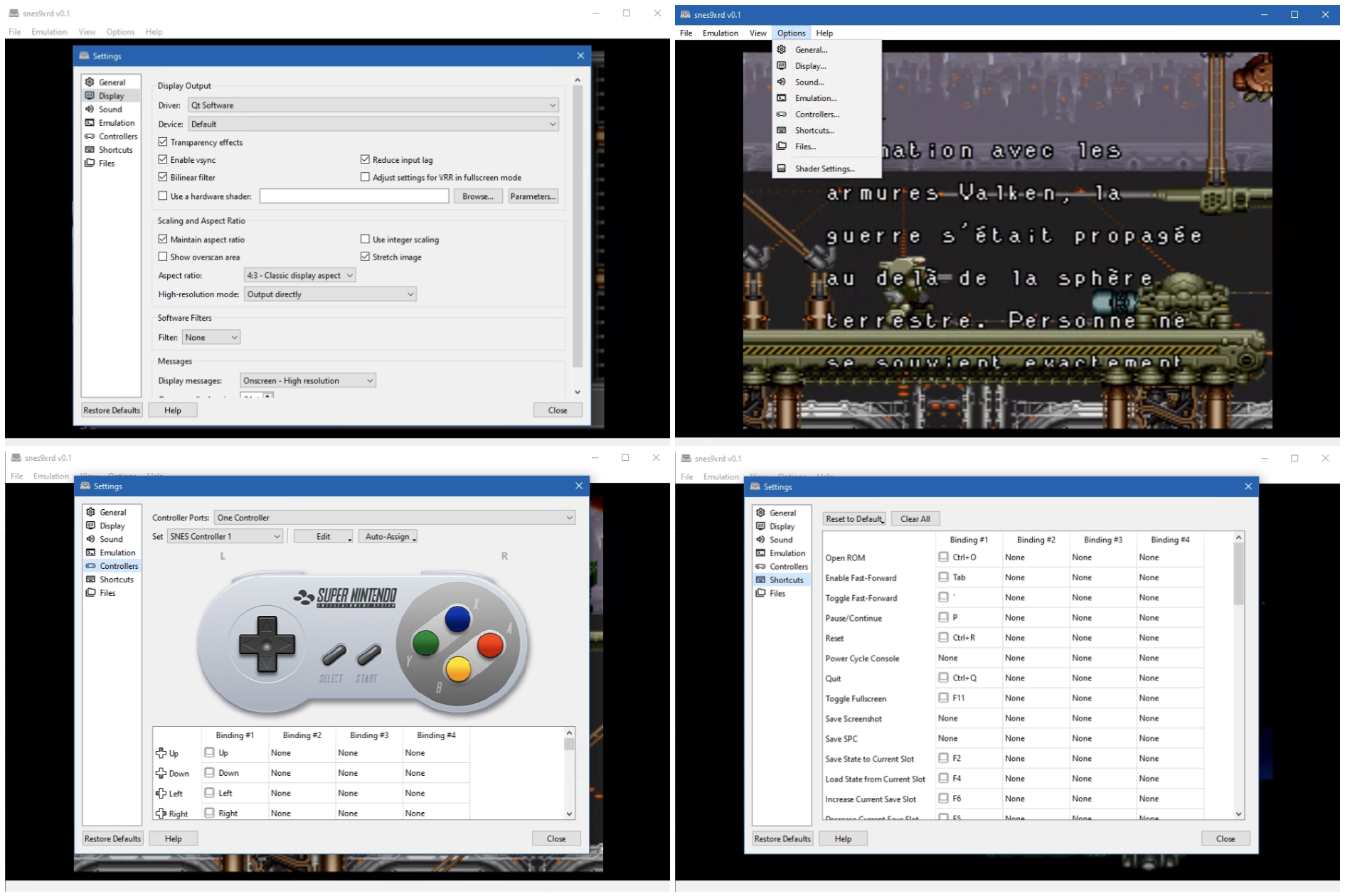
Snes9xrd est un fork personnel de l’émulateur Super Nintendo Snes9x. Il conserve intégralement le cœur d’émulation officiel ainsi que les front-ends GTK, Win32, macOS et libretro, tout en proposant une refonte importante du front-end Qt afin de le rendre plus complet, plus cohérent et plus agréable à utiliser.


L’un des principaux objectifs de ce fork est de rendre l’interface Qt aussi complète que l’interface Win32 en y réintroduisant les fonctionnalités qui lui faisaient défaut. Les paramètres d’affichage, les options de transparence, les shaders, les filtres logiciels, le frame skipping ainsi que les réglages audio avancés sont désormais entièrement accessibles depuis Qt. Les menus d’émulation et de configuration ont également été réorganisés afin d’offrir une présentation plus claire, plus intuitive et plus homogène.
 
Snes9xrd apporte également plusieurs améliorations à la gestion des contrôleurs. Le widget représentant la manette SNES indique désormais avec précision le bouton pressé, sans erreurs de surbrillance, tout en s’intégrant visuellement au thème général de l’interface. La configuration des manettes a été rendue plus fiable: les différents types d’entrées (boutons, axes analogiques et directions) sont correctement distingués, les associations de touches peuvent être sauvegardées et restaurées sans perte d’informations, et les boutons affichés correspondent fidèlement aux entrées réellement détectées.
 
L’interface générale a également été simplifiée. La sidebar expérimentale a été supprimée au profit d’une fenêtre principale plus traditionnelle, organisée autour d’une barre de menus classique. Le menu « Help → About » a été réintroduit et inclut désormais les crédits spécifiques au fork, renforçant ainsi la cohérence de l’ensemble.
 
En résumé, Snes9xrd ne modifie pas l’émulation SNES elle-même, mais vise avant tout à moderniser et à stabiliser l’expérience utilisateur en améliorant l’interface Qt, en fiabilisant la gestion des contrôleurs et en proposant un environnement plus propre, plus complet et plus agréable à utiliser.


Les changements sont les suivants:
 
NETPLAY
– Enabled TCP_NODELAY on client and server sockets, so small joypad/heartbeat packets are no longer held back by Nagle’s algorithm.
– Fixed the server heartbeat clock. It truncated the frame time to whole milliseconds (16 ms, about 62.5 Hz instead of 60 Hz). It now paces in microseconds.
– The server now waits on its client sockets until the next frame deadline instead of sleeping, so joypads that arrive mid-frame are no longer delayed by an extra frame. It also resyncs the clock after a long stall instead of bursting heartbeats.
– Windows: requests 1 ms timer resolution while a netplay server/client is running.
– Qt: controller and mouse button events are now applied during heartbeat waits, and changed joypad state is sent immediately. This reduces local input delay.
– « Show ping » now reports input echo time, heartbeat interval, jitter and queued heartbeat backlog, instead of a nominal ping value.
 
WINDOWS / PROJECT
– Removed the legacy Win32 desktop frontend and its build/dependency tree. The Qt frontend remains supported on Windows, as does the Windows libretro core build.
– Application title, About dialog and Windows file metadata now identify snes9xrd v0.7.
– README updated to document the game library, RetroAchievements and netplay.
 
PACKAGE
– snes9xrd-v0.7-win64.zip contains snes9xrd-qt.exe, libwinpthread-1.dll, cheats.bml, LICENSE and changes.txt.
– Keep libwinpthread-1.dll in the same folder as the executable.


Télécharger Snes9xRD v0.7 (9.6 Mo)

Site Officiel

En savoir plus…


https://getourbonus.com/fr/accueil

https://www.romspedia.com/