emuDownloadCenter (EDC) est un module de emuControlCenter qui permettra de télécharger les émulateurs directement à partir d’Internet sans les chercher pour ensuite les configurer et les installer pour une utilisation facile avec le frontend.
 
Ce projet sera disponible pour Noêl, d’ici là vous pouvez aider à contribuer à l’amélioration du programme de différentes façon en vous rendant sur cette page.

 
edc-banner-small
 

Site Officiel

Créé par Taizou, il s’agit d’un émulateur de Game Boy N&B/Color pour  Windows basé sur GEST v1.1.1  mais qui supporte des mappers en plus, le noms des fichiers Unicode et ajoute également de petit suppléments comme la possibilité de faire des captures d’écran.
 
hhg
 

  • Better Sintax support – fixes Dragon Ball Z 3 2002 Fighting
  • Auto-detection support for fixed/hacked/decrypted Sintax games
  • Support for (some) BBD games
  • Support for « Dragon Ball Z 3 » English translation of DBZ Goku Gekitouden
  • Fix roms loaded from ZIP not showing up in the recent roms list
  • More code refactoring mostly around rom type detection
  • Adds detection for Korean ‘Bomberman Selection’ cart
  • Fixes window layer issue affecting Sanguozhi Wudai
  • Adds support for ‘Last Bible’ multicart mapper, with detection for three carts on that mapper: V.Fame 18 in 1, V.Fame 12 in 1, SL Pokemon 36 in 1
  • Fixed savestates in Sintax games
  • Fixes Mortal Kombat 1&2 ([a1] only)
  • Fixes issue where border would remain when loading a regular game after a Super Game Boy one
  • Way more code refactoring to make it easier to add new mappers in future

 
Site alternatif.

Télécharger HhugBoy v1.1.6 (739.6 Ko)

Site Officiel

En savoir plus…

Petit news pour vous signaler que j’ai enfin fini les screenshots de tous les jeux Sony PSP et que le dat PSP fait à partir du dat no-intro PSP pour mon frontend LusSpace FE sera dispo dans quelques jours :


GTA PSP


Daxter PSP


LocoRoco PSP


Petit spoil de LusSpace FE version PSP full :
 
lusspace-psp


Site Officiel

Il s’agit d’un frontend pour Mednafen dédié uniquement à la Sega Saturn.


– Fixed a bug that occurred when changing the language or skins.
– Added a window with more information about the game.
– Added check for BIOS files on the specified routes.
– Window title bar color constantly changing in line with the chosen skin.
– Added ability to delete the profile for the selected game.
– Added new system messages.


Télécharger MedSat v1.2 (6.2 Mo)

Site Officiel

En savoir plus…

Créé par Avery Lee (l’auteur de VirtualDub), il s’agit d’un émulateur d’Atari 8 bits (800/800XL/130XE) disponible en 32 et 64 bits. Il dispose de beaucoup d’options ainsi que d’une bonne compatibilité. Il prend en charge les jeux protégés conformément à l’émulation. Il s’agit d’une version de développement au stade de béta.

 
features added

– Disk: Added support for full disk drive emulation of 810 and Happy 810 drives.
– UI: Copy/Save Frame now works for XEP-80 display.
-UI: Added variant of Copy/Save Frame which uses the true pixel aspect ratio with filtering.
 
bugs fixed

– Additions: Colormap now restores palette properly on exit.
– AltirraOS: Fix short block flag not being handled by direct SIO calls for the cassette device.
– Debugger: Static trace (st) and dump disassembly (.dumpdsm) commands now work with coprocessor targets.

 
Topic des versions Beta.

Télécharger Altirra (Beta) v2.90 Test 8 (3,9 Mo)

Site Officiel

En savoir plus…

A l’instar de MAMEinfo pour MAME(Arcade), le fichier MESSinfo vous permet de suivre les changements entre les versions concernant les différents systèmes émulés par ce multi-émulateurs.


Télécharger MESSinfo.dat v0.179 (9,2 Mo)

Site Officiel

En savoir plus…

Tout simplement 😉


Télécharger PSXACT (2018/08/20) (49 Ko)

Télécharger Redream v1.5.0.1239 (3.1 Mo)

Télécharger CXBX Reloaded v0.1.0 (1.3 Mo)

Télécharger bsnes-plus (x86) v073+3a (5.6 Mo)

Télécharger bsnes-plus (x64) v05 (7.8 Mo)

Anciennement connu sous le nom de RCPEmu Spoon Edition et développé par Matthew Howkins et Peter Howkins, il s’agit d’un émulateur d’Acorn RiscPC et A7000 pour Windows, Linux et OSX basé sur le célèbre RCPemu de Tom Walker.


All Platforms
– Issue with 8MB VRAM being less stable has been resolved, code is now correctly allowed in the 2-8MB area.
– ARM SWP instruction correctly handles unaligned access.
– Enhancements to TLB to correctly flush caches on more operations.
 
Windows
– The window maximise button has been disabled, as the size of the window is determined by the mode in RISC OS.


Télécharger RPCEmu v0.8.15 (773 Ko)

Site Officiel

En savoir plus…

QMC2 – M.A.M.E. est une interface graphique pour l’émulateur de jeux d’arcade M.A.M.E. Il est le successeur d’une des premières interfaces graphiques UNIX pour M.A.M.E. : QMamecat, et est aujourd’hui le projet le plus actif dans le domaine. QMC2 repose sur l’utilisation de la bibliothèque graphique Qt4.


qmc2
 
Changements :

– fix: ROMAlyzer: when identifying dumps contained in zip- or 7z-archives, fall back to a member’s file name if its CRC exists multiple times within the archive
– fix: when the loading animation was initially hidden and switched on later the gif movie wasn’t scaled (minor)
– imp: updated category.ini to MAME 0.179
– imp: updated minizip to a newer git revision (as of 09-OCT-2016)
– imp: updated PDF.js to a newer git revision (as of 30-SEP-2016)
– imp: ROMAlyzer: the check-sum wizard has been renamed to ‘check-sum finder’ and its auto-repair feature has been removed (it’s no longer required, the collection rebuilder is much better at this)
– imp: emulator configuration templates updated to MAME 0.179 (added new core search path option ‘swpath’)


Télécharger QMC2 (x86) v0.195 (patched v0.217+) (32.5 Mo)

Télécharger QMC2 (x64) v0.243 (48.9 Mo)

Site Officiel

En savoir plus…

AmiArcadia est le port amélioré de Tunix2001 ex ‘Win Arcadia 2001’ (par Gavin Turner) pour Amiga. Ecrit par James Jacobs et Gavin Turner, cette version est en fait le port Windows du port Amiga ! (un backport)


Il émule les consoles basé sur la famille des Arcadia2001 : Bandai, Emerson, Grandstand, Hanimex, Intervision, Leisure-Vision, Leonardo, MPT-03, Ormatu, Palladium, Poppy, Robdajet, Rowtron, Tele-Fever, Tempest, Tryom, Tunix, etc.
 
Il supporte aussi l’Interton VC 4000 et l’Elektor TV Games Computer. Il nécessite Windows 9x/ME/NT/2000/XP et tourne aussi sous Vista/8/10.
 

Télécharger Win Arcadia (Ami Arcadia) v36.8 (9.9 Mo)

Site Officiel

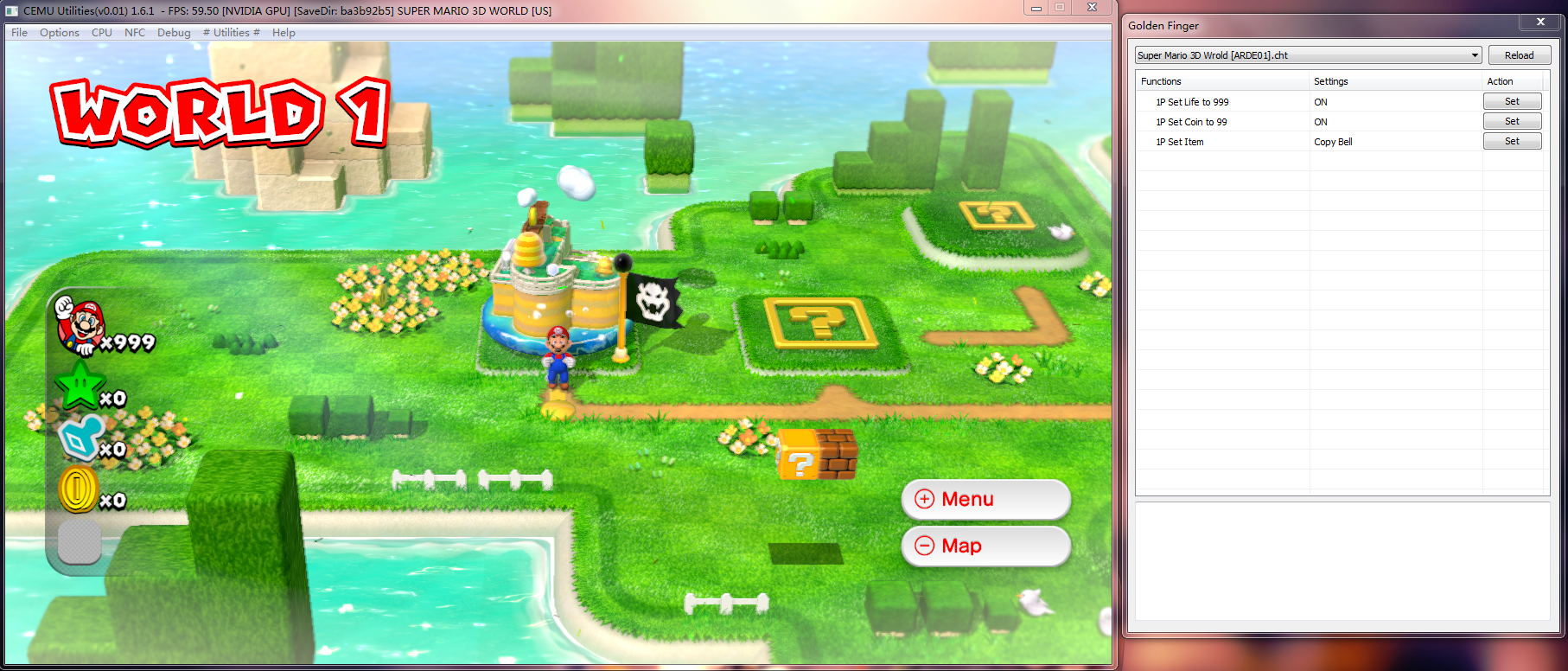
Il s’agit d’un utilitaire qui ajoute des fonctionnalités à l’émulateur de WiiU nommé Cemu. Vous pourrez, entre autres, ajouter des codes triches ce qui permettra aussi de tester de façon plus approfondie l’émulateur et d’améliorer en son débogage.


cemu-util1 cemu-util2


Run “MakeUtilities.exe” to Create CEMU Utilities for offical version. A filenamed “Cemu Utilities.exe”
should be appeared.
You should see a “# Utilities #” menu when you run “Cemu Utilities.exe”. There are 5 submenus in it.
 
1 Golden Finger -> Status 60%. -> 金手指
Golden Finger is finger make by pure gold, usually as the second finger in the right hanf. ^_^
2 Game Buster -> Status 10%. -> 遊戲克星
GameBuster is a game cheater(like CheatEngine).
3 Speed Pig -> Status 10%. -> 變速小豬
Speed Pig is a tool to increase or decrease the delay between refresh, so it should make the EMU
run faster or slower, but it is still according to your CPU. If it can’t make your games faster
because your CPU is too slow, the delay between frame to frame is very little, so you won’t notice
a very large increase.
4 Snap IT -> Status 10% -> 截距滷味
This is a tool to snap a picture of EMU, the short key is ALT+S. All the snaps should be put in
SNAPS folder. It snaps not only the game screen, but the entire Chankast window.
5 About CEMU Utilities


Télécharger Cemu Utilities v0.0.1 (6,4 Mo)

Site Officiel

En savoir plus…

Build de MAME(Arcade) qui empêche toute tricherie dans les vidéos .inp, utilisé par les sites qui référencent les records.


Télécharger WolfMame v0.179 (31,0 Mo)

Site Officiel

En savoir plus…


https://getourbonus.com/fr/accueil

https://www.romspedia.com/