HP82240B est un simulateur pour l’imprimante infrarouge Hewlett Packard HP 82240B. Comme il s’agit d’un simulateur, aucune image ROM n’est nécessaire. Le simulateur est conçu pour fonctionner avec l’interface de l’imprimante infrarouge des versions PC des émulateurs Hewlett Packard Emu28, Emu42 et Emu48. A la différence des émulateurs vous avez besoin de Windows 2000 +, comme système d’exploitation. Windows NT et Win9x/Me ne sont plus pris en charge.
Free42 est une ré-implémentation de HP-42S et de l’imprimante HP-82240. Free42 est une réécriture complète et ne contient aucun code HP. Les versions de Free42 s’exécutent sur Pocket PC, Microsoft Windows, PalmOS, Unix, et Mac OS X (application et widget Dashboard).
L’émulateur « Emu48 » a été développé a l’origine par « Sébastien Carlier » et publié sous licence GPL (nan pas le carburant). Cette version est développé par Christoph Giesselink et émule les HP38/39/40/48/49. Le service pack est à appliqué uniquement si vous désirez mettre à jour votre précédente version.
Il s’agit d’une interface graphique pour émulateurs de multi-ordinateurs et qui n’est disponible qu’en japonaise. Elle permet de gérer des images de disques durs et autres fiches pour ordinateurs d’origines japonais.
Il s’agit d’un frontend pour Mednafen avec une interface originale et très complète, en voici quelques caractéristiques:
– (Enhancement) – Background image – added ‘stretch and maintain aspect’ and ‘original size’ options (#196)
– (BugFix) – Controller and Misc Binding configuration windows now instantiate based on the current MedLaunch window height (so that buttons at the bottom of the window should never be cut off) (#197)
– (Enhancement) – Added shared memcard option for PSX (#194) – Caveat: this may not play nice with savestates, use with caution
– (BugFix) – Added better error handling when inspecting corrupt archive files (#198)
– (BugFix) – Fixed code typo that was causing an exception when choosing pce gecdbios (#200)
– (BugFix) – MedLaunch update checker can now connect using TLS 1.2 (so updates can be checked and downloaded from GitHub). Unfortunately this will obviously require a manual update before this is available (#201)
– (BugFix) – Controller input configurator fields are now only triggered when MedLaunch has focus (#203)
– (Enhancement) – Famicom expansion port controls can now be configured (when targeting mednafen >= v1.21.x) (#204)
– (Enhancement) – All controllers can now be configured within the ‘CONFIGS’ tab (when targeting mednafen >= v1.21.x) (#206)
– (Enhancement) – Added the ability to configure ALL virtual controllers that mednafen supports. The following additional controllers have been added (and are available to configure when targeting mednafen >= v1.21.x) (#207):
+ NES Power Pad (Side A and B)
+ NES Arkanoid Paddle
+ Famicom Family Keyboard
+ Famicom Family Trainer (Side A and B)
+ Famicom Hypershot
+ Famicom Mahjong Controller
+ Famicom Party Tap
+ Famicom Space Shadow Gun
+ PCE Tsushin Keyboard
+ Saturn Keyboard (US)
+ Saturn Keyboard (JP)
+ PSX Analog Joystick
– (Enhancement) – Most of the old-style popup dialogs have now been re-styled to fit with the standard MedLaunch theme
– (Enhancement) – MedLaunch splashscreen now gets updated with the current number and build date during the appveyor auto-build process (#208)
– (BugFix) – Fixed game data panel exception due to null CRC and SHA1 values in the DAT DB (#205)
– Mednafen 1.21.x support ## (#202)
+ Updated LogParser to handle new Mednafen version numbering and changes in stdout.txt behaviour
+ MedLaunch will now get version and attached gamepad/joystick info from the console (rather than stdout.txt) if the mednafen version is new enough
+ Added setting « video.fs.display » for all cores
+ Added the new ‘default’ and ‘softfb’ video driver settings. These will be translated on game launch to ‘opengl’ and ‘sdl’ if you are still using an old version of mednafen. Both ‘sdl’ and the removed ‘overlay’ options are still present in the UI (but marked as depreciated) but will be automatically translated into the new ‘softfb’ and ‘default’ options (on game launch) if you are running the new version of mednafen
+ Implemented new FPS overlay options
+ Added new Saturn JP Keyboard option
+ Implemented new mednafen control mapping System (compatibility for old system is still present when older mednafen versions are detected)
. New boolean logic operator bindings (||, &&, $!)
. New mouse bindings
. New SDL2 keyboard translations
. New DirectInput GamePad configuration methods implemented
. New XInput GamePad configuration methods implemented
. Optional [SCALE] and g-Flag lightgun settings now handled (and can be edited with the right-click context menu)
. All command bindings are now configurable (along with the new scancode modifiers)
MedAdvCFG (ou Mednafen Advanced Configuration) est un frontend créé par Nigel Todman destiné à l’émulateur Mednafen.
– Region is now autodetected based on BIOS, Defaults to NTSC-U if using unknown BIOS.
– Regions added to bios.dat
– Added option to boot SysCore with Disc Tray/Cart Ejected
– Clicking ‘Mode -> Advanced’ from the ‘Game Info’ screen of Basic Mode now actually returns you to Advanced Mode.
– Various Code Optimizations
– Fixed reference to removed control in Basic Mode
– Resized game selection form in Basic Mode slightly
– Game ID is now displayed in Basic Mode for PSX System Core
– Added support for Sega Saturn Racing Controller (MK-80107)
– Added support for Sega Saturn Mission Stick (MK-80104)
– Added support for Sega Saturn Dual Mission Stick (MK-80104)
– Added support for Sega Saturn Virtua Gun/Stunner (MK-80113)
– Added support for Sega Saturn NetLink US Keyboard (MK-80120)
– Added support for Sega Saturn 89-Key JP Keyboard (HSS-0129)
– Added ‘0.9.x.x Mode’ – Prevents 1.x parameters from being passed to cmdline. Automatically activates when a known 0.9.x.x version is detected.
– Various code optimizations
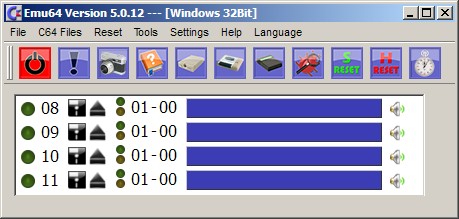
Il s’agit d’un émulateur de Commodore C64 en allemand et aussi en anglais.
– [issue # 117] Screen size is restored correctly when starting the Emu64. The problem was only in the Windows version.
– [issue # 119] Switching between full screen and window mode works again with Alt + Return under Ubuntu.
– [issue # 16] Video recording now possible directly from the Emu64
– TV / Video Setup – distortion is now also reset when reset to default.
– [issue # 121] When loading a PRG, it could happen that it was written across the borders of the C64 RAM.
– RESET completely removed from MOS-6569 (VICII). He has no RESET input!
– Info Window adjusted
– Build system conversion: from qmake to cmake
– [issue # 54] Setting 4: 3 at full screen is set by default.
– [issue # 87] Breakpoints are loaded correctly in the debugger.
– [issue # 131] Error loading CRT images fixed. Sams Journey is thus playable. (Score can not save yet!)
– [issue # 131] EasyFlash Logic for Write Register DE00 + DE02 taken from schematic.
– New command-line option: –data-path (specify a user-defined path for roms, floppysounds, gxf and languages.)
– New command line option: –video-capture (starts recording the C64 screen.)
Voici un émulateur de Nintendo NES développé par Geod Studio utilisant Unity et qui possède une fonction très sympathique de pseudo « 3D ».
Les caractéristiques sont les suivantes: – Participer à l’évolution de la technologie 3Dification
– Jouer à la NES avec de vrai graphisme 3D
– Jouez avec toutes les résolutions prises en charge par votre PC (fenêtré ou en mode plein écran)
– Son mono ou stéréo
– Personnaliser les graphismes comme vous voulez
– Jouer avec des casques de réalité virtuelle via Oculus ou SteamVR (version Pro)
– Mode de rendu Retina (version Pro)
– Caméra de suivi des personnages (version Pro)
3DNes fonctionne bien à partir d’un CoreM cadencé à 800MHz ainsi qu’avec une carte vidéo intégrée supportant la Full HD.
Les changements depuis la v1.4 sont les suivants:
-[Improvement][Pro] VR Re-Implementation: positional tracking, short view distance -> you will truly feel the depth of everything
-[New Feature][Pro] Retina Video Redering Mode
-[Improvement] [Pro] Camera Tracking Mode
-[New Feature] Light Direction And Intensity Customization
-[New Feature] Shape Customization Properties: Offset, Rotation, Scale, Layer (5 layers), Geo (5 types), Transparency …
-[New Feature] Shape Animation and Deformation
-[New Feature] Multi Instance : one 2D shape can be mapped to multi 3D sub-shapes
-[New Feature] Texture Editor : Custom Texture is a must for sub-shapes to be any useful.
-[New Feature] Scripting: the almighty tool to make the very final adjustment of shape properties before rendering
-[New Feature] 3DN File Size Mass Reduction
-[Improvement] Sound Emulation And Rendering Improved
-[Improvement] Video Rendering Performance Optimized
-[Modification] Trinus Plugin Removed
-[Bad News][Backward Compability Breaking] V2 are not compatible with 3DN V1 files
Il s’agit d’une version de démo, la version complète et payante (Pro) est disponible sur le site officiel.
DS4Windows est un programme portable qui vous permet d’obtenir la meilleure expérience lors de l’utilisation d’un DualShock 4 sur votre PC, en émulant un contrôleur Xbox 360, beaucoup de jeux deviennent alors accessibles.
– Changed some array copying to use unsafe memory pointers
– Use declared unsafe blocks in project
– Added CRC32 data validation for Bluetooth connections
– Added delay for device enable routine
– Now force disconnect for wireless controllers when suspending
MxUI est une interface graphique destinée à MAME qui se veut dans le même esprit que M+Gui mais plus moderne et rapide, elle utilise également M1 et les patchs IPS.
1 – fix the problem that the custom folder ini not support root-folder
2 – support the new mame’s xml
3 – optimized code.