Les changements par Google trad: 1. Increase Scanline Filter 2x 4x 6x. (Implement NTSC CRT Proportional Correction with YIQ 4: 1: 1 color bleeding)
2. Increase the operation right-click menu function
3. Rebuild the program, improve efficiency
4. repair a lot of test rom did not pass the wrong items. Test results (there may be a small error)
5. Remove third-party library dependencies (program files are currently reduced to only 167KB size)
6. Full-screen mode can be included in the Background directory background image.
PS. This version is suspended after the update, but I will be back.
La dernière version béta publique de l’excellent WinUAE, l’émulateur Commodore Amiga. La traduction est signée Tradu-France.
– Correction d’une corruption audio 16-bit du FM801.
– Retour des comptages de cycle en mode CE du 68020.
– Vider le masque d’état du bouton pendant les changements d’état de la capture de la souris
– L’état de la carte graphique G-REX et Cirrus Logic était redémarré si l’état de la carte en config auto était rescanné et que l’émulation était déjà lancée (3.4.0).
– Le bouton du milieu de la souris par défaut peut de nouveau être activé (avait été modifié dans la bêta 1).
– La souris Magic à la volée ne fonctionnait pas.
– Réécriture de la gestion de l’exception du FPU, implémentation partiel des exceptions arithmètiques (Andreas Grabher), etc…
– Ajout d’une boîte à cocher pour les exceptions arithmétique du FPU pour faciliter les tests. Sera supprimlé quand les exceptions seront totalement implémentées.
m64p (ou Mupen64Plus-GUI) est une interface graphique écrite en Qt5. Elle supporte tout ce que vous attendez d’une interface mupen64plus (sélection de plugins, édition de la configuration, gestion des sauvegardes, capture d’écran, pause, etc.).
Cette archive inclut Mupen64Plus + GlideN64 + une interface utilisateur.
JoyToKey (shareware) est un émulateur de clavier pour les joysticks. Il convertit les contrôles clavier (et souris). Utilisez-le lorsque vous désirez contrôler une application qui ne supporte pas les contrôles joystick. Vous pouvez même contrôler Word, Excel, etc…
Fixed a crash issue for some online games
Enhanced « Keyboard2 » page to support the followings:
Supported the emulation of Input1 ~ Input4 in sequence at the specified interval (hold duration)
Supported different key assignment based on how many times a button is pressed within the specified time threshold
Supported the key assignment when a button is released
Supported the definition of mouse cursor movement via right click menu. For example, this enables one button input to cycle through up, right, down, left mouse cursor movement whenever it’s pressed
Supported a mouse horizontal wheel rotation
Improved the keycode emulation for the Numpad ‘/’ and a few other keys
Miscellaneous configuration options were added for OneSwitch.org.uk ex) FontSizeProfileList=20 FontSizeButtonList=20 ProfileImageFullScreenRatio=1.0
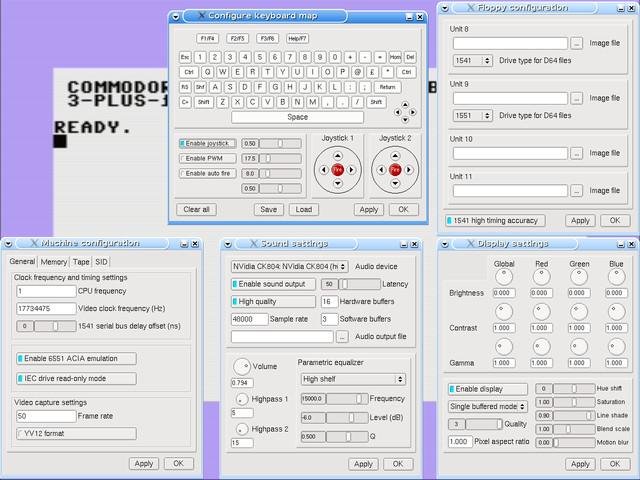
– Correction des opcodes SHS SHA SHY SHX ARR du CPU (mode décimal) pour passer les tests de VICE.
– Ajout de l’écriture du bruit du SID.
– Correction de la position du volume maître du SID. Ne fonctionnait plus depuis la version 1.0.8.8.
– Correction de la modulation de l’anneau du SID.
– Correction des décalages des secteurs lors de la lecture d’un D64.
– Ajustement du timing de la rotation du moteur du lecteur 1541 tel que nécessite Wonderland XIII de Censor Design.
– Correction d’une erreur avec la sauvegarde d’état / chargement d’état.
– Correction d’une erreur avec la sauvegarde FDI.
– Correction d’un problème avec Ultimax.
Créé par Exzap, il s’agit du second émulateur de Wii U à être disponible au public mais le premier à pousser jusqu’à l’émulation de jeux commerciaux. Il peut décrypter les images Wii U qui utilisent le format Wud mais également les fichiers RPS ou RPL. La résolution interne peu aller jusqu’à 1920×1080 selon les jeux. A noter que pour le moment, un seul contrôleur est accepté, il s’agit du DRC (GamePad) de la Nintendo Wii U. Cette version n’est compatible que pour les Windows x64 avec une carte graphique gérant OpenGL 4.0 ou supérieur.
Les changements:
En résumé: – Optimizations
– Improved compatibility
– Graphic improvements
– Bugfixes & minor adjustments
En détails: # New in 1.7.2c:
– GX2: Fixed a bug in GX2SwapScanBuffers() that could cause the GPU command stream to get corrupted
# New in 1.7.2b:
– coreinit: Fixed a crash bug in coreinit initialization code
# New in 1.7.2:
– general: Reorganized menu options for better clarity (Some debug option stuff wasn’t really for debugging)
– general: Added option to choose fullscreen scaling mode (stretch to screen or keep aspect ratio)
– general: Default and recommended value for CPU timer option is now ‘Host based’
– PPC: Thread emulation is now using Fibers. Technically speaking, this change was made to simplify context switching within HLE functions. It allows certain API to behave more similar to the real Cafe OS.
– coreinit: Fixed a bug that caused MEMGetAllocatableSizeForExpHeapEx() to return negative values under certain circumstances
– coreinit: Fixed a crash bug in MPRunTasksFromTaskQ()
– coreinit: Added API MPDequeTask(), MPWaitTaskQWithTimeout(), MPRunTask()
– coreinit: Fixed rare deadlock in alarm handler
– VPAD: Fixed fullscreen touch input for non-16:9 displays
– GX2: Fixed that under certain circumstances GX2WaitTimeStamp() could return immediately due to the low accuracy of the internally used timer (affected only ‘Host based timer’)
– GX2: Added support for texture format R16_G16_B16_A16_SNORM
– GX2: Added support for sampler2DRect textures
– GX2: Unsupported instructions in a GS Copyshader will no longer cause a crash
– GX2: Fixed texelFetch() accessing textures upside-down if ARB_clip_control is used
– GX2: Adjusted handling of vsync and flip event to decrease latency
– GX2: Optimized texture encoding & decoding
– GX2: Optimized frequently used GX2 API
– GX2: Optimized various parts of the GPU command processor
– GX2: Fixed incorrect mapping of GS->PS attributes if gl_FragCoord is used
– GX2: Fixed handling of GS input primitive LINE_STRIP
A noter que des packs graphiques haute définition sont disponibles ici. Ils permettent, entre autre, d’augmenter la résolution native des jeux car contrairement à Dolphin et parce que la machine est techniquement différente il n’est pas possible à Cemu d’augmenter la définition autrement que par cette méthode.
A l’inverse, des packs SD (définitions standards et/ou basses) sont disponibles sur ce lien et permettent à certains PC manquant de performance de lancer des jeux en 60 FPS.
Il s’agit d’une interface graphique dédiée à RetroArch. (site source)
Quelques caractéristiques:
– Interface graphique simple, complète et facile à utiliser
– Drag & Drop des ROMs pour lancer et créer des playlists.
– Utilise les bibliothèques des ROMs d’Archive.org
– Automatisation du Netplay
– Gestion des menus par jeu et par core et XMB
Il s’agit d’un émulateur de MS-DOS en ligne de commande destiné à Windows x86-64 (mais également aux versions 32 bits). Version dédiée à l’émulation des processeurs i286/i386/i486.
QMC2 – M.A.M.E. est une interface graphique pour l’émulateur de jeux d’arcade M.A.M.E. Il est le successeur d’une des premières interfaces graphiques UNIX pour M.A.M.E. : QMamecat, et est aujourd’hui le projet le plus actif dans le domaine. QMC2 repose sur l’utilisation de la bibliothèque graphique Qt4.
Changements :
fix: corrected the start-up restoration of the currently selected machine when said machine is hidden in the main view (aka ‘full detail view’) due to ROM state filtering
fix: template check: when a (presumably) boolean type option changes its semantic, make sure that the check at least sees the changed default (example: the ‘sound’ option in current MAME)
fix: correctly honor the ShowROMStatusIcons setting in the main view when the machine list is loaded from cache
fix: system-notes: got rid of some MAME/MESS/UME leftovers (OMG!) which prevented titles from being displayed in system-notes when they were (7-)zipped
imp: updated category.ini to MAME 0.183
imp: updated PDF.js to a newer git revision (as of 30-JAN-2017), now pre-built with gulp
imp: changed the category- and version-views to do an ascending sort of the category or version column before running the actual sort on the current criteria upon creation
imp: avoid UI flicker when initially creating the category- or version-views
imp: updated the emulator configuration templates to MAME 0.183 (changed the ‘sound’ option to correspond with current MAME)
imp: improved the main setup dialog’s (former) Machine-list tab (now called Machine- / Software-lists) by reorganizing the different options in separate sections
imp: software-lists: get rid of using a temporary file for looking up mountable devices for the current slot setup, use the standard input channel instead (we actually got rid of using a temporary file completely, so the corresponding setting has been removed as well)
imp: device configurator: adopted MAME’s new formatting of the -listslots output (this means that MAME 0.183 is required now!)
imp: component setup: when a feature isn’t allowed to be removed (i.e. the per-machine emulator configuration), indicate this by disabling the deactivate button
imp: the context-menu of each component’s tab-widget is now accessible by right-clicking the header (instead of a small area above it)
imp: software-lists: use list:name instead of list:name:part when generating software-specific arguments
imp: software-lists: added a (temporary) workaround for launching ColecoVision™ cartridge images (see MT bug #6504)
imp: device configurator: a loading animation is shown when the slot info cache has to be recreated (the previous indication for this was too subtle)
new: the last ten machine search patterns that were added to the drop-down list (i.e. by pressing Return or Enter) are saved and restored now
new: added a relaunch setup wizard item to the tools menu which will stop and restart QMC2 with the -r command line option
new: software-lists: added support for saving and restoring the last selected software item per system (BT #140)
new: added support for system- and software-manuals (in PDF format), allowing the use of an external PDF viewer (system default) as an alternative to the internal one which doesn’t work everywhere (BT #141, BT #116)
new: each component’s current tab can also be switched through the tab-widget header’s context-menu now (BT #134)
inf: changed the versioning scheme to match MAME’s version from now on (due to popular demand) – this should avoid confusion in the future