Il s’agit d’un port C++/C# de Visual 2C02 et de Visual 2A03 de Quietust (adapté du code de Visual 6502).

 
Il combine les deux simulateurs en un seul et permet à la simulation d’exécuter des ROMs NES (bien qu’à environ 1/1000ème de la vitesse d’une NES réelle). Toutefois il simule à la fois le 2C02 et le 2A03 ensemble beaucoup plus vite que les versions javascript (10-20x plus rapide).
 
Quelques caractéristiques ont été ajoutés comme le chargement / sauvegarde des états / mémoire, journalisation sur le disque etc.


Télécharger VisualNes (2017/01/14) (2,2 Mo)

Site Officiel

En savoir plus…

Il s’agit d’un émulateur de NEC PC-9801 qui supporte également le NEC PC-9821.


neko


Télécharger Neko Project 21 v0.86 Rev. 27 (4,2 Mo)

Site Officiel

En savoir plus…

Lightspeed MameLister est un générateur de listes multiples permettant tout un ensemble de choses et principalement la possibilité d’effectuer des tries en tout genre. En outre il accepte les listes de jeux en provenance de MAME mais aussi de beaucoup de frontends tel qu’Attract-mode, Hyperspin, PinballX, Maximus Arcade, Mala, Launchbox, mGalaxy, MameUIFX, MameWah, AtomicFE, AdvanceMenu, Cabrio, XML, Rom list, etc…

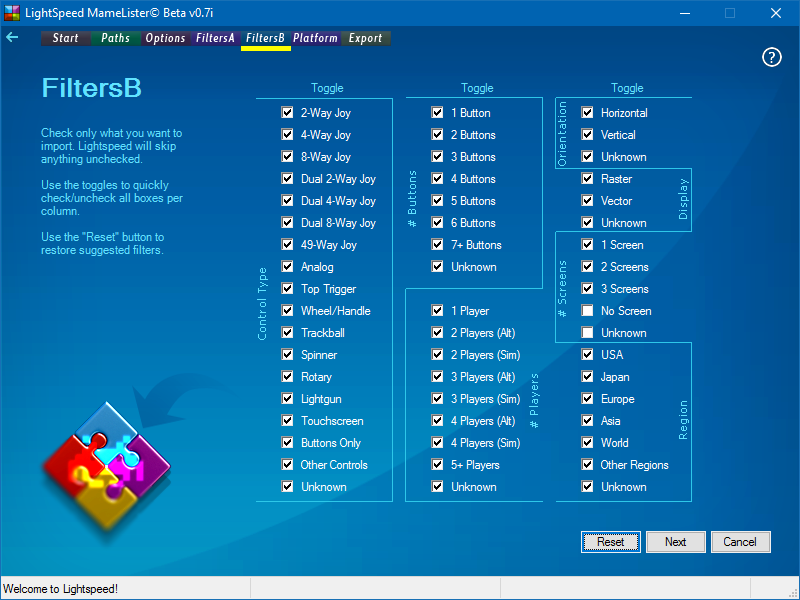
lightspeed1

lightspeed2


– Added preliminary backwards compatibility with older MAME versions. The oldest I could find for download was 0.100b, so I tested with it. Make sure to point to your older mame.exe and then update your xml file by clicking on « Mame -listxml », under options.
The catch is, not everything is hooked up just yet, so unless you check all the « unknown » checkboxes on both FiltersA and FiltersB tabs, you will not be able to see anything parsed if you are using an older MAME version!
– Preliminary compatibility with the latest changes on Launchbox images folder structure. Images should now be parsed just like before and this should also maintain backwards compatibility with previous versions of Launchbox
– Speed improvements. A complete list (36445 entries) can now be parsed in about 21 seconds in my machine, compared to about 72 seconds in Romlister. Considering that there are many other filters being used, this was quite a bit of a boost, reflected in all parsing methods from now on.
– List can now be matched against the Icons folder as well (in preparation for a new feature requested by John IV)
– Added an « Expand Tabs » checkbox under the export tab, so you can toggle to see all the information parsed under the hood.
– Eliminated the need of ControlsButtons.ini. Thinking about backwards compatibility with older MAME versions in the future, the controls are now being parsed on the fly, with no significant hit in performance
– Fixed a bug that was causing the number of players to be parsed incorrectly (thanks Milky @ Arcade Controls for reporting!).
– Introducing History ReparserTM, a different approach when it comes to extracting notes from History.dat. Games marked as “Export version” will now have a much better chance to have their notes extracted from the original games, so, much more complete notes from now on if you use LaunchBox, for example.
– Updated all support files to the latest versions available.
– Improved controllers metadata. Most games now have a controller associated to them.
– Renamed the default platform from “Mame Arcade” to simply “Arcade”
– Improved auto-fill when selecting MAME.exe
– Improved “reset” functions.
– FiltersA, 3rd toggle now ignores “All Killer” filter, since this is a very specific filter that ends up overwriting all others
– Removed the game descriptions in the status bar when parsing lists. This sped up the process by a few seconds. The progress bar is still present.
– Removed some splash screens. All info related should now be presented at the status bar, which is way faster than splash screens (it’s all about speed after all).
– Improved attract-mode generated lists.


Télécharger Lightspeed MameLister Beta v0.7j (12,4 Mo)

Site Officiel

En savoir plus…

Un émulateur de NES écrit en C#. My Nes est un émulateur NES portable et écrit en C#. Il fonctionne sur Vista et supérieur. Il supporte plus de 1000 roms. Le moteur du rendu vidéo utilise les librairies .net Framework 4, ce qui permet un affichage des couleurs réelles avec la plus grande précision. Il est possible de modifier la palette de couleurs d’un jeu. De plus l’affichage peut être soit en 16 bits, soit en 32 bits. La librairie SlimDX de janvier 2012 est requise.


My Nes propose également un navigateur de vos dossiers roms. Cette interface peut filtrer les jeux en fonction des mappers et peut afficher uniquement les mappers supportés. Elle associe également une capture d’écran à chaque rom.


Les changements:

– Improved: emulation code generally, the emulation now should work faster.
– Improved: sound playback, now it’s more accurate and the emulation goes faster.
– Fixed: a bug in sprite 0 hit, the bkg enabled flag was never checked when sprite 0 hit flag sets.
– Fixed: a bug when the emu crashes sometimes when attempting to open a rom and already running a game.


Télécharger My Nes (x86) v6.2.150 (4,0 Mo)

Site Officiel

En savoir plus…

Ce projet a été conçu à l’origine pour fournir un remplacement open source à PPJoy. Il s’agit d’un pilote virtuel qui permet d’émuler les manettes et joysticks. L’avantage sur xPadder ou Joytokey est principalement sa gratuité.


vjoy

 
– vGen interface DLL was added to installation


Télécharger vJoy v2.1.8.33 (10,6 Mo)

Site Officiel

En savoir plus…

Il s’agit d’un très bon émulateur de NES, ce fut le second à être releasé au public (en 1996 !) après Pasofami mais le premier à être le plus facilement utilisable. L’idée originale de l’INES appartient à Alex Krasivsky, qui a trouvé les premières informations sur le matériel et NDA a écrit le code initial, il ne reste rien de ce code aujourd’hui.
 

iNES lance une immense quantité de jeux NES, supporte le Gamegenie, le Family BASIC Keyboard, le FDS et le système arcade VS-System. iNES propose plusieurs filtres graphiques et supporte le jeu en ligne.
 
Il a été porté sur Unix, MacOS, MSDos, Windows, Symbian, PocketPC, etc…
 
inesines2
 
– Fixed DPCM sound channel (Journey To Silius, Castlevania 2, etc).
– Fixed sawtooth sound channel linear counter.
– Added support for binary .PAL files used by other emulators.
– Added « Force 4:3 Screen » option to iNES-Windows.
– Fixed 44kHz sound hiccups when 50Hz sync selected in iNES-Windows.
– Disabled Direct3D antialiasing when magnifying by x3 or more.
– iNES-Windows will use the last loaded .PAL file automatically.
– iNES-Windows will not overwrite last .NES file name with .PAL or .STA names.
– Keys [1]-[8] will toggle individual sound channels in iNES-Windows.
– Key [0] will toggle all sound channels in iNES-Windows.
– Added -4×3 command line option to iNES-Unix.


Télécharger iNES v4.8 (150,9 Ko)

Site Officiel

En savoir plus…

Un très bon frontend pour MAME.
 
mameclassicmameclassic2
 
– Added : Screen shots for machines formally found in MESS can now be displayed if created with F12 or Alt+F12
– Added : The BIOS drop-down now lists BIOS for machines formally found in MESS when configuring their options
– Added : You can now audit all ROMs of the machines formally found in MESS
– Changed : The Category filter can now filter machines formally found in MESS
– Changed : The Maintenance screen is now available when viewing machines formally found in MESS
– Fixed : A parent’s screen shot would be displayed even if you didn’t chose to use parent screen shots for clones
– Fixed : Ampersand (&) symbols would not be visible in the game lists
– Fixed : Changes to the BIOS Filter or Category Filter would not cause the lists to refresh with those changes if the changes were de-selecting everything
– Fixed : MAME would run on the main display even if another display was set in the screen option


Télécharger MAME Classic v8.8.0 (2,2 Mo)

Site Officiel

En savoir plus…

Il s’agit d’un émulateur multi-systèmes dont l’interface est multi-langues. Il propose également un très bon débogueur.
 

Version 0.1.2 :

– Libvdmgr / vdmgr : Correction du changement du mode d’écran depuis le menu qui n’était plus valide lors du basculement en plein écran quand il n’y avait pas d’autres fenêtres.
– Libvdmgr / vdmgr : Correction des paramètres des touches, de l’historique du fichier, etc… qui ne pouvait pas être correctement lu s’il y avait un symbole tel qu’un point dans le nom
d’un fichier image.
– Libvdmgr / vdmgr : Correction d’un problème lors de la sélection du paramètre de l’écran après avoir choisie le système sans BIOS ou firmware.
– Libvdmgr / vdmgr : Redémarrage de la lecture d »un fichier image depuis un redémarrage logiciel vers un redémarrage logiciel.Libvdmgr / vdmgr : Ajout de la traduction Allemande (Merci AW).
– Libvdmgr / vdmgr : Ajout de la sauvegarde de la position de la fenêtre.
– Module LED : Changement des images jusqu’à 32 LEDS. Ainsi elles peuvent être sélectionné individuellement.
– Module Z80 : Ajout d’instructions non définies.
– SG-1000 / SEGA MARK III : Sauvegarde SRAM dans le fichier.
– SG-1000 / SEGA MARK III : Implémentation autre que l’affichage VDP.
– SG-1000 / SEGA MARK III : Correction de l’image ROM.
– SG-1000 / SEGA MARK III : Changement de la méthode d’affichage, TV, AFFICHAGE ACTIF, pour le développement.
– TD-4 : Changement de la taille de la fenêtre.
– TD-4 : Mise à jour du module LED et mise à jour de l’image LED.
 
Version 0.1.1 :

– SEGA MARK III : Ajout du VDP 315-5124 et de la gestion des ROMS.
– Libvdmgr / vdmgr : Support ZIP des fichiers WAV pour jouer avec l’enregistreur de donnée.
– Libvdmgr / vdmgr : Correction d’instruction non définie pour le Z80 qui n’était pas affiché par le désassembleur.
– Libvdmgr / vdmgr : Correction du cycle d’horloge qui n’était pas affichés avec le mapper HVC-001.
– Libvdmgr / vdmgr : Support de l’enregistreur de donnée MSX.
– Libvdmgr / vdmgr : Correction du mapper MSX pour Hydlide 2 qui n’était pas activé.
– Libvdmgr / vdmgr : Correction du répertoire en cours qui était modifié pendant la sauvegarde du débugeur.
– Libvdmgr / vdmgr : Correction du nom des touches dans le fichier resource.dll.
– Libvdmgr / vdmgr : Ajout de la langue française (Merci Benjamin Siskoo).


Télécharger vdmgr v0.1.2 (1,4 Mo)

Site Officiel

En savoir plus…

Citra est le premier émulateur (et debugger) de Nintendo 3DS, écrit en C++ par Bunnei et proposé en open-source. Il exécute quelques jeux commerciaux (assez expérimental). Cette version est dédiée aux systèmes 64bits. (Code source, builds edge et Nightly Builds).

 
citra3ds


Plus d’infos sur le forum officiel.
 
Si vous voulez des builds alternatifs, c’est ici qu’il faudra aller.
 

Télécharger Citra Nightly 9 (12,5 Mo)

Site Officiel

En savoir plus…

RockNES est un très bon émulateur pour Nintendo NES. A essayer !

 
rocknes

 
– Fixed a bug in triple buffering mode, no more flashing on blitter change.
– Fixed a bug on color style change.
– Fixed a bug setting GUI colors, always use the main palette.

 
– Fixed a few problems in the GUI dialogs.
– Fixed a yellow vertical scanline in the 4x squared blitter.
– Fixed a glitch displaying status messages during gameplay.
– Fixed PPU clipping and motion blur enable/disable flags in the GUI.
– Triple buffering should set the video flag to fullscreen, fixed.
– Fixed version number in the documentation.

 
– Major revision of the graphics module and startup.
– Full rewrite of the game screen upscalers.
– Removed 4:3 aspect and pixelated blitters, prior to NTSC aspect ratio (squared).
– Removed the [!] menu from the GUI, general menu rework done.
– Removed frame scanline interpolation/flickering.
– Replaced the RGB color style with a new one.
– Fixed a couple of emulator startup obscure problems.
– Fixed switching to fullscreen/windowed modes.
– Added option to save your custom fullscreen mode.
– Added option to restore all the default settings.
– Motion blur filtering tweaked a bit.
– Fixed CHR ROM bankswitch state on savestate loading. This way, PTB tagged blocks (1 byte) were replaced by PAT tagged blocks (2 bytes long). Old files are still compatible to avoid problems.
– Fixed a bug in the LSR ($20) CPU instruction.
– Fixed « value MOD zero » in the PRG bankswitching system.
– Fixed mapper 25, IRQs should work ok.
– Fixed mapper 227 and adjusted it to work with 600in1 cart.
– Added mapper 90 nametable control enable/disable (mapper 211).
– Added key mapping for turbo buttoms.
– Added a quick fix for bad NSF files (should be bankswtiched).
– Added PRG ROM and CHR ROM CRC32 calculations.
– Changed « Header info » to « File info ».
– Removed mapper 72 due to the bad support and unsupported features.
– Fixed a couple of errors in the documentation (rocknes.txt).
– Moved the iNES header description into a separated file.
– General code rewrites, major cleanups and many cosmetic changes.


Télécharger RockNES (i686) v5.30d (1,6 Mo)

Site Officiel

En savoir plus…

bsnes-plus (ou bsnes+) est un fork de bsnes (basé sur bsnes-classic) destiné à introduire de nouvelles fonctionnalités et améliorations, la plupart visant au débogage. Il s’agit donc d’une version améliorée de bsnes 073 ou l’on retrouve donc l’ancienne interface ainsi que les anciens menus. Plus d’informations ici.
 
Il s’agit d’une version WIP (en cours de développement) dite « instable » basée sur les dernières sources GIT du projet.


Changements:
– Merge pull request #101 from ARM9/master
– Fix cgram-viewer RGB display values
Used to display color values shifted right by 3, now displays the correct 5-bit values.

 
Cette version est compatible avec le pack de shaders disponible ici.
 

Télécharger bsnes-plus (x86) WIP v05.60 (2020/05/09) (7.6 Mo)

Télécharger bsnes-plus (x64) WIP v05.105 (2025/03/23) (12.5 Mo)

Site Officiel

En savoir plus…

Créé par Purplemarshmallow, il s’agit d’un plugin LLE RDP pour émulateur N64 respectant les spécifications de Zilmar et basé sur Z64 de Ziggy.


z64gl


Télécharger Z64gl (2017/01/10) (371,0 Ko)

Site Officiel

En savoir plus…


https://getourbonus.com/fr/accueil

https://www.romspedia.com/

