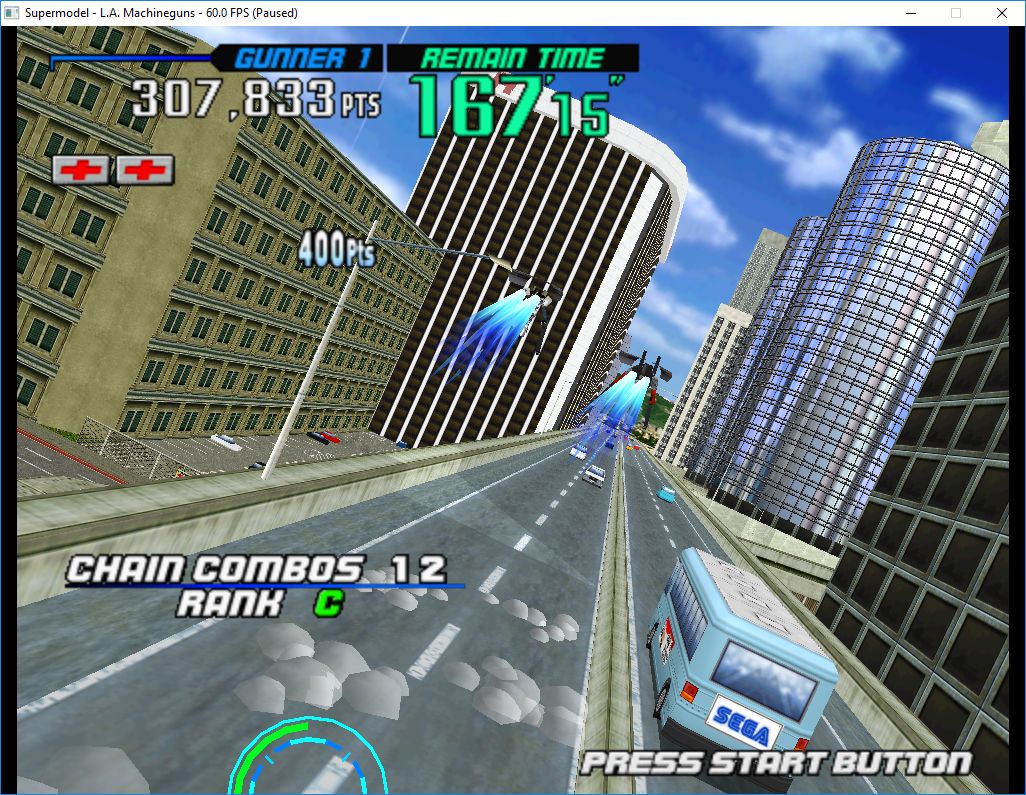
Le premier émulateur de Sega Model 3 créé par Bart Trzynadlowski, Ville Linde et Stefano Teso dans sa version de développement (voir ici) [source].
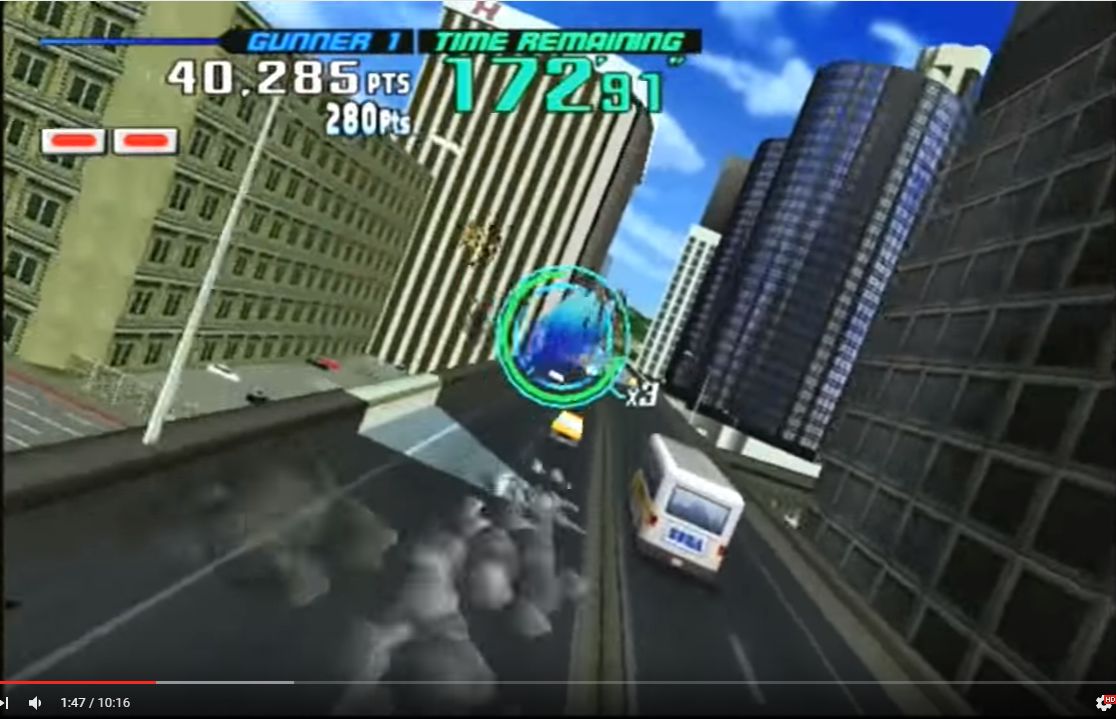
 
supermodel_actual

Wii version


supermodel_incorrectSupermodel (incorrect)


supermodel_vertexSupermodel with fixed shading

 
Les changements:
– change scroll fog logic to parse the lower priority viewports first

– implement scroll fog, fixes a tonne of missing fx

– Parse out scrollfog value used for blending over the 2d background.

– Fix scenes with missing fog in ocean hunter. The game was passing negative fog densities. The sign seems to be ignored by the model 3.

– same fix for legacy engine

– our scratch mem must match correct max texture size

– Fix the sky in advanced stage in Dirt Devils. It uses a massive (for 1998 :p) 1024×256 texture.

– Support multiple microTextures, fixes crazy texturing in sega ski champ. I’m assuming microtextures are always located on the other memory bank to the base texture. This logic seems to work for all our games anyway.


Télécharger SuperModel WIP (x86/x64) v0.3a r494 (1,6 Mo)

Site Officiel

En savoir plus…

La dernière version béta publique de l’excellent WinUAE, l’émulateur Commodore Amiga. La traduction est signée Tradu-France.
 

winuae


– Added generic Z2/Z3 autoconfig support to expansion.cpp. Previously each expansion type needed own separate autoconfig handling.
– Ariadne II added but not yet working. Drivers require working 9346 EEPROM chip. (RTL8029 is NE2000 clone with some extra features)
– Any archive mounted as a harddrive: skip files with zero length file names.
– LZX archive mounted as a harddrive: archives inside LZX archive didn’t always unpack and zero size files failed to open.
– Genlock custom video file, capture device and image file support fully implemented. GUI support added. Uses obsolete DirectShow SampleGrabber method which is not necessarily supported with all video files/capture devices. Image support requires png image files. Scaling is simple integer scaling. Genlock display changes to blue if image, video or capture device fails to open. Capture option uses default capture device. You may get few seconds of blue genlock screen before capture/video initializes fully. Maximum pointlessness feature level reached!
– uaesnd updates. It can play sound for the first time.
– Test compilation with Visual Studio 15 Preview 5.


Télécharger WinUAE (Public Beta) [32 bits] v6.1.0 Beta 23 (5.3 Mo)

Télécharger WinUAE (Public Beta) [64 bits] v6.1.0 Beta 23 (8.5 Mo)

Télécharger WinUAE (Public Beta) [32 bits] v6.1.0 Beta 23 FR (5.4 Mo)

Télécharger WinUAE (Public Beta) [64 bits] v6.1.0 Beta 23 FR (8.5 Mo)

Site Officiel

En savoir plus…

Atari800 est un émulateur Atari 800 (hum, c’était dur) mais aussi Atari XL/XE/5200. Passer en open source, il est maintenant développé par pas mal de personnes en provenance du net.


Télécharger Atari800 (Java) v4.0.0 (1.2 Mo)

Télécharger Atari800 (Dos) v4.0.0 (905 Ko)

Télécharger Atari800 (32 bits) v7.2.1 (2.8 Mo)

Site Officiel

En savoir plus…

Il s’agit d’un wrapper pour MAME (en ligne de commande) qui télécharge automatiquement les roms (à partir des softwarelist) depuis archive.org si celles-ci ne sont pas présentes dans le rompath. L’usage de la ligne de commande est identique à MAME original, il faut juste préciser ou se situe son exécutable. Il vous faudra une version de JAVA installée sur votre ordinateur.


iamame


– Upgraded the Windows executable generator « Launch4J Maven Plugin » dependency to latest version (1.7.12) as an attempt to fix reported Avast antivirus flagging ia-mame.exe as a threat. If the issue persist let me now
– Added support for MESS 0.149 CHD: Vsmile CD collection (to be used with « vsmilpro » driver)
– Added support for MESS 0.149 CHD: Mac HDD collection (to be used with « macclasc » driver)
– Added support for MESS 0.149 CHD: 3DO M2 collection (to be used with « 3do_m2 » driver)
– Added a « -noexecmame » option to prevent ia-mame to launch mame after its own execution.
– Now discover the Mame runtime command line options scheme dynamically instead of storing a static list internally. This greatly improves the accuracy of options regardless of the Mame version.
– Now support software list softwares clones (see issue #4)
– Fixed: Use Uppercase letters on command line throws exception (allowed by Mame) (see issue #5)
– Fixed: ia-mame does not find the Machine data on the XML using Mame < 0.16[2|1] because "machine" tag was previously named "game", which now makes ia-mame support olders versions of Mame (tested with 0.149) - Handle software having many cd-rom/chd parts - 7z support implemented


Télécharger ia-mame v0.9 (1.6 Mo)

Site Officiel

En savoir plus…

XRoar est un émulateur Dragon32/64 mais aussi Tandy CoCo.


xroar
 
– Worked around initialisation bug in GCC 4
– Worked around accept() and recv() seemingly not being cancellation points in MinGW pthreads (XRoar failed to shut down if GDB was attached)
– Fix building without GDB stub support [Stefan Haubenthal]
– Fix SDL1.2 build from tar.gz [Stefan Haubenthal]
– Fix MPI with DOS attached [pser1]
– Pass FIRQ through MPI correctly [pser1]


Télécharger XRoar (x86) v1.13.1 (2.6 Mo)

Télécharger XRoar (x64) v1.13.1 (2.5 Mo)

Site Officiel

En savoir plus…

GameEx est une interface graphique pour vos émulateurs. Elle sert également de lecteur vidéo, DVD et CD.


Certaines fonctionnalités de GameEx :
– lit aussi les fichiers audio.
– supporte les affichages LCD/VFD, ArcadeVGA.
– peut adapter son affichage pour les écrans larges, elle peut aussi tourner l’affichage de 90° (vertical).
– peut être contrôlée à distance, ou par une manette ou par la souris uniquement.
– supporte les contrôleurs arcade : HotRod, X-Arcade, SlikStik et IPAC.
– est compatible avec les interfaces entre PC et cartes arcade : U360, I-PAC, J-PAC.
– intègre un Jukebox qui supporte les fichiers ogg, mp3, wma, m4a, et flac.
– Les musiques peuvent être lues et changées pendant que vous êtes en train de jouer.


Ce frontend est disponible en version gratuite & payante (17 $) incluant de nombreuses autres fonctions.


Télécharger GameEx v14.58 (41,1 Mo)

Site Officiel

En savoir plus…

Applewin est un excellent émulateur Apple IIe pour Windows et développé par Tom Charlesworth. Applewin est basé sur la version originale 1.10.4 d’Oliver Schmidt.

 
applewin


Télécharger Applewin v1.26.0.5 (1,1 Mo)

Site Officiel

En savoir plus…

Il s’agit d’un émulateur de NES créé par Myles Johnston, permettant entre autres le remplacement de sprites et autres graphismes. On sait que peu de chose sur cet ému excepté qu’il utilise un autre émulateur en base et le mix avec Unity3D, à approfondir donc.


Télécharger RxNES v3.021 (34.4 Mo)

Site Officiel

En savoir plus…

Il s’agit d’un frontend pour Mednafen dédié uniquement à la Sega Saturn.


Fixes in Version 1.1:
=====================
– Fixed an issue when choosing a CD image, that’s already open by another application.
– Added « Fullscreen mode » option.
– Fixed definition of scanlines options.
– Added new system messages.
– Added blocking popup menu item « Clear list », if current games list is empty.
– Russian language support.
– Skins support.
 
Main features:
==============
– Support for the list of games.
– Support the profiles for each game (loading / saving).
– Ability to run games with the keeping pixel aspect ratio and widescreen (16:9).
– Multilanguage support (English / Russian). Other languages can be added by editing the external resources.
– Skins support.


Télécharger MedSat v1.1 (6.2 Mo)

Site Officiel

En savoir plus…

Il s’agit d’une branche de l’émulateur de Microsoft X-Box CXBX, apportant certains modifications et améliorations diverses.


cxbx
 
Branche Darkrush3760
Branche LukeUsher

Télécharger CXBX Reloaded (2016/10/06) (908,7 Ko)

En savoir plus…

Un émulateur de GameBoy Advance écrit en langage C par Jeffrey Pfau (endrift) et basé (sensiblement) sur GBA.js et qui a comme objectif d’être un émulateur de haute qualité. Disponible pour Windows (Vista et +), Linux et Mac OSX.
mgba


Bugfixes:

  • Core: Fix importing save games as read-only
  • FFmpeg: Fix encoding AAC
  • GB: Fix invalid STOP behavior on Game Boy Color
  • GB: Initialize audio properly
  • GB: Properly clear KEY1 bit 0 when switching speeds
  • GB: Properly unload save files when unloading a ROM
  • GB, GBA: Fix emulator hardlocking when halting with IRQs off
  • GB MBC: Fix MBC7 when size is incorrectly specified
  • GB MBC: Fix RTC access when no save file is loaded
  • GB SIO: Don’t auto-clock external shift clock
  • GB Video: Setting LYC=LY during mode 2 should trigger an IRQ
  • GB Video: Fix video frames getting missed when LCDC is off
  • GB Video: Clear screen when LCDC is off
  • GBA Cheats: Fix holding onto pointers that may get invalidated
  • GBA Cheats: Fix key-activated CodeBreaker cheats
  • GBA Cheats: Fix uninitialized memory getting freed when saving
  • GBA Hardware: Improve Game Boy Player rumble behavior
  • GBA Memory: Fix several unused I/O register read values
  • GBA Savedata: Fix loading savestates with 512Mb Flash saves
  • LR35902: Fix events running with the wrong cycle active
  • Qt: Fix “close” button on Overrides view
  • Qt: Fix saving overrides
  • Qt: Fix directory set unloading when replacing the ROM
  • Qt: Fix patch loading
  • Qt: Fix crash when saving an override if a game isn’t loaded
  • Qt: Fix showing default display driver as OpenGL (force 1.x)
  • SDL: Attach rumble in SDL frontend
  • Util: Fix PNG identification on files too small to be a PNG

 
Misc:

  • All: Only update version info if needed
  • All: Split out install locations for Libretro and OpenEmu
  • FFmpeg: Encoding cleanup
  • GB: Reset active region when reloading ROM
  • GB Memory: Initialize RAM pattern for GBC
  • GB Video: Improved video timings
  • Qt: Manage window sizes slightly better
  • Qt: Remember scale option independent of core dimensions


Télécharger mGBA v0.5.1 (9,0 Mo)

Site Officiel

En savoir plus…

La dernière version béta publique de l’excellent WinUAE, l’émulateur Commodore Amiga. La traduction est signée Tradu-France.
 

winuae


– OpalVision emulation. Not fully supported yet, King of Karate does not work but for example OpalPaint mostly work with some glitches.
– ColorBurst emulation, partial. Only existing software seems to be « CB Paint Update » in TOSEC. ColorBurst is functionally nearly identical to OpalVision but has less features. Note: that most test programs are buggy and very CPU speed sensitive, the slower the CPU the less you see..
– It was not possible to edit directory harddrive volume or device name.
– Current visible RTG display state was not fully re-initialized when system was reset.
– Increased GUI max size limits to support very high resolution screens.
– Some accelerator boards (for example CSMK1) mapped 128k board to Z2 autoconfig space when correct size was 64k. Caused validation halt error and/or reset loop if it wasn’t last Z2 board.


Télécharger WinUAE (Public Beta) [32 bits] v6.1.0 Beta 23 (5.3 Mo)

Télécharger WinUAE (Public Beta) [64 bits] v6.1.0 Beta 23 (8.5 Mo)

Télécharger WinUAE (Public Beta) [32 bits] v6.1.0 Beta 23 FR (5.4 Mo)

Télécharger WinUAE (Public Beta) [64 bits] v6.1.0 Beta 23 FR (8.5 Mo)

Site Officiel

En savoir plus…


https://getourbonus.com/fr/accueil

https://www.romspedia.com/