Ootake est un émulateur PC-Engine en provenance du Japon et basé sur PC2E, tournant sous Windows 2000, XP, Vista, 7, 8 et 10. Il nécessite Direct X v9.0c au minimum.


ootake
 
– At the top of the « Input » menu, the current pad connection status is
displayed on one line, such as « Connect [x-Button Pad] ». If you place the
mouse cursor over it, the menu for changing the connection pad appears.
– « 3-Button Pad (I+II) » added to the pad selection of the above menu. If
this is selected, pressing [IIIr] button will result in pressing [I]+[II]
button at the same time. In addition, [IIIs] button becomes [RUN] button.
It can be used for jumping of [I]+[II] in « Double Dragon II », and for
simultaneous bullet shooting of [I]+[II] in « Super Darius » and « Darius
Plus », and so on.
– [Alt] key can be assigned to PCE controller setting. Therefore, when you
want to open the menu, please use [Esc] key, the button by « CPU->
Configure Pause Button » menu, or mouse click.
Also, when [Shift] key is pressed five times, the fixed key setting dialog
will not be displayed. As a result, [Shift] key can be assigned to PCE
controller setting.
– When setting PCE controller from the [Setting] button (lower left of the
initial green screen), PCE controllers #2-#5 are initialized (keys not
set). If your controller setting is not stable, please set it here.
– The number of save states can be used to a maximum of 80.
(increased from 50 to 80)
– In the visual scene of the end of « Tenshi no Uta II », the problem of
stopping was solved (occurred in recent version. adjustment of CD access
timing). I was able to check the operation without problem until ending
with this version.
– When entering the first tower in « Tenshi no Uta II », the problem that
large noise exists on the head of some audio tracks (* this noises exists
with a real PC Engine) was solved. In Ootake, this obvious unnecessary
noise is cut and played cleanly.
* This problem is probably caused by a CD-ROM production mistake at that
time (the sound of the end of the previous track is mixed at the
beginning of the track).
In « Tenshi no Uta II », « Rayxanber II », « Eikan ha Kimini » and « Ginga
Fukei Densetsu Sapphire », this problem happens. Ootake solves it. If you
uncheck « Setting-> Improve-> Cut Inaccurate CD-DA Track Head Noise »
menu, this solving will be invalid (noise appear like real PC Engine).
– When specifying « .cue file » as an argument from the command prompt, the
bug that could not be opened (occurred from v2.81) has been fixed.
– Additionally, a detailed part has been improved and corrected.
+ Thank you very much for your reporting and encouragement. In this version,
there are few changes and the source change is slight. For a while (at
least for the Japanese autumn horse racing season), I will take a break.
I am pleased if this v2.86 becomes a stable version. But, if urgent
trouble or things worked on the previous version did not work, I will fix
it soon and update it.


Télécharger Ootake (2K/XP/Vista/7/8/10) v2.87 (1,2 Mo)

Site Officiel

En savoir plus…

Une interface graphique pour Cemu permettant de télécharger les jaquettes des jeux.


Les changements:
– New GUI being deployed (not finalized).
– Addition of the French translation.
– Code optimization and bug fixes.


Télécharger Cemu GUI v1.0.1.9 (17.3 Mo)

Site Officiel

En savoir plus…

MicroM8 (ex Octalyzer) est un émulateur d’Apple 2 multi-plateformes.


Télécharger MicroM8 (x86) (2019/12/16) (18.2 Mo)

Télécharger MicroM8 (x64) (2019/12/16) (18.8 Mo)

Site Officiel

En savoir plus…

Un émulateur de Sonclair Zx Spectrum (Z80 128K (Pentagon) AY/YM, Beeper, Beta Disk, Tape, Kempston Joystick/Mouse, Snapshots) basé sur UnrealSpeccy v0.37.3 par SMT. Créé pour être porté sur un maximum de plateforme (Windows, Linux, Mac, Symbian, WinMobile, Dingoo…).

 
– SDL2 with GLESv2 (ANGLE) release
– kempston mouse emulation
– joystick (gamepad) support
– web sources support
– full screen option
– new zooming options
– black-and-white option
– GigaScreen video mode support option
– RZX archive web source repaired


Télécharger UnrealSpeccy Portable v0.0.78.1 (2.5 Mo)

Site Officiel

En savoir plus…

Il s’agit d’un fork de Higan v094 créé par Julian Goracke. Builds compilés par notre ami Lo.
 
L’idée derrière cette version est de préserver et de séparer de Higan la partie Super Nintendo qui est presque parfaite de façon à proposer un émulateur dit « standalone » (émulateur autonome à système unique, sans émulation d’autres machines risquant d’en altérer le code). Tous les modules autre que la partie Super Nintendo ont donc été supprimés, la seule exception est le BS-X Satellaview qui est étroitement lié à la machine originale.


v1.01 WIP
– Modified « About » information located in the UI Config-Advanced tab
– The readme.txt and the changelog.txt are now two separate files.
– Enabled « StartFullScreen » by default in « settings.bml », delete current
« settings.bml » = %AppData%\xSnes to take effect! Doesn’t work the way
it should directly from UI library. Drag & Drop « Cartridge Folder »
to xSnes.exe only. Added to give example of current state.
– Replaced the game library golden diamond shape icon with a little
Super Nintendo controller icon.


Télécharger xSNES (x86) v1.01 WIP (1.3 Mo)

Télécharger xSNES (x64) v1.01 WIP (1.3 Mo)

Site Officiel

En savoir plus…

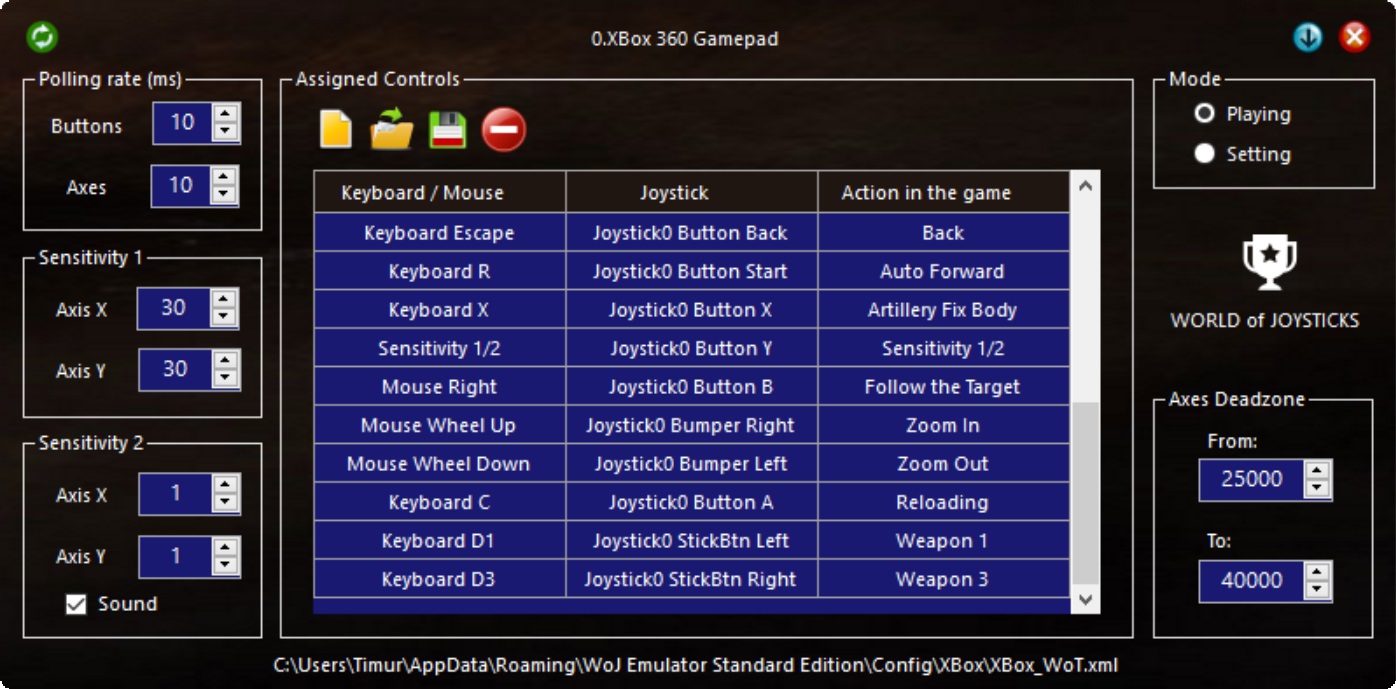
World Of Joysticks est un émulateur de clavier/souris pour les périphériques compatibles XInputs et DirectInput (joystick/manette/souris).
Une version Premium, pour XInput uniquement, est également disponible en version complète mais moyennant finance (5$). Elle propose d’autres possibilités et permet la gestion des manettes de Playstation 4 (DS4).


WoJ (XInput Emulator) est quant à lui un émulateur de manette Xbox 360 destiné uniquement aux périphériques compatibles DirectInput.


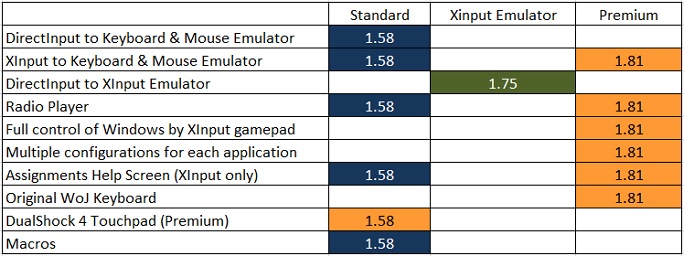
Différence entre les versions:


Télécharger WoJ Emulator (STD) [Keyboard and Mouse Emulator] v1.74 (3.8 Mo)

Télécharger WoJ Emulator (Premium) [Trial] v1.811 (2.7 Mo)

Télécharger WoJ Emulator (XInput Emulator) v2.73 (26.4 Mo)

Site Officiel

En savoir plus…

Un émulateur de PSP écrit en Java. Codé par Mad et Shadow (PCSX2) et rejoint par Wrayal, Fiveofhearts, Hlide et Dreampeppers99. Il émule les jeux commerciaux mais nécessite une puissante configuration.
 
jpcsp
 
Liste de jeux compatibles.
Site de développement du projet.
Builds SVN automatiques (alternative).
 

Télécharger JPcsp (x86) v0.7 rev 0318d15e (26.4 Mo)

Télécharger JPcsp (x64) v0.7 rev 00ac4d6 (29.1 Mo)

Site Officiel

En savoir plus…

Il s’agit d’un excellent émulateur de GameBoy/Color sous Windows.


– Added second joystick support to VGB-Windows.
– Added multiple monitor support to VGB-Windows.
– Fixed disappearing window in VGB-Windows.
– Fixed best full-screen mode detection in VGB-Windows.
– Fixed window flicker that appeared after recent Win10 updates.
– Fixed DirectInput joysticks support in VGB-Windows.
– Made directional pads work on XBox gamepads.
– Switched VGB-Linux to using PulseAudio sound.
– Updated old PulseAudio driver for 64bit Linux.


Télécharger VGB (Windows) v6.0 (207 Ko)

Télécharger VGB (Français) v6.0 (224 Ko)

Site Officiel

En savoir plus…

Un émulateur Sinclair QL shareware tournant sous Windows 9x/NT/2X/XP/Vista/7/8/10.


– Added support for « mdump version 2 » microdrive images.
– Option to use the ROM microdrive driver to access microdrive images (Sinclair ROMs only). Enabled by default. Increases compatibility, but access is slower compared to the Q-emuLator driver – the emulated tape speed is about twice that of a real cartridge.
– Take QL display screenshots by pressing Ctrl+F11. Screenshots are saved as a bitmap (.BMP file extension) at a fixed 512 x 256 resolution on the computer’s desktop.
– Changed QL sound timbre to match the original.
– Improved QLay microdrive images handling to be compatible with images produced by the MDIDriver_cde driver.
– 1% faster CPU emulation.
– Don’t stop emulation on Fxxx instructions. (Compatibility improvement for some buggy QL programs.)
– File system improvements and bug fixes:
+ Added support for floppy images where both sides are formatted but QDOS only uses a single side.
+ Escape * and ? filename characters when writing to Windows directories.
+ Correct the drive allocation sizes returned by IOF.XINF.
+ Allow some raw reads of partial floppy disk sectors.
+ ZIP file driver when the « level 2 » driver is enabled: Avoid opening an incorrect file when the requested file doesn’t exist but the filename is the prefix of the name of an existing file and the first character after the prefix is ‘_’.
+ Floppy image driver: Ensure unused parts of blocks are zeroed in all cases.
 
Other bug fixes:
– Improved Caps Lock handling and Caps Lock state consistency.
– Fixed spurious error message after unregistering application.


Télécharger Q-emuLator v4.0.4 (4.1 Mo)

Site Officiel

En savoir plus…

Voici les derniers émulateurs (et aussi les plus fréquemment mis à jour) en cours de développements.


VDosplus: Emulateur de DOS.

Citra: Emulateur de 3DS.

Decaf: Emulateur de WiiU.

RPCS3: Emulateur de Playstation 3.

Redream: Emulateur de Sega Dreamcast.

CXBX: Emulateur de Microsoft X-Box.

Xenia: Emulateur de Microsoft X-Box 360.

Cen64: Emulateur de Nintendo 64 Préliminaire.


Télécharger vDosPlus (2018/03/01) (1.8 Mo)

Télécharger Citra (Final build) (2024/03/07) (140 Mo)

Télécharger Decaf-Emu Build 231109 (40.8 Mo)

Télécharger RPCS3 (WIP) v0.0.43 Alpha (2026/11/16) (35.5 Mo)

Télécharger Redream v1.5.0.1239 (3.1 Mo)

Télécharger Xenia v1.0.2844 (2026/11/16) (3.9 Mo)

Télécharger CXBX Reloaded v0.1.0 (1.3 Mo)

Télécharger Cen64 (WIP) (2022/10/02) (2.6 Mo)

Télécharger Cen64 (Debugger) r2015.01.18 + (DEV) r2017.04.23 (3.4 Mo)

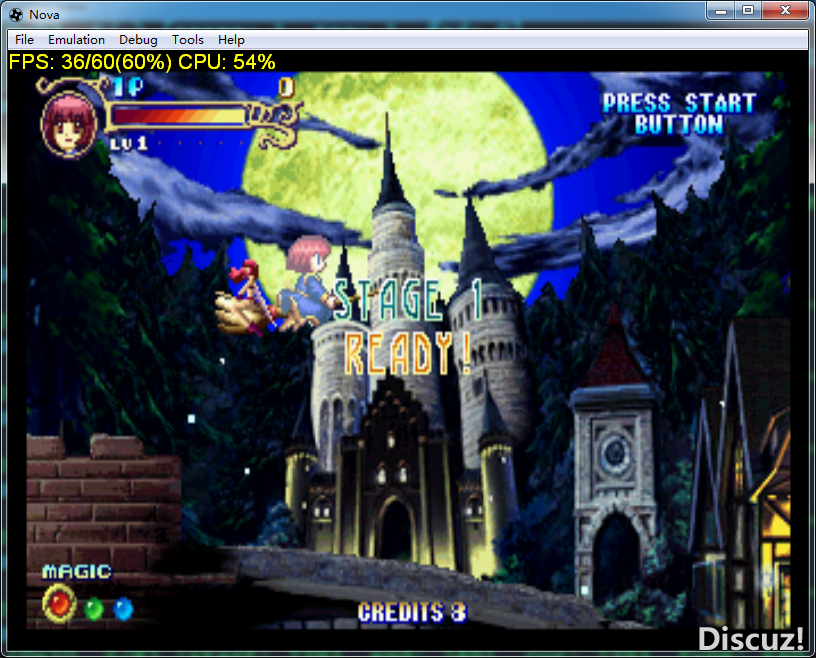
Créé par Steve Kwok en à peine une année (!), cet émulateur de Sega Saturn appelé Nova est capable d’exécuter plusieurs jeux commerciaux, mais il est encore à ses débuts. Nova est écrit en C ++ 11, et a comme objectif d’atteindre le même niveau que les autres émulateurs de console domestique.
 
Nova a donc été écrit à partir de zéro et en UNE SEULE ANNÉE, mais son écriture est inséparable de la recherche et contribution de nombreux auteurs d’émulateurs.
 
Nova ne prend actuellement pas en charge les jeux à partir du lecteur de CD-Rom, mais en revanche il lit les formats d’images de CD suivant: .cue, .mds, .ccd, .bin.


Changement de la 0.1.5:
– MISC: Added configuration file.
– MISC: Implemented I18N.
– MISC: Rewrote the CUE parser.
– MISC: Implemented startup from command line.
– MISC: Implemented dragging and dropping files.

– SH2: Improved address mapping and mirroring.
– UI: Improved the user interface.

– VDP1: Fixed Jump Call/Return.
– M68K: Fixed TAS instruction, 3D Baseball is in-game (Not playable due to graphic issues).

 
La traduction est assurée par Tradu-France, à noter qu’une liste de compatibilité est disponible ici.


Télécharger Nova v0.7 (1.9 Mo)

Télécharger Nova (Français) v0.6 (697 Ko)

Site Officiel

En savoir plus…

AmiArcadia est le port amélioré de Tunix2001 ex ‘Win Arcadia 2001’ (par Gavin Turner) pour Amiga. Ecrit par James Jacobs et Gavin Turner, cette version est en fait le port Windows du port Amiga (un backport) !


Il émule les consoles basé sur la famille des Arcadia2001 : Bandai, Emerson, Grandstand, Hanimex, Intervision, Leisure-Vision, Leonardo, MPT-03, Ormatu, Palladium, Poppy, Robdajet, Rowtron, Tele-Fever, Tempest, Tryom, Tunix, etc.
 
Il supporte aussi l’Interton VC 4000 et l’Elektor TV Games Computer. Il nécessite Windows 9x/ME/NT/2000/XP et tourne aussi sous Vista/8/10.
 

Télécharger Win Arcadia (Ami Arcadia) v36.8 (9.9 Mo)

Site Officiel


https://getourbonus.com/fr/accueil

https://www.romspedia.com/