Créé par BUT, Emuman, K&K, Sword et Xvi. Mame Plus! est sans problème la meilleure version de Mame pour Windows, avec ou sans frontend. Support multi-langage, tirs automatiques, option anti-sortie, interface interne améliorée, interface de gestion des roms améliorée, effets vidéos supplémentaires (2xSai, RGB, hq3x, 2xPM…), meilleure gestion des contrôles, support de la NeoGeo en mode console, il regroupe également plein de correctifs et de drivers additionnels…


Changements :

r5213
fix tw lang typo.
———————
r5212
fixed ui translation *update tp text
———————
r5211
*cleanup


Site source n°1. Site source n°2. Site source n°3.

Télécharger Mame/MameUI Plus! (x86) v0.158 r5213 (53.3 Mo)

Télécharger Mame/MameUI Plus! (x64) v0.168 r5272 (32.8 Mo)

Site Officiel

En savoir plus…

Une petite boutade car nous avons déjà des visiteurs venus de tous les horizons.


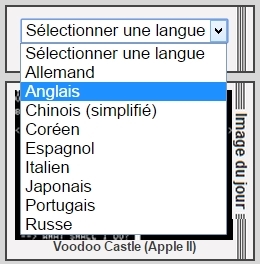
Une news dédiée à nos visiteurs étrangers.  Vous disposez désormais d’un module ‘Google’ pour traduire automatiquement votre site préféré. Il se situe sur la partie droite, au-dessus de l’image du jour.

Vous n’aurez plus qu’à garder le lien traduit, en favori ! Enjoy !
(Pour revenir au français, il vous suffira de cliquer sur « Afficher l’original » sur la barre du haut de google)


A news dedicated to our foreign visitors. You now have a Google mod to automatically translate your favorite site. It is located on the right side, above the image of the day.

You will just have to keep the translated link in bookmarks ! Enjoy !


eflangues1eflangues2


Vous n’avez désormais plus d’excuses pour ne plus suivre l’actualité de l’émulation sur notre site ! N’hésitez pas à partager le lien !^^


You no longer have any excuses to not follow the news of emulators on our site ! Don’t hesitate to share the traduced link !^^


Site Officiel

Une petite news pour vous signaler que Dolphin cartonne de plus en plus, et le dernier rapport concernant les améliorations est là pour le confirmer.


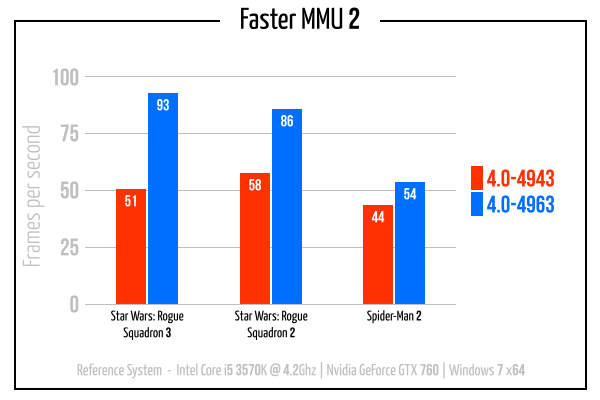
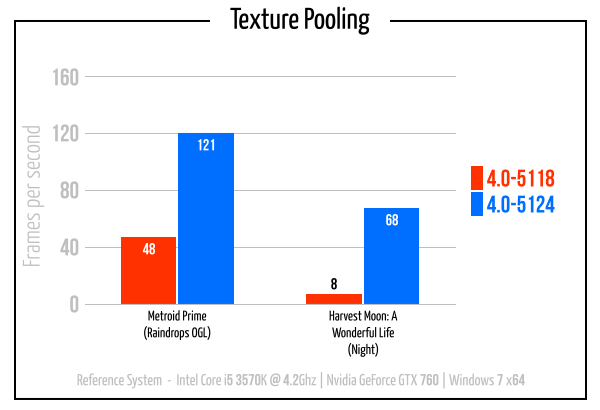
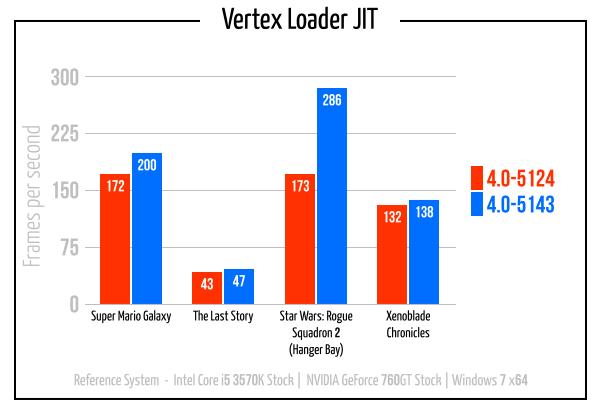
En effet, énormément d’améliorations et de corrections ont été apportées à la dernière version de développement. Les quelques graphiques, pour ne parler que d’eux, sont assez explicites :


fastermmu2TexturePoolingPerf

VertexLoaderJITPerf


Et cela n’est qu’une comparaison qu’entre 2 builds de développement tous deux déjà largement plus avancés que la dernière version stable de Dolphin v4.0.2 ! Imaginez donc le changement entre la dernière version stable et la dernière version de dev !


Par ailleurs, si justement vous voulez tester la dernière version de développement il vous suffit d’aller sur ce lien et de tester à votre guise (n’oubliez pas non plus qu’il y a une version de Dolphin basée sur le système d’arcade Tri-Force qui est à tester sur ce lien).


En attendant je vous invite à découvrir les gros changements qu’inclura la prochaine version officielle de cet incroyable émulateur de Nintendo GameCube/Wii : Dolphin.


Site Officiel

2015 sera l’année de l’émulation de la 3DS (aux cotés de PPSSPP et de l’indétrônable Dolphin qui tous deux cartonnent).


En effet de très gros progrès ont été réalisés et quelques jeux commencent à être jouables (très lentement et sans le son pour le moment), c’est le cas de Cave Story :


Les builds GIT ne prennent pas encore en compte ces améliorations qui concernent une autre branche du développement, mais rassurez-vous, cela ne saurait tarder 🙂


Site Officiel

Un gestionnaire de roms avec une interface aussi claire que Romcenter et axé sur la simplicité avec un nombre limité de fonctions. Une référence désormais.

L’immense avantage de ce manager est de pouvoir scanner n’importe quel repertoire de roms , en VRAC & ensuite -en fonction de ce que vous avez comme dats- de les ranger et replacer automatiquement. (très utile si vous avez des tonnes de dats (TOSEC). Il vous permet réellement de collectionner des centaines de collections avec un gain de temps considérable par rapport aux autres managers. Il convertit également les zips au format Torrentzip afin de faciliter le partage à travers les fichiers torrent.


romvault2.1

 
GordonJ informe également de la nécessité de s’enregistrer par email, les « crash reports » sont ainsi envoyés automatiquement, ce qui permet à celui-ci de travailler dessus et résoudre les problèmes. Astucieux !


Télécharger RomVault v2.2.1 (894.9 Ko)

Site Officiel

En savoir plus…

XEiJ (X68000 emulator in Java) est un émulateur de Sharp x68000 écrit en Java.


Changements :

– Position of the window, the disk image file name, and then restore the next time you start to save, such as the contents of the SRAM to at the end of the configuration file.
– Configuration file when it is started from the command line, when the Windows% APPDATA% / XEiJ / XEiJ.ini, everything else is ~ / XEiJ.ini or ./XEiJ.ini.
– The Web Storage when the Java applet, when the Java Web Start to save the settings by using the PersistenceService to a local file.
– I’ve updated the pattern test of display mode test. When are laid in background eliminates the disturbing number 0 of number, mark that indicates the reversal is small, brighten the front of the sprite, and dimmed the back of the sprite and background.
– It is possible to avoid a bug that is in the debugger db.x and source code debugger scd.x « input accumulated in the receive buffer when the remote console mode is missing every other character », with the terminal to transfer input a line-by-line I’ve improved compatibility.
– I have to be able to turn OFF the audio output speed control. Please be people to OFF that pitch from becoming unstable bad feeling than sound is interrupted.
– I’ve updated the version of Java SE to 8u31 (1.8.0_31) or more to request. Java ™ SE Development Kit 8, Update 31 Release Notes [www.oracle.com]


Télécharger XEiJ v0.15.01.29 (3,2 Mo)

Site Officiel

En savoir plus…

Residual, un projet voisin de la machine virtuelle ScummVM, vise à fournir une implémentation libre du moteur GrimE par le biais de la rétro-ingénierie. GrimE pour Grim Edit est un moteur de jeu développé par LucasArts. Il est le descendant de SCUMM et est destiné aux jeux d’aventure graphique en 3D. Il a servi notamment pour Grim Fandango et Escape from Monkey Island. Il utilise le langage de script open source Lua.


Version 0.2.1 is a bugfix release for 0.2.0. It fixes a crash when using subtitles in the Polish version of Myst III, and an IRIX port was added.


Télécharger ResidualVM v0.2.1 (3,4 Mo)

Site Officiel

En savoir plus…

Un « autre » émulateur de NES, tout simplement !


Changements :

– FULL SCREEN: Windows Key is now disabled. Combinations « alt+tab » and « ctl+esc » put the emulator in windowed mode. This is done for Fullscreen issues, so the emu doesn’thang.
– APU: 1 – New Sweep Unit code. Games like « Excitebike » now listen well. 2 – Passed more Blargg’s tests.
– Passed more Vblank/NMI Blargg’s tests.


Télécharger Yanese (x86) v0.63 (424.5 Ko)

Télécharger Yanese (x64) v0.89 (490 Ko)

Site Officiel

En savoir plus…

Scuore’s Mame Snap Collection est comme son nom l’indique une collection de screenshots pour Mame. Elle est gérée par Scuore du site Emulab.it.


scuore


Télécharger Scuore’s Mame Snap Collection v0.158 (140,1 Mo)

Site Officiel

En savoir plus…

La dernière version béta publique de l’excellent WinUAE, l’émulateur Commodore Amiga.


– Fixed infinite recursion (and stack overflow) when pause when uncaptered is enabled and display mode changes.
– Added AlfaPower/AT-BUS 508/2008/AlfaPower Plus IDE controller.
– Very simple low level SCSI emulator added to support Apollo software bit-banging SCSI.
– Added Apollo IDE/SCSI board (AT500/AT2008) and Apollo 1240/1260 accelerator boards with SCSI.
– Added GVP Series I SCSI controller.
– Added GVP A530 accelerator. Uses same boot ROM as GVP Series II SCSI controllers. (Uses GVP #2 SCSI slot)
– Added Masoboshi MC-702 IDE+SCSI controller.
– Toccata CD audio (AUX1) volume control added.
– Another Restart related crash fix.
– Added « framecounter » float shader variable.
– Paths panel Save All button now creates zip file that contains winuaebootlog.txt, winuaelog.txt and config file.
– Quickstart A1200 + accelerator board, A500+ and A600 with expansion never had RTC. (Wrong order of functions..)
– Possible clock sync option small stability improvement.
– Fixed memory corruption if directory harddrive with empty name was selected.

SCSI/IDE controller notes:

GVP Series I:
– Not true DMA, DMA transfers from WD to/from onboard SRAM buffer. CPU needed to read/write buffer ram.
– Driver (scsidev.device) is very old and has (many?) limits, for example only OFS and FFS partitions mount correctly.

AlfaPower/AT-Bus 508/2008/AlfaPower Plus:
– AlfaPower: no hardware interrupt (!!), AlfaPower Plus implements interrupt support.
– v6.10 ROM (Last that works with non-Plus hardware?) and v8.3 that requires Plus.

Apollo:
– All Apollo variants seems to have identical SCSI hardware. (Accelerators and 500/2000)
– SCSI is working. IDE is not fully tested, only AT500/AT2000 have full IDE driver. For some reason Apollo 1240/1260 driver still have short « is there any IDE drives » detection code remaining.
– « Software » SCSI, hardware can only do bus arbitration in hardware, everything else is done by bit-banging SCSI IO lines. Both SCSI and IDE also use non-DMA data transfers.
– 128k Apollo ROMs (68060 f00000 ROM code and SCSI driver) are currrently supported. Non-accelerator (AT500/AT2000) ROMs don’t seem to be available = can’t test IDE emulation.
– 128k v5.60 ROM added. Seems to be last 1240/1260 ROM with SCSI.

Masoboshi:
– Unusual design, SCSI supports both PIO and DMA, software selectable.
– IDE and SCSI (sort of) in non-DMA mode working.
– SCSI writes are not working correctly, do not use! DMA controller not yet emulated.
– « 2.201 » (device version) boot ROM added. ROM image does not have any version numbers or dates.
– IDE driver uses CHS addressing and seems to have problems with 2G drives, actual limit may be smaller. It tries to access first unavailable block number at the end of drive. (Driver flashes red background color if drive returns error status)

Most popular SCSI and IDE controllers are now implemented.
Remaining IDE boards that I’d like to support:
– Roctec RocHard (Need boot ROM)
– AdIDE 40/44 (Need boot ROM)
Remaining SCSI boards are 5380/53c80 based boards that need chip emulation first:
– All SupraDrives.
– Trumpcard 500/2000


Télécharger WinUAE (Public Beta) v3.1.0 Beta 7 (3,9 Mo)

Site Officiel

En savoir plus…

Très performant, PPSSPP est un émulateur de Sony PSP (pour Windows, Android et SDL) gratuit et libre écrit en C + + par Henrik Rydgard (très connu sous le pseudo de Ector, déjà auteur de l’émulateur de PSP Potemkin et surtout connu pour Dolphin, ayant également exercé sur nombre d’émulateurs Dreamcast).


Il traduit les instructions du processeur PSP directement dans du code optimisé pour machine x86, x64 et ARM en utilisant un compilateur JIT efficace.PPSSPP peut également fonctionner sur du matériel bas de gamme ainsi que sur certains smartphones et tablettes Android, aussi longtemps qu’il y aura un soutien pour OpenGL ES 2.0.


ppsspp


La liste de compatibilité ici
Cette archive inclut la version 32 et 64 bits.


Voici les nouveautés:

  • Many, many bug fixes in JIT and elsewhere, improving compatibility
  • Proper fix for Zenfone and related devices
  • Direct3D 9 supported as a rendering backend on Windows, helps on old GPUs and can be faster than OpenGL in many cases
  • You can now create specific configs per game
  • FPU rounding modes much better supported, fixes the Peace Walker boss that was undefeatable. NOTE: This breaks saves in Gods Eater – you must turn off the better rounding, load your save game, turn it on and save.
  • The JIT now uses SSE on x86, improving speed considerably. This does not affect ARM devices, that’s for the next version or two.
  • Improved audio output code on both Windows and Android, reducing audio latency on Windows and on some Android systems
  • FFMPEG upgraded, fixed some music hangs (« GHA phase shifts »)
  • Some Ad Hoc improvements, coldbird.net is now default adhoc server. Ad Hoc still unfinished and hard to use.
  • Graphics fixes: Bezier/spline drawing fixes, vertex position fixes, DanganRonpa on Adreno fixed, flat shading fixed, vertex cache improved, some PowerVR blockiness issues fixed, screen scaling filter added, Google Cardboard support
  • Simulate UMD speed better, fixing hangs in several games
  • More Atrac3 fixes, fixing hangs
  • Somewhat better disk full handling
  • Fixes to dynamic unloading of code, fixing problems in GEB and TRM 2/3
  • Updated to SDL2 where applicable (Linux, Mac)
  • Some new features, like analog/dpad-swap hotkey, graphics hack for Phantasy Star, show last bit of debug log in dev tools, etc
  • No more need for MSVCRT DLLs on Windows


Site de développement.
Site des builds automatiques WIP.


Télécharger PPSSPP v1.0 (14.4 Mo)

Site Officiel

En savoir plus…

Un très bon frontend pour MAME dont voici les principales caractéristiques :
– Options indépendantes par défaut concernant les Raster & jeux vectoriels
– Range les jeux favoris dans une liste séparée
– Possibilité de réglage individuel pour chaque jeu
– Trouve les changements de roms entre les versions de MAME
– Support de MAMEDiff (recquiert mamediff.exe)
– Nombreux filtres de jeux
– Support de NPlayers.ini & Catver.ini, des icones
– Support des informations de jeux (history.dat & mameinfo.dat)
– Répertoires alternatifs pour chaque répertoire dans le fichier mame.ini
– 2 répertoires de roms, vérifications des roms & samples pour les Bad sets
– Screen Shots
–  Possibilité de trouver et d’effacer les roms qui ne sont plus supportées par MAME.
–  Maintenance de vos répertoires MAME
–  Possibilité de désactiver Ctrl-Alt-Suppr, Ctrl-Esc, & la touche Windows pendant les séquences de jeux ss Win98


mameclassicmameclassic2


Changements :
New In This Version
(For M.A.M.E. version 0.158)
Added : Ability to display screenshots stored in the old M.A.M.E. structure (.png in the root of the Snap folder)
Added : More M.A.M.E. text files available under the Help pull-down menu
Added : Support for the 64-bit version of M.A.M.E.
Changed: Increased the size of the font


Télécharger MAME Classic v7.1.0 (1,9 Mo)

Site Officiel

En savoir plus…


https://getourbonus.com/fr/accueil

https://www.romspedia.com/