
Un très bon émulateur de Sega Saturn créé par Guillaume Duhamel, Theo Berkau et
Fabien Coulon et aidé par de multiples contributeurs. Il s’agit de la version 64 bits.


 general:
  – Removed Carbon, PSP, Wii and Windows ports
  – Removed autotools based build
  – Removed autopackage
  – mdf/mds images support (CyberWarriorX)
  – Safeguard to reject unsupported cue files (CyberWarriorX)
  – CD+G support (CyberWarriorX)
  – Improved « manual mode » (Guillaume)
  – Made it possible to build Yabause to ouput 16BPP (Guillaume)
  – Hat support in SDL joystick code (anonymous)
  – gdb stub (Guillaume)
  – Improved emulated bios (CyberWarriorX)
 sound:
  – Fixed most of the distorted cd audio issues with the scsp core (CyberWarriorX)
 video:
  – Improvements to the software renderer (transparency, frameskip,  (Guillaume)
 qt port:
  – Memory editor and search (CyberWarriorX)
  – Improvements to the SH2 debugger: Back trace support, step over, step out (CyberWarriorX)
  – Infinite loop tracking (CyberWarriorX)
  – Don’t restart emulation after every settings change (AmonX)
  – Made Yabause compilable with Qt5 and SDL2 (CyberWarriorX)
  – Log window can now be hidden (Guillaume)
  – Save and restore window position (Guillaume)
  – Can use .ini files in the application dir (Guillaume)
  – Mouse and 3D control pad support (CyberWarriorX)
  – Made drives and languages settings more user friendly (CyberWarriorX)
  – Changing to fullscreen now updates resolution too (CyberWarriorX)
  – Shortcuts editing (CyberWarriorX)
 

Télécharger Yabause (x64) v0.9.13 (7.6 Mo)

Site Officiel

En savoir plus…

fs-uae est un emulateur multi-plateformes (sur Linux , mac osX et windows) reprenant les travaux de WinUAE/E-UAE/PUAE en mettant l’accent sur l’émulation des jeux sur lecteur de disquette et CD-Rom. A noter que cette version propose un launcher dédié.

Une caractéristique unique est le jeu en ligne. Vous pouvez maintenant jouer à des jeux Amiga contre (ou avec) des amis sur Internet.

L’émulateur utilise le dernier code d’émulation Amiga WinUAE du projet et nécessite un ordinateur moyennement rapide avec accélération graphique (OpenGL) pour travailler. Une manette de jeu ou d’un joystick est recommandé, mais pas obligatoire (FS-UAE peut émuler une manette de jeu en utilisant les touches fléchées et Ctrl de droite / touches ALT).


Télécharger FS-UAE v2.3.15 Dev (29.9 Mo)

Site Officiel

En savoir plus…

Un émulateur multi-système écrit en Java et qui émule les machines suivantes: AC1, BCS3, C-80, HC900, Hübler/Evert-MC, Hübler-Grafik-MC, KC85/1, KC85/2, KC85/3, KC85/4, KC85/5, KC87, Kramer-MC, LC-80, LLC1, LLC2, PC/M, Poly-Computer 880, Schachcomputer SC2, SLC1, VCS80, Z9001, Z1013.


Télécharger JKCemu v0.9.3 (3.6 Mo)

Site Officiel

En savoir plus…

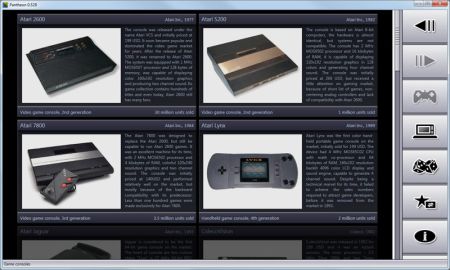
Pantheon
Superbe interface et très simple d’utilisation. Il s’agit d’un émulateur Acorn Atom, Acorn BBC Micro, Atari VCS 2600, Atari VCS 5200, Atari VCS 7800, Atari 8-bit, Atari Lynx, ColecoVision, MSX. Le gros avantage est que les jeux sont téléchargés automatiquement en un clic sans que l’on ait besoin de faire quoi que ce soit d’autre. Un excellent multi-console en devenir !


Télécharger Pantheon v1.642 (47.4 Ko)

Site Officiel

En savoir plus…

Anciennement connu sous le nom de bsnes, il s’agit d’un émulateur de NES/SuperNES/GameBoy/GameBoy Color/GameBoy Advance, (et anciennement Nintendo DS) mais aussi les sous systèmes Super GameBoy, BS-X Satellaview et Sufami Turbo.
En fait bsnes existe toujours mais n’est qu’un module de Higan (concernant la Super NES).

Il y a trois binaires dans cette archive, le premier est plus orienté sur la stabilité et l’absolu précision (il sert principalement aux développeurs ou à ceux qui cherchent une émulation Low Level de référence), le second est orienté performance et donc d’avantage destiné aux joueurs (ou aux petites configurations) et enfin le dernier est un astucieux mélange des deux car il permet d’obtenir une émulation très juste tout en étant bien plus rapide que le premier.
 

Télécharger Higan (x86) v093r10 (0.0 o)

Site Officiel

En savoir plus…

Un émulateur de NES pour windows et linux.


0.75
Implemented mappers 83, 90, 163, 164, 209, 211, 249.


Télécharger puNES (x86) v0.75 (762.0 Ko)

Télécharger puNES D3D9 (x64) v0.111 (24.1 Mo)

Site Officiel

En savoir plus…

EmuCenter2 est une interface simpliste qui regroupe les meilleurs émulateurs de console de jeux vidéo pour une simplicité accrue.


+ ADD:
– Button Quick Access Toolbar: Filter List by Types of games
(For this to work, it is necessary that the games have a description)
(Configurable in the ‘Options’ function)
(Function sort and filter can be associated with local search)
– 2 versions for the emulator ePSXe, namely 1.6 and 1.9
(1.6 to allow playing game Final Fantasy VIII)
(Requires updated emulator ePSXe.zip)
– New Section ‘Panasonic 3DO’ with emulator 4DO Version 1.3.2.3
– Compatible with:
– Automatic and manual configuration controller (Experimental)
– Automatic download pouches and descriptions
– Search link to download games
– New option: ‘Hide file * iso game list if a * cue (the same name) exists.’.
– Option to change the font size of the entire interface
– Adds support Amiga CD32 games console


Télécharger EmuCenter2 (complet) v6.6 (136.8 Mo)

Télécharger EmuCenter2 (mise à jour) v7.1.0.1 (7.3 Mo)

Site Officiel

En savoir plus…

Le frontend indispensable pour l’émulateur de Nintendo 64 nommé Mupen64Plus.


– log viewer dialog
– bug fixes


Télécharger M64Py (Mupen64Plus Frontend) v0.1.7 (20.0 Mo)

Site Officiel

En savoir plus…

Javatari est un émulateur Atari VCS 2600 qui fonctionne sur Java.
Il requiert Java 6 ou supérieur. Comme il ne nécessite pas de librairie externe, il fonctionne sur les systèmes d’exploitation compatibles avec le Java. Il possède une jolie interface graphique qui est une copie de la façade de la machine. L’émulateur possède un mode multijoueurs Client-serveur qui fonctionne bien sur les réseaux avec un faible latence (en LAN par exemple).


– Full support for the upcoming Java security requirements
– Both all-permissions and sandboxed deployment options


Télécharger JavAtari v4.0 (977.6 Ko)

Site Officiel

En savoir plus…

Un launcher / frontend pour l’émulateur Sony ps2 PCSX2.

Les améliorations sont les suivantes:


– Added a new feature that allows the rescraping of a game. Once initiated you are presented with a list of possible results, once you choose one the program will redownload the information and cover art and update it in your library.
– Program is now theme-able (although this feature isn’t entirely complete yet). You’ll find a new folder called Themes in the program folder which contains the default theme file you can use to edit the look of the program. There is also a built in editor(also not completely finished) which can be accessed in the settings options.
– Fixed an issue where entering and exiting TV mode multiple times would cause an out of memory exception.
– Fixed an issue where exiting TV mode would always return you to stacked view regardless of what view you were in when you initiated the TV mode change
– TV mode has received small visual changes
– Several misc. changes to help improve and speed up the program


Télécharger PCSX2 Bonus v2.0 (16/12/13) (209.5 Ko)

Site Officiel

En savoir plus…

Il s’agit d’un ensemble de shaders réunis dans un fichier à mettre dans le répertoire Dolphin-> \Sys\Shaders de votre émulateur. Les nouveautés sont:

 
-FXAA has now been completed.
FXAA: now has accurate alpha calculations, the algorithm is now based on full alpha-based luma detection. Previously It would only output correctly in Dolphin, using the green component as luma.
FXAA: added early exit pathing. [luma edge detection, and fullscreen anti aliasing].
FXAA: due to the above alpha changes, subpixel detection is improved, you are now accurately able to use 0.0 FxaaSubpixMax to achieve a completely edge-only based anti aliasing, with no visible blurring whatsoever.
-NFAA: updated & improved NFAA texture tapping, and samples, the settings have slightly altered because of this. (I’m considering just removing NFAA tbh. It’s a bit redundant, and inferior to the HQ FXAA in general)
-Gaussian Filtering: texture taps have been improved and slightly reworked, with slightly improved offsetting also.
-Blended Bloom: slightly improved the bloom blend output.
Blended Bloom: reworked BloomMixType 3. Mixing coefficients are now based on alpha values instead of the r component. produces better results.
Blended Bloom: improved the blending power of the bloom glow, it now produces nicer results. new options are [0 or 1].
Blended Bloom: added the option BloomLift, which adds the option of extra y axis offsetting to the bloom blend. Can increase the prominence of light reflecting on objects.
-Texture Sharpening: Updated, and slighly improved the 9-tap sampling, and bias.
Texture Sharpening: removed the option to use color for edge calculations. It wasn’t working as well as I thought, and was inferior to luma detection.
-Cel Shading: Toon shading has been completely rewritten, and is now called Cel Shading (not 100% accurate, as I don’t have lighting, and depth info, but it’s the best I can do with the limitations I have.). Using RGB & YUV luminance calculations with rounded blending of color components.
Cel Shading: Improved Cel edge calculations, and output.
Cel Shading: new options are as follows: EdgeStrength, EdgeFilter, EdgeThickness, PaletteType, UseYuvLuma, LumaConversion, ColorRounding. See in-shader documentation commenting for info on each.
-Scanlines: updated, and improved scanlines a bit, also reworked, and added some new options.
-Fixed some luminance, & clamping issues with various effects.
-Removed the f suffix on floating point values.
-Reordered the pseudo pass order of the main, for better merging of effects.
-Various other small coding improvements.


Télécharger DolphinFX v1.40 (11.5 Ko)

Site Officiel

En savoir plus…

Voici la dernière version de WinUAE x64 traduite en français !


Cette version nécessite  Visual C++ Redistributable for Visual Studio 2013.


Télécharger WinUAE (Français | 64 bits) v2.7.0 (4.3 Mo)

Site Officiel

En savoir plus…


https://getourbonus.com/fr/accueil

https://www.romspedia.com/

