Raine est un émulateur Arcade/NeoGeoCD ainsi qu’une excellente alternative à MAME.


En résumé:
So here is directly raine 0.90.2, probably the ultimate version, I guess a 1.0 version would use sdl2, but there are tons of things to rewrite, it could be done quicker by writing something less efficient but it’s not the way of raine, so it will probably never happen, at least not any time soon.
The link is as usual there for the download page : http://raine.1emulation.com/download/latest.html
 
For those who missed it, the huge change in 0.90 explaining the huge jump in version numbers is finally the availability of a pure C version, which can then be compiled in 64 bits and which is totally portable to anything then, that’s the big problem with asm, portability.
Except that the other big thing is that raine knows how to find some roms on internet (from the internet archives for those which are officially hosted there). All the neogeo roms are available. From a fresh install with an empty rom directory, this version is able to download any neogeo game + its bios if required.
I had to reinstall my cross compiler to create these binaries, so I created a topic on the subject in case it’s useful to anyone who would want to do the same, and so that I don’t forget if I have to do this again one day… the advantage is that last time I had only a 64 bits compiler for windows, this time the 32 bits version is back too, so you get 2 versions at the same time, normally there shouldn’t be a noticeable difference between the 2, but inside they are totally different, a ton of asm code for the 32 bits one, and only C and C++ for the 64 bits one.
 
Ah also if you ever want to use some japenese character in the gui, you need to change the default font to something containing japenese characters, there is a separate topic for that in the forum, I can’t provide such a font because most of them are not free, and they are huge compared to the Vera font ! + it’s easy to replace, most of the fonts in the default windows fonts directory should work.
 
I also uploaded a version of the history.dat file in the extras section with the names fixed for raine where I found any problem, also it’s much smaller than the official file, just install it in the raine directory if you are interested, and then you get info from the About section when a game is loaded.
 
There are also quite a few fixes as usual in this 0.90 branch, I won’t describe everything here, go see the git log if you are interested…
 
It should be the last raine version normally, unless we get 6 months of confinement and I get really too bored !


Changements:
 
– More fixes…


Télécharger Raine (32 bits) v0.98 (7.2 Mo)

Télécharger Raine (64 bits) v0.98 (7.1 Mo)

Site Officiel

En savoir plus…

Les derniers builds betas de Nintendulator, l’émulateur Nintendo NES.


Télécharger Nintendulator (64 bits) v0.985 Beta (2026/08/22) (548 Ko)

Télécharger Nintendulator (32 bits) v0.985 Beta (2026/08/22) (504 Ko)

Télécharger Nintendulator (Français) v0.985 Beta (2026/08/22) (724 Ko)

Site Officiel

En savoir plus…

Créé par DS Baxter (aka Shonumi Ikozumo) Il s’agit d’un émulateur de GameBoy/Color, GBA et NDS pour Windows. L’objectif est de créer un émulateur ultra-portable en utilisant C et SDL, documenter les fonctions de la Game Boy par un code clair, et ajouter de nombreuses améliorations (filtres graphiques, codes, sprites personnalisés…).
(Autres infos ici)


– Improved NDS support. Still very WIP, but now a number of commercial games boot and run.
– Added support for the Multi Plust On System
– Added support for the Turbo File GB and Turbo File Advance
– Added Game Boy Wars 3 data for internal GB Mobile Adapter server
– Added the ability for GBE+ to connect to a recreated GB Mobile Adapter server (such as the one from the Reverse Engineered Open Network)
– Added support for the AGB-006 and emulated CDZ models Zoids.
– Added a full database of all 70 Cosmic Characters for Full Changer used in Zok Zok Heroes.
– Added support for a few NDS Slot-2 devices (Rumble Pak, Ubisoft Thrustmaster Pedometer, HCV-1000).


Télécharger GB Enhanced+ v1.10 (23.0 Mo)

Site Officiel

En savoir plus…

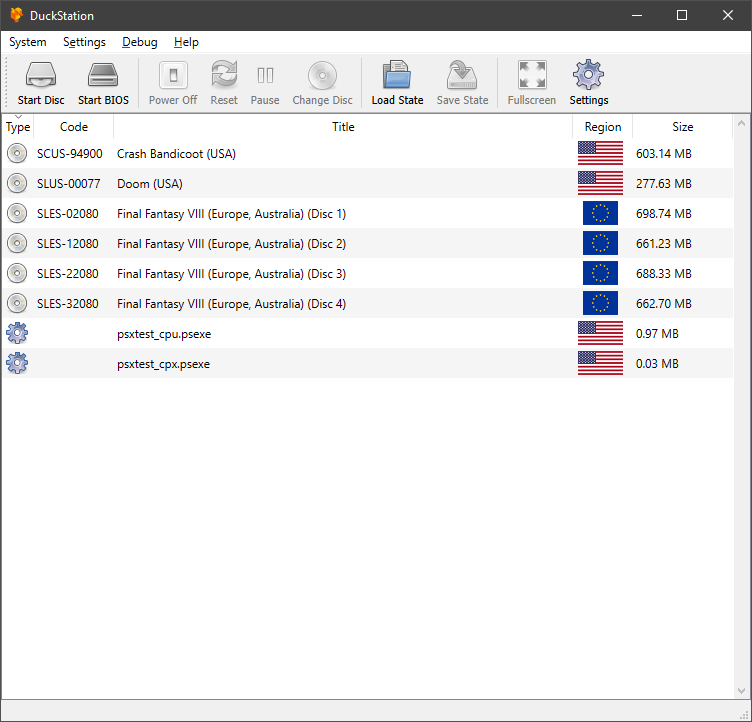
Il s’agit d’un émulateur de PlayStation One.


Caractéristiques:
– CPU Recompiler/JIT (x86-64 and AArch64)
– Hardware (D3D11 and OpenGL) and software rendering
– Upscaling and true colour (24-bit) in hardware renderers
– « Fast boot » for skipping BIOS splash/intro
– Save state support
– Windows and Linux support – macOS may work, but not actively maintained
– Supports bin/cue images, raw bin/img files, and MAME CMD formats.
– Direct booting of homebrew executables
– Digital and analog controllers for input (rumble is forwarded to host)
– Qt and SDL frontends for desktop
– Qt frontend has graphical configuration, and controller binding
– Automatic content scanning – game titles/regions are provided by redump.org

 
Configuration requise:
– A CPU faster than a potato.
– For the hardware renderers, a GPU capable of OpenGL 3.0/OpenGL ES 3.0/Direct3D 11 Feature Level 10.0 and above. So, basically anything made in the last 10 years or so.
– SDL-compatible game controller (e.g. XB360/XBOne)


Télécharger DuckStation v0.1 build 12XXX (71.6 Mo)

Site Officiel

En savoir plus…

Créé par l’auteur de CorgiDS, DobieStation est un émulateur PS2 en cours de développement avec pour objectif de proposer un port Android optimisé ainsi qu’un port PC rapide, précis et facile à utiliser.
 
Une grande partie de la bibliothèque de la PS2 peut démarrer ou accéder aux menus et certains titres peuvent même entrer dans le jeu y compris certains jeux spécifiques comme Final Fantasy X ou Shadow of the Colossus. Reste que pour l’instant l’émulateur est évidemment très préliminaire.


(Builds automatiques)
 

Télécharger DobieStation v0.0.1619 (15.9 Mo)

Site Officiel

En savoir plus…

Il s’agit d’un émulateur de Playstation. (Builds automatiques).
 
– Misc fixes etc.


Télécharger Avocado (x86) r784 (2.2 Mo)

Télécharger Avocado (x64) r784 (2.4 Mo)

Site Officiel

En savoir plus…

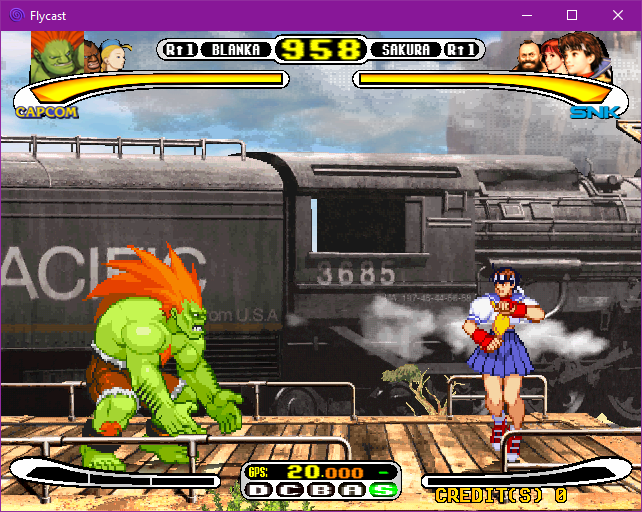
Flycast est un émulateur multiplateforme de Sega Dreamcast, Naomi et Atomiswave qui est basé sur Reicast. Informations ici.


Il prend en charge les jeux aux formats suivants:
– SEGA Dreamcast (CHD, CDI, GDI, CUE)
– SEGA Dreamcast utilisant WinCE
– SEGA NAOMI (.zip, .7z, .dat/.lst)
– SEGA NAOMI GD-ROM (.zip, .7z, .dat/.lst et .chd)
– Sammy Atomiswave (.zip, .7z)
 

Il ne prend pas encore en charge les jeux SEGA NAOMI 2, Hikaru et SEGA System SP.
 

Des packs de textures sont disponibles ici.


Builds automatiques (debug).
 

Télécharger Flycast v2.7 (9.4 Mo)

Site Officiel

En savoir plus…

Une version améliorée de Neko Project II et Neko Project 21 (PC98XX) mais dont les principales informations sont en japonais (l’interface est disponible en anglais). Plus d’informations.


(Ancien thread ici et là | Nouveau thread)
 

Télécharger Neko Project II / Project 21 fmgen v0.83k8 (2025/11/28) (764 Ko)

Site Officiel

En savoir plus…

m64p (ou Mupen64Plus-GUI) est une interface graphique écrite en Qt5. Elle supporte tout ce que vous attendez d’une interface mupen64plus (sélection de plugins, édition de la configuration, gestion des sauvegardes, capture d’écran, pause, etc.).
 
Cette archive inclut Mupen64Plus + GlideN64 + une interface utilisateur.


Some new features for the input plugin:
– Now supports Direct Input. These are « non-Xbox » style controllers, like an N64 controller connected to a Mayflash adapter for example. Since these types of controllers have unpredictable button layouts, the « Auto » profile won’t work for them, you have to create your own profile
– Added an option to control the analog sensitivity
– Now includes the Raphnet Raw Input plugin. You can switch to this input plugin by going to Settings to Plugin and Path Selection
– New hashing algorithm (XXH3), should provide some performance improvement
– Some foundational things to get closer to being able to boot more homebrew ROMs, but nothing visible yet

 
Code source. Builds ici.

Télécharger Simple64 (x86) (2020/06/02) (20.6 Mo)

Télécharger Simple64 (x64) v2024.12.1 (46.5 Mo)

Site Officiel

En savoir plus…

MedGui Reborn est une interface (Frontend) pour Mednafen sur OS Windows. Cette archive inclut MetroMed.


– Key shortcuts and joypad polling will be disabled if medguir form is not active
– Managed password request added on UCI
– Fixed any server message on UCI
– UCI irc is now integrated with MedClient to better manage online session
– Added notification icon on traybar for MedClient with details for online sessions opened and irc users connected
– Added any common irc functions on UCI irc
– Added EZNotification (popup widget) (https://github.com/clusterzx/EZNotifications) for opened online session, you can change theme on medguir notification icon on tray bar by right click mouse button
– Added Discord announcement on MedGuiR > NetPlay Discord channel (https://github.com/Kowalski7/Discord-Webhook-Announcer)
– Minor cosmetic change


Télécharger MedGui Reborn v0.127 (24.5 Mo)

Site Officiel

En savoir plus…

pantheon
 
Il s’agit d’un multi-émulateur qui gère les systèmes suivants avec une superbe interface très simple d’utilisation.
Ordinateurs : Acorn Atom, Acorn BBC Micro, Acorn Electron, Commodore PET, Atari 8-bit, MSX
Consoles : Atari VCS 2600, Atari VCS 5200, Atari VCS 7800, ColecoVision, Magnavox Odyssey 2, Sega Master System, Sega Megadrive, Mattel Intellivision
Consoles portables : Atari Lynx, Sega Game Gear, Nintendo GameBoy


Vous aurez besoin de .NET Framework installé sous Windows. Pantheon est spécifiquement dédié aux jeux.


Le gros avantage est que ceux-ci sont téléchargés automatiquement en un clic sans que l’on ait besoin de faire quoi que ce soit d’autre. Il est bien dommage que Panthéon ne dispose pas de filtres, cela rend les jeux très pixelisés en raison des basses résolutions natives.


Télécharger Pantheon v16.754 (138 Mo)

Site Officiel

En savoir plus…

Un émulateur de PSP écrit en Java. Codé par Mad et Shadow (PCSX2) et rejoint par Wrayal, Fiveofhearts, Hlide et Dreampeppers99. Il émule les jeux commerciaux mais nécessite une puissante configuration.
 
jpcsp
 
Liste de jeux compatibles.
Site de développement du projet.
Builds SVN automatiques (alternative).
 

Télécharger JPcsp (x86) v0.7 rev 0318d15e (26.4 Mo)

Télécharger JPcsp (x64) v0.7 rev 00ac4d6 (29.1 Mo)

Site Officiel

En savoir plus…


https://getourbonus.com/fr/accueil

https://www.romspedia.com/