Un excellent émulateur Nintendo NES pour windows et linux.


0.89 (Bugfix release)
In some circumstances, the audio could not be played correctly (crackling and pops). Fixed


Télécharger puNES SDL (x86) v0.89 (1,8 Mo)

Télécharger puNES OpenGL (x64) v0.111 (23.9 Mo)

Télécharger puNES D3D9 (x86) v0.111 (21.8 Mo)

Télécharger puNES D3D9 (x64) v0.111 (24.1 Mo)

Site Officiel

En savoir plus…

Raine est un émulateur Arcade. Conçu à l’origine pour émuler « Rainbow Islands », il supporte maintenant un paquet de jeux basés sur du hardware « Taito », « Jaleco » et bien d’autres encore. Il émule également la NeoGeo CD depuis que le projet NeoRaine a été intégré dans Raine.

Beaucoup moins gourmand que Mame, Raine s’avère une excellente alternative. Il inclut également un pack de shaders au format glsl compatible avec celui disponible pour Higan.


v0.63.7:
– The test of yesterday turned bad, here is the fix for the sound associations in the kof serie.


v0.63.6:
– Mainly based on the sound commands this time, it adds support for this to quite a lot of neogeo games. Notice that it’s a way to listen to the games music without any sound effects also, even without replacing the musics with external tracks.
– There is something experimental in the handling of the musics for the kof serie, needs to be tested, but it should be ok. See the forum if you are interested in the test, but it’s useful only when using external music tracks.
– Except that, fixed a crash in the game selection dialog (quite tricky to reproduce actually, I doubt anyone except me ever had it), and cue files passed on the command line are now recognized.


Télécharger Raine (Win) v0.63.7.2 (2.5 Mo)

Site Officiel

En savoir plus…

La dernière version béta publique de l’excellent WinUAE, l’émulateur Commodore Amiga.

 
– Tweaked 68020 reading from non-existing memory behavior. (AROS ROM boot hang)
– Added *.a500, *.a600, *.a1200 and *.a4000 extensions to ROM dialog file name filter.
– AVIOutput didn’t use (slow) reads from VRAM even when it should have been used it, resulting in tiny non-scaled video output if « capture before filtering » was not ticked and resolution was large enough.
– AROS ROM updated.


Télécharger WinUAE (Public Beta) v2.8.1 Beta 8 (3,9 Mo)

Site Officiel

En savoir plus…

Créé par BUT, Emuman, K&K, Sword et Xvi. Mame Plus! est sans problème la meilleure version de Mame pour Windows, avec ou sans frontend. Support multi-langage, tirs automatiques, option anti-sortie, interface interne améliorée, interface de gestion des roms améliorée, effets vidéos supplémentaires (2xSai, RGB, hq3x, 2xPM…), meilleure gestion des contrôles, support de la NeoGeo en mode console, il regroupe également plein de correctifs et de drivers additionnels…
Site source n°1. Site source n°2. Site source n°3.


r5162
*fixed compile problem
———————
r5161
* update to SVN r30884. * updated pgui CN, TW lang.
———————
r5160
* update to SVN r30879.
———————
r5159
1.6.0 beta1 added scale effects values (2xBRZ, 3xBRZ) updated for mame 0.154 updated all lang


Télécharger Mame/MameUI Plus! (x86) v0.153 r5162 (52,4 Mo)

Télécharger Mame/MameUI Plus! (x64) v0.168 r5272 (32.8 Mo)

Site Officiel

En savoir plus…

RomStation est une interface simple et intuitive facilitant l’émulation de nombreuses consoles de jeux.


romstation


Wii, NDS, PS2, GBA, GameCube, PS1, Saturn, Dreamcast, N64, SNES, MegaDrive, NES, Master System, Neo-Geo, Arcade, … RomStation centralise vos émulateurs favoris en un unique programme.

Vous gérez ainsi votre ludothèque plus simplement, sans vous soucier des différents émulateurs supportant chaque jeu.


Vous pouvez toutefois modifier plus librement chaque émulateur, en supprimer certains ou en ajouter d’autres, vous permettant par exemple d’en utiliser plusieurs pour une même console.
Grâce à un moteur de recherche adapté, vous filtrez instantanément tous vos jeux selon les critères choisis : titre, console, langue, genre, nombre de joueurs, …
RomStation offre également un espace entièrement automatisé pour affronter ou coopérer en ligne avec d’autres joueurs, sur une sélection de jeux compatibles régulièrement mise à jour.


A noter que pour bénéficier de toutes les fonctionnalités (débit illimité notamment pour le téléchargement des jeux), il vous faudra ’10 jetons’ (29.90 €)

 ******

Changements :

Suite à la lecture des quelques problèmes pratiques et techniques dont vous nous faites part, nous tentons aussi régulièrement que possible d’améliorer RomStation. Si vous possédez une version antérieure à l’actuelle 1.65, elle sera automatiquement mise à jour lors de votre prochain démarrage du logiciel. Merci de participer à l’amélioration de RomStation.


  • Mise à jour des émulateurs PCSX2 et Dolphin (32bits et 64bits).
  • La capture vidéo live peut maintenant intégrer la webcam. Nous vous rappelons que le flux des lives reste disponible pour une capture plus avancée.


Télécharger Romstation v1.65 (124,9 Mo)

Site Officiel

En savoir plus…

Un pack de cheats au format xml à utiliser avec Nestopia.


Télécharger Nestopia Cheat Code Pack (2014/06/16) (478,4 Ko)

Site Officiel

En savoir plus…

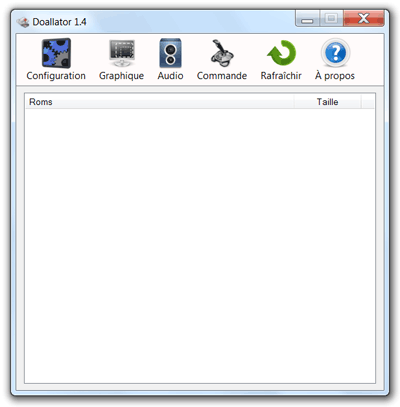
Lancé en juin 2014, Doallator est un petit projet d’émulateur multiplateformes. C’est à dire, qu’il devrait par la suite émuler plusieurs consoles différentes en se servant d’une seule et même interface. Ça devrait être le cas par la suite car il faut un commencement à tout et pour le moment, l’émulateur ne gère que la Chip 8. Avec un taux de compatibilité de plus de 78 % !
Codé en c#, compatible Windows XP, Vista, 7, 8 en 32 ou 64 bit.


.NET Framework 4.0 Client Profile doit obligatoirement être installé.


doallator


Principales caractéristiques de Doallator
 
Interface
– Simple et intuitive
– Liste des roms d’un dossier de votre choix
– Lancement d’une roms via un simple double clic
– Paramétre par défaut ou individuel via un clic droit
– Différents modes de tri disponible
 
Emulateur Chip 8
– Zoom de la résolution native 8x, 16x, 32x ou personnalisée
– Mode pleine écran disponible
– Réglage du volume du beep
– Configuration des touches du clavier de la Chip 8
– Réduction des scintillements des sprites en mouvement
– Réglage des frames par seconde
 
Utilitaire
– Lecture hexadécimal des roms Chip 8 (possible depuis l’interface)
– Débogage Chip 8 (uniquement durant l’émulation)


A noter que Doallator devient partenaire d’Emu-France et disposera de sa petite bannière 🙂


Télécharger Doallator v1.4 (536,4 Ko)

Site Officiel

En savoir plus…

Une petite news pour signaler que nous avons scindé la section Consoles en 2 : Consoles de salon et Consoles portables, histoire de clarifier la collection. Egalement l’ajout d’une section Sega Game gear dédiée.


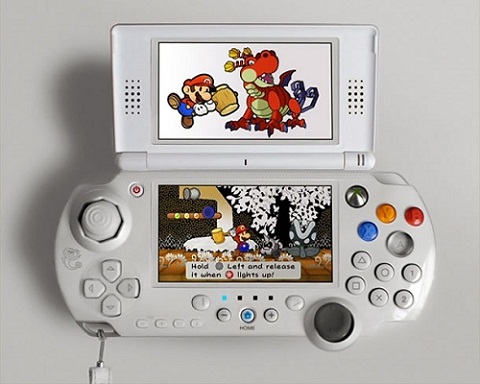
XBox-PS3-DS-PSP-WiiLa XDS-PSP3 Wii Edition


Ca se passe ICI

pa update

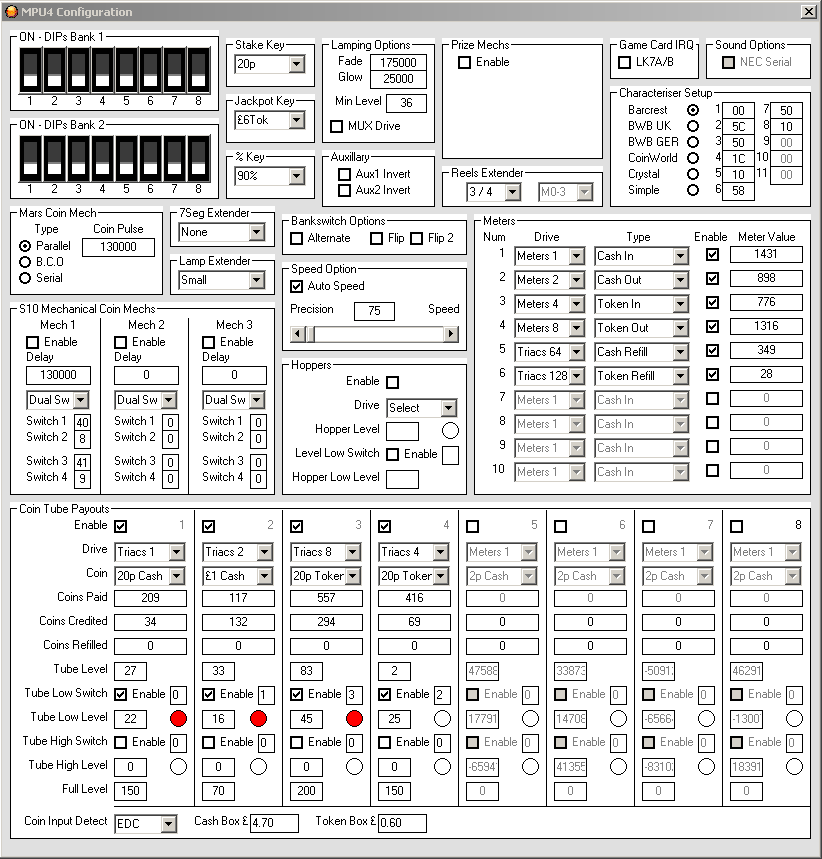
Un grand projet actif mené par Guitar. Project Amber peut émuler une grande majorité de jeux MPU4.

Supporte les Barcrest, BWB, Cristal, Coinworld, Empire, MDM, Il propose davantage d’options et de compatibilités que MFME. Un bon complément à celui-ci, Déjà une référence en matière de Fruit machine !

Une release se profile à l’horizon grâce au travail acharné de Guitar, aidé par une communauté soudée de passionnés de machines à sous, proche de l’auteur.


15/06/2014
Progress has been steady, but slower than I had hoped.
The synthesized sound is in, AY8910 needs a bit of work to sort the speed out on some machines.
For sampled sound the OKI chip is in and working, although it needs a few tweaks to sort out the dynamic frequency settings.
The NEC chip is written, and will be debugged later today to ensure its working.
The Crystal games decoding has been massively simplified and is now complete.
BWB, Coinworld & Simple Characterisers need doing.
Hoppers need doing.
1 Lamp Extender, 1 Reel Extender, and all the 7 seg extenders need completing.
That should see MPU4 complete and working.
Almost everything has been upgraded or tweaked to work more accurately, and to be easily re-used on later techs.

Getting FAME to initialize is step 1 of about 20, I am cautiously optimistic it can be made to work. IMPACT will be the next tech as I can use it as a test bed for the FAME dll. Getting a game going using just FAME will be much easier than running it as a second cpu.
MPU4 Plasma will either be a piece of cake or a nightmare, not likely any middle ground. MAME has a preliminary driver with it in but it looks very incomplete. If the memory map is pretty much right, it should be a doddle as there isn’t much to the Plasma board. If the memory map is wrong, or Barcrest are doing something funky with the board then it could be a bit of a mare to do. MPU4 video just seems like its going to be a massive pain in the backside to emulate we’ll see nearer the time.


9/06/2014

I’m toying with several ideas for server features. I haven’t decided yet what will make the final cut. One of the ideas was you could win a « Hot Tip » whereby the server would tell you which machines have high drift (i.e. are likely to pay out).
Other idea’s include a « Halves In » mode where you can go 50/50 with another player on a machine.
There will be 3 admin modes, master admin (me), minor admin (as assigned) and arcade admin (arcade owner)
admins will be able to change various settings and watch machines in real time, so if a machine needs a refill it will be able to be fixed without the original player leaving the machine.
Arcade owners will not be allowed to play in their own arcades. As an admin for an arcade you will be able to see various stats that would allow you to shark your own machines, so you wont be allowed to play in your own arcades.
There are other ideas too, but we’ll see what makes the final release. Be aware the when the new emu is released it will probably take a while to sort the bugs on the server.


Well, as per usual, things have been slower than I had hoped for.
But the coin handling is now in and working. Coin tubes are now emulated so token and cash low lights will go on and off as the real machine would. This also allows for different sounds to be played depending on whether a coin drops to tube, rejects, drops to cash box, or drops from tube A to tube B when tube A is full.
Small Lamp Extender is working, 7 Segs and Small extender is working.
The sampled sound framework is in and the OKI chip is 90% complete.
Thanks to a nudge in the right direction from DialTone, the FAME dll for the 68k core will now initialize without crashing the emulator.
This will (eventually) allow for MPU4 Plasma, MPU4 Video, M1 Video, JPM System 5, & JPM System 6 (IMPACT) to be emulated in future.
Sound, Extenders, Characteriser should see the regular MPU4 emulation complete.


01/06/2014

Todays 28 bugs later:
Lots of stuff has been fixed and most machines will boot now.
OKI and NEC sound is next on the agenda to allow sampled sound machines to boot without locking up waiting for the sound card.
Lamp, Reel & 7 Seg extenders can then be added as I need various machines working to test the various extenders.
I’m hoping tonight will see MPU4 (not Video or Plasma) near as dammit complete.
Some extra features have been added along the way, some extra bugs found in the original VB code too which have been fixed in the C++ version.
Once MPU4 is done I will post some screen shots or a video of the new stuff.
IMPACT will be next up on the to do list.


Vous trouverez tous les détails concernant Project Amber dans une section dédiée sur le forum de Fruit-Emu, où s’active une sympathique communauté.


Télécharger Project Amber v0.10910 RC1 (47,1 Mo)

Site Officiel

En savoir plus…

Une interface graphique pour Mame dédiée aux MameCabs.


Les changements:


06/14/2014

– Fixed second building crack sound effect not firing during the shutdown sequence
– Always center the selected category/game in the lists
– Asynchronously load game lists so that there’s no stutter when you select one
– Big Blue configuration utility can now read MAME’s list XML output
– New interface for adding games from MAME
– Added migration feature that lets you move Big Blue entries from one location to another


06/11/2014

– Fixed snapshot not resetting after a 2 player game
– Improved config UI scroll behavior


06/10/2014

– Added new shutdown/restart sequence to give people time to decide whether they really want to shut down or restart their machine
– Added support for game lists; you can now have multiple lists, but you can still configure Big Blue to work with only a single list if you want to keep it simple
– Big Blue now allows you to configure programs to run both before the main game is launched and after the main game is launched
– Dropped support for Windows XP; GroovyMAME works in Windows 7 now; I wanted to do some asynchronous coding for Big Blue’s game lists, and there’s no reason to cripple the program for a busted, out-of-date OS
– Added GUI configuration utility to maintain Big Blue


Télécharger Big Blue Frontend (2014/06/15) (24,4 Mo)

Télécharger Big Blue Frontend (XP) (2014/05/31) (9.2 Mo)

Site Officiel

En savoir plus…

MameUI est un émulateur multi-arcade émulant plus de 28000 jeux (à partir de 1975) et incluant une interface (frontend).


Télécharger MAMEUI64 v0.153.1 r30979 (17,8 Mo)

Télécharger MAMEUI Icons Pack v0.289 (43.5 Mo)

Télécharger MAMEUI Screenshots Pack (Update) up to v0.258 (5.6 Mo)

Site Officiel

En savoir plus…

Bochs est un émulateur PC tournant sous Windows, son développement s’effectue en Open Source. Ecrit en C + +, il fonctionne sur la plupart des plates-formes populaires. Il inclut l’émulation des CPU x86 d’Intel, les périphériques E / S courants et un BIOS personnalisé. Actuellement, Bochs peut être compilé pour émuler un processeur 386, 486, Pentium/PentiumII/PentiumIII/Pentium4 ou x86-64, y compris MMX option, SSEX et 3DNow! instructions.Bochs est capable d’exécuter la plupart des systèmes d’exploitation à l’intérieur de l’émulation, y compris Linux, DOS, Windows ® 95/98 et Windows ® NT/2000/XP ou Windows Vista/7/8.


L’utilisation «typique» de Bochs est de fournir émulation PC x86 complète, y compris le processeur x86, des périphériques et la mémoire. Cela vous permet d’exécuter OS et des logiciels au sein de l’émulateur sur votre poste de travail, un peu comme si vous aviez une machine à l’intérieur d’une machine. Par exemple, disons que votre poste est un poste de travail Unix/X11, mais que vous souhaitez exécuter des applications Win’95. Bochs va vous permettre d’exécuter Win 95 et le logiciel associé sur votre poste de travail Unix/X11, affichant une fenêtre sur votre poste de travail, simulant un moniteur sur un PC.
 
Les changements sont:
 
CPU / CPUDB
– allow sandy bridge configuration even when AVX is not compiled in
 
Configure and compile
– fixed compilation error when 3dnow support is enabled
– speedup Visual Studio build by almost 20% by adding /Gr compiler option
 
Misc
– fixed minimizing win32 gui window and resolution change while minimized
– added compiled SeaBIOS 1.7.5 image into Bochs tree along with Bochs BIOS images
– documentation fixes and updates


Télécharger Bochs (32 bits) v2.6.6 (4,9 Mo)

Télécharger Bochs (P4 + SMP) v2.6.11 (2.3 Mo)

Site Officiel

En savoir plus…


https://getourbonus.com/fr/accueil

https://www.romspedia.com/