Sorte d’équivalent de MAME32 pour PinMAME. Cette version est un vrai portage de PinMAMEW sous Windows.

0 commentaire



Sorte d’équivalent de MAME32 pour PinMAME. Cette version est un vrai portage de PinMAMEW sous Windows.
Il s’agit d’un « émulateur » de Windows95 pour Linux, MacOS et Windows.

Télécharger Windows95 Emulator (32 bits) v5.0.1 (409 Mo)
Voici les derniers émulateurs (et aussi les plus fréquemment mis à jour) en cours de développements.

VDosplus: Emulateur de DOS.
Citra: Emulateur de 3DS.
Vvctre: Emulateur de 3DS (basé sur Citra).
Decaf: Emulateur de WiiU.
RPCS3: Emulateur de Playstation 3.
Redream: Emulateur de Sega Dreamcast.
Reicast: Emulateur de Sega Dreamcast préliminaire.
Flycast: Emulateur de Sega Dreamcast préliminaire.
CXBX: Emulateur de Microsoft X-Box.
Xenia: Emulateur de Microsoft X-Box 360.
Cen64: Emulateur de Nintendo 64 Préliminaire.
Yuzu: Emulateur de Nintendo Switch Préliminaire.
Ryujinx: Emulateur de Nintendo Switch Préliminaire.
Vita3K: Emulateur de Sony PS Vita Préliminaire.
Avocado: Emulateur de Sony Playstation Préliminaire.
DuckStation: Emulateur de Sony Playstation Préliminaire.
Play!: Emulateur de Sony Playstation 2 Préliminaire.
DobieStation: Emulateur de Sony Playstation 2 Préliminaire.
GPCS4: Emulateur de Playstation 4 Préliminaire.
PS4 Delta: Emulateur de Playstation 4 Préliminaire.
Télécharger vDosPlus (2018/03/01) (1.8 Mo)
Télécharger Citra (Final build) (2024/03/07) (140 Mo)
Télécharger Vvctre r56 (4.7 Mo)
Télécharger Decaf-Emu Build 231109 (40.8 Mo)
Télécharger RPCS3 (WIP) v0.0.43 Alpha (2026/11/11) (35.5 Mo)
Télécharger Redream v1.5.0.1239 (3.1 Mo)
Télécharger Reicast (x86) (2020/05/31) (1.3 Mo)
Télécharger Reicast (x64) (2020/05/31) (1.5 Mo)
Télécharger Flycast v2.7 (9.4 Mo)
Télécharger Xenia v1.0.2844 (2026/11/11) (3.6 Mo)
Télécharger CXBX Reloaded (WIP) v0.1.0 (2026/04/21) (4.4 Mo)
Télécharger Cen64 (WIP) (2022/10/02) (2.6 Mo)
Télécharger Cen64 (Debugger) r2015.01.18 + (DEV) r2017.04.23 (3.4 Mo)
Télécharger Yuzu (Final WIP build) (2024/03/xx) (112 Mo)
Télécharger Ryujinx Build 1.1.1403 (190 Mo)
Télécharger Vita3K v0.2.1 (2026/11/11) (36.4 Mo)
Télécharger Avocado (x86) r784 (2.2 Mo)
Télécharger Avocado (x64) r784 (2.4 Mo)
Télécharger DuckStation v0.1 build 12XXX (71.6 Mo)
Télécharger Play! (x86) GIT v0.77 (2026/10/25) (8.9 Mo)
Télécharger Play! (x64) GIT v0.77 (2026/10/25) (10.3 Mo)
Télécharger DobieStation v0.0.1619 (15.9 Mo)
Ceci est un fork de l’émulateur Playstation, PCSX. L’objectif est à peu près le suivant:
– Apportez une base de code conforme aux normes d’aujourd’hui.
– En finir avec le système de plug-in et permettre une base de code monolithique unique qui gère tous les aspects de l’émulation Playstation.
– Utiliser SDL / OpenGL3 + / ImGui pour la portabilité et la lisibilité.
– Améliorez l’expérience du déboggage.
– Améliorez l’expérience de rendu.
Il s’agit de binaires préliminaires.

NB: Je précise que ce sont des builds basés sur le GIT à un instant T, l’auteur n’a rien proposé de stable ni de finalisé. Ces versions sont toujours à considérer comme des versions alpha préliminaires tant que l’auteur ne propose officiellement rien d’autres, cela permet en outre de faire connaitre le projet au plus grand nombre et si certain(e)s d’entre vous veulent y contribuer, tant mieux pour tous. Donc il se peut que ce genre de build fonctionne ou pas du tout, c’est en soit « normal » car c’est tout sauf finalisé. Cela s’applique à tous builds dit « GIT » que nous proposons.
Télécharger PCSX Redux (32 bits) (2023/03/27) (41.0 Mo)
Il s’agit d’un fork du plugin RDP d’Angrylion qui vise à améliorer les performances, ajouter de nouvelles fonctionnalités tout en conservant la précision du plugin d’origine.
Current features
– More maintainable code base by dividing the huge n64video.cpp into smaller pieces.
– Improved portability by separating the emulator plugin interface and window management from the RDP emulation core.
– Multi-threaded rendering support, which increases performance on multi-core CPUs significantly.
– Replaced deprecated DirectDraw interface with a modern OpenGL 3.3 implementation.
– Added manual window sizing.
– Added fullscreen support.
– Added BMP screenshot support.
– Added settings GUI.
– Added Mupen64Plus support.
Tested with Project64 2.3+. May also work with Project64 1.7 with a RSP plugin of newer builds (1.7.1+).
Les changements:
– Added new interpolation mode, which is less blocky than nearest-neighbor and less blurry than bilinear
– Added integer scaling option
– Merged Angrylion r113
– Fast compatibility mode is now the default for new configs
– Screenshots are saved in their native N64 resolution again (#98)
– Improved VI performance by fixing a false sharing issue
– Using major.minor version scheme from now on
– More fixes
Source des builds WIP.
Télécharger Angrylion RDP Plus v1.6 r32 (2025/01/06) (1.2 Mo)
GroovyMAME est un émulateur multi-systèmes basé sur MAME (Arcade + Consoles + Ordinateurs) et qui se focalise sur le rendu sur écran CRT (Moniteur de PC ou d’arcade avec fréquence particulière) car les auteurs sont convaincus que la technologie CRT est un must quand il s’agit de profiter de l’émulation dans toute sa splendeur. Cependant GroovyMAME peut être utilisé également sur écran LCD (principalement sur les modèles qui permettent un rafraîchissant à des taux personnalisés).

Beaucoup d’améliorations provenant de Groovy avaient été intégrées dans MAME il y a quelques temps rendant Groovy obsolète, mais depuis de nouvelles fonctions ont été développées en parallèles justifiant ces nouveaux builds.
A noter que des LiveCD sont également disponibles sur le site officiel.

Les changements:
– sync with mame v0.227
v2.001a
– This is the first public release of GM based on Switchres 2.0, a major redesign of our custom video library we’ve been working on for the whole last year. It has important new features that I’ll talk about in the new thread I’m preparing.
– Although this version is intended to completely replace current GM based on Switchres 0.xxx, we know that bugs may exist, so we’ll probably keep releasing the « legacy » GM here for some versions yet, depending on how things go.
v0.017t
Slider enhancements (as requested by schmerzkaufen):
– Increased vsync_offset slider limit to 1024
– Added 1-decimal precision to CPU overclock slider
Note sur la version D3D9EX (les builds ne sont valables que pour windows 7 ou supérieur):
Cette version intègre un patch Direct3D9Ex (également connu sous le nom de Direct3D 9.0L ou 9.L, le L faisant référence à Longhorn, nom de la base de code de Windows Vista) qui permet de bénéficier de certaines fonctionnalités introduites par l’utilisation des drivers WDDM tout en maintenant la compatibilité avec les applications écrites pour Direct3D 9. L’interface Windows Aero s’appuie sur D3D 9Ex et utilise certaines des fonctionnalités non présentes dans Direct3D 9 comme la possibilité de partager des surfaces DirectX entre plusieurs processus.
Pas de binaires 32 bits pour le moment.
MAJ: J’ai compilé les binaires 32 bits et le 64 bits non Ex.
Télécharger GroovyMAME (x86) v0.227 SwitchRes v0.017t (56.4 Mo)
Télécharger GroovyMAME (x64) v0.227 SwitchRes v0.017t (58.1 Mo)
Télécharger GroovyMAME D3D9Ex (x86) v0.227 SwitchRes v0.017t (56.4 Mo)
Télécharger GroovyMAME D3D9Ex (x64) v0.289 SwitchRes 2.22f (98.5 Mo)
Ootake est un émulateur PC-Engine en provenance du Japon et basé sur PC2E, tournant sous Windows 2000, XP, Vista, 7, 8 et 10. Il nécessite Direct X v9.0c au minimum.

– When playing a game in Full-Screen on Windows10/8.1/8/7/Vista, fixed a bug
that the dialog to open the ROM image file ([O] key or « File-> Open » menu)
was not displayed. *This is the only change, so if you are using Windows
XP, you can leave v2.99 as it is.
– The screen display processing has been sped up. The number of models that
can operate comfortably even on low-power PCs has increased.
* By the way, one note about the video card settings of the PC. If you set
the G-SYNC function and FreeSync(Adaptive-Sync) function to « Enable in
even Window mode » on a PC equipped with NVIDIA or AMD video chip, the
operation of Ootake etc. may be slow down depending on the PC environment.
(The default settings are fine)
* If G-SYNC and FreeSync are set to « Enable even in Window mode », many games
(such as games with fixed 60fps) will not work comfortably. Therefore, set
« G-SYNC / FreeSync is disabled in Window mode (default is disabled) ». I
strongly recommend it.
– The volume balance of the CD sound source (CD-DA), ADPCM sound source, and
wave memory sound source has been finely adjusted to bring it closer to
the feeling of an actual machine.
– Fixed a bug that noise might appear on the CD sound source depending on
the setting environment of « Audio->Adjust CD-DA(for Sync) ».
– The default audio settings has been changed from « DirectSound (a
vocalization method that has existed since the Windows 95 era) » to
« XAudio2 (currently the mainstream vocalization method) ». Depending on
your PC environment and taste, « DirectSound » may be better, so please
choose the one you like. In addition, XAudio2 can play the sound at a
timing closer to the actual machine. (In « Audio » menu)
– The operation speed and timing have been brought closer to the operation
of the actual machine. The problem that the screen was shaking when going
up the stairs when clearing the stage of « Prince of Persia » (occurred in
recent versions) has been solved.
– Fixed the sprite display processing part. Solved the problem that
unnecessary sprites were sometimes displayed at the bottom of the screen
when the 1st page boss of « Tiki Tiki Boys » appeared. Also, when your
character overlaps the water areas on the 1st and 4-1 stages, the problem
that your character did not hide has been resolved.
– When playing « Tiki Tiki Boys », the bottom two lines of the screen are
automatically masked with a black belt. (As with the actual machine, the
reason is that noise may be displayed.) * If you play in the mode to
display the overscan area, this process will not be performed and the
display will be the same as the actual machine (the bottom edge may be
disturbed).
– In « Turrican », the problem that it is canceled in a few seconds when you
pause during the game has been solved.
– When starting « The Addams Family », the screen display is shifted to the
right by half a character. By doing this, the disturbance of the screen
display on the right end (which also occurs on the actual machine) has
been reduced. * Also, if you press the [F11] key and play in the display
range of the old TV, the disturbance will disappear at all. * If you turn
on the « Perform SpriteLimit » setting or play in the mode that displays the
overscan area, this correction will not be performed and the display will
be the same as the actual machine (with distortion at the right end).
– Due to certain settings (combination of « Audio Buffer Size » and « CD-DA
Delay Frame », which will change the timing of access to the CD-ROM
slightly), the « Snatcher » may freeze at the start. The problem that was
there has been solved.
– Fixed a bug that the « CPU-> Swap STRIKE & BALL (for Baseball Games) » menu
(baseball game count display replacement function) did not work in v2.98.
– In « Tokimeki Memorial », if you turn on the sprite missing display setting
(CPU-> Perform SpriteLimit) or display the overscan area ([F12] key), dust
that is sometimes displayed on the left and right edges of the screen on
the actual machine (probably used as a data area) is displayed.
– When used on Windows 10/8/7/Vista, it is displayed in a new type file
dialog (when opening a ROM image, etc.). This solves the problem that when
the audio setting was set to « XAudio2 », noise (remaining sound from the
previous game play) might be heard when reopening the ROM image file.
– When moving the Ootake window, if the lower part of the game screen hangs
on the taskbar area, the position is automatically corrected so that the
lower part is just right and there is no gap.
– Since the official homepage site has been changed to SSL (HTTPS), the URL
of each document has been changed from « http » to « https ».
– When using XAudio2(Audio menu) on Windows XP, the problem (occurring from
v2.82) that the operation when opening a file may become unusually heavy
depending on the environment has been fixed.
– Other minor details have been fixed and improved.
BletchMAME est un frontend pour MAME. Contrairement aux autres existants (et qui fonctionnent comme des lanceurs tout en conservant l’interface utilisateur interne de MAME), BletchMAME remplace l’interface utilisateur interne de MAME par une interface graphique plus conventionnelle pour offrir une expérience plus conviviale dans un certain nombre de domaines (tels que les profils, la configuration des entrées et un certain nombre d’autres éléments). Bien que BletchMAME soit conçu pour prendre en charge toutes les machines que gère MAME, il convient particulièrement à la partie émulation d’ordinateur.

– Updated various parts of the worker_ui plugin in response to breaking LUA changes in MAME 0.227
– Changed the Images Dialog to a Configurable Devices dialog, combining image and slot selection
– Resurrected the « Quick Load/Save State » feature, which has been broken since 2.0
– Fixed profile renaming, which also has been broken since 2.0
– Fixed a bug in the profiles view that could cause a crash if one right clicks empty space
Xemu est une application multiplateforme et open source qui émule le matériel de la console de jeu Xbox d’origine, permettant aux utilisateurs de jouer à leurs jeux Xbox sur les systèmes Windows, macOS et Linux.
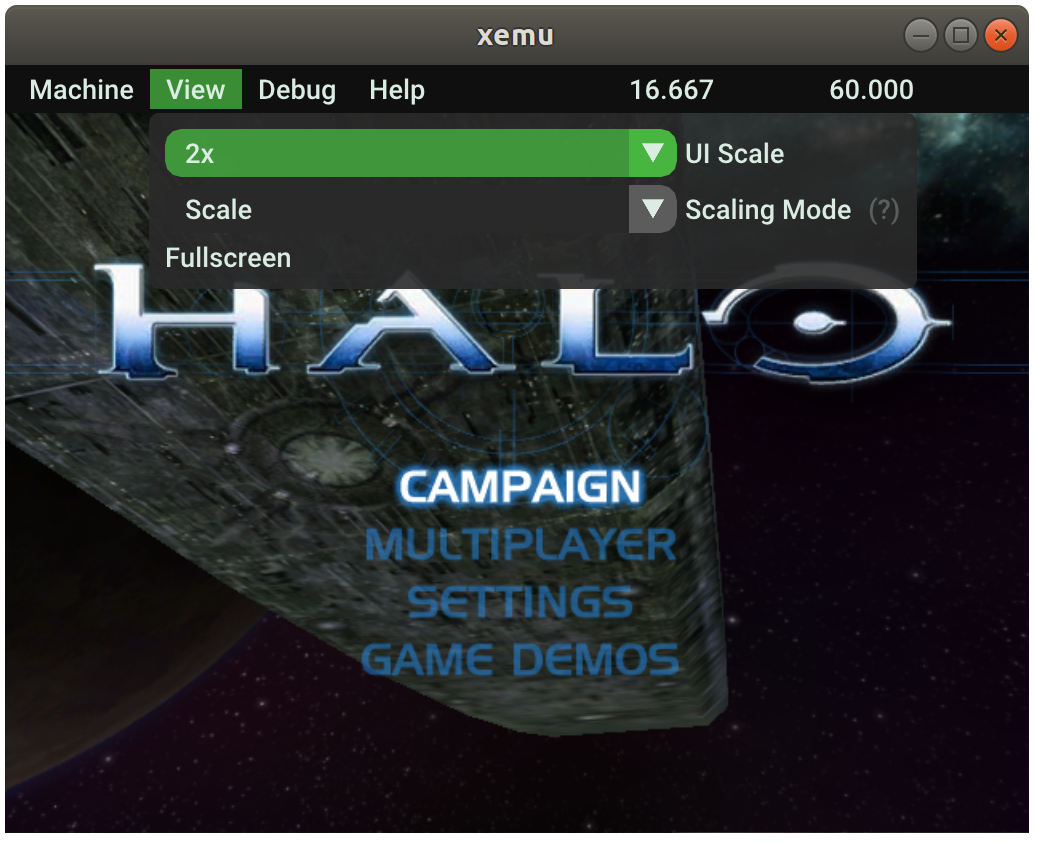
Ce projet est une branche active du projet XQEMU, qui est lui même basé sur le projet QEMU qui est populaire et très activement maintenu.

A noter que la version 32 bits n’est pas officielle (réalisée par Lo v2).
Télécharger Xemu (x86) (2020/06/12) (6.2 Mo)
Télécharger Xemu v0.8.139 (10.9 Mo)
Voici les derniers builds de Creamymami concernant MAME(Arcade).
– Caname c’est MAME(Arcade) ne supportant que les jeux CPS et Neo Geo.
– NMamex2 est un build de l’émulateur MAME(Arcade) sous Windows qui ne supporte que les jeux NeoGeo.
– Mame32k c’est MAME(Arcade) intégrant le module Kaillera (jeu en réseau).
– Mame32 More! est une version basée sur Mame Plus! mais compilée avec Kaillera.
Télécharger Caname v0.62.289 (2026/11/07) (2.4 Mo)
Télécharger NMamex2 v0.289 (2026/11/07) (1.7 Mo)
Télécharger Mame32K v0.67.289 (2026/11/07) (9.5 Mo)
Il s’agit de FBA Shuffle faite par Creamymami, contrairement aux versions de KOF2112, cette version est plus proche de la version officielle de FBA.

Télécharger FBA Shuffle (x86) [Creamymami] v2.4.0 (2026/11/07) (6.6 Mo)
Télécharger FBA Shuffle (x64) [Creamymami] v2.4.0 (2026/11/07) (7.1 Mo)
Conçu pour gérer les roms MAME, ClearMAMEPro supporte également tous les dats au format CM, mais aussi XML, permettant de gérer efficacement vos collections de roms & isos. Le manager le plus complet.

Changement :
– fixed: falsely hiding some missing information (split merged sets with nodump chds)

Télécharger ClrMAME Pro (XP) v4.035 (3.1 Mo)
Télécharger ClrMAME Pro (x86) v4.050 (3.9 Mo)

