Ootake est un émulateur PC-Engine en provenance du Japon et basé sur PC2E, tournant sous Windows 2000, XP, Vista, 7, 8 et 10. Il nécessite Direct X v9.0c au minimum.
 
ootake
 
– Fixed a bug (Occurs in v3.02) that the game could not be started if the
external CD-ROM drive was removed when playing a game with a full CD
installation in the « CD-ROM->CD Install » menu.
– The sprite display processing has been brought closer to the operation of
the actual machine. In the demo scene of « Dragon Slayer: The Legend of
Heroes 2 », the problem that the image was missing (occurred from the
recent version) has been resolved.
– The processing related to raster interrupts has been brought closer to the
operation of the actual machine. In the demo scene of « Sol Moonarge », the
problem that the drawing on the screen was disturbed (occurred from v2.81)
has been solved.
– Other minor parts have been corrected and improved.


Télécharger Ootake (2K/XP/Vista/7/8/10/11) v3.06 (1.4 Mo)

Site Officiel

En savoir plus…

Mesa3D peut être utilisé pour fournir un moteur de rendu Software aux applications OpenGL et est particulièrement utile pour exécuter d’anciennes applications et jeux qui utilisent une ancienne version d’OpenGL et qui ne fonctionnent pas correctement sur du matériel moderne.
 
Ces binaires (créés par pal1000) remplacent les précédents de Federico Dossena car pour des raisons techniques, ces derniers n’ont pu évoluer depuis la version 20.1.8.


Différences entre les packages MSVC et MinGW:
– Le package MinGW nécessite un processeur avec SSSE3 et à l’avantage de fournir une amélioration des performances de 3 à 5% avec les pilotes de rendu logiciel.
– Le package MinGW contient le pilote zink depuis la version 21.0.0 tandis que le package MSVC a introduit GLonD3D12 en même temps.
– L’outil SPIR-V vers DXIL introduit dans la version 21.0.0 n’est disponible que dans le package MSVC.
– Le package MinGW utilise ZSTD pour certaines tâches de compression depuis la version 20.1.8.
 

Site de développement.
 

Télécharger Mesa3D MSVC (x86/x64) v26.2.4 (67.0 Mo)

Télécharger Mesa3D MinGW (x86/x64) v26.2.4 (54.4 Mo)

Site Officiel

En savoir plus…

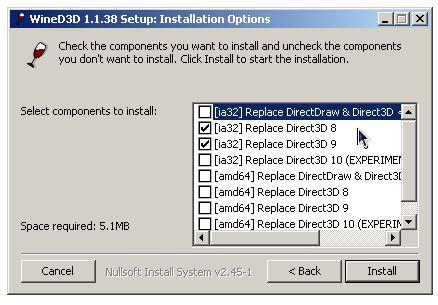
WineD3D For Windows est un wrapper DirectX 1-11 vers OpenGL basé sur WineD3D, qui est une implémentation presque complète de DirectX utilisée dans Wine.


Même si Windows prend en charge DirectX de manière native, l’utilisation de WineD3D peut améliorer la compatibilité avec les jeux plus anciens, en particulier sur Windows 8 et supérieurs qui ne prennent pas en charge les modes d’écran 16 bits. Une autre utilisation possible est d’imiter les versions non prises en charge de DirectX ou de transférer des applications DirectX vers OpenGL sans avoir à réécrire le code de rendu.
Notez que WineD3D est loin d’être parfait, et de nombreux jeux ne fonctionneront pas.
 
Des instructions sur l’utilisation des DLL sont également incluses.
 
Version 1.7.x fonctionne à partir de Windows 2000.
Version 6.x fonctionne à partir de Windows Vista.


Télécharger Wine D3D For Windows (Win 2K et +) v1.7.52 (1.7 Mo)

Télécharger Wine D3D For Windows (32 Bits | Win8 et +) v11.20 (1.9 Mo)

Télécharger Wine D3D For Windows (64 Bits | Win8 et +) v11.20 (1.9 Mo)

Site Officiel

En savoir plus…

Raine est un émulateur Arcade/NeoGeoCD ainsi qu’une excellente alternative à MAME.


En résumé:
 

v0.92.2
– mouse wheel fixed again
– the gui handles some strings too long to be displayed properly (they are cut now, but the default is still a small 640×480 window for raine, so just change that to fullscreen or anything bigger before complaining !)
– fix broken screenshots in opengl
– some experimental game controllers mappings for mer-curious, we’ll see how it goes…
– the option to use the dpad for movement only or to be able to remap it when the dpad is recognized (game controllers)
– and some little details (more default inputs for the joysticks, the hats are handled again natively for unknown game controllers…).

 
A tester avant d’adopter car il y a pas mal de bugs et des problèmes de mapping de manettes selon les configurations.
 

Télécharger Raine (Dos) v0.96.6 (5.3 Mo)

Télécharger Raine (32 bits) v0.98 (7.2 Mo)

Télécharger Raine (64 bits) v0.98 (7.1 Mo)

Site Officiel

En savoir plus…

XRoar est un émulateur Dragon32/64 mais aussi Tandy CoCo.
 
xroar
 
– 6801/6803: many more illegal instructions [Greg Dionne, Ron Klein]
– Fix EXTMEM signalling for writes to RAM [Stewart Orchard]
– MC10: Constrain video to internal 4K RAM [Simon Jonassen]
– Default -ao-fragments changed for new SDL audio [Steve Bamford]
– MPI: return to selected slot on reset [« dragonnostalgia », Tim Lindner]


Télécharger XRoar (x86) v1.12 (2.5 Mo)

Télécharger XRoar (x64) v1.12 (2.5 Mo)

Site Officiel

En savoir plus…

Nplayers : Exclusivement pour les frontends comme EmuLoader, MaLa etc.. ce fichier vous servira à classer les jeux par nombre de joueurs possibles : 1p, 2p, 1p+2p, 1p+2p alt, etc…
 
Multiplayer (ex Nplayers32) : Exclusivement pour MAME/MAMEUI ou clone de celui-ci… ce fichier vous servira à classer les jeux par nombre de joueurs possibles : 1p, 2p, 1p+2p, 1p+2p alt, etc…
 

Télécharger Nplayers v0.278 (303 Ko)

Site Officiel

En savoir plus…

Il s’agit de WinUAE, la référence de l’émulation Commodore Amiga, traduit en français.


Télécharger WinUAE (Français | 32 bits) v6.0.3 (8.6 Mo)

Télécharger WinUAE (Français | 64 bits) v6.0.3 (11.0 Mo)

Site Officiel

En savoir plus…

Créé par Taizou, il s’agit d’un émulateur de Game Boy N&B/Color pour Windows basé sur GEST v1.1.1 mais qui supporte des mappers en plus, le noms des fichiers Unicode et ajoute également de petit suppléments comme la possibilité de faire des captures d’écran.
 
hhg
 
– New mapper support: New GB Color HKxxxx PCB (used for Pokémon hacks), Vast Fame secondary releases on GGB-81 PCB (and others)
– Allow undersized save files to be read (to avoid saves being wiped when an « unlicensed compatibility mode » change results in a RAM size change)

 
Site alternatif.

Télécharger HhugBoy v1.4.2 (767 Ko)

Site Officiel

En savoir plus…

AmiArcadia est le port amélioré de Tunix2001 ex ‘Win Arcadia 2001’ (par Gavin Turner) pour Amiga. Ecrit par James Jacobs et Gavin Turner, cette version est en fait le port Windows du port Amiga (un backport) !


Il émule les consoles basé sur la famille des Arcadia2001 : Bandai, Emerson, Grandstand, Hanimex, Intervision, Leisure-Vision, Leonardo, MPT-03, Ormatu, Palladium, Poppy, Robdajet, Rowtron, Tele-Fever, Tempest, Tryom, Tunix, etc.
 
Il supporte aussi l’Interton VC 4000 et l’Elektor TV Games Computer. Il nécessite Windows 9x/ME/NT/2000/XP et tourne aussi sous Vista/8/10.
 

Télécharger Win Arcadia (Ami Arcadia) v36.8 (9.9 Mo)

Site Officiel

Nouvelle version de cet émulateur d’Amiga dont voici les améliorations:


Major update: custom chipset emulation rewrite (biggest reason for far too long release cycle)

  • Agnus/Alice internal DMA cycle processing and RGA bus pipelining (bitplanes, copper, blitter etc) accurately emulated.
  • Programmed display mode support greatly improved, for example cycle accurate horizontal blanking (even if it is changed mid-screen), badly documented BEAMCON0 bit combinations accurately emulated, previously unknown undocumented features emulated and more.
  • Blitter internal logic emulation updates, for example blitter register modifications when blitter is active are now accurately emulated, line mode with B channel enabled undocumented behavior emulated and more.
  • Chipset edge-cases and chipset version specific undocumented behavior emulation improved, for example Copper waiting for Blitter chipset bug is accurately emulated (which causes visible glitches and was not emulated previously), borderblank glitch if horizontal window is opened early.
  • Display emulation is now from hsync to hsync (not scanline to scanline) which enables accurate emulation of left (programmed modes or blanking modified) and right border (normally visible, position where horizontal position wraps around) edge cases without extra hacks, both bitplanes and sprites. Vertical is also from vsync to vsync, for example last visible line of display can be line 0 (or even larger if special programmed mode) which wasn’t fully emulated previously. Multiple DIWSTRT/STOP regions in single scanline supported, including start/stop horizontal wrap around.
  • Bitplane DMA overrun condition is not a special case anymore, all overrun conditions are now fully supported, including bitplane wrap around. Overrun can be used to create special modes that are still fully PAL (or NTSC) compatible without usual restrictions (for example it is possible to have full overscan, horizontal scrolling in 64-bit fetch mode and still have most sprites available)
  • Overscan+ and Extreme display size options. Can see everything in emulation that real chipset can output in PAL/NTSC compatible modes with adjusted blanking timing when using converters like OSSC. Also OCS Denise blanking bug on first and last line is now emulated and visible.
  • Audio internal timing is now accurate, for example low audio period (lower than DMA can support) interrupt and sample reload timing is now cycle-accurate.


New emulated hardware

  • CyberVision 64, CyberVision 64/3D and S3 Virge PCI emulation. (S3Trio and S3Virge chipset emulation from PCem)
  • Voodoo 3 (8M VRAM) PCI emulation. (Voodoo 3 emulation from PCem)
  • M.A.S.T. Fireball (SCSI HD controller)
  • Hardital Synthesis (SCSI HD controller)
  • A.L.F.2 (OMTI HD controller)
  • Combitec HD 20 A/HD 40 A (OMTI HD controller)
  • GVP G-Force040 (68040 accelerator)
  • GVP A1230 Turbo+ Jaws (68030 accelerator)
  • Prelude A1200 clockport expander support


Updates

  • JIT update (Aranym) + shift instruction flag fix.
  • x86 bridgeboard emulation updated to PCem v17 x86 core.
  • Recent Picasso96 multimonitor support: usegfx Picasso96 DISPLAYCHAIN is now only forced if uaegfx monitor is monitor id=0 (shared with native chipset). Previously DISPLAYCHAIN was always forced.
  • ALT+Space does not anymore open WinUAE window standard menu when input is captured.
  • Saving config file: Confirm overwrite if existing file is read-only.
  • Do not allow opposite joystick directions at the same time (some games crash..) if mapped using Game Ports panel. It is still allowed if configured using Input panel and it was mapped to left/right/up/down events (not horiz/vert).
  • Debugger updates. Configurable disassembly format, DMA debugger DDFSTRT, DDFSTOP, horizontal window, vertical window, blanking markers, full 32-bit/64-bit bitplane/sprite pointer addresses, cycle conflict info, fi command accepts assembly syntax (for example “fi trap #0”).


New features

  • FloppyBridge support.
  • Picasso96 v3.0+ uaegfx screen dragging and dual palette support.
  • uaeserial.device CMD_WRITE with io_Length=-1, EOFMODE and Mark and Space parity support implemented.
  • bsdsocket.library SBTC_GET_BYTES_RECEIVED, SBTC_GET_BYTES_SENT, SIOCIFADDR, SIOCIFFLAGS, SIOCIFBRDADDR, SIOCIFCONF, SIOCIFNETMASK, SIOCIFMETRIC and SIOCIFMTU support added.
  • All Z2 DMA HD controllers are now 24-bit addressing capable by default (real world capability), checkbox option added to enable full 32-bit capability (emulation only).
  • Added CD image select/eject keyboard shortcut. END+F5 = select CD image, END+SHIFT+F5 = eject CD. Statefile quick restore moved to END+F6
  • Executable as a disk image mounting now supports FFS and HD disks. Uses DD+OFS if selected file fits (like previously), then DD+FFS, finally HD+FFS (if drive is HD).
  • Amiga Bootblock Reader brainfile support (copy ABR package xml files to \plugins\ABR). Used when clicking “?” button in quickstart and disk panels.
  • Multi monitor mode window positions are now stored to registry/ini.
  • Experimental HDR mode. Supports brightness and contrast adjustment without immediate white clipping or black crush.


Bugs fixed

  • Fixed HAM left border corruption if overscan HAM mode and bitplane horizontal start was earlier than current filter horizontal start.
  • CDTV and CD32 CD audio playback statefile restore bugs fixed.
  • A2410 emulation fixed.
  • NPCap/WinPCap crash if more than 9 network devices was found.
  • Fixed GDI handle leak. GUI panel change leaked 2 font handles.
  • Floppy emulation rotation speed was slightly out of spec.
  • bsdsocket recv/recvfrom() returning truncated data now matches Unix/Amiga behavior. Windows also returned error when data was truncated.
  • OSD led font graphics is now generated from real Windows font and is high DPI aware.
  • If game controller was plugged in after config was loaded and loaded config had game controller configured in game ports panel, game controller was correctly remembered but type and autofire mode was set to default values.
  • 68040/68060 unimplemented FPU instruction emulation fixes, all 68060 FPSP test package tests pass now.
  • Softfloat FMOD, FREM update. FSINCOS implemented, calculates both SIN and COS simultaneously, previously FSINCOS calculated SIN and COS separately.
  • Add harddrive button tried to incorrectly guess logical geometry and didn’t enable full drive mode if drive didn’t already have RDB. Result was unusable drive.
  • CDFS mounting used wrong character set translation functions, files with region specific characters failed to open depending on Windows regional settings.
  • “Remove interlace artifacts” last line flickering workaround fix.
  • Fixed empty formatted standard HD ADF creation.
  • Many minor bugs fixed.


To do before 5.0. (Early 2022 – Summer 2022)

  • 68000 interrupt sampling timing needs to be 100% accurate (My cputester + extra tester hardware should solve this). This is the last remaining non-100% accurate part of A500 emulation.
  • Detect programmed modes that real world display can’t support. Blank emulated display when detected.
  • 4.9 bug fixes.
  • Possible optimizations.
  • Replace PCem with 86Box?


And more…
 
Notons que cette version devient incompatible avec Windows XP.


Télécharger WinUAE (x86) v6.0.3 (8.4 Mo)

Télécharger WinUAE (x64) v6.0.3 (10.8 Mo)

Télécharger WinUAE Shaders + Filters Pack (29/10/2017) (33 Ko)

Télécharger WinUAE Plugin + Extension Pack (21/06/2018) (13.6 Mo)

Site Officiel

En savoir plus…

BletchMAME est un frontend pour MAME. Contrairement aux autres existants (et qui fonctionnent comme des lanceurs tout en conservant l’interface utilisateur interne de MAME), BletchMAME remplace l’interface utilisateur interne de MAME par une interface graphique plus conventionnelle pour offrir une expérience plus conviviale dans un certain nombre de domaines (tels que les profils, la configuration des entrées et un certain nombre d’autres éléments). Bien que BletchMAME soit conçu pour prendre en charge toutes les machines que gère MAME, il convient particulièrement à la partie émulation d’ordinateur.


– Added an « Available » folder to the machine tree view (like MAMEUI)
– Added the ability to reset settings to default
– Current selections and auditing results will be described in the status bar
– Various improvements to auditing
– Hash paths will now default to ‘hash’ in the MAME directory
– Fixed a bug that could cause switching between paths in the paths dialog to not persist changes
– Various improvements to the CI/CD pipeline [Davide Cavalca]


Télécharger BletchMAME v3.0 (9.3 Mo)

Site Officiel

En savoir plus…

RetroArch est un émulateur multi-systèmes modulaire qui est conçu pour être rapide, léger et portable. Dédié à Linux, Windows, Mac OS X et BSD. Il est anciennement connue sous le nom SSNES.
 
Ce n’est pas un Frontend à proprement parler, ni véritablement un multi-emulateur.
Il utilise en fait des bibliothèques (core) d’émulateurs déjà existants sous la forme de fichier « libretro XXX.dll ». Ce n’est pas non plus un simple front end, car il offre l’émulation complète de plusieurs plateformes console et même final burn alpha.
 
retroarch
 
Actuellement, il existe des implémentations libretro pour les systèmes tels que SNES, NES, GBA, GB / GBC, la Genesis, et même des jeux d’arcade Final Burn Alpha et bien d’autres encore. Voir ici pour obtenir les cores nécessaires.
 

Libretro n’est pas seulement utilisable pour les émulateurs. Un port préliminaire d’une ré-implémentation open source de Cave Story a été porté aussi à libretro.


RetroArch croit en la modularité. L’application elle-même est une application commandée par ligne de commande qui convient à HTPC et autres. Il existe également une interface graphique pour RetroArch, en soutenant toutes les options de configuration unique.


RetroArch est portable, multi-langages, multi-plateformes et multi-systèmes. Il est ainsi disponible sur un grand nombres d’environnements parmi:
 
– Windows/ Linux / Mac OSX (PPC / Intel)
– Androïd / iOS / tvOS
– PSP / PS Vita
– Playstation 2 / 3 / 4
– Xbox / Xbox 360 / Xbox One
– GameCube / Wii / Wii U / Switch
– 2DS / 3DS
– Raspberry Pi
– OpenPandora
– Steam Link
– Web Browsers
– etc.
 
Un petit guide réalisé par DjLc est disponible sur ce lien.

 
retroarch2
 
Les nouveautés sont visible ici (changelog).


NOTA BENE pour XP:
Si l’exécutable ne se lance pas, créez un fichier « RetroArch.exe.manifest » (éditable avec un bloc note quelconque) et inscrivez les lignes suivantes à l’intérieur:
 

Cliquez ici pour récupérer le code

 
puis sauvegardez et enfin placez ce fichier a coté de l’exécutable (et c’est du tout bon !).


Télécharger RetroArch (95/98) v1.9.0 (128 Mo)

Télécharger RetroArch (98 SE/ME/2000) v1.22.2 (127 Mo)

Télécharger RetroArch (XP/Vista 32 bits) v1.22.2 (129 Mo)

Télécharger RetroArch (XP/Vista 64 bits) v1.22.2 (129 Mo)

Télécharger RetroArch (32 Bits) v1.22.2 (191 Mo)

Télécharger RetroArch (64 Bits) v1.22.2 (193 Mo)

Site Officiel

En savoir plus…



https://getourbonus.com/fr/accueil

https://www.romspedia.com/