EMULA (EMUlator LAuncher) est une interface graphique permettant de lancer un nombre conséquent d’émulateurs, il s’agit de sa version gratuite. Des versions plus complètes sont disponibles moyennant finances.


– FIX : Fixed a regression introduced with v2.0, images on
console-mode are visible again.
– FIX : Fixed possible crashes if square brackets are inside ROM
description.
– NEW : GameArt downloads have been removed due a copyright
problem.
– NEW : During an update all infofiles will not be overwritten
anymore.
– NEW : Minor changes in the current theme.
– NEW : You can drop any ROM into the EmuLa main window, if the ROM
is recognized it will be executed immediately otherwise a
requester will ask you to select which emulator you want to
use to run the dropped ROM.
This feature DOES NOT NEED a scan in order to work! You could
use EmuLa only using this feature to run your favorite ROMs!
– NEW : Added a progress bar while, in console mode, EmuLa is
building the ROMs interface. That’s because if there are lot
of ROMs (3/4k) it may take some seconds especially when
accessing them for the first time, and it may appear locked.


Télécharger Emula v2.0 (v36) (16.2 Mo)

Site Officiel

En savoir plus…

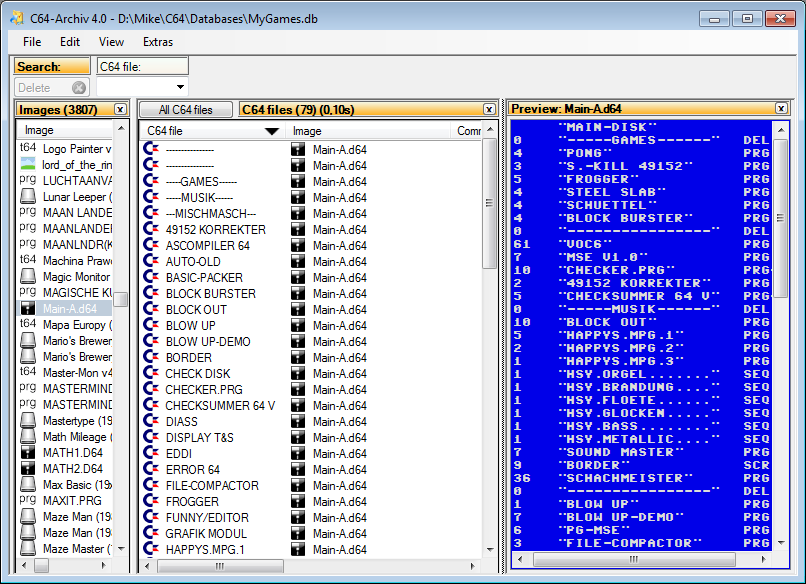
C64-Archiv est un gestionnaire de fichiers Commodore C64 facile à utiliser. Ce programme peut fonctionner -tel un frontend- avec des émulateurs tels que VICE, CCS64, HOXS64 et EMU64 pour lancer des programmes.


Télécharger C64-Archiv v4.4 (2.1 Mo)

Site Officiel

En savoir plus…

Budford permet la configuration de Cemu (ainsi que les options pour chaque jeu), son paramètrage et est également un outil de mise à jour automatique.


Pourquoi?
Cemu est un excellent émulateur. Mais il ne dispose actuellement que d’un support limité pour les paramètres par jeu. Combien de fois avez-vous activé le support multi-core pour Breath of the Wild, puis oublié de le reconvertir en single core avant de jouer à Mario Kart avec vos amis. Et nous savons tous combien cela peut être frustrant quand une nouvelle version arrive et que votre jeu préféré ne fonctionne plus.
 
Budford est un outil de gestion de la configuration pour Cemu avec une interface familière pour ceux qui ont utilisé l’émulateur Dolphin.
 
Budford n’est pas un lanceur de jeu, il est conçu pour fonctionner avec votre lanceur de jeu préféré.


Télécharger Budford v1.0.118 (2.3 Mo)

Site Officiel

En savoir plus…

Il s’agit d’une interface graphique dédiée à RetroArch. (site source)


Quelques caractéristiques:
– Interface graphique simple, complète et facile à utiliser
– Drag & Drop des ROMs pour lancer et créer des playlists.
– Utilise les bibliothèques des ROMs d’Archive.org
– Automatisation du Netplay
– Gestion des menus par jeu et par core et XMB


Télécharger SkeletonKey v0.99.81.08 (22.7 Mo)

Site Officiel

En savoir plus…

Il s’agit d’une interface graphique pour émulateurs d’arcade et consoles. (ancien site)


Télécharger RetroFE v0.10.31 (246 Mo)

Site Officiel

En savoir plus…

PlayNite est un gestionnaire open source de bibliothèque de jeux vidéo et un launcher avec prise en charge des bibliothèques tierces telles que Steam, GOG, Origin et Uplay. Incluant le support d’émulation de jeu et fournissant une interface unifiée pour vos jeux.

 
– Fix: Battle.net games not starting properly on some non-English Windows #829
– Fix: Reload of script extensions doesn’t work
– Fix: Fullscreen view not loading properly
– Fix: Various crashes
– Fix: Crash when editing game media
– Fix: Crash when assigning icon or cover image to a platform
– New: Breaking Changes to extensions API
– New: Game library is no longer stored in a single file #516
– New: Performance improvements to large libraries, reduced memory usage and greatly improved search/filtering speed
– New: Bethesda Launcher support (installed games only) #303
– New: Steam category import also imports hidden status #615 (by @psychonic)
– New: Download background images for Origin games #620
– Fix: Not all emulators show in game action settings #821
– Fix: Not all Steam games are imported #804 (by @psychonic)
– Fix: Accidental trimming of spaces put into filters #786 (by @jharmer95)
– Fix: Download higher quality media for GOG games if available
– Fix: Download better background images for Steam games #811
– Fix: Various crashes
– Fix: Platform and emulator settings are not being saved properly #799
– Fix: Some descriptions are broken #795
– Fix: Updated localizations
– Fix: Crash when setting categories #796
– Fix: Crash when starting Battle.net games
– Fix: Crash at startup
– Fix: Crash when running portable version
– Fix: Metadata download not working properly for Steam games
– New: Black Ops 4 support in Battle.net plugin
– New: Automatic import of Half-Life 1 and 2 mods #769, #788 (by @psychonic)
– New: TGA image support for game metadata #279
– New: Removed unnecessary system information from diagnostics package
– New: Option to update specific library on demand
– New: Option to start Playnite minimized #568
– New: Option to run Playnite when computer starts #64
– New: Option to disable metadata download after game import #705
– New: Option to disable background image
– New: Installation no longer requires admin privileges #664
– New: Diagnostics package is automatically uploaded after it’s generated
– Fix: Battle.net games are not automatically starter if Battle.net is not already running
– Fix: Play time of some Origin games not being counted properly
– Fix: Game edit window polish
– Fix: Game deselected after assigning categories
– Fix: Failed load of script extension prevents Playnite from starting properly #780
– Fix: Description paragraphs not rendered correctly #717
– Fix: Database import from previous playnite version fails #773
– Fix: Copied emulator profiles cannot be used #781
– Fix: Import of installed Steam games fails
– Fix: GOG metadata download not working after latest website redesign
– Fix: Possible game database corruption during update
– Fix: Crash when editing game after Playnite update
– Fix: Import of installed GOG games fails (4.51)


Télécharger PlayNite v10.64 (145 Mo)

Site Officiel

En savoir plus…

Un frontend multi-systèmes avec une vaste base de données hors ligne de métadonnées de jeux vidéo en provenance de MobyGames.


Télécharger Metropolis Launcher v1.2.0 mk2k (261 Mo)

Site Officiel

En savoir plus…

MedGui Reborn est une interface (Frontend) pour Mednafen sur OS Windows. Cette archive inclut MetroMed.


– Changed again main MedGuiR updater server and code to manage it
– Fixed wrong « offline » session on MedClient
– Fixed a generic untraceable exception on UCI client
– Fixed exception on sbi/ips Advanced patch menu
– Added missing toggle option on fast/slow forward (Advanced Mednafen Setting)
– Update HOW-TO r1.txt file
– Improved TGDB Scrape function
– Improved recognition of covers on multivolume CDs images
– Added a « Waiting » popup during TGDB download
– Prevent a possibile exception if a file will be not downloaded on TGDB section
– Fixed wrong (serial) sbi patch download for PSX game
– Added import/remove SBI patch option on Advanced menu
– Added the support for the new TGDB API (select it by the small refresh icon, near
– Scraper button and update all reported categories, this task must be only one time)
– Added TGDB Game Selector for multiple scrape occurrence
– Fixed missing NoPr.png exception
– Fixed a exception on MedGuiR Advanced menu
– Fixed exception Date time format with TGDB API
– Added refresh of text onto infobox message


Télécharger MedGui Reborn v0.127 (24.5 Mo)

Site Officiel

En savoir plus…

Plugin de contrôle créé par AQZ permettant de jouer en réseau sur internet (il s’agit d’une alternative au plugin Kaillera).
Il est conseillé d’utiliser ce plugin avec les plugins de contrôle « Jabo DirectInput7 » ou « N-Rage’s Direct-Input8 ».


Code source.

Télécharger AQZ Netplay Input Plugin r142 (326 Ko)

Site Officiel

En savoir plus…

Il s’agit d’un fork de DOSBox des plus intéressant, destiné à Windows Linux et MacOS et créé par Jon Campbell. Il possède une compatibilité excellente et met l’accent sur la précision d’émulation notamment en ce qui concerne l’émulation de Windows 3.x à ME. En outre il ajoute des améliorations en provenance d’autres builds comme DOSBox ECE avec l’émulation de la 3DFX en interne.


Les améliorations sont les suivantes:

 
voir site officiel


Télécharger DOSBox-X (Hx DOS) v2026.10.01 (9.7 Mo)

Télécharger DOSBox-X (LowEnd) v2026.10.01 (19.6 Mo)

Télécharger DOSBox-X (MinGW) v2026.10.01 (24.1 Mo)

Télécharger DOSBox-X (Visual Studio) v2026.10.01 (28.9 Mo)

Site Officiel

En savoir plus…

Une version améliorée de Neko Project II et Neko Project 21 (PC98XX) mais dont les principales informations sont en japonais (l’interface est disponible en anglais). Plus d’informations.


(Ancien thread | Nouveau thread)
 

Télécharger Neko Project II / Project 21 fmgen v0.83k8 (2025/11/28) (764 Ko)

Site Officiel

En savoir plus…

Un émulateur de Nec PC8801MA pour Windows.


Télécharger PC8801MA (2019/03/12) (381 Ko)

Site Officiel

En savoir plus…


https://getourbonus.com/fr/accueil

https://www.romspedia.com/