Play! est une tentative de créer un émulateur PlayStation 2 sous Windows / MacOS / iOS / Android. Il est actuellement écrit en C / C + + et utilise un système de mise en cache / de recompilation d’instruction pour obtenir de meilleures performances tout en émulant le CPU.
 
L’émulateur peut faire fonctionner quelques jeux, mais très moyennement dans la plupart des cas. L’objectif de l’auteur est d’atteindre un niveau de qualité qui permettra à quiconque de jouer son jeu favori PlayStation 2 sur son PC.
 
play

 
– Compatibility fixes (ie.: ‘Age of Empires 2’ and ‘Radiata Stories’ now boot).
– Fixed more rendering issues occurring in 2D games (ie.: ‘Ys 3’).
– [Android] Many UI improvements.


Télécharger Play! (x86) GIT v0.77 (2026/10/25) (8.9 Mo)

Télécharger Play! (x64) GIT v0.77 (2026/10/25) (10.3 Mo)

Site Officiel

En savoir plus…

AmiArcadia est le port amélioré de Tunix2001 ex ‘Win Arcadia 2001’ (par Gavin Turner) pour Amiga. Ecrit par James Jacobs et Gavin Turner, cette version est en fait le port Windows du port Amiga (un backport) !


Il émule les consoles basé sur la famille des Arcadia2001 : Bandai, Emerson, Grandstand, Hanimex, Intervision, Leisure-Vision, Leonardo, MPT-03, Ormatu, Palladium, Poppy, Robdajet, Rowtron, Tele-Fever, Tempest, Tryom, Tunix, etc.
 
Il supporte aussi l’Interton VC 4000 et l’Elektor TV Games Computer. Il nécessite Windows 9x/ME/NT/2000/XP et tourne aussi sous Vista/8/10.
 

Télécharger Win Arcadia (Ami Arcadia) v36.8 (9.9 Mo)

Site Officiel

Nouvelle version de cet émulateur multi-arcades et consoles.


fba
 
En voici les améliorations:


Fixes and new features

  • Restore MSVC full optimisation (should see slightly faster performance) [Barry]
  • Speed-up the Game List (F6) window considerably [dink]
  • Fixed 16-bit rendering for most games on Konami and Metro hardware [iq_132]
  • Fixed 16-bit RGB555 rendering in Taito F3 [dink]
  • Separate Force 16-Bit Video option between D3D Enhanced blitter and DX9 Alt blitter [Barry]
  • Fixed scfinals coin-up issue with a kludge [dink]
  • Fixed missing background layer in Bio-ship Paladin level 2 [dink]
  • Fixed an issue with Pururun’s sound [dink]
  • Massive Taito-F3 video fix-a-thon
    • Arabian Magic: ugly line down the screen at stage start, caused by off-by-one clipping
    • Arabian Magic: missing text in the cutscenes
    • Puzzle Bobble 4: missing end-of-round you won/lost animations
    • Land Maker: missing you won/lost text
    • Land Maker: tilemap alignment issues
    • Grid Seeker: missing continue screen
  • Remove unneeded DWM and MDI code, causes issues in Win10 [Barry]
  • Updated modern Windows builds to use the Segoe font recommended by Microsoft [Barry]
  • Fixed broken background issue in Ashura Blaster [dink]
  • Fixed animated background in Universal’s Space Raider [dink]
  • Added experimental SekBurnUntilInt() code to the 68k core [dink]
  • Fixed layer alignments and screensize in Ajax / Typhoon [dink]
  • Fix shadow/highlights for 2-cell column vscroll in Megadrive, in particular fixes the intro to Trouble Shooter / Battle Mania [dink]
  • Fix Super Real Darwin sprite:tile priorities [dink]
  • Fix timing inconsistencies / framerate issues on some Win 10 machines (high precision timer) [dink]
  • Fix Galaxian-custom sound that dink broke [Barry]
  • Add ability to rotate player digitally in Forgotten Worlds [dink]
  • Fix layer priorities in G-Loc (gloc) [Barry]
  • Fix cutscene crystal ball in some sets of Altered Beast [Barry]
  • Fixed broken sound in Puzzle King (4in1boot) [dink]
  • Disabled Force 16-bit emulation by default, can still be enabled by user, but causes issues with some systems, eg, Taito F3 [Barry]
  • Made the Enhanced blitter the default for normal builds [Barry]
  • Made force flip a default option for the Direct Draw blitter [Barry]
  • Set the full-screen resolution to the desktop resolution on first program start [Barry]
  • Fixed blue squares in Street Fighter Alpha 2 high score entry screen [Barry]
  • Added a message to install the Direct X runtimes if the DLLs are missing when starting the DirectX9 blitters, removed the message that showed at every FB Alpha start [Barry]
  • Added ability to choose which monitor (separated for Horizontal and Vertical games) to use for fullscreen in the DirectX 9 blitters [Barry]
  • Added alpha transparencies to Raiga Strato Fighter [iq_132]
  • Fixed video offset issue in Gundhara [dink]
  • Fixed alpha blending and many sprite:tile priority issues in Nitro Ball [dink]
  • Fixed MSM6295 Banking in Boogie Wings [dink]
  • For debug builds: show negative numbers with the debug counter (‘m’ and ‘n’) [dink]
  • Fixed the road and sky levels (broken raster effects) in Ed Randy / The Cliffhanger [dink]
  • Fixed « stuck » sprites in Pitfall II on Sega System 1 hardware [dink]
  • Fixed slow music tempo when sound rate set to 44100 in Contra, Jaleco Megasystem 1 games, Konami’s Surprise Attack and several Data East 16-Bit games [dink]
  • Fixed strange music tempo in Route 16 [dink]
  • Fixed un-smooth scrolling and cut-off end-of-level message in Konami’s Surprise Attack [dink]
  • Fixed video offset issue in X-Multiply m81 version [dink]
  • Ported the Namco C140 sound core to FBAlpha [dink]
  • Added resampling to the Konami K054539 Soundcore, now most later Konami games (Xexex, Moo Mesa, Bucky O’Hare, etc) will sound great at any user-selected soundrate [dink]
  • Fixed occasional sprite flickering in Mystic Warriors [dink]
  • Fixed occasional freeze in Atomic Robo-Kid when playing via keyboard and up+down or left+right is pressed at the same time [dink]
  • Fixed music, graphics, timing and color issues in Psychic 5 [dink]
  • Added CPU_IRQSTATUS_HOLD support to m6809 cpu core [dink]
  • Add watchdog device. Hook it up to Momoko 120% driver as an example. [iq_132]
  • Use real MCU for Nekketsu Kouha Kunio-kun, Guardian/Get Star, Fairy Land Story, Rumba Lumber, Onna Sansirou – Typhoon Gal, Chack’n Pop, Golden Axe (set 2, US) [Barry]
  • Added BurnRandom() / BurnRandomScan(), a predictable random number generator based on old BSD LCG [dink]
  • Hooked up BurnRandom() to games using rand() to allow for reliable input recordings and states [dink]
  • Enabled Alpha Transparency effects in Mystic Warriors [dink]
  • Fixed music issues in DJ Boy [dink]
  • Fixed a palette issue and possibly(?) fixed a timing issue in Heavy Unit [dink]
  • EEPROM saves path now configurable [Barry]
  • General source tidy-up/maintenance, and conversion to BurnMalloc/BurnFree [Barry]
  • Add support for the new format hiscore.dat file [Barry]
  • Fix issue with IPS Manager sometimes saving ini file incorrectly [Barry]
  • Added Generate All .dat file function [Barry]
  • Added checkbox filters to the HTML debug log, and added ten new output levels [Barry]
  • Added extra compile step to link drivers separately to avoid Windows 32KB process limit [Barry]
  • Updated the documentation [Barry]


New drivers

  • Add driver for Mappy, Dig Dug II, Super Pacman, Pac & Pal, Grobda and The Tower of Druaga [iq_132, dink]
  • Add driver for Gaplus / Galaga 3 [iq_132]
  • Added driver for Toypop and Libble Rabble on misc. Namco Hardware [iq_132]
  • Added driver for Cannon Ball, Magix / Rock and Rock Tris on Yun Sung 8 hardware [iq_132]
  • Added driver for US Games trivia [iq_132]
  • Added driver for Double Wings on Data East 16-bit Hardware [iq_132]
  • Added driver for Assault, Burning Force, Cosmo Gang: The Video, Dragon Saber, Mirai Ninja, Valkyrie no Densetsu, Ordyne, Phelios, Rolling Thunder 2, Marvel Land, Metal Hawk, Kyuukai Douchuuki, Super World Stadium 92 and 93, Steel Gunner, Steel Gunner 2, Dirt Fox, Finest Hour and Lucky and Wild on Namco System 2 Hardware [iq_132, dink]
  • Add driver for Time Soldiers/Battle Field, Sky Soldiers, Sky Adventure, Gang Wars, Super Champion Baseball on Alpha68k II and VI hardware [iq_132, dink]
  • Added driver for Sauro and Tricky Doc [iq_132]
  • Added driver and sound core for Wiping / Rug Rats [iq_132, dink]


New additions to existing drivers

  • Added Dottori-Man Jr. to the Dottori Kun driver [hap, JacKc]
  • Added Revenger ’84 to the EPOS driver [dink]
  • Added Ultimate Mortal Kombat Trilogy Hack r.5149 to Megadrive [dink]
  • Added Shinobi III M.I.J.E.T. Enhancement Hack to Megadrive [dink]


Clones and updated romsets in existing drivers

  • Added clone of Gals Panic DX (Asia) [arcade mod bios]
  • Added American Horseshoes (Taito-L) – was missing from the .40 release by accident [dink]
  • Added clone of Macross II (Korea) [CoolMod, CS, The Dumping Union, JacKc]
  • Added clone of The Last Blade (Special 2017, hack) [GSC20017, JacKc, iq_132]
  • Added clone of Street Fighter II: The World Warrior (Japan 911210, CPS-B-17) [ShouTime, Bonky, MetalliC, JacKc]
  • Added clone of Operation Wolf (Japan, SC) [ShouTime, JacKc]
  • Added clone of Operation Thunderbolt (Japan, SC) [ShouTime, JacKc]
  • Added clone of Silk Worm (prototype?) [frsj8112, JacKc]
  • Added clone of Double Dragon (Special 2017, hack) [JacKc, iq_132]
  • Added clone of Palamedes (US) [caius, The Dumping Union, JacKc]
  • Added Nebulous Bee, clone of Galaga [JacKc]
  • Added clone of Jackal (bootleg, Rotary Joystick) [f205v, The Iron Goat, JacKc]
  • Added clone of Rastan Saga (Japan Rev 1) [Michel BLANCO, JacKc]
  • Added clone of Captain Silver (Japan, revision 1) [Apocalypse, The Dumping Union, JacKc]
  • Added clone of Super Street Fighter II to the CPS-2 driver [Barry, idc/Team Avalaunch]
  • Added clone of Bucky O’Hare (ver JA) [ShouTime, The Dumping Union, JacKc]
  • Added Samurai Shodown IV – Amakusa’s Revenge / Samurai Spirits – Amakusa Kourin (Special 2017, hack) [GSC2007, JacKc]
  • Updated The King of Fighters ’98 (Combo) to Ver. 2017/04/08 [JacKc]
  • Sync. romsets with MAME 0.187 [Barry]


Télécharger Final Burn Alpha (XP) v0.2.97.43 (4.0 Mo)

Télécharger Final Burn Alpha (x86 NT6) v0.2.97.43 (4.0 Mo)

Télécharger Final Burn Alpha (x64 NT6) v0.2.97.43 (4.8 Mo)

Télécharger Preview Pack (Titles) v1.0.0.2+ (230 Mo)

Télécharger Preview Pack (In Game) v1.0.0.2+ (289 Mo)

Site Officiel

En savoir plus…

Ce fichier 7z (contenant des fichiers XML/JSON) vous permettra de tricher dans vos jeux préférés. Il s’active via la touche TAB sous MAME (arcade/consoles/ordinateurs).


Jumping the gun for this release, here is the cheat collection update for the latest MAME 0.186 (due release tomorrow). The highlight of this release is that it now contains cheats for 1929 games from the PSX softwarelist, I’ve collated the cheats from various GS/AR lists and converted them into XML format for ease of use.
 
pugsy


Décompressez l’archive (.zip) de manière à obtenir un fichier cheat.7z (qui en revanche n’est pas à décompresser) et que vous placerez dans le répertoire courant de Mame puis modifier le fichier ini de l’émulateur (fichier qui se créait en lançant la ligne de commande mame.exe -cc) et changer la ligne: « cheat 0 » en « cheat 1 ».


Idem dans plugin.ini mettre les lignes suivantes à « 1 »:

cheat 1
cheatfind 1


Télécharger Pugsy Cheat v0.187 (1,4 Mo)

Site Officiel

En savoir plus…

Foobar2000 est un lecteur de prime abord minimaliste. Son interface est des plus sobre avec la seule présentation d’une liste de lecture alors que la barre de progression et les boutons de contrôle peuvent n’être que des caractères textuels. Il supporte de nombreux formats sonores (notamment les formats audio d’anciennes machines) grâce à l’ajout de plugins.


Cette légèreté permet bien sûr à Foobar2000 d’être l’un des lecteurs MP3 les plus léger en termes de ressources mémoire / processeur, mais il ne faudrait pas croire que cela le contraint au minimum syndical. Le fonctionnement par plugins de ce lecteur lui permet d’être incroyablement modulaire et d’intégrer un nombre impressionnant de fonctions.


De nombreux formats audio en rapport avec l’émulation sont parfaitement supportés.


foobar

Les changements:


– Fixed horrible, horrible bug with inverted checkmarks in advanced preferences at 150% text size.
– Network streaming: added handlers for more HTTP redirect codes.
– Fixed foobar2000 process not setting its working directory to its installation location on startup.
– FLAC tagging fixes.


Télécharger Foobar2000 v1.3.16 (3,7 Mo)

Site Officiel

En savoir plus…

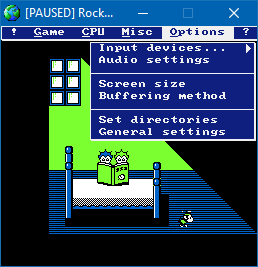
Encore une version de cet émulateur de NES.

 
rocknes

 
– Fixed a CHR bankswitching bug in the mapper 64 (Rolling Thunder works).


Télécharger RockNES (i686) v5.51 (1,6 Mo)

Site Officiel

En savoir plus…

Joyce est le meilleur émulateur Amstrad PCW disponible. Conçu sous Linux, il a été porté facilement sous Windows depuis qu’il utilise le SDL.
 
– the default keyboard mapping for the # and \ keys under Windows has been corrected.


Télécharger Joyce (Win) v2.2.12 (8.2 Mo)

Site Officiel

En savoir plus…

Il s’agit d’une interface graphique dédiée à l’émulateur Cemu. Maple Seed vous permet de sauvegarder les mises à jour Wii U, DLC et les titres directement sur votre PC, ainsi que de lancer Cemu avec des titres.


Cette version (V2) propose les options suivantes:
– Lancement du titre
– Titres complets
– Dernières mises à jour
– DLC
– Background dynamique
– Auto application des packs graphiques


Les changements sont:
– general bug fixes
– Improved processing
– LoadLibrary should ignore unauthorized paths
– Program should no longer force close for unavailable content
– Context menu no longer displays an update option if a patch is detected as non-existent (buggy)


Télécharger Maple Seed V2 v2.1.1.15 fix (3,8 Mo)

Site Officiel

En savoir plus…

Voici les derniers émulateurs (et aussi les plus fréquemment mis à jour) en cours de développements.


Citra: Emulateur de 3DS.

Decaf: Emulateur de WiiU.

RPCS3: Emulateur de Playstation 3.

Redream: Emulateur de Sega Dreamcast.

CXBX: Emulateur de Microsoft X-Box.

Xenia: Emulateur de Microsoft X-Box 360.

Cen64: Emulateur de Nintendo 64 Préliminaire.


Télécharger Citra (Final build) (2024/03/07) (140 Mo)

Télécharger Decaf-Emu Build 231109 (40.8 Mo)

Télécharger RPCS3 (WIP) v0.0.43 Alpha (2026/11/17) (35.5 Mo)

Télécharger Redream v1.5.0.1239 (3.1 Mo)

Télécharger Xenia v1.0.2844 (2026/11/17) (3.9 Mo)

Télécharger CXBX Reloaded v0.1.0 (1.3 Mo)

Télécharger Cen64 (WIP) (2022/10/02) (2.6 Mo)

Télécharger Cen64 (Debugger) r2015.01.18 + (DEV) r2017.04.23 (3.4 Mo)

Encore une version de cet émulateur de NES.

 
rocknes

 
– New NTSC default palette, including color emphasis, by Joel Yliluoma.
– All palette-related core was rewritten and fixed.
– Fixed palettes for VS games, including GUI dialog for selection.
– Fixed problems in the GUI ‘general settings’ dialog.
– Fixed PPU left clipping on/off setting.
– Fixed GUI alert box colors.
– Fixed a bug in the « Olive » and « Nocturne » color styles.
– Fixed gfx frame pointer reset, an obscure bug found by accident.
– Fixed emulation reset if an invalid opcode is found.
– Fixed mapper 64 IRQs (Hard Drivin’ works again).
– Fixed mapper 90 IRQs and savestates.
– Fixed Famicom Disk System savestates, system RAM and PPU IRQs, major bugs!
– Fixed initial scanline (fixes Time Lord).
– Fixed an obscure bug setting file loading path.
– Fixed ROM corruptor, it wasn’t restoring changes.
– Fixed a bug setting the CPU address range in the CPU state display.
– Fixed a few bugs in the config file parsing.
– Fixed resetting to the default settings.
– Custom fullscreen mode is now disabled if the last video mode was windowed.
– Improved color emphasis effect & MMC3 IRQs.
– Improved $2006 behaviour, old hacking removed.
– Removed restriction for running only 1 instance of RockNES.
– Frame rate (FPS) is no more displayed in the program window.
– Added mappers 190 (Magic Kid GooGoo) and 206.
– Added full NES palette viewer, including all the color styles palettes!
– Added 5 new color styles, related to R-G-B swapping.
– Added Game Genie codes, up to 10.
– Added NSF track number display on-screen.
– Another huge code cleanup and fixes, plus minor changes and improvements.


Télécharger RockNES (i686) v5.50 (1,6 Mo)

Site Officiel

En savoir plus…

Emulator Cabinet est un lanceur d’émulateurs tout-en-un.


Télécharger Emulator Cabinet v1.6 (81,0 Ko)

Site Officiel

En savoir plus…

Un émulateur de PSP écrit en Java. Codé par Mad et Shadow (PCSX2) et rejoint par Wrayal, Fiveofhearts, Hlide et Dreampeppers99. Il émule les jeux commerciaux mais nécessite une puissante configuration.
 
jpcsp
 
Liste de jeux compatibles.
Site de développement du projet.
Builds SVN automatiques (alternative).
 

Télécharger JPcsp (x86) v0.7 rev 0318d15e (26.4 Mo)

Télécharger JPcsp (x64) v0.7 rev 00ac4d6 (29.1 Mo)

Site Officiel

En savoir plus…


https://getourbonus.com/fr/accueil

https://www.romspedia.com/