Java SID Player 2 est un émulateur sonore Commodore 64 codé en Java. Il lit merveilleusement les SID et est basé sur le code source de Sidplay2 et Resid-fp. Il dispose des derniers patchs de filtres Antti Lankila.

Il supporte la stéréo des fichiers 2SID.


Site alternatif


Télécharger Java Sid Player 2 v3.3 (19,8 Mo)

Site Officiel

En savoir plus…

Les derniers builds en développement sont à présent disponibles.


Citra : Emulateur de Nintendo 3DS.
3Dmoo : Emulateur de Nintendo 3DS.
Play! : Emulateur de Playstation 2.
RPCS3 : Emulateur de Playstation 3.
Jpcsp : Emulateur de Sony PSP.
CxBx : Emulateur de Microsoft X-Box.
Xenia : Emulateur de Microsoft X-Box 360.


Télécharger Citra (32 bits) (2015/04/01) (12.5 Mo)

Télécharger 3dmoo (x86) (2017/08/21) (454 Ko)

Télécharger Play! (x86) GIT v0.77 (2026/10/25) (8.9 Mo)

Télécharger Play! (x64) GIT v0.77 (2026/10/25) (10.3 Mo)

Télécharger RPCS3 (32 bits) v0.0.0.4 (2014/06/02) (3.1 Mo)

Télécharger RPCS3 (WIP) v0.0.43 Alpha (2026/11/23) (35.6 Mo)

Télécharger JPcsp (x86) v0.7 rev 0318d15e (26.4 Mo)

Télécharger JPcsp (x64) v0.7 rev 00ac4d6 (29.1 Mo)

Télécharger CXBX Shogun v0.8.1-Pre3 (2015/10/30) (398 Ko)

Télécharger Xenia v1.0.2844 (2026/11/23) (3.9 Mo)

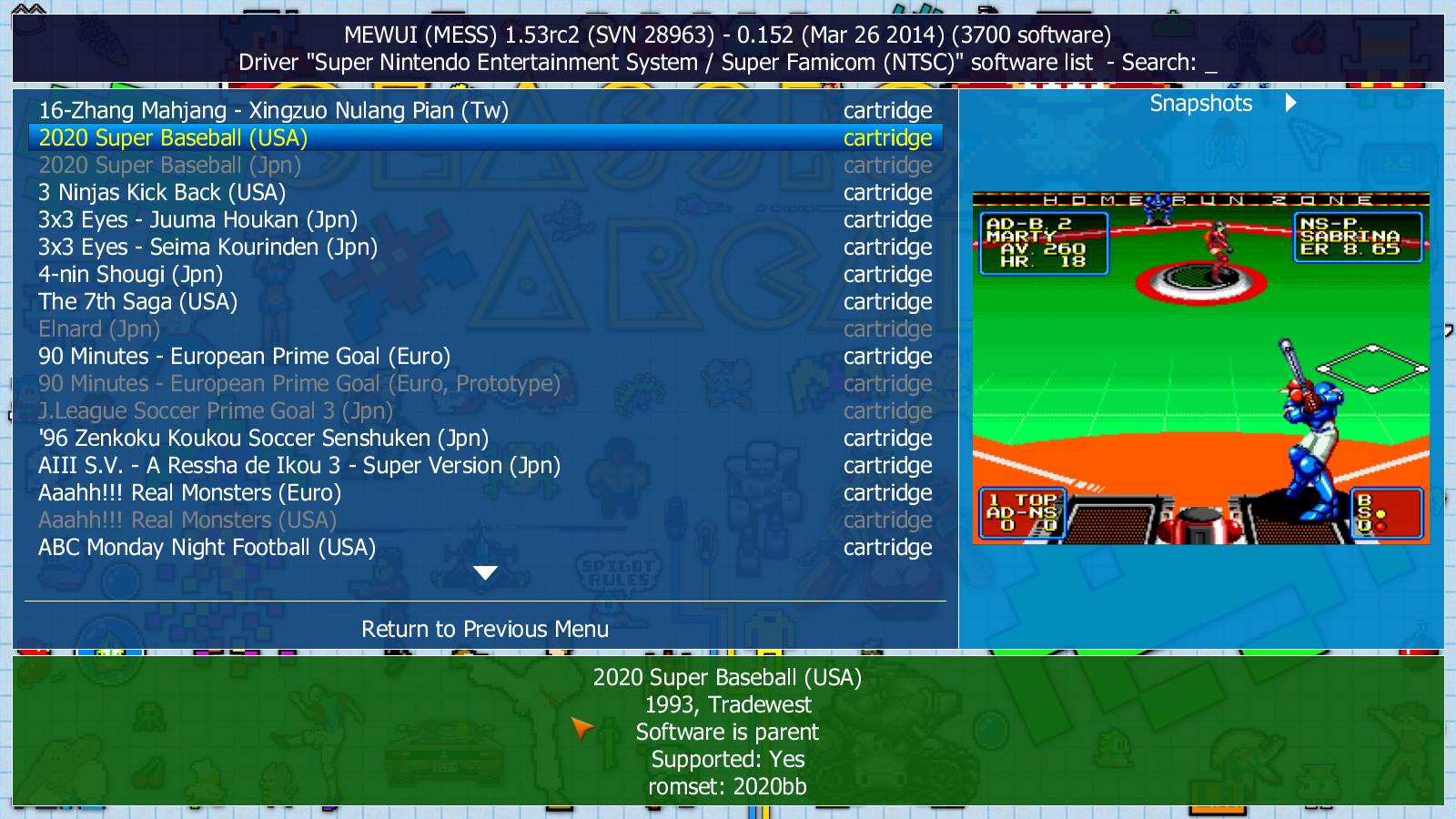
MEWUI-UME est une simple extension de l’interface interne de UME, dont la caractéristique principale réside dans la visualisation de la liste complète des jeux.


Voici un aperçu des fonctionnalités:
– Affichage de la liste complète des jeux.
– Confirmation à la fermeture d’un jeu, réglage activé par défaut.
– Recherche activée avec un minimum de 4 caractères inscrits.
– La recherche renvoie les 200 premiers résultats utiles.
– La pression de la touche TAB sur le menu principal active le menu de configuration.
– Changement de la taille de la police de caractère dans l’interface utilisateur.
– Changement de certaines informations affichées en bas du menu principal.
– Ajout d’informations sur MEWUI en haut du menu principal.


Changements :

Added: * Custom filter, option and menu. You can now combine multiple filters (up to 10) into one, all selected filters are in AND mode.

* New keyboard shortcuts to navigate the main menu: Left CTRL + Up/Down/PgUp/PgDown/Home/End (scrolls text of information) Left CTRL + Right/Left arrow (switches between images and information) Left ALT + Up/Down arrow (changes the active filter for the games list) * Preliminary menu for customizing the UI. - Option to change the main font and size. - Option to change the size of information text. - Sketched color management for standard menu. * Usage info for software (MESS / UME) available in right panel. Changed: * Removed option to autosave settings, settings are always saved when you exit from the options menu. * Grouped list is now in alphabetical order according to the name of the game and not the romset. * Search for images of cabinets also happens in 'cabdevs' by default (MESS / UME). * Improved search in submenus, enabled the TAB key to search for other results. * Updated to MAME / MESS / UME 0.155. Fixed: * Failure to generate the list of games / software by selecting a filter with an active search. * Improved handling of the error message for missing chd / rom. * Fixed rendering of images. * Error in the video options. * Less memory consumption. * Various minor fixes.


Télécharger MEWUI-UME (x86) v1.55 (27,5 Mo)

Télécharger MEWUI (x64) v1.70.1 (46.7 Mo)

Site Officiel

En savoir plus…

MEWUI-MESS est une simple extension de l’interface interne de MESS, dont la caractéristique principale réside dans la visualisation de la liste complète des jeux.


Voici un aperçu des fonctionnalités:
– Affichage de la liste complète des jeux.
– Confirmation à la fermeture d’un jeu, réglage activé par défaut.
– Recherche activée avec un minimum de 4 caractères inscrits.
– La recherche renvoie les 200 premiers résultats utiles.
– La pression de la touche TAB sur le menu principal active le menu de configuration.
– Changement de la taille de la police de caractère dans l’interface utilisateur.
– Changement de certaines informations affichées en bas du menu principal.
– Ajout d’informations sur MEWUI en haut du menu principal.


mewuimess


Changements :

Added: * Custom filter, option and menu. You can now combine multiple filters (up to 10) into one, all selected filters are in AND mode.

* New keyboard shortcuts to navigate the main menu: Left CTRL + Up/Down/PgUp/PgDown/Home/End (scrolls text of information) Left CTRL + Right/Left arrow (switches between images and information) Left ALT + Up/Down arrow (changes the active filter for the games list) * Preliminary menu for customizing the UI. - Option to change the main font and size. - Option to change the size of information text. - Sketched color management for standard menu. * Usage info for software (MESS / UME) available in right panel. Changed: * Removed option to autosave settings, settings are always saved when you exit from the options menu. * Grouped list is now in alphabetical order according to the name of the game and not the romset. * Search for images of cabinets also happens in 'cabdevs' by default (MESS / UME). * Improved search in submenus, enabled the TAB key to search for other results. * Updated to MAME / MESS / UME 0.155. Fixed: * Failure to generate the list of games / software by selecting a filter with an active search. * Improved handling of the error message for missing chd / rom. * Fixed rendering of images. * Error in the video options. * Less memory consumption. * Various minor fixes.


Télécharger MEWUI-MESS (x86) v1.55 (15,1 Mo)

Site Officiel

En savoir plus…

MEWUI est une simple extension de l’interface interne de MAME, dont la caractéristique principale réside dans la visualisation de la liste complète des jeux.


Voici un aperçu des fonctionnalités:
– Affichage de la liste complète des jeux.
– Confirmation à la fermeture d’un jeu, réglage activé par défaut.
– Recherche activée avec un minimum de 4 caractères inscrits.
– La recherche renvoie les 200 premiers résultats utiles.
– La pression de la touche TAB sur le menu principal active le menu de configuration.
– Changement de la taille de la police de caractère dans l’interface utilisateur.
– Changement de certaines informations affichées en bas du menu principal.
– Ajout d’informations sur MEWUI en haut du menu principal.


mewuimame


Changements :

Added: * Custom filter, option and menu. You can now combine multiple filters (up to 10) into one, all selected filters are in AND mode.

* New keyboard shortcuts to navigate the main menu: Left CTRL + Up/Down/PgUp/PgDown/Home/End (scrolls text of information) Left CTRL + Right/Left arrow (switches between images and information) Left ALT + Up/Down arrow (changes the active filter for the games list) * Preliminary menu for customizing the UI. - Option to change the main font and size. - Option to change the size of information text. - Sketched color management for standard menu. * Usage info for software (MESS / UME) available in right panel. Changed: * Removed option to autosave settings, settings are always saved when you exit from the options menu. * Grouped list is now in alphabetical order according to the name of the game and not the romset. * Search for images of cabinets also happens in 'cabdevs' by default (MESS / UME). * Improved search in submenus, enabled the TAB key to search for other results. * Updated to MAME / MESS / UME 0.155. Fixed: * Failure to generate the list of games / software by selecting a filter with an active search. * Improved handling of the error message for missing chd / rom. * Fixed rendering of images. * Error in the video options. * Less memory consumption. * Various minor fixes.


Télécharger MEWUI-MAME (x86) v1.55 (22,5 Mo)

Site Officiel

En savoir plus…

QMC2 – M.A.M.E./M.E.S.S est une interface graphique pour l’émulateur de jeux d’arcade M.A.M.E. Il est le successeur d’une des premières interfaces graphiques UNIX pour M.A.M.E. : QMamecat, et est aujourd’hui le projet le plus actif dans le domaine. QMC2 repose sur l’utilisation de la bibliothèque graphique Qt4. QMC2 s’avère judicieux en complément d’UME 🙂


qmc2


Télécharger QMC2 (x86) v0.45 (29,9 Mo)

Télécharger QMC2 (x64) v0.243 (48.9 Mo)

Site Officiel

En savoir plus…

MameUI64 est un émulateur multi-arcade émulant plus de 28000 jeux (à partir de 1975) et incluant une interface (frontend). Ce build est compilé par John IV et destiné exclusivement aux processeurs supportant les instructions 64 bits (x86-64 dit x64), de plus il vous faudra un système d’exploitation compatible x64 pour le faire fonctionner.


Télécharger MAMEUI64 v0.155 (17,9 Mo)

Site Officiel

En savoir plus…

Une petite brève juste pour relayer nous aussi l’info de la disponibilité de la 1ere démo jouable du portage assez fantastique de Super Mario World de la Super Famicom sur cette bien belle bécane qu’est le MSX2.


Amorcé aux alentours de mai 2011 (déjà) par Daemos, membre du forum MSX RESSOURCE CENTER, le projet a depuis fédéré pas mal de passion et c’est une véritable entraide des membres du forum qui pousse le portage depuis lors.


Télécharger le fichier sur ce lien

En savoir plus ici

MAMEUIFX est basé sur le code source de MAME/MAMEUI, emprunte des améliorations à de nombreux builds non officiels (en vrac : StretchMAME, JMAME, RND, AdvanceMAME, CANAME, WHACK…).


Changements :

– Implemented Transparency to Menu Icons of the GUI
– Fixed bug which caused GUI stalling in a loop when using Refresh option (As reported by haynor666)
– Removed very old hack in FUUKIFG3.C (no more needed)
– Renamed « cleanstretch » core option to « widestretch » (As requested by haynor666 ages ago)


Télécharger MAMEUIFX32 v0.155 (16,2 Mo)

Télécharger MAMEUIFX64 v0.175.1 (18.4 Mo)

Site Officiel

En savoir plus…

Voici ColEMu, un émulateur Colecovision tournant sous WIndows développé par le célèbre Marat Fayzullin. Sachez que l’émulateur est très complet et qu’il a été développé en C, ainsi un certain nombre de portage ont pu être effectués, en vrac : Unix/X, Amiga, Dreamcast (…).


colem


Changements :

The latest release, published on October 15 2014, comes with support for cheat codes, in AAAA-DD and AAAA-DDDD formats, and the Cheat Hunter tool for finding your own cheat codes in any game. To start searching for cheat codes, press F5 and select « Search Cheats ». I am no longer supporting MSDOS, Symbian, Maemo, and Meego ports, due to the demise of the respective platforms. Older ColEm versions for these platforms are still available from this web page though. The free Android port can be downloaded from Google Play. If you like it, you can also download the deluxe version with more features. Please, give it a try and report any encountered problems in the discussion group.


ColEm supports both standard and SuperAction controllers, including the spinners (controlled with mouse movement). I have also started adding Coleco Adam emulation but it is not finished yet. Please see the documentation for the full list of changes and additions.


Télécharger ColEM v3.2 (124,2 Ko)

Site Officiel

En savoir plus…

il s’agit d’un émulateur de Sharp x68000 écrit en Java.


Télécharger XEiJ v0.14.10.15 (2,7 Mo)

Site Officiel

En savoir plus…

UME (Universal Machine Emulator) est le projet qui relie MAME et MESS (32 + 64 bits) dans un seul émulateur multi-usages. Couplé au frontend QMC2, vous pouvez alors utiliser tous les fichiers Mame extras & Mess Extras.


Télécharger UME v0.155 (48,0 Mo)

Site Officiel

En savoir plus…


https://getourbonus.com/fr/accueil

https://www.romspedia.com/