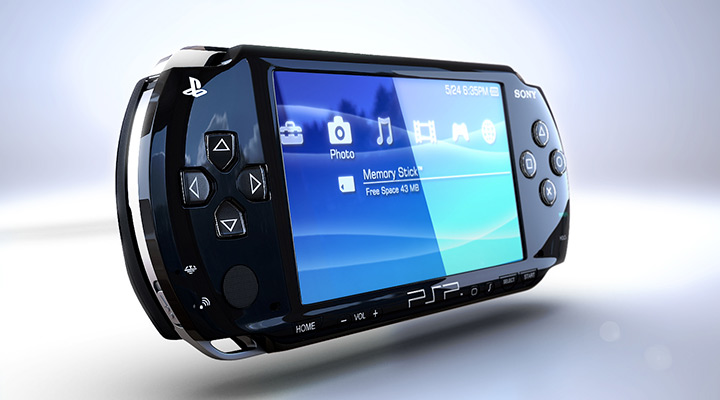
Un émulateur de PSP écrit en Java. Codé par mad et shadow (PCSX2) et rejoint par wrayal, fiveofhearts, hlide et dreampeppers99. Il émule quelques jeux commerciaux (tel que Puzzle Bobble Pocket ou Breath Of Fire III…) mais pas à pleine vitesse. Cet émulateur s’améliore progressivement.

psp


Presque 3 ans après la dernière version stable voici une nouvelle mouture qui passe en v0.7:


-> Added support for rendering in software mode, not using the GPU;
-> Added Game Pad support;
-> Major performance improvements in the graphic processing (see new Video options);
-> Automatic decoding of stereo ATRAC3+ audio using SonicStage;
-> Rendering of fonts using « sceFont ». OpenSource fonts are provided as a replacement
   for the PSP fonts. But the PSP original fonts can be used for maximal compatibility;
-> Automatic decryption of encrypted EBOOT.BIN and PGD files.
   Savedata files can also be loaded/saved in an encrypted form, like on a real PSP;
-> Added the configuration of regional settings
   under « Options » > « Configuration » > « Region »;
-> Configuration settings can be changed « on the fly »,
   i.e. the changes are effective immediately;
-> Draft implementation for the support of Video UMDs;
-> Basic network support:
   Infrastructure network is almost complete.
   Adhoc network is only working between two Jpcsp, not with a real PSP.
   Port shifting is available to support running two Jpcsp instances on the same computer.
   Signin to the PlayStation Network is not supported at all;
-> A lot of compatibility improvements in almost all of the PSP modules;
-> Major code cleanup in the module architecture (now using Java reflection);
-> New method used for computing FPS. The FPS value is now more reliable but usually lower
   than on previous releases. It doesn’t mean that the Jpcsp performance is now worse,
   but just that the previous FPS counter was over-optimistic;
-> Added Frame skipping option;
-> Added cheat import from cheat.db;
-> Added export function for the current 3D scene in Wavefront .obj/.mtl format,
   including the textures;
-> Added texture modding;
-> Added functions to clear the texture and vertex caches;
-> Added option to change the PSP clock speed;
-> Improved integrated Debugger;


Liste de jeux compatibles
Site de développement du projet.
Builds SVN automatiques.


Télécharger JPcsp (x86) v0.7 rev 3262 (16.6 Mo)

Télécharger JPcsp (x64) v0.7 rev 00ac4d6 (29.1 Mo)

Site Officiel

En savoir plus…

Un émulateur de Sinclair Zx Spectrum écrit en C# émulant également les machines suivantes:

– ZX Spectrum 48
– ZX Spectrum 128
– ZX Spectrum +3
– Pentagon 128/512/1024
– SCORPION 256
– ATM 4.50
– ATM 7.10
– PROFI 3.xx
– PROFI 5xx
– SPRINTER
– QUORUM 256
– Leningrad 1
– LEC 48/528
– et quelques variantes

Télécharger ZXMAK2 v2.7.5.7 (1.6 Mo)

Site Officiel

En savoir plus…

La ShinoA est à utiliser pour les AbandonWares. Ces anciens jeux qui ont du mal à fonctionner sur nos PC récents.


On lance l’installation sous Windows pour configurer la disquette.
On redémarre en laissant la disquette dans le lecteur pour démarrer dessus : l’installation se termine et après un redémarrage on peut s’en servir pour lancer les jeux.


Cette disquette peut être notamment utilisée pour Virtual PC via cette astuce :

1-Démarrer Windows Virtuel normallement
2-Insérer la Disquette virtuelle dans le lecteur de VirtualPC
3-Redémarrer le PC Virtuel en invite de commande (redémarrer en mode MS-Dos)
4-A l’invite C:\WINDOWS, taper « A: » et valider
5-Le prompt se transforme en A:\
6-Taper « raz » et valider les avertissements divers jusqu’à la fin du processus de remise à zéro de ShinoA5
7-Taper ensuite « Install » et valider. Si tout se passe bien, l’écran d’installation de la ShinoA5 apparaît. Suivre les instruction données
8-Après, pour redémarrer au besoin la Shino, il suffit de démarrer le PC avec la disquette virtuelle dans le lecteur de disquette virtuelle, et c’est Shino qui démarre à la place de Windows

(Source : Maxou sur Gameslover’s Network Forums)


PS : ce pack comprend les drivers pour Cartes Soundblaster & autres cartes Son (Hercules…)


Télécharger ShinoD7 Pack A5 Beta 5 (7.0 Mo)

Site Officiel

En savoir plus…

Un pack de cheats au format .pat (code Game Génie) à mettre dans un répertoire Patch de votre émulateur (n’oublier pas non plus d’ajouter le chemin dans l’émulateur pour pointer sur votre répertoire).


Télécharger Kega Fusion Cheat Code Pack (2013/06/27) (514.8 Ko)

Site Officiel

En savoir plus…

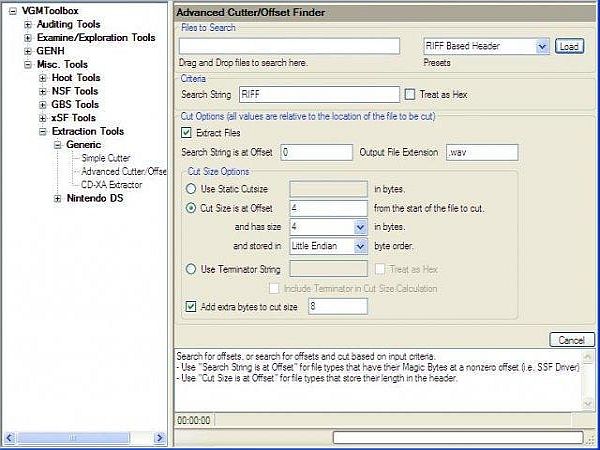
Inspiré par les GoodTools de Cowering et par le gestionnaire de rom ClrMAME de Roman, VGMToolbox est un outil en C# pour générer et vérifier les checksums des fichiers musicaux supportés par les émulateurs. Les GoodTools et ClrMame s’intéressent aux roms, VGMToolbox s’occupe des musiques extraites des roms. Il incorpore également plusieurs outils pour extraire, optimiser et construire des fichiers au format VGM [GBR, GBS, KSS, MDX, NSF, NSFE, SID, S98, SPC, VGM, xSF (PSF/PSF2/etc)]. (Source : Emunova)


VGMToolbox


Télécharger VGMtoolbox r926 (2.0 Mo)

Site Officiel

En savoir plus…

Stella est un émulateur Atari VCS 2600 multi-platforme, releasé sous licence GPL. A la base le projet a été développé pour Linux par Bradford W. Mott, cependant de nombreuses personnes ont rejoint l’équipe de développement pour porter Stella sur différents système d’exploitation comme AcornOS, AmigaOS, DOS, FreeBSD, IRIX, Linux, GP2X, OS/2, MacOS, Unix, et Windows (ouf!). Cette version inclus les binaires 32 et 64 bits.


Télécharger Stella (x86/x64) v3.9.0 (3.1 Mo)

Site Officiel

En savoir plus…

PPSSPP est un émulateur de Sony PSP (pour Windows, Android et SDL) gratuit et libre écrit en C + + par Henrik Rydgard (très connu sous le pseudo de Ector, déjà auteur de l’émulateur de PSP Potemkin et surtout connu pour Dolphin, ayant également exercé sur nombre d’émulateurs Dreamcast). Il traduit les instructions du processeur PSP directement dans du code optimisé pour machine x86, x64 et ARM en utilisant un compilateur JIT efficace.
PPSSPP peut également fonctionner sur du matériel bas de gamme ainsi que sur certains smartphones et tablettes Android, aussi longtemps qu’il y aura un soutien pour OpenGL ES 2.0.
Une poignée de jeux sont jouables pour le moment (Puzzle Bobble Deluxe, Puyo Pop Fever, Pinball Fantasies, Star Soldier, Blokus, Lumines, Knights in the Nightmare, Ridge Racer 2, BlazBlue…voir la liste de compatibilité ici) mais la liste devrait s’agrandir au fur et à mesure.


0.8.1 is pretty much just a crash fix release, fixing a couple of possible crashes around downloading the Atrac3+ plugin.


Site de développement.


Télécharger PPSSPP (x86) v0.8.0 (6.0 Mo)

Site Officiel

En savoir plus…

Un émulateur de PSP écrit en Java. Codé par mad et shadow (PCSX2) et rejoint par wrayal, fiveofhearts, hlide et dreampeppers99. Il émule quelques jeux commerciaux (tel que Puzzle Bobble Pocket ou Breath Of Fire III…) mais pas à pleine vitesse. Cet émulateur s’améliore progressivement.

psp


Les améliorations de la 3244 à 3261 :

-Experimental native memory implementation (through JNI). Not activated.
the WebCam connected to the PC is now used as a replacement for the PSP UsbCam. 
-Improved performance in some cases when using the option « Enable saving GE screen to Textures instead of Memory »: better reuse of the GE texture.
-Improved detection for writing of video textures directly into the frame buffer. This could fix flickering effects while playing a video in some games.
 -Experimental native memory implementation (through JNI). Not activated.
-Redesign of sceMpeg: decouple reading of video data for Xuggler and reading of video data from the PSP. This allows an improved compatibility of the PSP video reading without having to take into account of the Xuggler limitations.
 This could break the video play in a lot of applications! Please report any regression test issue on the forum.
 -Changed the naming of the video under the « tmp » directory to support multiple videos having the same file size.
-Code clean-up in sceDisplay. No functionality change (hopefully).
-Fixed error « java.lang.VerifyError: (class: _S1_2_xxxxxxx, method: s signature: ()I) Expecting to find float on stack »
-Improved unloading of PSP modules: mark the symbols that were resolved by the module to be unloaded as back to unresolved.
-New native Java memcpy sequence.
-changed icon to true Greek flag
-Fixed sceUtilityNetconf, was broken by r3248
-Avoid NullPointerException in sceUtilitySavedata mode=SAVE when SFO file doesn’t exist.
-Fixed scePsmfGetVideoInfo (issue introduced by r3153): the PSP seems to default to the stream #0 as current stream.
-Improved savedata dialogs to better match PSP:
– ask before overwrite a save
– displayed « completed » message after a save.
-Increased size of Debugger window: last registers ($sp, $ra) were not visible.
 -Allow to reduce the size of the Logger window.
-Improved sceAudioChReserve: check parameters and return correct error code. Channels are assigned starting from highest one.
-Fixed savedata issue introduced by r3229.
-Improved sceKernelSendMbx, sceKernelReceiveMbx based on PSP tests using mbx.pbp.

Liste de jeux compatibles
Site de développement du projet.
Builds SVN automatiques.

Télécharger JPcsp (x86) v0.6 rev 3261 (16.6 Mo)

Télécharger JPcsp (x64) v0.7 rev 00ac4d6 (29.1 Mo)

Site Officiel

En savoir plus…

AmiArcadia est le port amélioré de Tunix2001 ex ‘Win Arcadia 2001’ (par Gavin Turner) pour Amiga. Ecrit par James Jacobs et Gavin Turner, cette version est en fait le port Windows du port Amiga ! (un backport)

Il émule les consoles basé sur la famille des Arcadia2001 : Bandai, Emerson, Grandstand, Hanimex, Intervision, Leisure-Vision, Leonardo, MPT-03, Ormatu, Palladium, Poppy, Robdajet, Rowtron, Tele-Fever, Tempest, Tryom, Tunix, etc.

Il supporte aussi l’Interton VC 4000 et l’Elektor TV Games Computer. Il nécessite Windows 9x/ME/NT/2000/XP et tourne aussi sous Vista/7/8.


Changements :

* Improved « Log|Inefficient code? » option.
* New CLI argument: CLIPUNIT (AmiArcadia only).
* Miscellaneous improvements and bug fixes.


Télécharger Win Arcadia (Ami Arcadia) v21.12 (2.5 Mo)

Site Officiel

En savoir plus…

Un joli frontend pour mame (ou autres), très configurable et souvent mis à jour. Emu Loader est une interface graphique qui se greffe principalement sur les émulateurs arcade comme MAME, SEGA Model 2, SuperModel, Daphne. L’interface permet de gérer votre collection de roms, de vérifier vos jeux et de lancer vos émulateurs.


Les changements sont nombreux :

Fixed
-FATAL BUG: image zip content lists were not being re-initialized after switching images categories/layouts. Only fixed by restarting the application
-Application crash when creating games lists or auditing games. Equal chars ( = ) of ROM names replaced by by minus chars ( – )
-All ROM names are now checked for HTML tags, fixing A LOT of unusual ROM names (cosmetic fix)
-False « file not found » messages due to a couple variables not being handled correctly at frontend’s startup (cosmetic fix)
-Wrong system icon and game name in Emu Loader’s « Select File » custom dialog (cosmetic fix)
-Fatal bug haunting Emu Loader for more than a year! When game is already set as missing, ROMs list was not being updated in « system_name.miss » files after auditing… games with device sets were the most affected
This was a big problem as available ROMs were being shown as missing, making it impossible to update ROM sets
I don’t know how I could have missed this for so long!!!
-Several minor fixes, app settings and cosmetic fixes
-Images layout feature was being initialized TWICE at startup!!!
-Images splitter grip icon not being set at startup if setting was disabled
-Minor bug preventing EL from deleting « arcade\systemname.miss »
-Columns could be clicked while in grouped view… this mode does not allow sorting for obvious reasons

Changed
-File « biosset.ini » is only used for MAME now. This file’s purpose is to change the bios used on systems with multiple bios sets (like Neo-Geo). This prevents other emulators from messing this file up
-MAMu_ icons folders unified into a single folder. Select folder is now in Preferences screen, « Games List » page. Relative path is supported (relative to Emu Loader)
– EL use the same icons for all systems, but the following systems can be in a sub-folder (not required):
ZiNc: « mamu_icons_dir\zinc\ »
DICE: « mamu_icons_dir\dice\ »
Option « Run Game [AlterMAME] » is gone (games popup menu), and a new « Autorun Game with AlterMAME » menu item is added (ON/OFF toggle). Feature is located in emulators setup screen and in games popup menu
Just choose an alternate MAME build in Emulator Setup screen, run game normally. If it fails (MAME exit code 2), Emu Loader will try to re-run the game using AlterMAME executable
The AlterMAME feature now works as it was originally intended…
Feature « Show Game Docs » now display info for MAME only. No point showing info on other systems

Improved
-Several tweaks and optimizations everywhere
-Favorites list is always loaded with games list now, regardless of the feature being enabled or not. This causes a tremendous speed up when switching favorites on/off. One downside… games list loading can be up to 2.5 seconds slower if you favorites list is larger than three thousand games

Removed
-Settings « Bold font style in selected games » is removed. Pointless feature…
-MAME features « Show Average FPS » and « Show Error Messages » are no more. When running a game with missing ROMs, a error message will popup after exiting the emulator, and the « Game Details » screen can be open, showing what ROMs are missing for the game… this CANNOT be disabled and it’s supported on all systems (except Daphne)
-Button « Delete Image » removed from images tool bar. This feature can only be accessed in images popup menu (mouse right-click)

Added
-Support for MAME 0.149
-New emulator support: HBMAME (HomeBrew MAME), completely independant from MAME: http://hbmame.the-chronicles.org
-Most MAME based features are supported
-support for games with multiple bios sets like Neo-Geo (biosset_hbmame.ini)
-partial merged sets support (just like MAME)
-game custom settings
-game audio samples detection. also, scan for audio samples in « Games List » main menu
-features from « Run Game (Extra) » games popup menu are supported – NO support for mameinfo.dat, history.dat and other docs
-support for catver.ini, languages.ini and others
-detection of device sets and games with CHDs
-AlterMAME is NOT supported
New emulator support: DICE: Discrete Integrated Circuit Emulator
-it uses an external ClrMAME XML games list « DICE_xml.dat », created by myself specially for Emu Loader. It has more game info compared to regular XML lists
-ROMs folder cannot be customized. ROMs sets, zipped only, must be placed in DICE’s own « roms » sub-folder
-Games with no ROMs are set as available
Display orientation, number of players and controls types are now extracted from external ClrMAME XML .dat files, if available. This is mostly for DICE…
Support for zipped MAMu_ Icons (icons.zip). YES you read it right!
Notes:
-for ZiNc games, icons from « icons\zinc\ » sub-folder are used, if found but it’s not required
-for DICE games, icons from « icons\dice\ » sub-folder are used, if found, to avoid mixing with MAME icons (not required)
-MAMEUI icons do not have those special sub-folders. Icons from the root .zip folder are used instead
New setting: « Dark Font Selection Bar », for those who want to use a white font in games list (preferences screen, Games List tab)
Multi-column sorting. Sort by 2 different columns at the same time (request). Usage: click on first column header, then hold Ctrl key and click on a second column header
Notes:
-this is a hack and extremely experimental… not a true multi-column sort implementation!
-it only works with ascending sort (A to Z)
-only works with details view mode
Re-added screen resolution and screen refresh rate info in games list columns


Télécharger EmuLoader v7.0 (6.2 Mo)

Site Officiel

En savoir plus…

SBWin (anciennement SMD BIN WIN) est un convertisseur batch de roms Sega Genesis. Il supporte SMD (Super Magic Drive), les fichiers BIN (binary), et MD / MGD (Multi Game Doctor). Il supporte également en charge deux modes de compression.

– Interface entièrement graphique
– Convertit facilement les formats de roms SEGA Genesis.
– Vitesses rapides permettant la conversion des dizaines de fichiers en quelques secondes
– Portabilité facile des fichiers dû à au support de compression.
– Compatible de Windows XP à Windows 7

Complètement libre d’utilisation


Télécharger SBWin Converter v3.1.0 (2.9 Mo)

Site Officiel

En savoir plus…

Il s’agit d’un émulateur spécialisé dans l’enregistrement vidéo et basé sur le noyau de bsnes. Destiné avant tout aux vidéos dans le but d’obtenir des enregistrements parfaits en vu de référencements sur des sites comme TAS.


– Fix bug causing crash if triple has invalid button


Télécharger Lsnes (Beta) rr2 beta 8 (7.1 Mo)

Site Officiel

En savoir plus…


https://getourbonus.com/fr/accueil

https://www.romspedia.com/