Il s’agit du meilleur émulateur de PlayStation One, devant ePSXe et pSX.
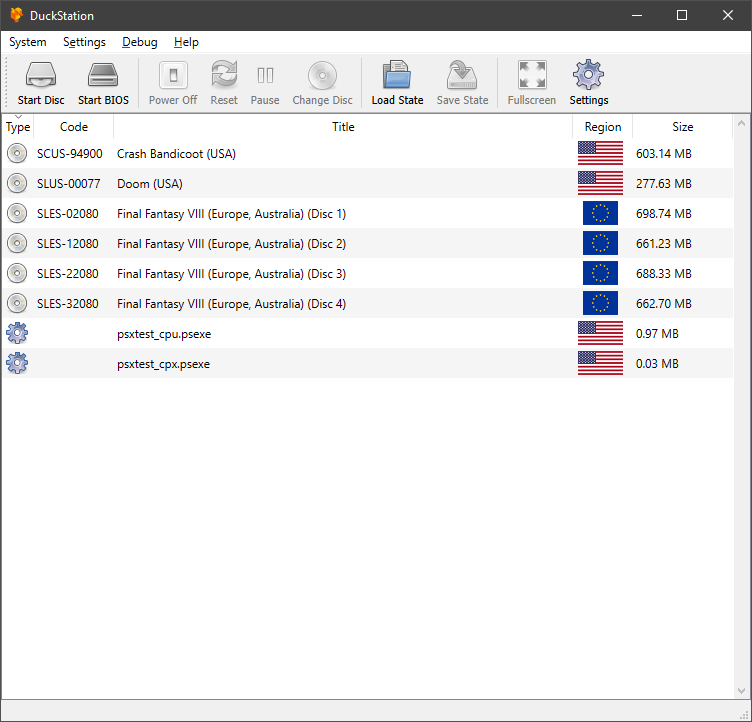
Caractéristiques:
– CPU Recompiler/JIT (x86-64, armv7/AArch32 and AArch64)
– Hardware (D3D11, OpenGL, Vulkan) and software rendering
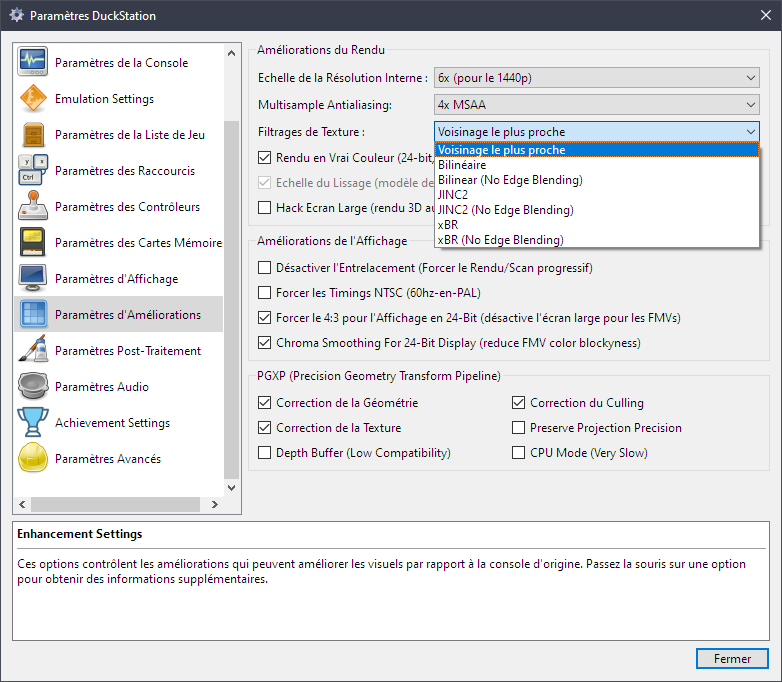
– Upscaling, texture filtering, and true colour (24-bit) in hardware renderers
– PGXP for geometry precision, texture correction, and depth buffer emulation
– Adaptive downsampling filter
– Post processing shader chains
– « Fast boot » for skipping BIOS splash/intro
– Save state support
– Windows, Linux, highly experimental macOS support
– Supports bin/cue images, raw bin/img files, and MAME CHD formats.
– Direct booting of homebrew executables
– Direct loading of Portable Sound Format (psf) files
– Digital and analog controllers for input (rumble is forwarded to host)
– Namco GunCon lightgun support (simulated with mouse)
– NeGcon support
– Qt and NoGUI frontends for desktop
– Automatic updates for Windows builds
– Automatic content scanning – game titles/regions are provided by redump.org
– Optional automatic switching of memory cards for each game
– Supports loading cheats from libretro or PCSXR format lists
– Memory card editor and save importer
– Emulated CPU overclocking
– Integrated and remote debugging
– Multitap controllers (up to 8 devices)
– RetroAchievements
Configuration requise:
– A CPU faster than a potato. But it needs to be x86_64, AArch32/armv7, or AArch64/ARMv8, otherwise you won’t get a recompiler and it’ll be slow.
– For the hardware renderers, a GPU capable of OpenGL 3.1/OpenGL ES 3.0/Direct3D 11 Feature Level 10.0 (or Vulkan 1.0) and above. So, basically anything made in the last 10 years or so.
– SDL, XInput or DInput compatible game controller (e.g. XB360/XBOne). DualShock 3 users on Windows will need to install the official DualShock 3 drivers included as part of PlayStation Now.
Les améliorations sont:
Preview Build:
– Fix message crash for missing CD image #1859 (Albert Liu)
– Remove title from toolbar/add open icon (Connor McLaughlin)
– [c502f8b]: GPU/Vulkan: Fix box downsampling using incorrect texture (Connor McLaughlin)
– [2704436]: README.md: Update dependencies for Linux (Connor McLaughlin)
– [03905b8]: Remove stub duckstation-sdl binary (Connor McLaughlin)
– Support diagonals in hat (Connor McLaughlin)
Development Build:
– [7675f3b]: Update Simple-Chinese language file to latest (zkdpower) #1830
– [3d08dd0]: QoL change for touch gliding (Certainty Witch) #1831
– [20f7cd7]: More QoL changes for touch gliding (Certainty Witch) #1831
– [dbedb8d]: update spanish qt, new config to block blank issues (falsepopsky) #1833
– Apply volume on output not sector read (Connor McLaughlin)
– [7037157]: GPU/SW: Remove unused 5-to-8 conversion functions (Connor McLaughlin)
– [391114c]: GPU/OpenGL: Only use one upload path and clamp to max SSBO size (Connor McLaughlin)
– Improve precision of 5-to-8 bit conversion for HW renderers (Connor McLaughlin)
– [b13c51a]: GPU/SW: Use new 5-to-8 converters for RGBA8 display (Connor McLaughlin)
– Log error message when skipping encrypted files #1836 (Albert Liu)
– Add Error helper class (Connor McLaughlin)
– Use Error class for complex errors (Connor McLaughlin)
– Hold position at end of track, not start of next (Connor McLaughlin)
– Split disc loading into separate method #1838 (Albert Liu)
– [39d1628]: Qt/MemoryCardEditor: Set combobox indices to 0 on close event (Albert Liu) #1839
– [d7196f1]: Qt/MemoryCardEditor: Add tool tips for new card and open card buttons (Albert Liu) #1839
– [663dc49]: CPU/Recompiler: Tiny optimization for div on x64 (Connor McLaughlin) #1840
– [5bbbb8d]: CPU/Recompiler: Use MAP_JIT for code space on Apple Silicon (Connor McLaughlin) #1840
– [5907a72]: Atualização Português do Brasil (Anderson_Cardoso) #1841
– [8b7e2b5]: CPU/Recompiler: Tiny optimization for div on x64 (Connor McLaughlin)
– Be less strict about bindable devices (Connor McLaughlin)
– Fix controller 1 default type of « Not Set » (Connor McLaughlin)
– Allow back button on controllers to be bound (Connor McLaughlin)
– Fix swapped labels for analog controller settings (Connor McLaughlin)
– Fix translatability of memory card editor tooltips (Connor McLaughlin)
– [818bdac]: Update duckstation-qt_de.ts (Max833) #1842
– [d346134]: Atualização Português do Brasil (Anderson_Cardoso) #1843
– Support passing import buffers in (Connor McLaughlin)
– Add MemoryCardImage class (Connor McLaughlin)
– Add memory card editor (Connor McLaughlin)
– Remove version from toolbar in game list (Connor McLaughlin)
– Add « Choose Cover Image » to game list menu (Connor McLaughlin)
– Don’t restart activities on keyboard change (Connor McLaughlin)
– Use user directory for memcard root (Connor McLaughlin)
– [132a485]: Update Simple-Chinese language file to latest (zkdpower) #1850
– Add an update notification about controller bindings (Connor McLaughlin)
– Add automatic controller mapping option (Connor McLaughlin)
– Always show icons in game list toolbar (Connor McLaughlin)
– Add a ‘no games found’ version of game list (Connor McLaughlin)
– Minor binding improvements (Connor McLaughlin)
– Stop activity recreate when theme is set (Connor McLaughlin)
– [6ecf75e]: (Android) update values-ru/strings to latest (6lackmag3) #1853
– [f02cee2]: (Android) update values-ru/arrays (6lackmag3) #1852
– Fix possible crash in memory card editor (Connor McLaughlin)
– Re-enable logging in EmulationSurfaceView (Connor McLaughlin)
– [1e3679c]: Update compatibility list (Connor McLaughlin)
– Fix message crash for missing CD image #1859 (Albert Liu)
– Remove title from toolbar/add open icon (Connor McLaughlin)
– [c502f8b]: GPU/Vulkan: Fix box downsampling using incorrect texture (Connor McLaughlin)
– [2704436]: README.md: Update dependencies for Linux (Connor McLaughlin)
– [03905b8]: Remove stub duckstation-sdl binary (Connor McLaughlin)
– Support diagonals in hat (Connor McLaughlin)
Stable Build:
– 2021/03/03: RetroAchievements are now available. You can now log in to your retroacheivements.org account in DuckStation and gain points in supported games. Currently only for Windows/Linux/Mac, Android will be added in the future.
– 2021/03/03: Multitap is now supported for up to 8 controllers. You can choose which of the two main controller ports have taps connected in Console Settings and bind controllers in Controller Settings.
– 2021/03/03: Ability to add/remove touchscreen controller buttons and change opacity added for the Android app.
– 2021/01/31: « Fullscreen UI » added, aka « Big Duck/TV Mode ». This interface is fully navigatible with a controller. Currently it’s limited to the NoGUI frontend, but it will be available directly in the Qt frontend in the near future, with more features being added (e.g. game grid) as well.
– 2021/01/24: Runahead added – work around input lag in some games by running frames ahead of time and backtracking on input. DuckStation’s implementation works with upscaling and the hardware renderers, but you still require a powerful computer for higher frame counts.
– 2021/01/24: Rewind added – you can now « smooth rewind » (but not for long), or « skip rewind » (for much long) while playing.
– 2021/01/10: Option to sync to host refresh rate added (enabled by default). This will give the smoothest animation possible with zero duped frames, at the cost of running the game <1% faster. Users with variable refresh rate (GSync/FreeSync) displays will want to disable the option.
- 2021/01/10: Audio resampling added when fast forwarding to fixed speeds. Instead of crackling audio, you'll now get pitch altered audio.
- 2021/01/03: Per game settings and game properties added to Android version.
- 2020/12/30: Box and Adaptive downsampling modes added. Adaptive downsampling will smooth 2D backgrounds but attempt to preserve 3D geometry via pixel similarity (only supported in D3D11/Vulkan). Box is a simple average filter which will downsample to native resolution.
- 2020/12/30: Hotkey binding added to Android version. You can now bind hotkeys such as fast forward, save state, etc to controller buttons. The ability to bind multi-button combinations will be added in the future.
- 2020/12/29: Controller mapping/binding added for Android version. By default mappings will be clear and you will have to set them, you can do this from Settings -> Controllers -> Controller Mapping. Profiles can be saved and loaded as well.
– 2020/12/29: Dark theme added for Android. By default it will follow your system theme (Android 10+), but can be overridden in settings.
– 2020/12/29: DirectInput/DInput controller interface added for Windows. You can use this if you are having difficulties with SDL. Vibration is not supported yet.
– 2020/12/25: Partial texture replacement support added. For now, this is only applicable to a small number of games which upload backgrounds to video RAM every frame. Dumping and replacement options are available in Advanced Settings.
– 2020/12/22: PGXP Depth Buffer enhancement added. This enhancement can eliminate « polygon fighting » in games, by giving the PS1 the depth buffer it never had. Compatibility is rather low at the moment, but for the games it does work in, it works very well. The depth buffer will be made available to postprocessing shaders in the future, enabling effects such as SSAO.
– 2020/12/21: DuckStation now has two releases – Development and Preview. New features will appear in Preview first, and make their way to the Development release a few days later. To switch to preview, update to the latest development build (older builds will update to development), change the channel from latest to preview in general settings, and click Check for Updates.
– 2020/12/16: Integrated CPU debugger added in Qt frontend.
– 2020/12/13: Button layout for the touchscreen controller in the Android version can now be customized.
– 2020/12/10: Translation support added for Android version. Currently Brazillian Portuguese, Italian, and Dutch are available.
– 2020/11/27: Cover support added for game list in Android version. Procedure is the same as the desktop version, except you should place cover images in /duckstation/covers (see Adding Game Covers).
– 2020/11/27: Disc database is shipped with desktop and Android versions courtesy of redump.org. This will provide titles for games on Android, where it was not possible previously.
– 2020/11/27: Compatibility databases added to libretro core – broken enhancements will be automatically disabled. You can turn this off by disabling « Apply Compatibility Settings » in the core options.
– 2020/11/27: SDL game controller database is included with desktop versions courtesy of https://github.com/gabomdq/SDL_GameControllerDB.
– 2020/11/21: OpenGL ES 2.0 host display support added. You cannot use the hardware renderer with GLES2, it still requires GLES3, but GLES2 GPUs can now use the software renderer.
– 2020/11/21: Threaded renderer for software renderer added. Can result in a significant speed boost depending on the game.
– 2020/11/21: AArch32/armv7 recompiler added. Android and Linux builds will follow after further testing, but for now you can build it yourself.
– 2020/11/18: Window size (resize window to Nx content resolution) added to Qt and SDL frontends.
– 2020/11/10: Widescreen hack now renders in the display aspect ratio instead of always 16:9.
– 2020/11/01: Exclusive fullscreen option added for Windows D3D11 users. Enjoy buttery smooth PAL games.
– 2020/10/31: Multisample antialiasing added as an enhancement.
– 2020/10/30: Option to use analog stick as d-pad for analog controller added.
– 2020/10/20: New cheat manager with memory scanning added. More features will be added over time.
– 2020/10/05: CD-ROM read speedup enhancement added.
– 2020/09/30: CPU overclocking is now supported. Use with caution as it will break games and increase system requirements. It can be set globally or per-game.
– 2020/09/25: Cheat support added for libretro core.
– 2020/09/23: Game covers added to Qt frontend (see Adding Game Covers).
– 2020/09/19: Memory card importer/editor added to Qt frontend.
– 2020/09/13: Support for chaining post processing shaders added.
– 2020/09/12: Additional texture filtering options added.
– 2020/09/09: Basic cheat support added. Not all instructions/commands are supported yet.
– 2020/09/01: Many additional user settings available, including memory cards and enhancements. Now you can set these per-game.
– 2020/08/25: Automated builds for macOS now available.
– 2020/08/22: XInput controller backend added.
– 2020/08/20: Per-game setting overrides added. Mostly for compatibility, but some options are customizable.
– 2020/08/19: CPU PGXP mode added. It is very slow and incompatible with the recompiler, only use for games which need it.
– 2020/08/15: Playlist support/single memcard for multi-disc games in Qt frontend added.
– 2020/08/07: Automatic updater for standalone Windows builds.
– 2020/08/01: Initial PGXP (geometry/perspective correction) support.
– 2020/07/28: Qt frontend supports displaying interface in multiple languages.
– 2020/07/23: m3u multi-disc support for libretro core.
– 2020/07/22: Support multiple bindings for each controller button/axis.
– 2020/07/18: Widescreen hack enhancement added.
– 2020/07/04: Vulkan renderer now available in libretro core.
– 2020/07/02: Now available as a libretro core.
– 2020/07/01: Lightgun support with custom crosshairs.
– 2020/06/19: Vulkan hardware renderer added.
Télécharger DuckStation v0.1 build 12XXX (71.5 Mo)
Site Officiel
En savoir plus…