Cette version fait directement suite aux précédentes créées par Ulrich Doewich et est à présent maintenue par Colin Pitrat.


Latest build of Caprice 32, with the newest cool features and the most recent bugs.


Télécharger Caprice32 (x86) v4.6.0 (2026/10/30) (6.6 Mo)

Télécharger Caprice32 (x64) v4.6.0 (2026/10/30) (6.3 Mo)

Site Officiel

En savoir plus…

DS4Windows est un programme portable qui vous permet d’obtenir la meilleure expérience lors de l’utilisation d’un DualShock 4 sur votre PC, en émulant un contrôleur Xbox 360, beaucoup de jeux deviennent alors accessibles.


– Removed use of Microsoft.Win32 namespace
– Changed suspend detection routine to use WMI


Télécharger DS4Windows (original) (x86) v3.3.3 (2.6 Mo)

Télécharger DS4Windows (original) (x64) v3.3.3 (2.6 Mo)

Site Officiel

En savoir plus…

Un excellent manager de roms à l’instar de clrmame et Romcenter. Romulus est capable d’importer les dats de RomCenter et clrmame (ancien format et format xml), les fichiers offlinelist et Mess. Il gère les roms non compressées ou compressées en zip, rar ou 7z. Il supporte également le Torrentzip. Il peut également importer un dat à partir de l’exécutable de Mame, générer des rapports ou des statistiques… Depuis la version 0.19, une exclusivité (!), il est pourvu d’un module communautaire dont l’objectif est le partage de fichiers à la manière d’un ftp client comme flashfxp.
 
Il dispose également d’un navigateur intégré, d’un localisateur de DATS, supporte les CHD de Mame…


Les changements:

– FIXED batch scan/rebuild start problem from profiles list option


romulus


Télécharger Romulus v0.049 (7.7 Mo)

Site Officiel

En savoir plus…

Reicast est à l’origine un portage pour Android de nullDC et qui est à présent disponible sous Windows, entre autre.


Il vous faudra les bibliothèques VC++ pour pouvoir le tester.


Télécharger Reicast (x86) (2020/05/31) (1.3 Mo)

Télécharger Reicast (x64) (2020/05/31) (1.5 Mo)

Site Officiel

En savoir plus…

Play! est une tentative de créer un émulateur PlayStation 2 sous Windows / MacOS / iOS / Android. Il est actuellement écrit en C / C + + et utilise un système de mise en cache / de recompilation d’instruction pour obtenir de meilleures performances tout en émulant le CPU.
 
L’émulateur peut faire fonctionner quelques jeux, mais très moyennement dans la plupart des cas. L’objectif de l’auteur est d’atteindre un niveau de qualité qui permettra à quiconque de jouer son jeu favori PlayStation 2 sur son PC.
 
play


Télécharger Play! (x86) GIT v0.77 (2026/10/25) (8.9 Mo)

Télécharger Play! (x64) GIT v0.77 (2026/10/25) (10.3 Mo)

Site Officiel

En savoir plus…

De nouveaux patchs sont disponibles sur le site de nos partenaire de chez la TRAF (et sur notre miroir), de quoi s’occuper de nombreuses heures 🙂
 
traf


Site Officiel

Il s’agit d’un émulateur de Nintendo 3DS écrit en C# et en LLE.


.


Télécharger LemonLime v1.0.39 (19.4 Mo)

Site Officiel

En savoir plus…

Le dernier build beta de Nintendulator, l’émulateur Nintendo NES.
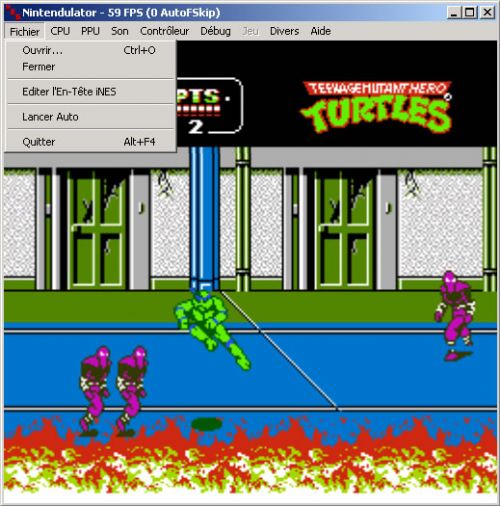


Télécharger Nintendulator (64 bits) v0.985 Beta (2026/08/22) (548 Ko)

Télécharger Nintendulator (32 bits) v0.985 Beta (2026/08/22) (504 Ko)

Télécharger Nintendulator (Français) v0.985 Beta (2026/08/22) (724 Ko)

Site Officiel

En savoir plus…

Le dernier build beta de Nintendulator, l’émulateur Nintendo NES.


– Overall:
Adjusted code to use C++ memory allocation routines where possible.
Added support for 64-bit builds.
Various code cleanup and bugfixes.
– APU:
Added separate logic for power-on and soft-reset events.
Updated various counters to more closely match actual hardware
behavior.
Upgraded audio playback code to use DirectSound 8.0.
– CPU:
Improved DMA emulation logic to properly handle both Sprite and PCM
operations happening concurrently.
Removed all inline assembly for 64-bit support.
Fixed interrupt timing for branch instructions without page crosses.
Added a configuration setting to suppress Debug statements for
invalid opcodes.
Added support for undefined opcodes AAC, ASR, ARR, ATX, and AXS.
– Controllers:
Renamed « Alternate Keyboard » to « Subor Keyboard ».
Updated Family Basic and Subor Keyboards to support movie recording
and playback.
Updated controllers to use Save/Load routines instead of exposing
their internal state as packed byte arrays.
Updated Arkanoid paddles to support axis configuration and adjusted
range of valid positions.
Added support for SNES Mouse.
Fixed support for configuring POV triggers as axes versus buttons.
– Debugger:
Updated CPU debugger and trace log output to include total elapsed
CPU cycles since reset.
Improved breakpoint support to properly handle intermediate reads.
Improved PPU debugger to only redraw pattern tables and sprites when
their corresponding palettes actually changed.
– Graphics:
Added separate default palettes for each region.
Improved fullscreen code to attempt to select a resolution which
matches your monitor’s aspect ratio.
Fix a bug with Zapper emulation while in fullscreen mode.
Added an alternative Playchoice-10 palette.
Added a configuration setting for Playchoice-10 palettes to control
whether or not extra gray colors should be added at 1D/2D/3D.
Fixed color emphasis to swap the Red/Green bits on PAL and Dendy.
Updated NTSC palette generation.
Added an option to horizontally stretch the window to produce the
correct aspect ratio.
– iNES Header Editor:
Moved header editor into its own source file.
Added support for editing NES 2.0 format fields.
– Mapper Interface:
Updated Mapper Interface version from 3.7 to 3.9.
Reordered several enumerated types to be more consistent.
Added support for debug-safe read handlers which do not trigger side
effects.
Improved handling of multiple DLLs supporting the same mapper.
– Main Program:
Updated Winamp plugin to support Unicode.
Added support for Hybrid (Dendy) timing – PAL’s 50Hz framerate, but
NTSC’s CPU/PPU clock ratio and VBLANK length.
Reorganized code for saving and loading configuration settings to be
localized according to function.
Increased maximum supported PRG RAM from 64KB to 1024KB.
Increased maximum supported CHR RAM from 32KB to 256KB.
Changed FDS disk writing to use a new file format which permits
tracking version numbers.
Added full NES 2.0 format support.
Reworked Savestate/Reset commands to avoid stopping and restarting
sound playback (and causing pops).
Fixed debugger breakpoints to properly unacquire input devices.
Fixed crash when exiting the program while in fullscreen mode.
Added a « Browse Save Files » option to the File menu.
– PPU:
Removed some unneeded optimizations that didn’t work with 64-bit and
weren’t beneficial with 32-bit anymore.
Fixed pre-render scanline to reset vertical scroll bits for every
cycle in 280-304 instead of just the last one.
Removed old « non-accurate » sprite evaluation logic.
Fixed emulation of $2007 accesses during rendering and how they
affect the VRAM address.
Added support for Vs. Unisystem PPUs returning special values from
the lower bits of $2002.
– Savestates:
Updated savestate logic to better handle version differences.
– Mappers:
Added support for NES 2.0 custom SRAM sizes
Added support for various iNES mappers using CHR RAM when no ROM is
present.
Updated MMC2 emulation for switching the lower CHR ROM bank.
Updated IRQ counters for MMC3, MMC5, MMC6, VRC4, VRC6, VRC7, and
Tengen RAMBO-1.
Updated MMC5 sound length counter timing and added support for
read-triggered PCM.
Updated iNES mappers 1 and 4 to support NES 2.0 PRG RAM sizes.
Updated iNES mapper 16 to support EEPROM saves, and added mapper 159
as a variant.
Added iNES mapper 210 as a variant of mapper 19.
Fixed iNES mappers 21, 22, 23, and 25 to properly reflect their
actual functionality.
Improved compatibility for iNES mapper 185.
Added support for NES-AN1ROM, HVC-FKROM, NES-PEEOROM, NES-SC1ROM,
NES-SHROM, NES-SH1ROM, NES-SIROM, NES-SJROM, NES-SL2ROM,
NES-SL3ROM, NES-SLRROM, NES-SMROM, NES-TBROM, NES-TEROM,
NES-TKSROM, NES-TL2ROM, NES-TLSROM, NES-TNROM, NES-TQROM,
and NES-TVROM boards.
Added support for iNES mappers 28, 31, 36, 48, 57, 72, 77, 82, 92,
101, 107, 152, 154, 155, 159, 165, 191, 192, 193, 194, 200, 201,
203, 205, 206, 207, 240, 242, and 245.
Merged iNES mapper 151 (Extended Vs. Unisystem) into 75 (VRC1).
Fixed NSF player to properly silence internal channels when changing
tracks.


Télécharger Nintendulator (Ansi) v0.980 (455 Ko)

Télécharger Nintendulator (Unicode) v0.980 (462 Ko)

Télécharger Nintendulator (Français) v0.980 (464 Ko)

Site Officiel

En savoir plus…

BlastEm a pour objectif d’être un émulateur Genesis extrêmement précis tout en fonctionnant sur du matériel relativement modeste en utilisant des techniques de pointe.


blastem
 
Les changements sont les suivants:
 
New Features
– New Nuklear UI with almost complete access to configuration options
– Added support for creating SDL2 mappings from inside the emulator
– Loading ROMs from ZIP archives is now supported
– Loading gzip compressed ROMs is now supported
– Internal screenshots can now be in PNG format
– New VDP plane debug view
– VDP debug views are now in separate windows
– Experimental support for sync to video (not enabled by default)
– Preliminary support for MegaWifi cart emulation
 
Bugfixes
– Fixed a number of 68K decoder bugs (mostly illegal instruction decoding)
– Fixed a number of memory leaks
 
Accuracy/Completeness Improvements
– Added support for J-Cart emulation
– Implemented Z80 interrupt mode 2
– Fixed the timing of a number of 68K instructions
– Fixed the timing of the Z80 JP cc, nn instruction
– Fixed the order bytes of a word are written to VRAM from the FIFO (fixes minor corruption in Road Rash 3 bike menu)
 
Other Changes
– Added support for Open GL ES in addition to the existing desktop GL support
– Some small optimizations


Télécharger BlastEM v1.0 (4.6 Mo)

Site Officiel

En savoir plus…

Il s’agit d’un fork de DOSBox des plus intéressant, destiné à Windows Linux et MacOS et créé par Jon Campbell. Il possède une compatibilité excellente et met l’accent sur la précision d’émulation notamment en ce qui concerne l’émulation de Windows 3.x à ME. En outre il ajoute des améliorations en provenance d’autres builds comme DOSBox ECE avec l’émulation de la 3DFX en interne.


Les améliorations sont les suivantes:

 
voir site officiel


Télécharger DOSBox-X (Hx DOS) v2026.10.01 (9.7 Mo)

Télécharger DOSBox-X (LowEnd) v2026.10.01 (19.6 Mo)

Télécharger DOSBox-X (MinGW) v2026.10.01 (24.1 Mo)

Télécharger DOSBox-X (Visual Studio) v2026.10.01 (28.9 Mo)

Site Officiel

En savoir plus…

Un excellent manager de roms à l’instar de clrmame et Romcenter. Romulus est capable d’importer les dats de RomCenter et clrmame (ancien format et format xml), les fichiers offlinelist et Mess. Il gère les roms non compressées ou compressées en zip, rar ou 7z. Il supporte également le Torrentzip. Il peut également importer un dat à partir de l’exécutable de Mame, générer des rapports ou des statistiques… Depuis la version 0.19, une exclusivité (!), il est pourvu d’un module communautaire dont l’objectif est le partage de fichiers à la manière d’un ftp client comme flashfxp.
 
Il dispose également d’un navigateur intégré, d’un localisateur de DATS, supporte les CHD de Mame…


Les changements:

– FIXED problems getting information from CHDs in paths with « % » chars.
– FIXED rebuilding files in profiles with CHDs and no ROMs.
– IMPROVED recovering last focus when closing forms to go back.
– NO MORE flickering when batch run for rebuild or scan. More speed added because is not necessary to close and reopen window for every profile.
– REWRITED saving cache by some problems. Now old cache files won’t work you must rescan again to save new cache files.
– REMOVED Trurip dat group for Updater. Trurip is dead ?
– UPDATED CHDMAN binaries to 0.205 version.


romulus


Télécharger Romulus v0.049 (7.7 Mo)

Site Officiel

En savoir plus…


https://getourbonus.com/fr/accueil

https://www.romspedia.com/