DS4Windows est un programme portable qui vous permet d’obtenir la meilleure expérience lors de l’utilisation d’un DualShock 4 sur votre PC, en émulant un contrôleur Xbox 360, beaucoup de jeux deviennent alors accessibles.

 
– Fixed problem with unplugging controllers causing cross thread issues
– Changed timer usage in main form
– Fixed issue with SONYWA connections having invalid calibration data
– Removed UI thread usage from unplug routine
– Fixed variable scope for swap profile routine


Télécharger DS4Windows (original) (x86) v3.3.3 (2.6 Mo)

Télécharger DS4Windows (original) (x64) v3.3.3 (2.6 Mo)

Site Officiel

En savoir plus…

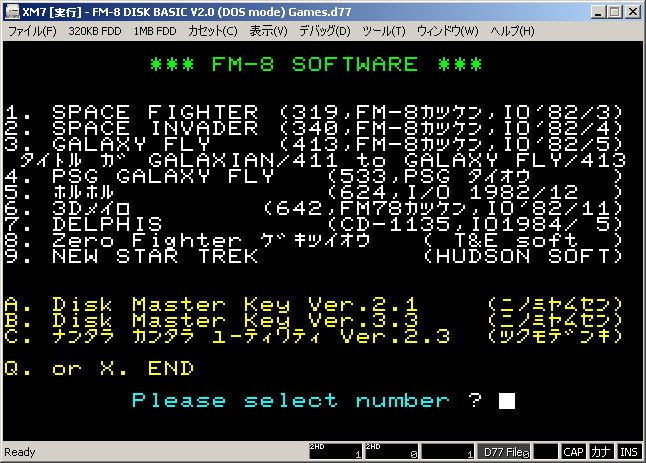
Un émulateur FM7 tout en Japonais par Ryu Takegami. Ces versions font suite à XM7 Emulator Final Release du même auteur. Toutefois la branche « regular » vient de reprendre du service.


Ancien site [pour archive].
 
Notez une chose (trad. de google):
For a few years (or rather since PI. ‘S site was closed) I have not had any impressive impressions, I’m satisfied I intended to report a bug with my page / Twitter account and report it to the developer There are people, and development machines that kept running for the last 6 years are not in good condition and there is no more money to repair, so we decided to terminate the development of XM 7 Type R / XM 7 pure on July 21, 2018.
Since I moved the site to RetroPC.NET side on August 23, 2018, this site will close on January 23, 2019.

 
L’ancien site était à l’origine sur retropc puis a migré pendant des années sur celui-ci, et le voila de nouveau sur son lieu d’origine chez retropc. Sincèrement je comprend rien à la démarche donc si quelqu’un comprend mieux les choses, qu’il nous le dise en commentaire merci ^^


Télécharger XM7 for Win32 + DirectX V1.1L77SX+z10 R4 (Version finale) (338 Ko)

Télécharger XM7 for Win32 + DirectX V2.9L77SX+z10 R4 (Version finale) (312 Ko)

Télécharger XM7 for Win32 + DirectX V2.9L77SX+z10-V2 R4 (Version finale) (318 Ko)

Télécharger XM7 for Win32 + DirectX V3.4L77SX+z10 R4 (Version finale) (321 Ko)

Télécharger XM7 TypeR for Win32 + DirectX V1.1L77SX+z10 R3a (Version finale) (395 Ko)

Télécharger XM7 TypeR for Win32 + DirectX V2.9L77SX+z10 R3a (Version finale) (354 Ko)

Télécharger XM7 TypeR for Win32 + DirectX V2.9L77SX+z10-V2 R3a (Version finale) (360 Ko)

Télécharger XM7 TypeR for Win32 + DirectX V3.4L77SX+z10 R3a (Version finale) (362 Ko)

Télécharger XM7pure for Win32 + DirectX V1.1L77SX+z06r2 (313 Ko)

Télécharger XM7pure for Win32 + DirectX V2.9L77SX+z06r2 (299 Ko)

Télécharger XM7pure for Win32 + DirectX V3.4L77SX+z06r2 (308 Ko)

Site Officiel

En savoir plus…

Il s’agit d’une version non officielle de AdvanceMAME basée sur la v106.1, améliorant un ensemble de choses et principalement dédiée au MAMEcab et dont le but ultime est de dépasser VSyncMAME.


AdvanceMAME EX for MS-DOS 2017/03
===================================
* Based on AdvanceMAME 0.106.1
* Stabilization of screen mode construction.
* Fixed operating clock of Matrox Millennium video card.
* Fixed an issue in which operation becomes violent when the vsync option is enabled.
* Added Intel ICH 5 and NVIDIA nForce 2 MCP-T to the corresponding chipset of AC’97 sound source.
* debug_rawsound yes By designating, it realizes a clear sound quality without blurring.
* Fixed one frame delayed bug at pause.
* Fixed bug that keyboard LED does not work.
* Back to port Toa Plan 1 (0.181) and Namco ND-1 (0.183) driver. [toaplan1.c] [namcond1.c]
I spoiled the 0.106 specification, but Shark! And Vimana need to add HD647180 ROM.
* Normal (10 MHz) of CPS 1 driver and DASH board (12 MHz) sorting correction and fps change. [cps1.c]
* Improve sound balance and sound emulation of CPS 1 and NeoGeo driver. [cps1.c] [neogeo.c]
 
AdvanceMAME EX Revision 1 2018/01
———————————–
* Adjust neodio’s sound command timing. [neogeo.c]
* Namco ND – 1 Namco Classic (0.194) driver backport. [namcond1.c]
* Fang Fang (0.181) driver backport. [vaportra.c]
* Crazy Cop (0.160) in Thunder Cross (0.137 u4) backport port driver. [thunderx.c]
* Backport of drivers with love’s hot lock (0.178). [rockrage.c]
* Backport the hot-blood cynical Kuniokun-kun (0.190) driver. [renegade.c]
* It corresponds to NoCD version of CP system 3, CD version is also operable, but it is Omit. [cps3.c]
 
AdvanceMAME EX Revision 2 2018/04
———————————–
* Added SiS 730 to SiS video compatible chipset.
* Added SiS SI 7018 to the corresponding chipset of AC’97 sound source.
* Change the default directory name to ROM « ROMS » and sample « SAMPLES ».
* Bug fixation that CP system 2 does not start. [cps2.c]
* Hell visit (0.196) driver backport. [asuka.c]
* Akyoku SH – 2 (0.172) driver backport. [psikyosh.c]
 
AdvanceMAME EX Revision 3 2018/08
———————————–
* Backport Gunpei (0.198) driver. [gunpey.c]
* Dragon Buster (0.141 u4) backport port driver. [skykid.c]
* US Championship V’Ball (0.146 u 2) driver backport. [vball.c]
* Donga plan 1 (0.201) driver is obsoleted 0.106 compatible with backport. [toaplan1.c]


Télécharger AdvanceMAME EX Rev. 3 (2018/08/17) (7.5 Mo)

Site Officiel

En savoir plus…

Un émulateur Sinclair QL shareware tournant sous Windows 9x/NT/2X/XP/Vista/7/8/10.


– Resizable main window.
– Compatibility improvements.
– Precise QL speed emulation.
– Dot matrix printer emulation.
– Mount .ZIP files as disks.
– Use .QLPAK single-file QL software archives.
– Smart full screen upscaling.
– Access microdrive images and floppy images.
– QL Sampled Sound System.
– Improved display emulation when running on Windows 7.


Télécharger Q-emuLator v4.0.4 (4.1 Mo)

Site Officiel

En savoir plus…

La dernière version béta publique de l’excellent WinUAE, l’émulateur Commodore Amiga. La traduction est signée Tradu-France.


Les changements sont visibles ici


Télécharger WinUAE (Public Beta) [32 bits] v6.1.0 Beta 23 (5.3 Mo)

Télécharger WinUAE (Public Beta) [64 bits] v6.1.0 Beta 23 (8.5 Mo)

Télécharger WinUAE (Public Beta) [32 bits] v6.1.0 Beta 23 FR (5.4 Mo)

Télécharger WinUAE (Public Beta) [64 bits] v6.1.0 Beta 23 FR (8.5 Mo)

Site Officiel

En savoir plus…

Budford permet la configuration de Cemu (ainsi que les options pour chaque jeu), son paramètrage et est également un outil de mise à jour automatique.


Pourquoi?
Cemu est un excellent émulateur. Mais il ne dispose actuellement que d’un support limité pour les paramètres par jeu. Combien de fois avez-vous activé le support multi-core pour Breath of the Wild, puis oublié de le reconvertir en single core avant de jouer à Mario Kart avec vos amis. Et nous savons tous combien cela peut être frustrant quand une nouvelle version arrive et que votre jeu préféré ne fonctionne plus.
 
Budford est un outil de gestion de la configuration pour Cemu avec une interface familière pour ceux qui ont utilisé l’émulateur Dolphin.
 
Budford n’est pas un lanceur de jeu, il est conçu pour fonctionner avec votre lanceur de jeu préféré.


Télécharger Budford v1.0.118 (2.3 Mo)

Site Officiel

En savoir plus…

Créé par hex_usr (nSide/Lunar Snes), bsnes-mcfly est un port de l’interface graphique Qt de bsnes v073 à higan v106. Cette version est basée sur la dernière version d’Higan (mais ne se concentre que sur la partie Super NES) et ajoute énormément de fonctionnalités.
Dans les versions de développement (et jusqu’à la v106) il était connu sous le nom de « bsnes-classic » dans une tentative de remplacer la fourche d’Awjackson également nommée « bsnes-classic » qui paraissait être abandonnée. Cependant, AWJ a montré que bsnes-classic était encore en vie, par conséquent ce projet a dû être renommé.
 
L’objectif est en partie de faire arrêter l’utilisation de bsnes 073 et de fork comme bsnes-classic (et plus tard bsnes+) et de tout fusionner dans un seul émulateur combinant à la fois les améliorations des dernières versions d’Higan et en même temps les avantages des anciennes versions de bsnes (notamment l’interface).


This version of the Qt GUI has the following features:
– Compatibility with higan v106, including v106-style gamepaks (cartridge folders)
. Low-level emulation of the HG51BS169 (Cx4) and ARM6 (ST018)
. Newer MSU1 features such as audio resume
– Concatenated firmware in game ROMs, as well as a firmware/ fallback directory.
. No cartridge folders are created within the user’s home directory. It is all handled in memory.
– Database lookup of SNES and Super Famicom cartridges. The database is embedded right into the application along with heuristics for games not in it, so icarus is not required.
– Compressed archives: Zip, GZip, BZip2
. Support for Zip and GZip provided by nall instead of snesreader
. BZip2 support by Rob Landley under the zero-clause BSD license
– Copier extensions: SMC, SWC, FIG, UFO, GD3, GD7, DX2, MGD, MGH, 048, 058, 068, 078, BIN, USA, EUR, JPN, AUS
. All of these extensions are also available for use with BS Memory and Sufami Turbo slot cartridges.
– Optional FuSoYa header (512 bytes at the beginning of the ROM)
– WASAPI and ASIO audio drivers
– Exclusive mode for Direct3D and WASAPI
– Separate directories for save RAM, save states, and other mutable game files
– Turbo buttons
– asciiPad (more advanced turbo switches with Off, Turbo, and Auto settings)
– Simultaneous up/down and left/right (must be enabled in the settings file)
. I needed to use a really evil compilation trick to enable this feature without modifying higan directly.
– IPS, UPS, and BPS soft-patching
. IPS and UPS patches are applied before removing the FuSoYa header, and BPS patches are applied after.
– Movie recording and playback
– Cheats
. Pro Action Replay (AAAAAA:DD, AAAAAADD, AAAAAA/DD)
_ Can omit the address/data separator or use a colon, when higan v106 mandates the use of an equals sign or a slash.
. Game Genie (GGGG-GGGG)
– Cheat search (works only on WRAM at 7e-7f:0000-ffff)
– Software filters
. 2xSaI, Super 2xSaI, Super Eagle
. HQ2x, LQ2x, Scale2x
. Pixellate2x
. blargg’s snes_ntsc
. Phosphor3x (was included in some bsnes v08x versions)
– OpenGL shaders
. Curvature and Edge Detection from higan v092
. HQ2x, Pixellate, Scale2x
. HDR-TV, Watercolor (these were marked “Archive” in bsnes v083 and not restored when bsnes v085 went back to XML from BML)
. Sepia (converted from Direct3D)
– Only 1 copy of nall for the overall project instead of a separate copy each for bsnes, snesfilter, and snesreader
 
Features missing from bsnes v073:
– Compressed archives: Z (compress), 7z, RAR, JMA
. Most of these have restrictive licenses. Need to think carefully on how to implement them…
– Selecting one of multiple files in a single Zip archive
– snes_ntsc configuration dialog
. Because the palette size was increased from 32768 to 524288, changing a setting causes bsnes to freeze while it recreates the palette. This dialog had to go.
– Binding the Pause/Break key to an input
– Direct3D shaders
. As consolation, the Sepia shader was converted to OpenGL

 
Les changements:
http://forums.nesdev.com/viewtopic.php?f=12&t=17377
https://board.byuu.org/viewtopic.php?f=4&t=2061


Télécharger bsnes-mcfly v106r14b (13.2 Mo)

Site Officiel

En savoir plus…

Steam ROM Manager permet, comme son nom l’indique, de gérer vos roms dans Steam et bien plus encore.


Télécharger Steam Rom Manager v2.6.3 (92.7 Mo)

Site Officiel

En savoir plus…

d3d8to9 est un module pseudo-pilote qui vise à améliorer la compatibilité et la stabilité dans les jeux utilisant le rendu Direct3D 8 en convertissant tous les appels d’API et les shaders de bas niveau en éléments équivalents Direct3D 9. Il permet également aux jeux concernés d’obtenir de nouvelles possibilités à partir d’outils éprouvés et des wrappers écrits pour Direct3D 9.


Télécharger D3D8to9 v1.16 (122 Ko)

Site Officiel

En savoir plus…

SMSQmulator est un émulateur de machines exécutant SMSQ / E. SMSQ / E qui est un système d’exploitation initialement conçu pour des machines compatibles avec Sinclair QL (un ordinateur domestique / professionnel inventé au Royaume-Uni dans les années 1980). Il a un processeur de la famille Motorola 68000.
 
SMSQmulator émule ce processeur et, tout en n’émulant pas un Sinclair QL, il imite une machine idéale qui s’en inspire.


Télécharger SMSQmulator v2.26 (Java 7) (2.7 Mo)

Télécharger SMSQmulator v2.26 (Java 8) (2.7 Mo)

Site Officiel

En savoir plus…

Créé par Kuroneko, il s’agit d’un émulateur de puces sonores type SPC (format Super NES) servant aussi de frontend pour SNESAPU.


Télécharger SPC Sound Hardware Emulator (2024/03/10) (2.0 Mo)

Site Officiel

En savoir plus…

Il s’agit du seul émulateur Basic Master disponible (très bon, au demeurant !), connu également sous le nom de Bml3mk5. Cliquez sur « En savoir plus » pour la description résumée de ce système.
Des versions avec debuggeur sont disponibles sur le site officiel.
 

mark5


Télécharger Hitachi Basic Master Level3 MARK5 (x86) v2.1.4 (479 Ko)

Télécharger Hitachi Basic Master Level3 MARK5 (SDL) v2.1.4 (2.3 Mo)

Télécharger Hitachi Basic Master Level3 MARK5 (x64) v2.1.4 (520 Ko)

Site Officiel

En savoir plus…


https://getourbonus.com/fr/accueil

https://www.romspedia.com/