Quickplay est un grand frontend multi-système incluant des fonctions avancées pour Mame, Virtual Tree, Emu-Finder, un système IPS, Mirroring de répertoire, support Zip pour les émulateurs ne le supportant pas et beaucoup d’autres choses.
– Some protection against Windows changing 8:3 path defaults for devices
– fixed issue with hazemd in the modern age
– Basic solution for shortname issues in multiloader
– A bunch of changes that allow us to get rid of precompiled executables
– prepared supplementary files for a world without compiled exes
– relative path tools should now work consistently throughout
– bugfix #38 – You can’t have a batch file tool with a relative path in tools.ini
– replaced react’s cmd.exe with the exe from IRTriarge (virustotal doesnt false positive on it)
– added game and watch emu/frontend
– Minor tweaks to retroarch toolset
– updated retroarch efind for latest version of Retroarch
– improved RetroArch assets
– doc for retroarch after some tests
– More multiloader fixes and features (after a large change in previous release)
– allow for override of filetype in zip or mount situations (for emus that have strange requirements)
– fixed bugs with longnames in paths
– Fixed unquoted chars in loop for name find
– fixed a bug with dealing with zips
– fixed a bug where we’d loop instead of exit if we didn’t find 7zip/daemon tools
– remove winmount files
– change to directly running the batch file as a tool
Un émulateur multi-consoles qui émule en vrac : Game Boy (N&B/Color), Game Boy Advance, Nes, Lynx, PC Engine (TurboGrafx 16), SuperGrafx, NeoGeo Pocket, PC-FX, WonderSwan (N&B/Color), Saturn, accessoires ps1…
Il s’agit d’un émulateur de MS-DOS en ligne de commande destiné à Windows x86-64 (mais également aux versions 32 bits). Version dédiée à l’émulation des processeurs i286/i386/i486.
Highly-Experimental Playstation Simulator x64 est un émulateur PSone et PS2 en développement (au stade préliminaire), codé par TheGangster dont certains éléments proviennent de Mame/Mess ou PCSX.
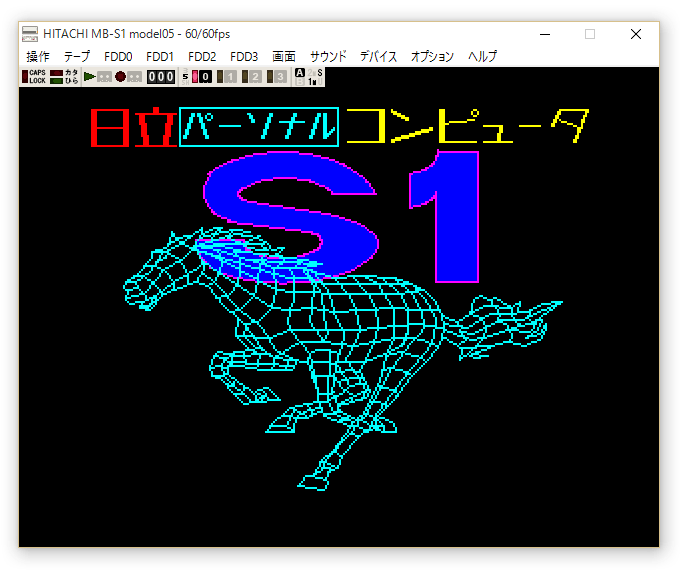
Il s’agit du seul émulateur Basic Master disponible (très bon, au demeurant !), connu également sous le nom de Bml3mk5. Cliquez sur « En savoir plus » pour la description résumée de ce système.
Des versions avec debuggeur sont disponibles sur le site officiel.
Les changements par Google trad: 1. Increase Scanline Filter 2x 4x 6x. (Implement NTSC CRT Proportional Correction with YIQ 4: 1: 1 color bleeding)
2. Increase the operation right-click menu function
3. Rebuild the program, improve efficiency
4. repair a lot of test rom did not pass the wrong items. Test results (there may be a small error)
5. Remove third-party library dependencies (program files are currently reduced to only 167KB size)
6. Full-screen mode can be included in the Background directory background image.
PS. This version is suspended after the update, but I will be back.
La dernière version béta publique de l’excellent WinUAE, l’émulateur Commodore Amiga. La traduction est signée Tradu-France.
– Correction d’une corruption audio 16-bit du FM801.
– Retour des comptages de cycle en mode CE du 68020.
– Vider le masque d’état du bouton pendant les changements d’état de la capture de la souris
– L’état de la carte graphique G-REX et Cirrus Logic était redémarré si l’état de la carte en config auto était rescanné et que l’émulation était déjà lancée (3.4.0).
– Le bouton du milieu de la souris par défaut peut de nouveau être activé (avait été modifié dans la bêta 1).
– La souris Magic à la volée ne fonctionnait pas.
– Réécriture de la gestion de l’exception du FPU, implémentation partiel des exceptions arithmètiques (Andreas Grabher), etc…
– Ajout d’une boîte à cocher pour les exceptions arithmétique du FPU pour faciliter les tests. Sera supprimlé quand les exceptions seront totalement implémentées.
m64p (ou Mupen64Plus-GUI) est une interface graphique écrite en Qt5. Elle supporte tout ce que vous attendez d’une interface mupen64plus (sélection de plugins, édition de la configuration, gestion des sauvegardes, capture d’écran, pause, etc.).
Cette archive inclut Mupen64Plus + GlideN64 + une interface utilisateur.
JoyToKey (shareware) est un émulateur de clavier pour les joysticks. Il convertit les contrôles clavier (et souris). Utilisez-le lorsque vous désirez contrôler une application qui ne supporte pas les contrôles joystick. Vous pouvez même contrôler Word, Excel, etc…
Fixed a crash issue for some online games
Enhanced « Keyboard2 » page to support the followings:
Supported the emulation of Input1 ~ Input4 in sequence at the specified interval (hold duration)
Supported different key assignment based on how many times a button is pressed within the specified time threshold
Supported the key assignment when a button is released
Supported the definition of mouse cursor movement via right click menu. For example, this enables one button input to cycle through up, right, down, left mouse cursor movement whenever it’s pressed
Supported a mouse horizontal wheel rotation
Improved the keycode emulation for the Numpad ‘/’ and a few other keys
Miscellaneous configuration options were added for OneSwitch.org.uk ex) FontSizeProfileList=20 FontSizeButtonList=20 ProfileImageFullScreenRatio=1.0
– Correction des opcodes SHS SHA SHY SHX ARR du CPU (mode décimal) pour passer les tests de VICE.
– Ajout de l’écriture du bruit du SID.
– Correction de la position du volume maître du SID. Ne fonctionnait plus depuis la version 1.0.8.8.
– Correction de la modulation de l’anneau du SID.
– Correction des décalages des secteurs lors de la lecture d’un D64.
– Ajustement du timing de la rotation du moteur du lecteur 1541 tel que nécessite Wonderland XIII de Censor Design.
– Correction d’une erreur avec la sauvegarde d’état / chargement d’état.
– Correction d’une erreur avec la sauvegarde FDI.
– Correction d’un problème avec Ultimax.
Créé par Exzap, il s’agit du second émulateur de Wii U à être disponible au public mais le premier à pousser jusqu’à l’émulation de jeux commerciaux. Il peut décrypter les images Wii U qui utilisent le format Wud mais également les fichiers RPS ou RPL. La résolution interne peu aller jusqu’à 1920×1080 selon les jeux. A noter que pour le moment, un seul contrôleur est accepté, il s’agit du DRC (GamePad) de la Nintendo Wii U. Cette version n’est compatible que pour les Windows x64 avec une carte graphique gérant OpenGL 4.0 ou supérieur.
Les changements:
En résumé: – Optimizations
– Improved compatibility
– Graphic improvements
– Bugfixes & minor adjustments
En détails: # New in 1.7.2c:
– GX2: Fixed a bug in GX2SwapScanBuffers() that could cause the GPU command stream to get corrupted
# New in 1.7.2b:
– coreinit: Fixed a crash bug in coreinit initialization code
# New in 1.7.2:
– general: Reorganized menu options for better clarity (Some debug option stuff wasn’t really for debugging)
– general: Added option to choose fullscreen scaling mode (stretch to screen or keep aspect ratio)
– general: Default and recommended value for CPU timer option is now ‘Host based’
– PPC: Thread emulation is now using Fibers. Technically speaking, this change was made to simplify context switching within HLE functions. It allows certain API to behave more similar to the real Cafe OS.
– coreinit: Fixed a bug that caused MEMGetAllocatableSizeForExpHeapEx() to return negative values under certain circumstances
– coreinit: Fixed a crash bug in MPRunTasksFromTaskQ()
– coreinit: Added API MPDequeTask(), MPWaitTaskQWithTimeout(), MPRunTask()
– coreinit: Fixed rare deadlock in alarm handler
– VPAD: Fixed fullscreen touch input for non-16:9 displays
– GX2: Fixed that under certain circumstances GX2WaitTimeStamp() could return immediately due to the low accuracy of the internally used timer (affected only ‘Host based timer’)
– GX2: Added support for texture format R16_G16_B16_A16_SNORM
– GX2: Added support for sampler2DRect textures
– GX2: Unsupported instructions in a GS Copyshader will no longer cause a crash
– GX2: Fixed texelFetch() accessing textures upside-down if ARB_clip_control is used
– GX2: Adjusted handling of vsync and flip event to decrease latency
– GX2: Optimized texture encoding & decoding
– GX2: Optimized frequently used GX2 API
– GX2: Optimized various parts of the GPU command processor
– GX2: Fixed incorrect mapping of GS->PS attributes if gl_FragCoord is used
– GX2: Fixed handling of GS input primitive LINE_STRIP
A noter que des packs graphiques haute définition sont disponibles ici. Ils permettent, entre autre, d’augmenter la résolution native des jeux car contrairement à Dolphin et parce que la machine est techniquement différente il n’est pas possible à Cemu d’augmenter la définition autrement que par cette méthode.
A l’inverse, des packs SD (définitions standards et/ou basses) sont disponibles sur ce lien et permettent à certains PC manquant de performance de lancer des jeux en 60 FPS.