Il s’agit d’un port amélioré de Genesis Plus créé à l’origine par le grand Charles MacDonald et destiné à la GameCube/Wii, cette version est un backport pour Windows.
0 commentaire



Il s’agit d’un port amélioré de Genesis Plus créé à l’origine par le grand Charles MacDonald et destiné à la GameCube/Wii, cette version est un backport pour Windows.
SSE pour « Steven Seagal Edition » est un émulateur d’Atari ST basé sur le STeem original v3.2 de 2004. Il emprunte également des améliorations en provenance de Hatari.
- Display: new option 'scanlines interpolated', mixing 'stretch' mode with
scanline. That way the picture resembles more the display of a colour
monitor on a real ST.
The option is available in both low and medium resolutions.
The option is not in the SSE option tab but in 'Display', it works
(or should) for both windowed and full screen modes.
Like some other SSE features, it's more a hack than anything.
Please don't change while emulation is running, it could crash Steem.
- Floppy drive: new option to display current drive, side, track and sector.
Yes kid, admit it, it was your fantasy, now it's true!
The "on screen display" way has been chosen because it's far less involved
than messing with status bar/full screen, it just works. Quick win.
The option is not in the SSE option tab but in 'On Screen Display'.
- Disk image name scrolling (same option tab).
- Floppy drive slow mode (snails in Disk manager)
Bugfixes: Decade, War Heli, Noughts and Mad Crosses, probably others.
Improvements, based on technical documentation about controller and disk
format (gaps):
Japtro - fix copied from Hatari (it worked before thanks to compensating
emulation imprecisions).
ProCopy "Analyze" function (WD1772 'Read address')
Microprose Golf loading speed
ST-NICCC 2000 Final by Oxygene (STF+STE version) loading speed
Sentinel on Automation 001 is now FIXED in slow disk mode, all TOS. At last!
FDCTNF.TOS by Petari, but just a hack (check 'Hacks')
Note: WD1772 Commands types III and IV haven't been much modified yet.
- Pasti: toggling Pasti on/off in the disk manager will not force a reset
anymore.
Smarter disk manager, setting pasti on/off as needed, displaying all
images.
New option to make Pasti handle only STX images, Steem being in charge of
the rest. Interesting possibilities.
- Timings: more precise STE CPU frequency, more precise STE DMA sound frequency,
more precise MFP timers for shorter intervals (HWTST001.PRG).
- CPU exceptions: value of PC (program counter) in some provoked crashes now
based on Motorola microcode analysis!
No more vulgar opcode-based hacks in Steem baby (Blood Money, European Demos,
Phaleon, Transbeauce 2, War Heli...)
- CPU fetching in IO zone (Union demo, Warp STX)
- CPU Bugfix Death of the Clock Cycles (broken by the Aladin fix in 3.5.0)
- Shifter: fixed Armada is Dead scroller, broken since 3.3 with 'Hacks' on
(hack for Big Wobble was conflicting).
- Added option in 'startup' page to disable DSP (it's buggy/crash-prone).
Attempt to reduce aliasing, eg Star Trek - nog very good!
If you're annoyed by cracks in samples caused by the filter, uncheck DSP or
Microwire.
- ACIA emulation making a more explicit use of the chip's registers, with
some improvements (MIDI: Notator) and bugfixes (Hades Nebula, broken
since 3.4)
- HD6301 IKBD emulation bugfixes. Because we use 3rd party code, we depend in
some measure on its structure, which makes some improvements difficult.
- To reduce code footprint, removed hack that has demos Dragonnels,
Froggies, Transbeauce 2 running without 'true 6301 emu mode'.
- STE auto set RAM to 2MB, STF to 1MB, for better compatibility. Of course
you can still change it at your convenience.
- Option 'Stealth' renamed 'Emu detect' (opposite effect, maybe clearer so).
Dernier référencement pour M1 le player de musiques Arcade (maintenu par Tafoid de MAMEtesters.org).
Les changements sont :
– A number of sets had changed roms including:
arkretrn, sidebs, superchs, wwfsstars
– Data sync to MAME 0.149
QMC2 – M.A.M.E./M.E.S.S est une interface graphique pour l’émulateur de jeux d’arcade M.A.M.E. Il est le successeur d’une des premières interfaces graphiques UNIX pour M.A.M.E. : QMamecat, et est aujourd’hui le projet le plus actif dans le domaine. QMC2 repose sur l’utilisation de la bibliothèque graphique Qt4. QMC2 s’avère judicieux en complément d’UME 🙂
Télécharger QMC2 (x86) v0.39 (28.0 Mo)
Doscenter est un manager destiné aux collectionneurs de larges collections de jeux DOS. Similaire à Romcenter, mais dédié aux jeux PC, et non aux roms consoles.
Il faut savoir que Romcenter ne peut pas gérer proprement les jeux PC, cette application permet de pallier à ce souci.
Doscenter repose sur la collection initiale : Complete_PC_MS-DOS_Collection, que l’on pouvait trouver sur le site Underground Gamer
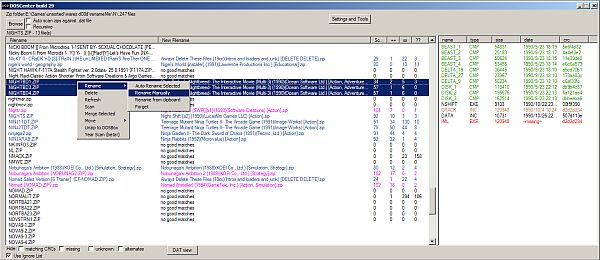
Caractéristiques:
* Renommage de fichiers Zip sur la base DAT fichier CRC correspondant
* Détermine les fichiers inconnus (noir) et les fichiers absents (rouge).
* Zip utilitaire de fusion
* Permet de savoir à l’avance le résultat de fusions entre différents fichiers pour prévenir les erreurs.
* Zip visionneuse de fichiers / Renamer
* Analyse un fichier zip avec le fichier DAT.. Pas de corespondances ? Cliquez 2 fois sur le fichier et le contenu du zip sera affiché.
S’il ya un ou nfo, un .Diz, cliquez 2 fois sur ce fichier et l’afficher dans le navigateur. Si vous voyez le nom du jeu, sélectionnez-le, copiez-le dans le presse-papiers. puis dans le volet gauche, sélectionnez votre fichier et sélectionnez «renommer dans le presse-papiers » pour convertir rapidement et facilement vos anciens fichiers zip de 8 caractères, pour quelque chose de plus significatif.
Il s’agit d’un excellent build de Mame (basé sur MamePlus!) ajoutant quelques jeux et hacks en supplément. Ashura le maintient depuis 2004 (!).
Créé par BUT, Emuman, K&K, Sword et Xvi. Mame Plus! est sans problème la meilleure version de Mame pour Windows, avec ou sans frontend. Support multi-langage, tirs automatiques, option anti-sortie, interface interne améliorée, interface de gestion des roms améliorée, effets vidéos supplémentaires (2xSai, RGB, hq3x, 2xPM…), meilleure gestions des contrôles, support de la NeoGeo en mode console, il regroupe également plein de correctifs et de drivers additionnels…
Télécharger Mame/MameUI Plus! (x86) v0.149 (21.8 Mo)
Ces fichiers ini sont a mettre dans le répertoire « folders » de MAMEUI (ou clones). Il propose un trie des jeux par catégories, année de sortie, version de Mame…
MAMEUIFX est basé sur le code source de MAME/MAMEUI, emprunte des améliorations à de nombreux builds non officiels (en vrac : StretchMAME, JMAME, RND, AdvanceMAME, CANAME, WHACK…).
Télécharger MAMEUIFX32 v0.149 (15.6 Mo)
Un émulateur de NeoGeoCD basé en partie sur neocdpsp de Yoyofr. Il inclut également un pack de shaders au format glsl compatible avec celui disponible pour Higan.
Neoraine :
 - support for iso.gz files : it allows to easily convert downloaded
 content. After downloading, cd to the new directory and :
 gzip -9 *.iso
 for n in *.wav; do
   oggenc $n && rm -f $n
 done
 And you can then point neoraine directly to the cue file without even
 editing it. The surprising part is that an iso.gz is as small or smaller
 than the contents of the iso transfered to a zip file, so it's the best
 solution. I am sure there are equivalent ways in windows to do that
 without typing anything and with a lot of clicks ! ;-)

Common fixes :
 - new sound sync method : just rely entierly on sdl, which makes more
 sense, there was still some old code in there which should have
 disappeared a long time ago. It should fix some reports about sound
 breaking after very long sessions in neoraine.
 - fix a stupid bug with gamepads (bad detection).
 - video info display bigger
 - progress dialog was invisible when loading a game from the command line
 and using the opengl rendering.
 - No default bpp forced for opengl anymore : I noticed that on systems
 which don't have accelerated opengl, it's best to use the desktop bpp to
 render in oepngl, so that's what I do now. As a side effect the long black
 screens which could be seen when entering or leaving fullscreen are almost
 gone with this change now.
 - opengl : force vbl sync when double buffer is enabled : horizontal
 scrolling was not perfect without the vbl, even when using double buffer,
 it could be seen in batrider and/or spacedx for example.
Raine est un émulateur Arcade. Conçu à l’origine pour émuler « Rainbow Islands », il supporte maintenant un paquet de jeux basés sur du hardware « Taito », « Jaleco » et bien d’autres encore.
Beaucoup moins gourmand que Mame, Raine s’avère une excellente alternative. Il inclut également un pack de shaders au format glsl compatible avec celui disponible pour Higan.
Raine :
 - Add guwanges, which is a special edtion of guwange. I don't know what's
 new inside exactly, but at least the background during attract mode is
 different.
 - Add semicom drivers poppyrap, cookbib3, pzlbreak. Easy to add, not bad
 technically, and good to test the new ways to write clones and drivers !
 - In november 2010, a global change from me prevented quite a few game
 drivers to correctly load these games, so these drivers just crashed the
 emulator or produced a black screen at best. The drivers affected and now
 fixed are : cookbib, htchctch, chokchok, sf2yyc, galpanic, hyperpac,
 twinkle, 3in1semi, cookbib2, moremore, moremorep, finalttr, hyperpcb,
 wintbob, macrossp, ssmissin, pipibibi, mchampdx, hedpanic !
 - the lsystem (taito_l) driver now finally works in any color depth, which
 allows it to work in opengl or with yuv overlays. While I was at it, I
 added 2 more plotting sets : plotting becomes plottinga (to follow mame
 names), added plotting and plottingb. There is more work to be done on
 this driver, but this was the most important part.
 - cleanup of the asuka/bonzeadv/earthjk/cadashr drivers :
   - As a bonus, the background of eto is finally fixed, but since it's a
   pure japenese game it won't be very interesting !
   - Added cadashg, the german version of cadash which was missing, but all
   the translations of cadash except english are so bad that it's barely
   believable anyway !
   - Region dipswitches are now supported by raine, that means dipswitches
   which change based on the selected region. It allowed me to remove
   jigkmgri, a now useless region clone of bonzeadv.
   - A dipswitch testing another dipswitch can be seen in galmedes now, if
   you change the dipswitch coinage type, the coinage is updated in real
   time on screen. I might have overdone it here, but Stephh is very happy
   with this change ! ;-)
 - Taito tetris now finally works in any color depth, so it can be used
 with opengl or yuv oerlays too.
 - bsystem driver : finally fully playble in any color depth too, so
 compatible with opengl and yuv overlays. Also I added the missing sprites
 to spacedx (you can see them when selecting the type of game). They have
 always been missing... Also fixed the framebuffer of this driver : there
 was a very funny bug here, if you watched spacedx attract mode long
 enough, when the game sequence started, the copyright notice was still
 displayed in the background. But the best part is that the shots of the
 ships were attacking the letters and destroying them ! It was quite fun to
 see a copyright notice being attacked this way !
 - cps2 : fix avspd not starting (not exactly a bug here, it was more an
 unemulated raster effect that the game was waiting for ever)

Console :
 - now supports the 68020 and the z80. Not everything works (don't try the
 breakpoints with these cpus !), but the basic stuff works. You need dz80
 installed on the system to be able to disassemble z80 code, and m68kdis to
 display 68020 code (like for the 68000). Also the console won some colors,
 it's a basic terminal emulator after all so there was no reason not to use
 more colors ! ;-)
MameUI32 est un émulateur multi-arcades émulant plus de 28000 jeux (à partir de 1975) et incluant une interface (frontend). Ce build est compilé par nos partenaires de chez MameWorld.

