Créé par l’auteur de ClrMAME Pro (à ne pas confondre), il s’agit d’un petit outil qui présente certains avantages par rapport au reconstructeur de ClrMAME Pro. Plus rapide, mode de fusion autonome, reconstruction CHD pour n’en nommer que quelques-uns. Il se veut plus moderne même si assez simplifié pour le moment. Il s’agit peut-être d’un futur remplaçant officiel à ClrMAME Pro (mais seul l’avenir pourra nous le dire).


Les changements:
 
Core:
– fixed: dir2dat: fixed broken ‘archive as files’ option
– fixed: cmdline, not always load/save settings.xml from application folder
– fixed: cmdline, when using relative paths, they are not always relative to the current directory (cmdline version) or application folder (ui version)
– misc: rewrote wrong named machines fixing. Clearer handling should also sort out all known rare edge cases which were fixed. Also it reports all found instances of wrong named machines (e.g. chd folder and archive)
– misc: updated ZipArchive to 5.0.1/zlib-ng 2.3.3 zip operations are way faster
– misc: updated cli11 to 2.6.2
– misc: updated bit7z to 4.0.11
 
UI:
– misc: changed the way the tree gets refreshed, maybe this solves the rare « no tree » refreshing issue

 

Télécharger ClrMAME (Scanner & Rebuilder) v0.7.0 (5.5 Mo)

Site Officiel

En savoir plus…

Obentou est un émulateur multi‑systèmes écrit en C, conçu pour regrouper en un seul programme tous les émulateurs développés par son auteur au fil des années.
Le projet est open‑source et distribué sous licence GPL‑3.0.
 

Systèmes actuellement supportés:
– Space Invaders Arcade
– Pacman core
– Chip-8
– Bytepusher — machine fantasy à 1 opcode
– GBC — Game Boy / Game Boy Color / Mega Duck
– NES — Nintendo Entertainment System
– PCE — PC‑Engine
– PV1000 — Casio PV‑1000
– TMS80 — systèmes TMS9918 + Z80 (SMS / Game Gear / SG‑1000 / SC‑3000)
– WATARA
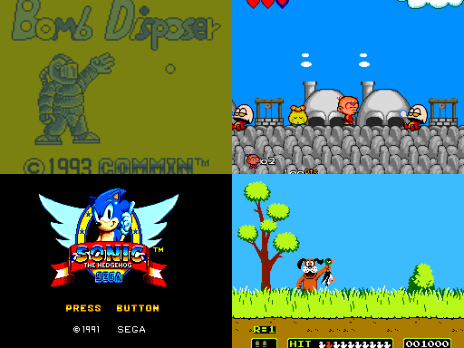


Les changements sont:
 
– added support to Space Invaders Arcade


Télécharger Obentou v0.1.7 (2.0 Mo)

Site Officiel

En savoir plus…

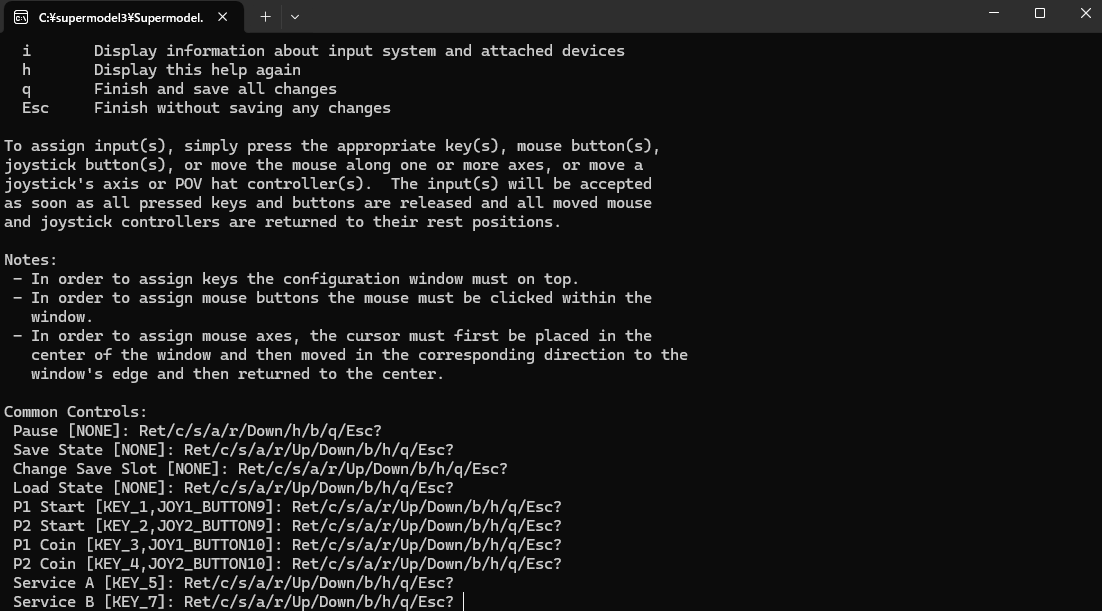
Sega Model 3 UI est un frontend graphique pour Supermodel, l’émulateur Sega Model 3.
Il permet de remplacer l’utilisation en ligne de commande par une interface visuelle conviviale, simplifiant la sélection des jeux, la configuration vidéo et audio, ainsi que la gestion des contrôles.
 
Initialement créée par Nuexzz, cette version reprend le concept de l’interface précédente, mais elle est désormais entièrement développée par BackPonBeauty (massaya39), il s’agit donc d’un frontend pour Super Model Emulator permettant plusieurs customisations (à l’instar de Sega Model 2 UI). En outre il est conçu pour fonctionner de manière optimale avec Supermodel3‑PonMi, le fork amélioré de Supermodel.
 
Caractéristiques:
– Liste complète des jeux pris en charge avec aperçu visuel (snaps)
– Sélection des répertoires de ROMs et lancement facile des jeux (Load Rom)
– Accès à toutes les options vidéo et sonores
– Gestion des contrôles et périphériques compatibles, avec affichage en temps réel de l’état des contrôleurs (XInput / RawInput)
– Options et fonctions avancées (ex : FakeScanLine toggle, opacité)
– Possibilité de modifier le titre des jeux lorsqu’utilisé avec Supermodel3‑PonMi
– Certaines options de lien avec le système ne fonctionnent qu’avec la version originale créée par Spindizzi


Les changements sont:
 
– Fix: Add missing SharpDX.DirectInput NuGet package
– Add SharpDX.DirectInput to packages.config (was missing)
– Update HintPath to use NuGet package location
– Fixes build failures on clean installations
– Verified on multiple environments (Windows 10/11, VS 2019/2022)
– BarrelEffect range 1-10 to 1-100

 
Topic original.
Nouveau topic.
 

Télécharger Sega Model 3 UI (2026/04/13) (18.8 Mo)

Site Officiel

En savoir plus…

Cette version de SuperModel propose des ajustements spécifiques au fork PonMi, permettant notamment une meilleure gestion des raccourcis clavier pour certaines actions avancées (pause, gestion du comportement d’exécution, etc.), facilitant l’usage quotidien de l’émulateur dans un environnement moderne.
 
Elle est également pensée pour une intégration optimale avec des frontends, ce qui permet par exemple de gérer plus facilement l’affichage et l’identification des jeux (y compris la différenciation entre plusieurs clones d’un même titre via le frontend).
 
Objectifs du projet:
– Fournir une version modifiée de SuperModel
– Apporter des ajustements spécifiques absents du build officiel
– Améliorer l’ergonomie et l’usage quotidien de l’émulateur
– Servir de base technique à des projets tiers (frontends, outils, intégrations personnalisées)
 
Fonctionnalités principales:
– Émulation du Sega Model 3
– Support des jeux d’arcade Model 3 (Daytona USA 2, Scud Race, Virtua Fighter 3, etc.)
– Paramétrage avancé via fichiers de configuration
– Options graphiques étendues (résolution, plein écran, rendu, effets visuels selon version)
– Support du clavier, des manettes et de périphériques compatibles
– Ajustements internes et fonctionnalités spécifiques au fork PonMi
– Maintien de la compatibilité avec les évolutions du projet SuperModel officiel
 
Le fonctionnement reste pleinement compatible avec l’écosystème SuperModel, tout en étant particulièrement bien adapté à une utilisation conjointe avec le frontend
Sega Model 3 UI, avec lequel il s’intègre naturellement pour offrir une expérience plus conviviale et mieux structurée.


Télécharger SuperModel PonMi r260424 (8.7 Mo)

Site Officiel

En savoir plus…

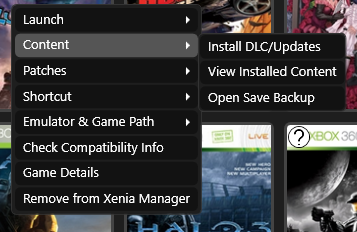
Xenia Manager est un outil conçu pour simplifier l’utilisation de l’émulateur Xenia. Il vise à rendre les jeux et l’installation de correctifs spécifiques plus simples et plus conviviaux, tout en fournissant une interface facile à utiliser pour ajuster les paramètres de Xenia. Ce projet n’est en aucun cas affilié à l’équipe Xenia.


Caractéristiques principales:
– Installation de Xenia en 1 clic avec création automatique de profil
– Mise à jour automatique de Xenia (paramétrable)
– Installation et gestion faciles du contenu : DLC/TUs sans lancer Xenia
– Prise en charge des patches Canary & Netplay, avec gestion avancée (ajout, édition, suppression, doublons)
– Profils de configuration par jeu, incluant des réglages optimisés par la communauté
– Gestion complète des profils Xenia : import, export, édition, sauvegardes automatiques
– Interface dynamique des paramètres, s’adaptant à la structure du fichier de config
– Création de raccourcis Steam avec prise en charge des artworks
– Détection fiable clavier/souris via un Input Listener multiplateforme
– Importation et exportation des sauvegardes de jeu avec système de backup basé sur le XUID
– Faible utilisation des ressources grâce au chargement à la demande
– Paramètres de jeux optimisés disponibles ici


Télécharger Xenia Manager v4.1.2 (16.7 Mo)

Site Officiel

En savoir plus…

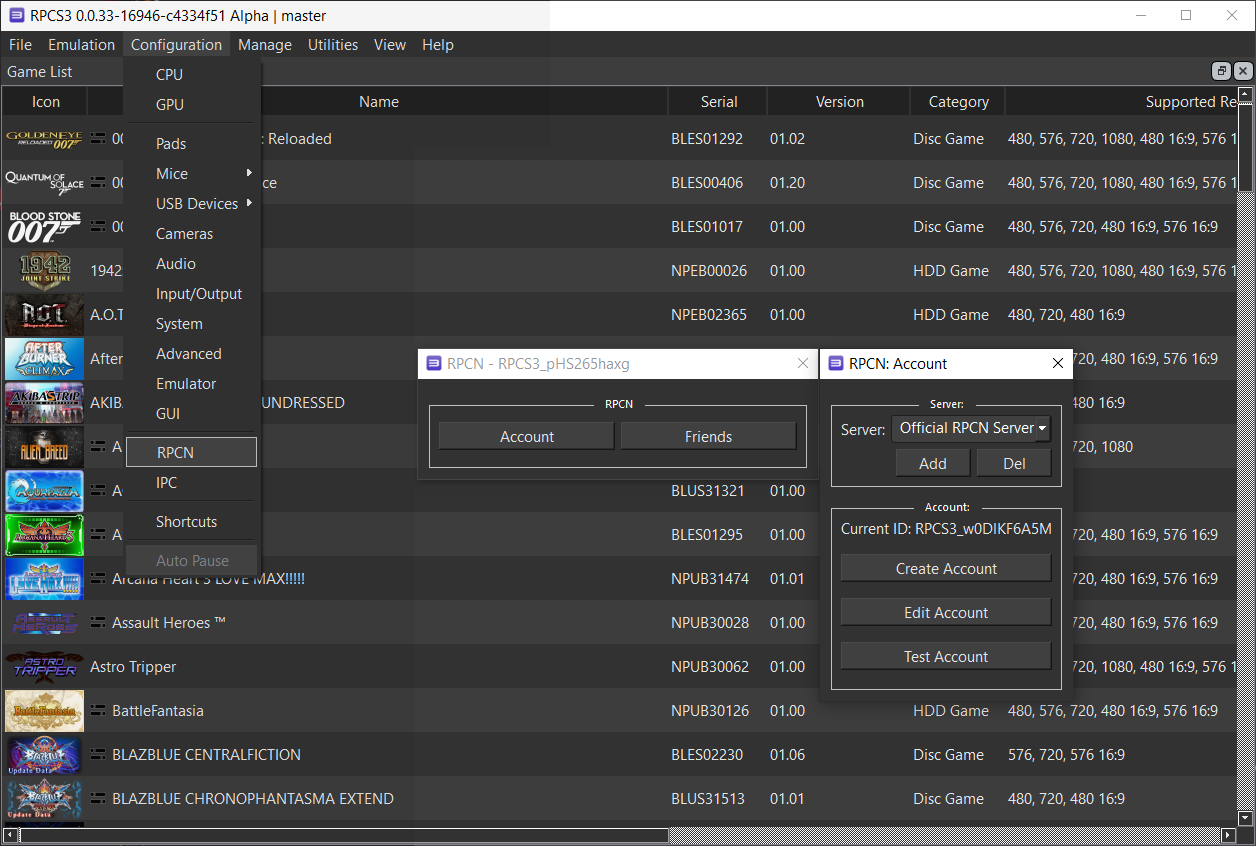
Il s’agit d’un réseau de recherche et de communication en ligne (RPCN), c’est à dire un serveur de matchmaking destiné à être utilisé avec RPCS3.
 

Le Netplay dans RPCS3 est donc introduit par GalCiv, qui a développé RPCN, un serveur open-source qui émule le match-making P2P réalisé sur la PlayStation 3. RPCN peut également être utilisé pour communiquer avec des serveurs privés pour les jeux qui nécessitent un serveur dédié pour les fonctions multijoueurs. À cet égard, les jeux qui nécessitent un serveur personnalisé ne fonctionneront pas, à moins qu’un serveur privé créé par des fans ne soit mis en place. Cela sort du cadre de l’émulateur et devra être développé par la communauté.


Les changements dans cette version sont:
 
– Updated dependencies
– Misc fixes

 
Liste de compatibilité ici.
Plus d’infos ici.


Télécharger RPCN (RPCS3) v1.8.6 (5.0 Mo)

Site Officiel

En savoir plus…

Simple Launcher est une interface moderne pour émulateurs qui facilite le lancement de jeux rétro et ajoute surtout un support CHD universel grâce à son module CHDMounter, permettant d’utiliser des fichiers CHD même avec des émulateurs qui ne les prennent pas en charge nativement, comme RPCS3, Xenia , Xemu ou autres.
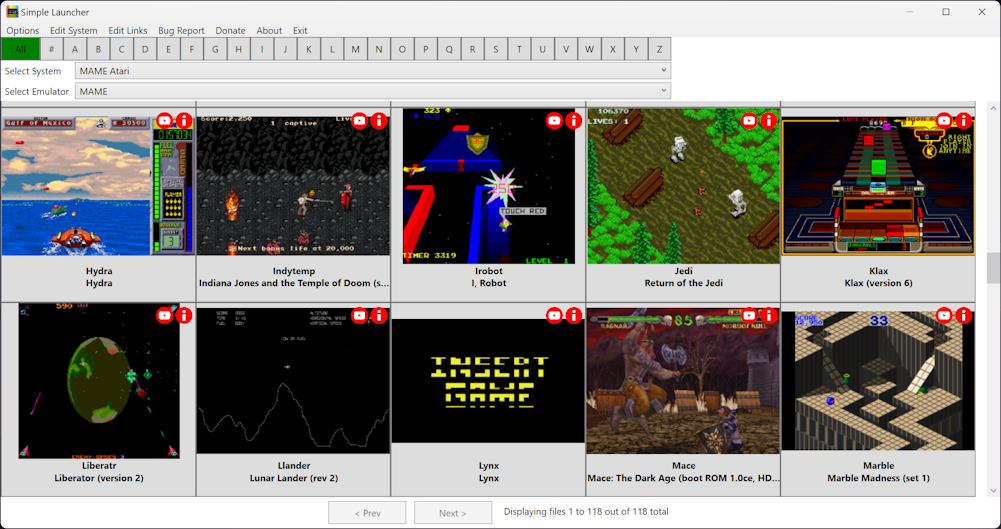


Les changements sont les suivants:
 
– Improved support for .bat files.
– Fixed handling of placeholders during path validation.
– Fixed an edge case in the path containment check where an exact match between the resolved path and base folder was incorrectly rejected.
– Added required resource files for PSX packaging, including icons, images, a game information database, and encryption keys.
– Added comprehensive unit tests for ZIP path traversal validation, temporary directory cleanup, PathHelper resolution methods, and .bat file validation.
 
🔄 Updater Overhaul
– Completely refactored the auto-updater with a clean service-oriented architecture (UpdateService, GitHubService, DownloadService, ZipService)
– Added real-time download progress bar and status text during updates
– Added global exception handling and graceful fallback to manual download
 
🌍 Localization & Translation
– Added more localized tooltips across the main interface
 
🎨 UI/UX Improvements
– System image selection with live preview and validation in the system editor
 
🛡️ Reliability & Robustness
– Added LocalAppData fallback for data files
– Enhanced emulator path validation and UAC cancel handling
– Improved path validation with long path support and mismatch detection
– Explicit TLS 1.2/1.3 support and enhanced HTTP error logging
 
🧪 Testing
– Added comprehensive unit test suite for core services
 
📚 Documentation & Tools
– Standardized emulator paths and added official download links in parameters.md
– Updated BatchConvertToCHD and RomValidator tool binaries
– Added timeout messaging for image downloads and USB path guidance


Télécharger SimpleLauncher v5.3.3 (101 Mo)

Site Officiel

En savoir plus…

MedGui Reborn est une interface (Frontend) pour Mednafen sur OS Windows. Cette archive inclut MetroMed.


– Fixed crash on cheat manager for unrecognized serial game name
– Better management of errors on Cheat Manager
– On Import cheat , the cheat will be copied on MedGuiR cheat folder
– Added Saturn v1.01a region free bios on compatible bioses list
– Changed user-agent on webclient header to fix download problems
– Removed the cmd popup that appear on Windows 11
– Fixed error on 403 web exception
– Changed thegamesdb boxart code
– Fixed auto-download of cheat from GameHacking web page


Télécharger MedGui Reborn v0.127 (24.5 Mo)

Site Officiel

En savoir plus…

Il s’agit d’un émulateur de Sega Saturn très prometteur.
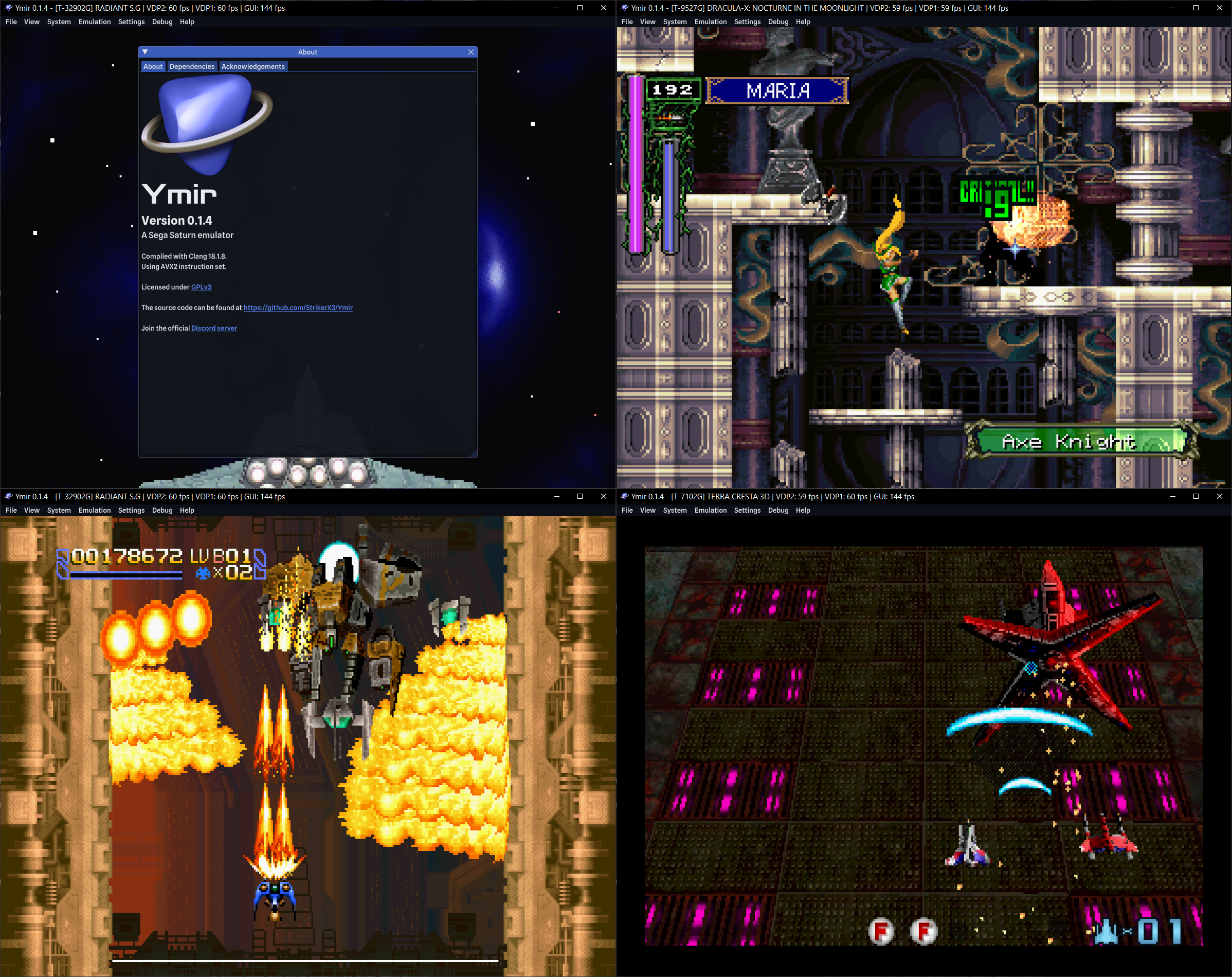


Quelques caractéristiques:
– Charger des jeux à partir de fichiers MAME CHD, BIN+CUE, IMG+CCD, MDF+MDS ou ISO
– Détection automatique de la ROM IPL (BIOS)
– Changement automatique de région
– Jusqu’à deux joueurs avec des manettes standard sur les deux ports (prise en charge de davantage de types de manettes à venir)
– Raccourcis clavier entièrement personnalisables
– Prise en charge des cartouches RAM, DRAM et ROM (d’autres à venir)
– Gestionnaire de mémoire intégré pour importer et exporter des sauvegardes, et transférer entre la RAM interne et celle de la cartouche
– Sauvegarde des états compatibles avec les versions futures
– Rewind (jusqu’à une minute à 60 fps), mode turbo, avancement image par image (avant et arrière)
– Mode plein écran avec prise en charge VRR et faible input lag
– Améliorations graphiques optionnelles, comme le rendu désentrelacé/progressif des modes haute résolution et le rendu transparent des polygones en mesh
– Émulation optionnelle du bloc CD en bas niveau
– Un débogueur en développement avec de nombreuses fonctionnalités avancées
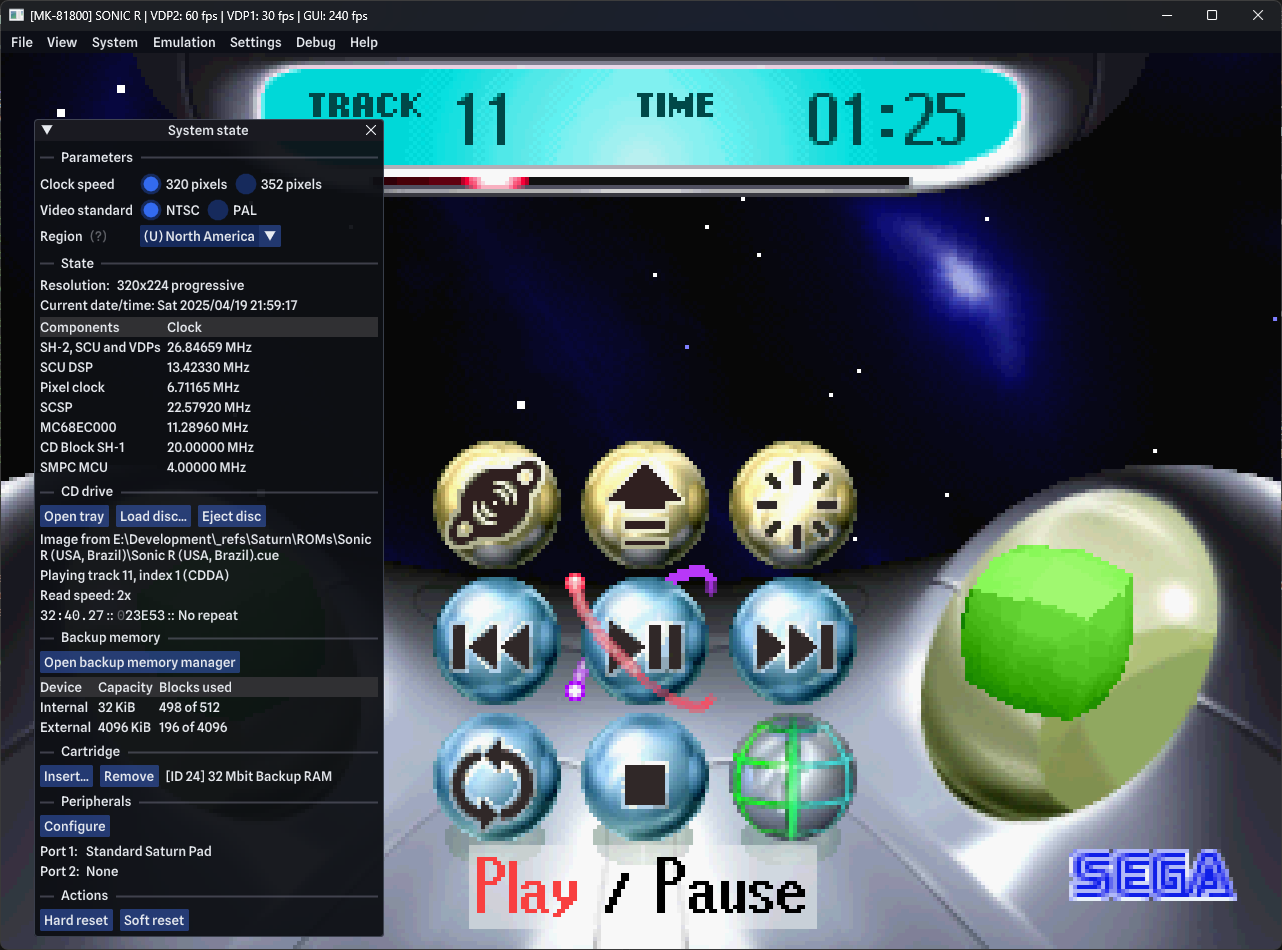


Voici les nouveautés:
 
New features and improvements
– App: Add command line option `-F` / `–fast-forward` to launch the emulator in fast‑forward mode.
– App: Always use installed mode under Flatpak.
– App: Check for profile at the executable location. (#706)
– App: Warn users about Flatpak filesystem permissions if the app is running in its sandbox and a disc image fails to load.
– Backup RAM: Support in-memory and copy‑on‑write memory‑mapped files in addition to regular memory‑mapped files.
– Build: Add simple feature flags system. All feature flags enabled by default on development builds.
– Build: Support Profile‑Guided Optimization (PGO) builds. (#742)
– Debugger: Allow scrolling the SH2 disassembly view. (#743)
– Debugger: Colorize VRAM access timing slots in the delay viewer.
– Debugger: Implement keyboard navigation and interactions in the SH2 disassembly view.
– Debugger: Manage SH2 breakpoints and watchpoints on the frontend and allow enabling/disabling them.
– Debugger: Optimize SH2 breakpoints and watchpoints when debug tracing is enabled.
– Debugger: Trace and display SH2 call stack.
– Debugger: Trace and display SH2 data stack contents.
– GameDB: Add new game‑specific flags to improve compatibility (MC68EC000 clock, VDP1 stalls, VDP1 slowdown, relaxed VDP2 checks).
– Input: Added support for mouse events.
– Input: Capture mouse for light gun and mouse peripherals (System mouse / Physical mouse modes).
– Input: Experimental Virtua Gun peripheral implementation. (#33)
– Input: Implemented Shuttle Mouse peripheral. (#32)
– MIDI: Force RtMidi to use dummy API if initialization fails.
– Save states: Added actions to undo a save state and restore an undone save state. (#700, #727)
– Save states: Store one extra save state per slot for undo. (#700, #727)
– Settings: Show currently loaded profile path in Settings > General.
– System: Select preferred system variant (Saturn, HiSaturn, V‑Saturn, Dev Kit) and auto‑pick matching IPL ROM. (#637, #725)
– Video: Add option to enable/disable video synchronization in full screen mode.
– Video: Allow selecting full screen resolution and target display. (#705)
– Video: Allow switching graphics backends for GUI rendering.
 
Fixes
– Build: Introduced separate x64‑win‑llvm toolchains for SSE2 and AVX2 support. (#713)
– Build: Perform ad‑hoc signature on macOS binaries to work around “damaged app” warning. (#698)
– Build: Remove duplicate binary from macOS packages.
– GameDB: Fix crashes and issues in multiple games (Vampire Savior, Baku Baku Animal, Chisato Moritaka, DBZ, Emit Vol.3, Metal Fighter Miku, Spot Goes to Hollywood, Steamgear Mash, Waku Waku 7).
– GameDB: Fix crashes in Deep Fear. (#740)
– GameDB: Fix no‑boot regression in Jikkyou Oshaberi Parodius. (#283)
– GameDB: Fix performance issues in Fishing Koushien II. (#812)
– Input: Fix analog to D‑Pad axis conversion. (#754)
– MIDI: Defend against crashes when library fails to initialize.
– SCU: Timer fixes.
– SH2: Interrupt, cache, and watchpoint decoding fixes.
– VDP1: Fix zero horizontal character size handling.
– VDP1: Fix framebuffer swap race condition (Actua Golf, FIFA 98, Gran Chaser).
– VDP1: Increase PTM=1 drawing delay during VBlank (Earthworm Jim 2).
– VDP1: Properly load save state data with threaded rendering.
– VDP1: Rework cycle counting method and increase cycle budget (Road Rash, Virtua Cop, Burning Rangers).
– VDP1: Stall drawing on VRAM writes for Mega Man X3 / Rockman X3. (#244)
– VDP1: Stop processing commands on all‑zeros entry (Sekai no Shasou kara). (#761)
– VDP2: Multiple fixes for VRAM access, timing, scroll CP, bitmap access, sprite data, priority, and special cases (Radiant Silvergun, Mr. Bones, Sonic 3D Blast, X‑Men vs SF, Girls in Motion Puzzle, Daisuki, BattleSport, etc.)


Télécharger Ymir v0.3.0 (14.7 Mo)

Site Officiel

En savoir plus…

Cet émulateur Apple‑1 moderne, réécrit en C++ avec Dear ImGui et OpenGL, dérive d’un ancien projet initialement développé en Java et offre désormais une émulation fidèle, rapide et multiplateforme, tout en prenant en charge l’ensemble des cartes d’extension P‑LAB — modem Wi‑Fi, terminal, microSD, A1‑SID, carte graphique TMS9918 — ainsi que la carte graphique couleur GEN2 d’Uncle Bernie.
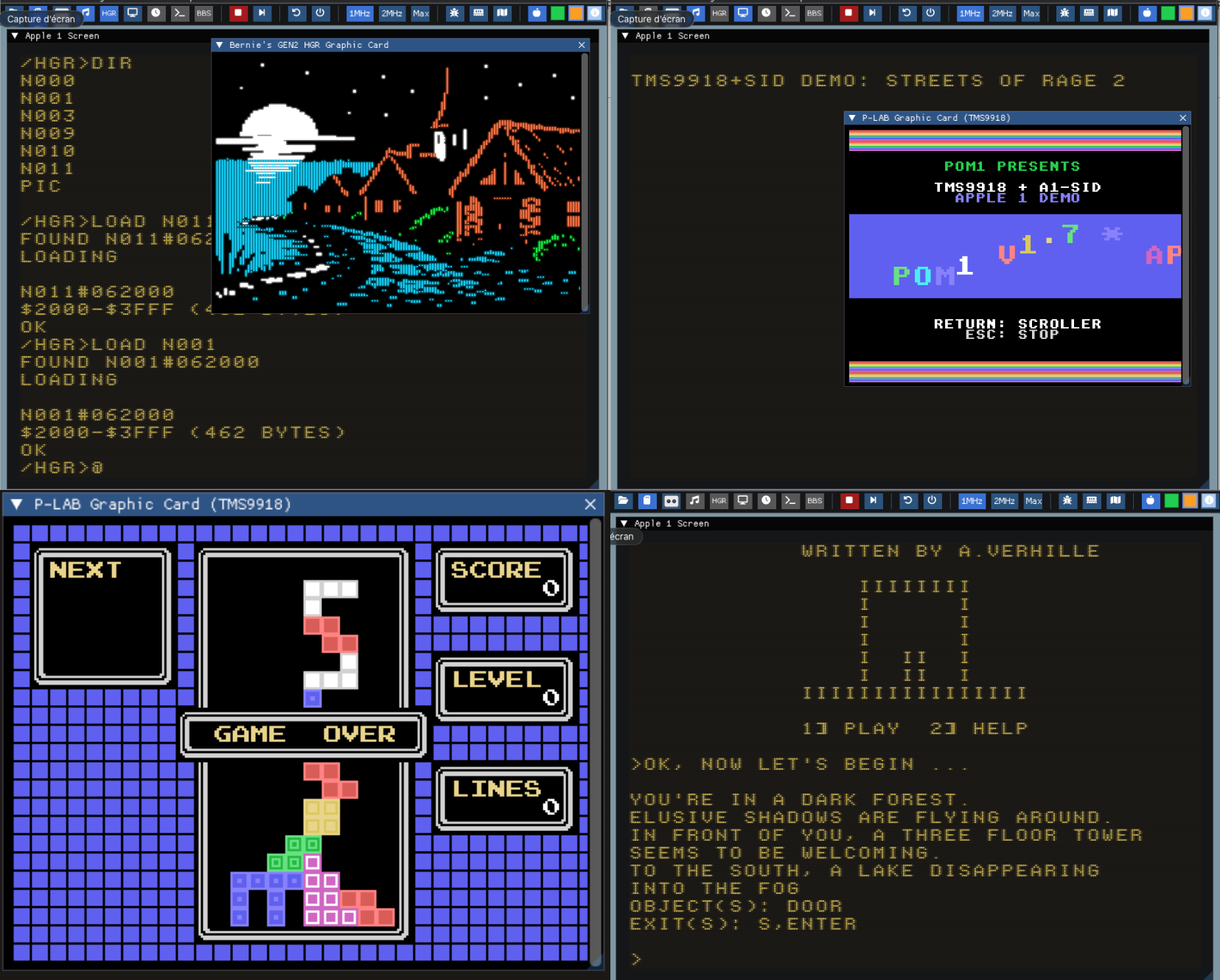


Pour célébrer les 50 ans d’Apple (1976–2026), la version 1.7 de POM1 est publiée en hommage au demi‑siècle d’Apple Computer, fondée le 1er avril 1976.
 
Il intègre désormais la prise en charge des composants matériels suivants :
 
– Modem Wi-Fi P-LAB
– Carte Terminal P-LAB
– Carte de stockage microSD P-LAB
– Carte son P-LAB A1-SID
– Carte graphique P-LAB Apple-1 (TMS9918)
– Carte graphique couleur GEN2 d’Uncle Bernie
 
Version en ligne disponible ici.
 

Télécharger Pom1 v1.8.6 (5.4 Mo)

Site Officiel

Site Officiel original (archive)

En savoir plus…

Mupen64 RR Lua (ou Mupen64 Re-recording Lua) est un fork (le 3eme) de Mupen64 permettant l’enregistrement de vidéo.


Les changements sont:
 
⚡ Performance
– VFWEncoder – Offload encoding to another thread (#621)
– LuaRenderer – Skip expensive TransparentBlt during capture (#620)
– Tighten message loop (#606)
– Use 32bpp BGRA video buffers (#605)
– Lua – Skip lua calls when no callbacks are registered (#604)
 
✨ Features
– Dark mode (#569)
– Lua – Add emu.get_speed_mode and emu.set_speed_mode (#618)
– Lua – Add d2d.draw_image2 (#600)
– TASAudio – Use SDL3 for playback (#594)
– Lua – debugger API (#592)
– Website – Add stroop page (#596)
– Lua – More serious trust message (#595)
– CoreDbg – (breaking) Remove CoreDbg GUI (#589)
– LuaRenderer – Native resizing support (#583)
– Move logs into /logs folder (#553)
– Remove fast dispatcher (#554)
– Compare – (breaking) Remove compare system (#555)
– Benchmark – (breaking) Remove benchmark system (#556)
– Seeker – Better error feedback (#549)
 
🐞 Bugfixes
– TASAudio – Messed up stereo audio during capture (#625)
– TASVideo – Broken screenshot functionality (#623)
– Crash when trying to capture screenshot using a video plugin that doesn’t support it (#622)
– LuaRenderer – Visible pink alpha mask on platforms without LWA_COLORKEY support (#587)
– AppActions – File > Exit causes crash (#582)
– LuaRenderer – Run rendering heartbeat on a separate thread (#577)
– LuaRenderer – Overlays stealing focus from primary window (#572)
– Double spaces in plugin names (#568)
– Set CMAKE__COMPILER_TARGET based on VS environment (#563)
– Default directories are created in app directory regardless of configured paths (#562)
– Website – Remove now-redundant notice about early versions (#561)
 
📚 Documentation
– Lua – Update docs with latest API definitions (#559)

 
Site original. Fork 1. Fork 2. Fork 3.
 

Télécharger Mupen64 RR Lua v1.4.0-beta (+AVI Fixes builds) (12.2 Mo)

En savoir plus…

Il s’agit d’un émulateur de N64 écrit en Rust par Logan McNaughton (simple64) et dont certaines portions proviennent de mupen64plus et/ou ares.


Les objectifs en résumé sont les suivants:
– Performance. L’auteur veux pouvoir utiliser cet émulateur sur son ordinateur portable.
– Facile à utiliser.
– Facile de travailler avec. Les recompilateurs dynamiques sont performants mais ils sont très difficiles à lire et à comprendre. Cet émulateur n’aura des interprèteurs que pour le CPU et RSP. De plus, il est entièrement écrit en Rust (en dehors de Parallel-RDP), un langage de programmation moderne dont le nombre d’utilisateurs ne cesse de croître. L’auteur a essayé d’éviter l’utilisation de macros, qui peuvent réduire la répétitivité du code, mais aussi sa lisibilité.
 

Les changements sont:
 
– Fix a crash on MacOS 15
– Press F1 to toggle showing FPS (internal game FPS) and VI/S (emulated refresh rate)
– Added support for opening a ROM by dropping it onto the window
– Added option for VSync
– Added list of recently opened ROMs
– GameBoy RAM is now written back to the save file
– Improved transferpak loading (file dialogs appear when you enable a transferpak, not when the game starts)


 

Télécharger Gopher64 v1.1.19 (37.3 Mo)

Site Officiel

En savoir plus…


Casino-en-ligne-fiable.com

https://getourbonus.com/fr/accueil

https://www.romspedia.com/

https://www.casinoonlinefrancais.fr

Lucky 7 bonus

https://www.casinogratuitsansdepot.com

pablocasino.org

critiquejeu.info

playbonus

casinodoc.org

laplanquedujoueur.com

casinoonlinefrancais
Listing de toutes les actualités , Page numéro 14 - Emu-France

Azahar est une fusion entre Lime3DS et le fork Citra de PabloMK7.


Cette version « Plus » restaure certaines fonctionnalités supprimées de la version originale.
 

AzaharPlus est identique à Azahar à l’exception des caractéristiques suivantes :
 

– Compatibilité avec tous les fichiers du jeu. Si un fichier fonctionne avec un fork Citra, il fonctionne avec AzaharPlus.
– Compatibilité avec les anciens processeurs (pas besoin de SSE4.2)
– Compatibilité avec Android 9
– (Sur Android) Possibilité de télécharger les fichiers système à partir des serveurs officiels. Aucun besoin d’une véritable 3DS.
 

La version Android est disponible en deux variantes :
– Une variante avec le même identifiant d’application qu’Azahar, ce qui la remplace sur l’appareil. Son nom d’affichage est « AzaharPlus ». Utilisez cette option si vous avez d’autres applications qui ciblent Azahar, comme une interface par exemple.
– Une autre variante avec un nouvel identifiant d’application, permettant de coexister avec Azahar sans problème. Son nom d’affichage est « +AzaharPlus+ ».
 

Télécharger AzaharPlus v2125.0 A (58.4 Mo)

Site Officiel

En savoir plus…

UPX (sigle de l’anglais Ultimate Packer for eXecutables) est un logiciel libre permettant de compresser des fichiers exécutables. C’est un programme gratuit, distribué sous licence GNU GPL.
 
Le programme permet de compresser un exécutable, utilisant la technologie de compression sans pertes UCL, de sorte que le programme une fois lancé se décompresse lui-même.


Plus d’informations ici. Liste des changements .
 

Télécharger UPX (Dos) v5.1.1 (751 Ko)

Télécharger UPX (32/64 bits) v5.1.1 (1.2 Mo)

Site Officiel

En savoir plus…

– MAME(Arcade), partie arcade de MAME, est un émulateur multi-arcade émulant plus de 37000 jeux (à partir de 1975).

– MAME(MESS), partie consoles et ordinateurs de MAME, est un émulateur multi-systèmes émulant des dizaines de milliers de jeux.


Les builds 32 bits restent compatibles XP (compilation customisée avec GCC 15.x / Python 3 et/ou clang 21.x).
 

Télécharger MAME(Arcade) [32 bits] v0.287 (66.9 Mo)

Télécharger MAME(Arcade) [64 bits] v0.287 (63.5 Mo)

Télécharger MAME(MESS) [32 bits] v0.287 (33.8 Mo)

Télécharger MAME(MESS) [64 bits] v0.287 (30.5 Mo)

Site Officiel

En savoir plus…

Il s’agit d’un émulateur de Sinclair ZX Spectrum.


Les changements sont:
– added support for CRT-like blur and black-and-white displays


Télécharger ZXIAN v35 (1.3 Mo)

Site Officiel

En savoir plus…

Amiberry est un émulateur Amiga optimisé, libre (GPLv3), basé sur le cœur WinUAE, conçu pour ARM et x86 (Raspberry Pi, PC, etc.), offrant JIT ARM64/x86-64, interface moderne (Dear ImGui), support WHDLoad, shaders/bezels, intégration RetroArch et une distribution multi‑plateforme (Linux, macOS, Windows, Android, FreeBSD, Haiku) avec paquets et scripts d’installation prêts à l’emploi.


Télécharger Amiberry v8.1.4 (21.3 Mo)

Site Officiel

En savoir plus…

Tanuki3DS est un émulateur 3DS pour MacOS, Linux et Windows écrit en C qui vise à être simple, rapide et compatible. Actuellement, il peut lancer un nombre raisonnable de jeux avec des graphismes et un son de qualité et à pleine vitesse. Il prend également en charge quelques fonctionnalités intéressantes comme les manettes, l’avance rapide, l’agrandissement de la vidéo et la caméra libre.


Les changements sont:

– GPU emulation improvements:
correct lighting emulation
normal mapping, shadow mapping
fog
– Camera and Mic support
– Motion controls fixes
– New game list UI
– Other misc fixes/improvements


Télécharger Tanuki3DS v0.5.1 (4.7 Mo)

Site Officiel

En savoir plus…

Il s’agit d’un émulateur de Sega Megadrive et Mega-CD.


Version en ligne disponible ici.
 
Les changements:
– Vastly improved accuracy of interrupt and H/V counter timings.
– Vastly improved emulation of 68k/Z80 DMA stalls.
– The DAC channel now has its distinct Mega Drive ‘crunchiness’.
– Fixes crashing in The Spiral.
– Fixes dots covering the screen in OutRunners.
– Fixes the 512-colour demo in Titan Overdrive.
– Mostly eliminates the black bars seen during the fractal effect in Titan Overdrive II.
– Added emulation of the V-scroll latching.
– Fixes Devon’s high-colour Ronald McDonald tech-demo.
– Fixed frame-rate not being affected by changing the ‘TV standard’ option.
– Fixed save data being lost after a hard reset.
– Made UI scaling of menus consistent across DPIs.
Tile viewer.
Stamp viewer.
Plane viewers.
Stamp map viewer.
– Enlarged some menus.
Sprite list.
Tile viewer.


Télécharger Clownmdemu v1.6.10 (9.4 Mo)

Site Officiel

En savoir plus…

IV/Play (prononcé «Four Play») est une interface graphique pour MAME. Il a été conçu par un codeur rémunéré par John IV comme une alternative à MAMEUI (que Robbbert maintient). IV/Play mise sur une séparation réelle entre frontend et code MAME afin que les changements sur MAME n’affectent plus le frontend. Il vous faudra .NET 10.0 pour le lancer.


FLAT VIEW & GLOBAL SORT
Added a new flat view which displays all machines alphabetically and non indented; clones decoupled from their parents, favorites not pinned, parents at full opacity. Accessible via the TAB cycle or the F1 View dropdown. Flat View is also the only mode that supports global sort, which orders the list by default, description, machine name, manufacturer, or year. The selected sort field persists through restarts; direction resets to its natural default. Sort cycles via Alt S or the F1 Sort dropdown; especially useful when a filter result contains thousands of entries.
 
DEEPER DAT INTEGRATION FOR FILTER SEARCHES
History.xml, MAMEINFO.dat, and CatList.ini are now indexed/hydrated at first use and integrated into the Ctrl F filter system. history: (or hist:) searches the descriptive text from History.xml, while genre: (gg:) queries CatList.ini categories and subgenres. MAMEINFO.dat contributes first appearance version data, exposed through mameversion: and mv: along with natural language forms such as “version 53.” These sources also participate in the natural language layer, allowing combined queries like “imperfect shooters from 1995” or “platformers added in 0.99.” Two new operators workingstatus: and supportstatus: extend filtering to MAME’s internal status flags for both arcade and softlist items. See the down arrow on the Filter dialogue for a series of examples.
 
AVAILABLE ROMS GAMELIST
The ‘Available’ gamelist, accessible from the F1 Custom Gamelist dropdown or via the shortcut cycle key Alt‑INS/DEL, performs a simple .zip/.7z audit on the rompath entries defined in MAME.ini and matches those against machines in the XML, providing a list of only found items. Detection is non‑recursive and name‑only. Clones’ presence is assumed when using fully merged ROM sets. The gamelist intentionally does not show ROM‑less games like Pong; switch back to the full gamelist to see those entries. To activate this feature it is necessary to hit F12 to do a quick audit of archival ROMs in MAME’s -rompath.
 
PLATFORM-BASED SOFTLIST FILTER GROUPING
When a filter (Ctrl-F) returns software list results, IV/Play now collapses them into platform-level family nodes rather than producing one row per software item per hardware variant. A search for ‘zaxxon’ produces a single ‘Zaxxon (Atari 2600)’ entry, a single ‘Zaxxon (ColecoVision)’ entry, a single ‘Zaxxon (MSX1)’ entry, and so on; one row per platform, regardless of how many hardware machine variants or regional releases exist for that platform in MAME. Pressing Enter on a family node drills down into it, showing the parent release and any clones (regional variants, alternate revisions) for that platform. The parent entry shows its clone count, and each clone shows its parent name in brackets. Press Alt-Left Arrow, Backspace, or ESC to return to the platform-level filter results. Adding ‘noclones’ to the filter suppresses clone entries before grouping runs, so only parent releases appear and drill-down shows a single launchable entry.
 
NATIVE AOT TRANSITION / PERFORMANCE
IV/Play now ships as a native Ahead-of-Time (AOT) build, producing a smaller, fully self contained executable that no longer requires users to install the .NET 10 runtime (Note: the .exe size increases as a byproduct). Startup behavior is more consistent across machines, with faster warm launches and smoother recovery after full XML exports or database rebuilds. Overall responsiveness improves due to native code generation, and memory usage is slightly reduced.
 
MACHINE STATUS AWARE ICON BORDERS
This configuration feature surfaces the status of MAME machines that appear in Alt-Enter properties as not working (red), imperfect (orange), and working (green) by using the black border of the existing icons and changing them to that color (or any user chosen in the *.cfg). Further, since the imperfect games are the most in need of visual differentiation, they are now defaulted to a bkground derived themed color to complement the auto-theme feature. This auto color for the imperfect status border can be turned off in F1 to return to user chosen RGB settings. It also extends to softlist machine media items.
 
HIDDEN.INI
IV/Play now supports a hidden.ini file at the executable level for permanently suppressing entries from the game list before any filter or display logic runs. Each line takes one of three prefix forms: type: targets a machine category, machine: targets a specific short name, and driver: targets all machines sharing a source driver. Excluded entries are removed from the dataset entirely — they do not appear in filter results, favorites, or any custom gamelist. The file follows the same precedence rules as Favorites.ini and survives factory resets. It is generated automatically if not present and contains the syntax/usage information. Its creation can be suppressed by a toggle in the *.cfg if desired.
 
CUSTOM GAME LIST GENERATION FROM FILTER RESULTS
Using Alt-L from a filter result set will now automatically create an entry in the custom-list.ini file.
 
NUMBER OF CLONES / PARENT
Added the ability to show the number of clones a machine has on the gamelist, as well as the counterpart `[parent: x]` on clone entries. Clone counts use singular/plural forms (“1 clone” / “5 clones”) and appear left‑anchored immediately after the machine description. This can reveal interesting historical patterns where widely bootlegged games may have dozens of clones. Accessible in F1 as two independent toggles.
 
COMMAND LINE OVERRIDE AUTOCOMPLETE
Returning from IV/Play 1.8, MAME’s `-showusage` output is captured and used for the command line override text input.
 
ADDITIONAL FEATURES
• DPI detection and display has been hardened; IV/Play now flows better when dragged across multiple monitors with different DPIs and scaling settings.
• Added toggles for ‘Show Parents’ and ‘Show Machines’ to create even more display permutations. These can also be accessed via natural language queries in Ctrl‑F such as “Parents” or “Machines Only.”
• Added new randomized splash screens which appear on full MAME XML export and .db rebuilds at launch.
• Added Shift‑F8 to show all the new internal splash screens in an overlay panel.
• Added two new 3-way filter operators to Ctrl-F: workingstatus:working / :imperfect / :notworking (alias ws:) distinguishes fully-working from imperfect-emulation machines, going beyond the boolean working only phrase. supportstatus:yes / artial / :no (alias ss:) filters softlist items by their MAME support level. Combine with a system name for best results: snes supportstatus:yes. Natural language aliases such as imperfect machines, broken games, and partially supported are also supported.
• Added a ‘snapshot’ of the entire user configuration taken on launch and available in the F2 log. If changes are made through the session, they are flagged by a color change and delta icon (Δ) on the next F2 to make for easier debugging/diagnostic work.
• Added Genre, MAME version, and machine type to Alt-Enter properties since we consume all of that and hydrate it now. Requires History.xml, MAMEINFO.dat, and CatList.ini.
• Added a subtle configuration/F1 button at the bottom of the vertical scrollbar. This is the first time in the app’s history that the configuration dialogue is accessible without a keypress.
• Added current game list in use to the titlebar.
• Add Alt-O to select a new random bkground. Note shortcut keys are all assignable in the *.cfg and some major ones in the F1 dialogue.
• Rename favorites and custom gamelist in the distribution packages so they don’t overwrite users’ own files.
• Added the ability to return the app to center of screen and its default dimensions. Double click the titlebar or use Ctrl-Shift-0.
• Added an OS aware System / Dark / Off mode drop-down in F1.
• Added a browser-like Ctrl-F (Find) inside the overlays, including F2 & F3, and the DAT peeks.
• Modernized the font and color pickers in F1.
• Removed hardcoded Segoe UI usage through out the rest of the app, main UI font now set in the F1 config and will propagate. New default per Windows 11 is Segoe UI Variable Text.
• Created a TTF font based on MAME’s very old uismall.bdf for use in MAME’s internal UI. Double-click it, choose ‘Install’ to bring it into Windows 11, then use ‘-uifont MAMEUISmallMod’ in the MAME.ini to utilise it, in-game. It also looks nice as the UI font in IV/Play itself, set in F1. Added to the distribution package.
• Added a third font picker field in F1, this for the rest of the UI, including dialogues. This allows a separate gamelist font setting to be decoupled and individualized.
• No longer including favorites.ini and the custom gamelist.ini in the distribution package so there is no accidental overwriting on decompressing the archive.


Télécharger IV/Play v2.6.2 (14.6 Mo)

Site Officiel

En savoir plus…

Maintenu par Robbbert, il s’agit de la suite la plus directe de MAMEUIFX, ne contenant que la partie arcade de MAME et supprimant les « extra games » que proposait MAMEUIFX (ces derniers étant tous inclus dans HBMAME).
 
As before, the releases only have the binary. Any other needed files come with the standard MAME from mamedev.org.
 
– Arcade games only
– NO pinball
– NO poker games
– NO gambling games
– NO systems that require software, such as computers and consoles
– If all the games of a specific source file are not functional, then they are removed.

 
Changement:
– sync with mame v0.287
 

arcade
 

Télécharger ARCADE (32 bits) v0.287 (32.0 Mo)

Télécharger ARCADE (64 bits) v0.287 (38.3 Mo)

Site Officiel

En savoir plus…

Voici l’ensemble des screenshots et icônes de MAME réunis dans des packs à télécharger…


Télécharger MAMEUI Screenshots Pack v0.287 (272 Mo)

Télécharger MAMEUI Icons Pack v0.287 (43.2 Mo)

Site Officiel

En savoir plus…

Initialement nommé Mame32, il fut le premier port de MAME(Arcade) sous plateforme Windows. MAMEUI32/64 est un émulateur multi-arcade et multi consoles/ordinateurs incluant une interface (frontend).
 
Comme c’est Robbbert qui, de toute façon, fait le job pour MAMEUI depuis des années (et non John IV), il vient de proposer directement les deux builds sur sa page et pas uniquement la version 32, comme ça « ça c’est fait » ! ^^


Changements valables pour MAMEUI/MESSUI:
– Updated to Latest Mame
– Winui: added DRC option switch, needed because of some recent model2 regressions but the game works with the switch off
– Added or improved sounds in various mostly-silent 8-bit games: sspaceat, sspaceat2, sspaceat3, sspaceatc, sspacaho, invcarht, carhntds, alphaho, alphahob, ace, tinv2650, sia2650, dodgem, fgoal, fgoala, sshot, sshota, gunchamps, foolrace, blackhol, beaminv, pacominv, pacominva, ctainv, worldinv, ipminvad2, andromed, skychut, headoni, spacbeam, greenber, spfghmk2, spfghmk22, satsf3d.
– Fixed the long-standing sound bug in schaser and clones.

 
Rappel:
L’ancien MESSUI devient le nouveau MAMEUI (arcade+console+ordinateur), l’interface étant plus aboutie et performante. L’ancienne interface (très proche visuellement mais avec quelques menus en moins) de MAMEUI est donc définitivement abandonnée.
 
– MESSUI (full version) has been renamed to MAMEUI. The old MAMEUI interface has been retired.
 
A noter que MESSUI est à présent totalement fusionné dans MAMEUI (qui conserve ce nom), seule une petite astuce permet de transformer MAMEUI en MESSUI (voir ici).
 
En résumé:
MAME = Arcade + consoles + ordinateurs
MAME(arcade) = MAME en version Arcade uniquement.
MAME(MESS) = MAME en version consoles et ordinateurs uniquement.
MAMEUI = MAME + Interface dédiée.
MESSUI = MAME(MESS) + Interface dédiée. => voir indication ci-dessus.
ARCADE = MAME(arcade) + Interface dédiée (et basée sur l’ancien MAMEUIFX).


Télécharger MAMEUI32 v0.287 (60.2 Mo)

Télécharger MAMEUI64 v0.287 (104 Mo)

Site Officiel original de John IV (archive)

Site Officiel de Robbbert

En savoir plus…

Build de MAME(Arcade) qui empêche toute tricherie dans les vidéos .inp, utilisé par les sites qui référencent les records.


Build 32 bits compilé par St Hiryu.
 

Télécharger WolfMAME (32 bits) v0.287 (59.9 Mo)

Télécharger WolfMAME (64 bits) v0.287 (66.9 Mo)

Site Officiel

En savoir plus…


Casino-en-ligne-fiable.com

https://getourbonus.com/fr/accueil

https://www.romspedia.com/

https://www.casinoonlinefrancais.fr

Lucky 7 bonus

https://www.casinogratuitsansdepot.com

pablocasino.org

critiquejeu.info

playbonus

casinodoc.org

laplanquedujoueur.com

casinoonlinefrancais