Un émulateur de Rolant MT-32.


Les changements sont les suivants:
 
v2.5.0:
 

mt32emu
=======
 

– Added support for partial ROM images that may be dumped from several supported hardware
models. Previously, those had to be either concatenated or interleaved for the emulation
engine to accept. (#44)
– Added a few API extensions to better handle ROM images that can now be either full and /
or partial, including iteration over several ROM files to find ones compatible with
particular model of hardware units. (#47)
– Various improvements in build and packaging processes. (#43, #46)
– Fixed a couple of minor bugs. (#51, #60)
 

mt32emu_qt
==========

– Updated mt32emu library to version 2.5.1.
– Added support for partial bitwise ROM dumps (#56). Now, the synth can operate with
a pair of control ROM files and a pair of PCM ROM files, which are merged when needed.
– Reworked ROMSelectionDialog to permit selection of multiple ROM files of each type
and to support known machine configurations to simplify ROM selection.
– Added a new option to the main menu to permit a choice whether to show native system
file selection dialogs or internal dialogs provided by Qt. This may become in handy in
case the native dialogs lack some functions or exhibit unwanted behaviour otherwise.
 

mt32emu_win32drv
================

– Updated mt32emu library to version 2.5.1.
– Added support for partial bitwise ROM dumps (#58). Now, the synth can operate with
a pair of control ROM files and a pair of PCM ROM files, which are merged when needed.
– Build improvements. Replaced obsolete project files for MS Visual Studio with a CMake
build script. That allows easy configuration and generation of project files for specific
MS Visual Studio versions as well as to build the driver using other build tools,
e.g. ninja.
 

v2.4.0:
 

mt32emu
=======
 

– In addition to already existing options intended to improve
audio output quality in contrast to somewhat degrading emulation
accuracy, the two more quirks of LA-32 are now configurable.
NicePanning enlarges the allowed value range for the pan setting,
providing for smoother panning.
NicePartialMixing disables occasional counter-phase mixing of partials
making the timbres that contain closely sounding partials be
mixed in a more predictable way.
– Improved emulation of the pitch overflow quirks of the MT-32 GEN0
by disabling the upper-bound check that is only applied during the base
pitch calculations by modern units. Specifically, this fixes the « starfall »
timbre playing at wrong pitch in the WILLY BEAMISH intro when using
ROMs of the MT-32 GEN0 (discovered by eddieduff at Sourceforge).
– Fixed a bug that caused loss of the least significant bit of PCM samples
loaded from ROMs.
 

mt32emu_qt
==========

– Updated mt32emu library to version 2.4.2.
– Added mode « Hide to tray on close ». When enabled, the application does not
exit when the user closes the main window. To exit the application, the
corresponding menu items can be used in menu « Tools » and the tray icon menu.
– Added possibility to select output device on macOS with the CoreAudio driver.
– Reworked internal MIDI message routing and buffering in case multiple MIDI
streams are attached to a single (pinned) synth, so that the resulting stream
supplied to the synth contains MIDI messages ordered by their timestamp
frame-wise. This improves the timing accuracy to the best possible extent.
– Added support for integration with the JACK audio kit. Now the application
may serve as one or more JACK clients providing either a single MIDI input
port, a pair of output audio ports, or a combined synth client with the input
and output ports. In the latter case, MIDI processing and audio rendering are
performed synchronously without any explicit additional latency.
– Improved the MIDI recording function. It now allows recording from several
MIDI sources simultaneously. When more than one MIDI session is attached to
a Synth being recording MIDI, a standard MIDI file type 1 is created
subsequently that contains recorded MIDI events of each session in a separate
MIDI track, which may be helpful while editing the MIDI file further.
Additionally, improved timing of the MIDI recorder wrt. memory allocations
in the MIDI thread yet fixed a couple of bugs that may be revealed when
a broken / unsupported MIDI event reaches the recorder, or in case MIDI events
are received out of order (i.e. with decreasing timestamps).
– Added support for the two new synth properties NicePanning and
NicePartialMixing introduced with mt32emu release 2.4.0.
 

mt32emu_win32drv
================

– Updated mt32emu library to version 2.4.2.
– Added support for the two new synth properties NicePanning and
NicePartialMixing introduced with mt32emu release 2.4.0.
– Improved installation tools for compatibility with Windows 10 2004/20H2.


Nous recommandons d’utiliser VirtualMIDISynth pour faire office de switch midi / midi mapper (choisir le output midi en VirtualMIDISynth lui même ou MT-32 Synth Emulator).
Fonctionne également à merveille avec la Version spéciale Daum Dos box qui supporte Munt. Fonctionne très bien avec Hoot! Media player classic notamment avec le playback des fichiers .mid!
Les résultats sont à des années lumière de tout ce que VirtualMIDISynth peut accomplir avec une banque soundfont MT-32.
 
Bonus! ROM nécessaire au bon fonctionnement de Munt: ici ou là.


Télécharger Munt (x86/x64) v2.8.2 (24.3 Mo)

Site Officiel

En savoir plus…

Java SID Player 2 est un fantastique émulateur sonore Commodore 64 codé en Java.
 

Doté de nombreuses fonctionnalités (interface fournie, accès aux BDD de collections sonores C64, effets spéciaux etc…), il lit merveilleusement les SID et se base sur le code source de Sidplay2 et Resid-fp. Il dispose des derniers patchs de filtres Antti Lankila.


javasidjavasid2


Il supporte la stéréo des fichiers 2SID.


Télécharger Java Sid Player 2 v4.14 (224 Mo)

Site Officiel

En savoir plus…

LE player de musique ZXSpectrum/CPC, la perle de sa catégorie.


Télécharger AY-3-8910/12 Emulator v3.0 (6.7 Mo)

Site Officiel

En savoir plus…

Un émulateur sonore de Commodore C64 qui requiert un chip SID original (6581/6582/8580).


acid64_screenshot
 

Quelques caractéristiques:
 

– Cycle based 6510 CPU, 6526 CIA chip and 6569 VIC-II chip emulation
– Cycle exact playback of SID tunes
– Support of multiple SID devices and stereo playback for 2SID files
– Support of PSID, RSID, 2SID, PRG and PC64 files
– Support of STIL, Song Length Database and SID Id
– Fast incremental SID file search
– Seek through SID tunes via slider bar
– Exact frequency playback like a real C64 for PAL and NTSC tunes
– Anonymous usage statistics
– SID signal indicator for each voice (Note trigger)
– Skips silence of beginning of tunes
– Muting of voices, easy solo voices and toggle filter on/off
– Switch between devices on the fly without restarting the song
– Drag & drop support for multiple files
– Minimize to system tray for background playing
– Easy short cuts to change settings on the fly and for controlling the playback
– And much more…


Télécharger ACID64 Player Pro v4.4.3 (67.2 Mo)

Site Officiel

En savoir plus…

SNES SPC700 Player est un lecteur SPC permettant de lire des fichiers musicaux Super NES (SPC) sur votre ordinateur.
 

Il est basé sur SNESAPU.DLL v2.0, qui a une reproductibilité et une qualité sonore bien établies, et intègre certaines des dernières fonctions de la version v3.0 et des extensions originales.


Télécharger SPCPlay v2.21.2 (build 8822) (116 Ko)

Site Officiel

En savoir plus…

ASAP (Another Slight Atari Player) est un émulateur sonore d’Atari 8 Bits (*.sap, *.cmc, *.mpt, *.rmt, *.tmc, …).


– Fixed « click » glitches. Depending on the music and the ASAP port, they were happening every dozen of seconds or not at all.
– New XMMS2 plugin. Ubuntu and Fedora packages available.
– Experimental OpenCL port running on a GPU.
– Limited memory allocations on loading SAP files.
– foobar2000: Minor stability fix for parallel conversions.


Télécharger ASAP (x86) v8.0 (1.0 Mo)

Télécharger ASAP (x64) v8.0 (776 Ko)

Site Officiel

En savoir plus…

LaunchBox a été conçu comme une interface attrayante pour DOSBox, mais a depuis été élargi pour supporter à la fois les jeux PC modernes et les consoles émulées. DOSBox continuera d’être une priorité principale pour LaunchBox.
 
Il peut rechercher dans la database TheGamesDB.net (une base de données en ligne communautaire qui permet à quiconque de contribuer) pour les metadatas & box-arts. Il peut exporter les fichiers image, dispose d’une meilleure compatibilité avec dropbox.
 
LaunchBox comprend des processus d’importations automatiques pour Steam, D-Fend Reloaded, et les fichiers ROM pour des gains de vitesse.
 
LaunchBox-3.6


Télécharger LaunchBox v14.1 (502 Mo)

Site Officiel

En savoir plus…

Play! est une tentative de créer un émulateur PlayStation 2 sous Windows / MacOS / iOS / Android. Il est actuellement écrit en C / C + + et utilise un système de mise en cache / de recompilation d’instruction pour obtenir de meilleures performances tout en émulant le CPU.
 
L’émulateur peut faire fonctionner quelques jeux, mais très moyennement dans la plupart des cas. L’objectif de l’auteur est d’atteindre un niveau de qualité qui permettra à quiconque de jouer son jeu favori PlayStation 2 sur son PC.
 
play
 
– Compatibility improvements: Atelier Marie & Elie and Tairyou Jigoku now go ingame.
– Fixed regression in Mushihimesama. Goes back ingame.
– Fixed sound/music issues in Kingdom Hearts.
– Vulkan: Improved handling of min & mag filters (some games should look less blocky).
– iOS: Added support for AltServer JIT activation. This needs to be enabled in the settings.
– Android: Improved position of FPS label on notched screens.
– Android: Fixed crashes.
– Misc fixes


Télécharger Play! (x86) GIT v0.77 (2026/10/25) (8.9 Mo)

Télécharger Play! (x64) GIT v0.77 (2026/10/25) (10.3 Mo)

Site Officiel

En savoir plus…

Felix (contraction de « Felis lynx ») est un émulateur d’Atari Lynx qui a pour ambition de devenir un émulateur de Lynx nouvelle génération et précis.


Il s’agit d’une version en cours de développement.
 
Les changements:
– Introducing simple GUI
– Fixed XOR sprites drawing
– Redefinable key mapping
– Simple gamepad support
– Automatic key remapping depending on rotation
– Giving Felix the focus for keyboard after a drag&drop
– Cpu corrections (fixes Dracula)
– Ability to change rotation and eeprom properies (can’t be saved yet)
– Extended lua debugging facilities


Télécharger Felix v0.6.4 (854 Ko)

Site Officiel

En savoir plus…

Ootake est un émulateur PC-Engine en provenance du Japon et basé sur PC2E, tournant sous Windows 2000, XP, Vista, 7, 8 et 10. Il nécessite Direct X v9.0c au minimum.
 
ootake
 
– Fixed a bug (Occurs in v3.02) that the game could not be started if the
external CD-ROM drive was removed when playing a game with a full CD
installation in the « CD-ROM->CD Install » menu.
– The sprite display processing has been brought closer to the operation of
the actual machine. In the demo scene of « Dragon Slayer: The Legend of
Heroes 2 », the problem that the image was missing (occurred from the
recent version) has been resolved.
– The processing related to raster interrupts has been brought closer to the
operation of the actual machine. In the demo scene of « Sol Moonarge », the
problem that the drawing on the screen was disturbed (occurred from v2.81)
has been solved.
– Other minor parts have been corrected and improved.


Télécharger Ootake (2K/XP/Vista/7/8/10/11) v3.06 (1.4 Mo)

Site Officiel

En savoir plus…

Mesa3D peut être utilisé pour fournir un moteur de rendu Software aux applications OpenGL et est particulièrement utile pour exécuter d’anciennes applications et jeux qui utilisent une ancienne version d’OpenGL et qui ne fonctionnent pas correctement sur du matériel moderne.
 
Ces binaires (créés par pal1000) remplacent les précédents de Federico Dossena car pour des raisons techniques, ces derniers n’ont pu évoluer depuis la version 20.1.8.


Différences entre les packages MSVC et MinGW:
– Le package MinGW nécessite un processeur avec SSSE3 et à l’avantage de fournir une amélioration des performances de 3 à 5% avec les pilotes de rendu logiciel.
– Le package MinGW contient le pilote zink depuis la version 21.0.0 tandis que le package MSVC a introduit GLonD3D12 en même temps.
– L’outil SPIR-V vers DXIL introduit dans la version 21.0.0 n’est disponible que dans le package MSVC.
– Le package MinGW utilise ZSTD pour certaines tâches de compression depuis la version 20.1.8.
 

Site de développement.
 

Télécharger Mesa3D MSVC (x86/x64) v26.2.4 (67.0 Mo)

Télécharger Mesa3D MinGW (x86/x64) v26.2.4 (54.4 Mo)

Site Officiel

En savoir plus…

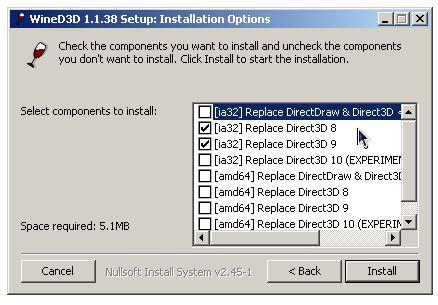
WineD3D For Windows est un wrapper DirectX 1-11 vers OpenGL basé sur WineD3D, qui est une implémentation presque complète de DirectX utilisée dans Wine.


Même si Windows prend en charge DirectX de manière native, l’utilisation de WineD3D peut améliorer la compatibilité avec les jeux plus anciens, en particulier sur Windows 8 et supérieurs qui ne prennent pas en charge les modes d’écran 16 bits. Une autre utilisation possible est d’imiter les versions non prises en charge de DirectX ou de transférer des applications DirectX vers OpenGL sans avoir à réécrire le code de rendu.
Notez que WineD3D est loin d’être parfait, et de nombreux jeux ne fonctionneront pas.
 
Des instructions sur l’utilisation des DLL sont également incluses.
 
Version 1.7.x fonctionne à partir de Windows 2000.
Version 6.x fonctionne à partir de Windows Vista.


Télécharger Wine D3D For Windows (Win 2K et +) v1.7.52 (1.7 Mo)

Télécharger Wine D3D For Windows (32 Bits | Win8 et +) v11.20 (1.9 Mo)

Télécharger Wine D3D For Windows (64 Bits | Win8 et +) v11.20 (1.9 Mo)

Site Officiel

En savoir plus…


https://getourbonus.com/fr/accueil

https://www.romspedia.com/