Il s’agit d’un émulateur de Sega 8 bits écrit en C++ par Ignacio Sanchez.
 
Il émule les machines suivantes:
– Sega Mark III
– Sega Master System
– Sega Game Gear
– Sega Game 1000 (SG-1000)
– Othello Multivision


Voici donc les changements:
 

🎵 VGM Recorder
⚙️ Add support for Game Gear 93C46 Mapper
⌨️ Custom shortcuts. Add shortcuts to gamepad buttons
🌎 Support for UTF-8 characters in paths
🎮 Updated game controller database
🐛 Bug fixes

 
Le binaire 32 bits est compilé par Lo v2.


Télécharger GearSystem (32 bits) v3.1.0 (13.5 Mo)

Télécharger GearSystem (64 bits) v3.8.6 (1.7 Mo)

Site Officiel

En savoir plus…

GearLynx est un émulateur d’Atari Lynx pour Windows.


Les changements sont:
There may be bugs and unfinished features.
 

Télécharger GearLynx v0.0.11 (1.8 Mo)

Site Officiel

En savoir plus…

Gearboy est un émulateur de Nintendo GameBoy / Gameboy Color écrit en C++ qui fonctionne sur iOS, Raspberry Pi, Mac, Windows & Linux.
 
L’accent a été mis sur la lisibilité du code source avec un haut degré de compatibilité.


🎵 VGM Recorder
⌨️ Custom shortcuts. Add shortcuts to gamepad buttons
🎨 Improve GBC color correction
🌎 Support for UTF-8 characters in paths
🎮 Updated game controller database
🐛 Bug fixes

 
Le builds 32 bits est compilé par Lo v2.
 

Télécharger GearBoy (32 bits) v3.1.1 (13.5 Mo)

Télécharger GearBoy (64 bits) v3.7.5 (1.8 Mo)

Site Officiel

En savoir plus…

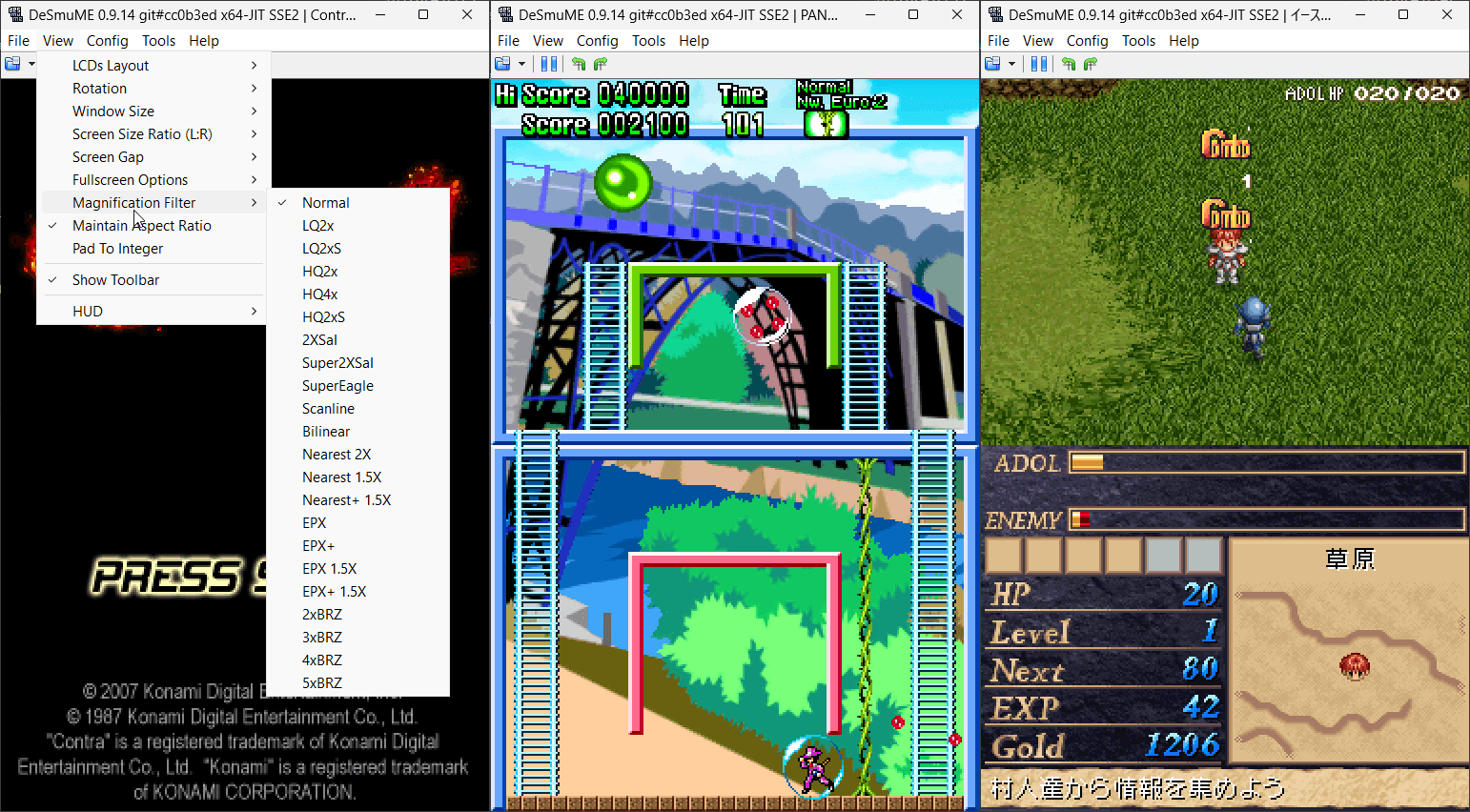
Il s’agit de l’émulateur de Nintendo DS mais dans une version en cours de développement.


(Builds automatiques ou )
 
Les principaux changements depuis ma news précédente sont:
– NDSSystem.cpp: In GameHacks::reset(), have the loop for deleting cheats objects match the loop in GameHacks::execute() for better code consistency.
– Windows Port/Interface: Make build files more robust and less prone to breakage for future Visual Studio versions. (Related to commit 39f27d3, 5e006a0, and PR #936.)
– Windows Interface: Make builds compatible with VS2012, VS2013, and VS2026. (Related to commit 39f27d3 and PR #936.)
– Windows Port: Make builds compatible with VS2012, VS2013, and VS2026. (Based on PR#936.)

 
Notez que les fichiers sont mis à jour régulièrement sur notre site mais ne sont newsés que de temps en temps.


Télécharger DeSmuME (Dev) v0.9.14.1663 (2.6 Mo)

Télécharger DeSmuME (Français) v0.9.14 (14/02/2024) (2.1 Mo)

Site Officiel

En savoir plus…

Il s’agit d’un émulateur d’ordinateurs de la série Fujitsu FM-7 (FM-7/FM77AV/FM77AV40). Le but est principalement d’émuler le FM77AV40 et de prendre en charge au minimum le FM77AV.
 
À l’heure actuelle, il ne peut exécuter que quelques jeux sans son. Par la suite de nouvelles fonctionnalités arriveront bientôt.


Mutsu_CUI ROM-PATH 

Options:

-PAUSE
  Pause on start.

-IMGPATH dir
  Image search path.

-T77|-TAPE t77file.t77
  Set T77 cassette data recorder dump.

-AUTOSTARTTAPE
  Auto start the first tape program.

-T77AUTOSAVE|-AUTOSAVETAPE t77file.t77
  In old days, we were saving programs/data in audio cassette tapes.  I had to press REC
  button before writing, and must release REC button before reading.  If I forgot pressing
  REC and thought I was saving data, it was not saved, and gone as soon as I turned off
  the PC.  If I forgot releasing the REC button before reading, I accidentally erased
  the tape instead of reading from it.  Not to repeat such tragedy, you can specify
  auto-save tape image.  The file does not have to exist.  The program will create it.
  If you don't virtually press REC button in the emulator, or if you write-protect the
  primary tape image, data will be saved to this auto-save image.  You can later mount it
  for reading.

-FD0 filename
  Floppy disk image file name for Drive A.

-FD1 filename
  Floppy disk image file name for Drive B.

-FD0WP,-FD1WP
  Write protect floppy disk.

-FD0UP,-FD1UP
  Write un-protect floppy disk.

-GENFD filename.d77 320|640
  Generate an empty disk. Need to specify 320KB disk (2D) or 640KB disk (2DD)
  Specify 400 as size to make 2D disk with 1024-byte per sector, 5 sectors per track.

-DIVD77 filename.d77
  Divides multi-disk D77 file into single-disk D77 files.
  Suffix  _1, _2, _3, ... will be added after each file name.
  Does nothing if the file is already a single-disk image.

-NOWAIT
  Run VM without adjusting time for the wall-clock time.

-ALIAS aliasLabel filename
  Define file-name alias.  Alias can later be used as a parameter to FDxLOAD, TAPELOAD commands.
  eg. You can use -ALIAS DISKA "full-path-to-game-diskA" to ease disk swap from command.

-KEYBOARD DIRECT/TRANS/TRANS2/TRANS3
  Keyboard mode.  DIRECT is good for gaming.  TRANS/TRANS2/TRANS3 is good for typing.

-AUTOSTOP autoStopType
  FM-7 seriew before FM77AV could not detect key-release.  Therefore, game programs
  could start moving a character by a key stroke, but did not know when the key was
  released and should stop.  Therefore, we had to press typically Num-5 top stop a
  character.  In the emulator, this problem can be solved by virtually typing a
  different key when num keys or arrow keys are released.  You can choose from
  AFTER_NUM_RELEASE, AFTER_ARROW_RELEASE, AFTER_NUM_RELEASE_AND_RETYPE,
  AFTER_ARROW_RELEASE_AND_RETYPE, and AFTER_ANY_KEY_RELEASE.

-AUTOSTOPKEY keyCode
  Specify which key should virtually be pressed after num keys or arrow keys are
  released.

-GAMEPORT0 KEY|PHYSx|ANAx|NONE
-GAMEPORT1 KEY|PHYSx|ANAx|NONE
  Specify game-port emulation.  By keyboard (Arrow,Z,X,A,S), or physical gamepad.
  PHYS0,PHYS1,PHYS2,PHYS3 use physical game pad direction button (or hat switch) as up/down/left/right.
  ANA0,ANA1,ANA2,ANA3 use physical game pad analog stick as up/down/left/right.
  KEYMOUSE use arrow keys and ZX keys for mouse cursor and buttons.
  NUMPADMOUSE use NUMPAD number keys and /* keys for mouse cursor and buttons.
  PHYS0MOUSE,PHYS1MOUSE,PHYS2MOUSE,PHYS3MOUSE use physical game pad digital axis for mouse.
  ANA0MOUSE,ANA1MOUSE,ANA2MOUSE,ANA3MOUSE use physical game pad analog axis for mouse.

-BUTTONHOLDTIME0 0|1 time_in_millisec
-BUTTONHOLDTIME1 0|1 time_in_millisec
  In some games, when you click on a menu or a button, you end up selecting the next menu
  or the button that happens to appear in the next options.  Daikoukai Jidai (KOEI)
  is virtually unplayable.  Super Daisenryaku keeps scrolling to the end when you want
  to scroll only by one screen width.  You really had to press the button and release
  immediately.  How patient we were!
  It is due to the bad programming.  When the program reads button state as DOWN, it must
  wait until the state changes to UP before making a next selection.  But, we cannot go
  in to all of the programs and write patches.  Instead, this option let you limit
  maximum time that the button is sent as DOWN to the virtual machine even when
  you keep it down for 100 seconds.

-VIRTKEY townsKey gamePadPhysicalId button
  Assign a virtual key to a gamepad button.

-COM0, -COM1, -COM2, -COM3
  Enable COM port.

-QUICKSSDIR dir
  Specify quick screen shot directory.

-HOSTSHORTCUT hostKey ctrl shift "command"
  Assign host short cut key (hot key).

-INITCMD cmd
  Specify initial command.

-EVTLOG filename.evt
  Specify event-log file to play back.

-SCALE X
  Screen scaling X percent.

-AUTOSCALE
  Auto scaleing screen to match the window size.

-MAXIMIZE
  Maximize the window on start up

-FULLSCREEN
  Fullscreen on start up


Télécharger Mutsu Build 20251206 (1.0 Mo)

Site Officiel

En savoir plus…

Il s’agit d’un émulateur de PC Engine / TurboGrafx-16 / CD-ROM² / Super CD-ROM² et Arcade CD-ROM² / SuperGrafx multi plateformes.


🎵 VGM Recorder
💿 Memory Base 128 support
⌨️ Custom shortcuts. Add shortcuts to gamepad buttons
💾 Save/Load BRAM to file. It can import save files from other emus
🎮 Updated game controller database
🌎 Support for UTF-8 characters in paths
🐛 Bug fixes and GUI improvements


Télécharger GearGRAFX v1.6.5 (2.1 Mo)

Site Officiel

En savoir plus…

Gearcoleco est un émulateur ColecoVision multiplateforme très précis écrit en C++ qui fonctionne sous Windows, macOS, Linux, BSD, Raspberry Pi et RetroArch.


Les changements:
🎵 VGM Recorder
💾 Add support for OCM Mapper
⌨️ Custom shortcuts. Add shortcuts to gamepad buttons
⏯️ Add option to enable/disable pause on focus lost
🖼️ New icon for macos
🌎 Support for UTF-8 characters in paths
🎮 Updated game controller database
⚙️ Debugger improvements
🐛 Bug fixes


Télécharger GearColeco v1.5.5 (1.6 Mo)

Site Officiel

En savoir plus…

Créé par CaptainYS, il s’agit d’un émulateur pour Windows, MacOs et Linux de Fujitsu FM-Towns et sa déclinaison console Marty. C’est un émulateur du légendaire ordinateur Fujitsu FM TOWNS. Le but est d’imiter le modèle II MX qui était le dernier ordinateur sur lequel l’auteur a (dixit) « prêté allégeance ». L’auteur essaie également de trouver et de documenter autant que possible les fonctionnalités non documentées du système FM TOWNS pendant l’écriture de l’émulateur.


Les changements:
 

– YM2612 improvement.
– High-fidelity mode a few percent speed up.
– Improved fidelity of FDC Seek command.
– Fix for undefined behavior of GetKeyState(0).
– Support VGM recording of the second YM2203 for WHGPlay on Mutsu.
– Fixed: CMOS File button was not working.
– Updated TGDRV.COM. It does nothing if executed on real TOWNS.
– Internal opCode 0xF?? -> 0x1??.
– Adding Disc Image TOC tester.
– Updated event-log file for test.
– Added disassembly tests.
– cdopen.c (testc).
– Fixed: FDC Seek command timing.
– Added support for 2nd YM2203 for WHGPlay on Mutsu.
– Fixed: Undefined behavior of GetKeyState(0).
– Improved fidelity of FDC Seek command.
– Fixed: CMOS File button was not working.
– Updated TGDRV.COM. It does nothing if executed on real TOWNS.
– Internal opCode 0xF?? -> 0x1??.
– Adding Disc Image TOC tester.
– Updated event-log file for test.
– Added disassembly tests.
– cdopen.c (testc).
– …
– Cumulative updates.


Un pack de bios est disponible ici et un guide complet (Tuto en pdf ici: anglais / français).
 

Télécharger Tsugaru (2025/12/06) (1.9 Mo)

Site Officiel

En savoir plus…

dgVoodoo est un glide wrapper mais aussi un wrapper DirectDraw/Direct3D (v1 à 7, 8.1 et 9) vers Direct3D11/12. Pour simplifier grandement, ça émule une carte 3DFX qui va pouvoir gérer la bibliothèque propriétaire Glide (Glide 2.11, Glide 2.45, Glide 3.1 et Napalm) mais également les vieilles cartes graphiques compatibles DD/D3D v1 à v9. Quel est l’intérêt ? Jouer aux anciens jeux qui fonctionnent mal sur les nouvelles cartes graphiques (parce qu’ils ont été optimisés pour le Glide ou de vieilles versions de DirectX et non pour d’autres API telles que OpenGL ou DirectX v11 ou v12) ou tout simplement utiliser un émulateur qui lui aussi utilise le Glide. Cette version est destiné à Windows Vista/7/8/10/11 avec DirectX 11 (ou supérieur) d’installé et vous devez posséder une carte graphique (compatible DirectX Level 10.1) supportant les Shaders Model v4 ou v5.
 
glquake
 
Vous aurez besoin de ces bibliothèques pour activer certaines fonctions graphiques.
A noter que des patchs pour certains jeux sont disponibles ici.
 
Les changements:
 
– Fixing the ‘failed dynamic index buffer Lock’ bug in D3D8/9 coming with modern D3D12 drivers on Win11
– Fixing a bug for the sake of the Win11 SDK D3D12 Debug layer (it is not a bug actually but the debug layer undervalidates the thing in question)
– Fixing a D3D12 interface leak
– Determining the refresh rate of the current desktop display mode always failed, fixed (D3D11/12)
– Removing YUV texture support from D3D8/9 in general (Wallace & Gromit in Zoo Project)
– Fixing a silent error in the D3D8/9 frontend (BC Kings)
– Fixing a frontend D3D8 bug (Roland Garros French Open/Next Generation Tennis 2002)


Télécharger dgVoodoo v2.86.4 (17.7 Mo)

Télécharger 3Dfx splash / D3D Compiler for DgVoodoo2 v4.x (3.2 Mo)

Site Officiel

En savoir plus…

Hades est un émulateur de Nintendo GameBoy Advance en cours de développement, il vise à atteindre un équilibre satisfaisant entre convivialité, vitesse et précision.


Actuellement, Hades présente les caractéristiques suivantes:
 

– Une précision décente
– Correction des couleurs
– Sauvegarde rapide (également connue sous le nom de Save State)
– Support de l’horloge en temps réel (RTC)
– Support des contrôleurs de jeu
 

C’est le troisième émulateur à passer les benchs de la cartouche AGS Aging Cartridge utilisée pour tester les systèmes Game Boy Advance.
 

Les nouveautés:
 
– Resize screenshots to the chosen display size.
– Misc fixes


Télécharger Hades v1.0 Build 251208 (6.5 Mo)

Site Officiel

En savoir plus…

PlayNite est un gestionnaire open source de bibliothèque de jeux vidéo et un launcher avec prise en charge des bibliothèques tierces telles que Steam, GOG, Origin, Battle.net et Uplay. Incluant le support d’émulation de jeu et fournissant une interface unifiée pour vos jeux.
 
Les changements sont visibles ici (non compatible windows 8 et inférieur).


Télécharger PlayNite v10.46 (134 Mo)

Site Officiel

En savoir plus…

Un service centralisé de gestion de bibliothèque/collection de jeux, axé sur l’émulation. Configurez une fois, jouez n’importe où.


Télécharger Retrom v0.7.46 (16.4 Mo)

Site Officiel

En savoir plus…


Casino-en-ligne-fiable.com

https://getourbonus.com/fr/accueil

https://www.romspedia.com/

https://www.casinoonlinefrancais.fr

Lucky 7 bonus

https://www.casinogratuitsansdepot.com

pablocasino.org

critiquejeu.info

playbonus

casinodoc.org

laplanquedujoueur.com

casinoonlinefrancais