Il s’agit d’un très bon émulateur Apple I, II et d’Agat 7/9 (un clone russe de l’apple II).

 
This version contains an experimental rendering engine. New features include:

– Proper 7×8 pixel characters in text modes
– Fonts are used exactly as taken from system ROMs
– Real-time NTSC TV simulation in native Apple modes


Télécharger Agat Emulator v1.30.2 (6.1 Mo)

Site Officiel

En savoir plus…

Ce fichier permet de sauvegarder vos meilleurs scores sous MAME(Arcade), ils apparaissent ensuite dans les crédits de chaque jeux, comme dans la réalité. Cette version non officielle est souvent mise a jour, elle supporte les tout derniers jeux ajoutés dans MAME(Arcade).


Ce fichier était devenu inutile depuis Mame v0.107u2, il fallait donc l’utiliser qu’avec des builds non officiels. Mais depuis MAME v0.172, ce fichier a été intégré officiellement avec l’émulateur dans un répertoire plugins/hiscore (c’est dans ce répertoire qu’il faudra placer le fichier).


Ce fichier sert à être téléchargé que si sa version est plus récente que celui que propose MAME en interne, mais dans le cas contraire c’est que MAME propose déjà la dernière version (qui sera donc la même). A noter qu’il ne fonctionne qu’avec MAME v0.174 ou supérieur.


Télécharger Hiscore.dat (Non Officiel) (2023/12/05) (87 Ko)

Site Officiel

En savoir plus…

A l’instar de MAMEinfo pour MAME(Arcade), le fichier MESSinfo vous permet de suivre les changements entre les versions concernant les différents systèmes émulés par MAME (partie consoles et ordinateurs).


Télécharger MESSinfo.dat v0.289 (7.1 Mo)

Site Officiel

En savoir plus…

Anciennement connu sous le nom de Super Sleuth, il s’agit d’un bon émulateur de Sega Master System, GameBoy, NES, SuperNES et IBM PC AT/XT émulant plusieurs types de composants.


yoshi

Les changements sont:

 
– [SFC] Fixed another WRAM bug introduced in the last release
– [ALL] Rewrote the audio streaming code


Télécharger Kindred v1.12 PB 3 (2.1 Mo)

Site Officiel

En savoir plus…

Un excellent frontend multi-systèmes axé sur la simplicité d’utilisation.


Les nouveautés sont les suivantes:
 
[New] ‘Group’ feature (group several systems into one group)
[New] ‘Presenter II’ theme.
[New] ‘MyGameBoyAdvance’ theme.
[New] Screensaver feature.
[New] Ambient sounds play (background music option).
[Improved] ‘Go to top of the list’/’Go to end of the list’ commands can now be used in the ‘Systems’ and ‘Top 10’ windows to navigate to the start/end of the lists.
[Improved] PC keyboard can be used to type in the ‘Search’ window.


Télécharger mGalaxy v10.1 (172 Mo)

Site Officiel

En savoir plus…

Il s’agit d’un émulateur de GameBoy N&B/Color écrit en Lua.


– Now targets Love 11.2
– LuaJIT settings optimized for a rather hefty performance boost. Credit to @nico-abram, @TannerRogalsky and @meepen for the suggestions.
– Less unpack, more FFI. Several small speed improvements from light code reorganization
– Audio now routes through QueueableSource, greatly reducing skips, pops, and latency when running fullspeed
– Proper support for General Purpose and HBlank DMA, needed by a few popular CGB games
 
A word of warning: I no longer have access to a Macintosh, so I can’t test the OSX build. I’m providing it anyway in the hopes that it continues to be useful, but I can’t give it any sort of seal of approval. Pull requests welcome if I’ve buggered it up in some way.


Télécharger LuaGB v0.1.1 Alpha (3.3 Mo)

Site Officiel

En savoir plus…

Binjgb est un émulateur de GameBoy N&B/Color proposant également un débogueur.


Télécharger Binjgb (32 bits) v0.1.10 (719 Ko)

Télécharger Binjgb (64 bits) v0.1.11 (963 Ko)

Site Officiel

En savoir plus…

Un émulateur GameBoy N&B/Color dont le but est d’obtenir une émulation la plus précise possible. Cette version propose des changements liés à la vitesse de Pokemon. Site proposant les sources.


– Improved RNG accuracy for gen2 games to where all known gen2 manips sync with console.
– Improved accuracy of fadeout timing.
– Add rudimentary support for HuC3 mapper used by Robopon. Allows for saving, using the real-time clock and using the remote-activated functionality (P2P IR is not supported)
– Add « open save folder » option to have Windows Explorer (or equivalent) show you the folder where your saves are. Has no effect if you change the save folder to the option to use the same folder as the ROM, for now. This may be adjusted next release.
– (Non-PSR only) Added more platforms that you can emulate games on. DMG, GBC, GBA (same as GBP without the fadeout) and SGB2 (partial support, only really the things that are necessary to sync with console RNG-wise and colors on the main screen) are supported.
 
Note: If you download the Non-PSR version of Gambatte-Speedrun, select a platform other than Game Boy Player, and do a Pokémon speedrun on it, your run will be REJECTED from the leaderboards. PSR runners should use the attachment with PSR in its name, or be careful to have GBP selected for all attempts.


Télécharger Gambatte SpeedRun R7 Build 723 (10.0 Mo)

Site Officiel

En savoir plus…

Il s’agit d’une version béta de bsnes ajoutant un mode haute résolution au mode 7 et qui gère à présent l’affichage en mode écrans larges, le résultat est absolument magnifique !! Espérons que byuu pourra l’intégrer dans le projet officiel prochainement !
 

Avant


Après!


WideScreen en action !

 
New in this version:
 
– Widescreen: Setting to expand Mode 7 backgrounds to the left and right for a 16:9 aspect ratio.
– Tweaked the behavior of Output/Center to drop the top and bottom 4 scanlines in 1080p fullscreen. This bumps the scaling form 4x to 5x and with widescreen allows native 1080p fullscreen Mode 7 with uniformly scaled sprites.
– Replaced magic numbers with preliminary detection for values at the edges that break perspective correction. Fixes Tales of Phantasia (and should not break Super Mario Kart).
– Disabled the automatic switching to non-scaled when there is no Mode 7 background, as it breaks with widescreen. [may also help with some shaders, IIRC someone asked for this]


A télécharger ici: beta 1, beta 2, beta 3, beta 4.

Site Officiel

La dernière version béta publique de l’excellent WinUAE, l’émulateur Commodore Amiga. La traduction est signée Tradu-France.


Les changements sont visibles ici


Télécharger WinUAE (Public Beta) [32 bits] v6.1.0 Beta 21 (5.3 Mo)

Télécharger WinUAE (Public Beta) [64 bits] v6.1.0 Beta 21 (8.5 Mo)

Télécharger WinUAE (Public Beta) [32 bits] v6.1.0 Beta 21 FR (5.4 Mo)

Télécharger WinUAE (Public Beta) [64 bits] v6.1.0 Beta 21 FR (8.5 Mo)

Site Officiel

En savoir plus…

Hoxs64 est un émulateur Commodore 64 tournant sous Windows avec DirectX 9 au minimum. Il est encore en développement, si bien que s’il manque quelques choses maintenant, elle sera là plus tard (dixit l’auteur) 😉
 
hoxs1

hoxs2
 

– Fix ANE opcode for Turrican 3
– Added debugger step over JSR and step out with stack instructions functionality.
– Fixed incorrect memory map while using the debugger that allowed the VIC to read from IO space.
This caused Emufuxx0r to fail while using the debugger.


Télécharger Hoxs64 (x86) v1.1.2.9 (4.4 Mo)

Télécharger Hoxs64 (x64) v1.1.2.9 (5.1 Mo)

Télécharger Hoxs64 (9X/2K) v1.0.23 (503 Ko)

Télécharger Hoxs64 Français (9X/2K) v1.0.23 (542 Ko)

Télécharger Hoxs64 Français (x86) v1.1.2.9 (3.7 Mo)

Télécharger Hoxs64 Français (x64) v1.1.2.9 (3.7 Mo)

Site Officiel

En savoir plus…

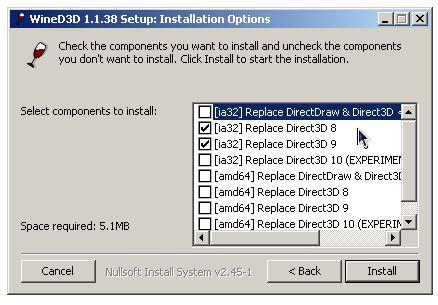
WineD3D For Windows est un wrapper DirectX 1-11 vers OpenGL basé sur WineD3D, qui est une implémentation presque complète de DirectX utilisée dans Wine.


Même si Windows prend en charge DirectX de manière native, l’utilisation de WineD3D peut améliorer la compatibilité avec les jeux plus anciens, en particulier sur Windows 8 et supérieurs qui ne prennent pas en charge les modes d’écran 16 bits. Une autre utilisation possible est d’imiter les versions non prises en charge de DirectX ou de transférer des applications DirectX vers OpenGL sans avoir à réécrire le code de rendu.
Notez que WineD3D est loin d’être parfait, et de nombreux jeux ne fonctionneront pas.
 
Des instructions sur l’utilisation des DLL sont également incluses.
 
Version 1.7.x fonctionne à partir de Windows 2000.
Version 4.x fonctionne à partir de Windows Vista.


Télécharger Wine D3D For Windows (Win 2K et +) v1.7.52 (1.7 Mo)

Télécharger Wine D3D For Windows (32 Bits | Win8 et +) v11.20 (1.9 Mo)

Télécharger Wine D3D For Windows (64 Bits | Win8 et +) v11.20 (1.9 Mo)

Site Officiel

En savoir plus…


https://getourbonus.com/fr/accueil

https://www.romspedia.com/