Play! est une tentative de créer un émulateur PlayStation 2 sous Windows / MacOS / iOS / Android. Il est actuellement écrit en C / C + + et utilise un système de mise en cache / de recompilation d’instruction pour obtenir de meilleures performances tout en émulant le CPU.
 
L’émulateur peut faire fonctionner quelques jeux, mais très moyennement dans la plupart des cas. L’objectif de l’auteur est d’atteindre un niveau de qualité qui permettra à quiconque de jouer son jeu favori PlayStation 2 sur son PC.
 
play

 
– Code style fixes.
– Add Exit button on iOS.
– Add ptrace call on iOS to simulate debugger.


Télécharger Play! (x86) GIT v0.77 (2026/10/25) (8.9 Mo)

Télécharger Play! (x64) GIT v0.77 (2026/10/25) (10.3 Mo)

Site Officiel

En savoir plus…

Ecrit par StapleButter (auteur des émulateurs de SuperNES lolSNES/blargSNES pour DS et 3DS et ayant contribué pour DeSmuME), il s’agit d’un émulateur de Nintendo DS pour Windows et Linux dont l’objectif est de faire les choses bien et rapidement, semblable à blargSNES mais en mieux (dixit l’auteur).
 
Les changements:
 
– fix possible crashes when exiting
– wifi: add basic access point melonAP (very beta)
– fix SMULWx/SMLAWx opcodes, fixes Sims 2 music
– add support for loading BIOS/firmware files and config file from AppData or ~/.config/melonds or from the executable directory (hcorion)
– add 32-bit IPCSYNC reads/writes (Dirbaio)
– add savestates
– 3D: (hopefully) fix bug in shadow/AA interaction (visible in the MKDS character select preview, bottom border of the platform thing)


Site officiel proposant les sources.

Télécharger melonDS v1.1 (18.5 Mo)

Site Officiel

En savoir plus…

Très performant, PPSSPP est un émulateur de Sony PSP (pour Windows, Android et autres via SDL) gratuit et libre écrit en C + + par Henrik Rydgard (très connu sous le pseudo de Ector, déjà auteur de l’émulateur de PSP Potemkin et surtout connu pour Dolphin, ayant également exercé sur nombre d’émulateurs Dreamcast).
 
ppsspp
 
Les changements sont les suivants:
 
– Fix for insta-crash on Galaxy Note 9, some Xiaomi devices, and the new nVidia Shield (#11441)
– Vertex range culling on most platforms, fixes DTM: Race Driver and similar (#11393)
– Major speed boost in some Gundam and Earth Defense Force games (#10973)
– Fix for issues with post processing shaders in GL 3+ (#11182)
– Fixes to sound output switching on Windows (WASAPI) (#11438)
– Detects DirectInput devices when running (#11461)
– Simple Discord integration (#11307)
– New debugging APIs (#10909)
– Task switching made a lot more robust (fixes GPD XD problems) (#11447)
– Texture decoding optimizations (#11350)
– Tons and tons of miscellaneous bugfixes and compatibility fixes


Télécharger PPSSPP v1.20.4 (19.4 Mo)

Site Officiel

En savoir plus…

Il s’agit d’une version de Caprice modifiée par Frédéric Coste.


– Fix disk drive motor command (CPC’Crack 3 disk detection)
– Fix Z80 bad instructions disassembly
– Add Code explorer using Pasmo assembler
– Fix FDC problem with Read Track command
– Fix problem with tape motor stop
– Add support for Multiface 2
– Save screenshots in PNG format
– Save/Restore device settings
– Fix CRTC regression with Pinball Dreams
– Fix minor bugs


Télécharger Caprice Forever (32 bits) v26.10 (4.7 Mo)

Site Officiel

En savoir plus…

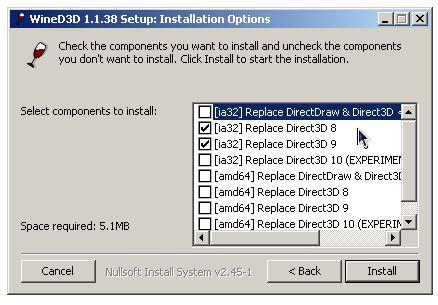
WineD3D For Windows est un wrapper DirectX 1-11 vers OpenGL basé sur WineD3D, qui est une implémentation presque complète de DirectX utilisée dans Wine.


Même si Windows prend en charge DirectX de manière native, l’utilisation de WineD3D peut améliorer la compatibilité avec les jeux plus anciens, en particulier sur Windows 8 et supérieurs qui ne prennent pas en charge les modes d’écran 16 bits. Une autre utilisation possible est d’imiter les versions non prises en charge de DirectX ou de transférer des applications DirectX vers OpenGL sans avoir à réécrire le code de rendu.
Notez que WineD3D est loin d’être parfait, et de nombreux jeux ne fonctionneront pas.
 
Des instructions sur l’utilisation des DLL sont également incluses.
 
Version 1.7.x fonctionne à partir de Windows 2000.
Version 2.x fonctionne à partir de Windows Vista.


Télécharger Wine D3D For Windows (Win 2K et +) v1.7.52 (1.7 Mo)

Télécharger Wine D3D For Windows (32 Bits | Win8 et +) v11.20 (1.9 Mo)

Télécharger Wine D3D For Windows (64 Bits | Win8 et +) v11.20 (1.9 Mo)

Site Officiel

En savoir plus…

Anciennement connu sous le nom de RCPEmu Spoon Edition et développé par Matthew Howkins et Peter Howkins, il s’agit d’un émulateur d’Acorn RiscPC et A7000 pour Windows, Linux et OSX basé sur le célèbre RCPemu de Tom Walker.


Les changements:
User Interface
– A screenshot can be saved of the current display, by choosing ‘Take Screenshot…’ from the File menu.
– Entering full-screen mode displays a reminder of how to leave this mode. The message can be hidden by ticking the checkbox.
– Choosing ‘Reset’ or ‘Exit’ from the File menu will request confirmation before taking the action.
– The CD-ROM sub-menu has moved to the Disc menu.
 
Networking
– The EtherRPCEm driver module now works with RISC OS Select 3 or later (4.39 – 6.20).
– Networking configuration now requires fewer steps to be performed in RISC OS as a result of the following changes. The documentation has been updated to reflect this.
– The driver module is now provided directly by the networking podule. This means there is no need to install the driver in the Boot sequence.
– The driver module is now 26/32-bit neutral. This means that there is no need to install an updated SharedCLibrary for the network driver. Note, you may well still need this update for application compatibility.
– The driver module now auto-installs AutoSense file in Boot sequence.
 
HostFS
– The Create-Dir, Rename and Save entry points now return an error if part of the path is invalid, instead of saving the file to a wrong location.
 
Keyboard
– Keys can no longer get ‘stuck’ if held down when interacting with GUI menus.
 
Other fixes
– Some potential crash scenarios when resetting/exiting have been fixed.
 
Windows
– Shift-F10 keypresses are now passed through to the emulated machine, instead of invoking the Windows context menu handler.
– If you are using a keyboard layout with ‘dead keys’ (e.g. US-International) these keypresses are now passed through. Dead keys are used to compose accented characters, and are not found on the UK keyboard layout.
– The Windows executable has Data Execution Prevention (DEP) enabled.
 
All the keyboard fixes and the enabling of DEP are based on contributions by J. Percival.


Télécharger RPCEmu v0.9.5 (10.3 Mo)

Site Officiel

En savoir plus…

Nplayers : Exclusivement pour les frontends comme EmuLoader, MaLa etc.. ce fichier vous servira à classer les jeux par nombre de joueurs possibles : 1p, 2p, 1p+2p, 1p+2p alt, etc…


Nplayers32 : Exclusivement pour MameUI ou clone de celui-ci… ce fichier vous servira à classer les jeux par nombre de joueurs possibles : 1p, 2p, 1p+2p, 1p+2p alt, etc…


Télécharger Nplayers v0.278 (303 Ko)

Site Officiel

En savoir plus…

MedGui Reborn est une interface (Frontend) pour Mednafen sur OS Windows. Cette archive inclut MetroMed.


– Fixed inverted xscalefs, yscalefs values on reading mednafen config file.
– Added autodownload for any missing dll
– First attemp for m3u autodetection
– Fixed Main form layout
– Fixed wrong icon assignment on Super Nintendo – Music Module file (.rsn) on prescan
– Fixed wrong cd detection in any Saturn games
– Changed main MedGuiR logo (thx to beatkitchen for joystick logo)
– Significantly reduced the size of the executable
– Added new Antarctica mirror on Modland Scraper
– Now Modland Scraper should be download module driver also when there is incongruence from file recognized on Modland mirror and the file specified on main music module
– Changed VuMeter colors on About Screen
– Added missing SIPS psx regional code into psx cd detection
– Added « Fix Video Pal » option, a internal way to fix PAL game reducing orizontal black border.(It will create a specific « Per Game Config »)
– Added tooltip on ModLand Scraper refresh button
– Changed TGDB platrform_field string
– Added custom font on About screen
– Prevent same module song random play from about screen


Télécharger MedGui Reborn v0.127 (24.5 Mo)

Site Officiel

En savoir plus…

No$NES est un émulateur et débugger de Nintendo NES/FDS/PC10/VS.


– web: created no$project patreon page, https://www.patreon.com/martin_korth
– mapper 218: updated magic floor (ntsc fix, bigger boulder, smaller floors)
– mapper 218: ported herve couppe’s starfight to nes
– apu: mutes all sound channels on apu reset
– a22i: refuses bytes >FFh (eg. important range check for ‘mov [nn+x],y’)
– xed editor: fixed scrolling upon backspace in first some lines (thanks yuki)
– apu: fixed PAL sound frequencies (nes_sound_factor) (thanks Dwedit)
– debug: vram viewer fixed missing invalidate’s on each 2nd obj in oam-screen
– gui: changed icon (higher contrast, inverse/white plug, 12/16/32/48-pix sizes)
– fixed intcount on F2/F4 breaks (showing correct scanline in debug status bar)
– emu/help: added mapper 28 emu/specs (action 53 homebrew X-in-1 multicart’s)
– emu/help: added some MMC5 details (irq,chr_bank_msbs + info on sound/multiply)
– help: added note on Orb-3D glasses (pulfrich effect with dark/clear glasses)
– added aspect ratio option (square pixels, or real PAL/NTSC ratios)
– gui: setup uses asia-compatible TabControl instead of unreliable PropertySheet
– gui: created own help engine (instead of microcrap’s suicidal windows .hlp)
– added donate button in help dropdown, added uforce in controller summary


Télécharger No$NES v1.2 (335 Ko)

Site Officiel

En savoir plus…

Le premier émulateur de Sega Model 3 créé par Bart Trzynadlowski, Ville Linde et Stefano Teso dans sa version de développement (voir ici) [source].


Les changements:
svn 755
???
svn 754
Fade out microtextures with higher textures LODs. Fixes incorrectly applied microtextures in LA machineguns.
svn 753
debug code should be disabled
svn 752
Smooth texture repeat makes no sense for alpha/contour textures with pixel dilate. HW seems to treat them as non smooth anyway. Also implement some line of sight stuff, used by Scud. Really need to check the threading/synchronisation of the register reads but it basically works.
svn 751
return correct PCI ID
svn 750
fix debugging code


Ajout:
– correction des musiques dans sega rally 2 (mix)
– correction musique 1er niveau 2joueurs (la cave rouge) dans vf3 (pas sûr de la modif, et donc cela peut éventuellement entrainer d’autre problèmes sonore sur d’autre jeux).(inclut officiellement)
 

Les fichiers sont compilés par spindizzi, merci à lui. IMC.


Télécharger SuperModel v0.4 Build 261114 (5.2 Mo)

Télécharger SuperModel WIP (XP) v0.3a r862 (6.3 Mo)

Site Officiel

En savoir plus…

m64p (ou Mupen64Plus-GUI) est une interface graphique écrite en Qt5. Elle supporte tout ce que vous attendez d’une interface mupen64plus (sélection de plugins, édition de la configuration, gestion des sauvegardes, capture d’écran, pause, etc.).
 

Cette archive inclut Mupen64Plus + GlideN64 + une interface utilisateur.


Code source.

Télécharger Simple64 (x86) (2020/06/02) (20.6 Mo)

Télécharger Simple64 (x64) v2024.12.1 (46.5 Mo)

Site Officiel

En savoir plus…

Les packs de screenshots pour MAME d’Antopisa sont disponibles.


Antopisa
 
1,592 snaps and 2,076, icons, pictures, ico, pdf and mp4, downloadable here:
 
• Cabinets: progetto-SNAPS Cabinet Pictures
• Control Panels: progetto-SNAPS Control Panel & Controller Pictures
• Covers (Software): progetto-SNAPS Software’s Box Cover Pictures
• Devices: progetto-SNAPS Device Pictures
• Icons: progetto-SNAPS Icons Extended
• Manuals (MAME): progetto-SNAPS Manuals – Packed
• Manuals (MAME): progetto-SNAPS Manuals – Single Files
• Manuals (Software): progetto-SNAPS Software’s Manuals
• Marquees: progetto-SNAPS Marquee, Logo & Backglass Pictures
• PCB: progetto-SNAPS PCB Pictures
• Snapshots (MAME): progetto-SNAPS Snapshots
• Snapshots (Software): progetto-SNAPS Software’s Snaps
• Soundtracks: progetto-SNAPS MP3 Soundtracks
• Videosnaps (MAME): progetto-SNAPS MP4 VideoSnaps – Packed
• Videosnaps (MAME): progetto-SNAPS MP4 VideoSnaps – Single Files
 
—————————————
Snapshots update:
—————————————
Artwork Preview: 5 new (tot. 2,930 png) UPDATE 1 pack, 385Kb
Bosses: 20 new & 155 upd (tot. 1,525 png) UPDATE 1 pack, 5.16mb
Ends: 25 new (tot. 950 png) UPDATE 1 pack, 850kb
GameOver: 1 del, 26 new (tot. 7,500 png) UPDATE 1 pack, 325Kb
HowTo: 5 new (tot. 1,730 png) UPDATE 1 pack, 78.5Kb
Logo: 25 new (tot. 2,450 UPDATE 1 pack, 209Kb
Scores: 20 new & 1 upd (tot. 7,135 png) UPDATE 1 pack, 515Kb
Select: 10 new (tot. 4,415 png) UPDATE 1 pack, 333Kb
Snap: 2 del, 91 new & 55 upd (tot. 39,503 png) UPDATE 1 pack, 4.09Mb
Titles: 2 del, 91 new & 32 upd (tot. 39,503 png) UPDATE 1 pack, 4.46Mb
Versus: 5 new & 1 upd (tot. 1,155 png) UPDATE 1 pack, 231Kb
Warning: 25 new (tot. 925 png) UPDATE 1 pack, 113Kb
 
—————————————
Other resources update:
—————————————
Cabinets [1]: 36 new & 42 upd (tot. 5,900 png) UPDATE 1 pack, 48.4Mb
Control Panels [1]: 50 new & 79 upd (tot. 3,000 png) UPDATE 1 pack, 76.2Mb
Devices: 3 del, 28 new (tot. 1,975 png) UPDATE 1 pack, 17.3Mb
Icons Extended: 8 del, 283 new & 26 upd (tot. 34,600 ico) UPDATE 1 pack, 7.12Mb
Manuals [7]: 1 del, 26 new & 23 upd (tot. 2,500 png) UPDATE 1 pack, 164Mb
Marquees [7]: 2 del, 27 new & 23 upd (tot. 4,225 png) UPDATE 1 pack, 56.4Mb
PCB: 1 del, 26 new (tot. 3,025 png) UPDATE 1 pack, 53.8Mb
Soundtrack[3]: 150 upd (tot. 150 zip) UPDATE 1 pack, 123Kb
Videosnaps: 1del, 1 new & 1 upd (tot. 6,000 png) UPDATE 1 pack, 8.87Mb
 
—————————————
Software’s resource update:
—————————————
– psx_covers [2] (850 new & 19 upd png) UPDATE!
– psx_manuals [2] (250 new & 4 upd pdf) UPDATE!
– psx_titles [2] (1,000 new & 5 upd png) UPDATE!
– sgx_covers (5 new png) NEW!
– snes_covers [2] (250 new png) NEW!
– snes_manuals [2] (47 new pdf) UPDATE!


Site Officiel

Miroir Officiel 1

Miroir Officiel 2

En savoir plus…



https://getourbonus.com/fr/accueil

https://www.romspedia.com/