La dernière version béta publique de l’excellent WinUAE, l’émulateur Commodore Amiga. La traduction est signée Tradu-France.


– Replaced b7 unmapped zero checkbox with a 3 option select menu. Different A2000/B2000 variants can have either pullup or pulldown resistors connected to CPU data lines.
– CD SCSI emulator READ CD-DA and READ CD-DA MSF emulated.
– Single console output max write size was limited to about 4000 characters. It truncated or corrupted for example 100+ line disassembly.
– D3D11 RTG mode supported, D3D9X dependency should be gone, screenshots/recording supported, filter scaling/position options enabled, shaders are built-in, scanlines and masks/overlays supported.
– D3D11 mode not yet supported: transparent OSD, low latency vsync (need totally different logic), custom shaders (won’t be implemented in next official version).
– D3D11 didn’t restore back to fullscreen (or to blank fullscreen) from minimized state in certain situations.
– D3D11 fullscreen mode + GUI can work strangely. (GUI may open on desktop with black background, exiting GUI may not restore fullscreen or cause mode to become minimized)
– Fall back to D3D9 if D3D11 fails to init, only fall back to DirectDraw if D3D9 also fails to init.
– GamePorts panel custom mapping incorrectly parsed joystick autofire state from config file.
– On the fly switching from KS 1.2 to KS 1.3+ properly undoes possible previously added KS 1.2 autoboot UAE rom patches.
– Added Reiter Software Wedge HD controller emulation.
– Added 3.07 GVP Series I ROM.
 
Reiter Software Wedge:
– Simple XT adapter hardware. Emulation only supports OMTI controller based harddrives.
– No autoconfig, no boot ROM, no interrupts.


Télécharger WinUAE (Public Beta) [32 bits] v6.1.0 Beta 23 (5.3 Mo)

Télécharger WinUAE (Public Beta) [64 bits] v6.1.0 Beta 23 (8.5 Mo)

Télécharger WinUAE (Public Beta) [32 bits] v6.1.0 Beta 23 FR (5.4 Mo)

Télécharger WinUAE (Public Beta) [64 bits] v6.1.0 Beta 23 FR (8.5 Mo)

Site Officiel

En savoir plus…

pfeMame (écrit par Gareth Finch) est un frontend pour MAME, écrit en Python. Il est multiplateforme (testé sur Linux – Ubuntu et Windows). Il comprend également une interface graphique destinée aux MameCab qui permet le contrôle à l’aide de joystick / manette.


pfemame_main

 
– Reinstated the pfeMAME.png file in the root pfeMAME folder. While it’s not used by any part of the code, in Linux it can be used to create a desktop icon and in some distributions they will automatically see that icon for the desktop.
– Updated the code that tries to open the pfeMAME manual. It needed to check first for the existence of the pfeMAME manual file itself before trying to open it.
– Fixed the problem with the manual not always opening under Linux builds – depended upon the folder name – if it included a space (like the Builds do) then it wouldn’t work. Contrary to what everyone says, I did have to encapsulate the path in quotes.
– Added a method to make a game a favorite by clicking in the favorite column for that game. Did the same with star rating. UPDATE – Have actually commented this out in the source code as it was causing an unwanted problem when you use the cursor keys to scroll and the mouse pointer was hovering over the rating or favorite column (every game was then selected as a favorite). Will come back to this later.
– Added a method to reset the game emulation engine back to the default MAME for any games that have been selected to use a different engine (e.g. sega model2/3)
– Adjusted the panel size for the MAME controls popup window so that it displays more detail and fits better on the screen
– Fixed a bug in the filepaths.py window sizing that was causing very different size issues across different platforms and even within different display managers under Linux.
– Suppressed the option to play games with different emulation engines under Linux as there is no support for the model2/3 engines that I am aware of.
– In tile view I have changed some of the textctrl objects to statictext as under newer versions of Linux I was having problems with borders being displayed
– Fixed a bug that was creating duplicate entries in the runs.dat file once the number of runs exceeded 9. The method I was using to locate an entry in the file was incorrect and didn’t allow for numbers above 9 (Due to 10 being 2 digits not 1).
– Added some highlighting of the messages and game information headings to make them a bit prettier
– Removed the unnecessary print() commands in the open manual code – what were they doing there I don’t know.
– Added gio open as a method to open the pfeMAME manual as under Ubuntu 17.10 the old gnome-open has been depreciated and should no longer be used
– Finally fixed the longstanding indexerror exception raised by the ultimatelistcontrol object in Linux only when trying to move or drag the pointer over the header. Never found out why so have just implemented an override for the GetItem function and added a capture for the exception so I no longer get an error.
– If systems support is not enabled, do not look for systems at all when building the database from scratch. This can speed things up on slower systems.
– If in preferences a setting has been changed that requires a restart of pfeMAME, you will now be notified by a pop-up-prompt when the preferences window is closed.
– Added a game video play function. A new folder ‘video’ is available in file paths. If a video is available for the currently selected game, a caption under the game image will say that a video is available. If in preferences you have selected to auto play game videos, then the message will say that the video is auto loading in 5 seconds, after which it will automatically play.
– Replaced the message window delimiter with a global one (also made it longer)
– Added date/time stamp to the messages window
– Removed the listverticalsize variable as it was static and not needed
– Removed the preference to scale game icons as if you dont select this and you have a very large icon library like me, the application will essentially stall on startup as it will take forever to read each icon to find its size in order to set the maximum row size.
– Implemented a preference for game icon scaling size as a fixed value of 16, 24, or 32 pixels. 16 is default but 24 kind of looks nice.


Télécharger pfeMame (32 bits) v3.9.2 (119 Mo)

Télécharger pfeMame (64 bits) v1.008 (12.5 Mo)

Site Officiel

En savoir plus…

Il s’agit d’un petit frontend pour Cemu.

 
– The launcher now supports WUD / WUX ROMS
– Added a nice support option (adfly link) 😀


Télécharger Zogolo’s Launcher v1.5 (2,9 Mo)

Site Officiel

En savoir plus…

Il s’agit d’une version de Caprice modifiée par Frédéric Coste.


– Fix FDC engine to pass most of Kevin Thacker’s New ‘acid’ tests:
– write sector with wrong cylinder;
– write sector with bad cylinder;
– Fix FDC engine to pass old Kevin Thacker’s ‘acid’ tests for Amstrad CPC 6128 only;
– Load disk and tape images inside ZIP from menu;
– Update fullscreen dialog windows;
– Add AMX Mouse simulation;
– Improve support of second joystick;
– Add display option to reduce text during pause;
– Add dialogs GUI skin customization;
– Fix minor bugs.


Télécharger Caprice Forever v17.11 (1.8 Mo)

Site Officiel

En savoir plus…

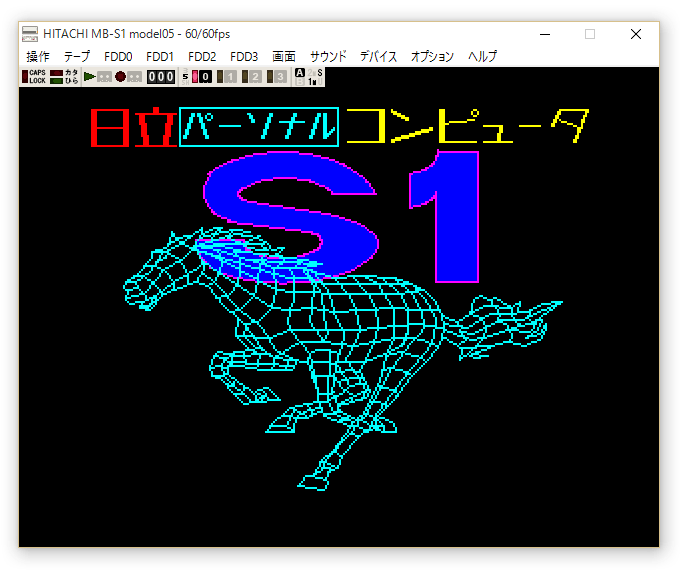
Un émulateur d’Hitachi MB-S1 Model05 créé par Sasaji.


Télécharger Hitachi MB-S1 Model05 (x86) v0.9.4 (602 Ko)

Télécharger Hitachi MB-S1 Model05 (x64) v0.9.4 (668 Ko)

Site Officiel

En savoir plus…

Il s’agit du seul émulateur Basic Master disponible (très bon, au demeurant !), connu également sous le nom de Bml3mk5. Cliquez sur « En savoir plus » pour la description résumée de ce système.
Des versions avec debuggeur sont disponibles sur le site officiel.
 

mark5


Télécharger Hitachi Basic Master Level3 MARK5 (x86) v2.1.4 (479 Ko)

Télécharger Hitachi Basic Master Level3 MARK5 (x64) v2.1.4 (520 Ko)

Télécharger Hitachi Basic Master Level3 MARK5 (SDL) v2.1.4 (2.3 Mo)

Site Officiel

En savoir plus…

Cemu SMMDB (aka Super Mario Maker Save File Editor et dont le nom SMMDB est en référence à ce projet du même auteur) est un éditeur de sauvegarde pour Super Mario Maker tournant évidemment sous l’émulateur de WiiU nommé Cemu.


enhancements:
– display maker and uploader separately
 
fixes:
– HTTPS support
– various styling fixes
– fixed a bug with courses that were not downloaded from SMMDB


Télécharger Cemu SMMDB v2.2.1 (32.8 Mo)

Site Officiel

En savoir plus…

Il s’agit d’une interface graphique pour l’émulateur OpenMSX (en 32 & 64 bits) proposant une multitude de fonctions.


openmsxl

 
Les changements sont visibles ici.
 

Télécharger OpenMSX Launcher v1.10 (4,9 Mo)

Site Officiel

En savoir plus…

PGXP (Parallel/Precision Geometry Transform Pipeline) apporte une haute précision dans les données 3D géométriques. Cette amélioration est uniquement disponible en émulation et non disponible sur la console d’origine.


Il est actuellement intégré à PCSX via le plugin OpenGL v1.78 de Pete avec l’extension de Tapeq’s Tweak basé sur Pete’s OpenGL v2.9. Il vous faudra donc Pete’s OpenGL2 Driver v2.9 placé dans le même répertoire pour que le tweak puisse s’appliquer.


Il permet:
– Une grande précision sur les Vertex data (Géométrie plus stable)
– Réduction de l’effet « Triangle Culling » (modèles plus détaillés)
– Perspective des « Texture Mapping » correcte (distorsion de texture réduite)

 
Source de PCSXR
Source de PCSXR (iCatButler)
Builds auto sur Appveyor
 

Télécharger PCSXR-PGXP Build 20171115 (1.57 Mo)

Site Officiel

En savoir plus…

Il s’agit d’une suite d’émulateurs modifiés pour fonctionner avec le site RetroAchievements et permettant d’ajouter des « succès » (achievements) à la Steam, la possibilité d’enregistrer ses records et de les comparer en direct avec les autres !


Télécharger RAGens v0.58 (1.1 Mo)

Télécharger RANes v1.1 (6.1 Mo)

Télécharger RASnes9x v1.63 (7.7 Mo)

Télécharger RAVisualboyAdvance v1.2.0 (13.7 Mo)

Télécharger RAPCEngine v0.002 (1.7 Mo)

Télécharger RAP64 v1.0 (4.9 Mo)

Télécharger RAMeka v1.0 (1.9 Mo)

Site Officiel

En savoir plus…

World Of Joysticks est un émulateur de clavier/souris pour les périphériques compatibles XInputs et DirectInput (joystick/manette/souris).
Une version Premium, pour XInput uniquement, est également disponible en version complète mais moyennant finance (5$). Elle propose d’autres possibilités et permet la gestion des manettes de Playstation 4 (DS4).


WoJ (XInput Emulator) est quant à lui un émulateur de manette Xbox 360 destiné uniquement aux périphériques compatibles DirectInput.


Différence entre les versions:


Télécharger WoJ Emulator (STD) [Keyboard and Mouse Emulator] v1.74 (3.8 Mo)

Télécharger WoJ Emulator (Premium) [Trial] v1.811 (2.7 Mo)

Télécharger WoJ Emulator (XInput Emulator) v2.73 (26.4 Mo)

Site Officiel

En savoir plus…

Il s’agit d’un émulateur de Nec PC9801/9821 basé sur Neko Project II/21.


Télécharger Np2x v0.84 (2017/11/15) (706,6 Ko)

Site Officiel

En savoir plus…


https://getourbonus.com/fr/accueil

https://www.romspedia.com/