Également disponible sous Linux, Xpeccy est un excellent et complet émulateur de:


– ZX Spectrum 48K
– Spectrum +2
– Spectrum +3
– Pentagon (128-512K)
– ZS Scorpion (256,1024) + ProfROM
– Pentagon 1024SL
– ATM Turbo 2
– ZXEvo BaseConf
– ZXEvo TSConf
– MSX1 (beta)
 
Forum alternatif
 
xpeccy


Télécharger Xpeccy v0.6 (2017/02/03) (4,8 Mo)

Site Officiel

En savoir plus…

Il s’agit d’un émulateur de Nec PC9821 pour Windows et créé par Satotomi.


sl9821_2
 
sl9821_1
 

Télécharger SL9821 v0.2.2.0 (404,2 Ko)

Site Officiel

En savoir plus…

Fuse (Free Unix Spectrum Emulator) est un émulateur tournant à l’origine sous Unix. Plusieurs portages ont été fait dont celui pour Windows. Les systèmes 16K, 48K, 128K, +2, +2A, +3, +3e, SE, TC2048, TC2068, TS2068, Pentagon 128 et Scorpion ZS 256 sont émulés.
 
– Fuse 1.3.3 released.
– Emulation core improvements:
– Add support for the hidden MEMPTR register (thanks, Boo-boo, Vladimir Kladov and the members of the « Z80 Assembly Programming On The ZX Spectrum » Facebook group) (Philip Kendall).
– Mark new disks as needing to be saved (Gergely Szasz).
– Show more information on disk modification status in menus (Gergely Szasz).
 
Miscellaneous improvements:
– Remove duplicated insert/eject code from DivIDE, Simple IDE and ZXATASP interfaces (Philip Kendall).
– Improve IDE interface master/slave initialisation code (Philip Kendall).
– Fix multiple save of disks (Gergely Szasz).
– Allow overwriting disk images (Gergely Szasz).
– Various minor bugfixes.


Télécharger Fuse v1.3.3 (2,2 Mo)

Site Officiel

En savoir plus…

Voici les derniers émulateurs (et aussi les plus fréquemment mis à jour) en cours de développements.


Citra: Emulateur de 3DS.

RPCS3: Emulateur de Playstation 3.

Redream: Emulateur de Sega Dreamcast.

Xenia: Emulateur de Microsoft X-Box 360.

Cen64: Emulateur de Nintendo 64 Préliminaire.


Télécharger Citra (Final build) (2024/03/07) (140 Mo)

Télécharger RPCS3 v0.0.43 Alpha (36.7 Mo)

Télécharger Redream v1.5.0.1239 (3.1 Mo)

Télécharger Xenia v1.0.2844 (2026/11/18) (3.9 Mo)

Télécharger Cen64 (WIP) (2022/10/02) (2.6 Mo)

Télécharger Cen64 (Debugger) r2015.01.18 + (DEV) r2017.04.23 (3.4 Mo)

Il s’agit d’un ficher DAT regroupant plusieurs informations retraçant l’historique des avancées de l’émulation des jeux ainsi que des informations sur eux au sein de MAME (arcade/consoles/ordinateurs), il comporte également une section « tips and tricks ». En anglais.


Télécharger History.dat v1.82a (4,3 Mo)

Site Officiel

En savoir plus…

MedAdvCFG (ou Mednafen Advanced Configuration) est un frontend créé par Nigel Todman destiné à l’émulateur Mednafen.

 
– Redump verification for PSX
– NetPlay controls are now functional*
– NetPlay control is now a ComboBox
– Several NetPlay servers predefined.
– Resolution now selectable from dropdown
– Ads, Because who doesn’t like ads.
– Added link to CoversDB.org
– PlayStats are planned for future
– Hosted by CoversDB.org
– Various Code Optimizations
 
* Notes on NetPlay Support
 
Not all SysCores support NetPlay.
Namely, SS does not.
SNES and PSX do 🙂
To NetPlay, Use Same BIOS and Same ROM
MD5 must match across board. Select same server. Play!

 
medadv
 

Télécharger MedAdvCFG v0.3.0 (133,8 Ko)

Site Officiel

En savoir plus…

Peter Söjstrand qui est vraiment un grand fifou (accompagné de 5 autres furieux) , nous offre sur un plateau d’argent un EXCELLENT remake 2.5D sous forme de best of de la franchise mettant en scène le BlueBot préféré des pitis nenfants, avec au menu :


  • Des passages de dessin animé en FMV (ouai du full motion vidéo, ça veux plus rien dire en  2017 mais du coup cela sonne bien old school et c’est beau^^).
  • un OST électro qui met la banane.
  • Des zooms, des changements de perspectives (oui autant se servir de la 3d !).
  • Un mode VERSUS
  • Un mode COOP steuplé!
  • Des achievements à débloquer, des bonus en veux tu en voila,  le tout totalement GRATOS mon jeune ami !!!


Alors fonces directement me télécharger cette déclaration d’amour à un des tout meilleurs jeux de plateforme de l’époque ou il faisait bon vivre et ou ton p’tit frère remplissait encore sa couche !!!


C’est ici pour télécharger le jeu ! (des versions sans installeurs sont disponibles sur le site officiel)


Site Officiel

Voici les dernières versions des émulateurs de Shigekazu Hirao.


j80: Ecrit en Java, j80 est un émulateur précis, axé sur la série d’ordinateurs japonais NEC PC-8000 (PC-8001+PCG8100). j80 dispose d’excellente fonctions de traçage et de débogage. Il gère aussi le PCG8100.
 
j68: Un émulateur de Hitachi Basic Master MB-6880 (Basic Master and Basic Master Level 2).
 
u80/u85: Ecrit en Java, u80 est un émulateur du premier ordinateur personnel Japonais : le TK-80, mais aussi son évolution le TK-85.
 
c80: Il s’agit d’un émulateur de COMKIT 8060, 8061 et 8062.
 
m80: Il s’agit d’un émulateur de MP-80 et MP-85.
 
PCM8001: Ecrit en Java, il s’agit d’un lecteur vidéo/image de cassettes que pouvait lire le Nec PC8001.
 
CMT8001
: Ecrit en Java, il s’agit d’un lecteur et convertisseur sonore des cassettes que pouvait lire le Nec PC8001.
 

Télécharger j80 Release 6.117 (v6.7.12) (1.0 Mo)

Télécharger j68 Release 1b9 (v1.b.13) (324 Ko)

Télécharger u80TK/u85TK Release 1b96 (v1.b.100) (580 Ko)

Télécharger c80 Release 1b6 (v1.b.10) (328 Ko)

Télécharger M80 Release 1b6 (v1.b.10) (381 Ko)

Télécharger PCM8001 Release 6.12 (v6.4.2) (74 Ko)

Télécharger CMT8001 Release 6.12 (v6.4.2) (79 Ko)

Site Officiel

En savoir plus…

CxBx Reloaded est un émulateur Microsoft Xbox basé sur la version 0.7.8C de Caustik. Il s’agit d’une branche de l’émulateur de Microsoft X-Box CXBX, apportant certains modifications et améliorations diverses. Il s’agit de la version en français réalisée par Tradu-France.


Télécharger CXBX Reloaded (Français) v0.0.1 (542,5 Ko)

Site Officiel

En savoir plus…

Nouvelle version de cet émulateur de Videoton TV Computer.
[Ordi.] WinTVC v1.2.0
 

wintvc_invaders

Changements :
– implemented most featured of the pixel based CRTC 6845 emulation engine
– FILE I/O MOPS ROM support to load CAS files from BASIC
– WaveMapper sound driver replaced with a DirectSound one
– save emulator window screenshot into 32-bit BMP
– saving to AVI és WAV improved
– line based emulation phased out
– removed statically linked DDRAW.DLL


Télécharger WinTVC (x86/x64) v1.4.1 (175 Ko)

Site Officiel

En savoir plus…

Créé par hex-usr (et basé sur Higan), il s’agit d’un émulateur de NES/VS.System/PlayChoice-10/SuperNES/GameBoy/GameBoy Color/GameBoy Advance/WonderSwan/WonderSwan Color/SwanCrystal/GameGear/SMS/Megadrive/PC-Engine mais aussi des sous systèmes Super GameBoy, BS-X Satellaview et Sufami Turbo, mais ajoute un lots de fonctionnalités en suppléments comme davantage de mappers NES, le NES Four Score, le Zapper, le Power Pad, l’adaptateur 4 joueurs, le VS. System (uniquement les jeux UniSystem n’utilisant pas le Zapper), le PlayChoice-10 mais aussi d’autres éléments à découvrir.


nside


Changements:

– SuperMikeMan pointed out that hiro’s GTK and Qt targets will not compile because I treated the settings object as a pointer type, when it really is a non-pointer type. This has been fixed.

– Re-implemented randomness for the LXA and XAA instructions. This time, by using nall::random(), which hopefully is not subject to compilation errors on Linux and BSD.

– Now, noise values are initialized each time the MOS 6502 is reset, so the same values will be used throughout the life of Famicom or Atari 2600 game session.

– Fixed a long-standing bug preventing Famicom ROMs from being imported.

– The reason this bug remained since the very beginning of nSide’s development (when bsnes v091 was released) is that I use a completely unrelated tool to do « in-place » purifications, where a ROM gets converted to a cartridge folder right where the ROM used to be rather than moved into the library. I deliberately avoided using cart-pal, my own fork of icarus, for the sole purpose of controlling where the purification moves my ROMs. Thus, I never found this bug until today (emu-france.com).

– The only reason I found it when I did is that I made an amazing discovery in GitHub for Windows: When typing the phrase « lxa #imm » in a previous commit, I discovered that GitHub for Windows will show a list of repository issues immediately after typing the number sign (#). This is the only way that GitHub for Windows will show a list of issues
without requiring the repository owner to go online.

– This bug is a result of overcompensating for the iNES header; cart-pal was repeating a certain operation to avoid including the iNES header in the SHA256 hash calculation. The repetition happened in 2 separate locations in the code, and the result was that the program ROM was assumed to start 32 bytes in instead of 16 bytes.

– Removed another rand() from the MOS 6502’s XAA/ANE #imm opcode.

– Removed rand(), a possible source of Linux compilation errors, from the MOS 6502’s LXA #imm opcode. This opcode is unstable and needs to not work in order to prevent homebrewers relying on it, so rand() has been replaced with 0x00.

– However, the « No More Secrets » document details 2 use cases where LXA will always work: when the argument is 0x00 (lxa #$00), or when the accumulator was 0xff before executing the opcode. The code has been modified to account for these 2 safe cases.

 
Cette version, compilée par notre ami Lo, est basée sur Higan 102r02.
 
Lire le readme pour plus d’informations (assez importants).
 

Télécharger nSide (x86) v009.16 r528 (10.3 Mo)

Télécharger nSide (x64) v009.16 r528 (10.7 Mo)

Site Officiel

En savoir plus…

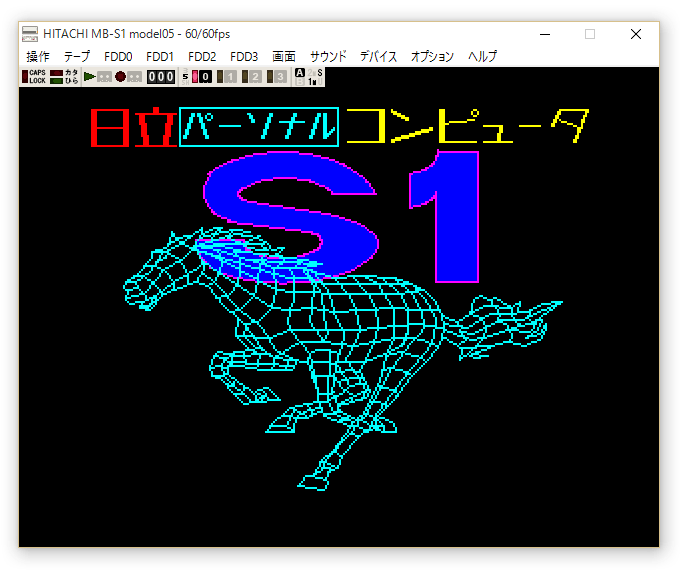
Un émulateur d’Hitachi MB-S1 Model05 créé par Sasaji.


Télécharger Hitachi MB-S1 Model05 (x86) v0.9.4 (602 Ko)

Télécharger Hitachi MB-S1 Model05 (x64) v0.9.4 (668 Ko)

Site Officiel

En savoir plus…


https://getourbonus.com/fr/accueil

https://www.romspedia.com/