
Créé par hex-usr (et basé sur Higan), il s’agit d’un émulateur de NES/VS.System/PlayChoice-10/SuperNES/GameBoy/GameBoy Color/GameBoy Advance/WonderSwan/WonderSwan Color/SwanCrystal/GameGear/SMS/Megadrive/PC-Engine mais aussi des sous systèmes Super GameBoy, BS-X Satellaview et Sufami Turbo, mais ajoute un lots de fonctionnalités en suppléments comme davantage de mappers NES, le NES Four Score, le Zapper, le Power Pad, l’adaptateur 4 joueurs, le VS. System (uniquement les jeux UniSystem n’utilisant pas le Zapper), le PlayChoice-10 mais aussi d’autres éléments à découvrir.


nside


Changements:

– SuperMikeMan pointed out that hiro’s GTK and Qt targets will not compile because I treated the settings object as a pointer type, when it really is a non-pointer type. This has been fixed.

– Re-implemented randomness for the LXA and XAA instructions. This time, by using nall::random(), which hopefully is not subject to compilation errors on Linux and BSD.

– Now, noise values are initialized each time the MOS 6502 is reset, so the same values will be used throughout the life of Famicom or Atari 2600 game session.

– Fixed a long-standing bug preventing Famicom ROMs from being imported.

– The reason this bug remained since the very beginning of nSide’s development (when bsnes v091 was released) is that I use a completely unrelated tool to do « in-place » purifications, where a ROM gets converted to a cartridge folder right where the ROM used to be rather than moved into the library. I deliberately avoided using cart-pal, my own fork of icarus, for the sole purpose of controlling where the purification moves my ROMs. Thus, I never found this bug until today (emu-france.com).

– The only reason I found it when I did is that I made an amazing discovery in GitHub for Windows: When typing the phrase « lxa #imm » in a previous commit, I discovered that GitHub for Windows will show a list of repository issues immediately after typing the number sign (#). This is the only way that GitHub for Windows will show a list of issues
without requiring the repository owner to go online.

– This bug is a result of overcompensating for the iNES header; cart-pal was repeating a certain operation to avoid including the iNES header in the SHA256 hash calculation. The repetition happened in 2 separate locations in the code, and the result was that the program ROM was assumed to start 32 bytes in instead of 16 bytes.

– Removed another rand() from the MOS 6502’s XAA/ANE #imm opcode.

– Removed rand(), a possible source of Linux compilation errors, from the MOS 6502’s LXA #imm opcode. This opcode is unstable and needs to not work in order to prevent homebrewers relying on it, so rand() has been replaced with 0x00.

– However, the « No More Secrets » document details 2 use cases where LXA will always work: when the argument is 0x00 (lxa #$00), or when the accumulator was 0xff before executing the opcode. The code has been modified to account for these 2 safe cases.

 
Cette version, compilée par notre ami Lo, est basée sur Higan 102r02.
 
Lire le readme pour plus d’informations (assez importants).
 

Télécharger nSide (x86) v009.16 r528 (10.3 Mo)
Télécharger nSide (x64) v009.16 r528 (10.7 Mo)

Site Officiel

En savoir plus…

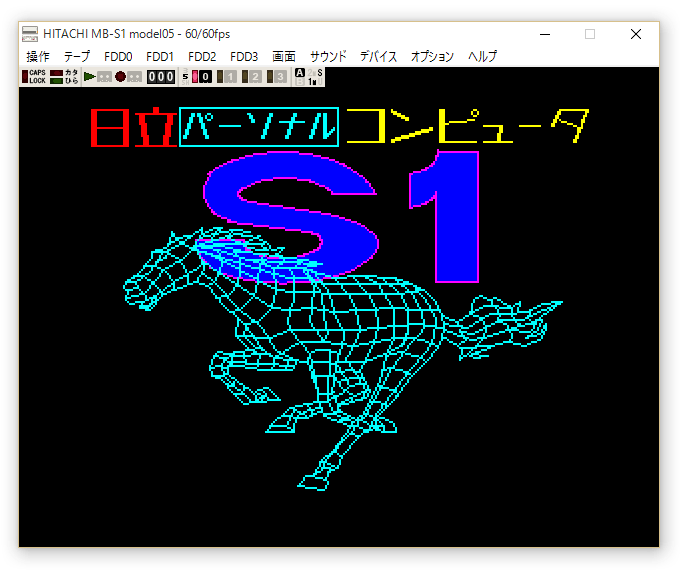
Un émulateur d’Hitachi MB-S1 Model05 créé par Sasaji.


Télécharger Hitachi MB-S1 Model05 (x86) v0.9.4 (602 Ko)

Télécharger Hitachi MB-S1 Model05 (x64) v0.9.4 (668 Ko)

Site Officiel

En savoir plus…

Il s’agit du seul émulateur Basic Master disponible (très bon, au demeurant !), connu également sous le nom de Bml3mk5. Cliquez sur « En savoir plus » pour la description résumée de ce système.
Des versions avec debuggeur sont disponibles sur le site officiel.
 

mark5


Télécharger Hitachi Basic Master Level3 MARK5 (x86) v2.1.4 (479 Ko)

Télécharger Hitachi Basic Master Level3 MARK5 (x64) v2.1.4 (520 Ko)

Télécharger Hitachi Basic Master Level3 MARK5 (SDL) v2.1.4 (2.3 Mo)

Site Officiel

En savoir plus…

Il s’agit d’un émulateur de MS-DOS en ligne de commande destiné à Windows x86-64 (mais également aux versions 32 bits). Version dédiée à l’émulation des processeurs i286/i386/i486.


Télécharger MSDos Player for Win32-x64 (02/02/2017) (2,0 Mo)

Site Officiel

En savoir plus…

Il s’agit d’un émulateur de MSX/MSX2/MSX2+ créé par le grand Marat Fayzullin dont cette dernière version est enfin disponible gratuitement (ce qui ne fut pas le cas pendant des années).


– Fixed loading of BASIC-only cartridges (Danger X4, Crazy Bullet, etc).
– Added a hack to ignore bad writes to ASCII16 MegaROM mapper (Vaxol).
– Added « Interpolate Video | Nearest Neighbor » option to fMSX-Windows.
– fMSX-Windows will not overwrite last loaded file name with other names.
– Added « Force 4:3 Screen » option to fMSX-Windows.
– Added -4×3 command line option to fMSX-Unix.
– Fixed file associations on Windows 8+.
– Slightly rearranged Windows menus.


Télécharger fMSX (Windows) v4.8 (354,2 Ko)

Site Officiel

En savoir plus…

Créé par DH & Hykem (et rejoint par un ensemble de développeurs), RPCS3 est un émulateur de Playstation 3 multi-plateformes qui a pour objectif de devenir le plus complet possible. Il fait principalement office de désassembleur mais pousse la performance jusqu’à exécuter un certains nombres de jeux commerciaux devenant ainsi le premier émulateur de PS3 émulant un jeu du commerce, toutefois il nécessite un PC extrêmement performant.
 
En effet il vous faudra rien de moins qu’un CPU type core i7 @ 4Ghz, une carte graphique récente type nVidia GTX, de la mémoire haute performance type DDR4 ou encore un système d’exploitation récent pour espérer lancer des jeux dans un mode relativement fluide (mais attention cela dépend énormément des builds et des jeux).
 
Plusieurs rendus s’offre à vous: Aucun, OpenGL, DirectX12 (Windows 10 uniquement) et Vulkan (qui a pour but de remplacer à terme OpenGL et ses dérivés en exploitant plus efficacement les architectures informatiques modernes).
 
Cette version, qu’on va dire « stable » dans le sens ou elle est officiellement publiée sur le site officiel (ce qui change des builds réguliés dit « WIP » ou « GIT ») n’est disponible que pour les processeurs 64 bits.
 
rpcs3


Site officiel des sources et versions compilées (builds).
 

Télécharger RPCS3 v0.0.43 Alpha (36.7 Mo)

Site Officiel

En savoir plus…

Il s’agit d’une branche de l’émulateur de Microsoft X-Box CXBX, apportant certains modifications et améliorations diverses.


cxbx_reloaded
 
Branche Darkrush3760
Branche LukeUsher


Télécharger CXBX Reloaded (2017/02/01) (908,7 Ko)

Site Officiel

En savoir plus…

bsnes-plus (ou bsnes+) est un fork de bsnes (basé sur bsnes-classic) destiné à introduire de nouvelles fonctionnalités et améliorations, la plupart visant au débogage. Il s’agit donc d’une version améliorée de bsnes 073 ou l’on retrouve donc l’ancienne interface ainsi que les anciens menus. Plus d’informations ici.
 
Il s’agit d’une version WIP (en cours de développement) dite « instable » basée sur les dernières sources GIT du projet.


Changements:
– Merge pull request #107 from ARM9/master
– SuperFX property viewer improvements
– added register 3036 (rom bank register ROMBR)
– fixed register 3039 (clock register CLSR), used to display wrong values due to misinterpreted implementation detail

 
Cette version est compatible avec le pack de shaders disponible ici.
 

Télécharger bsnes-plus (x86) WIP v05.60 (2020/05/09) (7.6 Mo)

Télécharger bsnes-plus (x64) WIP v05.105 (2025/03/23) (12.5 Mo)

Site Officiel

En savoir plus…

Il s’agit d’un émulateur multi-plateformes qui supporte les machines suivantes: ZX Spectrum, ZX-Uno, ZX80, ZX81 et Z88.


– Added experimental emulation of Sinclair QL. Keyboard is not working yet
– Added remote command protocol
– Added Easter Egg 😉
– Added menu item to reload IDE and MMC contents from file. You can now modify a used file outside the emulator and reload its contents
– Added setting to write configuration file
– Added setting to disable autoframeskip
– Added support for drag&drop on Mac OS X, SDL2
– Improved Debug CPU Window: now you can switch between different views:
1) 1 opcode, cpu registers, other internal registers
2) 9 opcodes, other internal registers
3) 15 opcodes
4) 9 hexdump lines, other internal registers
5) 15 hexdump lines
– Fixed text to speech routine when sending non-ascii character
– Fixed bug reading ULAplus register 64


Télécharger ZEsarUX v4.3 (51,1 Mo)

Site Officiel

En savoir plus…

A l’instar de MAMEinfo pour MAME(Arcade), le fichier MESSinfo vous permet de suivre les changements entre les versions concernant les différents systèmes émulés par ce multi-émulateurs.


Télécharger MESSinfo.dat v0.182 (9,2 Mo)

Site Officiel

En savoir plus…

Un excellent manager de roms à l’instar de clrmame et Romcenter. Romulus est capable d’importer les dats de RomCenter et clrmame (ancien format et format xml), les fichiers offlinelist et Mess. Il gère les roms non compressées ou compressées en zip, rar ou 7z. Il supporte également le Torrentzip. Il peut également importer un dat à partir de l’exécutable de Mame, générer des rapports ou des statistiques… Depuis la version 0.19, une exclusivité (!), il est pourvu d’un module communautaire dont l’objectif est le partage de fichiers à la manière d’un ftp client comme flashfxp.
 
Il dispose également d’un navigateur intégré, d’un localisateur de DATS, supporte les CHD de Mame…


Les changements:

– ADDED In settings an option to apply registry fix to detect mapped drives at elevated applications as Romulus.
– ADDED To XML dats new param at « 

« .The new «  » node contains filename of needed header for the profile. This param don´t take effect in other rom mamangers.
– ADDED Saving current header xml file when creating XML dats from Database and fixdats.
– FIXED Problems detecting inside Zip files with especial attributes.
– FIXED Problems with inverted CRCs and correct CRCs in same profile. Rebuilding correct CRC when inverted CRC exists in same place.
– FIXED Detecting ROMs scan or rebuild hidden files or folders. Thanks to Agus.
– FIXED Detecting folders inside compressed files when profile has single folders information. Thanks to Agus.
– FIXED Reading and creating baddumps when MD5 and/or SHA-1 checksums are filled with zeroes.
– FIXED Zero bytes creation baddumps when MD5 and/or SHA-1 checksums are filled with information.
– FIXED Problems displaying master games list end at Offlinelist profiles with filters.
– FIXED Open URLs in Richedits using OS default web browser when in settings is enabled the option to do it.
– FIXED Visuals non rectangle hints on Windows 8 and laters.
– FIXED Taskbar preview size problems for Windows 7 and laters.
– CHANGED Importation security code to prevent files information with final backslash when really has checksums converting it to files and not folders. Thanks to Agus.


romulus


Télécharger Romulus v0.033 (5,4 Mo)

Site Officiel

En savoir plus…

Un gestionnaire de roms avec une interface aussi claire que Romcenter et axé sur la simplicité avec un nombre limité de fonctions. Une référence désormais.


L’immense avantage de ce manager est de pouvoir scanner n’importe quel repertoire de roms , en VRAC & ensuite -en fonction de ce que vous avez comme dats- de les ranger et replacer automatiquement. (très utile si vous avez des tonnes de dats (TOSEC). Il vous permet réellement de collectionner des centaines de collections avec un gain de temps considérable par rapport aux autres managers. Il convertit également les zips au format Torrentzip afin de faciliter le partage à travers les fichiers torrent.


romvault2.1

 
– Turns out there was a error in my 7z code when working with non-compressed files inside of 7z files, this is now fixed and here is the quick update.


Télécharger RomVault v2.6.1 (874,3 Ko)

Site Officiel

En savoir plus…


https://getourbonus.com/fr/accueil

https://www.romspedia.com/

