Un émulateur de NES en chinois.

0 commentaire



Créé par Avery Lee (l’auteur de VirtualDub), il s’agit d’un émulateur d’Atari 8 bits (800/800XL/130XE) disponible en 32 et 64 bits. Il dispose de beaucoup d’options ainsi que d’une bonne compatibilité. Il prend en charge les jeux protégés conformément à l’émulation. Il s’agit d’une version de développement au stade de béta.
– Fixes reboot issue with Happy 1050. The problem was that the controller CPU was getting reset before the ROM banking logic, so sometimes it was trying to boot from one bank with the reset vector of the other.
– Rename Tiger 1050 -> Tygrys 1050. The firmware tag and device name have changed, so you will have to re-set those up.
– Reimplemented SIO transmissions from full drive to POKEY. This eliminates a byte delay that was causing Happy warp mode to fail, since it has a very fast speed switch between ACK and Complete.
– Drive emulation speed is now adjusted for NTSC/PAL. This is unfortunately the result of investigating high-speed write issues with the Speedy 1050, which turned out to be due to a marginal read loop on the drive side. Speedy 1050 high speed mode operates at a POKEY divisor of 9, or 32 computer cycles per bit. Reads are fine, but data frame writes are tight on the drive because the read loop is 180 cycles at 1MHz. In PAL, this just barely works because 320 cycles @ 1.77MHz comes out to 180.8 drive cycles, but in NTSC 320 cycles @ 1.79MHz = 178.7 drive cycles. This was causing the drive to lose a bit halfway through the data frame in NTSC. 🙁
– Disk change is now emulated, including the write protect sensor and the not ready bit on the 1050. This is necessary for the 1050 to recheck density and for enhanced drives to flush their track read buffer. As a result, you will now hear the motor spin up and possibly a seek when switching disks. The not ready status bit is also now continuously updated after type II/III commands, as this is required by the 1050 (and yet another omission in the FDC docs).
– Fixed FDC transfer timing being too fast for single density in 1050 drives.
– Read/write operations now fail on half tracks.
– Formatting is now supported for MFM formats (enhanced/double density).
– Tweaked the FDC to work around some firmwares locking up when trying to format a disk with formatting blocked (VRWSafe mode) because they cannot handle a write protect error on the Write Track command. 810 and 1050 now fail the format command quickly; some enhanced drive firmwares will still attempt the format, and for protected disks on those drives you will need to force the disk mode to full read-only (R/O).
– Fixed transmission errors with full drive emulation when SIO burst mode is enabled for disk drives; this is now ignored by the full drive emulator since it is not supported.
– Fixed a bug with the standard drive emulator not getting re-enabled when removing a full disk drive.
– The swap/rotate commands now work for full disk drives.
– Added .fdc and .riot commands in the debugger.
Un très bon émulateur de TI-99/4A tournant sous Windows. Il fut connu sous le nom d’AMI99, mais fut renommé car beaucoup de personnes pensaient qu’il s’agissait d’un émulateur Commodore Amiga.


Les fonctionnalités :
-Les roms systèmes & plusieurs cartouches sont inclues sous licence Texas Instruments
-démarre et fait fonctionner correctement toutes les fonctions OS (excepté l’I/O et le TI BASIC,
-la plupart des modules fonctionnent très bien
-Le switch des cartouches XB/Atarisoft/Jon379/SuperSpace cartridge est supporté
-Emulation complète du son sur tous les channels, en incluant le support du son digitalisé
-Speech implémenté à la fois sur les roms et sur le speak externe.
-Le scan CRU du clavier est implémenté
-Support du joystick et du timer 9901
-Le disque supporte les fichiers V9T9, TIFILES/Xmodem, les fichies natifs Windows, les images disque V9T9 DSK & PC99 DSK (les images DSK sont en lecture seule)
-DirectX fenetré et plein écran, comme les modes fenétrés non-DirectX
-détection des collisions (par pattern)
-Nombreux filtres vidéos en option (HQ4X, 2xSAI, SuperEagle, NTSC, etc)
-débugger intégré en single step
-Emulation clavier PS/2 keyboard
-Sélection des menus par souris (double-cliquer sur l’écran)
-Support de la carte 1MB Super AMS
-Code source complet inclus
Créé par Exzap, il s’agit du second émulateur de Wii U à être disponible au public mais le premier à pousser jusqu’à l’émulation de jeux commerciaux. Il peut décrypter les images Wii U qui utilisent le format Wud mais également les fichiers RPS ou RPL. La résolution interne peu aller jusqu’à 1920×1080 selon les jeux. A noter que pour le moment, un seul contrôleur est accepté, il s’agit du DRC (GamePad) de la Nintendo Wii U. Cette version n’est compatible que pour les Windows x64 avec une carte graphique gérant OpenGL 4.0 ou supérieur.

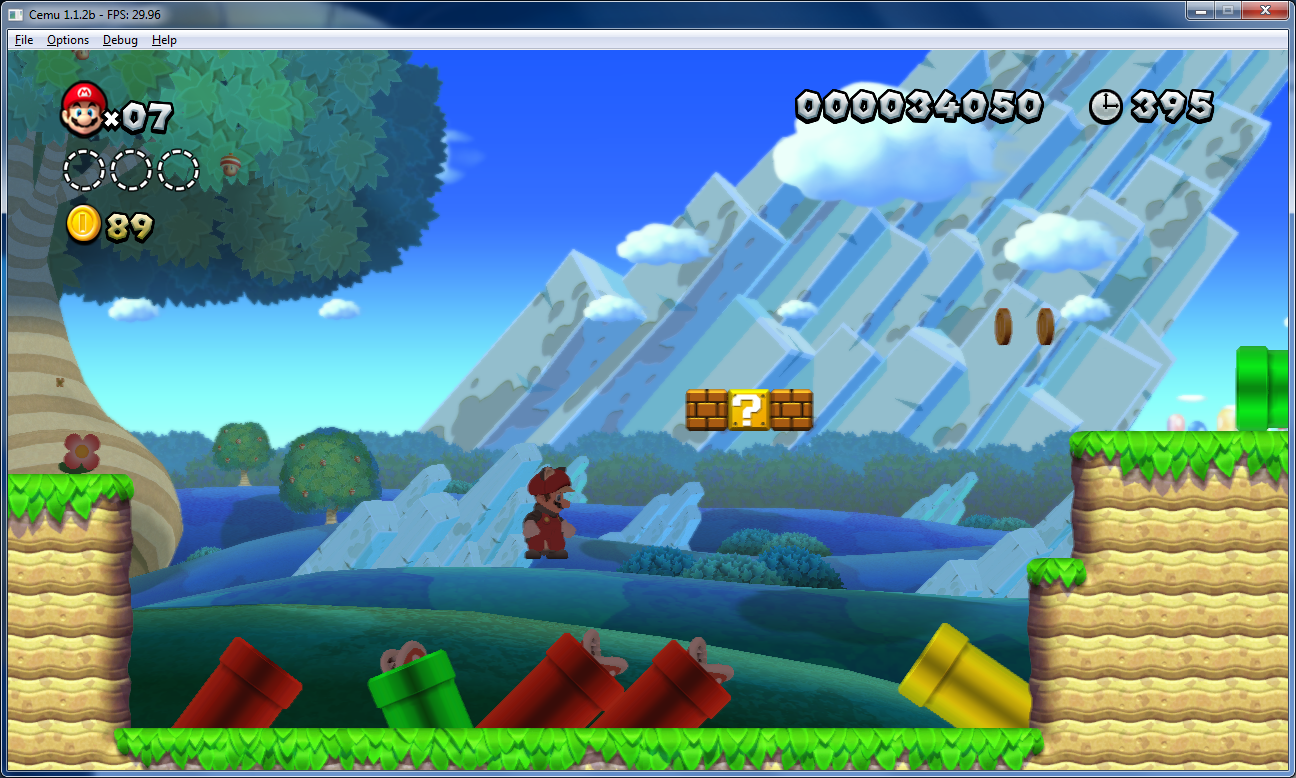

Les changements:
En résumé:
– Hardware acceleration for Streamout
– Recompiler improvements
– Optimized file operations + AES-NI support
– Minor bugfixes, graphic and compatibility improvements
En détails:
# CEMU 1.6.2c
– CPU: Fixed a bug in recompiler PSQ_STU instruction
# CEMU 1.6.2 + 1.6.2b
– CPU: Fixed a rare crash bug that could occur when the recompiler attempted to analyze certain functions
– CPU: Improved detection of function entry points for recompiler
– CPU: Added instructions LBZUX, SRW., PSQ_LU, PSQ_STU and PS_DIV to recompiler
– CPU: Adjusted recompiler PS_MERGE10 instruction to generate faster code
– FS: Various optimizations to FSA thread, resulting in quicker processing of file operations
– FS: If available, AES-NI is now used for filesystem decryption
– AX: Added API AXAcquireMultiVoice()
– NFP: Deactivate event will now be correctly signaled
– GX2: Added support for Streamout emulation via OpenGL’s Transform Feedback
– GX2: Slightly reduced the number of shaders that need to be compiled (by optimizing away render states that previously affected the generated shader code)
– GX2: Improved handling of bottom of pipe event
– GX2: Added API GX2DrawIndexedImmediateEx()
– GX2: Fixed a bug in the buffer cache that could cause out-of-bounds allocations which would result in CEMU crashing
– GX2: Fixed a bug where textures would be immediately reloaded from RAM after being updated by a GPU-side operation
Une liste de compatibilité est disponible ici.
fs-uae est un emulateur multi-plateformes (sur Linux , mac osX et windows) reprenant les travaux de WinUAE/E-UAE/PUAE en mettant l’accent sur l’émulation des jeux sur lecteur de disquette et CD-Rom. A noter que cette version propose un launcher dédié.
Une caractéristique unique est le jeu en ligne. Vous pouvez maintenant jouer à des jeux Amiga contre (ou avec) des amis sur Internet.
L’émulateur utilise le dernier code d’émulation Amiga WinUAE du projet et nécessite un ordinateur moyennement rapide avec accélération graphique (OpenGL) pour travailler. Une manette de jeu ou d’un joystick est recommandé, mais pas obligatoire (FS-UAE peut émuler une manette de jeu en utilisant les touches fléchées et Ctrl de droite / touches ALT).

Le launcher est relié au site OAGD, immense base de données sur l’Amiga et permet parfois de vous mener directement à la page de téléchargement du jeu. Il simplifie grandement les réglages relatifs à WinUAE. Formidable !
Les nouveautés:
– Alt+F4 and Cmd+Q will no longer quit FS-UAE (in full keyboard emulation mode).
– Use raw input on Windows again (allows grabbing of Windows keys, etc).
– New option raw_input = 0 will disable use of raw input for keyboard.
– Fixed loading shaders from fs-uae.dat.
– Updated Xbox 360 configs for Linux.
Changes in FS-UAE Launcher 2.8.1:
– Fixed problem where rating could be reset for first loaded game/variant.
– New experimental option: relative_temp_feature.
Changes in FS-UAE Arcade 2.8.1:
– Added stretch / keep aspect toggle button to top right menu.
– Added V-Sync toggle button to top right menu.
– Ability to see and change variant before starting the game.
– Make menu rendering conformant to FS-UAE style.
– More transition animations.
– New cover rendering for non-portrait covers.
– Use –platform= to start with a given platform filter, e.g. –platform=cd32.
– Variant sort order fixed to be same as in FS-UAE Launcher.
– Fixed arrow keys for FS-UAE Arcade on MacOS.
– Reversed position of platform and publisher names.
Télécharger FS-UAE (Stable) [32 bits] v2.8.3 (58.8 Mo)
Télécharger FS-UAE (Stable) [64 bits] v3.2.35 / v3.2.35 (75.3 Mo)
GameEx est une interface graphique pour vos émulateurs. Elle sert également de lecteur vidéo, DVD et CD.
Certaines fonctionnalités de GameEx :
– lit aussi les fichiers audio.
– supporte les affichages LCD/VFD, ArcadeVGA.
– peut adapter son affichage pour les écrans larges, elle peut aussi tourner l’affichage de 90° (vertical).
– peut être contrôlée à distance, ou par une manette ou par la souris uniquement.
– supporte les contrôleurs arcade : HotRod, X-Arcade, SlikStik et IPAC.
– est compatible avec les interfaces entre PC et cartes arcade : U360, I-PAC, J-PAC.
– intègre un Jukebox qui supporte les fichiers ogg, mp3, wma, m4a, et flac.
– Les musiques peuvent être lues et changées pendant que vous êtes en train de jouer.
Ce frontend est disponible en version gratuite & payante (17 $) incluant de nombreuses autres fonctions.
VMware vous permet de lancer plusieurs systèmes d’exploitation sur un même PC sans avoir besoin de partitionner votre disque et sans reboot. Vous pouvez facilement isoler et protéger chaque environnement, et bien entendu les applications et données qui tourne dessous. Il permet aux utilisateurs de configurer facilement chacun des systèmes d’exploitation, ce qui inclut un interface réseau complet, gestion de périphériques, partage de fichiers, copier/coller et annuler les changements fait durant un session. VMware permet aux « opérateurs » d’encapsuler et de manipuler chaque environnement, la possibilité de faire un retour arrière en redémarrant une application ou encore de déplacer un environnement a travers différentes machines configurées.

Voici une nouvelle version du pack d’icônes à utiliser avec FBA (basé sur celui de Mamu_) que Gab75 a mis à jour.
Dans FBA aller dans le menu Misc / icons / enable (et sélectionner).
Créé par Avery Lee (l’auteur de VirtualDub), il s’agit d’un émulateur d’Atari 8 bits (800/800XL/130XE) disponible en 32 et 64 bits. Il dispose de beaucoup d’options ainsi que d’une bonne compatibilité. Il prend en charge les jeux protégés conformément à l’émulation. Il s’agit d’une version de développement au stade de béta.
– Debugger: Added .crc command.
– Disk: Added support for full disk drive emulation of 810, Happy 810, 810 Archiver, 1050, 1050 Duplicator, US Doubler, Speedy 1050, Happy 1050, Super Archiver, TOMS 1050, and Tiger 1050 drives.
Hatari est un émulateur Atari ST et STE tournant sous Linux, BSD, BeOS, Mac OS X et bien d’autres systèmes supportants la librairie SDL, il est basé sur les sources de WinSTon.
Cette nouvelle version ajoute le support des Atari TT et Falcon. Tout ceci est encore expérimental, il n’y a d’ailleurs pas d’émulation du DSP du Falcon. Plusieurs correctifs ont été ajoutés, le build pour Windows se compile mieux au passage.

Emulation:
– Machine:
– Support for MegaST & MegaSTE machines added
(this also replaces the Real Time Clock / RTC option, since this chip
is only available on the Mega machines)
– The general purpose registers of the TT SCU are now correctly emulated
(this fixes the problem with AHDI not finding any partitions during boot)
– HD:
– Fix: Disable GEMDOS opcodes after GEMDOS drive is disabled
– Fix: GEMDOS HD can now be initialized multiple times,
e.g. when running EmuTOS RAM image from a normal TOS
– Fix: WORD access to IDE data register at 0xf00002
– Fix: ‘*.*’ pattern with GEMDOS HD should match also files
without extension
– Video:
– Full rewrite of the GLUE state machine, including support for the
4 wakeup states in STF mode, as well as more accurate video timings
(hbl, timer b, top/bottom and left/right removal, mixing 50/60/71 Hz
lines)
– Correctly shows the last 8 pixels for STE 224 byte overscan
– Fix: reading video counter $FF8205/07/09 after modifying it
while display is ON
– Fix: location of the video counter’s restart when screen runs at 60 Hz
– TT: sync ST & TT color registers immediately on write, handle
palette bank setting correctly, fix duochrome colors
– Falcon: handle byte access special case for ST color registers
– Falcon: border color support also in HiColor
– better hbl/timer b interrupts when CPU runs at 16/32 MHz
– Sound:
– Special cases for STE DMA sound when start address = end address
– Increase STE DMA volume when compared to the YM2149 volume
– Greatly improve Falcon DMA sound
– CPU:
– use WinUAE CPU for STF/STE mode too, not just Falcon (old CPU core
is considered deprecated)
– improved IACK and simultaneous interrupts
– access IO regs on 2 cycle boundaries when possible
– More accurate 68060 mode (instructions from previous CPU versions
removed in 68060 aren’t accepted/emulated anymore)
– Misc bus error / IO mem register handling fixes for TT & Falcon
(e.g. add TT DIP switch register handler)
– Blitter:
– Better bus arbitration when blitter is started
– Don’t cause bus error when accessing regions causing CPU bus error
– Fixes to DSP addressing
– Floppy:
– Fix the value of the WPT bit when inserting/ejecting a write protected
floppy
Emulator:
– Generic fixes:
– Autosave to already existing file works first time after v1.4
(dialog for file overwrite got automatically canceled on exit)
– SDL GUI:
– MegaST/MegaSTe support
– Shortcuts can be configured in the keyboard dialog
– User can provide volume label when creating a floppy image
– Show dialog on HD image size issues
– Better SDL2 support:
– SDL2 is now enabled by default
– Resizable windows, including ST/STE screen scaling
– « –desktop » option is used also for ST/STe instead of « –desktop-st »
– Command line:
– Renamed –fpu-type option to –fpu
– Configuration:
– Hatari defaults to ST both with oldUAE & WinUAE CPU core
– Preferred private configuration directory is now ~/.config/hatari
on Linux/Unix (the legacy location ~/.hatari is still used if
the other one does not exist yet)
– Windows config location is now: AppData\Local\Hatari
– Support SDL key names in keymap files in addition to key codes
– Comment characters (#, 😉 can also be mapped in keymap file
– Added NatFeats SCSI (NF_SCSI) driver for Linux version of Hatari
– Debugger:
– Fix: close debugger log file only when explicitly requested,
not when continuing emulation from debugger
– Fix: direct DSP register, disasm and memdumps to debugger log
file, similarly to CPU
– Fix: direct CPU and DSP symbol traces to trace file, not stderr
– Fix: ‘:once’ option when there’s only one breakpoint (v1.9 regression)
– Fix: NatFeats NF_DEBUGGER command now actually drops to debugger
– ‘n’ (next) command run until (dbcc backwards branch) loop exits
(in addition to running until subroutine and exception calls return)
– Support Atari debugger XBios(11) / Dbmsg() API
– ‘variables’ / ‘v’ command to list Hatari debugger’s builtin symbols
– Also trace exception can be caught
– Removed features:
– Support for rendering to 8-bit host screens
– Support for (buggy) RsConf() interception with –bios-intercept
Other:
– Allow building without Zlib
– zip2st tool can convert directories to .st image files,
not just .zip files.
Fixed games:
– Chainz and Jewelz by Paradize (blitter, bus errors)
Fixed demos:
– spec512 image in the Intro of the Place To Be Again (video, restart counter)
– Menu screen in the Place To Be Again (video, writing/reading video
counter during active display)
– A Little Bit Insane by Lazer (no DMA sound during the demo)
– LoSTE and Closure by Sync (video, wakeup states and glue timings)
– Death of the left border by TNT (video, stabilizer)
– Gen4 Demo by Ziggy / Overlanders (video)
– Suretrip 49% by Checkpoint (cpu, exceptions stacking)
– Tymewarp by YM Rockerz (megaste mode, cpu control at $ff8e21)
– overscan plasma in Graphics Sound 2 in Relapse by Cybernetic (blitter)
– RGBeast by Agression (blitter)
– Drone by DHS, PhotoChrome Viewer by DML (video, last 8 pixels)
Notes:
TOS NF_SCSI driver is available from:
http://hddriver.seimet.de/en/downloads.html
Télécharger Hatari (x86) v2.6.1 (5.9 Mo)
Un Frontend pour MAME(Arcade + consoles + ordinateurs), il est aussi compatible avec AdvanceMAME, MESS, RAINE… A la fois petit et complet, il gère les MP3, les images animés, affiche en plein écran (on est presque déjà en train de jouer). Il permet même de créer un économiseur d’écran à partir des images des jeux 🙂
Télécharger AdvanceMENU (Win) (0 O)
AdvanceMESS est un version non-officielle de MAME(MESS) spécialement conçu pour l’affichage TV avec beaucoup d’options d’affichage, mais aucun changement niveaux émulation par rapport à la version officiel. Cette version est optimisé pour les processeurs Pentium.
Télécharger AdvanceMESS (Win) (0 O)

