Ce vénérable émulateur de consoles Nintendo 8/16-bit vient de recevoir une mise à jour. Le site étant entièrement en japonais, il est difficile d’en connaitre les réelles améliorations.
1 commentaire



Ce vénérable émulateur de consoles Nintendo 8/16-bit vient de recevoir une mise à jour. Le site étant entièrement en japonais, il est difficile d’en connaitre les réelles améliorations.
Un excellent émulateur Nintendo NES pour windows .
PuNES supporte le mappers 0, MMC1, UNROM, CNROM. Il utilise la bibliothèque SDL.


Mappers supportés : 0, 1, 2, 3, 4, 5, 7, 9, 10, 11, 12, 13, 15, 16, 18, 19, 21, 22, 23, 24, 25, 26, 28, 32, 33, 34, 37, 38, 41, 42, 44, 45, 46, 47, 49, 50, 51, 52, 53, 56, 57, 58, 60, 61, 62, 64, 65, 66, 67, 68, 69, 70, 71, 72, 73, 74, 75, 76, 77, 78, 79, 80, 82, 83, 85, 86, 87, 88, 89, 90, 91, 92, 93, 94, 95, 96, 97, 99, 105, 107, 108, 112, 113, 114, 115, 116, 117, 118, 119, 120, 121, 132, 133, 136, 137, 138, 139, 140, 141, 142, 143, 144, 145, 147, 148, 149, 150, 152, 153, 154, 156, 158, 159, 163, 164, 165, 171, 172, 173, 175, 176, 177, 178, 180, 182, 183, 184, 185, 186, 189, 191, 192, 193, 194, 195, 199, 200, 201, 202, 203, 204, 205, 206, 207, 208, 209, 211, 212, 213, 214, 215, 216, 217, 221, 222, 225, 226, 227, 228, 229, 230, 231, 232, 233, 234, 235, 240, 241, 242, 243, 244, 245, 246, 249.
Son : Implementé
FDS : Implementé
Game Genie : Implementé
Changements :
– A new icon (thx to Phil Pinsonneault).
– Added the ability to configure the shortcuts and associate them with a button of the joystick.
– Increased the number of save slots to 10.
– Added, in fullscreen mode, an overlay that shows when you select, save or load a save state.
– Fixed the display of the GUI when you increase or decrease the save slot.
– Fixed the shortcuts for Inc/Dec save slot (in 0.91, for a mistake, F2 = Inc and F3 = Dec).
– Fixed a bug that in rare circumstances did not allow the configuration of the joystick.
– Implemented properly the behavior of the mapper FME-7 (http://forums.nesdev.com/viewtopic.php?f=2&t=12436&start=15#p142263).
– Fixed the issue with Startropics e Startropics II.
Télécharger puNES SDL (x86) v0.92 (7,7 Mo)
Télécharger puNES OpenGL (x64) v0.111 (23.9 Mo)
Télécharger puNES D3D9 (x86) v0.111 (21.8 Mo)
La crème des émulateurs CPC écrit en Java et dédié à Windows. Au début du projet, il reprenait les sources de JEMU écrites par R. Wilson et de celles d’Enhanced Emulator par Markus Hohmann. La mouture actuelle nommée Desktop est plus qu’un simple émulateur car elle intègre son propre environnement de bureau. Elle contient entre autres un logiciel de dessin, une messagerie instantanée, une calculatrice pour votre Amstrad CPC, un tchat, une horloge et d’autres fonctionnalités.
Java CPC a la particularité de se connecter sur la Base de données du site CPC-Devilmarkus. Lancez le « Gamebrowser » situé sur le desktop, cochez l’option « Boot Games » situé en haut du browser : le jeu se lancera automatiquement via la commande qui s’adaptera à votre configuration AZERTY ou QWERTY !
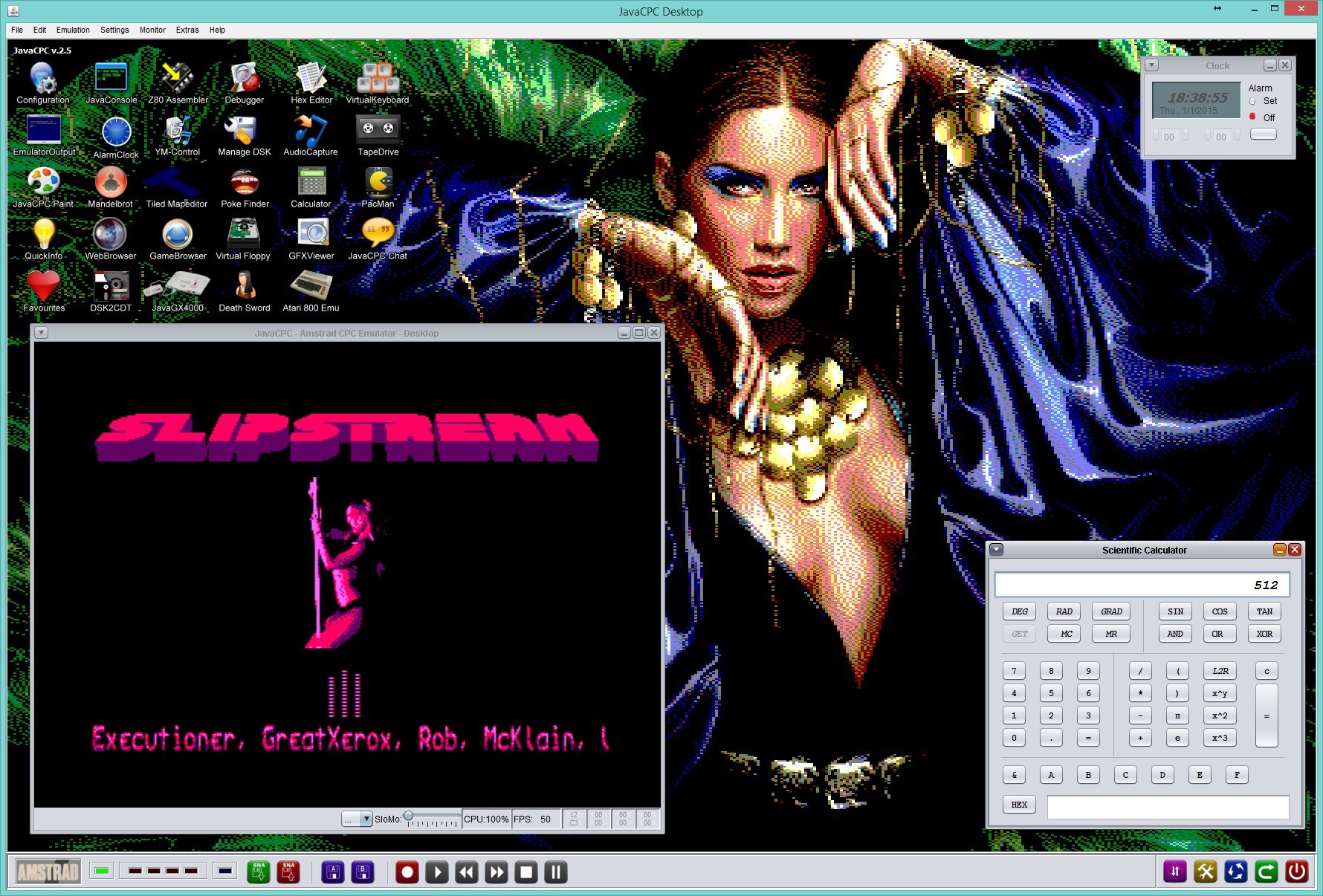
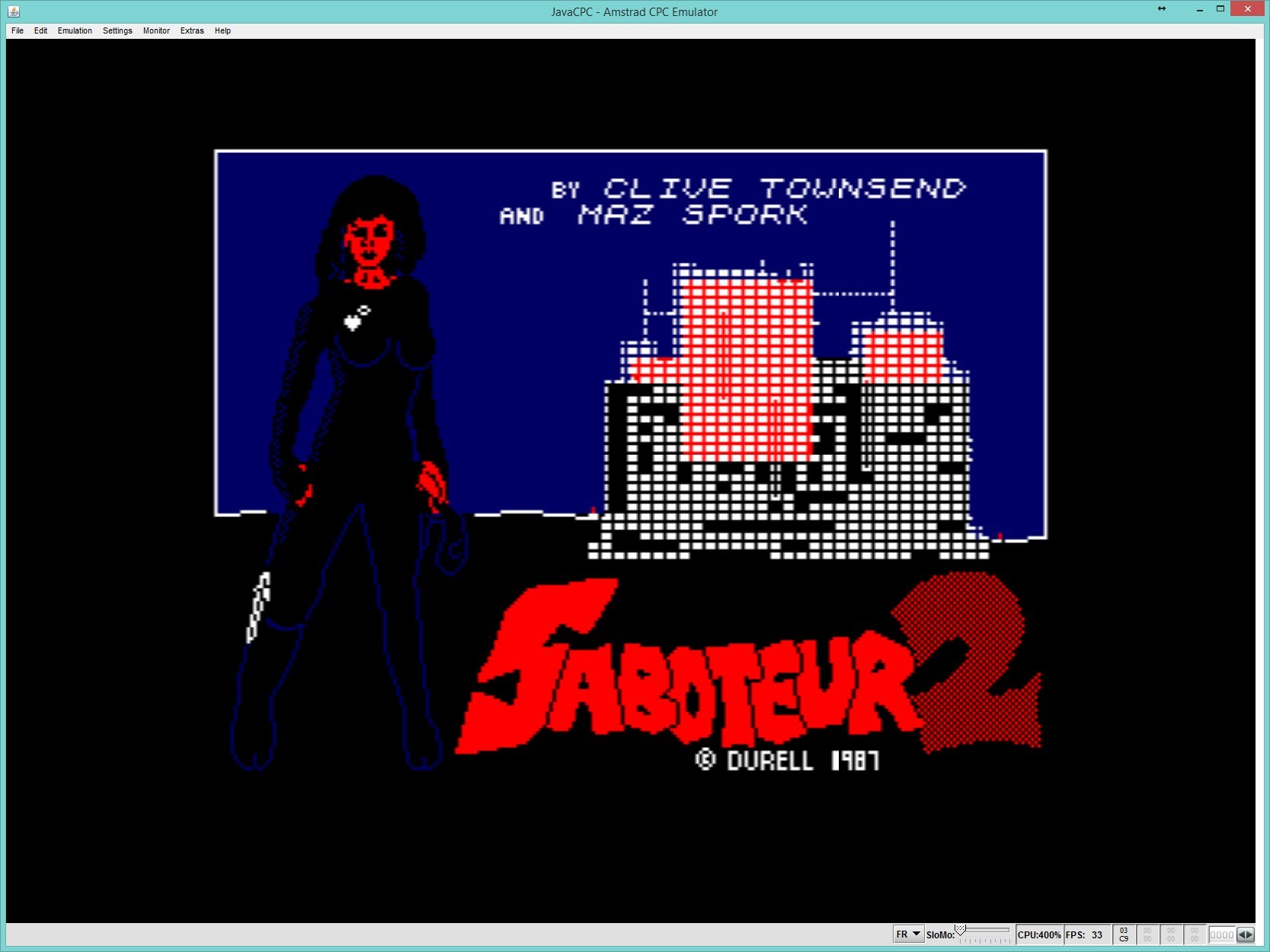
Greatxerox dans les greetings^^
Quelques caractéristiques :
– émulation très précise des ordinateurs de la gamme Amstrad CPC,
– émulation parfaite de la puce sonore AY et du digiblaster,
– émulation des CRTC 0 et 1 pour bien faire tourner presque toutes les démos,
– traduction du clavier en anglais, allemand, espagnol,
– des fonctions utiles comme le lecteur interne YM, un logiciel de dessin JavaCPC Paint,
– un lecteur virtuel de cassettes qui supporte les formats CDT, CSW, WAV et MP3…
Pour plus d’infos, en ligne de commande : « javacpc.exe -help » ou « javacpc64.exe -help »
Changements :
Update from v2.7 to v2.8 changelog:
– Amstrad.eu BDD added (Play games directly from Amstrad CPC for ever : Amstrad.eu database)
– Bugfix in BASIC autotype and autoboot
– Some GUI changes
– Some parts are partially translated into German, French or Spanish (Translation is still in progress)
*Le disque dur de Devilmarkus vient de lâcher. Devilmarkus ayant des problèmes d’argent, et si vous voulez que l’émulation CPC progresse sans entraves, n’hésitez pas à faire un don de 5 ou 10 €. Quelques personnes suffisent.*. Il ne manque que 50 €. Bouton DONATE. Merci pour lui. (à votre bon coeur m’sieur dames !)
ENG : the Devilmarkus’s HDD just crashed. DM got problems of lack money. If you want the CPC emulation continue normally, please don’t hesitate to DONATE 5 or 10 € or $. A few people are necessary. thanks for contributors !
dgVoodoo est un glide wrapper mais aussi un wrapper DirectDraw/Direct3D (v3 à 7) vers Direct3D11. Pour simplifier grandement, ça émule une carte 3DFX qui va pouvoir gérer la bibliothèque propriétaire Glide (Glide 2.11, Glide 2.43, Glide 3.0) mais également les vieilles cartes graphiques compatibles DD/D3D v1 à v7. Quel est l’intérêt ? Jouer aux anciens jeux qui fonctionnent mal sur les nouvelles cartes graphiques (parce qu’ils ont été optimisés pour le Glide ou de vieilles versions de DirectX et non pour d’autres API telles que OpenGL ou DirectX v11) ou tout simplement utiliser un émulateur qui lui aussi utilise le Glide. Cette version est destiné à Windows Vista/7/8/10 avec DirectX 11 d’installé et vous devez posséder une carte graphique (compatible DirectX Level 10.1) supportant les Shaders Model v4 ou v5.

Les changements:
2.42:
– Direct3D3 renderstate handling bugfixes (some of them were disabled)
– Various DirectDraw bugfixes like object/structure version handling,
surface blitting, basic ROP codes are added, and others
– Compatibility fixings in DirectDraw surface creation functionality
– Compatibility fixings in DirectDraw surface locking functionality
– Compatibility fixings in Direct3D device creating
– Fixing/refactoring light handling in general; now software vertex
processing can handle any number of them, and also, they can be added at
any index in Direct3D7
– 32 bit z-buffer support added
– Minor Direct3D rendering bugs
– Bad return code in an empty (but necessary) function on IDirect3DTexture,
fixed
– Missing multithreading guarding in some Direct3D3 methods, fixed
2.41:
– Direct3D 3 support is added;
so that all Direct3D interface is supported now
– Bug in the resolution enumerator in DirectDraw, fixed
(classic and all other resolutions are now enumerated with all bit depths.)
– Resolution combo box was buggy in the setup; couldn’t enumerate anything
when too much resolutions were available, fixed
– Logic of selecting the refresh rate when unspecified rate is requested
by the application is changed
– Overridable refresh rates
– Bugfixings and improvement for blitting to the primary surface in
DirectDraw
– Bugfixings for other general surface locking/blitting functionality
– Minor DrawPrimitive bug fixed (missing triangles in Diablo II with
Direct3D renderer)
– Bug with monochrome lighting is fixed
(discovered with Jedi Knight – Mysteries of the Sith)
– Bug in surface blitting, fixed (The Settlers IV)
– Bug/incompatibility fixings in surface handling in:
GetAttachedSurface, EnumerateSurfaces, SetSurfaceDesc and loading
textures from system memory surfaces to texture surfaces in video memory
– DX wrapper is now more noshutdown-proof when unexpectedly pulled out from
the process memory area; LithTech engine based games now should work
(tested with Blood2 and Shogo Mobile Armor Division)
– Various other small bugs fixed that I came across
– Introducing ‘unspecified’ scaling mode. If you want to apply
‘scaling but keeping aspect ratio’ then select it on your graphics driver
control panel and select ‘unspecified’ mode in dgVoodoo Setup.
If it does not work then your only chance is forcing it through the
graphics control panel (it all seems to be a Windows issue).
– Disabling ‘Bilinear blit stretch’ in the default configuration.
I’ve seen a few games where it caused more ‘harm’ than coolness that is
why I decided to disable it by default.
2.4:
DirectX rendering:
– New, improved version of DirectDraw. It fully supports creating and
blitting to/from textures, Z-buffers and 3D-renderable surfaces with
several pixel formats. Also, general API-behavioring is more accurate
to the original one because of lot of bugfixings and heavy reverse
engineering.
– Gammacontrol interfaces is added to DirectDraw
– First version of Direct3D implementation is added and (almost) fully
supports DirectX5, DirectX6 and DirectX7. For more and technical details,
see the DirectX readme. Direct3D interfaces are also as carefully reverse
engineered as DirectDraw ones.
Glide rendering:
– Bug in handling utility textures, fixed (missing textures in South Park)
– Bug with PALETTE6666 extension fixed
(unreadable menu text in Need For Speed – Porsche 2000 with a Voodoo2
or higher)
– Bug with tripebuffering fixed (missing 3D elements in The Tainted)
– Adapting Glide3 to 3Dfx mini GL driver (3Dfxvgl.dll),
(American McGee’s Alice):
– Lowering gamma bitnum to 8 (3Dfx didn’t follow his own rules…)
– Some init/exit code could get stuck because they can get called from
DLLMain, fixed
Setup:
– ‘Apply’ button in the setup is added
(I got bored to OK’ing and reopening the setup each time I want to
modify the config of more folders or running instances)
Il s’agit d’un émulateur multi-systèmes émulant les consoles NES, SuperNes, Sega Master System, SG-1000, Sega Game Gear, PC-Engine (TurboGrafx-16) / CD-ROM, SuperGrafx, Sega Genesis, Gameboy/Color, Atari 2600, Atari 7800 mais aussi TI-83 Calculator.
Bizhawk utilise des fonctions d’enregistrement vidéo et est relié au projet TasVideo.

Changements :
Nes
FDS - fix load behavior based on real world observations. Most games will load about 4 seconds faster now
Quicknes - Clip top and bottom by default
Fix Soft reset in Ki no Bouken
Support Cool Boy 400 in 1
N64
Updated save type of Donkey Kong 64
Fix cheats
Better support of the System Bus across Ram related tools
Added Excitebike 64 (USA) (Rev A) and Turok - Rage Wars (USA) (Rev A) to gamedb
GB
add ability to load VBA saves with RTC (although the clock time itself is invariably trashed)
Fix reporting incorrect PC and A register values, note: this is a breaking change to text savestates
SNES
IPCRingBuffer - greatly improve performance on dual and single core machines
PCE
Improve performance
Atari 7800
Combine Ram1 and Ram2 into a single Ram domain
Make some memory domains read-only instead of silently failing to write
EmuHawk
A Debugger tool (with varying support among cores)
GDI+ display method as a fallback for lack of opengl 2.0 support
Improve Rewind performance
Improvements to sound, less prone to audible glitches and reduces latency
Reduce CPU usage when idling
Fix dialog issues with alternate DPI sizes
AV Dumping - add ImageSequenceWriter
Add options for display of various window components (menu,frame,caption,statusbar)
Add --chromeless commandline argument
Make rewind speed proportional to rewind frequency
Single frame rewinds when short pressing rewind key while paused
Allow clock throttle to take over for audio / vsync throttles during fast forward or rewind for proper speed control
Option to automatically check for and notify of new versions.
Add a menu item for Save RAM and bold it if it is dirty; allow it to be manually flushed, instead of having to wait for the client or core to close
Trace Logger - Clean up newline handling in Copy
Add --dump-frames commandline to control which frames get dumped by the auto-dumping feature
Recent Menus - add ability to configure their own recent size
Platform Chooser - show game hash
Fix cancelling out of the core picker causes exception (issue #316)
Fix crash trying to use snes bg hotkeys when snes is not loaded
Fix missing movie extension for game names that have a . at Length-4
Fix out of range exception when importing firmware from an archive
Fixes to Single Instance mode
Log Window - fix Copy All button line formatting
Lua
Fixed memory leaks
Memory library - default to main memory if user did not specify a domain
Fixed a bug with analog controls not being cleared
Don't crash emulator when lua scripts error during event callbacks
Fix fill behavior in drawBox, drawRectangle, drawEllipse, and drawPie
Fix event.oninputpoll() to return a GUID like every other event
Gui library - make all colors optional parameters and use defaults if not provided
Add gui.defaultForeground(color) and gui.defaultBackground(color)
Recover from a locked drawing surface exception and log to the console, rather than crash the emulator
Lua Console
Add a command window for on-the-fly lua commands
Functions list - fix laggy scrolling and searching
Don't nag to save a session, unless a session exists
Make scripts relative to the lua session instead of relative to the .exe, this breaks existing .luases files
Use Fixed width font for console window
Movies
Fix duplicated input after a movie ends
Multitrack recording - support analog input
Store firmware information in movie headers
When the "Pause" movie end option is selected, fix bug where unpausing keeps repausing the emulator
Don't disable movie play/record options when a movie is active
Fix movie recording on Genesis Team Player
Hex Editor
If a domain is not writable, switch to a "read only" mode
Default to memory domain byte size
Fix Load .tbl file menu item when rom is in an archive
Fixes to the Poke dialog
Find box - focus and highlight on load
Ram Search/Watch
Better memory usage
Fix issues with signed values. Resolves issue 340.
Implement previous type "last change". Fixes issue 331.
Auto-search - Account for lag, add option to turn this feature off
16.16 Fixed point support
Fixed go-to using index instead of address
Support Copy/Paste
Ram Watch - Default to memory domain byte size
Ram Watch - Added read/write breakpoint setting to context menu.
Cheats
Fixed cheats not working
Fix cheats on large memory domains
Never ask to save changes, since it intelligently handles the situation anyway
Virtual Pads
Fix max X/Y value of target being off by 1
Fix NES Zapper target being 210 pixels tall instead of 240
Buttons - when right-clicking for autofire, respect the frame that autofire started on and take lag frames into account
Buttons - disable special command keys (space, tab, and shift+tab)
TAStudio
Various improvements, but still beta


nGlide est un wrapper 3DFX Voodoo Glide, ce qui signifie qu’il émule la bibliothèque 3DFX Glide, vous n’avez donc pas besoin d’avoir une carte Voodoo 3Dfx pour jouer à des jeux écrits pour le Glide v2 API (glide2x.dll) et v3 (glide3x.dll). En réalité nGlide fait une conversion du Glide vers Direct3D qui lui est supporté par presque toutes les cartes graphiques d’aujourd’hui.
Changements :
Glide2:
-added support for Hind
-added support for SimCopter
-added support for Xtom 3D
-fixed Codename: Eagle disappearing textures
-fixed Dreams to Reality (with DOSBox + Gulikoza’s patch) fog problem
-fixed Formula 1 track surface details problem
-fixed Formula 1 ’97 depth fighting issue
-fixed Incubation: Time Is Running Out image quality with high resolutions
-fixed Incubation: The Wilderness Missions image quality with high resolutions
-fixed Jane’s Combat Simulations: F-15 Classic cross cursor issues
-fixed NASCAR Racing 3 cursor traces
-fixed Newman Haas Racing blinking car shadow
-fixed Return Fire 2 disappearing objects
-fixed Star Wars: Rogue Squadron 3D ctd after ending mission
-fixed Ultima 9: Ascension cursor in videos
-fixed V-Rally missing shadows under cars
-fixed Vigilance switch video modes error
Glide3:
-added support for TEXFMT extension (FXT1 and S3TC compressed / 32-bit / 2k textures)
-added support for PIXEXT extension (T-Buffer / Stencil buffer)
-added support for 24bit-Z mode
-fixed Homeworld garbled graphics in 1024×768
-fixed Serious Sam: The First Encounter missing lens flare effect
-fixed Serious Sam: The Second Encounter missing lens flare effect
Miscellaneous:
-added support for individual configurations via environment variables
-added support for Windows 10
-added 144Hz refresh rate mode
-added support for Direct3D reference rasterizer (software rendering)
(place d3dref9.dll from DirectX SDK into game/system directory to use it)
-fixed missing 1024×768+ resolutions in several Glide2 games
-fixed minor glitch with lines rendering
-fixed some incompatibilities with anisotropic filtering
-improved performance of lfb reads and writes
-unsupported internal resolutions by GPU are now upscaled by default
Il s’agit de la dernière version en date du fichier M1.xml (fichier référençant les jeux lisibles via l’émulateur sonore) pour le player de musiques Arcade M1.
Un excellent émulateur Amstrad CPC.
– Emulation hautement précise de tous les modèles Amstrad CPC
– Un des émulateurs les plus rapides sous Windows
– Debugguer & assembleur intégrés
– Support pour les images disque DSK/ESDK/ARC & DSC
– Support des archives ZIP, ARJ, JAR, CAB, BH, GZ, Z, LHA, ARC, TAR, ZOO & UUE
– Configuration des réglages en temps réel
– Contrôle automatique des versions pour les MAJ
Pour la petite histoire, cette version a été élaborée il y a déjà 2 ou 3 ans mais n’avait jamais été distribuée. Nous attendons patiemment une version finale 🙂
*Attention, pensez à désactiver la mise à jour automatique dans les options*
Citra est le premier émulateur (et debugger) de Nintendo 3DS, écrit en C++ par Bunnei et proposé en open-source. Il commence à exécuter quelques jeux commerciaux (très expérimental). (Code source).
Encore de la news pour cet émulateur de Nintendo 3DS qui avance toujours plus vite. Le nouveau moteur de rendu dont nous vous parlions précédemment permet déjà d’émuler plutôt (très) bien Cave Story comme nous le montre la vidéo ci-dessous (comparant les moteurs de rendu soft et OGL) !
Changements :
* Temp fix for sprintf strings
* Viewport every frame for cave story resolution
* Attrib semantics, cave story works without define
* Cave story work (actually main() placement)
Plus d’infos sur le forum officiel.
Télécharger Citra (x86) (2015/03/03) (13,1 Mo)

Il s’agit d’un excellent build MAME de notre partenaire brésilien. MamePlus [Ash-Build] est « The BEST one » dixit Ashura-X, et basé sur MamePlus! Il ajoute quelques jeux et hacks en supplément. Ce build est maintenu depuis 2004 ! Ici en version 64 bits.

Changements :
– Sync with last mameplus(0.159) source (r36157).
– Added Warriors of Fate – Tenchi wo Kurau 2 (Japan 921031, Three Extra Players). (Thx MAME32FX)
Télécharger MamePlus [Ash-Build] (x64) v0.159 (2015/03/02) (18,5 Mo)
Qui ne connait pas Filezilla ?
FileZilla est un client FTP libre qui vous permet de charger ou télécharger les fichiers sur un serveur. Par exemple les éléments de votre site web chez ou depuis votre hébergeur. Il possède une interface utilisateur graphique intuitive. Rapide et fiable, Filezilla est gratuit et multi-plateforme : il fonctionne sur tout système d’exploitation. Supporte plusieurs types de connexion : client FTP, FTPS et SFTP (mode normal ou sécurisé). Indispensable à tous ceux qui gèrent un site Web ou envisagent de le faire.
Il s’agit d’un excellent build MAME de notre partenaire brésilien. MamePlus [Ash-Build] est « The BEST one » dixit Ashura-X, et basé sur MamePlus! Il ajoute quelques jeux et hacks en supplément. Ce build est maintenu depuis 2004 !
Changements :
– Sync with last mameplus(0.159) source (r36157).
– Added Warriors of Fate – Tenchi wo Kurau 2 (Japan 921031, Three Extra Players). (Thx MAME32FX)
Télécharger MamePlus [Ash-Build] (x86) v0.159 (2015/03/02) (16,5 Mo)
Télécharger MameUI [Ash-Build] (x64) v0.173 (2016/04/28) (27.8 Mo)

