Codé par JustBurn, AdventureVision emulator est le seul émulateur dédié spécifiquement à l’Adventure Vision. Il dispose de capacités de débugging mais connait un petit problème de Son.


Il est possible de glisser/déposer la rom directement dans la fenêtre de jeu et vous pouvez ajuster la vitesse d’émulation en ajustant la taille du tampon sonore dans les réglages.


Télécharger AdViEmulator v1.0 (5,9 Mo)

Site Officiel

En savoir plus…

Il s’agit d’un excellent émulateur de GameBoy/Color sous Windows qui devient gratuit (comme le reste des émulateurs de Marat Fayzullin).


As of December 29 2014, VGB-Windows is free for everyone to use and share. The new VGB 4.5 for Windows and Linux includes a long list of additions and fixes accumulated since the last 3.5 release. It emulates GameBoy Light, GameShark, the tilt sensor, MBC7, TAMA05, and MMM01 memory mappers. There have been major fixes to GameBoy CPU and LCD controller emulation. The noise sound channel is much closer to the original in this version. I have also added support for translation patches (.IPS), custom palettes (.PAL), and a semi-automatic Cheat Hunter tool to search for new cheat codes. In other words, have fun! 🙂


If you like VGB-Windows and want to support its further development, consider downloading VGB-Android for your phone or tablet. The Android version comes with many cool extras, such as built-in Cheatopedia with codes for dozens of popular games, State Exchange for exchanging gameplay states with other users, and more. Give it a try and report any encountered problems in the discussion group.


I had to stop development of MSDOS, Maemo, and Symbian ports, as these platforms are pretty much dead nowadays. Sorry, but still no apple for iOS users (blame Steve Jobs for your terrible closed platform).

The complete list of features and the list of new features and fixes can be found in the documentation.


Télécharger VGB (Windows) v4.5 (129.8 Ko)

Site Officiel

En savoir plus…

LaunchBox a été conçu comme une interface attrayante pour DOSBox, mais a depuis été élargi pour soutenir à la fois les jeux PC modernes et les consoles émulées. DOSBox continuera d’être une priorité principale pour LaunchBox.


Il peut rechercher dans la database TheGamesDB.net (une base de données en ligne communautaire qui permet à quiconque de contribuer)  pour les metadata & les box-arts. Il peut exporter les fichiers image, dispose d’une meilleure compatibilité avec dropbox.


LaunchBox comprend des processus d’importation automatiques pour Steam, D-Fend Reloaded, et les fichiers ROM pour des gains de vitesse.


LaunchBox-3.6


– New Premium Feature: Game counts can now be added to the sidebar from the Options dialog (with the option to align right if desired)
– New Feature: « All », « (None) », and « (Exists) » side bar items can now be hidden, shown, or renamed in the Options dialog; « (None) » and « (Exists) » are now hidden by default
– New Feature: You can now choose to be notified to update to beta releases from the Options dialog (Updates section)
– New Feature: New Manage Emulators option is available under the Tools menu
– New Feature: LaunchBox now automatically knows proper configurations for select emulators and can automatically suggest emulators and settings for various platforms
– Improvement: Emulators now support multiple platforms with different command-line parameters for each platform
– Improvement: Emulator command-line parameters can now be set per emulator, per platform, or per game
– Improvement: The search box can now be accessed using Ctrl+F; the shortcut for fullscreen is now F11
– Improvement: The search box no longer flickers
– Improvement: Empty folders are now added in export packages
– Improvement: The welcome form is no longer mandatory for beta releases
– Improvement: Beta releases no longer disallow hiding the Welcome screen
– Fixed: Touch screen swiping now works with the new themes
– Fixed: Side bar scrollbar wasn’t showing up or hiding in some cases when adding or removing games
– Fixed: Side bar was in some cases not showing items until scrolling after changing filter types
– Fixed: Sometimes results were missing from TheGamesDB.net searches when searching subsequent times


Télécharger LaunchBox v4.2 (21,2 Mo)

Site Officiel

En savoir plus…

Un plugin GPU pour émulateur de Playstation 1 qui s’oriente vers la simplicité et la précision.


– Fixed offset emulation. Use Direct3D if available.


Télécharger AmiDog’s GPU Plugin v1.10 (114,5 Ko)

Site Officiel

En savoir plus…

Créé par Avery Lee (l’auteur de VirtualDub), il s’agit d’un émulateur d’Atari 8 bits (800/800XL/130XE). Il dispose de beaucoup d’options ainsi que d’une bonne compatibilité. Il prend en charge les jeux protégés conformément à l’émulation.


Télécharger Altirra v2.60 Test 29 (3,5 Mo)

Site Officiel

En savoir plus…

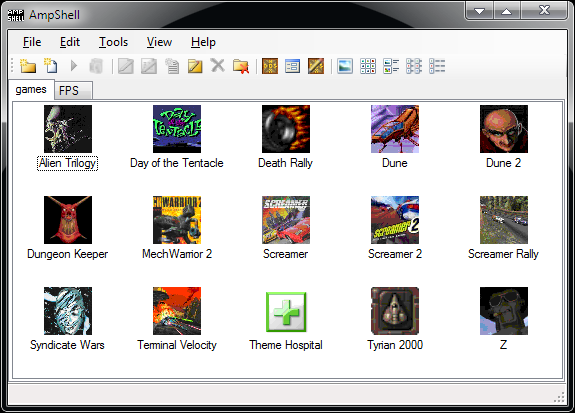
Il s’agit d’un frontend simple et complet pour DosBox et ses clones.


AmpShell1.1


Télécharger AmpShell v1.1.3.1 (1.9 Mo)

Site Officiel

En savoir plus…

Il ne s’agit pas d’un émulateur multi-systèmes mais d’une archive regroupant tous les émulateurs de Takeda.


Elle inclut:


– Emu5: Emulateur de SORD m5
– EmuLTI8: Emulateur de MITSUBISHI Elec. MULTI8
– EmuPIA: Emulateur de TOSHIBA PASOPIA
– EmuPIA7: Emulateur de TOSHIBA PASOPIA7 et LCD
– EmuZ-80B: Emulateur de SHARP MZ-80B
– EmuZ-80K: Emulateur de SHARP MZ-80K
– EmuZ-700: Emulateur de SHARP MZ-700
– EmuZ-800: Emulateur de SHARP MZ-800
– EmuZ-1200: Emulateur de SHARP MZ-1200
– EmuZ-1500: Emulateur de SHARP MZ-1500
– EmuZ-2200: Emulateur de SHARP MZ-2200
– EmuZ-2500: Emulateur de SHARP MZ-2500
– EmuZ-2800: Emulateur de SHARP MZ-2800
– EmuZ-3500: Emulateur de SHARP MZ-3500
– EmuZ-5500: Emulateur de SHARP MZ-5500
– EmuZ-6500: Emulateur de SHARP MZ-6500/6550
– eBabbage-2nd: Emulateur de Gijutsu-Hyoron-Sha Babbage-2nd
– eFamilyBASIC: Emulateur de Nintendo Family BASIC
– eFM-16pi: Emulateur de FUJITSU FM-16pi
– eFMR-30: Emulateur de FUJITSU FMR-30
– eFMR-50: Emulateur de FUJITSU FMR-50
– eFMR-60: Emulateur de FUJITSU FMR-60
– eFP-200: Emulateur de CASIO FP-200
– eFP-1100: Emulateur de CASIO FP-1100
– eHC-20: Emulateur de EPSON HC-20/HX-20
– eHC-40: Emulateur de EPSON HC-40/PX-4
– eHC-80: Emulateur de EPSON HC-80/PX-8/Geneva
– eHANDY98: Emulateur de NEC PC-98HA (HANDY98)
– eJ-3100GT: Emulateur de TOSHIBA J-3100GT
– eJ-3100SL: Emulateur de TOSHIBA J-3100SL
– eJX: Emulateur de IBM Japan Ltd PC/JX
– eMAP-1010: Emulateur de SEIKO MAP-1010
– eMYCOMZ-80A: Emulateur de Japan Electronics College MYCOMZ-80A
– eN5200: Emulateur de NEC N5200
– ePC-8001mkIISR: Emulateur de NEC PC-8001mkIISR
– ePC-8201: Emulateur de NEC PC-8201/PC-8201A
– ePC-8801MA: Emulateur de NEC PC-8801MA
– ePC-9801: Emulateur de NEC PC-9801
– ePC-9801E: Emulateur de NEC PC-9801E/F/M
– ePC-9801VM: Emulateur de NEC PC-9801VM
– ePC-98LT: Emulateur de NEC PC-98LT
– ePC-98DO: Emulateur de NEC PC-9801DO
– ePC-100: Emulateur de NEC PC-100
– ePC-3200: Emulateur de SHARP PC-3200
– ePC-ENGINE: Emulateur de NEC PC-ENGINE / SuperGrafx
– ePHC-20: Emulateur de SANYO PHC-20 emulator
– ePHC-25: Emulateur de SANYO PHC-25 emulator
– ePV-1000: Emulateur de CASIO PV-1000
– EmuGaki: Emulateur de CASIO PV-2000
– ePyuTa: Emulateur de TOMY PyuTa / PyuTa Jr
– ePX-7: Emulateur de Pioneer PX-7 (MSX1 + LaserDisc)
– eQC-10: Emulateur de EPSON QC-10/QX-10
– eRX-78: Emulateur de BANDAI RX-78
– eSC-3000: Emulateur de SEGA SC-3000
– eSCV: Emulateur de EPOCH Super Cassette Vision
– eTK-80BS: Emulateur de NEC TK-80BS (COMPO BS/80)
– eX-07: Emulateur de CANON X-07
– eX1: Emulateur de SHARP X1
– eX1twin: Emulateur de SHARP X1twin
– eX1turbo: Emulateur de SHARP X1turbo
– eYS-6464A: Emulateur de Shinko Sangyo YS-6464A


A cela s’ajoutent les émulateurs suivants :


– yaGAMEGEAR: Emulateur de  SEGA GAME GEAR (by Mr.tanam)
– yaMASTERSYSTEM: Emulateur de  SEGA MASTER SYSTEM (by Mr.tanam)
– yaPC-6001: Emulateur de  NEC PC-6001 (by Mr.tanam)
– yaPC-6201: Emulateur de  NEC PC-6001mkII (by Mr.tanam)
– yaPC-6601: Emulateur de  NEC PC-6601 /SR (by Mr.tanam)


Télécharger Takeda Common Binaries (29/12/2014) (12.2 Mo)

Site Officiel

En savoir plus…

Il s’agit d’un émulateur de V-Tech Creativision et de plusieurs de ses clones : Funvision, Disk Smith Wizzard & consoles Hanimex. L’archive comprend les versions 32 & 64 bits.


vtechemuvtechemu2

Fonctionnalités :

– Démarrage, chargement et sauvegarde de cassette utilisant le langage BASIC
– Interface en ligne de commande, options de sélection et dé-sélection facile
– SDL 2.0 fenêtré ou Textures en streaming plein écran
– LLIST / LPRINT vers fichier
– Enregistrement vidéo pour démonstrations et présentations
– Débogage des jeux maisons en une seule étape
– Affichage des registres du VDP
– Création de capture d’écran pendant le jeu, au format BMP
– Pour les développeurs : extraction du contenu mémoire (Ram et Vram) à partir de n’importe quel endroit
– Capture d’écran du jeu en cours, et conservations de vos scores


Télécharger CreatiVision Emulator (x86 & x64) v0.2.9 (951,8 Ko)

Site Officiel

En savoir plus…

Voici ColEMu, un émulateur Colecovision tournant sous Dos et Windows développé par le célèbre Marat Fayzullin. Sachez que l’émulateur est très complet et qu’il a été développé en C, ainsi un certain nombre de portage ont pu être effectués, en vrac : Unix/X, Amiga, Dreamcast (…).


colem


Changements :
-Added accurate SN76489 noise channel emulation.
-Added RAM-based cheats with AAAA in 0x6000..0x63FF range.
-Added Cheat Hunter tool that lets you search for cheat codes.
-Now properly restoring sound parameters.
-Disabled console window in ColEm-Windows.
-Fixed compilation errors in ColEm-Unix.


Télécharger ColEM v3.3 (124,5 Ko)

Site Officiel

En savoir plus…

De nouvelles traductions sont disponibles chez Generation IX, vous les trouverez sur le site officiel (on en a profité pour repacker les packs de traductions du site).


Site Officiel

En savoir plus…

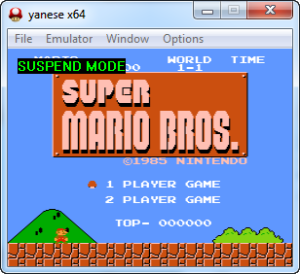
Un « autre » émulateur de NES, tout simplement !


yanese


– Minor bug fixes: Battletoads as well other games run well now.
– No debugger: It wasn’t powerful enough and i did this emulator meant to play, not for dev. Anyway it had some bugs.
– Fixed « Window X » Behavior: Now it works well.


Télécharger Yanese (x86) v0.46 (118,7 Ko)

Télécharger Yanese (x64) v0.89 (490 Ko)

Site Officiel

En savoir plus…

XEiJ (X68000 emulator in Java) est un émulateur de Sharp x68000 écrit en Java.


Les changements (google trad):

– I have to rebuild the stage of CRTC. CRTC IRQ and V-DISP transitions in horizontal front porch. Raster break even H-SYNC in with a transition to the few instructions to several tens after instruction after the break.
– I have changed the process of superposition of the video controller. After selecting a screen that represents either the sprite screen and text screen, superimposed on the graphics screen.
– I added the display mode test. And confirmation of display modes such as CRTC and video controller, I will perform the operation test in any of the test data.
– Output waveform of the sound monitor Scales left-click and right-click in the time direction, and I hold down the Shift key in the amplitude direction.


Télécharger XEiJ v0.14.12.16 (3,1 Mo)

Site Officiel

En savoir plus…


https://getourbonus.com/fr/accueil

https://www.romspedia.com/