
Voilà, après bien des années et de nombreuses demandes de fans, la version NeoGeo CD de l’Universe Bios de Razoola !

Sur le même principe que l’Universe Bios pour MVS/AES, ce bios de remplacement vous permettra de jouer avec vos jeux avec une foule de possibilités supplémentaires (cheats, mode AES/MVS, Vitesse accrue/Protection supprimée…).
Bien que réservé principalement aux possesseurs de la véritable console, ce bios pourra évidemment s’utiliser avec des émulateurs de NeoGeo comme FBA/MESS/RAINE/… (lorsque ceux-ci seront à jour).
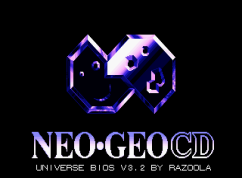
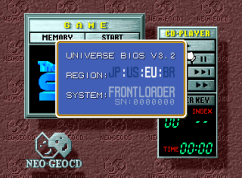
 

cd0001 cd0002


OTHER FEATURES

  • Brings the CDZ style radio screen to Top and Front Loaders.
  • Slightly faster loading on Top/Front Loaders (hardly noticeable but it’s there).
  • The in game menu has all the features of the MVS/AES Universe Bios.
  • An MVS/AES BIOS SWITCH option (see below).
  • Disables CD protection (failing CD drives work in some cases).

LIMITATIONS

  • Does not currently support high score saving.
  • There is no jukebox player, use the Bios CD music payer.
  • 68000 error trapping is not yet included.


Ha, et pour ceux ou celles qui se demanderaient comment faire pour souder le bios sur sa carte mère, une solution toute prête est disponible ici pour un prix tout à faire abordable !


cd0001x


Ce bios est disponible (moyennant finance) sur le site de Razoola.
 

Site Officiel

Lancé en juin 2014, Doallator est un projet d’émulateur multiplateformes. Il devrait par la suite émuler plusieurs consoles différentes en se servant d’une interface commune. Pour l’instant, l’émulateur gère le Chip 8, le Super Chip 8, le Mega Chip8 et la GameBoy (préliminaire).


doallator


Les changements sont les suivants:
– Ajout de dix nouveaux filtres : Filtre 2x + Bilinéaire, Eagle 2x, Eagle 3x, Eagle 3xB, Scale 2x, Scale 3x, AdvInterp 2x, AdvInterp 3x, XBR 2x (+ AlphaBlending), XBR 3x (+ AlphaBlending) et XBR 4x (+ AlphaBlending)
– Application des filtres dans un nouveau thread afin de les rendre beaucoup plus rapide
– Affichage du nombre de FPS et du taux de FPS atteints par rapport aux FPS nécessaires en temps réel dans l’en-tête de la console
– Réorganisation de certains formulaires


Télécharger Doallator v1.21 (775,0 Ko)

Site Officiel

En savoir plus…

La dernière version béta publique de l’excellent WinUAE, célèbre émulateur Amiga. Traduite en Français.


Télécharger WinUAE (Public Beta) v2.9.0 Beta 24 FR (3,8 Mo)

Site Officiel

En savoir plus…

La dernière version béta publique de l’excellent WinUAE, l’émulateur Commodore Amiga.


– Native code Z3 offset was wrong if Z3 mapping was using « real » mode.
– CD32 NVRAM file was not automatically created (b14).
– Added some accelerator board A1200 and A4000 configs to Quickstart.
– Only PCM audio worked (and was always used) when recording audio in non-wave mode.
– Picasso IV in Z3 mode didn’t appear in Z3 autoconfig space.
– Initialize VGA chip emulation earlier, fixes emulator crash when Piccolo board is configured. (Also for some reason Piccolo and Piccolo SD boards are not used by OS4)
– Too large Z2 RTG VRAM value in config file was accepted as valid.
– Show user friendly message if PPC CPU is started without PPC plugin.
– Disassembler decoded FMOVE.x FPy,<ea> incorrectly, FPy was wrong.
– « Untrap = middle button » + « Minimize when focus is lost » + full-window mode didn’t minimize. Only windowed mode should require real lost focus to become minimized.
– GUI appeared under full-window background window.
– Use secondary fast RAM bank for A2620/A2630 accelerator memory, works better with other Z2 boards (like A2091)
– Allow hardware unsupported (total >8M) Z2 total board size. Can happen in real world so it should be available in emulation too.
– Added Z2 autoconfig address validation, log and ignore any autoconfig attempt outside of valid Z2 regions.
– Added 68030 + more compatible CPU core. Previously this combination was unusable.


Télécharger WinUAE (Public Beta) v2.9.0 Beta 24 (4.2 Mo)

Site Officiel

En savoir plus…

Ecrit en Java par Shigekazu Hirao (HAL8999), u80 est un émulateur du premier ordinateur personnel Japonais : le TK-80, mais aussi son évolution le TK-85.


u80_r1_3u80_r1_4


Télécharger u80TK/u85TK Release 1b11 (v1.b.11) (285,9 Ko)

Site Officiel

En savoir plus…

Un émulateur de BK-0010 (un ordinateur familial russe utilisé également dans les écoles et basé sur un PDP-11) écrit par WadiM (site de dev ici).


BK (Soviet home/school, PDP-11 based):
- fixed BIN loading to video memory ("saturn.bin");
- fixed autostart in case of big BIN header ("loto.bin");
- more exact BK keyboard emulation (two keys could be pressed only if option 
  in the "Input" menu selected, else allowed only one key per moment);
- fixed 0177700 register check (R-Type now Ok);
- added option to debug BIOS EMT calls ("Debug" menu), w/o decoding yet;
- CPU registers shown again in debug mode (was bug in previous version);
- fixed MFPS high byte processing (sign extends low byte now, not preserves);
- fullscreen mode support (Alt+Enter or via menu);


Télécharger SPC Emulator (BK-001X) v0.97 Plus (05/11/14) (650,7 Ko)

Site Officiel

En savoir plus…

Un émulateur de Korvet basé sur l’architecture i8080 et l’environnement CP/M, écrit par WadiM (site de dev ici).


Korvet (Soviet school, could-be MSX):
- added Korvet Z80 configs;
- CPU registers shown again in debug mode (was bug in previous version);
- added MEM(ORY) command to console (shows current memory layout);
- added CPM command to console (shows CP/M-relatad information);
- added option to debug CP/M BDOS calls ("Debug" menu), w/o decoding yet;
- sync frequency removed from "Computer" menu as deprecated;
- fullscreen mode support (Alt+Enter or via menu);


Télécharger SPC Emulator (Korvet) v0.97 Plus (05/11/14) (638,4 Ko)

Site Officiel

En savoir plus…

Ecrit en Java, j80 est un émulateur précis, axé sur la série d’ordinateurs japonais NEC PC-8000. j80 dispose d’excellente fonctions de traçage et de débogage. Il gère aussi le PCG8100.


j80


Changements (google trad) :

[Release 6.20] Ver. 6.2.7 2014.11.15
——————————————————————————
· The emulator side control logic of that involved in the debugger GUI I was adjusted
Old: I release the pause implicit when the memory editor is no longer active
Shin: The ~ main window, when the tracer is activated
Additional: I release the pause implicit when the memory editor is closed
– I have changed the internal implementation of the automatic type function
• If you have had / input file to read the files in a batch will be released soon
· It corresponded to a long string that does not contain a newline
• During automatic type behavior in the case where the Roman character input, etc. has changed
Old: it is inserted after the line break immediately after
New: inserted after the type until the end of the file (much to be ignored by the buffer Full case of)
· I was the clipboard of the content adds the ability to auto-type
You may have to garbled under the influence of such implementation and character code of the copy source apps
Was introduced the N-Font, you are editing in Hidemaru (European), EditPad Lite (windows-1252)
If so, we have confirmed that there is no problem
Even if you are editing in Shift-JIS and UTF-8, etc., Kana (part that is not garbage on the screen)
It should Correll to have
· You have changed the notation of the disassembler (in the trial)
Hexadecimal: $ * → 0 * H
Binary number:% ???? _ ???? → ???? _ ???? B
Notation of disassembler for traces (in the context of display space) is directly


(Source : Anna Wu)


Télécharger j80 – PC-8000 Series Emulator Release 620 (v6.2.7) (541,3 Ko)

Site Officiel

En savoir plus…

GroovyMAME est un émulateur d’arcade basé sur MAME et qui se focalise sur le rendu sur écran CRT (Moniteur de PC ou d’arcade avec fréquence particulière) car les auteurs sont convaincus que la technologie CRT est un must quand il s’agit de profiter de l’émulation dans toute sa splendeur. Cependant GroovyMAME peut être utilisé également sur écran LCD (principalement sur les modèles qui permettent un rafraîchissant à des taux personnalisés).


A noter que des LiveCD sont également disponibles sur le site officiel.


Changements :

GroovyMAME
– Updated to latest MAME | MESS Source.


SwitchRes
Support for rotated desktops (Windows & Linux).
– E.g. if you have your desktop rotated 90º, launch GroovyMAME like this: groovymame.exe 1942 -monitor vertical -aspect 3:4
(« Magic » resolutions won’t work with rotated desktops. If you’re still using them we encourage you to move to « super » resolutions).


Finally proper support for « super » resolutions (Windows & Linux):
– Fix for modeline scoring to properly select the best available « super » resolution.
– Fix for blank UI due to wrong scaling when in rotated mode and using « super » resolutions.
– Fix for vector games that didn’t show when using « super » resolutions.


Moved our official build to SDL2 (Linux):
– Fix for SDL2 broken waitvsync feature, now we perform vsync through DRM.
– Fix for SDL2 broken mode switching feature while in fullscreen.
– Added support for asynchronous rendering (equivalent to -triplebuffer in Windows).


Full logs back in working order.


Télécharger GroovyMAME (x86) v0.155 SwitchRes v0.015c (15.9 Mo)

Site Officiel

En savoir plus…

GroovyUME est un émulateur multi-systèmes basé sur UME et qui se focalise sur le rendu sur écran CRT (Moniteur de PC ou d’arcade avec fréquence particulière) car les auteurs sont convaincus que la technologie CRT est un must quand il s’agit de profiter de l’émulation dans toute sa splendeur. Cependant GroovyUME peut être utilisé également sur écran LCD (principalement sur les modèles qui permettent un rafraîchissant à des taux personnalisés).


A noter que des LiveCD sont également disponibles sur le site officiel.


Changements :

GroovyMAME
– Updated to latest MAME | MESS Source.


SwitchRes
Support for rotated desktops (Windows & Linux).
– E.g. if you have your desktop rotated 90º, launch GroovyMAME like this: groovymame.exe 1942 -monitor vertical -aspect 3:4
(« Magic » resolutions won’t work with rotated desktops. If you’re still using them we encourage you to move to « super » resolutions).


Finally proper support for « super » resolutions (Windows & Linux):
– Fix for modeline scoring to properly select the best available « super » resolution.
– Fix for blank UI due to wrong scaling when in rotated mode and using « super » resolutions.
– Fix for vector games that didn’t show when using « super » resolutions.


Moved our official build to SDL2 (Linux):
– Fix for SDL2 broken waitvsync feature, now we perform vsync through DRM.
– Fix for SDL2 broken mode switching feature while in fullscreen.
– Added support for asynchronous rendering (equivalent to -triplebuffer in Windows).


Full logs back in working order.


Télécharger GroovyUME (x86) v0.155 SwitchRes v0.015c (21,2 Mo)

Télécharger GroovyMAME (x64) v0.227 SwitchRes v0.017t (58.1 Mo)

Site Officiel

En savoir plus…

Free42 est une ré-implémentation de HP-42S et de l’imprimante HP-82240. Free42 est une réécriture complète et ne contient aucun code HP. Les versions de Free42 s’exécutent sur Pocket PC, Microsoft Windows, PalmOS, Unix, et Mac OS X (application et widget Dashboard).


free42


Changements :

– Decimal version: Fixed ACOS. It would return 0 for acos(-1).


Télécharger Free42 v1.5.5 (4,3 Mo)

Site Officiel

En savoir plus…

Egalement disponible sous Linux, Xpeccy est un excellent et complet émulateur de Sinclair Zx Spectrum dont voici les nombreuses fonctionnalités.

Forum alternatif


xpeccy


Changements :

new build: 20141114
– corrected beeper, noflic and grayscale filters.
– debugger is partially remade.
– added breakpoints at read/write memory address.
– corrected screen layout.


PS : A noter qu’Xpeccy dispose désormais d’un site !


Télécharger Xpeccy v0.5 (2014/11/14) (7,0 Mo)

Site Officiel

En savoir plus…


https://getourbonus.com/fr/accueil

https://www.romspedia.com/

