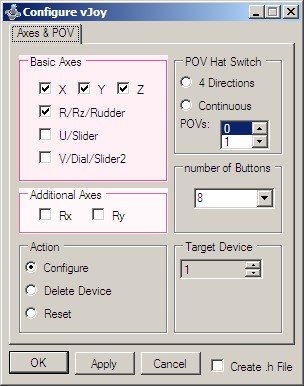
Il s’agit d’un pilote virtuel qui permet d’émuler les manettes et joysticks. L’avantage sur xPadder ou Joytokey est principalement sa gratuité.
Changement:
– Periodic update of position data – as outcome: default positions
0 commentaire



Il s’agit d’un pilote virtuel qui permet d’émuler les manettes et joysticks. L’avantage sur xPadder ou Joytokey est principalement sa gratuité.
Changement:
– Periodic update of position data – as outcome: default positions

Depuis 2000, La collection TOSEC est un des plus grand projets existants de préservation des roms & isos (avec Redump.org, Gamebase & Trurip).
TOSEC Status
Last Release
date: 2014-02-28
dats: 2,265
sets: 616,203
roms: 722,008
size: 4.36 TB
TOSEC-Main
dats: 1,296
TOSEC-ISO
dats: 160
TOSEC-PIX
dats: 809
The Old School Emulation Center
28/02/2014
Hello, and welcome to a brand new TOSEC release!
Lots of work continues on Commodore. Many thanks once again to the tireless
efforts of Crashdisk, mai, Duncan Twain and Vicman. We also have some nice new
additions from mictlantecuhtle and lots of SHA-1 corrections from Cassiel.
On the ISO side, Maddog has updated the Sega Dreamcast and NAOMI.
On the PIX side, Aral and friends have contributed a huge number of new and
updated DATs.
Many thanks to everyone who has contributed new images or offered any error
reports. Even though not all of these have been actioned/added to this release,
we promise to get to all these just as soon as possible! Your continued support
is genuinely appreciated.
All folders and contents should be self explanatory. All necessary CUEs are also
included. There are also some scripts included to assist in creating TOSEC folders,
and some ‘move’ scripts for those of you using RomVault.
For all the latest work-in-progress news, as well as expanded details on all
upcoming changes and additions, keep up to date by visiting us at: www.tosecdev.org
Enjoy!
The TOSEC Team
Il s’agit d’une interface graphique écrite par Tyler J. Stachecki et destinée à l’émulateur de Nintendo64 nommé CEN64.
– Various bugs fix
-Clean up config file
MEAGRE (pour Multiple Emulator And Game Runner Environment) est une interface graphique supportant un ensemble d’émulateurs parmi lesquels on trouve:
DOSBox
ScummVM
WinFrotz
MAME
MESS
Gameboy Advance Emulators
NES emulators
SNES emulators
N64 Emulators
Sega Master System emulators
Apple II
Atari 2600 emulators
Atari 5200 emulators
Windows Based Executables
Il s’agit d’un éditeur de table pour Flippers.
– this is the final release to be based on DirectX 7
– add « To Collection » to the context menu to assign a selected element to a collection
– add moving of single selected collection in the collection manager
– add CurrentAngle() function to the gate object
– add « Is Toy » checkbox to disable collision handling on mesh primitives completely.
– add collision detection to mesh primitives together with hit threshold and hit event
– add Z offset to the backdrop options. With this settings you’re able to zoom in/out the table without changing FOV/Inclination/Layback settings
– add Z scale option to the backdrop options. With this setting you’re able to reduce/increase the overall depth of a table.
– add table dimension manager for an easy way to calculate real table dimensions into VP table units and vice versa
– add a ball throwing feature to VP. To use it check « Throw Balls in Player » in the debug window (ESC -> « Debug Window ») and by left clicking and holding the left mouse
button you create a new ball and it throws the balls in that direction you move the mouse cursor when you release the left mouse button. If you click on a non
moving ball you can reuse that ball and no new calls will be created. A right click on a ball will remove that ball from the table.
– add touch support for tablets (windows 8 and upwards)
current mapping:
upper left – add credit
middle upper left – left magna save/2nd button
middle lower left – left flipper
lower left – start
upper right – quit (press for 2 seconds to exit VP completely)
middle upper right – right magna save/2nd button
middle lower right – right flipper
lower right – plunger
– add Alpha-Flasher element. Use this element to add (additive) alpha flashers instead of abusing the alpha ramp element. The flasher is a ‘dynamic’ element, that means it is not pre-rendered
and it’ll be updated every frame.
Limitations:
If ‘Display Image In Editor’ option is selected and the flasher is rotated the image won’t rotate due to a DX7 limitation.
If the flasher is not an additive alpha flasher you can colorize the image with ‘Color’ if you don’t want that effect set the color to blank white (RGB 255,255,255).
– add height offset to bumper element
– add additional (optional) parameters to PlaySound to increase/decrease the frequency, apply all the settings to an already playing sample and choose if to restart this sample from the beginning or not
all parameters are now: PlaySound « name »,loopcount,volume,pan,randompitch,pitch,useexisting,restart
pitch can be positive or negative and directly adds onto the standard sample frequency
useexisting is 0 or 1 (if no existing/playing copy of the sound is found, then a new one is created)
restart is 0 or 1 (only useful if useexisting is 1)
– per table setting of adaptive vsync (-1 = default, 0 = off, 1 = automatic detection, anything else: refresh rate in Hz)
– change per table settings for AA, FXAA and ball reflection (-1 takes the default from the video preferences, 0 forces off, 1 forces on)
– tweak key input code to save one frame (or more?) of lag
– change the old ‘Physics Max.Looptime’ setting to ‘Physics Max. Loops’
it allows to specify the maximum number of iterations spent in the physics update.
by setting it f.e. to 1, the rendered frame updates will -always- match the physics updates, everything above 1 allows for multiple physics updates per frame
(2, 3 or 4 can be good values for this, as it slows down the physics temporarily if the FPS drop below 50, 33 or 25 in these cases).
– import/export of global physics options sets
– import/export of local/table physics options sets (that could then be reused globally of course and the other way round)
Note that for local/table export the first found flipper is used to export the flipper physics settings (and for import all flippers will be assigned with the same settings)
– add optional ball trails/motion blur (also adjustable per-table)
– add script option ‘DisableLighting’ for balls to disable lighting. This also allows to change the color of the ball via ‘Color’ directly
– add enabled flag to flippers
– separate/new texture maps for the lighting of lights (more details) and bumpers (brighter)
– fix problem with DMD/VPinMAME window being hidden behind VP window
– secondary/backglass sound output (by DJRobX)
if a sound effect contains ‘bgout_’ in the name or ‘* Backglass Output *’ in its path then it is played via the secondary sound output (music always)
this can also be done with existing tables by using the new ‘To BG Out’ button in the sound manager
– script editor updated to use latest scintilla (3.3.9)
pfeMame (écrit par Gareth Finch) est un frontend pour MAME, écrit en Python. Il est multiplateforme (testé sur Linux – Ubuntu et Windows XP). Il comprend également une interface graphique destinées aux MameCab qui permet le contrôle à l’aide joystick / manette.
PinballX est un frontend gratuit pour jeux de flippers numériques développé par l’auteur de GameEx. Il est compatible avec les bases de données et les médias disponibles pour HyperPin.
GameEx est une interface graphique pour vos émulateurs. Elle sert également de lecteur vidéo, DVD et CD. Elle lit aussi les fichiers audio. – GameEx supporte les affichages LCD/VFD, ArcadeVGA. – Elle peut adapter son affichage pour les écrans larges, elle peut aussi tourner l’affichage de 90° (vertical). – Elle peut être contrôlée à distance, ou par une manette ou par la souris uniquement. – Elle supporte les contrôleurs arcade : HotRod, X-Arcade, SlikStik et IPAC. – Elle est compatible avec les interfaces entre PC et cartes arcade : U360, I-PAC, J-PAC. – Elle intègre un Jukebox qui supporte les fichiers ogg, mp3, wma, m4a, et flac. Les musiques peuvent être lues et changées pendant que vous êtes en train de jouer Ce frontend est disponible en version gratuite & payante (17 $) incluant de nombreuses autres fonctions.
News reprise intégralement chez BRD:
Attention, bonne affaires en perspectives chez nos amis de DotEmu !
En effet, DotEmu fêtent leur 7eme anniversaire. Pendant 7 jours (il en reste encore 2), nous auront le droit à de grosses promotions sur les catalogues mobiles et PC.

Concrètement, vous trouverez pour vos mobiles iPhone ou Android, les jeux Another World, Raiden Legacy, Double Dragon Trilogy, R-Type ou encore le dernier Gobliiins Trilogy à 0,89€ soit 80% de réduction. Sur PC, c’est pas moins de 150 jeux qui vous sont proposés, allant parfois jusqu’à 70% de réduction. Beaucoup de bon titres, comme Raiden Fighters, les Phantasy Star, les pack DotEmu Exclusive Genesis, les jeux Megadrive Streets of Rage 1 et 2 etc… que du bon !
Consulter le catalogue de jeux en promotion sur AppStore et Google Play.
Consulter le catalogue de jeux en promotion pour PC.
La troisième édition du Re-play festival aura lieu à MOUANS-SARTOUX dans le 06, tout le week-end du 16 et 17 Mars, de 10:00 à 19:00… A voir, à faire, et à refaire… pour rêver, jouer et rejouer…
Toutes les consoles de notre jeunesse, flipper, bornes d’arcades sur 1500m² de bonheur…
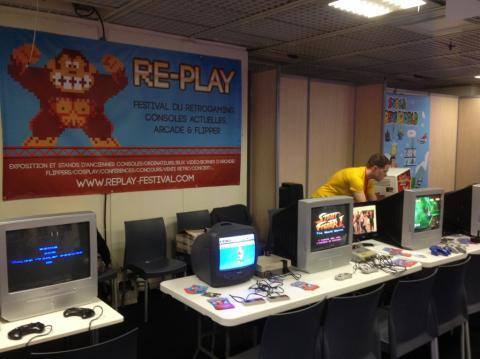

Ateliers réparations, concours Bomberman sur écran géant l’année dernière, quelques fans en cosplay, arcades, flippers, consoles, et quelques magasins de pièces ou consoles ‘alternatives’…
Bref, un événement à ne pas louper…
RPCS3 a pour objectif de devenir un émulateur de Playstation 3 complet même s’il reste un chemin énorme avant d’y parvenir. Pour le moment il fait principalement office de désassembleur, la première marche vers un début d’émulation. N’espérez donc pas jouer à un jeu commercial avant longtemps, toutefois il commence à exécuter quelques jeux amateurs.
Télécharger RPCS3 (32 bits) v0.0.0.4 (2014/06/02) (3.1 Mo)
Télécharger RPCS3 (WIP) v0.0.43 Alpha (2026/11/25) (35.6 Mo)
Un gestionnaire de roms avec une interface aussi claire que Romcenter et axé sur la simplicité avec un nombre limité de fonctions. Une référence désormais.
L’immense avantage de ce manager est de pouvoir scanner n’importe quel repertoire de roms , en VRAC & ensuite -en fonction de ce que vous avez comme dats- de les ranger et replacer automatiquement. (très utile si vous avez des tonnes de dats (TOSEC). Il vous permet réellement de collectionner des centaines de collections avec un gain de temps considérable par rapport aux autres managers. Il convertit également les zips au format Torrentzip afin de faciliter le partage à travers les fichiers torrent.

– Happy Fat Tuesday, and here is a quick bug fix update, fixed a couple of bug that caused the fix engine to crash when fixing files.
– Fixed renaming a file if it was needing the case of some characters changed.
– Fixed moving files out to ToSort

