Play! est une tentative de créer un émulateur PlayStation 2 sous Windows / MacOS / iOS / Android. Il est actuellement écrit en C / C + + et utilise un système de mise en cache / de recompilation d’instruction pour obtenir de meilleures performances tout en émulant le CPU.
L’émulateur peut faire fonctionner quelques jeux, mais très moyennement dans la plupart des cas. L’objectif de l’auteur est d’atteindre un niveau de qualité qui permettra à quiconque de jouer son jeu favori PlayStation 2 sur son PC.
– Style fix.
– Implement FBA GS register.
– Remove fp dst color.
– Move code around to make it clearer.
– Name some more variables.
– Name variables.
– Fix blending formulae and test color clamping.
– Update Nuanceur submodule.
– Blend using integer values.
– Cleanup.
– Fixes / Cleanup
Foobar2000 est un lecteur de prime abord minimaliste. Son interface est des plus sobre avec la seule présentation d’une liste de lecture alors que la barre de progression et les boutons de contrôle peuvent n’être que des caractères textuels. Il supporte de nombreux formats sonores (notamment les formats audio d’anciennes machines) grâce à l’ajout de plugins.
Cette légèreté permet bien sûr à Foobar2000 d’être l’un des lecteurs MP3 les plus léger en termes de ressources mémoire / processeur, mais il ne faudrait pas croire que cela le contraint au minimum syndical. Le fonctionnement par plugins de ce lecteur lui permet d’être incroyablement modulaire et d’intégrer un nombre impressionnant de fonctions.
De nombreux formats audio en rapport avec l’émulation sont parfaitement supportés.
Les changements:
– Built-in WASAPI exclusive output.
– Rewritten entirely in beta 7, old beta1-6 bugs should be gone.
– Added ‘smart stop’ option in Advanced Preferences; press stop key once to stop-after-current, twice to stop now.
– Fixed WavPack lossy not working regression from 1.6.6.
– Made Output preferences reflect output device changes made by output picker toolbar. (beta 5)
– Allowed per-track REM COMMENT in cuesheets. (beta 6)
– HLS radio bug fixes. (beta 6)
– Fixed crashing on failed paste operations in Properties dialog. (beta 6)
– Fixed incorrect handling of UTF-8 file names inside ZIP archives. (beta 6)
– Removed 8-bit output option. (beta 7)
– Fixed inaccurate preamp decibel formatting in Converter setup dialog. (beta 7)
– Prevented popup of Preferences page prompting for a valid output device if the audio device was unplugged with foobar2000 in background. (beta 13)
– Added .weba (WebM audio) to recognied extensions. (beta 15)
– Fixed issues with playing certain streamed M4A files. (beta 16)
m64p (ou Mupen64Plus-GUI) est une interface graphique écrite en Qt5. Elle supporte tout ce que vous attendez d’une interface mupen64plus (sélection de plugins, édition de la configuration, gestion des sauvegardes, capture d’écran, pause, etc.).
Cette archive inclut Mupen64Plus + ParaLLEl-RDP + une interface utilisateur.
Notez que la dernière archive incluant le plugin GlideN64 est disponible ici.
– Updates to Parallel RDP from the upstream repo
– Misc Fixes
Les améliorations: – Old Color TV filter is ON by default (can be turned off in preferences)
– added support for interlace TV output (by default ON)
– improvement of border render
– added stereo sound for AY-channels (ABC by default, it is possible turn on ACB)
– embedded JDK updated to Liberica OpenJDK 16.0.2+7
– minor refactoring and improvements
Créé par Exzap (et aidé par Peter Gov), il s’agit du second émulateur de Wii U à être disponible au public mais le premier à émuler des jeux commerciaux. Il peut décrypter les images Wii U qui utilisent le format Wud mais également les fichiers RPS ou RPL. La résolution interne peu aller jusqu’à 1920×1080 selon les jeux (et au delà avec des packs graphiques). Actuellement, le DRC (GamePad), le contrôleur Pro et le contrôleur classique sont émulés. Les Wiimotes sont également émulées (y compris le support natif). Les entrées du clavier + contrôleurs USB en tant que périphériques d’entrée sont également pris en charge. La saisie tactile du GamePad peut être contrôlée par un clic gauche de la souris. La fonctionnalité Gyro est émulée avec des limitations et peut être contrôlée via le bouton droit de la souris. Cette version n’est compatible que pour les Windows x64 (à partir de Windows 7) avec une carte graphique gérant OpenGL 4.1 (ou supérieur) ou Vulkan et il faudra posséder 4 à 8 Go de mémoire vive (Ram) pour le faire fonctionner. (Correspondance ID-Titre [archive ici]).
En résumé: – More accurate Wii U system fonts (using Cemuhook’s shared fonts)
– Bug fixes & many smaller improvements
En détails:
New in 1.25.1c:
UI: Cemu will inform the user about the available Cemuhook update if an outdated Cemuhook installation is detected
New in 1.25.1b:
general: A side effect of upgrading wxWidgets was that it broke compatibility with Cemuhook
This hotfix prevents outdated Cemuhook from crashing Cemu
You can get an updated version of Cemuhook for 1.25.1 on https://cemuhook.sshnuke.net/
New in 1.25.1:
general: We now ship with Cemuhook’s shared fonts as the default system fonts
Our previous placeholder font was incomplete and lacked some special characters as well as many non-latin characters
Credits go to rajkosto for creating the fonts and hand-drawing the Nintendo specific glyphs
general: Fixed an issue where Cemu would create the mlc directory at the default location before the user set a location in the ‘Getting started’ window
general: Improved robustness of title/update installer. It should no longer crash when encountering unexpected errors
AX: Fixed behavior of AXGetVoiceLoopCount()
Resolves an issue where animations would reset or skip ahead in Splatoon and Super Mario Maker (#15)
This change may also positively affect games that are prone to random sound corruptions (e.g. Paper Mario Color Splash)
GX2: GX2ResetGPU() will no longer softlock Cemu
Games occasionally call this API if they believe the emulated GPU is stuck (e.g. due to excessive shader compilation stutter)
Seen in Xenoblade Chronicles X, Mario Tennis and Darksiders 2
UI: Removed precompiled shaders option from UI as it had no effect on Vulkan. There was also no reason to set it to anything but the default (auto) on OpenGL
This is just a UI change, none of the actual shader caching mechanics were changed
UI: Clicking the download graphic packs button in the ‘Getting started’ window will correctly open and show the graphic packs window
Previously the gfx pack window would either not open at all or show up empty
misc: Upgraded wxWidgets (GUI library) to version 3.1.5
This may resolve crashes that some users have been experience when accessing any file or folder selection dialog
Note:
(#xx) refers to resolved bug tracker issues. See http://bugs.cemu.info/projects/cemu/
A noter que des packs graphiques haute définition sont disponibles ici. Ils permettent, entre autre, d’augmenter la résolution native des jeux car contrairement à Dolphin et parce que la machine est techniquement différente il n’est pas possible à Cemu d’augmenter la définition autrement que par cette méthode.
A l’inverse, des packs SD (définitions standards et/ou basses) sont disponibles sur ce lien et permettent à certains PC manquant de performance de lancer des jeux en 60 FPS.
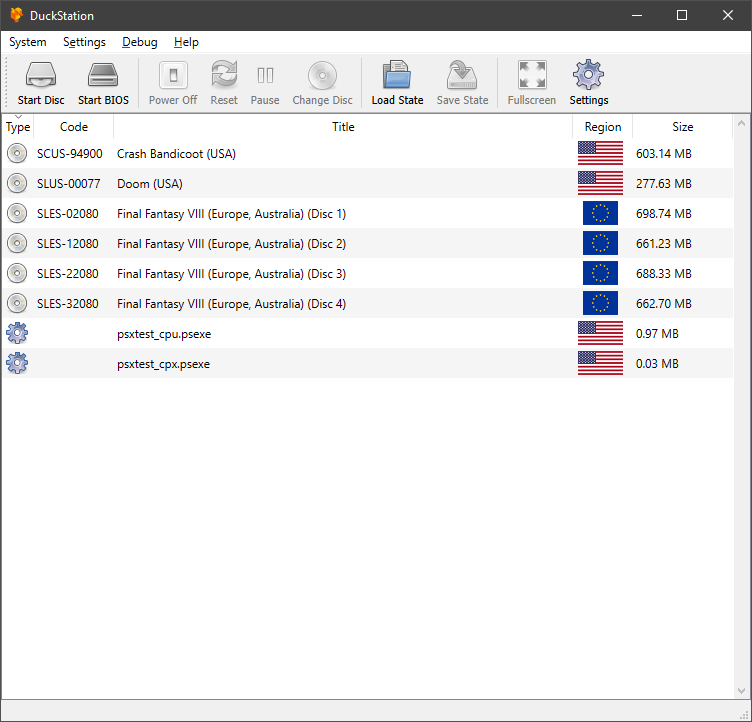
Il s’agit du meilleur émulateur de PlayStation One, devant ePSXe et pSX.
Caractéristiques: – CPU Recompiler/JIT (x86-64, armv7/AArch32 and AArch64)
– Hardware (D3D11, OpenGL, Vulkan) and software rendering
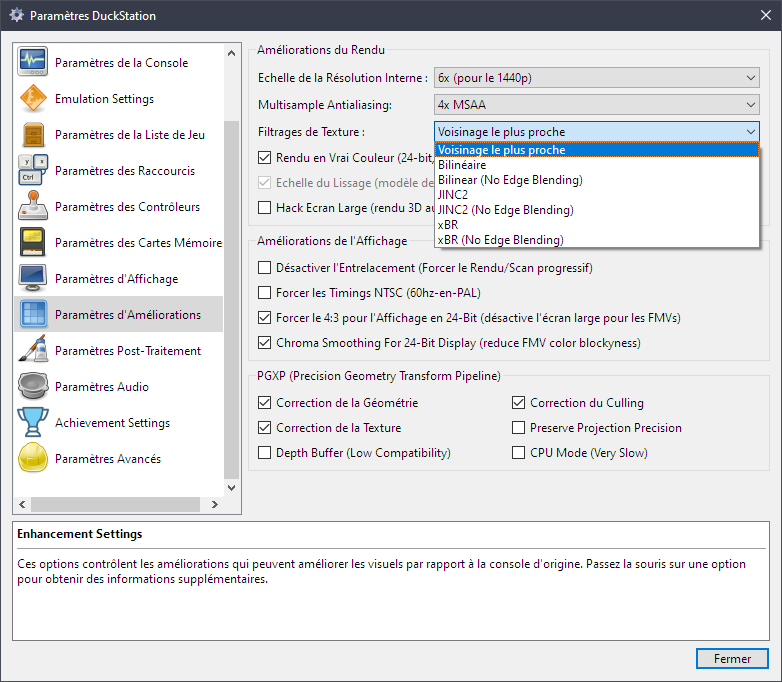
– Upscaling, texture filtering, and true colour (24-bit) in hardware renderers
– PGXP for geometry precision, texture correction, and depth buffer emulation
– Adaptive downsampling filter
– Post processing shader chains
– « Fast boot » for skipping BIOS splash/intro
– Save state support
– Windows, Linux, highly experimental macOS support
– Supports bin/cue images, raw bin/img files, and MAME CHD formats.
– Direct booting of homebrew executables
– Direct loading of Portable Sound Format (psf) files
– Digital and analog controllers for input (rumble is forwarded to host)
– Namco GunCon lightgun support (simulated with mouse)
– NeGcon support
– Qt and NoGUI frontends for desktop
– Automatic updates for Windows builds
– Automatic content scanning – game titles/regions are provided by redump.org
– Optional automatic switching of memory cards for each game
– Supports loading cheats from libretro or PCSXR format lists
– Memory card editor and save importer
– Emulated CPU overclocking
– Integrated and remote debugging
– Multitap controllers (up to 8 devices)
– RetroAchievements
Configuration requise: – A CPU faster than a potato. But it needs to be x86_64, AArch32/armv7, or AArch64/ARMv8, otherwise you won’t get a recompiler and it’ll be slow.
– For the hardware renderers, a GPU capable of OpenGL 3.1/OpenGL ES 3.0/Direct3D 11 Feature Level 10.0 (or Vulkan 1.0) and above. So, basically anything made in the last 10 years or so.
– SDL, XInput or DInput compatible game controller (e.g. XB360/XBOne). DualShock 3 users on Windows will need to install the official DualShock 3 drivers included as part of PlayStation Now.
Les améliorations sont:
Preview Build:
– 106dc29: Fixed cheat type 52 only working with 1st subtype (PugsyMAME) #2460
– cbfd602: Tiny ‘fix’ – README.md (Anderson_Cardoso) #2461
– a5f2f5d: Update localization READM.md (Anderson_Cardoso) #2462
– Fix crash in FS UI when scale changes (Connor McLaughlin)
– 494b6e0: GPU/Vulkan: Add complete VK_EXT_debug_utils API entry points (Wunkolo) #2438
– 9808918: GPU/Vulkan: Add debug utility functions (Wunkolo) #2438
– 7152ab9: Android Arrays (Anderson_Cardoso) #2464
– 3fed0d7: Android Strings (Anderson_Cardoso) #2466
– ad591f5: Atualização Português do Brasil (Anderson_Cardoso) #2470
– cf5e291: Update Turkish localization (Anderson_Cardoso) #2471
– 7025cc3: Improved Cheat Memory Scanner functionality (PugsyMAME) #2460
– f835db6: Improved Cheat Memory Scanner functionality (PugsyMAME) #2478
– 0576cb6: Update compatibility list (Connor McLaughlin)
– Add debug/debugfast build tag to title bar (Connor McLaughlin)
– Add regression test runner/checker (Connor McLaughlin)
– Disable rewind on 32-bit ARM/Android (Connor McLaughlin)
– Silence fast forward/turbo messages when using FS UI (Connor McLaughlin)
– 8bea6e1: GPU/Vulkan: Fix warnings introduced by #2438 (Connor McLaughlin)
– Add onscreen indicator for rewind (Connor McLaughlin)
Development Build:
– Fix debug console toggling not applying (Connor McLaughlin)
– 26a8f8d: Common/Log: Restore old console behavior (Connor McLaughlin)
– 77eb8e4: Common/Log: Rewrite for better unicode handling (Connor McLaughlin)
– Fix invalid TOC for multi-track discs (Connor McLaughlin)
– 642f804: Common/Log: Fix compilation on Android (Connor McLaughlin)
– Fix event list getting unsorted on Delay (Connor McLaughlin)
– a542fa8: CPU/CodeCache: Fix crash when switching from interpreter to recompiler (Connor McLaughlin)
Cette extension shell ajoute quelques fonctionnalités intéressantes aux navigateurs de fichiers pour la gestion des images de disques et de ROM de jeux vidéo.
Bug fixes:
– Fix a division by zero when reading PSP CISO/CSO images.
– This bug was reported by @NotaInutilis in issue #286.
– Fix a crash in the BC7 and PVRTC image decoders if the image dimensions were not a multiple of the tile size.
– rp-download: Allow clone3(), which is needed on systems that have by glibc-2.34.
Other changes:
– GTK+ frontends now use libgsound if available.
– Experimental support for GTK4 has been added. It’s not available by default (configuration is commented out in CMake), since none of the major file browsers support GTK4 yet.
Un émulateur Sam Coupe tournant sous Windows et développé en Open Source. Le site de développement se trouve ici.
Les changements: – fixed missing video update before display memory changes.
– fixed CPU emulation of undocumented BIT instructions (#56)
– fixed media warnings for unattached devices (#24)
– fixed unwanted ROM symbols in user code (#26)
– fixed ATA device revision string not showing date correctly.
– fixed menu issues, usually seen as duplicate entries [Win32].
– fixed disassembly of some DDCB undocumented instructions.
– restored full double register display in instruction trace (#55).
– added samdos2 symbols to debugger (#44)
– added address symbols to trace view (#43)
– added proper version number to About (#45)
– added hidden option to simulate disk read errors, for developers.
– added SAMdiskHelper version check to recommend upgrade [Win32].
– improved dosboot to only trigger in ROM1.
– increased menu MRU from 6 to 9 items [Win32].
– fixed main screen memory contention alignment (#54).
– fixed debugger single-stepping just index prefixes (#53).
– fixed instruction trace showing double registers when only half changed.
– fixed step-out feature in debugger.
– fixed debugger benchmark mode still processing interrupts.
– fixed cancelled line interrupt end event showing in debugger.
– added ‘tryvrr’ option (default=true) to try Variable Refresh Rate video.
– added Ctrl modifier to run more instructions using the KP4/5/6.
Il s’agit d’un émulateur multi-systèmes qui émule les machines suivantes :
– CDP18S020 Evaluation Kit
– Cidelsa
– COMX-35
– COMIX-35
– Cosmac Elf
– Cosmac Elf 2000
– Cosmac VIP
– Cosmac VIP II, prise en charge des versions ‘ED’ et ‘RCA’
– Cosmicos
– ETI 660
– FRED 1
– FRED 1.5
– Infinite UC1800
– MCDS, Microboard Computer Development System
– Membership Card
– Microboard System, prise en charge des CPU CDP18S600 à CDP18S610
– Microtutor
– Microtutor II
– MS 2000, MicroDisk Development System
– Netronics Elf II
– Oscom Nano
– Pecom 32 and 64
– Quest Super Elf
– RCA Coin Arcade
– RCA Studio II
– RCA Studio III / Victory MPT-02
– RCA Studio IV
– Telmac TMC-600
– Telmac 1800
– Telmac 2000
– VELF
– VIP2K Membership Card
– Visicom COM-100
A l’instar de MAMEinfo pour MAME(Arcade), le fichier MESSinfo vous permet de suivre les changements entre les versions concernant les différents systèmes émulés par MAME (partie consoles et ordinateurs).