Voici les derniers émulateurs (et aussi les plus fréquemment mis à jour) en cours de développements.



VDosplus: Emulateur de DOS.

Citra: Emulateur de 3DS.

Vvctre: Emulateur de 3DS (basé sur Citra).

Decaf: Emulateur de WiiU.

RPCS3: Emulateur de Playstation 3.

Redream: Emulateur de Sega Dreamcast.

Reicast: Emulateur de Sega Dreamcast préliminaire.

Flycast: Emulateur de Sega Dreamcast préliminaire.

CXBX: Emulateur de Microsoft X-Box.

Xenia: Emulateur de Microsoft X-Box 360.

Cen64: Emulateur de Nintendo 64 Préliminaire.

Yuzu: Emulateur de Nintendo Switch Préliminaire.

Ryujinx: Emulateur de Nintendo Switch Préliminaire.

Vita3K: Emulateur de Sony PS Vita Préliminaire.

Avocado: Emulateur de Sony Playstation Préliminaire.

DuckStation: Emulateur de Sony Playstation Préliminaire.

Play!: Emulateur de Sony Playstation 2 Préliminaire.

DobieStation: Emulateur de Sony Playstation 2 Préliminaire.

GPCS4: Emulateur de Playstation 4 Préliminaire.

PS4 Delta: Emulateur de Playstation 4 Préliminaire.


Télécharger vDosPlus (2018/03/01) (1.8 Mo)

Télécharger Citra (Final build) (2024/03/07) (140 Mo)

Télécharger Vvctre r56 (4.7 Mo)

Télécharger Decaf-Emu Build 231109 (40.8 Mo)

Télécharger RPCS3 (WIP) v0.0.43 Alpha (2026/11/11) (35.5 Mo)

Télécharger Redream v1.5.0.1239 (3.1 Mo)

Télécharger Reicast (x86) (2020/05/31) (1.3 Mo)

Télécharger Reicast (x64) (2020/05/31) (1.5 Mo)

Télécharger Flycast v2.7 (9.4 Mo)

Télécharger Xenia v1.0.2844 (2026/11/11) (3.6 Mo)

Télécharger CXBX Reloaded (WIP) v0.1.0 (2026/04/21) (4.4 Mo)

Télécharger Cen64 (WIP) (2022/10/02) (2.6 Mo)

Télécharger Cen64 (Debugger) r2015.01.18 + (DEV) r2017.04.23 (3.4 Mo)

Télécharger Yuzu (Final WIP build) (2024/03/xx) (112 Mo)

Télécharger Ryujinx Build 1.1.1403 (190 Mo)

Télécharger Vita3K v0.2.1 (2026/11/11) (36.4 Mo)

Télécharger Avocado (x86) r784 (2.2 Mo)

Télécharger Avocado (x64) r784 (2.4 Mo)

Télécharger DuckStation v0.1 build 12XXX (71.6 Mo)

Télécharger Play! (x86) GIT v0.77 (2026/10/25) (8.9 Mo)

Télécharger Play! (x64) GIT v0.77 (2026/10/25) (10.3 Mo)

Télécharger DobieStation v0.0.1619 (15.9 Mo)

Télécharger GPCS4 v0.2.0 (src 0.2.1) R230627 (8.6 Mo)

Télécharger PS4 Delta (2020/04/05) (2.1 Mo)

dgVoodoo est un glide wrapper mais aussi un wrapper DirectDraw/Direct3D (v1 à 7, 8.1 et 9) vers Direct3D11. Pour simplifier grandement, ça émule une carte 3DFX qui va pouvoir gérer la bibliothèque propriétaire Glide (Glide 2.11, Glide 2.45, Glide 3.1 et Napalm) mais également les vieilles cartes graphiques compatibles DD/D3D v1 à v9. Quel est l’intérêt ? Jouer aux anciens jeux qui fonctionnent mal sur les nouvelles cartes graphiques (parce qu’ils ont été optimisés pour le Glide ou de vieilles versions de DirectX et non pour d’autres API telles que OpenGL ou DirectX v11) ou tout simplement utiliser un émulateur qui lui aussi utilise le Glide. Cette version est destiné à Windows Vista/7/8/10 avec DirectX 11 (ou supérieur) d’installé et vous devez posséder une carte graphique (compatible DirectX Level 10.1) supportant les Shaders Model v4 ou v5.
 
glquake
 
Vous aurez besoin de ces bibliothèques pour activer certaines fonctions graphiques.
 
Les changements:

 
– Bug causing crash is fixed in D3D (Hot Wheel Micro Racers)
– Fixing a bug in the DXBC generator (Psychonauts)
– Fixing a bug in the DX11 backend causing corrupted textures (RIM – Battle Planets low texture quality)
– Fixing a bug in D3D9 frontend (Hydro Thunder MAT3 crash)
– Fixing an old limitation in dgVoodoo internals (crash with Atomic FE)
– Dithering did not work with Glide3 Napalm build – fixed
– Fixing malfunctioning auto-aspect ratio correction for swapchains unexpectedly forced back to windowed mode
– Fixing broken dynamic resolution/MSAA/output config change in Glide


Télécharger dgVoodoo v2.87.6 (35.2 Mo)

Télécharger 3Dfx splash / D3D Compiler for DgVoodoo2 v4.x (3.2 Mo)

Site Officiel

En savoir plus…

Un très bon émulateur de TI-99/4A tournant sous Windows. Il fut connu sous le nom d’AMI99, mais fut renommé car beaucoup de personnes pensaient qu’il s’agissait d’un émulateur Commodore Amiga.
 

classicti99classicti991

 
Les fonctionnalités :
– Les roms systèmes & plusieurs cartouches sont inclues sous licence Texas Instruments
– Démarre et fait fonctionner correctement toutes les fonctions OS (excepté l’I/O et le TI BASIC,
– La plupart des modules fonctionnent très bien
– Le switch des cartouches XB/Atarisoft/Jon379/SuperSpace cartridge est supporté
– Emulation complète du son sur tous les channels, en incluant le support du son digitalisé
– Speech implémenté à la fois sur les roms et sur le speak externe.
– Le scan CRU du clavier est implémenté
– Support du joystick et du timer 9901
– Le disque supporte les fichiers V9T9, TIFILES/Xmodem, les fichies natifs Windows, les images disque V9T9 DSK & PC99 DSK (les images DSK sont en lecture seule)
– DirectX fenetré et plein écran, comme les modes fenétrés non-DirectX
– Détection des collisions (par pattern)
– Nombreux filtres vidéos en option (HQ4X, 2xSAI, SuperEagle, NTSC, etc)
– Débugger intégré en single step
– Emulation clavier PS/2 keyboard
– Sélection des menus par souris (double-cliquer sur l’écran)
– Support de la carte 1MB Super AMS
– Code source complet inclus
– Etc.
 
Après la v3.99.4, le système d’incrémentation des versions à changé, on en ignore la justification.
 

Télécharger Classic99 v399.086 (35.5 Mo)

Site Officiel

En savoir plus…

XRoar est un émulateur Dragon32/64 mais aussi Tandy CoCo.
 
xroar
 
– Support CAS padding without fast loading enabled
– Don’t escape option arguments if they expect a filename [« .mad. »]
– Fix setting 6309 registers from GDB
– Fix GDB listen on machine reconfigure (eg snapshot load) [Pere Serrat]
– Fix joystick axis & button option parsing [David Ladd]


Télécharger XRoar (x86) v1.12 (2.5 Mo)

Télécharger XRoar (x64) v1.12 (2.5 Mo)

Site Officiel

En savoir plus…

Stella est un excellent émulateur Atari VCS 2600 multi-platformes, releasé sous licence GPL. A la base, le projet a été développé pour Linux par Bradford W. Mott, cependant de nombreuses personnes ont rejoint l’équipe de développement pour porter Stella sur différents systèmes d’exploitation tels qu’AcornOS, AmigaOS, DOS, FreeBSD, IRIX, Linux, GP2X, OS/2, MacOS, Unix, et Windows (ouf!).
Cette version inclut les binaires 32 et 64 bits.
 
stella
 
Les changements sont:
 

- Fixed Pitfall II ROM not working correctly.
- Fixed crashes when using some combinations of bankswitching schemes on incorrect ROMs, or when using invalid ROM file sizes, etc.
- Fixed RIOT timer behaviour on reading/writing at the wraparound cycle.
- Fixed incorrectly setting D6 bit on TIA reads in some cases. Related to this, improve 'tiadriven' option to randomize only D5..D0 bits.
- Fixed custom palette and TV effects adjustable slider rounding issue.
- Fixed some bugs in 3E+ scheme when using non-standard ROM sizes.
- Fixed crash in Audio & Video dialog when opened from debugger, and the debugger window sometimes being resized when using the Options dialog.
- Make NTSC custom phase shift not affect Yellow anymore.
- Fixed '1x' snapshot mode; TV effects are now disabled. This mode now generates a clean, pixel-exact image.
- Fixed mappings sometimes not being saved in the Retron77 port.
- A ROM properties file may now be placed next to the ROM (with the same name as the ROM, except ending in .pro), and Stella will automatically apply the properties to the ROM. [NOTE: this was present in 6.2, but was mistakenly left out of the changelog]
- Added button to Game Info dialog to save properties of the currently loaded ROM to a separate properties file (in the default save directory). This is useful in conjunction with the previous item.
- Allow changing custom palette and TV effects adjustables in 1% steps again.
- Updated documentation for changes in ROM properties key names.
- The codebase now compiles under gcc6 again. Future versions will require gcc7, though.


Télécharger Stella (64 bits) v7.0c (4.1 Mo)

Site Officiel

En savoir plus…

Ce fichier 7z (contenant des fichiers XML/JSON) vous permettra de tricher dans vos jeux préférés. Il s’active via la touche TAB sous MAME (arcade/consoles/ordinateurs).

 
pugsy
 

Décompressez l’archive (.zip) de manière à obtenir un fichier cheat.7z (qui en revanche n’est pas à décompresser) et que vous placerez dans le répertoire courant de Mame puis modifier le fichier ini de l’émulateur (fichier qui se créait en lançant la ligne de commande mame.exe -cc) et changer la ligne: « cheat 0 » en « cheat 1 ».


Idem dans plugin.ini mettre les lignes suivantes à « 1 »:

cheat 1
cheatfind 1


Télécharger Pugsy Cheat v0.279 (3.8 Mo)

Site Officiel

En savoir plus…

Hoxs64 est un émulateur Commodore 64 tournant sous Windows avec DirectX 9 au minimum. Il est encore en développement, si bien que s’il manque quelques choses maintenant, elle sera là plus tard (dixit l’auteur) 😉
 
hoxs1

hoxs2
 

1) Prevent ImGUI from saving imgui.ini text files everywhere.


Télécharger Hoxs64 (x86) v1.1.2.9 (4.4 Mo)

Télécharger Hoxs64 (x64) v1.1.2.9 (5.1 Mo)

Télécharger Hoxs64 (9X/2K) v1.0.23 (503 Ko)

Télécharger Hoxs64 Français (9X/2K) v1.0.23 (542 Ko)

Télécharger Hoxs64 Français (x86) v1.1.2.9 (3.7 Mo)

Télécharger Hoxs64 Français (x64) v1.1.2.9 (3.7 Mo)

Site Officiel

En savoir plus…

DS4Windows est un programme portable qui vous permet d’obtenir la meilleure expérience lors de l’utilisation d’un DualShock 4 sur votre PC, en émulant un contrôleur Xbox 360, beaucoup de jeux deviennent alors accessibles.
 

– Updated to use newer version of ViGEm.NET client libraries
– Correct feature configuration for Hori PS4 Mini controller. Contribution by sergejkiller
– Finally removed AnyCPU targets from solution
– Added extra null check safeguard for output slots
– Finally re-enabled Controller Readings tab from Profiles list
– Finally removed support for old Flush HID option
– Improved UI markup in Profile Editor window. Contribution by dondrakon
– Add some extra Japanese translation string. Contribution by stryblt
– Added config version number to profiles
– Change to bundle DE lang assembly pack
– Added app_version attr to profiles
– Added extra exception catch to safeguard against corrupt XML files
– Changed Profile Editor to not change virtual devices during loading
– Changed Check Updates default interval to 1 Day rather than 1 Hour
– Add Apply button on profile settings window. Contribution by dondrakon
– Added Chinese Simplified translation. Contribution by mayawei
– Allow skipping a version update from Updater Window
– Added link for HidNinja program in Settings tab
– Bundled HidNinja v.0.2 HidGuardian management program
– Added app_version attr to main config file


Télécharger DS4Windows (original) (x86) v3.3.3 (2.6 Mo)

Télécharger DS4Windows (original) (x64) v3.3.3 (2.6 Mo)

Site Officiel

En savoir plus…

Il s’agit d’un émulateur d’Atari 7800 qui est en réalité un fork du pilote MAME Atari 7800 mais avec plusieurs améliorations ajoutées.


Les changements sont les suivants:
 
– Implementation of XM control registers updated.
– SALLY (CPU) and MARIA (Graphics chip) performance adjustments.
– Additional display options and enhancements.
– Audio indication of no ROM loaded silenced.
– corrected ST and Amiga mouse button behavior.
– 7800 bios files made optional. (with warning when absent)
– minor POKEY audio emulation improvements.
– framerate update to 50Hz/60Hz.


Site de développement ici.
 

Télécharger A7800 v5.2 (8.5 Mo)

Site Officiel

En savoir plus…

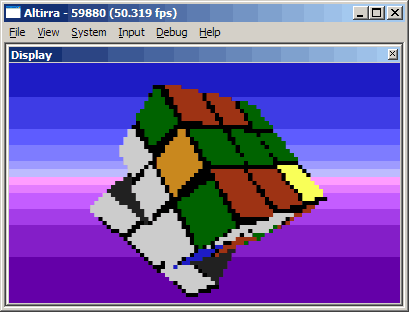
Créé par Avery Lee (l’auteur de VirtualDub), il s’agit d’un émulateur d’Atari 8 bits (800/800XL/130XE) disponible en 32 et 64 bits. Il dispose de beaucoup d’options ainsi que d’une bonne compatibilité. Il prend en charge les jeux protégés conformément à l’émulation.


[features added]
– AltirraOS: The boot screen in the XL/XE version now continues boot on disk insertion rather than forcing a reboot.
– AltirraOS: Extended memory scan limit for 800 version to $D000 to support 52K expanded configurations.
– Audio: Individual channels on the secondary POKEY can now be muted.
– Cartridge: Added JRC 64K + RAM cartridge type.
– Cassette: Optimized cassette tape emulation routines.
– Cassette: Added option for high-pass prefiltering before the turbo tape decoder.
– Debugger: Improved loop detector in history view to more precisely capture loop.
– Debugger: Added @tapepos pseudovariable.
– Debugger: Specifying ? for a path argument now opens a file dialog to select the path.
– Debugger: The disassembly window now has support for showing procedure dividers, previewing called procedures, and jumping to call targets.
– Debugger: Disassembly and History views now save their disassembly settings.
– Debugger: Added option to disable automatic system symbols.
– Debugger: Alt+Shift+click on the display jumps to History at the corresponding beam position.
– Debugger: Verifier supports detecting access to non-canonical hardware addresses.
– Debugger: .caslogdata command superceded by updated CASDATA/CASDATA2 logging channels.
– Devices: XEP80 can now be switched to different controller ports.
– Disk: Added full emulation for 810 Turbo, Amdek AMDC-I/II, and Percom AT-88 disk drives.
– Disk: A warning is now displayed when attempting to insert a disk into a drive that doesn’t support it (e.g. double-density disk into an 810).
– Disk: Detailed errors are displayed when a disk image write fails on the host and is remounted virtual read/write.
– Disk Explorer: Added Import File and Export File commands so that drag and drop is not needed to copy files.
– Display: Added option for frame blending in linear color space for better accuracy.
– Display: Color settings can be saved and loaded from external files.
– Display: Added new default preset for PAL.
– Display: The Hue Start slider in color settings now has the same I-Q angle definition in PAL quirks mode and works in PAL high artifacting mode.
– Firmware: Add Firmware now detects OS ROM images even if the specific image is not recognized.
– Firmware: Added detection for more MIO firmware images and support for auto-trimming padded 16K images down to 8K.
– Input: The keyboard layout editor now warns if the key mapping being added conflicts with a keyboard shortcut.
– Recorder: Added options for pixel aspect ratio and frame scaling.
– Recorder: Added support for recording to WMV and H.264 through Media Foundation on Windows 7 and later.
– SaveStates: Save state format rewritten to v2 (*.atstate2), now based on JSON within a .zip file for better accessibility and versioning.
– SaveStates: CPU state can now be saved mid-instruction.
– Simulator: Reordered frame wait and device poll timing around VBLANK to reduce input and output latency.
– UI: Added experimental dark theme support.
– UI: Added /reset command-line switch to selectively reset settings.
– UI: Audio monitor now shows modified frequencies for two-tone mode, indicators for two-tone mode and asynchronous receive mode, and better shows ultrasonic effects.
– UI: Added audio scope for viewing raw POKEY output.
– UI: Added options for controlling mouse pointer visibility.
– UI: Audio monitor positioning can now be customized.
– Video: Added PERITEL adapter and monochrome monitor emulation.
 

[bugs fixed]
– AltirraOS: Audio configuration is reset more often on tape reads to produce familiar sounds.
– AltirraOS: Disk boot can now occur after cassette boot and right cartridge non-boot.
– AltirraOS: OLDADR usage adjusted for compatibility with SDX QUICKED.SYS.
– AltirraOS: SIO transmit operations can now be interrupted by User Break.
– AltirraOS: The Display Handler now properly sets the default background color (COLOR4) to $06 when opening a GR.11 screen.
– AltirraOS: KRPDEL is now set and keyboard repeat rates are NTSC/PAL adjusted on the XL/XE/XEGS version.
– AltirraOS: Fixed an SIO issue with an out-of-spec short delay from asserting the command line to first command byte.
– AltirraOS: Fixed disk boot issues if a PBI device or cartridge init routine issued an SIO request with DAUX2 > 0 before the disk boot.
– AltirraOS: The boot screen now resets the Break key state properly after a boot is interrupted by the Break key.
– AltirraOS: Improved native mode compatibility of 816 version.
– ANTIC: RNMI (400/800 System Reset) is now always synchronized to VBI.
– Audio: Fixed stereo mixing being twice as loud as mono mixing.
– CPU: Fixed cycle timing for indexed illegal read-modify-write instructions and ARR #imm ($6B).
– CPU: Fixed extra instruction being run occasionally for a DLI delayed by WSYNC.
– CPU: 65C816 (dp,X) addressing mode now always wraps in emulation mode when accessing high byte regardless of DP.
– CPU: 65C816 (dp) addressing mode properly wraps in emulation mode with DP aligned, except for PEI (dp).
– CPU: 65C816 WDM instruction now properly fetches two bytes.
– Debugger: .dumpdsm -s option now interprets 6809 instructions.
– Debugger: Line number information is now updated properly when using cartridge bank mapping in MADS listings.
– Debugger: Disassembly window now accepts cartridge bank addresses.
– Debugger: Fixed broken option to auto-load kernel ROM symbols.
– Debugger: Reduced frequency of stale memory in the disassembly window.
– Debugger: Fixed incorrect call nesting in history window in Z80 mode.
– Debugger: Fixed some disassembly errors in 6809 mode.
– Debugger: Input byte (ib) now correctly issues read cycles with side effects in the main CPU address space.
– Devices: Fixed crash on ANTIC reading from SoundBoard hardware registers.
– Devices: 65C816 emulation fixes for Veronica.
– Disk: Fixed some illegal indexed RMW instructions taking too few cycles for 6502 coprocessors in full disk emulators.
– Disk: Full drive emulation FDC now allows Write Track commands to proceed immediately when the index signal is already active.
– Disk: Improved accuracy of RIOT interval timer.
– Disk: Corrected FDC head load and initial DRQ timings for Write Track command.
– Disk: Implemented FDC Write Track quirk for back-to-back CRC ($F7) tokens.
– Disk: Fixed some 6809 coprocessor emulation bugs.
– Disk: Corrected side 2 sector mappings for ATR8000, Percom, and XF551 full drive emulators.
– Disk: Fixed case where drive timing could be disrupted after hitting a drive coprocessor breakpoint.
– Disk: Seek sounds no longer overlap when disk access is accelerated.
– Disk: Fixed crash when ejecting disk at specific point during disk read command.
– Disk: FD1771 FDC now properly times out in two revolutions instead of five in 810 full drive mode.
– Disk: Fixed bogus FDC interrupts from Force Interrupt commands.
– Disk: Indus GT ignores ready status to match hardware.
– Disk Explorer: Fixed a filename validation bug with DOS 2 disks where duplicate files could be written if the original filename had extra characters after the extension.
– Disk Explorer: Modifying a mounted disk image now forces a disk change to flush caches on emulated full drives that do track buffering.
– Display: Fixed an issue with color profiles having the wrong color matching setting when initially established.
– Display: Fixed crash when pasting into enhanced text display in CIO mode.
– Display: Typing in enhanced text display (CIO mode) now clears the attract mode counter.
– Firmware: Fall back to next available firmware if default firmware for a type is removed.
– Input: Character mappings in custom keyboard layouts didn’t work for non-ASCII extended characters.
– Input: Changes to custom keyboard layouts didn’t take effect immediately.
– PerfAnalyzer: Joystick state (PIA port A) is now captured in traces.
– POKEY: Improved accuracy of two-tone mode timing at 1.79MHz.
– Recorder: Fixed SAP type R initial silence detector checking AUDFx registers instead of AUDCx registers.
– SaveStates: POKEY serial input state is now saved.
– SCSI: Fixed BSY being asserted in selection phase even for non-existent devices.
– Simulator: Improved accuracy of power-up values for POKEY and GTIA registers.
– Simulator: Display message via placeholder ROM if kernel ROM file could not be loaded.
– VBXE: Fixed a crash when toggling shared memory option.
– VBXE: Fixed double correction of display with gamma or color correction options enabled.
– VFS: Fixed zip/gz paths with non-ASCII characters not being encoded properly and getting dropped on restart.


Télécharger Altirra v4.40 Stable (8.3 Mo)

Site Officiel

En savoir plus…

Qemu est un émulateur basé sur la translation dynamique de code, qui lui permet d’obtenir de très bonnes performances. Il permet actuellement d’exécuter des programmes pour ix86, arm, sparc et powerpc sur diverses plateformes (PC, PPC, alpha, arm, sparc, amd64, mips, ia64, …) et de lancer des OS pour PC ou PPC. Inclus les images systèmes et les fichiers bat pour i386, mipsel, arm, sparc et PCC. QEMU émule en permanence le processeur et cela peut réduire la performance d’un facteur cinq à dix. Pour pouvoir obtenir des performances plus comparables à un système non virtualisé ou à VMware (réduction de performance d’un facteur 1 à 2 seulement), il faut utiliser un module d’accélération, ce qui nécessite un système Linux sur architecture x86 ou x86_64 avec un noyau 2.4.x ou 2.6.x.
 
Qemu
 
Les changements sont visibles ici.


Télécharger QEMU (x86) v7.2.0 (152 Mo)

Télécharger QEMU (x64) v11.1 (197 Mo)

Site Officiel

En savoir plus…

Un émulateur de GB/GBC/GameBoy Advance écrit en langage C par Jeffrey Pfau (endrift) et basé (sensiblement) sur GBA.js et qui a comme objectif d’être un émulateur de haute qualité. Disponible pour Windows (Vista et +), Linux, Mac OSX et bien d’autres systèmes.
 
mgba
 
Emulation fixes:
– ARM: Fix timing on Thumb shift instructions
– GB: Fix GBC game registers after skipping BIOS
– GB MBC: Support 4MB MBC30 ROMs (fixes #1713)
– GB Video: Fix BGPS value after skipping BIOS (fixes #1717)
– GBA: Add missing RTC overrides for Legendz games
– GBA BIOS: Reset renderer when RegisterRamReset called (fixes #1756)
– GBA SIO: Fix Multiplayer busy bit
– GBA SIO: Fix double-unloading active driver
– GBA Timers: Fix deserializing count-up timers
– GBA Video: Fix mosaic objects drawing past the end (fixes #1702)
– GBA Video: Fix disabling OBJWIN in GL renderer (fixes #1759)
– GBA Video: Add missing parts of 256-color mode 0 mosaic (fixes #1701)
– GBA Video: Fix double-size OBJ wrapping in GL renderer (fixes #1712)
– GBA Video: Simplify sprite cycle counting (fixes #1279)
– GBA Video: Fix sprite/backdrop blending regression
 

Other fixes:
– 3DS: Fix framelimiter on newer citro3d (fixes #1771)
– ARM: Fix disassembling of several S-type instructions (fixes #1778)
– ARM Debugger: Clear low bit on breakpoint addresses (fixes #1764)
– CMake: Always use devkitPro toolchain when applicable (fixes #1755)
– Core: Fix ELF loading regression (fixes #1669)
– Core: Fix crash modifying hash table entry (fixes #1673)
– GB Video: Fix some cases where SGB border doesn’t draw to multi-buffers
– GBA: Reject incorrectly sized BIOSes
– GBA: Break infinite loop for 0-frame mVLs (fixes #1723)
– Qt: Fix OpenGL 2.1 support (fixes #1678)
– Qt: Fix unmapping zipped ROM (fixes #1777)
 

Misc:
– 3DS: Clean up legacy initialization (fixes #1768)
– GBA Serialize: Only flunk BIOS check if official BIOS was expected
– Qt: Disable Replace ROM option when no game loaded
– Qt: Defer texture updates until frame is drawn (fixes #1590)
– Qt: Set icon for Discord Rich Presence
– Qt: Show a warning when save file can’t be opened


Télécharger mGBA (32 bits) v0.10.5 (13.8 Mo)

Télécharger mGBA (64 bits) v0.10.5 (13.5 Mo)

Site Officiel

En savoir plus…


https://getourbonus.com/fr/accueil

https://www.romspedia.com/