Mesa3D peut être utilisé pour fournir un rendu OpenGL aux applications Software.
Il est particulièrement utile pour exécuter d’anciennes applications et des jeux qui utilisent une ancienne version d’OpenGL et qui ne fonctionnent pas correctement sur du matériel moderne.
Notez que ce dispositif de rendu est loin d’être parfait, et de nombreux jeux ne fonctionneront pas encore.
 
Des instructions sur l’utilisation de la DLL sont incluses.


Télécharger Mesa3D (x86) v20.1.8 (6.7 Mo)

Site Officiel

En savoir plus…

MicroM8 (ex Octalyzer) est un émulateur d’Apple 2 multi-plateformes.


Télécharger MicroM8 (x86) (2019/12/16) (18.2 Mo)

Télécharger MicroM8 (x64) (2019/12/16) (18.8 Mo)

Site Officiel

En savoir plus…

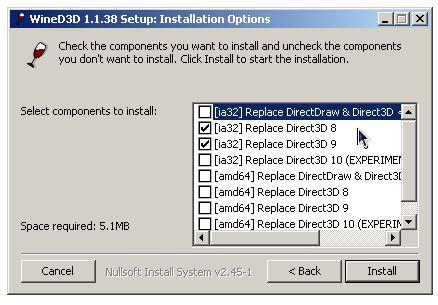
WineD3D For Windows est un wrapper DirectX 1-11 vers OpenGL basé sur WineD3D, qui est une implémentation presque complète de DirectX utilisée dans Wine.


Même si Windows prend en charge DirectX de manière native, l’utilisation de WineD3D peut améliorer la compatibilité avec les jeux plus anciens, en particulier sur Windows 8 et supérieurs qui ne prennent pas en charge les modes d’écran 16 bits. Une autre utilisation possible est d’imiter les versions non prises en charge de DirectX ou de transférer des applications DirectX vers OpenGL sans avoir à réécrire le code de rendu.
Notez que WineD3D est loin d’être parfait, et de nombreux jeux ne fonctionneront pas.
 
Des instructions sur l’utilisation des DLL sont également incluses.
 
Version 1.7.x fonctionne à partir de Windows 2000.
Version 2.x fonctionne à partir de Windows Vista.


Télécharger Wine D3D For Windows (Win 2K et +) v1.7.52 (1.7 Mo)

Télécharger Wine D3D For Windows (32 Bits | Win8 et +) v11.20 (1.9 Mo)

Télécharger Wine D3D For Windows (64 Bits | Win8 et +) v11.20 (1.9 Mo)

Site Officiel

En savoir plus…

PlayNite est un gestionnaire open source de bibliothèque de jeux vidéo et un launcher avec prise en charge des bibliothèques tierces telles que Steam, GOG, Origin et Uplay. Incluant le support d’émulation de jeu et fournissant une interface unifiée pour vos jeux.

 
Fix: Jumplist and tray icon game list not being updated properly
Fix: Crash when Steam is not installed
New: List of Patreon contributors added into « About » menu dialog
New: List of various contributors added into « About » menu dialog
New: Show links on right-click menu #375
New: Option to close Platnite after when game is started #147
New: German localization (thanks to PhrozenByte) #347
New: French localization (thanks to ArtexJay) #343
New: Don’t add shortcuts when updating #351
New: Cover image aspect ratio configurable via theme profiles (GameCoverViewRation variable)
New: Automatically set sorting name without « The » at the start of titles #154
New: Added various help links and tooltips
New: {PlayniteDir} variable can be used in game action paths #333
Fix: Various metadata download fixes and improvements #374 #377
Fix: Updated localizations
Fix: Slow startup time with large game library
Fix: Restored Modern theme look to original 3.0 release
Fix: Leaking Chromium processes
Fix: Database path changes not visible in settings
Fix: Crash when manual metadata download fails #376
Fix: Crash when downloading metadata from igdb #370
Fix: Crash when database is not opened #369
Fix: Cannot enter spaces into game details fields #386
Fix: Auto update failing #335
Fix: Tweak database open error messaging #327


Télécharger PlayNite v10.64 (145 Mo)

Site Officiel

En savoir plus…

Un émulateur de puce sonore OPL3.
 
Le Yamaha YMF262, également connu sous le nom OPL3 (OPL est un acronyme pour FM Operator Type-L), est une puce de synthèse FM publiée par Yamaha Corporation en 1988. Il s’agit d’une version améliorée du Yamaha YM3812 (OPL2). Il a été utilisé dans un certain nombre de cartes son IBM PC, y compris Sound Blaster 16 et Pro AudioSpectrum (16 bits).


Télécharger Opl3emu (x86) (27/09/2020) (3.8 Mo)

Télécharger Opl3emu (x64) (27/09/2020) (2.0 Mo)

Télécharger Opl3emu (WIP) (24/08/2018) (1.3 Mo)

Site Officiel

En savoir plus…

Un émulateur de Rolant MT-32.


Les changements sont les suivants:
 

mt32emu
=======

* Improved emulation of partial allocator. It still handles individual partials
as entities and not pairs, but now it keeps inactive partials on a stack
rather than assigns the first free partial sorted by index. This behaviour
better corresponds to how the real units allocate partials though.
* Fixed various issues with accessing ROM files with localised pathnames.
* Fixed old thinko about MIDI channel mapping when a MIDI channel is assigned
to multiple parts. In this case, the messages received on that MIDI channel
are now handled by all the parts.
* Changed semantic of the build option libmt32emu_WITH_INTERNAL_RESAMPLER. When
disabled, the built-in resampler support is no longer included in the build
implicitly. In case no external resampler library is found, a simple stub
is used instead, that either outputs at the internal synth sample rate
or is muted. This is mainly intended to reduce the library size when
the sample rate conversion is handled externally.

 
mt32emu_qt
==========

* Updated mt32emu library to version 2.3.0.
* Replaced application icon for mt32emu-qt with a new nicer one.
* Fixed a few minor bugs in MIDI player dialog.
* Fixed various issues with accessing files with localised pathnames.
* Improved timing accuracy of realtime rendering.
* Added experimental support for Windows 9x platform. As a side effect,
Qt version 4.5.3 is now supported.
* Added new option « Max Partials » in synth configuration. It allows setting
the maximum number of partials playing simultaneously.
 

mt32emu_win32drv
================

* Updated mt32emu library to version 2.3.0.
* Fixed inappropriate implementation of MODM_GETDEVCAPS message that sometimes
resulted in returning unreadable driver name to the consumer MIDI
application.
* In Windows MIDI driver setup tool, implemented « repair » command. This command
allows to restore the registry entry used by driver which may be overwritten
by Windows or some other application.
* Reimplemented Windows MIDI driver setup tool for x64 platform. It no longer
allows to install 32-bit and 64-bit drivers separately since this way doesn’t
seem to be supported by Windows. Instead, the setup tool now detects
the platform it runs on and installs the drivers as appropriate. This should
improve stability of the 32-bit driver on 64-bit systems.
* Added support for new synth profile option « Max Partials ». It allows setting
the maximum number of partials playing simultaneously.


Nous recommandons d’utiliser VirtualMIDISynth pour faire office de switch midi / midi mapper (choisir le output midi en VirtualMIDISynth lui même ou MT-32 Synth Emulator).
Fonctionne également à merveille avec la Version spéciale Daum Dos box qui supporte Munt. Fonctionne très bien avec Hoot! Media player classic notamment avec le playback des fichiers .mid!
Les résultats sont à des années lumière de tout ce que VirtualMIDISynth peut accomplir avec une banque soundfont MT-32.
 
Bonus! ROM nécessaire au bon fonctionnement de Munt: ici ou là.


Télécharger Munt (x86/x64) v2.8.2 (24.3 Mo)

Site Officiel

En savoir plus…

L’idée est simple: « Et si vous pouviez prendre un jeu Xbox360 et l’exécuter sur votre PC? »
C’est l’objectif que se fixe ce projet qui n’est pas un émulateur à proprement parler mais un recompilateur d’exécutable qui permet de convertir un jeu x360 en jeu compatible Windows. Évidemment ce projet reste très préliminaire et seuls quelques jeux maison ou démos arrivent à fonctionner.


Les builds sont disponibles ici.
 

Télécharger Rexdex Xbox360 Recompiler R55 (11.3 Mo)

Site Officiel

En savoir plus…

Cette version fait directement suite aux précédentes créées par Ulrich Doewich et est à présent maintenue par Colin Pitrat.


– Latest build of Caprice 32, with the newest cool features and the most recent bugs.


Télécharger Caprice32 (x86) v4.6.0 (2026/10/30) (6.6 Mo)

Télécharger Caprice32 (x64) v4.6.0 (2026/10/30) (6.3 Mo)

Site Officiel

En savoir plus…

PGXP (Parallel/Precision Geometry Transform Pipeline) apporte une haute précision dans les données 3D géométriques. Cette amélioration est uniquement disponible en émulation et non disponible sur la console d’origine.


Il est actuellement intégré à PCSX via le plugin OpenGL v1.78 de Pete avec l’extension de Tapeq’s Tweak basé sur Pete’s OpenGL v2.9. Il vous faudra donc Pete’s OpenGL2 Driver v2.9 placé dans le même répertoire pour que le tweak puisse s’appliquer.


Il permet:
– Une grande précision sur les Vertex data (Géométrie plus stable)
– Réduction de l’effet « Triangle Culling » (modèles plus détaillés)
– Perspective des « Texture Mapping » correcte (distorsion de texture réduite)

 
Source de PCSXR
Source de PCSXR (iCatButler)
Builds auto sur Appveyor
 

Télécharger PCSXR-PGXP v1.9.95 Build 2021.07.20 (17.8 Mo)

Site Officiel

En savoir plus…

Il s’agit d’un fork du plugin RDP d’Angrylion qui vise à améliorer les performances, ajouter de nouvelles fonctionnalités tout en conservant la précision du plugin d’origine.


Current features
– More maintainable code base by dividing the huge n64video.cpp into smaller pieces.
– Improved portability by separating the emulator plugin interface and window management from the RDP emulation core.
– Multi-threaded rendering support, which increases performance on multi-core CPUs significantly.
– Replaced deprecated DirectDraw interface with a modern OpenGL 3.3 implementation.
– Added manual window sizing.
– Added fullscreen support.
– Added BMP screenshot support.
– Added settings GUI.
– Added Mupen64Plus support.
 
Tested with Project64 2.3+. May also work with Project64 1.7 with a RSP plugin of newer builds (1.7.1+).

 
Source des builds WIP.
 

Télécharger Angrylion RDP Plus v1.6 r32 (2025/01/06) (1.2 Mo)

Site Officiel

En savoir plus…

VV est un émulateur d’ordinateur russe sorti en 1987 : le Vector-06c.


Quoi de neuf:
Fixes in the I / O Port Read Emulation


Télécharger Virtual Vector v7.17 (1.3 Mo)

Site Officiel

En savoir plus…

YAPE (Yet Another Plus/4 Emulator) est un excellent émulateur Commodore C16/plus4 tournant sous Windows XP à 10. Cette version utilise la bibliothèque SDL.


External monitor improvements:
– debuggable drive
– dump raster counters for Commodore 64 as well
– split functionality of the ‘M’ and ‘>’ TEDMON commands
– hunt command (‘H’)
– repeating the last command on ENTER
 
Video:
– CRT emulation fix
– vsync option added
– adjust saturation & brightness
– hue offset option added
– CRT gamma correction added
 
Audio:
– better timing during frequent updates
 
Commodore plus/4 mode:
– TED emulation improvements ($FF1E writes, sound)
 
Commodore 64 mode:
– replaced palette with measured hues
– sprite emulation fixes
– improved serial IEC port emulation accuracy
– preliminary cartridge (.CRT) support
 
Overall:
– reduced static array initialization usage to reduce binary size for Emscripten
– isolated CIA emulation code
– various bug and compiler warning fixes


Télécharger Yape/SDL (x86) v0.71.2 (1.1 Mo)

Télécharger Yape/SDL (x64) v0.81.1 (879 Ko)

Site Officiel

En savoir plus…


https://getourbonus.com/fr/accueil

https://www.romspedia.com/