Il s’agit d’un débogueur de code et de mémoire Commodore 64, Atari XL / XE et NES qui fonctionne en temps réel. C’est un outil de prototypage rapide où vous pouvez jouer avec la machine Commodore 64 et ses composants internes.
 

Le débogueur C64 intègre le moteur d’émulation VICE v3.1 C64 créé par l’équipe de VICE et le moteur d’émulation Atari800 v3.1.0 est créé par l’équipe d’Atari800.


Télécharger C64 65XE NES Debugger v0.64.58.6 (4.9 Mo)

Site Officiel

En savoir plus…

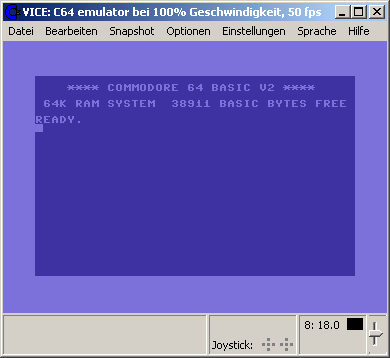
La version Windows de ce superbe émulateur Commodore C64, C128, VIC20, CBM-II, Plus4 et de tous les modèles « PET ».


Les changements:

* Changes in Vice 3.6.1
=======================

This is a service release which fixes some regressions and annoyances reported
by our users after the 3.6 release.


** general
----------

- Fixed sound buffer underrun behaviour, it will now cause a small glitch and
  no longer disable sound or flood the log with warnings.

- Do not write the log to a file instead of stdout when stdout is already 
  redirected to a file or pipe, so we can do just that on the shell.

- At exit, put quotes around parameters of the regenerated command line options
  so eg filenames with spaces in them will not break it.

- Suppress warnings about duplicated labels when playing back monitor commands
  to make mrsid a happy bunny.

- For cartridges that contain RAM that can be loaded from (and saved to) a file,
  do not init RAM on powerup if backed up by a file (mimic battery backup).

- Do not clear the keyboard input when a 'reset' hotkey was pressed. this allows
  to "hold" keys when pressing reset, for example "run/stop" when resetting FC3.
  Note that this still is limited by various other things, like the keyboard
  mapping and keys reserved by your window manager.

- FFMPEG recordings now default to mp4/h264/AAC instead of some divx avi bullshit.

- On smart attach automatically change the drive type also when not autostarting.
- In some cases the wrong drive was selected automatically on smart attach.

- Fixed sampler file loading.

** build system
---------------

- Version x.y.0 builds will now generate a version number of x.y (no .0).
  Additionally, support for semver style build labels has been added, allowing
  versions such as 3.6-beta, 3.6.1-beta, etc.

- Make configure check for *both* avresample and swresample, prefer swresample.

- MacOS bindist support for bundling avresample.

** C64 fixes
------------

- Added belgian/dutch keymap provided by sorex.

- Added support for the 21sec backup parallel cable.

- Set default ram size for ramlink to 16mb, enable it on ROM attach.
- Fix ramlink API calls for slot0, add missing ROM image setting to UIs.

** C128 fixes
-------------

- Various MMU mapping fixes.

** GTK3 fixes
-------------

- Tracked down and helped fixing an upstream GTK bug that made VICE crash on any
  keypress under certain conditions, making VICE work again for Jazzcat :)

- Fixed default joystick/gamecontroller mappings on Windows/Linux/MacOS.
- Fixed mapping logic to handle multiple events and duplicate mappings correctly.

- Allow negative coordinates for windows, this should fix restoring the window
  position that was broken on some multi-monitor setups.

- Monitor: remember and restore VTE window size and position.
 - Make the monitor window "remember" its position and size between invocations.
 - Allow setting the position and size via command line, using `-monitorxpos`,
   `-monitorypos`, `-monitorwidth` and `-monitorheight`.
 - Position and size is saved along with the settings.

- Made joystick/control port tabs only show the extra ports when they are
  available.

- Mouse pointer changes shape when hovering over clickable status bar items.

- CPU speed / FPS settings added to the main menu.

- Correctly use the LED colors for drives > 8.

- Fixed drive/tap popup menu labels, only display "#8:0" etc if the drive is a
  dual drive device in the context menus and directory popup menus. Only show
  "Directory of tape #1/#2" in xpet, show "Directory of tape" in other emulators.

- Added statusbar led for shiftlock.
- Added clickable 40/80colums LED to x128.
- Added clickable LED for the CAPS aka DIN/ASCII key in x128.

- Properly update both keyboard debugging widgets on x128.

- Don't grey-out sound setting widgets when sound is disabled, so configuration
  can be changed before enabling sound again.

- Various fixes related to the new hotkeys feature:
  - Allow for a few more modifiers when setting hotkeys.
  - Filter certain modifiers that are only getting in the way (eg numlock).
  - Remove old hotkey from the table when redefining.
  - Make Return/Enter trigger Accept in the dialog, make Escape trigger Cancel.
  - Only show actions that have a corresponding menu item.
  - Use hardware keycodes to figure out the key that was pressed. fixes eg the
    situation on macOS that hotkeys could not be defined because they produce
    various symbols.

** SDL fixes
------------

- Fixed mapping logic to handle multiple events and duplicate mappings correctly.

** macOS fixes
--------------

- Fixed macOS bindist not working if placed in path with a space in it. Also
  the runtime cwd will now default to the user’s home directory, unless launched
  using the CLI scripts in the root bin folder in which case the current cwd
  will be preserved.

- Gtk3: added MacOS specific .vhk (hotkey) files.

- FFMPEG recordings now work on Apple Silicon binary distributions

- The launcher .app apps no longer require Rosetta on Apple Silicon


Site Vice Nightly builds (mise à jour automatique quotidienne).


Télécharger VICE (Dos) v3.1 (29.3 Mo)

Télécharger SDLVICE (32 bits) v3.1 (16.9 Mo)

Télécharger SDLVICE (64 bits) v3.1 (10.4 Mo)

Télécharger SDL2VICE (32 bits) v3.8.0 (32.2 Mo)

Télécharger SDL2VICE (64 bits) v3.10.0 (39.2 Mo)

Télécharger WinVICE (32 bits) v3.8.0 (38.8 Mo)

Télécharger WinVICE (64 bits) v3.10.0 (45.1 Mo)

Site Officiel

En savoir plus…

Plugin de contrôle créé par AQZ permettant de jouer en réseau sur internet (il s’agit d’une alternative au plugin Kaillera).
Il est conseillé d’utiliser ce plugin avec les plugins de contrôle « Jabo DirectInput7 » ou « N-Rage’s Direct-Input8 ».


Quelques changements:
– Display an error if there is no base input plugin
– Misc fixes and clean up

 
Code source.

Télécharger AQZ Netplay Input Plugin r142 (326 Ko)

Site Officiel

En savoir plus…

PlayNite est un gestionnaire open source de bibliothèque de jeux vidéo et un launcher avec prise en charge des bibliothèques tierces telles que Steam, GOG, Origin, Battle.net et Uplay. Incluant le support d’émulation de jeu et fournissant une interface unifiée pour vos jeux.
 
Fixed:
– Folder scan ignores some executables incorrectly
– Crash when filtering only assigned items on game edit dialog
– Switching application modes doesn’t work properly when switching during library update
– Crash when renaming library fields
– Possible delay or deadlock when shutting down Playnite externally


Télécharger PlayNite v10.64 (145 Mo)

Site Officiel

En savoir plus…

AmiArcadia est le port amélioré de Tunix2001 ex ‘Win Arcadia 2001’ (par Gavin Turner) pour Amiga. Ecrit par James Jacobs et Gavin Turner, cette version est en fait le port Windows du port Amiga (un backport) !


Il émule les consoles basé sur la famille des Arcadia2001 : Bandai, Emerson, Grandstand, Hanimex, Intervision, Leisure-Vision, Leonardo, MPT-03, Ormatu, Palladium, Poppy, Robdajet, Rowtron, Tele-Fever, Tempest, Tryom, Tunix, etc.
 
Il supporte aussi l’Interton VC 4000 et l’Elektor TV Games Computer. Il nécessite Windows 9x/ME/NT/2000/XP et tourne aussi sous Vista/8/10/11.
 

Télécharger Win Arcadia (Ami Arcadia) v36.8 (9.9 Mo)

Site Officiel

La dernière version béta publique de l’excellent WinUAE, l’émulateur Commodore Amiga. La traduction est signée Tradu-France.


Les changements ici.
WARNING: don’t use it you aren’t sure, this is « more beta » than usually.
 

Télécharger WinUAE (Public Beta) [32 bits] v6.1.0 Beta 21 (5.3 Mo)

Télécharger WinUAE (Public Beta) [64 bits] v6.1.0 Beta 21 (8.5 Mo)

Télécharger WinUAE (Public Beta) [32 bits] v6.1.0 Beta 21 FR (5.4 Mo)

Télécharger WinUAE (Public Beta) [64 bits] v6.1.0 Beta 21 FR (8.5 Mo)

Site Officiel

En savoir plus…

pantheon
 
Il s’agit d’un multi-émulateur qui gère les systèmes suivants avec une superbe interface très simple d’utilisation.
Ordinateurs : Acorn Atom, Acorn BBC Micro, Acorn Electron, Commodore PET, Atari 8-bit, MSX
Consoles : Atari VCS 2600, Atari VCS 5200, Atari VCS 7800, ColecoVision, Magnavox Odyssey 2, Sega Master System, Sega Megadrive, Mattel Intellivision
Consoles portables : Atari Lynx, Sega Game Gear, Nintendo GameBoy
 
Vous aurez besoin de .NET Framework installé sous Windows. Pantheon est spécifiquement dédié aux jeux.
 
Le gros avantage est que ceux-ci sont téléchargés automatiquement en un clic sans que l’on ait besoin de faire quoi que ce soit d’autre. Il est bien dommage que Panthéon ne dispose pas de filtres, cela rend les jeux très pixelisés en raison des basses résolutions natives.


Télécharger Pantheon v16.754 (138 Mo)

Site Officiel

En savoir plus…

Il s’agit du second excellent émulateur de Nintendo Switch, écrit en C#.


Une liste de compatibilité est disponible ici.
 
Des builds automatiques sont disponibles ici.
Site de développement.
 

Télécharger Ryujinx Build 1.1.1403 (190 Mo)

Site Officiel

En savoir plus…

Il s’agit d’un projet de recherche créé par exjam, en vue d’une émulation de la Nintendo Wii U. Il vous faudra Linux ou Windows en version 64 bits ainsi que Directx 12 ou OpenGL 4.5 ou Vulkan et les bibliothèques de Visual Studio 2017 pour espérer le faire fonctionner.


Builds automatiques ici. 
 

Télécharger Decaf-Emu Build 231109 (40.8 Mo)

Site Officiel

En savoir plus…

Développé par Mike Wynne, il s’agit d’un émulateur Sinclair ZX81, Sinclair ZX80, Sinclair ZX Spectrum 16k/48k, Sinclair ZX Spectrum 128k, Amstrad/Sinclair Spectrum +2, Amstrad/Sinclair Spectrum +2a, Amstrad/Sinclair Spectrum +3, Timex TS1000, Timex TS1500, Timex TS2068, Timex TC2048, Lambda 8300, Ringo R470, MicroDigital TK85 et Jupiter ACE.


Bug fixes:
– Resolved an issue affecting specific pseudo hi-res display driver implementations that would
cause the first line to mis-aligned.
– Loading a snapshot that has Chroma colour enabled was not re-enabling the colour mode.
– The RAM provided by the Chroma 80 interface was being incorrectly mirrored in the memory map.
– Changed the default values of bits 6 and 7 when reading port $FE for a Jupiter Ace.
– Changed the default value of the data bus on the Jupiter Ace from 0xFF to 0x20.
– Microdrive .MDR files were saved with an incorrect size.
– Memory window View Words option could lock up for the Spectrum and Jupiter Ace.
– Memory window View Traditional option defaults to the character set for the selected computer
model if the default ROM is changed and no corresponding character set bitmap exists.
– « Access Denied » error dialog no longer gets displayed after taking the PC out of hibernation.
– The BASIC listing import facility was not detecting Spectrum 128 specific keywords unless
the ‘Accept alternate keyword spellings’ option was selected.
– The BASIC listing import facility was not allowing a line number of 0.
– Unused bits of ZX Printer input port $FB now return the idle status of the data bus.
– COPYing a collapsed display on a ZX81 no longer results in corrupt printer output.
– Resolved issue introduced in version 1.18 that broke support for some custom display drivers,
i.e. Invaders (Odyssey Computing), HiRes Pacman (Brian Lewis), HiRes Invaders (Brian Lewis)
and the ASZMIC ROM (Comprocsys).
 
Enhancements:
– Updated ZXpand+ firmware to ‘t0mte’.
– Facility to create a blank microdrive file.
– The BASIC listing import facility now sets a non-zero value for system variable SEED.
– The BASIC listing import facility now tolerates a wider range of formatting if the ‘Accept
alternate keyword spellings’ option is selected.


Télécharger EightyOne v1.41 (4.9 Mo)

Site Officiel

En savoir plus…

RetroArch est un émulateur multi-systèmes modulaire qui est conçu pour être rapide, léger et portable. Dédié à Linux, Windows, Mac OS X et BSD. Il est anciennement connue sous le nom SSNES.
 
Ce n’est pas un Frontend à proprement parler, ni véritablement un multi-emulateur.
Il utilise en fait des bibliothèques (core) d’émulateurs déjà existants sous la forme de fichier « libretro XXX.dll ». Ce n’est pas non plus un simple front end, car il offre l’émulation complète de plusieurs plateformes console et même final burn alpha.
 
retroarch
 
Actuellement, il existe des implémentations libretro pour les systèmes tels que SNES, NES, GBA, GB / GBC, la Genesis, et même des jeux d’arcade Final Burn Alpha et bien d’autres encore. Voir ici pour obtenir les cores nécessaires.
 

Libretro n’est pas seulement utilisable pour les émulateurs. Un port préliminaire d’une ré-implémentation open source de Cave Story a été porté aussi à libretro.


RetroArch croit en la modularité. L’application elle-même est une application commandée par ligne de commande qui convient à HTPC et autres. Il existe également une interface graphique pour RetroArch, en soutenant toutes les options de configuration unique.


RetroArch est portable, multi-langages, multi-plateformes et multi-systèmes. Il est ainsi disponible sur un grand nombres d’environnements parmi:
 
– Windows/ Linux / Mac OSX (PPC / Intel)
– Androïd / iOS / tvOS
– PSP / PS Vita
– Playstation 2 / 3 / 4
– Xbox / Xbox 360 / Xbox One
– GameCube / Wii / Wii U / Switch
– 2DS / 3DS
– Raspberry Pi
– OpenPandora
– Steam Link
– Web Browsers
– etc.
 
Un petit guide réalisé par DjLc est disponible sur ce lien.

 
retroarch2
 
Les nouveautés sont visible ici (changelog).


NOTA BENE pour XP:
Si l’exécutable ne se lance pas, créez un fichier « RetroArch.exe.manifest » (éditable avec un bloc note quelconque) et inscrivez les lignes suivantes à l’intérieur:
 

Cliquez ici pour récupérer le code

 
puis sauvegardez et enfin placez ce fichier a coté de l’exécutable (et c’est du tout bon !).


Télécharger RetroArch (95/98) v1.9.0 (128 Mo)

Télécharger RetroArch (98 SE/ME/2000) v1.22.2 (127 Mo)

Télécharger RetroArch (XP/Vista 32 bits) v1.22.2 (129 Mo)

Télécharger RetroArch (XP/Vista 64 bits) v1.22.2 (129 Mo)

Télécharger RetroArch (32 Bits) v1.22.2 (191 Mo)

Télécharger RetroArch (64 Bits) v1.22.2 (193 Mo)

Site Officiel

En savoir plus…

SheepShaver est un émulateur Open Source supportant MacOS Classic pour PowerPC. En d’autres termes, il vous permet d’exécuter sur votre ordinateur des applications conçues pour MacOS Classic (PowerPC), même si vous utilisez un autre système d’exploitation. Cependant, vous devez posséder une image de ROM de PowerMacintosh ainsi qu’une version adéquate de MacOS pour PowerPC. SheepShaver est distribué sous licence libre GPL.
 
Sur les systèmes à base de PowerPC, les applications s’exécuteront nativement, i.e. sans aucune émulation du processeur. Autrement, SheepShaver intègre le premier émulateur de PowerMac G4, mais sans MMU, capable d’exécuter MacOS Classic. Bien que pour l’instant le noyau d’émulation utilise des techniques basiques de traduction dynamique de code (JIT) les performances restent toutefois honnêtes et atteignent environ 1/8e de la vitesse réelle du processeur hôte.
 
Il s’agit d’un ensemble de binaires réunis dans une même archive, l’un d’entre eux propose un ensemble de correction et d’amélioration par rapport à la version 2.3 originale.


Changements:
Fixes:
– Prevents Windows key press to open Windows start menu, see option Reserve Windows Key in the Keyboard/Mouse tab in the GUI.
– Includes correct keycodes file.


Télécharger Sheep Shaver (Non officiel) (2025/01/31) (39.6 Mo)

Site Officiel

En savoir plus…


https://getourbonus.com/fr/accueil

https://www.romspedia.com/

