Il s’agit de WinUAE, la référence de l’émulation Commodore Amiga, traduit en français.
Télécharger WinUAE (Français | 32 bits) v6.0.3 (8.6 Mo)
0 commentaire



Il s’agit de WinUAE, la référence de l’émulation Commodore Amiga, traduit en français.
Télécharger WinUAE (Français | 32 bits) v6.0.3 (8.6 Mo)
Anciennement appelé UoYabause, YabaSanshiro est une version basée sur Yabause (émulateur Saturn) maintenue par Devmiyax (développeur japonais).
Devmiyax avait proposé plusieurs patchs pour la branche officielle puis plus rien pendant de longs mois jusqu’à l’arrivée de YabaSanshiro sur la scène de l’émulation Saturn pour le système Android et sur laquelle cette version Windows est basée. L’émulateur fait presque jeu égal avec SSF (d’ailleurs certains passent mieux sur Yabause) rendant les deux émulateurs complémentaires.
Cette version inclut à la fois les dernières améliorations de la version officielle de développement de Yabause et celles de Devmiyax, probablement le build le plus abouti.

Les améliorations:
– Graphics Emulation Improvement
Ce build est basé sur les dernières sources disponibles et a été compilé par Tradu-France.
Vous pouvez consulter la liste de compatibilité avec les jeux UoYabause sur le Wiki Uoyabause Tradu-France. L’avantage du Wiki, c’est que tout le monde peut participer à la liste.
MAME Content Manager Plus est un programme simple qui permet de trier et selectionner les roms que vous voulez garder sur votre PC. Il permet de facilement renommer ou effacer les roms MAME en utilisant les catégories : Adult, Quiz, Mahjong, Puzzle, etc.

Les changements sont visibles ici.
Également disponible sous Linux, Xpeccy est un excellent et complet émulateur de:
– ZX Spectrum 48K
– Spectrum +2
– Spectrum +3
– Pentagon (128-512K)
– ZS Scorpion (256,1024) + ProfROM
– Pentagon 1024SL
– ATM Turbo 2
– ZXEvo BaseConf
– ZXEvo TSConf
– MSX1 (beta)
– MSX2 (alpha)
– Gameboy color
Télécharger Xpeccy v0.6 (2026/08/20) (9.8 Mo)
Nouvelle version de cet émulateur d’Amiga dont voici les améliorations:

Emulated hardware expansion updates:
New emulated hardware expansions:
Direct3D 11 support implemented:
Other new features and updates:
Bugs fixed:
AVI recording bug fixes and updates:
And more…

Télécharger WinUAE (x86) v6.0.3 (8.4 Mo)
Télécharger WinUAE (x64) v6.0.3 (10.8 Mo)
Télécharger WinUAE Shaders + Filters Pack (29/10/2017) (33 Ko)
Télécharger WinUAE Plugin + Extension Pack (21/06/2018) (13.6 Mo)
Il s’agit du Frontend GameEX mais optimisé pour les jeux d’arcade.
Il est plus léger, possède des améliorations cosmétiques et prend en charge les nouveaux thèmes vidéo de chez EmuMovies.
Il prend en charge les systèmes de MAME et d’arcade et présente les différences de caractéristiques suivantes par rapport à la version standard de GameEx:
– Supporte les thèmes vidéo.
– Moins de code. Plus léger. Moins d’options.
– Design optimisé pour les écrans de télévision et d’arcade.
– Support des résolutions basse (640 x 480).
– Apparence plus proche d’un HyperSpin.
Télécharger GameEx Multiplatform Arcade Edition v19.97 (271 Mo)
GameEx est une interface graphique pour vos émulateurs. Elle sert également de lecteur vidéo, DVD et CD.

Certaines fonctionnalités de GameEx :
– lit aussi les fichiers audio.
– supporte les affichages LCD/VFD, ArcadeVGA.
– peut adapter son affichage pour les écrans larges, elle peut aussi tourner l’affichage de 90° (vertical).
– peut être contrôlée à distance, ou par une manette ou par la souris uniquement.
– supporte les contrôleurs arcade : HotRod, X-Arcade, SlikStik et IPAC.
– est compatible avec les interfaces entre PC et cartes arcade : U360, I-PAC, J-PAC.
– intègre un Jukebox qui supporte les fichiers ogg, mp3, wma, m4a, et flac.
– Les musiques peuvent être lues et changées pendant que vous êtes en train de jouer.
Ce frontend est disponible en version gratuite & payante (17 $) incluant de nombreuses autres fonctions.
Il s’agit d’un émulateur de Sega GameGear / Master System, Nintendo GameBoy / GameBoy Color écrit en Java. Le son reste perfectible et l’absence de filtres graphiques se fait sentir. (une version sans Java est également disponible sur le site officiel).


Mais outre une émulation précise, Emulicious dispose de fonctions supplémentaires :
– Mise à jour automatique
– Turbo ajustable
– Moteur ajustable
– Patching d’IPS
– Sauvegardes d’état (Master System/Game Gear uniquement)
Outils (Master System/Game Gear uniquement) :
– Debugger
– Visualisateur de palette, cartes, scripts, sprites…
– Traceur mémoire
MicroM8 (ex Octalyzer) est un émulateur d’Apple 2 multi-plateformes.


Télécharger MicroM8 (x86) (2019/12/16) (18.2 Mo)
bsnes-plus (ou bsnes+) est un fork de bsnes (basé sur bsnes-classic) destiné à introduire de nouvelles fonctionnalités et améliorations, la plupart visant au débogage. Il s’agit donc d’une version améliorée de bsnes 073 ou l’on retrouve donc l’ancienne interface ainsi que les anciens menus. Plus d’informations ici.
Il s’agit d’une version WIP (en cours de développement) dite « instable » basée sur les dernières sources GIT du projet.


Changements:
– Merge pull request #153 from LuigiBlood/master
– BSX code clean up and more accurate reset values
– Satellaview Bigger Data File again
– Support Bigger Satellite Data Files
Cette version est compatible avec le pack de shaders disponible ici.
Télécharger bsnes-plus (x86) WIP v05.60 (2020/05/09) (7.6 Mo)
Télécharger bsnes-plus (x64) WIP v05.105 (2025/03/23) (12.5 Mo)
pfeMame (écrit par Gareth Finch) est un frontend pour MAME, écrit en Python. Il est multiplateforme (testé sur Linux – Ubuntu et Windows). Il comprend également une interface graphique destinée aux MameCab qui permet le contrôle à l’aide de joystick / manette.

• Added a size to the drop down options in the preferences window as under Linux some of them were not readable (Linux doesn’t size them automatically)
• Adjusted the size of the MAME version and database age text as under Linux they were wrapping (need to investigate why I have to specify a size)
• Added a proper capture for the CTFL-F to search for roms. In some situations, the existing CTRL-F hook which was based upon the menubar just wouldn’t work.
• Made the 5 second video auto-play message actually count down (5-4-3-2-1)
• Removed the check that a game had been running for more than a second before it tried updating the number of runs. It never worked correctly in Windows and was also disabled in some other instances. Now regardless of how long you let a game run, the number of runs count is incremented.
• Fixed a bug where if the mylist_temp.cfg database was deleted the application would crash as it couldn’t handle a FileNotFoundError exception. Now if the file is not found it will rebuild from scratch.
• Sorted out (finally) the layout issues with the scrolled panels on the gametypes and file paths windows. They lay out the same across Windows & Linux now and the vertical scrollbar is in the right place under Linux and also there is no longer the ugly horizontal scroll bar that was not needed.
• Ensured that the game video timer restarts at 5 seconds if you click away and back again
• Changed where the game video timer is stopped in order to prevent a pop-up error message every 5 seconds if its unable to play a video.
• When game videos finish playing, the static game image will be displayed.
• Improvement to splash screen image to make it stand out more
• Added a border to the ‘pfe’ part of the icon so that on dark desktops you can still see it
• Removed the need for the blank icon – used the wxpython built in image creator
• Fixed an alignment issue with the game icons
• General corrections to comments in the source code
• Fixed a bug that was causing the ‘Unknown file extension’ message in the messages window to be displayed as ‘known file extension’. Was trimming the 2 leading characters in the same code that removed the b’ binary indicator from subprocess calls.
• Added a ‘Play Random Game’ function and an additional icon. This will randomly select a game that is listed as existing (however it won’t know if the game is flagged as actually working or not)
• Replaced io.open for the history.dat file with the built-in ‘open’ as under python3 one is an alias for the other. Also makes all my file opens the same. Also means I can get rid of the import io statement.
• Improvements in the buildgamelist code. Better laid out, reads better. Also, slight improvement in speed on slower systems when refreshing the database.
• Limited the game refresh time display in the messages window to 2 decimal places
• Fixed a problem where games that were not listed in the catver.ini file would not be displayed. There is now a ‘Not Classified’ game category that is hard coded in. As long as its ticked, you’ll be able to see those games (and search for Not Classified).
• Changed the numbering system again. Got rid of the last digit – my revision control doesn’t need to be that complex.
• Some fixes to the checkallgames save file
• Fixed / improved a number of file open r/w code sections – was not following best python practices
• Stopped double delimiters from being displayed in the messages window when there is no output from MAME
• Moved the code that displays the number of roms, available, and in view into a function as the same code was repeated 5 times
• Changed ‘Available’ to ‘Exists’ in the statusbar and also changed ‘In View’ to ‘In Current View’
• After changing game categories, the number of roms, available etc is updated
• Stopped the game video player when the tile view is called as well as when a game is run
• Merged the two lists that were being used to auto-locate all files/folders in the folderpaths window and cleaned up some unnecessary local variable passing and shadowing.
• Tileview code clean-ups, better definition of exception clauses, cleaned up some variable name shadowing
• Tileview Bug fix: System support was totally broken. Forgot to hardcode the system folder to roms folder (was still using old systems folder). Was likely causing crash on new installs.
• Rungame general code improvements and tidy ups
• Re-wrote the enginetouse code in rungame.py as the original version was a quick hack.
• Visual Pinball tables had disappeared from the games list due to the same problem that prevented Not Classified game types. Had to add ‘Pinball’ to the games list (you need to make sure its checked).
• Found that the pfeMAME.ico icon file was possibly not properly formed. While trying to get WindowsXP support working with wxpython phoenix I found that the current icon didn’t work. Comparing to a previous icon size they were different. Have reverted to the previous one (looks the same to me).
• Got pfeMAME working on WindowsXP with wxpython phoenix. You have to use python 3.4. Other than that, everything seems to work for now. This may change with future wxpython releases as I don’t know how long they will support older python versions.
• System short names were no longer being displayed. Seems that it happened way back when I moved to python 3.x but I never noticed it.
• Added additional game engine support (SM2/3 & Visual Pinball) to TileView. You will need a mouse!!
• When database refresh is performed and errors are found in the dat files, a single line for each dat file is now created with the quantity of errors found, rather than a separate error message in the messages window for each error found.
• Replaced the configparser based code in the gametypes file and the main pfemame.py with my own simpler version – is a lot faster to open the window now and the code is cleaner. Some memory use improvements also.
• Removed the global variables gamecatName and gamecatCat and passed them in the functions instead. This frees up memory and reduces unnecessary code.
• Replaced the ScrolledMessageDialog that was being used to display the logfile with my own window. Don’t know why but the built in one was taking 6 seconds to get the data into the window and display it. Also used the same for the controls window as I like mine better.
• More code refactoring in filepath.py – man I did a few things the hard way originally.
• Some code cleanups (mostly nested Ifs) in preferences.py
• Fixed a problem that prevented systems roms from running if their folder name ends in _cass, _flop, _cart (You could still run them if you right clicked and selected to override the HASH support).
• Lots of code clean-ups in Tileview
• Tileview now starts up a lot faster
• Fixed another issue with the way that systems short names work. Looking at alll HASH files that currently exist, there are many different folder suffixes that I would need to support (e.g. CASS, FLOP, etc). When building the games database, if a rom is identified as a system, the code now looks for any folder starting with the system name (e.g. spectrum) and then searches through that folder (e.g. spectrum_cass) adding all files it finds. The problem with this method is that it doesn’t solve the naming convention issue (or lack thereof) that exists in MAME at the moment – for example, in the case of the archimedes systems, there is just one hash file called archimedes.xml that covers all of the different system types. The ONLY way I have found to manage this would be so slow that it takes about 15 minutes to build the games database on a very fast PC – just not practical. For now you can get around it by creating an alias to the folder (rather than duplicating each different name that you need.
• Message window and log file will now record if a system has been run using the short name or long name. Will help with debug.
• Fixed a problem that I think crept in with the move to wxPython Phoenix whereby the tile view wasn’t exactly full screen on some systems.
• Seems the about box was never pointing to the correct icon file.
• Additional exception tracking if file paths are incorrect for various files that are being opened.
• The messages box timestamp was formatted to gmtime, not local. Oops.
• Added a check that a MAME rom actually exists before trying to run it.
• Tidied up the backup & restore code
• Re-wrote the right-click context menu for the games list. It also now displays the help text in the status bar.
• pfeMAME icon was garbage in Linux – top level image was compressed which is not supported.
• A large number of general code cleanups and code refactorings
• Have switched to using the built in function ‘shelve’ to store the cached version of the games list. I was previously storing as ASCII text using file read and write functions as well as the necessary code overhead. This is way more simple and I never have to touch it again.
• Big update to ‘check all games’. You can now see the scroll bar as each game is checked using -verifyroms. All games in your library with an ‘exists’ flag are checked so if you have a very large library then expect this process to take a very long time. Also added some color to the output window.
Télécharger pfeMame (32 bits) v3.9.2 (119 Mo)
Ce programme permet d’émuler un PC sous plusieurs OS. Il tourne sous Windows, Linux ou Mac. Il permet de faire tourner des machines virtuelles sous différents OS (Windows de tout type, Linux, FreeBSD OS/2 etc.).
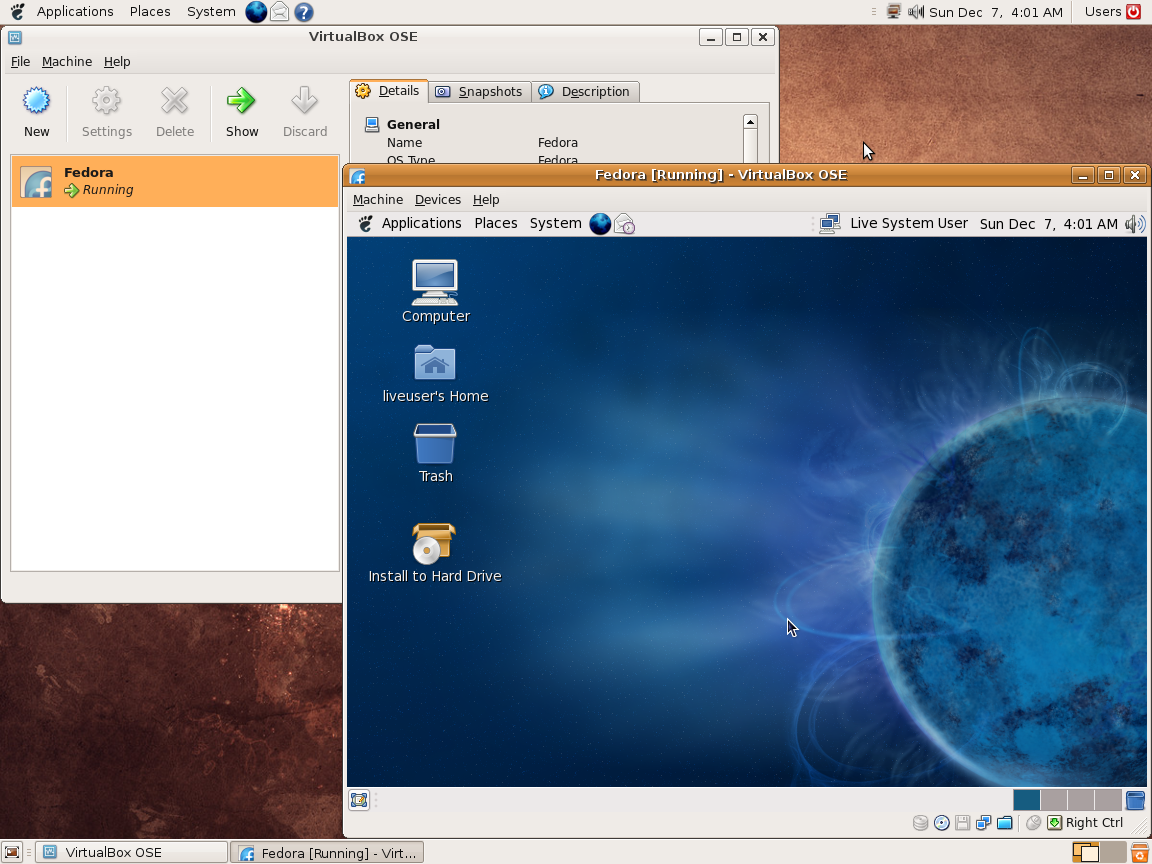
Vitualbox est également open-source et gratuit (pour les particuliers). Les solutions existantes de virtualisation étant soit très chères pour le particulier, soit incomplètes au niveau du support des systèmes, VirtualBox propose donc une alternative intéressante à Vmware et VirtualPC.
Les améliorations sont lisibles ici.
Télécharger VirtualBox v7.2.22 (170 Mo)
Télécharger VirtualBox - Oracle VM VirtualBox Extension Pack v7.2.22 (19.1 Mo)


